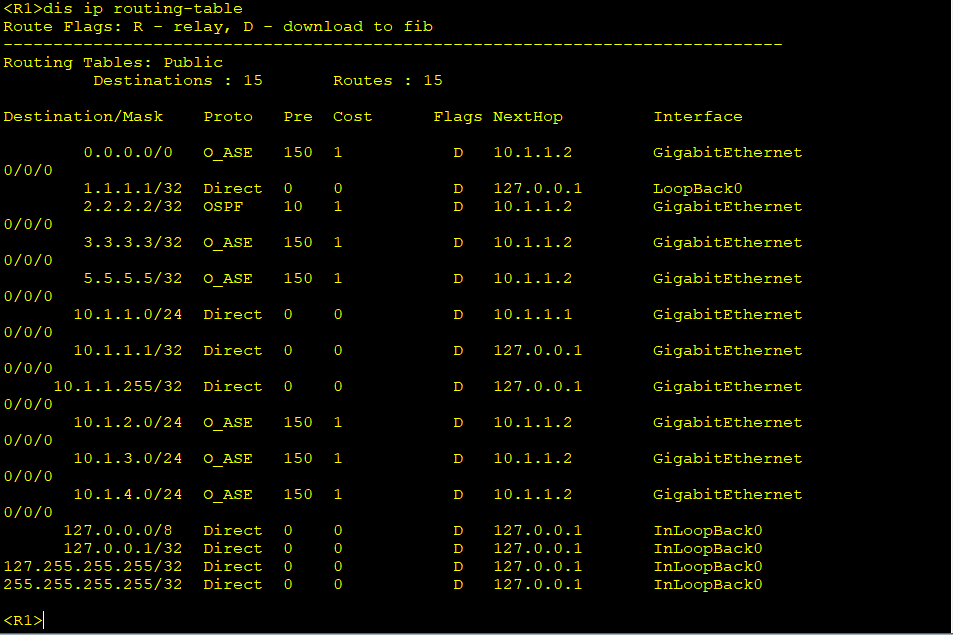
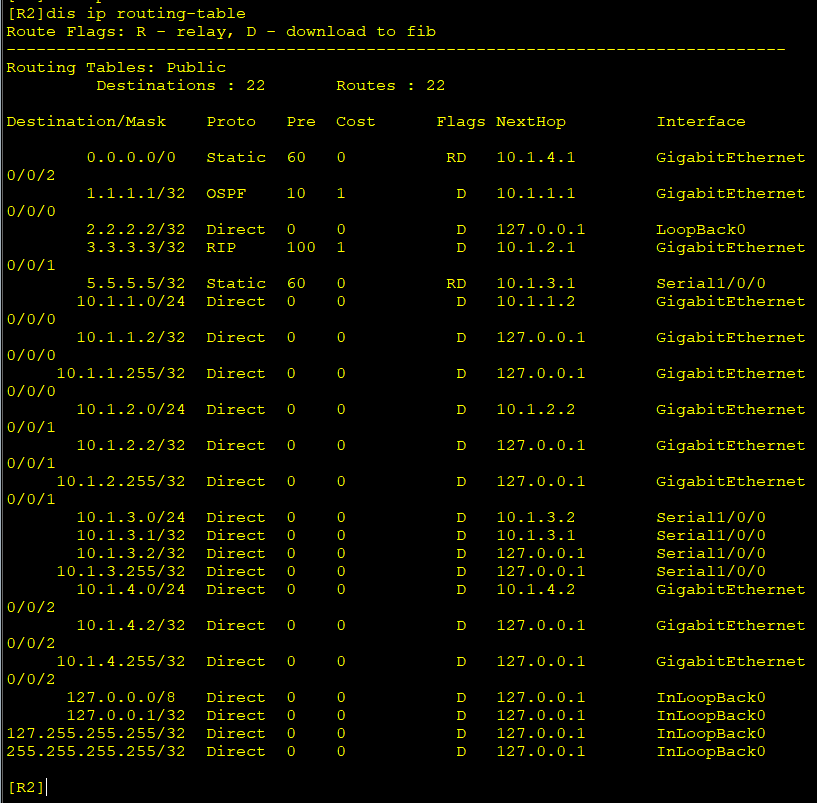
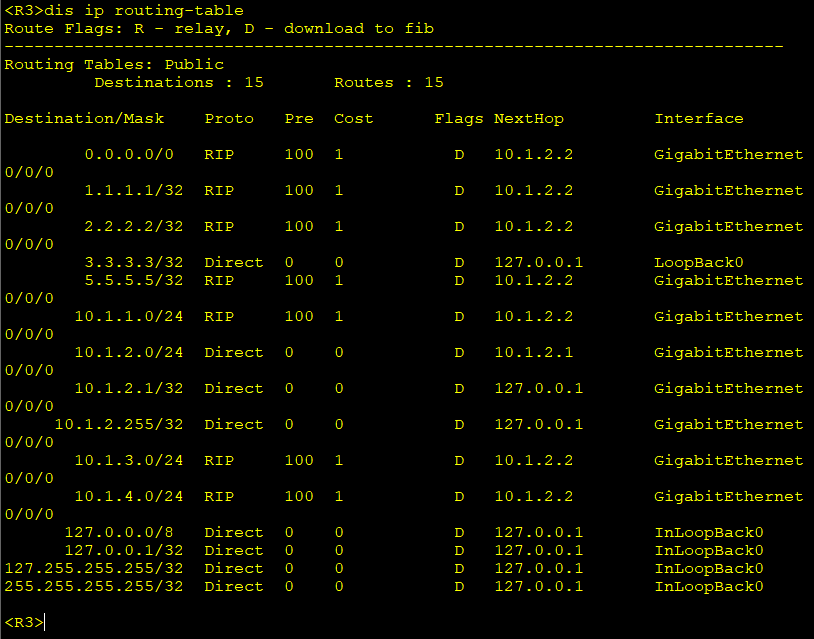
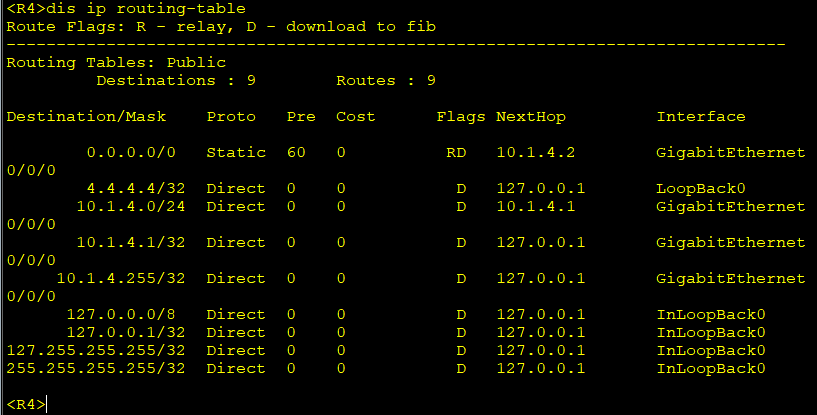
配置命令:
R1ospf 1
R1-ospf-1import-route rip 1
R1-ospf-1import-route direct
R1-ospf-1import-route static
R1-ospf-1default-route-advertise always
R1-ospf-1qu
R1rip 1
R1-rip-1import-route ospf 1
R1-rip-1import-route direct
R1-rip-1import-route static
R1-rip-1default-route originate
R1-rip-1import-route ?
bgp Border Gateway Protocol (BGP) routes
direct Direct routes
isis Intermediate System to Intermediate System (ISIS) routes
ospf Open Shortest Path First (OSPF) routes
rip Routing Information Protocol (RIP) routes
static Static routes
unr User Network Route
实验内容
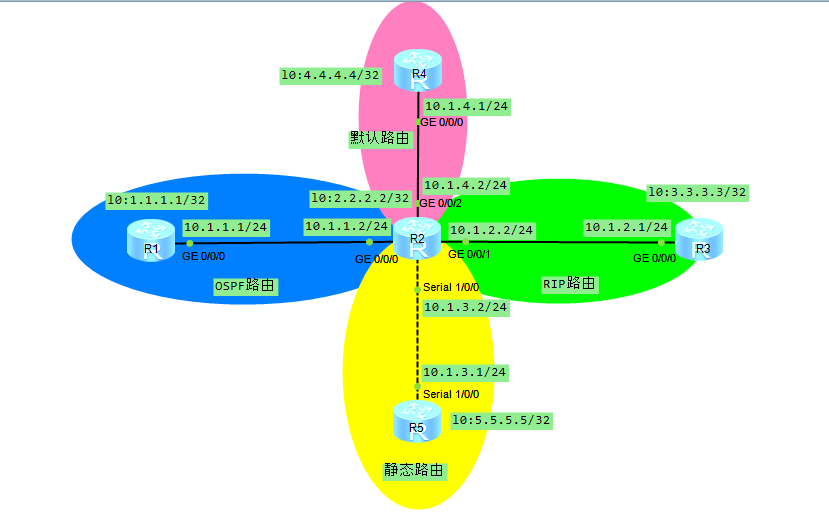
一、基础配置
R1:
<Huawei>sys
Enter system view, return user view with Ctrl+Z.
Huaweiundo info-center ena
Info: Information center is disabled.
Huaweisysn R1
R1int l0
R1-LoopBack0ip add 1.1.1.1 32
R1-LoopBack0int g0/0/0
R1-GigabitEthernet0/0/0ip add 10.1.1.1 24
R1-GigabitEthernet0/0/0qu
R1
R2:
<Huawei>sys
Enter system view, return user view with Ctrl+Z.
Huaweiundo info-center ena
Info: Information center is disabled.
Huaweisysn R2
R2int l0
R2-LoopBack0ip add 2.2.2.2 32
R2-LoopBack0int g0/0/0
R2-GigabitEthernet0/0/0ip add 10.1.1.2 24
R2-GigabitEthernet0/0/0int g0/0/1
R2-GigabitEthernet0/0/1ip add 10.1.2.2 24
R2-GigabitEthernet0/0/1int g0/0/2
R2-GigabitEthernet0/0/2ip add 10.1.4.2 24
R2-GigabitEthernet0/0/2int s1/0/0
R2-Serial1/0/0ip add 10.1.3.2 24
R2-Serial1/0/0qu
R2
R3:
<Huawei>sys
Enter system view, return user view with Ctrl+Z.
Huaweiundo info-center ena
Info: Information center is disabled.
Huaweisysn R3
R3int l0
R3-LoopBack0ip add 3.3.3.3 32
R3-LoopBack0int g0/0/0
R3-GigabitEthernet0/0/0ip add 10.1.2.1 24
R3-GigabitEthernet0/0/0qu
R3
R4:
<Huawei>sys
Enter system view, return user view with Ctrl+Z.
Huaweiundo info-center ena
Info: Information center is disabled.
Huaweisysn R4
R4int l0
R4-LoopBack0ip add 4.4.4.4 32
R4-LoopBack0int g0/0/0
R4-GigabitEthernet0/0/0ip add 10.1.4.1 24
R4-GigabitEthernet0/0/0qu
R4
R5:
<Huawei>sys
Enter system view, return user view with Ctrl+Z.
Huaweiundo info-center ena
Info: Information center is disabled.
Huaweisysn R5
R5int l0
R5-LoopBack0ip add 5.5.5.5 32
R5-LoopBack0int s1/0/0
R5-Serial1/0/0ip add 10.1.3.1 24
R5-Serial1/0/0qu
R5
二、路由配置
R1:
R1ospf 1
R1-ospf-1ar 0
R1-ospf-1-area-0.0.0.0net
R1-ospf-1-area-0.0.0.0network 1.1.1.1 0.0.0.0
R1-ospf-1-area-0.0.0.0net
R1-ospf-1-area-0.0.0.0network 10.1.1.0 0.0.0.255
R1-ospf-1-area-0.0.0.0qu
R1-ospf-1
R2:
R2ospf 1
R2-ospf-1ar 0
R2-ospf-1-area-0.0.0.0network 2.2.2.2 0.0.0.0
R2-ospf-1-area-0.0.0.0network 10.1.1.0 0.0.0.255
R2-ospf-1-area-0.0.0.0qu
R2-ospf-1qu
R2rip 1
R2-rip-1ver 2
R2-rip-1netw
R2-rip-1network 10.0.0.0
R2-rip-1qu
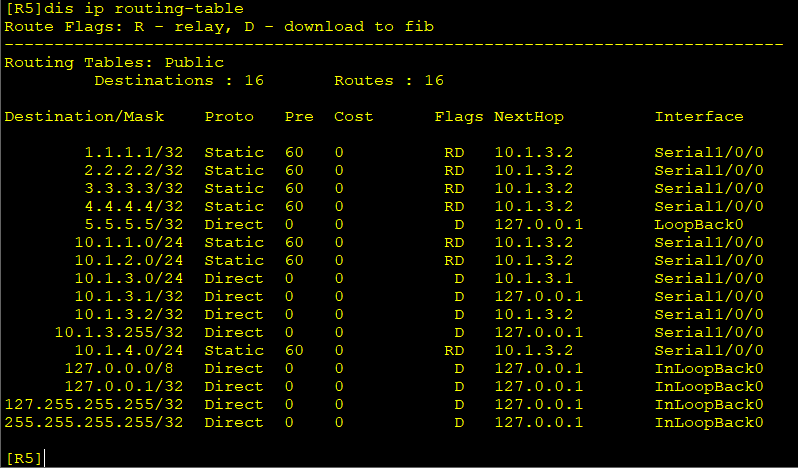
R2ip route-static 5.5.5.5 32 10.1.3.1
R2ip route-static 0.0.0.0 0 10.1.4.1
R3:
R3rip 1
R3-rip-1ver 2
R3-rip-1network 3.0.0.0
R3-rip-1network 10.0.0.0
R3-rip-1qu
R3
R4:
R4ip route-static 0.0.0.0 0 10.1.4.2
R5:
R5ip route-s
R5ip route-static 1.1.1.1 32 10.1.3.2
R5ip route-static 2.2.2.2 32 10.1.3.2
R5ip route-static 3.3.3.3 32 10.1.3.2
R5ip route-static 4.4.4.4 32 10.1.3.2
R5ip route-static 5.5.5.5 32 10.1.3.2
R5ip route-static 10.1.1.0 24 10.1.3.2
R5ip route-static 10.1.2.0 24 10.1.3.2
R5ip route-static 10.1.4.0 24 10.1.3.2
R5
三、路由重定向
R2ospf 1
R2-ospf-1import-route rip 1
R2-ospf-1import-route static
R2-ospf-1default-route-advertise always
R2rip 1
R2-rip-1import-route ospf 1
R2-rip-1import-route static
R2-rip-1default-route originate
R2-rip-1qu
四、验证