目标
- 理解卷积神经网络的核心思想和设计动机
- 掌握卷积、池化等关键操作的工作原理
- 使用PyTorch构建自己的CNN模型
- 理解CNN在图像分类、目标检测等任务中的应用
- 调试和优化CNN模型
第一部分:为什么需要卷积神经网络?
1.1 传统神经网络处理图像的局限性
让我们先思考一个问题:如果使用之前学过的全连接神经网络处理一张图片,会有什么问题?
python
import torch
import numpy as np

# 假设有一张 224x224 的彩色图片
image_height = 224
image_width = 224
channels = 3  # RGB三通道

# 将图片展平后输入全连接网络
flattened_size = image_height * image_width * channels  # 224 * 224 * 3 = 150,528
print(f"一张224x224的彩色图片展平后:{flattened_size:,} 个输入特征")

# 假设第一个隐藏层有512个神经元
hidden_units = 512

# 计算第一层的参数量
parameters = (flattened_size + 1) * hidden_units  # +1 是偏置项
print(f"第一层参数数量:{parameters:,}")

# 参数量太大导致的问题:
print("\n⚠️ 全连接网络处理图像的问题:")
print("1. 参数量爆炸:150,528 × 512 = 77,000,000+ 参数")
print("2. 计算效率低:需要大量矩阵乘法")
print("3. 容易过拟合:参数太多,数据不足")
print("4. 忽略了空间结构:像素之间的位置关系丢失")
输出结果:
一张224x224的彩色图片展平后:150,528 个输入特征
第一层参数数量:77,115,392

⚠️ 全连接网络处理图像的问题:
1. 参数量爆炸:150,528 × 512 = 77,000,000+ 参数
2. 计算效率低:需要大量矩阵乘法
3. 容易过拟合:参数太多,数据不足
4. 忽略了空间结构:像素之间的位置关系丢失
1.2 CNN的三大核心思想
卷积神经网络通过三个关键思想解决了上述问题:
1. 局部连接(Local Connectivity)
不是每个神经元都连接到所有输入,只连接输入的一小部分区域
2. 权重共享(Weight Sharing)
同一个滤波器(卷积核)在整个图像上滑动使用,大大减少参数
3. 空间下采样(Spatial Subsampling)
通过池化操作减少特征图尺寸,保留重要信息
第二部分:CNN核心组件详解
2.1 卷积操作(Convolution)
直观理解:特征检测器
想象你有一张照片,想找出其中的边缘、纹理等特征。卷积操作就像用一个小窗口(滤波器) 在图片上滑动,检测特定的模式。
python
import matplotlib.pyplot as plt
import numpy as np

# 创建一个简单的6x6图像(模拟边缘)
image = np.array([
    [1, 1, 1, 0, 0, 0],
    [1, 1, 1, 0, 0, 0],
    [1, 1, 1, 0, 0, 0],
    [1, 1, 1, 0, 0, 0],
    [1, 1, 1, 0, 0, 0],
    [1, 1, 1, 0, 0, 0]
])

# 创建两个不同的卷积核(滤波器)
vertical_edge_kernel = np.array([  # 垂直边缘检测
    [1, 0, -1],
    [1, 0, -1],
    [1, 0, -1]
])

horizontal_edge_kernel = np.array([  # 水平边缘检测
    [1, 1, 1],
    [0, 0, 0],
    [-1, -1, -1]
])

print("原始图像(6x6,左侧亮,右侧暗):")
print(image)
print("\n垂直边缘检测核(3x3):")
print(vertical_edge_kernel)
print("\n水平边缘检测核(3x3):")
print(horizontal_edge_kernel)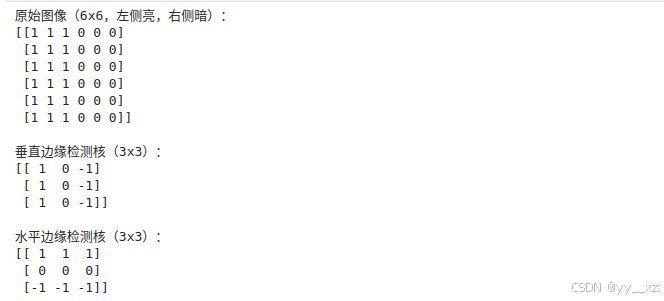
卷积运算的数学过程
python
def manual_convolution(image, kernel):
    """手动实现卷积操作"""
    img_h, img_w = image.shape
    kernel_h, kernel_w = kernel.shape

    # 输出特征图尺寸
    output_h = img_h - kernel_h + 1
    output_w = img_w - kernel_w + 1

    output = np.zeros((output_h, output_w))

    # 滑动窗口计算卷积
    for i in range(output_h):
        for j in range(output_w):
            # 提取图像块
            patch = image[i:i+kernel_h, j:j+kernel_w]
            # 逐元素相乘并求和
            output[i, j] = np.sum(patch * kernel)

    return output

# 应用卷积
vertical_edges = manual_convolution(image, vertical_edge_kernel)
horizontal_edges = manual_convolution(image, horizontal_edge_kernel)

print("\n卷积结果 - 垂直边缘检测:")
print(vertical_edges)
print("\n卷积结果 - 水平边缘检测:")
print(horizontal_edges)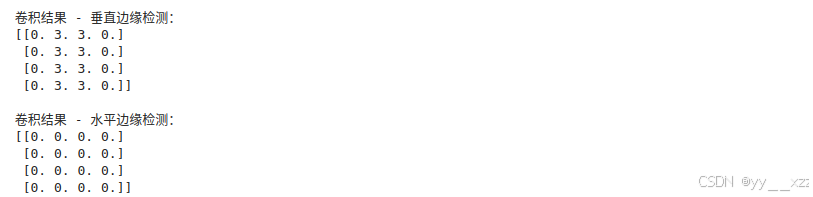
可视化卷积过程:
python
def visualize_convolution(image, kernel, result):
    """可视化卷积过程"""
    fig, axes = plt.subplots(1, 3, figsize=(12, 4))

    # 原始图像
    axes[0].imshow(image, cmap='gray', vmin=0, vmax=1)
    axes[0].set_title('原始图像')
    axes[0].set_xticks(range(image.shape[1]))
    axes[0].set_yticks(range(image.shape[0]))
    axes[0].grid(True, alpha=0.3)

    # 卷积核
    axes[1].imshow(kernel, cmap='coolwarm', vmin=-1, vmax=1)
    axes[1].set_title('卷积核(滤波器)')
    axes[1].set_xticks(range(kernel.shape[1]))
    axes[1].set_yticks(range(kernel.shape[0]))

    # 添加核值标注
    for i in range(kernel.shape[0]):
        for j in range(kernel.shape[1]):
            axes[1].text(j, i, f'{kernel[i, j]}',
                        ha='center', va='center',
                        color='white' if abs(kernel[i, j]) > 0.5 else 'black')

    # 卷积结果
    axes[2].imshow(result, cmap='gray')
    axes[2].set_title('卷积结果(特征图)')
    axes[2].set_xticks(range(result.shape[1]))
    axes[2].set_yticks(range(result.shape[0]))
    axes[2].grid(True, alpha=0.3)

    # 添加结果值标注
    for i in range(result.shape[0]):
        for j in range(result.shape[1]):
            axes[2].text(j, i, f'{result[i, j]:.0f}',
                        ha='center', va='center',
                        color='white' if abs(result[i, j]) > 2 else 'black')

    plt.tight_layout()
    plt.show()

# 可视化
print("\n垂直边缘检测过程:")
visualize_convolution(image, vertical_edge_kernel, vertical_edges)

print("\n水平边缘检测过程:")
visualize_convolution(image, horizontal_edge_kernel, horizontal_edges)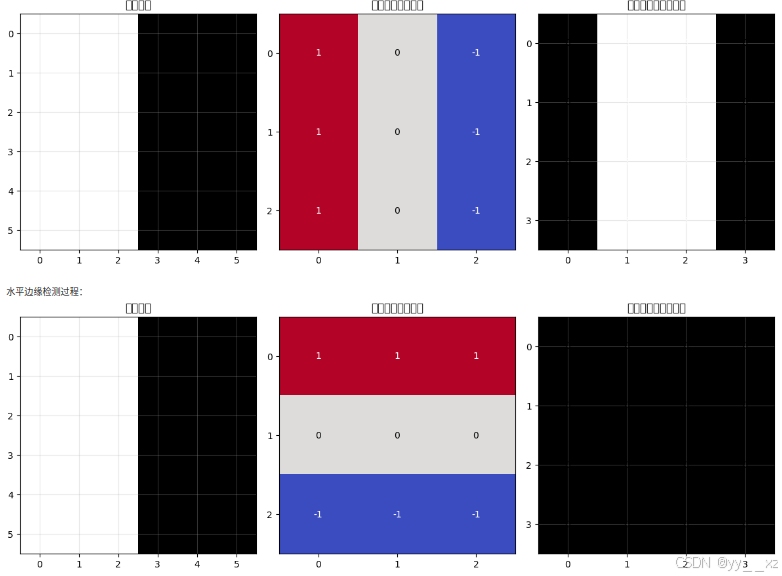
卷积的重要概念
python
# 演示CNN中的关键参数
def explain_convolution_parameters():
    print("="*60)
    print("卷积操作的关键参数详解")
    print("="*60)

    print("\n1. 卷积核大小(Kernel Size):")
    print("   - 常见大小:3×3, 5×5, 7×7")
    print("   - 小的核(3×3):感受野小,捕获局部特征")
    print("   - 大的核(7×7):感受野大,捕获全局特征")

    print("\n2. 步幅(Stride):")
    print("   - 卷积核每次滑动的距离")
    print("   - stride=1:每次移动1像素,输出尺寸大")
    print("   - stride=2:每次移动2像素,输出尺寸减半")

    print("\n3. 填充(Padding):")
    print("   - 在图像边缘添加0值像素")
    print("   - 'same' padding:输出尺寸与输入相同")
    print("   - 'valid' padding:不填充,输出尺寸变小")

    print("\n4. 通道数(Channels):")
    print("   - 输入通道:彩色图像为3(RGB),灰度图像为1")
    print("   - 输出通道:卷积核的数量,每个核学习不同特征")

    print("\n5. 特征图计算公式:")
    print("   - 输出高度 = (输入高度 + 2×填充 - 核高度) / 步幅 + 1")
    print("   - 输出宽度 = (输入宽度 + 2×填充 - 核宽度) / 步幅 + 1")

explain_convolution_parameters()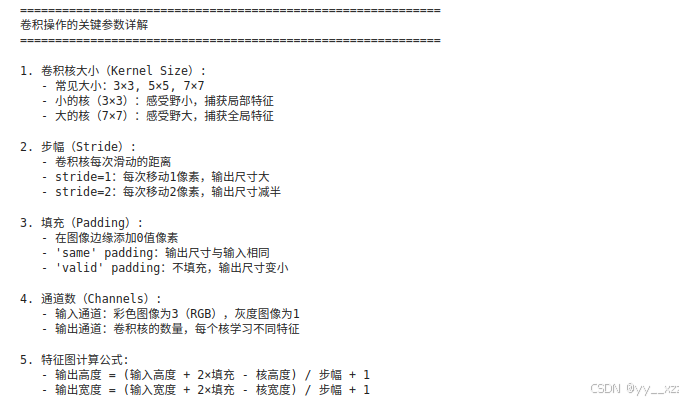
2.2 激活函数(Activation Function)
卷积后通常要加激活函数,引入非线性。
python
import torch
import torch.nn.functional as F

# 演示不同的激活函数
def demo_activation_functions():
    # 创建一些数据
    x = torch.linspace(-5, 5, 100)

    # 计算不同激活函数的输出
    relu = F.relu(x)
    sigmoid = torch.sigmoid(x)
    tanh = torch.tanh(x)
    leaky_relu = F.leaky_relu(x, negative_slope=0.1)

    # 可视化
    plt.figure(figsize=(12, 8))

    activations = [
        ('ReLU', relu, 'red'),
        ('Sigmoid', sigmoid, 'blue'),
        ('Tanh', tanh, 'green'),
        ('Leaky ReLU (α=0.1)', leaky_relu, 'orange')
    ]

    for i, (name, activation, color) in enumerate(activations, 1):
        plt.subplot(2, 2, i)
        plt.plot(x.numpy(), activation.numpy(), color=color, linewidth=3)
        plt.title(name)
        plt.xlabel('输入')
        plt.ylabel('输出')
        plt.grid(True, alpha=0.3)
        plt.axhline(y=0, color='black', linestyle='-', alpha=0.3)
        plt.axvline(x=0, color='black', linestyle='-', alpha=0.3)

    plt.suptitle('常用激活函数对比', fontsize=16)
    plt.tight_layout()
    plt.show()

    print("\nCNN中常用的激活函数:")
    print("1. ReLU(最常用):")
    print("   - 优点:计算简单,缓解梯度消失")
    print("   - 缺点:负区间梯度为0(神经元'死亡')")

    print("\n2. Leaky ReLU:")
    print("   - 优点:负区间有小的梯度,缓解神经元死亡")

    print("\n3. Sigmoid(用于输出层):")
    print("   - 优点:输出在0-1之间,适合概率")
    print("   - 缺点:容易梯度消失")

demo_activation_functions()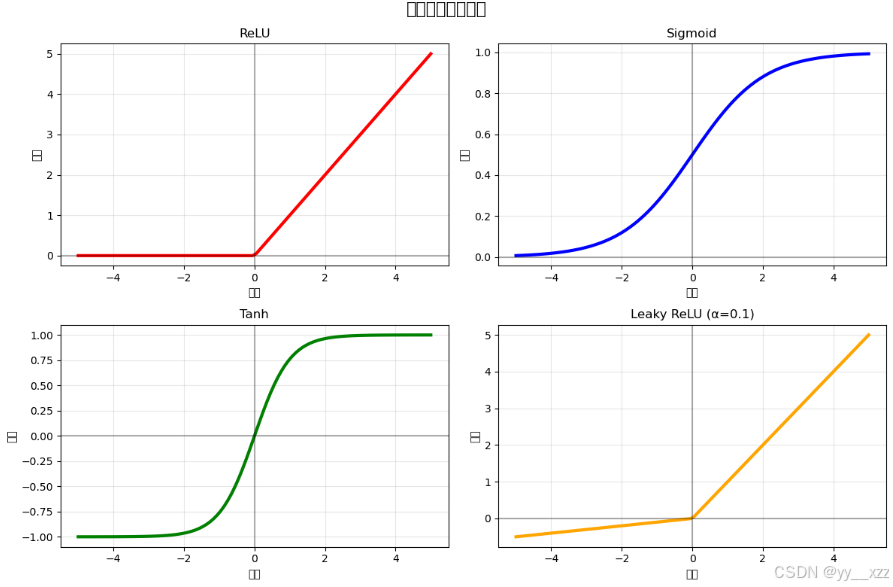
2.3 池化操作(Pooling)
池化的目的是降维 和增加平移不变性。
python
def demo_pooling_operations():
    # 创建一个4x4的特征图
    feature_map = np.array([
        [1, 2, 5, 3],
        [4, 8, 6, 2],
        [7, 3, 9, 1],
        [2, 5, 4, 6]
    ])

    print("原始特征图(4x4):")
    print(feature_map)

    # 最大池化(2x2,步幅2)
    def max_pooling_2d(matrix, pool_size=2, stride=2):
        h, w = matrix.shape
        output_h = (h - pool_size) // stride + 1
        output_w = (w - pool_size) // stride + 1

        output = np.zeros((output_h, output_w))

        for i in range(0, h - pool_size + 1, stride):
            for j in range(0, w - pool_size + 1, stride):
                patch = matrix[i:i+pool_size, j:j+pool_size]
                output[i//stride, j//stride] = np.max(patch)

        return output

    # 平均池化(2x2,步幅2)
    def avg_pooling_2d(matrix, pool_size=2, stride=2):
        h, w = matrix.shape
        output_h = (h - pool_size) // stride + 1
        output_w = (w - pool_size) // stride + 1

        output = np.zeros((output_h, output_w))

        for i in range(0, h - pool_size + 1, stride):
            for j in range(0, w - pool_size + 1, stride):
                patch = matrix[i:i+pool_size, j:j+pool_size]
                output[i//stride, j//stride] = np.mean(patch)

        return output

    max_pool_result = max_pooling_2d(feature_map)
    avg_pool_result = avg_pooling_2d(feature_map)

    print("\n最大池化结果(2x2):")
    print(max_pool_result)

    print("\n平均池化结果(2x2):")
    print(avg_pool_result)

    # 可视化
    fig, axes = plt.subplots(1, 3, figsize=(12, 4))

    # 原始特征图
    im1 = axes[0].imshow(feature_map, cmap='viridis')
    axes[0].set_title('原始特征图 (4x4)')
    axes[0].set_xticks(range(4))
    axes[0].set_yticks(range(4))
    plt.colorbar(im1, ax=axes[0], fraction=0.046, pad=0.04)

    # 最大池化
    im2 = axes[1].imshow(max_pool_result, cmap='viridis')
    axes[1].set_title('最大池化结果 (2x2)')
    axes[1].set_xticks(range(2))
    axes[1].set_yticks(range(2))
    plt.colorbar(im2, ax=axes[1], fraction=0.046, pad=0.04)

    # 平均池化
    im3 = axes[2].imshow(avg_pool_result, cmap='viridis')
    axes[2].set_title('平均池化结果 (2x2)')
    axes[2].set_xticks(range(2))
    axes[2].set_yticks(range(2))
    plt.colorbar(im3, ax=axes[2], fraction=0.046, pad=0.04)

    plt.tight_layout()
    plt.show()

    print("\n池化操作的作用:")
    print("1. 降维:减少计算量和参数")
    print("2. 平移不变性:物体轻微移动不影响识别")
    print("3. 防止过拟合:减少空间信息,增加鲁棒性")
    print("4. 扩大感受野:池化后每个神经元看到更大区域")

    print("\n最大池化 vs 平均池化:")
    print("最大池化:保留最显著特征,常用于图像")
    print("平均池化:保留整体信息,对噪声更鲁棒")

demo_pooling_operations()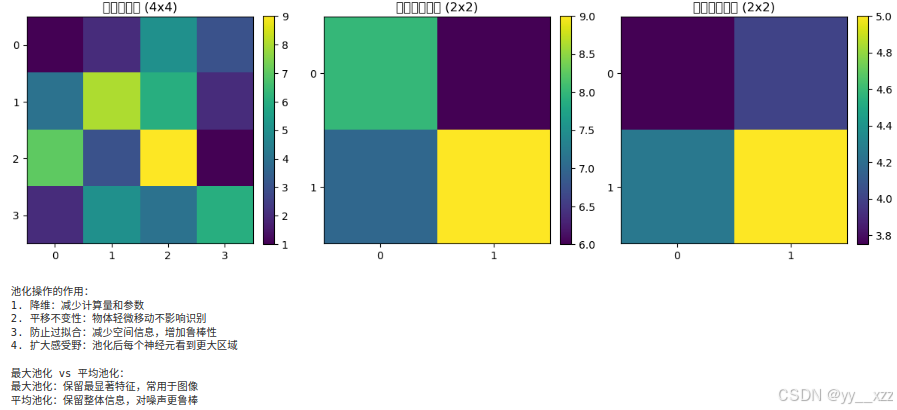
2.4 全连接层(Fully Connected Layer)
在CNN的最后,通常会有1-3个全连接层,用于最终的分类或回归。
python
def explain_fc_layers():
    print("="*60)
    print("CNN中的全连接层")
    print("="*60)

    print("\n全连接层的作用:")
    print("1. 整合特征:将卷积提取的局部特征组合成全局特征")
    print("2. 进行分类:输出每个类别的概率")
    print("3. 进行回归:输出预测值")

    print("\n典型CNN架构中的全连接层:")
    print("输入 → [卷积层 → 激活 → 池化] × N → 展平 → 全连接层 → 输出")

    print("\n展平操作(Flatten):")
    print("将多维特征图转换为一维向量")
    print("例如:64个7×7的特征图 → 展平为 64×7×7 = 3136维向量")

    print("\n现代CNN的趋势:")
    print("1. 减少全连接层参数(使用全局平均池化)")
    print("2. 增加Dropout防止过拟合")
    print("3. 使用批归一化加速训练")

explain_fc_layers()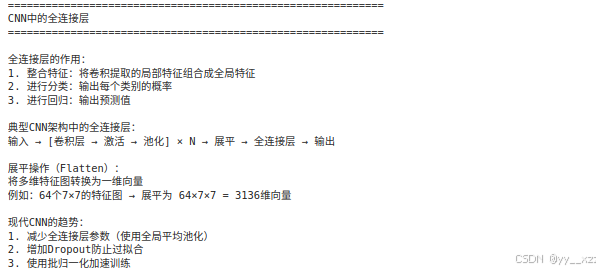
第三部分:经典CNN架构分析
3.1 LeNet-5(1998年) - CNN的开山之作
python
import torch.nn as nn

class LeNet5(nn.Module):
    """LeNet-5 - 最早的CNN架构,用于手写数字识别"""

    def __init__(self, num_classes=10):
        super(LeNet5, self).__init__()

        # 特征提取部分
        self.features = nn.Sequential(
            # 卷积层1: 输入1通道,输出6通道,5x5卷积核
            nn.Conv2d(in_channels=1, out_channels=6, kernel_size=5),
            nn.Tanh(),  # 原始LeNet使用Tanh
            # 平均池化层: 2x2池化
            nn.AvgPool2d(kernel_size=2, stride=2),

            # 卷积层2: 输入6通道,输出16通道,5x5卷积核
            nn.Conv2d(in_channels=6, out_channels=16, kernel_size=5),
            nn.Tanh(),
            nn.AvgPool2d(kernel_size=2, stride=2),
        )

        # 分类部分
        self.classifier = nn.Sequential(
            # 展平后输入: 16*4*4 = 256(假设输入32x32)
            nn.Linear(16 * 4 * 4, 120),
            nn.Tanh(),
            nn.Linear(120, 84),
            nn.Tanh(),
            nn.Linear(84, num_classes),
        )

    def forward(self, x):
        x = self.features(x)
        x = x.view(x.size(0), -1)  # 展平
        x = self.classifier(x)
        return x

# 创建LeNet实例
lenet = LeNet5()
print("LeNet-5 架构分析:")
print(lenet)
print("\n参数量分析:")
total_params = sum(p.numel() for p in lenet.parameters())
print(f"总参数量:{total_params:,}")
print(f"可训练参数:{sum(p.numel() for p in lenet.parameters() if p.requires_grad):,}")

print("\nLeNet-5的历史意义:")
print("1. 首次成功应用CNN于实际任务(手写数字识别)")
print("2. 确立了CNN的基本结构:卷积 → 池化 → 全连接")
print("3. 启发了后续所有CNN架构")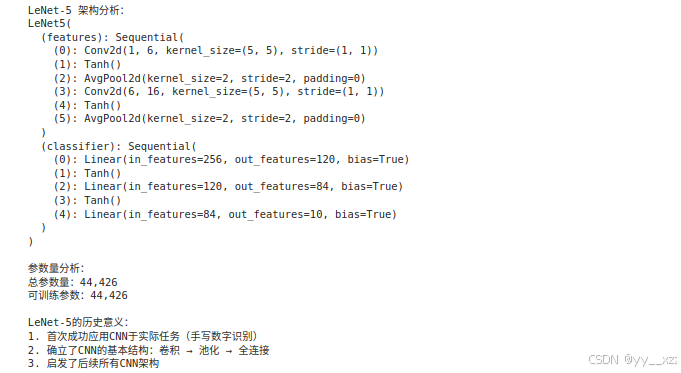
3.2 AlexNet(2012年) - 深度学习复兴的标志
python
class AlexNet(nn.Module):
    """AlexNet - 2012年ImageNet冠军,深度学习复兴的标志"""

    def __init__(self, num_classes=1000):
        super(AlexNet, self).__init__()

        self.features = nn.Sequential(
            # 第一层: 大卷积核
            nn.Conv2d(3, 64, kernel_size=11, stride=4, padding=2),
            nn.ReLU(inplace=True),
            nn.MaxPool2d(kernel_size=3, stride=2),

            # 第二层
            nn.Conv2d(64, 192, kernel_size=5, padding=2),
            nn.ReLU(inplace=True),
            nn.MaxPool2d(kernel_size=3, stride=2),

            # 第三层
            nn.Conv2d(192, 384, kernel_size=3, padding=1),
            nn.ReLU(inplace=True),

            # 第四层
            nn.Conv2d(384, 256, kernel_size=3, padding=1),
            nn.ReLU(inplace=True),

            # 第五层
            nn.Conv2d(256, 256, kernel_size=3, padding=1),
            nn.ReLU(inplace=True),
            nn.MaxPool2d(kernel_size=3, stride=2),
        )

        self.avgpool = nn.AdaptiveAvgPool2d((6, 6))

        self.classifier = nn.Sequential(
            nn.Dropout(p=0.5),  # AlexNet首次使用了Dropout
            nn.Linear(256 * 6 * 6, 4096),
            nn.ReLU(inplace=True),
            nn.Dropout(p=0.5),
            nn.Linear(4096, 4096),
            nn.ReLU(inplace=True),
            nn.Linear(4096, num_classes),
        )

    def forward(self, x):
        x = self.features(x)
        x = self.avgpool(x)
        x = x.view(x.size(0), -1)
        x = self.classifier(x)
        return x

# AlexNet的创新点
print("="*60)
print("AlexNet的创新点:")
print("="*60)
print("1. 使用ReLU激活函数:缓解梯度消失,加速训练")
print("2. 使用Dropout:防止过拟合")
print("3. 数据增强:增加训练数据多样性")
print("4. 多GPU训练:当时在2个GPU上并行训练")
print("5. 局部响应归一化(LRN):增加局部竞争")
print("6. 重叠池化:提高精度,缓解过拟合")

alexnet = AlexNet()
total_params = sum(p.numel() for p in alexnet.parameters())
print(f"\nAlexNet参数量:{total_params:,}(约6000万)")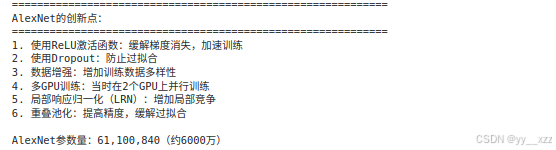
3.3 现代CNN架构趋势
python
def explain_cnn_evolution():
    print("\n" + "="*60)
    print("CNN架构演化趋势")
    print("="*60)

    print("\n1. 从大卷积核到小卷积核:")
    print("   LeNet: 5×5, 5×5")
    print("   AlexNet: 11×11, 5×5, 3×3")
    print("   VGG: 全部使用3×3")
    print("   趋势:小卷积核减少参数,增加非线性")

    print("\n2. 从浅到深:")
    print("   LeNet: 2个卷积层")
    print("   AlexNet: 5个卷积层")
    print("   VGG-16: 13个卷积层")
    print("   ResNet: 最多152个卷积层")
    print("   趋势:更深的网络学习更复杂的特征")

    print("\n3. 从复杂到简洁:")
    print("   AlexNet: 复杂结构,定制化设计")
    print("   VGG: 模块化设计,规则结构")
    print("   ResNet: 残差连接,解决梯度消失")

    print("\n4. 全连接层的演变:")
    print("   早期:多个全连接层(AlexNet有3个)")
    print("   现代:减少或不用全连接层")
    print("   替代:全局平均池化(Global Average Pooling)")

explain_cnn_evolution()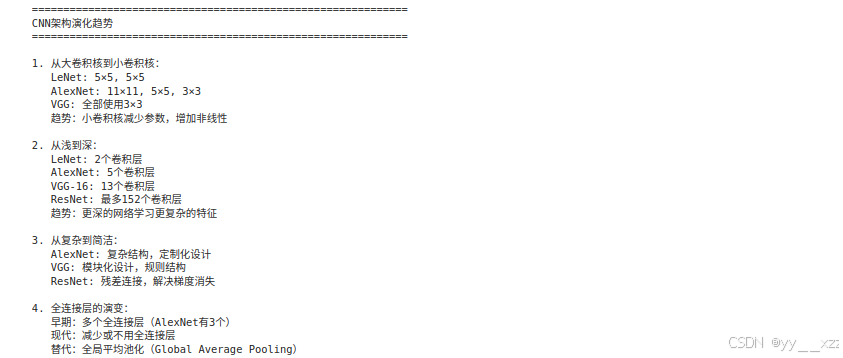
第四部分:PyTorch实现CNN实战
4.1 使用CNN进行图像分类(CIFAR-10)
python
import torch
import torch.nn as nn
import torch.optim as optim
import torchvision
import torchvision.transforms as transforms
from torch.utils.data import DataLoader
import matplotlib.pyplot as plt

class SimpleCNN(nn.Module):
    """一个简单的CNN,用于CIFAR-10分类"""

    def __init__(self, num_classes=10):
        super(SimpleCNN, self).__init__()

        # 卷积块1
        self.conv_block1 = nn.Sequential(
            nn.Conv2d(3, 32, kernel_size=3, padding=1),  # 32x32x3 → 32x32x32
            nn.BatchNorm2d(32),
            nn.ReLU(inplace=True),
            nn.Conv2d(32, 32, kernel_size=3, padding=1),  # 32x32x32 → 32x32x32
            nn.BatchNorm2d(32),
            nn.ReLU(inplace=True),
            nn.MaxPool2d(kernel_size=2, stride=2),  # 32x32x32 → 16x16x32
            nn.Dropout2d(0.2)
        )

        # 卷积块2
        self.conv_block2 = nn.Sequential(
            nn.Conv2d(32, 64, kernel_size=3, padding=1),  # 16x16x32 → 16x16x64
            nn.BatchNorm2d(64),
            nn.ReLU(inplace=True),
            nn.Conv2d(64, 64, kernel_size=3, padding=1),  # 16x16x64 → 16x16x64
            nn.BatchNorm2d(64),
            nn.ReLU(inplace=True),
            nn.MaxPool2d(kernel_size=2, stride=2),  # 16x16x64 → 8x8x64
            nn.Dropout2d(0.3)
        )

        # 卷积块3
        self.conv_block3 = nn.Sequential(
            nn.Conv2d(64, 128, kernel_size=3, padding=1),  # 8x8x64 → 8x8x128
            nn.BatchNorm2d(128),
            nn.ReLU(inplace=True),
            nn.Conv2d(128, 128, kernel_size=3, padding=1),  # 8x8x128 → 8x8x128
            nn.BatchNorm2d(128),
            nn.ReLU(inplace=True),
            nn.MaxPool2d(kernel_size=2, stride=2),  # 8x8x128 → 4x4x128
            nn.Dropout2d(0.4)
        )

        # 分类器
        self.classifier = nn.Sequential(
            nn.Flatten(),  # 4x4x128 = 2048
            nn.Linear(128 * 4 * 4, 512),
            nn.BatchNorm1d(512),
            nn.ReLU(inplace=True),
            nn.Dropout(0.5),
            nn.Linear(512, num_classes)
        )

    def forward(self, x):
        x = self.conv_block1(x)
        x = self.conv_block2(x)
        x = self.conv_block3(x)
        x = self.classifier(x)
        return x

def train_cifar10():
    """训练CNN进行CIFAR-10分类"""

    # 数据预处理
    transform = transforms.Compose([
        transforms.RandomHorizontalFlip(),  # 数据增强
        transforms.RandomCrop(32, padding=4),
        transforms.ToTensor(),
        transforms.Normalize((0.4914, 0.4822, 0.4465),  # CIFAR-10的均值和标准差
                            (0.2470, 0.2435, 0.2616))
    ])

    # 加载数据集
    train_dataset = torchvision.datasets.CIFAR10(
        root='./data', train=True, download=True, transform=transform
    )

    test_dataset = torchvision.datasets.CIFAR10(
        root='./data', train=False, download=True, transform=transforms.ToTensor()
    )

    # 创建数据加载器
    train_loader = DataLoader(train_dataset, batch_size=128, shuffle=True, num_workers=2)
    test_loader = DataLoader(test_dataset, batch_size=100, shuffle=False, num_workers=2)

    # 创建模型
    model = SimpleCNN(num_classes=10)
    device = torch.device('cuda' if torch.cuda.is_available() else 'cpu')
    model = model.to(device)

    print(f"使用设备: {device}")
    print(f"模型参数量: {sum(p.numel() for p in model.parameters()):,}")

    # 定义损失函数和优化器
    criterion = nn.CrossEntropyLoss()
    optimizer = optim.Adam(model.parameters(), lr=0.001)
    scheduler = optim.lr_scheduler.ReduceLROnPlateau(optimizer, mode='min', patience=5)

    # 训练循环
    num_epochs = 30
    train_losses, test_accuracies = [], []

    for epoch in range(num_epochs):
        # 训练阶段
        model.train()
        running_loss = 0.0

        for batch_idx, (inputs, targets) in enumerate(train_loader):
            inputs, targets = inputs.to(device), targets.to(device)

            # 前向传播
            outputs = model(inputs)
            loss = criterion(outputs, targets)

            # 反向传播
            optimizer.zero_grad()
            loss.backward()
            optimizer.step()

            running_loss += loss.item()

            if batch_idx % 100 == 0:
                print(f'Epoch [{epoch+1}/{num_epochs}] | '
                      f'Batch [{batch_idx+1}/{len(train_loader)}] | '
                      f'Loss: {loss.item():.4f}')

        avg_loss = running_loss / len(train_loader)
        train_losses.append(avg_loss)

        # 测试阶段
        model.eval()
        correct = 0
        total = 0

        with torch.no_grad():
            for inputs, targets in test_loader:
                inputs, targets = inputs.to(device), targets.to(device)
                outputs = model(inputs)
                _, predicted = outputs.max(1)
                total += targets.size(0)
                correct += predicted.eq(targets).sum().item()

        accuracy = 100. * correct / total
        test_accuracies.append(accuracy)

        # 学习率调整
        scheduler.step(avg_loss)

        print(f'Epoch [{epoch+1}/{num_epochs}] | '
              f'Train Loss: {avg_loss:.4f} | '
              f'Test Accuracy: {accuracy:.2f}% | '
              f'LR: {optimizer.param_groups[0]["lr"]:.6f}')

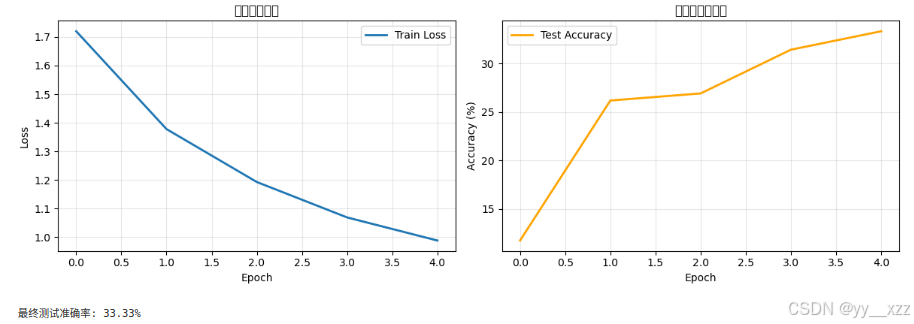
    # 可视化训练过程
    plt.figure(figsize=(12, 4))

    plt.subplot(1, 2, 1)
    plt.plot(train_losses, label='Train Loss', linewidth=2)
    plt.xlabel('Epoch')
    plt.ylabel('Loss')
    plt.title('训练损失曲线')
    plt.legend()
    plt.grid(True, alpha=0.3)

    plt.subplot(1, 2, 2)
    plt.plot(test_accuracies, label='Test Accuracy', linewidth=2, color='orange')
    plt.xlabel('Epoch')
    plt.ylabel('Accuracy (%)')
    plt.title('测试准确率曲线')
    plt.legend()
    plt.grid(True, alpha=0.3)

    plt.tight_layout()
    plt.show()

    print(f"\n最终测试准确率: {test_accuracies[-1]:.2f}%")

    return model

# 注意:实际运行会耗时较长,建议在GPU上运行
model = train_cifar10()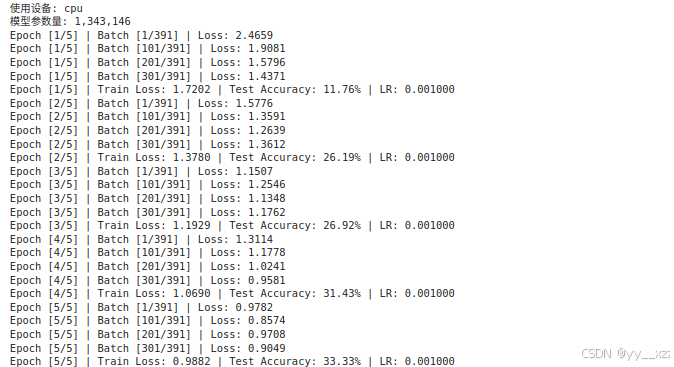
4.2 CNN特征可视化
python
def visualize_cnn_features(model, image):
    """可视化CNN各层的特征图"""

    # 获取模型的卷积层
    conv_layers = []
    for layer in model.modules():
        if isinstance(layer, nn.Conv2d):
            conv_layers.append(layer)

    print(f"模型有 {len(conv_layers)} 个卷积层")

    # 创建钩子函数来获取中间特征
    features = []
    def hook_fn(module, input, output):
        features.append(output.detach())

    # 注册钩子
    hooks = []
    for layer in conv_layers[:4]:  # 只可视化前4层
        hooks.append(layer.register_forward_hook(hook_fn))

    # 前向传播
    model.eval()
    with torch.no_grad():
        _ = model(image.unsqueeze(0))  # 添加batch维度

    # 移除钩子
    for hook in hooks:
        hook.remove()

    # 可视化特征图
    num_layers = len(features)
    fig, axes = plt.subplots(num_layers, 8, figsize=(16, num_layers*2))

    for i, feature in enumerate(features):
        # 选择前8个通道
        num_channels = min(8, feature.size(1))

        for j in range(num_channels):
            if num_layers == 1:
                ax = axes[j]
            else:
                ax = axes[i, j]

            channel_data = feature[0, j].cpu().numpy()

            # 归一化到0-1以便显示
            if channel_data.max() > channel_data.min():
                channel_data = (channel_data - channel_data.min()) / (channel_data.max() - channel_data.min())

            ax.imshow(channel_data, cmap='viridis')
            ax.set_xticks([])
            ax.set_yticks([])

            if j == 0:
                ax.set_ylabel(f'Conv{i+1}', fontsize=12)

    plt.suptitle('CNN各层特征图可视化', fontsize=16)
    plt.tight_layout()
    plt.show()

# 示例:可视化特征图(需要先有训练好的模型和图片)
# visualize_cnn_features(model, sample_image)
第五部分:CNN进阶话题
5.1 1x1卷积的作用
python
def explain_1x1_convolution():
    print("="*60)
    print("1×1卷积的神奇作用")
    print("="*60)

    print("\n1. 通道维度变换(降维/升维):")
    print("   输入:H×W×C_in → 输出:H×W×C_out")
    print("   例如:256通道 → 64通道(降维)")
    print("   例如:64通道 → 256通道(升维)")

    print("\n2. 增加非线性:")
    print("   1×1卷积 + 激活函数 = 非线性变换")
    print("   可以组合通道间的信息")

    print("\n3. 减少计算量:")
    print("   在Inception网络和ResNet中广泛使用")
    print("   先用1×1卷积降维,再用3×3卷积")

    print("\n4. 示例代码:")

    # 演示1x1卷积
    input_channels = 256
    output_channels = 64

    # 传统3x3卷积
    conv3x3 = nn.Conv2d(input_channels, output_channels, kernel_size=3, padding=1)
    params_3x3 = sum(p.numel() for p in conv3x3.parameters())

    # 使用1x1卷积降维后再用3x3
    conv1x1_reduce = nn.Conv2d(input_channels, 64, kernel_size=1)  # 降到64通道
    conv3x3_small = nn.Conv2d(64, output_channels, kernel_size=3, padding=1)
    params_1x1_3x3 = sum(p.numel() for p in conv1x1_reduce.parameters()) + \
                     sum(p.numel() for p in conv3x3_small.parameters())

    print(f"   直接3×3卷积参数量:{params_3x3:,}")
    print(f"   1×1降维+3×3卷积参数量:{params_1x1_3x3:,}")
    print(f"   参数减少:{(1 - params_1x1_3x3/params_3x3)*100:.1f}%")

explain_1x1_convolution()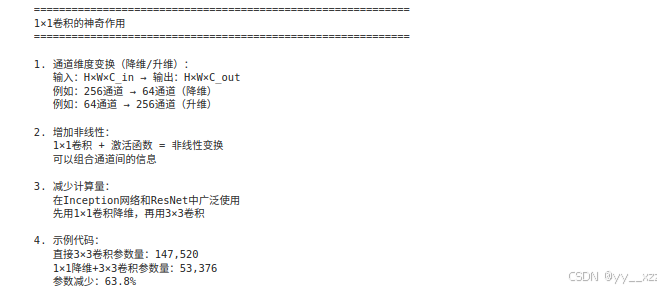
5.2 感受野计算
python
def calculate_receptive_field():
    """计算CNN的感受野"""

    print("="*60)
    print("感受野(Receptive Field)计算")
    print("="*60)

    print("\n感受野定义:")
    print("输出特征图上的一个像素,对应输入图像上的区域大小")

    print("\n计算规则:")
    print("1. 第一层感受野 = 卷积核大小")
    print("2. 后续每层:感受野 = 上一层的感受野 + (卷积核大小-1) × 前面所有层的步幅乘积")

    print("\n示例:VGG-16的感受野计算")

    # VGG-16的架构
    layers = [
        ('conv3', 3, 1),  # 卷积核大小,步幅
        ('conv3', 3, 1),
        ('pool2', 2, 2),  # 池化大小,步幅
        ('conv3', 3, 1),
        ('conv3', 3, 1),
        ('pool2', 2, 2),
        ('conv3', 3, 1),
        ('conv3', 3, 1),
        ('conv3', 3, 1),
        ('pool2', 2, 2),
        ('conv3', 3, 1),
        ('conv3', 3, 1),
        ('conv3', 3, 1),
        ('pool2', 2, 2),
        ('conv3', 3, 1),
        ('conv3', 3, 1),
        ('conv3', 3, 1),
        ('pool2', 2, 2),
    ]

    receptive_field = 1
    total_stride = 1

    print("\n层-by-层感受野计算:")
    for i, (layer_name, kernel_size, stride) in enumerate(layers):
        if 'conv' in layer_name:
            receptive_field = receptive_field + (kernel_size - 1) * total_stride
        elif 'pool' in layer_name:
            receptive_field = receptive_field + (kernel_size - 1) * total_stride

        total_stride *= stride

        print(f"第{i+1:2d}层 {layer_name:6s} | "
              f"感受野: {receptive_field:3d} | "
              f"累积步幅: {total_stride}")

    print(f"\n最终感受野: {receptive_field}")
    print("这意味着输出层的一个神经元能看到输入图像上{receptive_field}×{receptive_field}的区域")

calculate_receptive_field()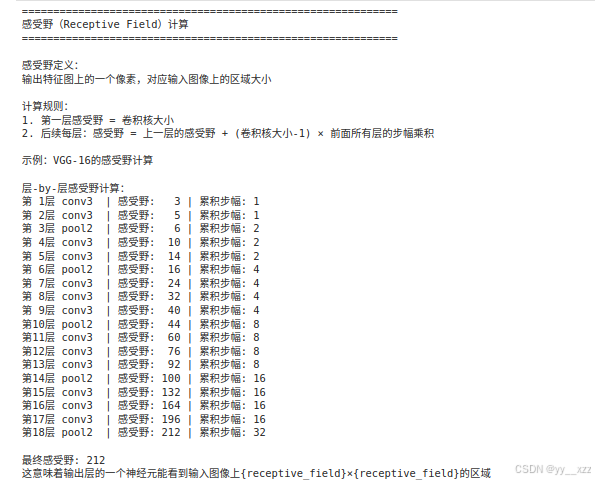
5.3 批归一化(Batch Normalization)
python
def explain_batch_norm():
    print("\n" + "="*60)
    print("批归一化(Batch Normalization)")
    print("="*60)

    print("\n问题:内部协变量偏移(Internal Covariate Shift)")
    print("网络每层的输入分布会随着训练而变化")
    print("导致训练困难,需要小心调整学习率")

    print("\n批归一化的解决方案:")
    print("1. 对每个batch的数据进行标准化")
    print("2. 学习两个参数:缩放γ和平移β")
    print("3. 公式:BN(x) = γ × (x - μ)/σ + β")

    print("\n批归一化的好处:")
    print("1. 允许使用更大的学习率")
    print("2. 减少对初始化的依赖")
    print("3. 有轻微的正则化效果")
    print("4. 加速训练收敛")

    print("\n在CNN中的使用位置:")
    print("卷积层后、激活函数前(最常用)")
    print("Conv → BN → ReLU → Pooling")

    print("\n代码示例:")
    print("""
class ConvBlock(nn.Module):
    def __init__(self, in_channels, out_channels):
        super().__init__()
        self.conv = nn.Conv2d(in_channels, out_channels, 3, padding=1)
        self.bn = nn.BatchNorm2d(out_channels)  # 批归一化
        self.relu = nn.ReLU(inplace=True)

    def forward(self, x):
        x = self.conv(x)
        x = self.bn(x)    # 批归一化
        x = self.relu(x)  # 激活函数
        return x
    """)

explain_batch_norm()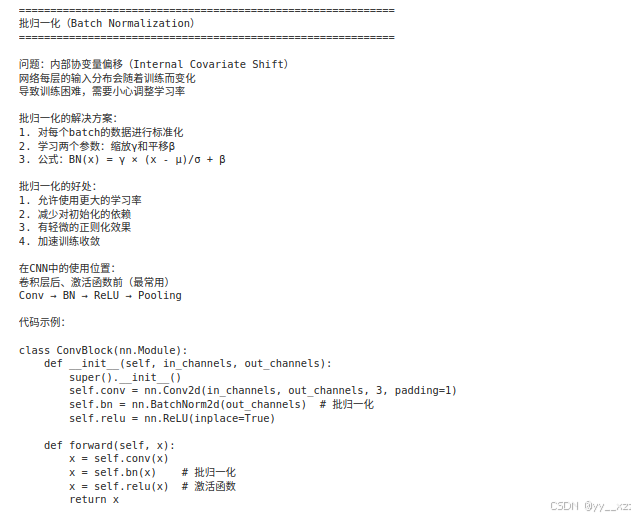
常见问题与解决方案
Q1: 如何设计CNN架构?
经验法则:
- 从简单开始:先试3-5层的小网络
- 使用小卷积核:3×3是最常用的尺寸
- 逐步增加深度:每次增加1-2层,观察性能变化
- 使用标准模块:如ResNet的残差块
- 考虑感受野:确保最终感受野覆盖整个目标
Q2: 如何防止CNN过拟合?
策略:
- 数据增强:旋转、翻转、裁剪、颜色变换
- Dropout:在全连接层使用Dropout
- 批归一化:有轻微的正则化效果
- 权重衰减:L2正则化
- 早停:监控验证集损失
- 简化模型:减少参数数量
Q3: CNN学习率怎么设置?
建议:
- 初始学习率:0.01(SGD)或0.001(Adam)
- 学习率衰减:每30个epoch乘以0.1
- 热身(Warmup):前几个epoch线性增加学习率
- 余弦退火:使用cosine学习率调度
- 监控损失:如果损失不下降,适当降低学习率
Q4: 如何解释CNN的决策?
方法:
- 特征可视化:可视化卷积核和特征图
- CAM/Grad-CAM:生成类激活图
- 遮挡测试:遮挡部分图像看预测变化
- 敏感性分析:改变输入看输出变化
总结与练习
核心知识点总结:
- 卷积操作:局部连接,权重共享
- 池化操作:降维,增加平移不变性
- 经典架构:LeNet, AlexNet, VGG, ResNet
- 现代技巧:批归一化,Dropout,残差连接
- 实践应用:图像分类,特征可视化
实操练习:
练习1:构建自定义CNN
python
# 尝试设计一个用于MNIST的CNN
class MyCNN(nn.Module):
    def __init__(self):
        super().__init__()
        # 你的设计
        pass

    def forward(self, x):
        # 前向传播
        pass
练习2:可视化训练过程
python
# 记录并可视化:
# 1. 每层的激活值分布
# 2. 梯度流
# 3. 权重分布
练习3:比较不同架构
python
# 比较以下架构在CIFAR-10上的性能:
# 1. 简单CNN(3层)
# 2. VGG风格(多个3×3卷积)
# 3. 带残差连接的CNN
练习4:实现数据增强
python
# 实现自定义数据增强:
# 1. 随机擦除(Random Erasing)
# 2. 混合图像(Mixup)
# 3. 颜色抖动(Color Jitter)