一、复选框CheckBox
1、CompoundButton类是抽象的复合按钮,由它派生而来的子类包括:复选框CheckBox、单选按钮RadioButton以及开关按钮Switch
2、下图描述了复合按钮的继承关系
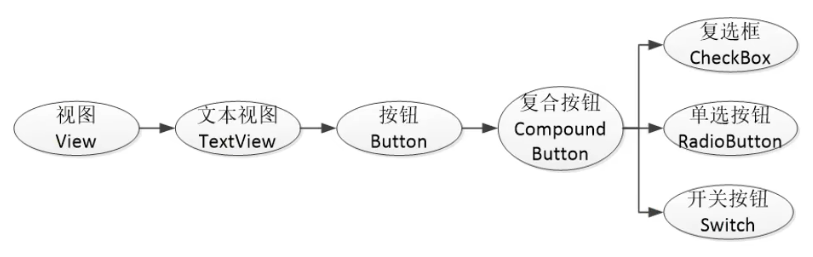
在Android体系中,CompoundButton类是抽象的复合按钮,因为是抽象类,所以它不能直接使用。实际开发中用的是CompoundButton的几个派生类,主要有复选框CheckBox、单选按钮RadioButton以及开关按钮Switch,这些派生类均可使用CompoundButton的属性和方法。加之CompoundButton本身继承了Button类,故以上几种按钮同时具备Button的属性和方法
3、CompoundButton在XML文件中主要使用下面两个属性
(1)checked:指定按钮的勾选状态,true表示勾选,false则表示未勾选。默认为未勾选
(2)button:指定左侧勾选图标的图形资源,如果不指定就使用系统的默认图标
4、CompoundButton在Java代码中主要使用下列4种方法
(1)setChecked:设置按钮的勾选状态
(2)setButtonDrawable:设置左侧勾选图标的图形资源
(3)setOnCheckedChangeListener:设置勾选状态变化的监听器
(4)isChecked:判断按钮是否勾选
5、例子
checkbox_selector.xml
XML
<?xml version="1.0" encoding="utf-8"?>
<selector xmlns:android="http://schemas.android.com/apk/res/android">

    <item android:drawable="@drawable/check_choose" android:state_checked="true" />
    <item android:drawable="@drawable/check_unchoose" android:state_checked="false" />

</selector>
activity_check_box.xml
XML
<?xml version="1.0" encoding="utf-8"?>
<LinearLayout xmlns:android="http://schemas.android.com/apk/res/android"
    xmlns:app="http://schemas.android.com/apk/res-auto"
    xmlns:tools="http://schemas.android.com/tools"
    android:layout_width="match_parent"
    android:layout_height="match_parent"
    android:orientation="vertical"
    android:padding="5dp"
    tools:context=".CheckBoxActivity">

    <CheckBox
        android:id="@+id/ck_system"
        android:layout_width="match_parent"
        android:layout_height="wrap_content"
        android:padding="5dp"
        android:text="这是系统的CheckBox"/>

    <CheckBox
        android:id="@+id/ck_custom"
        android:layout_width="match_parent"
        android:layout_height="wrap_content"
        android:button="@drawable/checkbox_selector"
        android:padding="5dp"
        android:text="这个CheckBox换了图标"/>

</LinearLayout>
CheckBoxActivity.java
java
package com.example.chapter05;

import androidx.appcompat.app.AppCompatActivity;

import android.os.Bundle;
import android.widget.CheckBox;
import android.widget.CompoundButton;

public class CheckBoxActivity extends AppCompatActivity implements CompoundButton.OnCheckedChangeListener {

    @Override
    protected void onCreate(Bundle savedInstanceState) {
        super.onCreate(savedInstanceState);
        setContentView(R.layout.activity_check_box);

        CheckBox ck_system = findViewById(R.id.ck_system);
        CheckBox ck_custom = findViewById(R.id.ck_custom);

        ck_system.setOnCheckedChangeListener(this);
        ck_custom.setOnCheckedChangeListener(this);
    }

    @Override
    public void onCheckedChanged(CompoundButton compoundButton, boolean b) {
        String desc = String.format("您%s了这个CheckBox", b ? "勾选" : "取消勾选");
        compoundButton.setText(desc);
    }
}