有这样一个需求,将EXCEL中的每行记录自动生成为1张PPT,如下图有2条记录则生成2张PPT。
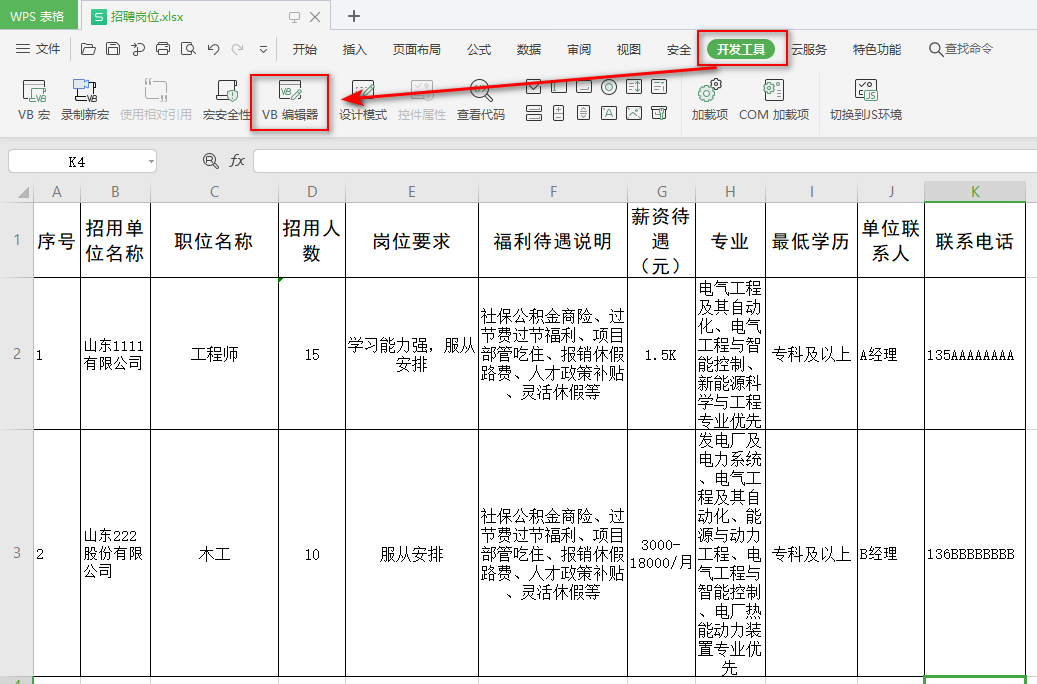
开发工具--VB编辑器
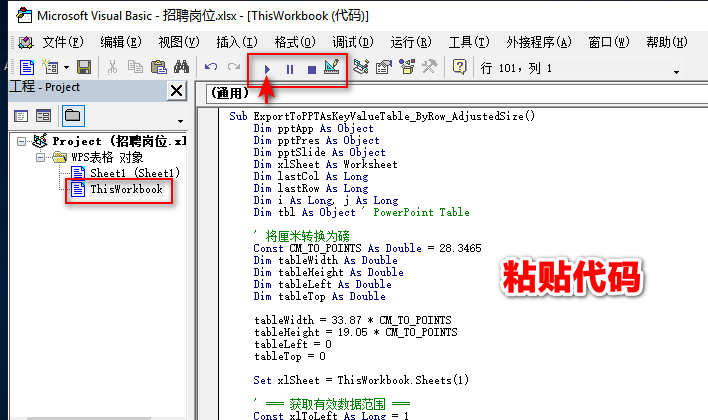
Project--WPS表格对象--ThisWorkbook--粘贴代码
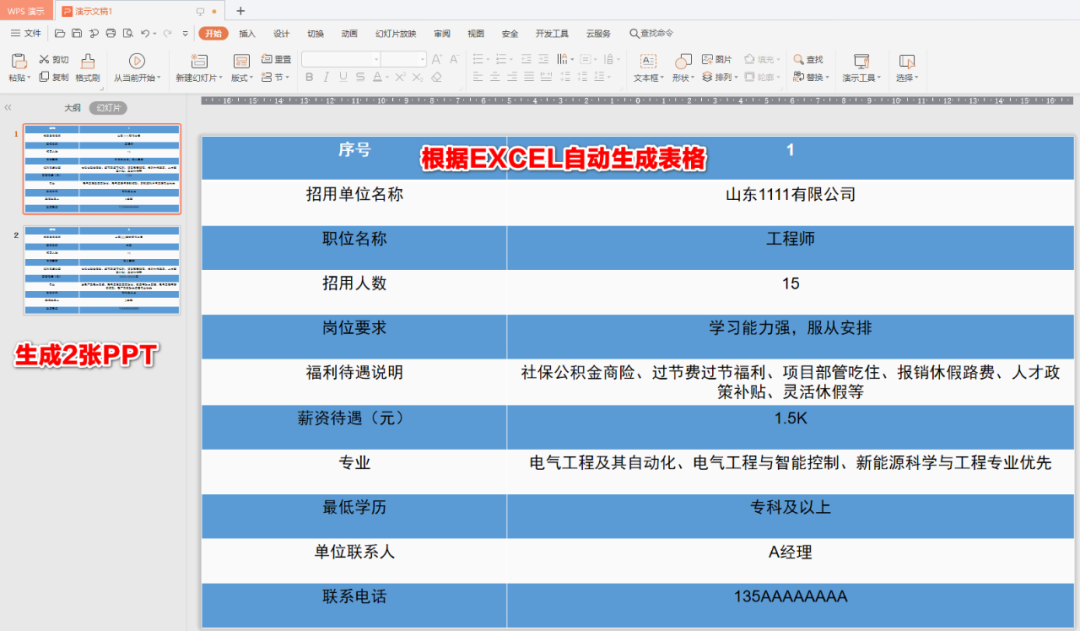
运行程序,自动生成PPT
Sub ExportToPPTAsKeyValueTable_ByRow_AdjustedSize()
    Dim pptApp As Object
    Dim pptPres As Object
    Dim pptSlide As Object
    Dim xlSheet As Worksheet
    Dim lastCol As Long
    Dim lastRow As Long
    Dim i As Long, j As Long
    Dim tbl As Object ' PowerPoint Table

    ' 将厘米转换为磅
    Const CM_TO_POINTS As Double = 28.3465
    Dim tableWidth As Double
    Dim tableHeight As Double
    Dim tableLeft As Double
    Dim tableTop As Double

    tableWidth = 33.87 * CM_TO_POINTS
    tableHeight = 19.05 * CM_TO_POINTS
    tableLeft = 0
    tableTop = 0

    Set xlSheet = ThisWorkbook.Sheets(1)

    ' === 获取有效数据范围 ===
    Const xlToLeft As Long = 1
    Const xlUp As Long = -4162

    ' 最后一列(基于第1行)
    If Application.WorksheetFunction.CountA(xlSheet.Rows(1)) = 0 Then
        MsgBox "第1行(标题行)为空!", vbExclamation
        Exit Sub
    End If
    lastCol = xlSheet.Cells(1, xlSheet.Columns.Count).End(xlToLeft).Column

    ' 最后一行(基于第1列)
    If Application.WorksheetFunction.CountA(xlSheet.Columns(1)) = 0 Then
        MsgBox "第1列无数据!", vbExclamation
        Exit Sub
    End If
    lastRow = xlSheet.Cells(xlSheet.Rows.Count, 1).End(xlUp).Row

    ' 至少要有标题 + 1 行数据
    If lastRow < 2 Then
        MsgBox "没有数据行(至少需要第2行)!", vbExclamation
        Exit Sub
    End If

    ' === 启动 PowerPoint ===
    On Error Resume Next
    Set pptApp = GetObject(, "PowerPoint.Application")
    If pptApp Is Nothing Then Set pptApp = CreateObject("PowerPoint.Application")
    On Error GoTo 0

    If pptApp Is Nothing Then
        MsgBox "无法启动 PowerPoint!", vbCritical
        Exit Sub
    End If

    pptApp.Visible = True
    Set pptPres = pptApp.Presentations.Add

    ' === 遍历每一行数据(从第2行到lastRow)===
    Dim slideIndex As Long
    For i = 2 To lastRow
        ' 添加新幻灯片
        Set pptSlide = pptPres.Slides.Add(pptPres.Slides.Count + 1, 12) ' 空白版式

        ' 创建表格:lastCol 行 × 2 列(不含标题行)
        Set tbl = pptSlide.Shapes.AddTable(lastCol, 2, tableLeft, tableTop, tableWidth, tableHeight).Table

        With tbl
            ' --- 数据行(键值对)---
            For j = 1 To lastCol
                .Cell(j, 1).Shape.TextFrame2.TextRange.Text = CStr(xlSheet.Cells(1, j).Value)
                .Cell(j, 2).Shape.TextFrame2.TextRange.Text = CStr(xlSheet.Cells(i, j).Value)

                ' 居中对齐
                .Cell(j, 1).Shape.TextFrame2.TextRange.ParagraphFormat.Alignment = 2
                .Cell(j, 2).Shape.TextFrame2.TextRange.ParagraphFormat.Alignment = 2

                ' 交替背景色(可选)
                If j Mod 2 = 1 Then
                    .Cell(j, 1).Shape.Fill.ForeColor.RGB = RGB(91, 155, 213)
                    .Cell(j, 2).Shape.Fill.ForeColor.RGB = RGB(91, 155, 213)
                Else
                    .Cell(j, 1).Shape.Fill.ForeColor.RGB = RGB(250, 250, 250)
                    .Cell(j, 2).Shape.Fill.ForeColor.RGB = RGB(250, 250, 250)
                End If
            Next j

            ' 调整表格列宽以适应指定宽度
           ' >>> 关键修改:自定义列宽比例 <<<
            .Columns(1).Width = tableWidth * 0.35  ' 字段列窄一些
            .Columns(2).Width = tableWidth * 0.65  ' 值列宽一些
        End With
    Next i

    MsgBox "成功导出 " & (lastRow - 1) & " 张幻灯片!", vbInformation
End Sub