一 ,GITHUB是知名网站代码托管平台,类似网盘
二 ,下面命令可以帮你在手机termux上,把代码推送上去
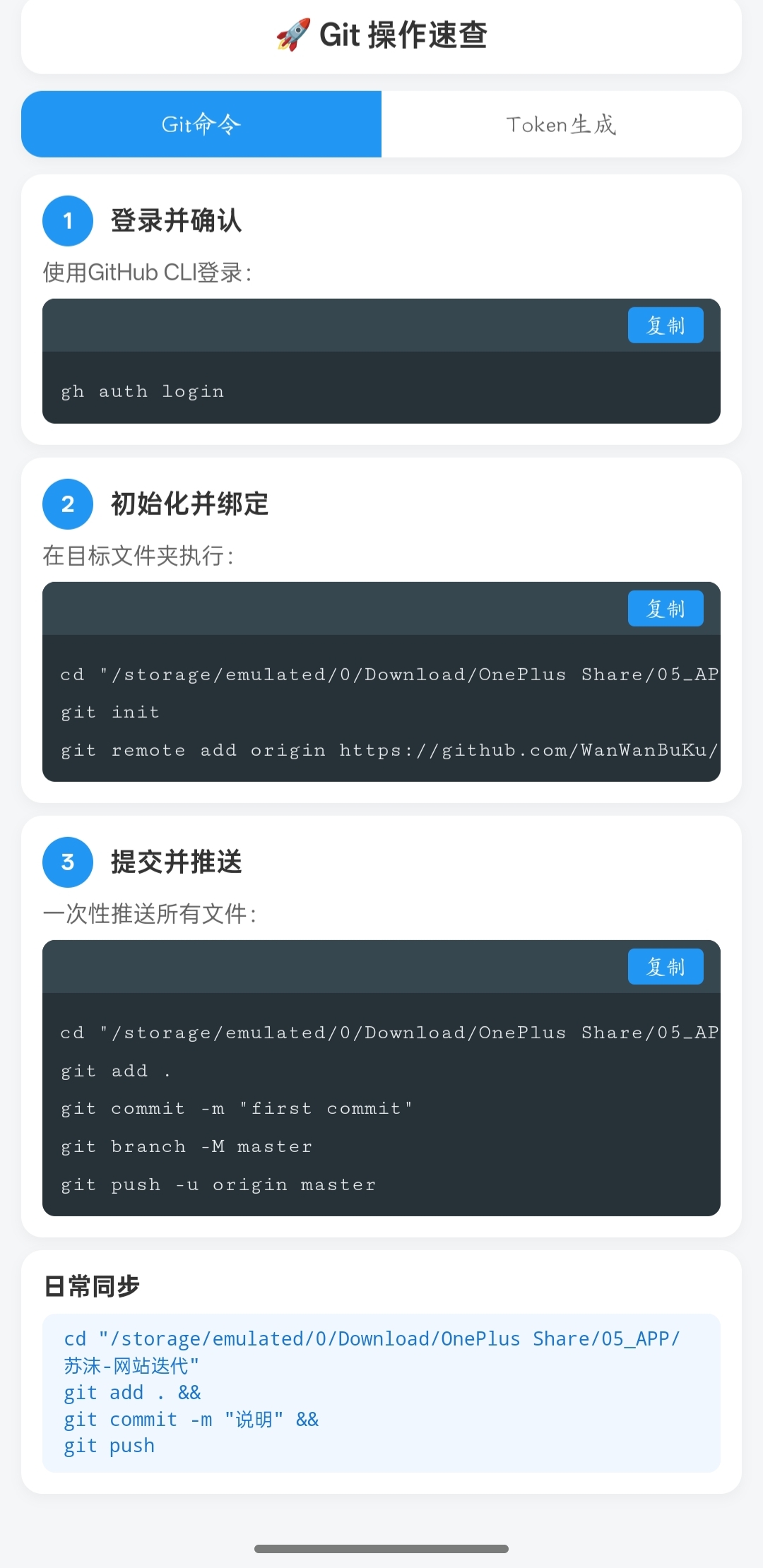
三,详细内容已做成,网页随时查。稍作修改,可以集成到个人网站
html
<!DOCTYPE html>
<html lang="zh-CN">
<head>
    <meta charset="UTF-8">
    <meta name="viewport" content="width=device-width, initial-scale=1.0, maximum-scale=1.0, user-scalable=no">
    <title>Git 操作指南</title>
    <style>
        * { margin: 0; padding: 0; box-sizing: border-box; }
        body {
            font-family: -apple-system, BlinkMacSystemFont, 'PingFang SC', sans-serif;
            background: #f5f6f7;
            padding: 10px; /* 缩小页面边距 */
            color: #333;
        }
        .container { max-width: 400px; margin: 0 auto; }
        .header {
            background: white; border-radius: 10px; padding: 10px;
            margin-bottom: 8px; text-align: center;
            box-shadow: 0 2px 6px rgba(0,0,0,0.04);
        }
        .header h1 { font-size: 16px; color: #333; font-weight: 600; }

        /* Tab 样式 */
        .tabs {
            display: flex; background: white; border-radius: 10px;
            margin-bottom: 8px; box-shadow: 0 2px 6px rgba(0,0,0,0.04); overflow: hidden;
        }
        .tab-btn {
            flex: 1; padding: 8px; border: none; background: white;
            font-size: 13px; font-weight: 500; color: #666; cursor: pointer;
        }
        .tab-btn.active { background: #2196F3; color: white; }

        /* 内容控制 */
        .tab-content { display: none; }
        .tab-content.active { display: block; }

        /* 步骤卡片通用 */
        .step {
            background: white; border-radius: 10px; padding: 10px;
            margin-bottom: 6px; box-shadow: 0 2px 6px rgba(0,0,0,0.04);
        }
        .step-header { display: flex; align-items: center; margin-bottom: 6px; }
        .step-number {
            width: 24px; height: 24px; background: #2196F3; color: white;
            border-radius: 50%; display: flex; align-items: center; justify-content: center;
            font-size: 12px; font-weight: 600; margin-right: 8px; flex-shrink: 0;
        }
        .step-title { font-size: 14px; font-weight: 600; color: #333; }
        .step-desc { font-size: 12px; color: #666; margin-bottom: 6px; }

        /* 说明文字框 (Token页) */
        .token-content {
            background: #f8f9fa; border: 1px solid #e9ecef; border-radius: 6px;
            padding: 8px; font-size: 12px; color: #333; line-height: 1.5;
        }

        /* 代码块 */
        .code-block { background: #263238; border-radius: 6px; overflow: hidden; }
        .code-header { display: flex; justify-content: flex-end; padding: 4px 8px; background: #37474F; }
        .copy-btn {
            background: #2196F3; color: white; border: none; padding: 2px 8px;
            border-radius: 3px; font-size: 11px; cursor: pointer;
        }
        .copy-btn.copied { background: #4CAF50; }
        .code-content { padding: 8px; overflow-x: auto; }
        .code-content code {
            color: #ECEFF1; font-family: 'Courier New', monospace;
            font-size: 11px; line-height: 1.4; white-space: pre;
        }

        /* 底部 */
        .footer {
            background: white; border-radius: 10px; padding: 10px;
            margin-top: 6px; box-shadow: 0 2px 6px rgba(0,0,0,0.04);
        }
        .footer h3 { font-size: 13px; margin-bottom: 6px; color: #333; }
        .footer p { font-size: 12px; color: #666; margin-bottom: 6px; }
        .quick-cmd {
            background: #f0f7ff; padding: 6px 10px; border-radius: 6px;
            font-family: monospace; font-size: 10px; color: #1976D2; line-height: 1.4;
        }
    </style>
</head>
<body>
    <div class="container">
        <div class="header">
            <h1>🚀 Git 操作速查</h1>
        </div>

        <div class="tabs">
            <button class="tab-btn active" onclick="switchTab(0)">Git命令</button>
            <button class="tab-btn" onclick="switchTab(1)">Token生成</button>
        </div>

        <!-- Tab 1: Git命令 -->
        <div class="tab-content active">
            <div class="step">
                <div class="step-header">
                    <div class="step-number">1</div>
                    <div class="step-title">登录并确认</div>
                </div>
                <p class="step-desc">使用GitHub CLI登录:</p>
                <div class="code-block">
                    <div class="code-header">
                        <button class="copy-btn" onclick="copyCode(this)">复制</button>
                    </div>
                    <div class="code-content">
                        <code>gh auth login</code>
                    </div>
                </div>
            </div>

            <div class="step">
                <div class="step-header">
                    <div class="step-number">2</div>
                    <div class="step-title">初始化并绑定</div>
                </div>
                <p class="step-desc">在目标文件夹执行:</p>
                <div class="code-block">
                    <div class="code-header">
                        <button class="copy-btn" onclick="copyCode(this)">复制</button>
                    </div>
                    <div class="code-content">
                        <code>cd "/storage/emulated/0/Download/OnePlus Share/05_APP/苏沫-网站迭代"
git init
git remote add origin https://github.com/WanWanBuKu/SM.git</code>
                    </div>
                </div>
            </div>

            <div class="step">
                <div class="step-header">
                    <div class="step-number">3</div>
                    <div class="step-title">提交并推送</div>
                </div>
                <p class="step-desc">一次性推送所有文件:</p>
                <div class="code-block">
                    <div class="code-header">
                        <button class="copy-btn" onclick="copyCode(this)">复制</button>
                    </div>
                    <div class="code-content">
                        <code>cd "/storage/emulated/0/Download/OnePlus Share/05_APP/苏沫-网站迭代"
git add .
git commit -m "first commit"
git branch -M master
git push -u origin master</code>
                    </div>
                </div>
            </div>

            <div class="footer">
                <h3>日常同步</h3>
                <div class="quick-cmd">
                    cd "/storage/emulated/0/Download/OnePlus Share/05_APP/苏沫-网站迭代"<br>
                    git add . &&<br>
                    git commit -m "说明" &&<br>
                    git push
                </div>
            </div>
        </div>

        <!-- Tab 2: Token生成 -->
        <div class="tab-content">
            <div class="step">
                <div class="step-header">
                    <div class="step-number">1</div>
                    <div class="step-title">登录GitHub</div>
                </div>
                <div class="token-content">登录GitHub账号,点击右上角头像 → Settings</div>
            </div>

            <div class="step">
                <div class="step-header">
                    <div class="step-number">2</div>
                    <div class="step-title">进入开发者设置</div>
                </div>
                <div class="token-content">左侧栏拉到最下方,点击 Developer settings → Personal access tokens → Tokens (classic)</div>
            </div>

            <div class="step">
                <div class="step-header">
                    <div class="step-number">3</div>
                    <div class="step-title">生成新令牌</div>
                </div>
                <div class="token-content">点击 Generate new token → Generate new token (classic),验证账号密码</div>
            </div>

            <div class="step">
                <div class="step-header">
                    <div class="step-number">4</div>
                    <div class="step-title">填写令牌信息</div>
                </div>
                <div class="token-content">填写 Note(令牌备注),在 Expiration 下拉框选择 30 days</div>
            </div>

            <div class="step">
                <div class="step-header">
                    <div class="step-number">5</div>
                    <div class="step-title">选择权限</div>
                </div>
                <div class="token-content">勾选所需权限(按需选,避免全选),拉到最下方点击 Generate token</div>
            </div>

            <div class="step">
                <div class="step-header">
                    <div class="step-number">6</div>
                    <div class="step-title">保存令牌</div>
                </div>
                <div class="token-content">复制生成的令牌(仅显示一次),妥善保存,后续可用于Git命令行、API调用等场景</div>
            </div>

            <div class="footer">
                <p style="font-size:11px; color:#999; text-align:center;">需要权限速查表吗?</p>
            </div>
        </div>
    </div>

    <script>
        function switchTab(index) {
            const tabs = document.querySelectorAll('.tab-btn');
            const contents = document.querySelectorAll('.tab-content');
            tabs.forEach((tab, i) => {
                i === index ? tab.classList.add('active') : tab.classList.remove('active');
            });
            contents.forEach((content, i) => {
                i === index ? content.classList.add('active') : content.classList.remove('active');
            });
        }

        function copyCode(btn) {
            const codeBlock = btn.closest('.code-block');
            const code = codeBlock.querySelector('code').textContent;
            navigator.clipboard.writeText(code).then(() => {
                btn.textContent = '已复制';
                btn.classList.add('copied');
                setTimeout(() => {
                    btn.textContent = '复制';
                    btn.classList.remove('copied');
                }, 1500);
            }).catch(() => {
                const ta = document.createElement('textarea');
                ta.value = code;
                document.body.appendChild(ta);
                ta.select();
                document.execCommand('copy');
                document.body.removeChild(ta);
                btn.textContent = '已复制';
                btn.classList.add('copied');
                setTimeout(() => {
                    btn.textContent = '复制';
                    btn.classList.remove('copied');
                }, 1500);
            });
        }
    </script>
</body>
</html>