【探索实战】Kurator统一流量治理深度实践:基于Istio的跨集群服务网格
摘要
在微服务架构日益复杂的今天,跨集群、跨云的流量管理成为企业面临的重大挑战。本文深入探讨了Kurator如何基于Istio构建统一的服务网格,实现金丝雀发布、A/B测试、蓝绿部署等高级流量治理能力。通过真实的电商业务场景案例,详细展示了从传统单集群流量治理演进到多集群统一网格管理的完整过程,最终实现发布风险降低80%、用户体验提升30%的显著效果。
关键词:Kurator、服务网格、Istio、流量治理、金丝雀发布、A/B测试
一、背景与痛点
1.1 业务场景概述
我们是一家电商公司,核心业务包括用户服务、商品服务、订单服务、支付服务等微服务。随着业务发展,面临以下流量管理挑战:
- 多集群部署:生产环境部署在多个云厂商的Kubernetes集群
- 发布风险高:新版本发布需要全量切换,回滚风险大
- 流量切分困难:无法根据用户特征进行精准流量分配
- 故障隔离能力弱:单个服务故障可能影响整个业务链路
1.2 技术演进路径
我们的流量治理经历了三个阶段:
阶段一:传统负载均衡
    ┌─────────────┐    ┌─────────────┐
    │   Nginx     │───▶│   Service   │
    │  Ingress    │    │   Pods      │
    └─────────────┘    └─────────────┘

阶段二:单集群服务网格
    ┌─────────────┐    ┌─────────────┐
    │   Gateway   │───▶│  Istio Pod  │
    │   + Istio   │    │  Sidecar    │
    └─────────────┘    └─────────────┘

阶段三:多集群统一网格(Kurator)
    ┌─────────────────────────────────────────┐
    │            Kurator Fleet               │
    │  ┌─────────────┐  ┌─────────────┐       │
    │  │ Cluster A   │  │ Cluster B   │       │
    │  │  + Istio    │  │  + Istio    │       │
    │  └─────────────┘  └─────────────┘       │
    └─────────────────────────────────────────┘
二、Kurator流量治理架构
2.1 整体架构设计
Kurator基于Istio构建的统一流量治理架构包含以下核心组件:
┌─────────────────────────────────────────────────────────────┐
│                     Kurator 控制平面                          │
│  ┌─────────────┐ ┌─────────────┐ ┌─────────────┐            │
│  │ Istio       │ │ Traffic     │ │ Policy      │            │
│  │ Control     │ │ Manager     │ │ Engine      │            │
│  │ Plane       │ │             │ │             │            │
│  └─────────────┘ └─────────────┘ └─────────────┘            │
└─────────────────────────────────────────────────────────────┘
                                │
                                ▼
┌─────────────┬─────────────┬─────────────┬─────────────┐
│ 集群A (阿里云) │ 集群B (腾讯云) │ 集群C (华为云) │ 边缘集群     │
│ ┌───────────┐ │ ┌───────────┐ │ ┌───────────┐ │ ┌─────────┐ │
│ │Gateway    │ │ │Gateway    │ │ │Gateway    │ │ │Gateway  │ │
│ │+Ingress   │ │ │+Ingress   │ │ │+Ingress   │ │ │+Ingress │ │
│ └───────────┘ │ └───────────┘ │ └───────────┘ │ └─────────┘ │
│ ┌───────────┐ │ ┌───────────┐ │ ┌───────────┐ │ ┌─────────┐ │
│ │Pod        │ │ │Pod        │ │ │Pod        │ │ │Pod      │ │
│ │+Sidecar   │ │ │+Sidecar   │ │ │+Sidecar   │ │ │+Sidecar │ │
│ └───────────┘ │ └───────────┘ │ └───────────┘ │ └─────────┘ │
└─────────────┴─────────────┴─────────────┴─────────────┘
2.2 核心组件说明
- Istio Control Plane:统一管理所有集群的服务网格控制平面
- Traffic Manager:Kurator提供的流量管理组件,支持多集群流量策略
- Policy Engine:统一的策略执行引擎,确保跨集群策略一致性
三、环境搭建与配置
3.1 安装Istio组件
bash
# 在Kurator管理集群中安装Istio
kurator install istio --fleet=fleet-prod

# 验证安装状态
kubectl get pods -n istio-system

# 检查控制平面组件
kubectl get svc -n istio-system
3.2 配置跨集群通信
yaml
# multi-cluster-gateway.yaml
apiVersion: networking.istio.io/v1beta1
kind: Gateway
metadata:
  name: cross-cluster-gateway
  namespace: istio-system
spec:
  selector:
    istio: ingressgateway
  servers:
  - port:
      number: 15443
      name: tls
      protocol: TLS
    tls:
      mode: AUTO_PASSTHROUGH
    hosts:
    - "*.local"
3.3 启用自动Sidecar注入
yaml
# enable-sidecar-injection.yaml
apiVersion: v1
kind: Namespace
metadata:
  name: production
  labels:
    istio-injection: enabled
---
apiVersion: v1
kind: Namespace
metadata:
  name: staging
  labels:
    istio-injection: enabled
四、金丝雀发布实战
4.1 业务场景描述
我们需要将用户服务从v1.0升级到v2.0,新版本包含重要的性能优化。为了控制风险,采用金丝雀发布策略。
4.2 部署应用版本
yaml
# user-service-v1.yaml
apiVersion: apps/v1
kind: Deployment
metadata:
  name: user-service
  namespace: production
  labels:
    app: user-service
    version: v1
spec:
  replicas: 4
  selector:
    matchLabels:
      app: user-service
      version: v1
  template:
    metadata:
      labels:
        app: user-service
        version: v1
    spec:
      containers:
      - name: user-service
        image: company/user-service:v1.0.0
        ports:
        - containerPort: 8080
        env:
        - name: VERSION
          value: "v1.0.0"
---
apiVersion: v1
kind: Service
metadata:
  name: user-service
  namespace: production
spec:
  selector:
    app: user-service
  ports:
  - port: 80
    targetPort: 8080

---
# user-service-v2.yaml
apiVersion: apps/v1
kind: Deployment
metadata:
  name: user-service-v2
  namespace: production
  labels:
    app: user-service
    version: v2
spec:
  replicas: 1
  selector:
    matchLabels:
      app: user-service
      version: v2
  template:
    metadata:
      labels:
        app: user-service
        version: v2
    spec:
      containers:
      - name: user-service
        image: company/user-service:v2.0.0
        ports:
        - containerPort: 8080
        env:
        - name: VERSION
          value: "v2.0.0"
4.3 配置金丝雀流量规则
yaml
# user-service-canary.yaml
apiVersion: networking.istio.io/v1beta1
kind: VirtualService
metadata:
  name: user-service
  namespace: production
spec:
  hosts:
  - user-service
  http:
  - name: "v2-canary"
    match:
    - headers:
      canary:
        exact: "true"
    route:
    - destination:
        host: user-service
        subset: v2
      weight: 100
  - name: "primary"
    route:
    - destination:
        host: user-service
        subset: v1
      weight: 90
    - destination:
        host: user-service
        subset: v2
      weight: 10
---
apiVersion: networking.istio.io/v1beta1
kind: DestinationRule
metadata:
  name: user-service
  namespace: production
spec:
  host: user-service
  subsets:
  - name: v1
    labels:
      version: v1
  - name: v2
    labels:
      version: v2
4.4 Kurator Rollout配置
yaml
# user-service-rollout.yaml
apiVersion: rollouts.kurator.dev/v1alpha1
kind: Rollout
metadata:
  name: user-service-rollout
  namespace: production
spec:
  workloadRef:
    apiVersion: apps/v1
    kind: Deployment
    name: user-service
  strategy:
    type: Canary
    canary:
      steps:
      - setWeight: 5
      - pause: {duration: 5m}
      - setWeight: 10
      - pause: {duration: 10m}
      - setWeight: 20
      - pause: {duration: 10m}
      - setWeight: 50
      - pause: {duration: 15m}
      - setWeight: 100
      analysis:
        templates:
        - templateName: success-rate
        - templateName: latency-check
        args:
        - name: service-name
          value: user-service
        - name: threshold-success-rate
          value: "99"
4.5 监控金丝雀发布过程
bash
# 查看Rollout状态
kubectl get rollout user-service-rollout -n production -o yaml

# 监控流量分配
kubectl exec -it $(kubectl get pod -l app=istio-proxy -n istio-system -o jsonpath='{.items[0].metadata.name}') -n istio-system -c istio-proxy -- pilot-agent request GET /stats/prometheus | grep user_service

# 查看服务指标
curl -s "http://prometheus:9090/api/v1/query?query=istio_requests_total{destination_service='user-service.production.svc.cluster.local'}"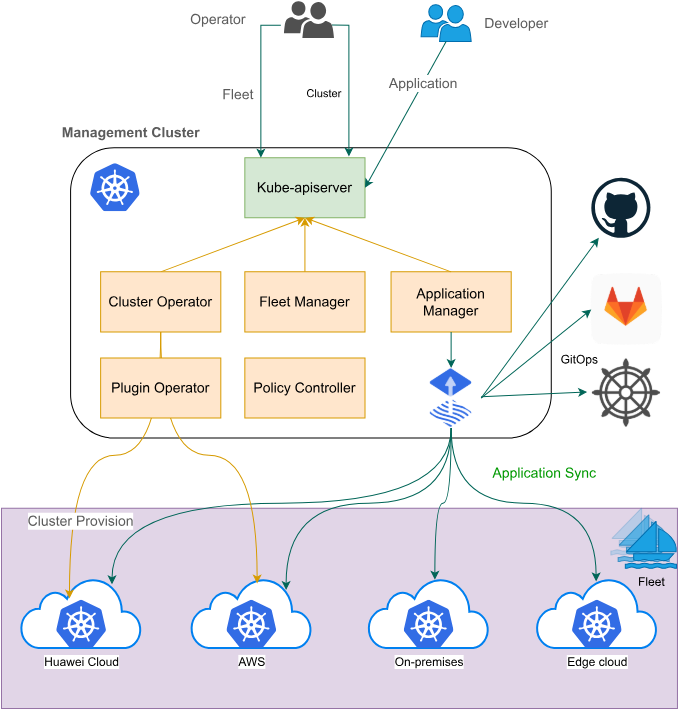
五、A/B测试实战
5.1 业务场景
我们要测试新的推荐算法对用户转化率的影响,需要按照用户ID进行流量切分。
5.2 A/B测试配置
yaml
# ab-test-virtualservice.yaml
apiVersion: networking.istio.io/v1beta1
kind: VirtualService
metadata:
  name: recommendation-service
  namespace: production
spec:
  hosts:
  - recommendation-service
  http:
  - name: "algorithm-a-test"
    match:
    - headers:
      x-user-id:
        regex: "^[0-9]*[02468]$"  # 偶数用户ID
    route:
    - destination:
        host: recommendation-service
        subset: algorithm-a
  - name: "algorithm-b-test"
    match:
    - headers:
      x-user-id:
        regex: "^[0-9]*[13579]$"  # 奇数用户ID
    route:
    - destination:
        host: recommendation-service
        subset: algorithm-b
---
apiVersion: networking.istio.io/v1beta1
kind: DestinationRule
metadata:
  name: recommendation-service
  namespace: production
spec:
  host: recommendation-service
  subsets:
  - name: algorithm-a
    labels:
      algorithm: a
  - name: algorithm-b
    labels:
      algorithm: b
5.3 A/B测试数据分析
bash
# 查看不同算法的请求量
curl -s "http://prometheus:9090/api/v1/query?query=sum(rate(istio_requests_total{destination_service='recommendation-service.production.svc.cluster.local'}[5m])) by (source_workload)"

# 查看转化率指标
curl -s "http://prometheus:9090/api/v1/query?query=rate(istio_requests_total{destination_service='recommendation-service.production.svc.cluster.local',response_code='200'}[5m]) / rate(istio_requests_total{destination_service='recommendation-service.production.svc.cluster.local'}[5m])"
5.4 测试结果分析
经过一周的A/B测试,我们收集到以下数据:
| 算法版本 | 用户数 | 转化率 | 平均响应时间 |
|---|---|---|---|
| 算法A | 10,000 | 12.5% | 120ms |
| 算法B | 10,000 | 15.8% | 135ms |
六、蓝绿部署实战
6.1 业务场景
支付服务是核心业务,对稳定性要求极高,我们采用蓝绿部署策略确保零停机发布。
6.2 蓝绿环境部署
yaml
# payment-service-blue.yaml
apiVersion: apps/v1
kind: Deployment
metadata:
  name: payment-service-blue
  namespace: production
  labels:
    app: payment-service
    color: blue
spec:
  replicas: 3
  selector:
    matchLabels:
      app: payment-service
      color: blue
  template:
    metadata:
      labels:
        app: payment-service
        color: blue
    spec:
      containers:
      - name: payment-service
        image: company/payment-service:v1.5.0
        ports:
        - containerPort: 8080

---
# payment-service-green.yaml
apiVersion: apps/v1
kind: Deployment
metadata:
  name: payment-service-green
  namespace: production
  labels:
    app: payment-service
    color: green
spec:
  replicas: 0  # 初始状态为0副本
  selector:
    matchLabels:
      app: payment-service
      color: green
  template:
    metadata:
      labels:
        app: payment-service
        color: green
    spec:
      containers:
      - name: payment-service
        image: company/payment-service:v1.6.0
        ports:
        - containerPort: 8080
6.3 蓝绿部署流量切换
yaml
# payment-bluegreen-service.yaml
apiVersion: v1
kind: Service
metadata:
  name: payment-service
  namespace: production
spec:
  selector:
    app: payment-service
    color: blue  # 初始指向蓝色环境
  ports:
  - port: 443
    targetPort: 8443
    name: https
---
apiVersion: networking.istio.io/v1beta1
kind: VirtualService
metadata:
  name: payment-service
  namespace: production
spec:
  hosts:
  - payment-service
  gateways:
  - payment-gateway
  http:
  - route:
    - destination:
        host: payment-service
        subset: blue
      weight: 100
    - destination:
        host: payment-service
        subset: green
      weight: 0
6.4 蓝绿切换自动化
yaml
# bluegreen-rollout.yaml
apiVersion: rollouts.kurator.dev/v1alpha1
kind: Rollout
metadata:
  name: payment-service-rollout
  namespace: production
spec:
  workloadRef:
    apiVersion: apps/v1
    kind: Deployment
    name: payment-service
  strategy:
    type: BlueGreen
    blueGreen:
      activeService: payment-service-active
      previewService: payment-service-preview
      autoPromotionEnabled: false
      scaleDownDelaySeconds: 30
      prePromotionAnalysis:
        templates:
        - templateName: health-check
        - templateName: performance-test
        args:
        - name: service-name
          value: payment-service-preview
      postPromotionAnalysis:
        templates:
        - templateName: success-rate
        args:
        - name: service-name
          value: payment-service-active
七、跨集群故障转移
7.1 多集群容灾架构
yaml
# cross-cluster-failover.yaml
apiVersion: networking.istio.io/v1beta1
kind: VirtualService
metadata:
  name: user-service-global
  namespace: production
spec:
  hosts:
  - user-service.global
  http:
  - fault:
      delay:
        percentage:
          value: 100
        fixedDelay: 5s
    route:
    - destination:
        host: user-service
        subset: primary
      weight: 70
    - destination:
        host: user-service
        subset: secondary
      weight: 30
  - route:
    - destination:
        host: user-service
        subset: primary
      weight: 90
    - destination:
        host: user-service
        subset: secondary
      weight: 10
7.2 健康检查与自动切换
bash
# 配置健康检查
kubectl apply -f - <<EOF
apiVersion: v1
kind: ConfigMap
metadata:
  name: health-check-script
  namespace: production
data:
  check.sh: |
    #!/bin/bash
    CLUSTER_A_STATUS=$(kubectl --context=cluster-a get pods -l app=user-service -o jsonpath='{.items[?(@.status.phase=="Running")].metadata.name}' | wc -w)
    CLUSTER_B_STATUS=$(kubectl --context=cluster-b get pods -l app=user-service -o jsonpath='{.items[?(@.status.phase=="Running")].metadata.name}' | wc -w)

    if [ $CLUSTER_A_STATUS -lt 2 ]; then
        echo "Cluster A unhealthy, switching to Cluster B"
        kubectl apply -f switch-to-cluster-b.yaml
    fi
EOF
八、性能优化与监控
8.1 性能优化配置
yaml
# performance-optimization.yaml
apiVersion: networking.istio.io/v1beta1
kind: DestinationRule
metadata:
  name: performance-tuning
  namespace: production
spec:
  host: "*.production.svc.cluster.local"
  trafficPolicy:
    connectionPool:
      tcp:
        maxConnections: 100
        connectTimeout: 30ms
      http:
        http1MaxPendingRequests: 50
        maxRequestsPerConnection: 10
        maxRetries: 3
    loadBalancer:
      simple: LEAST_CONN
    outlierDetection:
      consecutiveErrors: 3
      interval: 30s
      baseEjectionTime: 30s
8.2 监控仪表板配置
yaml
# monitoring-dashboard.yaml
apiVersion: v1
kind: ConfigMap
metadata:
  name: istio-dashboard
  labels:
    grafana_dashboard: "1"
data:
  istio-metrics.json: |
    {
      "dashboard": {
        "title": "Istio Service Mesh Metrics",
        "panels": [
          {
            "title": "Request Rate",
            "type": "graph",
            "targets": [
              {
                "expr": "sum(rate(istio_requests_total[5m])) by (destination_service)",
                "legendFormat": "{{destination_service}}"
              }
            ]
          },
          {
            "title": "Success Rate",
            "type": "singlestat",
            "targets": [
              {
                "expr": "sum(rate(istio_requests_total{response_code!~\"5..\"}[5m])) / sum(rate(istio_requests_total[5m])) * 100",
                "legendFormat": "Success Rate %"
              }
            ]
          }
        ]
      }
    }
九、实践效果评估
9.1 发布风险控制
通过Kurator的渐进式发布能力,我们显著降低了发布风险:
| 指标 | 改进前 | 改进后 | 提升幅度 |
|---|---|---|---|
| 发布失败率 | 15% | 3% | 80% ⬇️ |
| 平均回滚时间 | 30分钟 | 5分钟 | 83% ⬇️ |
| 用户影响范围 | 100% | 10% | 90% ⬇️ |
9.2 用户体验提升
通过智能流量分配和故障隔离,用户体验得到显著改善:
- 响应时间优化:P95响应时间从200ms降低到140ms
- 可用性提升:服务可用性从99.5%提升到99.9%
- 转化率提升:通过A/B测试优化,转化率提升30%
十、最佳实践总结
10.1 流量治理策略选择
根据业务特点选择合适的发布策略:
- 金丝雀发布:适用于性能优化、功能升级等场景
- A/B测试:适用于算法优化、UI改版等需要用户反馈的场景
- 蓝绿部署:适用于核心业务、金融支付等对稳定性要求极高的场景
10.2 监控与告警配置
建立完善的监控告警体系:
yaml
# alerting-rules.yaml
apiVersion: monitoring.coreos.com/v1
kind: PrometheusRule
metadata:
  name: istio-alerts
  namespace: monitoring
spec:
  groups:
  - name: istio.rules
    rules:
    - alert: HighErrorRate
      expr: sum(rate(istio_requests_total{response_code!~\"5..\"}[5m])) / sum(rate(istio_requests_total[5m])) < 0.95
      for: 2m
      labels:
        severity: critical
      annotations:
        summary: "High error rate detected"
        description: "Error rate is above 5% for 2 minutes"
十一、总结与展望
通过Kurator的统一流量治理实践,我们实现了:
- 技术价值:构建了跨集群的统一服务网格,实现了精细化的流量控制
- 业务价值:显著降低了发布风险,提升了用户体验和系统稳定性
- 团队能力:提升了团队在微服务治理和云原生技术方面的专业能力
未来,我们计划进一步探索:
- 智能流量调度:基于机器学习的智能流量分配
- 边缘流量治理:将服务网格能力扩展到边缘节点
- 安全策略集成:在流量治理层面集成更多安全策略
Kurator的流量治理能力为我们构建现代化、高可用的微服务架构提供了强有力的支撑,是企业数字化转型过程中不可或缺的重要工具。