在编程的过程中,我们经常需要处理字符和字符串,为了方便操作字符和字符串,C语言标准库提供了一系列库函数,接下来,我们来一起了解学习一下这些函数。
一、字符分类函数
C语言中有一系列的函数是专门用于字符分类的,也就是一个字符是属于什么类型的字符的。
这些函数都需要包含一个头文件ctype.h
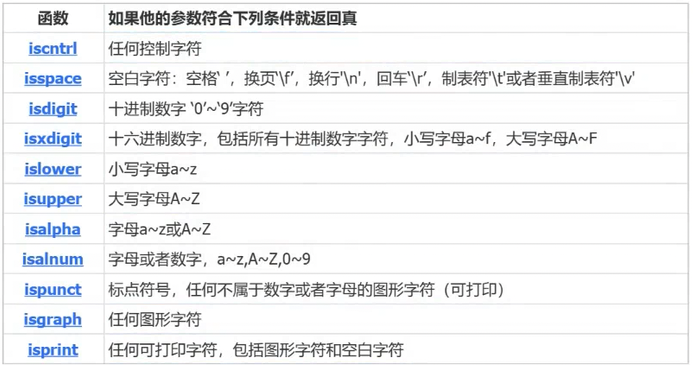
这些函数使用方法非常类似,我们就讲解一个函数:
cpp
int islower ( int c );islower是能够判断参数部分的c是否是小写字母的。
如果是小写字母,就返回非0整数;如果不是小写字母,则返回0。
练习:
写一个代码,将字符串中的小写字母全部转换为大写字母,其他字符保持不变。
如果我们没有学islower函数,我们可能会写出
代码一:
cpp
#define  _CRT_SECURE_NO_WARNINGS 1
#include<stdio.h>
#include<ctype.h>
int main()
{
	char arr[] = "I Love You.";
	int i = 0;
	while (arr[i]!='\0')
	{
		if(arr[i] >= 'a' && arr[i] <= 'z')
		arr[i] -= 32;
		i++;
	}
	printf("%s", arr);
}
我们学会islower函数之后,我们可以这样写
代码二:
cpp
int main()
{
	char arr[] = "I Love You.";
	int i = 0;
	while (arr[i] != '\0')
	{
		if (islower(arr[i])!=0)
			arr[i] -= 32;
		i++;
	}
	printf("%s", arr);
}
二、字符转换函数
C语言提供了2个字符转换函数:
cpp
int tolower(int c);//将参数传进去的大写字母转小写
int toupper(int c);//将参数传进去的小写字母转大写
有了这两个函数,我们又可以简化标题一中的代码二:
cpp
int main()
{
	char arr[] = "I Love You.";
	int i = 0;
	while (arr[i] != '\0')
	{
		if (islower(arr[i]))
			arr[i] = toupper(arr[i]);
		i++;
	}
	printf("%s", arr);
}
三、strlen的使用和模拟实现
cpp
size_t strlen(const char* str);(一)strlen函数的使用
1.字符串以'\0'作为结束标志,strlen函数返回的是在字符串中'\0'出现的字符的个数(不包含'\0');
2.参数指向的字符串必须要以'\0'结束;
3.注意函数的返回值类型是size_t,是无符号的(!易错!);
4.strlen的使用需要包含头文件;
5.学会strlen函数的模拟实现。
验证size_t类型代码:
cpp
#include<string.h>

int main()
{
	char* str1 = "abcdef";
	char* str2 = "ghi";
	if (strlen(str2) - strlen(str1) > 0)
	{
		printf(">\n");
	}
	else
		printf("<\n");
	return 0;
}
按理说,3-6=-3应该是小于号,那为什么还是输出了">"了呢?
原因就在于size_t是无符号的,所以会自动忽略运算完的负号。
但如果我们强制类型转换为int型,那么此时就是小于号了。
cpp
#include<string.h>

int main()
{
	char* str1 = "abcdef";
	char* str2 = "ghi";
	if ((int)strlen(str2) - (int)strlen(str1) > 0)
	{
		printf(">\n");
	}
	else
		printf("<\n");
	return 0;
}
(二)strlen函数的模拟实现
1.方式一:计数器
cpp
#include<assert.h>
int my_strlen(const char* str)
{
	int count = 0;
	assert(str);
	while(*str!=0)
	{
		count++;
		str++;
	}
	return count;
}

int main()
{
	printf("%d\n", my_strlen("abcdef"));
}
2.方式二:指针-指针
cpp
int my_strlen(const char* str)
{
	char* p = str;
	while (*p != '\0')
	{
		p++;
	}
	return p-str;
}

int main()
{
	printf("%d\n", my_strlen("abcdef"));
}
3.方式三:递归
cpp
int my_strlen(const char* str)
{
	assert(str);
	if (*str == '\0')
		return 0;
	else
		return 1 + my_strlen(str + 1);
}

int main()
{
	printf("%d\n", my_strlen("abcdef"));
}
4.另外说明
cpp
int main()
{
	char* arr = "abcdef";
	printf("%p\n", arr);
	printf("%p\n", &arr);
	return 0;
}
arr指向的是字符串首元素,也就是这个字符串中a的地址;
而&arr指向的则是字符指针变量arr本身的地址。

四、strcpy函数的使用和模拟实现
cpp
char* strcpy(char* destination, const char* source);(一)strcpy函数的使用
1.Copies the C string pointed by source into the array pointed by destination, including the terminating null character (and stopping at that point);
2.源字符串必须以'\0'结束;
3.此函数会将源字符串中的'\0'拷贝到目标空间;
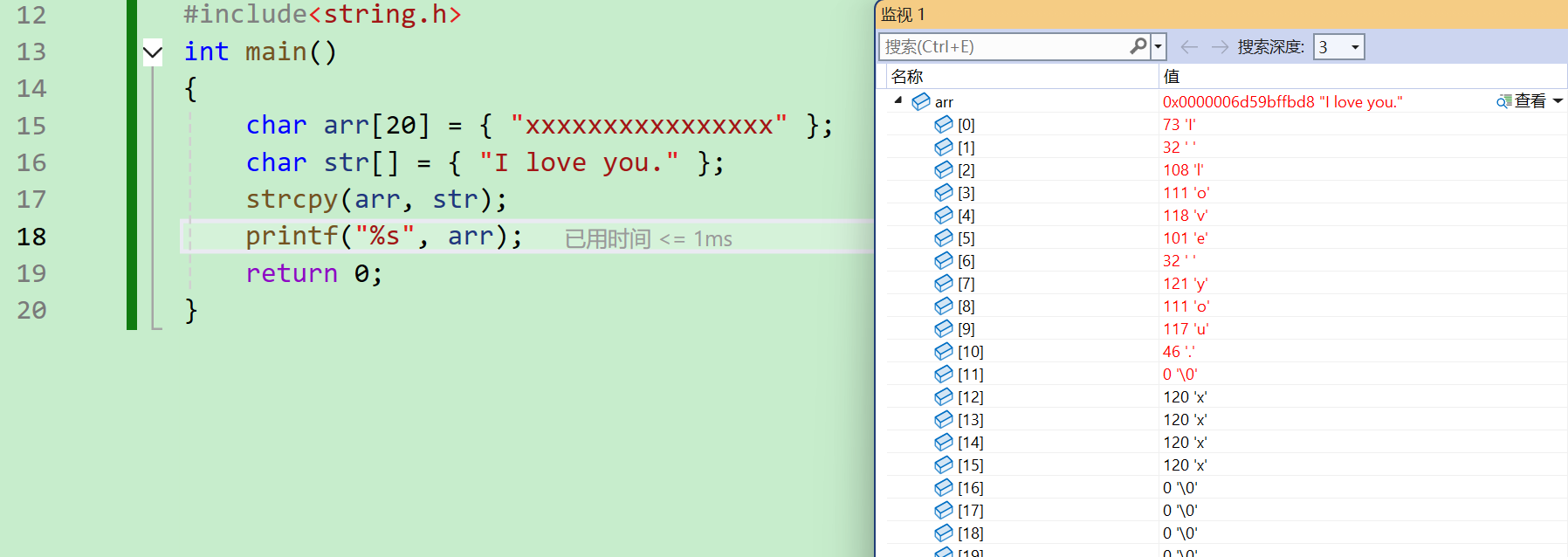
4,目标空间必须足够大,以确保能存放源字符串;
5.目标空间必须可修改。
(二)strcpy函数的模拟实现
1.代码一
cpp
#include<string.h>
void my_strcpy(char* dest, char* src)
{
	while (*src != '\0')
	{
		*dest = *src;
		dest++;
		src++;
	}
	*dest = '\0';
}
int main()
{
	char arr[20] = { "xxxxxxxxxxxxxxxx" };
	char str[] = { "I love you." };
	my_strcpy(arr, str);
	printf("%s", arr);
	return 0;
}
2.代码二
cpp
#include<string.h>
#include<assert.h>
void my_strcpy(char* dest, const char* src)
{
	assert(dest != NULL);
	assert(src != NULL);
	while (*dest++ = *src++)
	{
		;
	}

}
int main()
{
	char arr[20] = { "xxxxxxxxxxxxxxxx" };
	char str[] = { "I love you." };
	my_strcpy(arr, str);
	printf("%s", arr);
	return 0;
}
这里虽然++的运算级优先于*,但是由于后置++是先使用再自增,所以没有影响。
3.代码三
cpp
#include<string.h>
#include<assert.h>
char my_strcpy(char* dest, const char* src)
{
	assert(dest != NULL);
	assert(src != NULL);
	char* ret = dest;
	while (*dest++ = *src++)
	{
		;
	}
	return ret;
}
int main()
{
	char arr[20] = { "xxxxxxxxxxxxxxxx" };
	char str[] = { "I love you." };
	my_strcpy(arr, str);
	printf("%s", arr);
	return 0;
}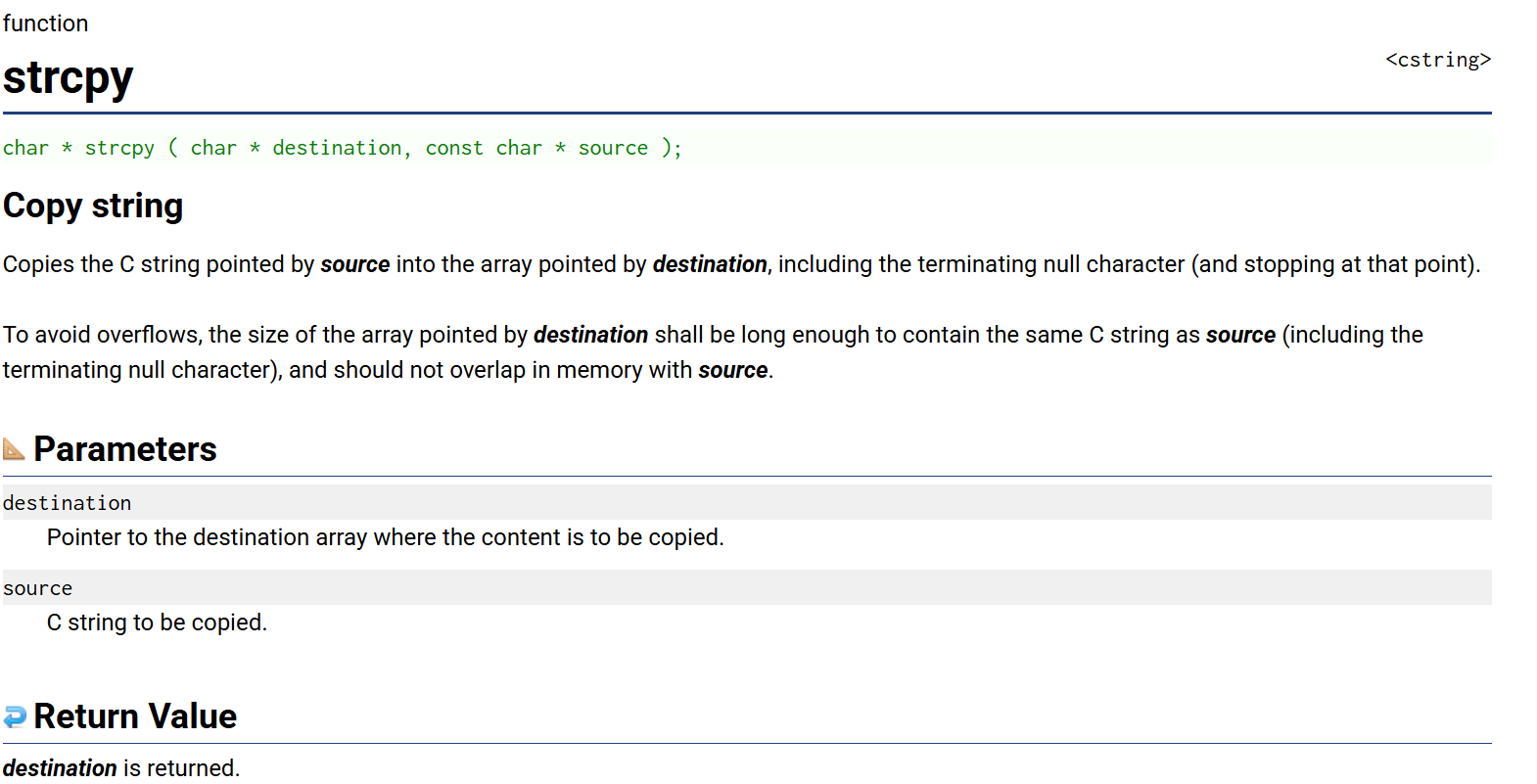
这里我们观察到,真正的strcpy函数的返回值是char类型,值是一开始的destination,所以我们又优化了一下自定义函数my_strcpy。
五、strcat函数的使用和模拟实现
(一)strcat函数的使用
1.Appends a copy of the source string to the destination string. The terminating null character in destination is overwritten by the first character of source , and a null-character is included at the end of the new string formed by the concatenation of both in destination;
2.源字符串必须以'\0'结束;
3.目标字符串中也得有'\0',否则没有办法知道追加从哪里开始;
4.目标空间必须有足够大,能容纳下源字符串的内容;
5.目标空间必须可修改。
6.字符串自己给自己追加,如何?
cpp
#include<string.h>
int main()
{
	char arr[20] = { "I love " };
	char str[] = { "you." };
	strcat(arr, str);
	printf("%s", arr);
}
(二)strcat函数的模拟实现
1.代码一
cpp
#include<string.h>
#include<assert.h>
char* my_strcat(char* dest, const char* src)
{
	assert(dest && src);
	char* ret = dest;
	int count = strlen(dest);
	dest += (count);
	while (*dest++ = *src++)
		;
	return ret;
}
int main()
{
	char arr[20] = { "I love " };
	char str[] = { "you." };
	my_strcat(arr, str);
	printf("%s", arr);
}
通过strlen函数来实现特定位置追加。
2.代码二
cpp
#include<string.h>
#include<assert.h>
char* my_strcat(char* dest, const char* src)
{
	assert(dest && src);
	char* ret = dest;
	while (*dest != 0)
	{
		dest++;
	}
	while (*dest++ = *src++)
		;
	return ret;
}
int main()
{
	char arr[20] = { "I love " };
	char str[] = { "you." };
	my_strcat(arr, str);
	printf("%s", arr);
}
通过whlie循环来实现特定位置追加。
3.字符串自己给自己追加?
那我们或许有这样一个思考:同一个字符串可不可以自己给自己追加呢?
先来看我们自己写的自定义函数的代码:
cpp
#define  _CRT_SECURE_NO_WARNINGS 1
#include<stdio.h>
#include<assert.h>
#include<string.h>
char* my_strcat(char* dest, const char* str)
{
	assert(dest && str);
	char* ret = dest;
	while (*dest != '\0')
	{
		dest++;
	}
	while (*dest++ = *str++)
	{
		;
	}
	return ret;
}
int main()
{
	char arr1[20] = {"abcdef"};
	char arr2[] = {"ghi"};
	my_strcat(arr1, arr1);
	printf("%s\n", arr1);
	return 0;
}
假如我们全部改为arr1:
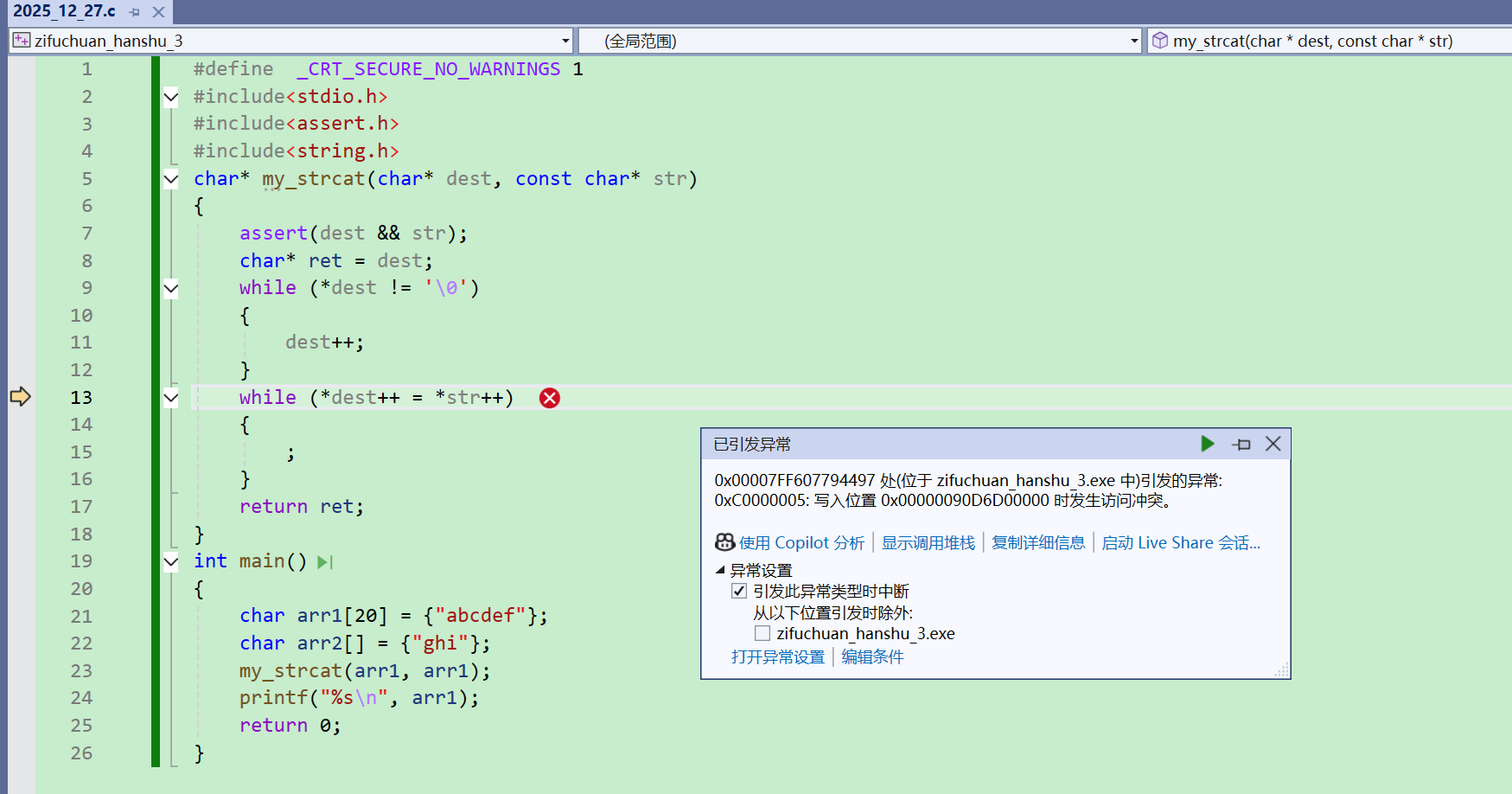
此时会陷入死循环,最终导致程序崩溃。
但是,我们如果用C语言库中的函数:
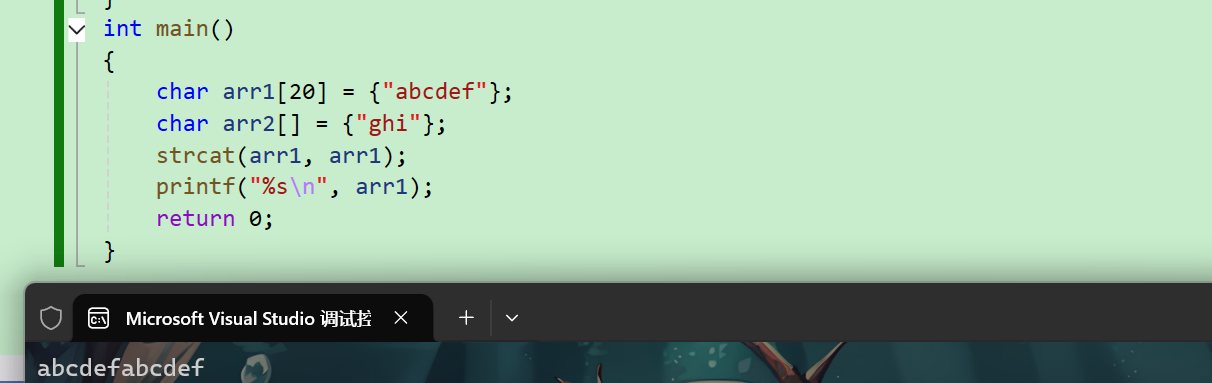
我们发现,是可行的。
所以说,我们模拟函数和C语言库里的函数并不是完全一样的,但是会和我们写的非常相似。
这里我们可以用everything来搜一下strcat.c:
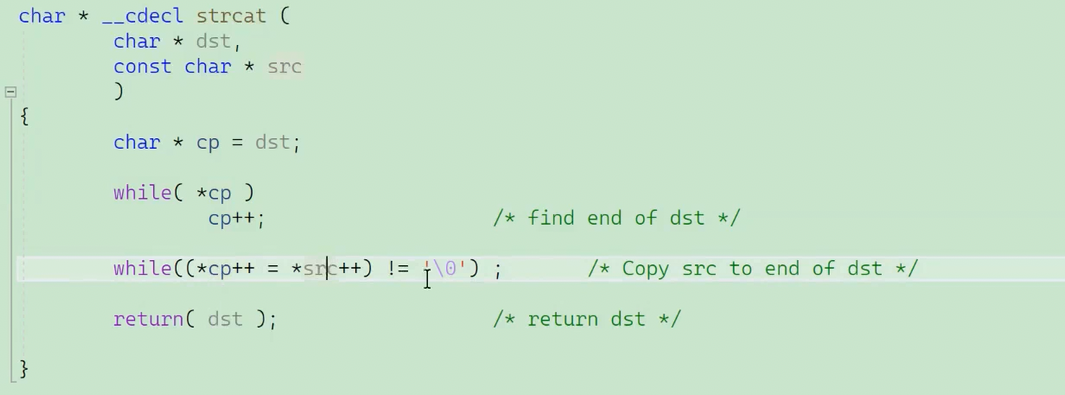
我们会发现,这段代码其实和我们自己模拟实现的代码逻辑非常相似。
六、strcmp函数的使用和模拟实现
(一)strcmp函数的使用
1.This function starts comparing the first character of each string. If they are equal to each other, it continues with the following pairs until the characters differ or until a terminating null-character is reached;
2.如何判断两个字符串大小呢?答案是比较两个字符串对应位置上的ASCII码值大小(不管具体长度)。

3.strcmp函数测试:
cpp
int main()
{
	char arr1[] = { "abcdef" };
	char arr2[] = { "abq" };
	int ret = strcmp(arr1, arr2);
	printf("%d", ret);
	return 0;
}
(二)strcmp函数的模拟实现
cpp
int my_strcmp(const char* str1, const char* str2)
{
	assert(str1 && str2);
	while (*str1 == *str2)
	{
		if (*str1 == '\0')
			return 0;
		str1++;
		str2++;
	}
	return* str1 - *str2;

}

int main()
{
	char arr1[] = { "abcdef" };
	char arr2[] = { "abq" };
	int ret = my_strcmp(arr1, arr2);
	printf("%d", ret);
	return 0;
}
七、strncpy函数的使用
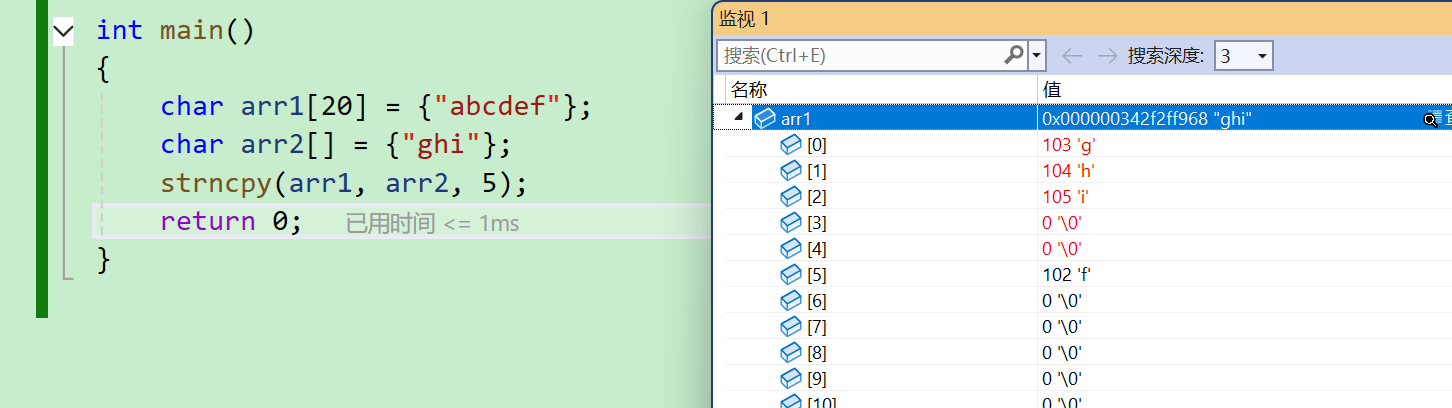
1.Copies the first num characters of source to destination . If the end of the source C string (which is signaled by a null-character) is found before num characters have been copied, destination is padded with zeros until a total of num characters have been written to it;
2.拷贝num个字符,从源自符到目标空间;
3.如果源自符的长度小于num,则拷贝完源自符之后,在目标的后边追加0,知道num个。

八、strncat函数的使用
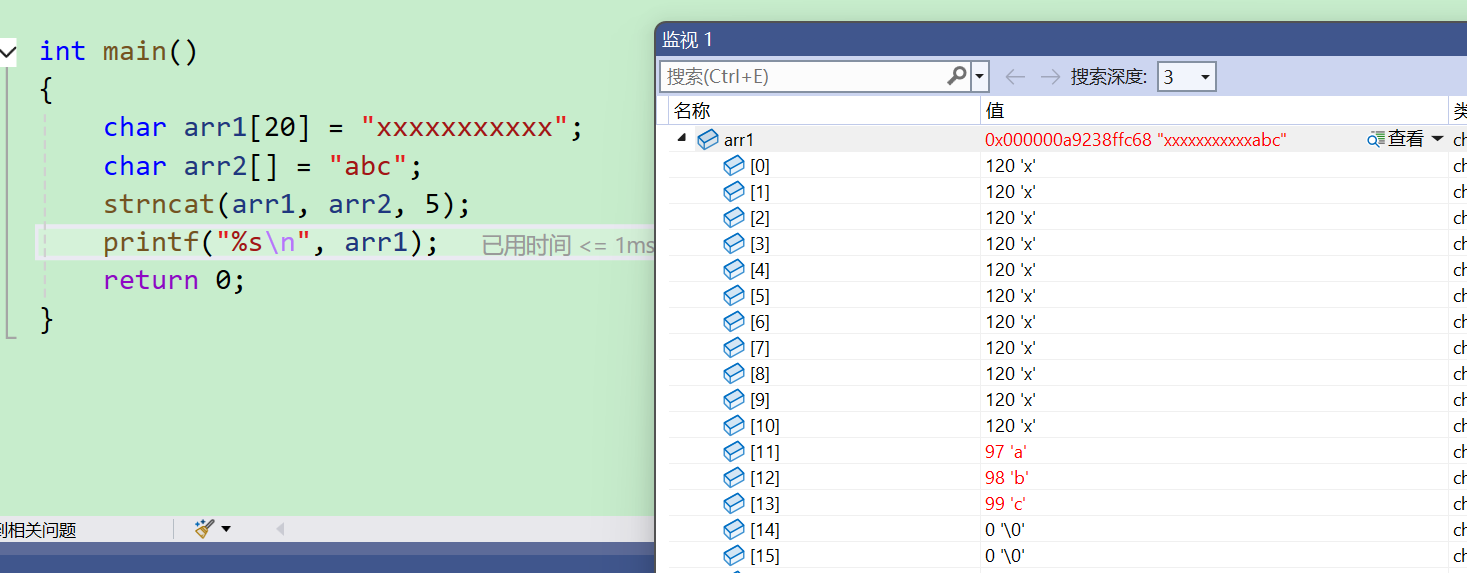
1.Appends the first num characters of source to destination, plus a terminating null-character;
2.If the length of the C string in source is less than num, only the content up to the terminating null-character is copied.
cpp
int main()
{
	char arr1[20] = "xxxxxxxxxxx";
	char arr2[] = "abc";
	strncat(arr1, arr2, 5);
	printf("%s\n", arr1);
	return 0;
}

九、strncmp的使用
Compares up to num characters of the C string str1 to those of the C string str2 .
This function starts comparing the first character of each string. If they are equal to each other, it continues with the following pairs until the characters differ, until a terminating null-character is reached, or until num characters match in both strings, whichever happens first.
cpp
int main()
{
	char arr1[20] = "abxxxxxxxx";
	char arr2[] = "abc";
	int ret=strncmp(arr1, arr2, 2);
	printf("%d\n",ret);
	return 0;
}
cpp
int main()
{
	char arr1[20] = "abxxxxxxxx";
	char arr2[] = "abc";
	int ret=strncmp(arr1, arr2, 3);
	printf("%d\n",ret);
	return 0;
}
十、strstr函数的使用和模拟实现
(一)strstr函数的使用
1.Returns a pointer to the first occurrence of str2 in str1 , or a null pointer if str2 is not part of str1;
2.The matching process does not include the terminating null-characters, but it stops there.
cpp
int main()
{
	char arr1[] = "this is an apple\n";
	//const char* p = "appl";
	char arr2[] = "is";
	char* ret = strstr(arr1, arr2);

	if (ret != NULL)
	{
		printf("%s\n", ret);
		printf("%p\n", &ret);
	}
	else
	{
		printf("找不到\n");
	}

	return 0;
strstr返回的是第一次出现的位置,也就是第一个is的i的地址,由于打印的是字符串,所以我们只给出首地址,就可以把整个字符串打印出来了。
(二)strstr函数的模拟实现
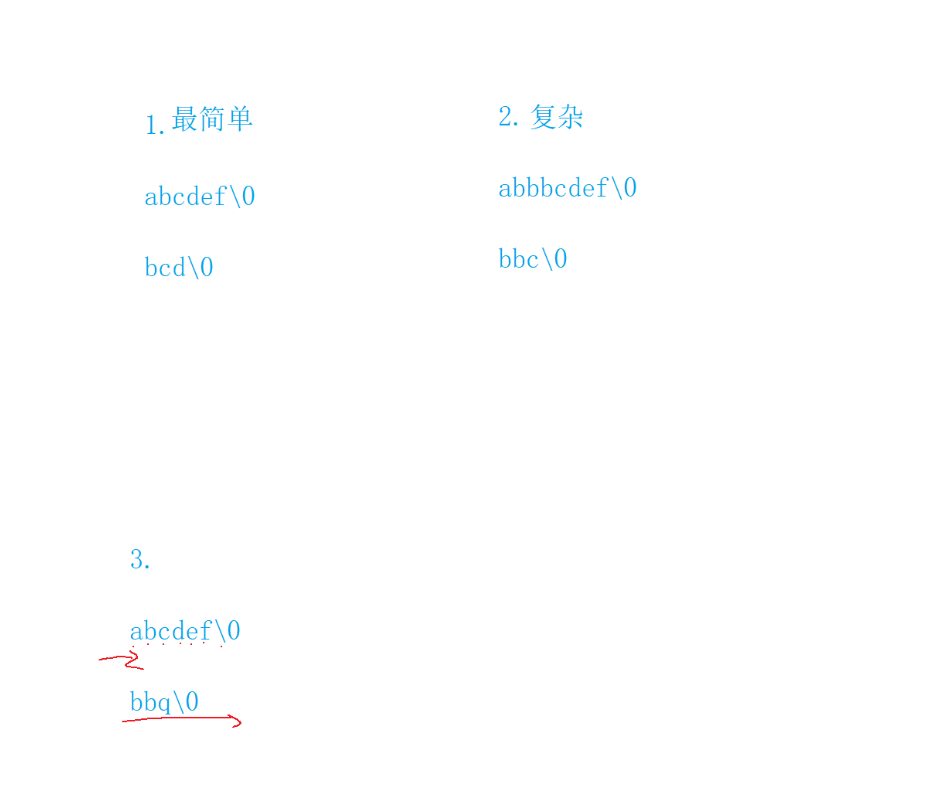
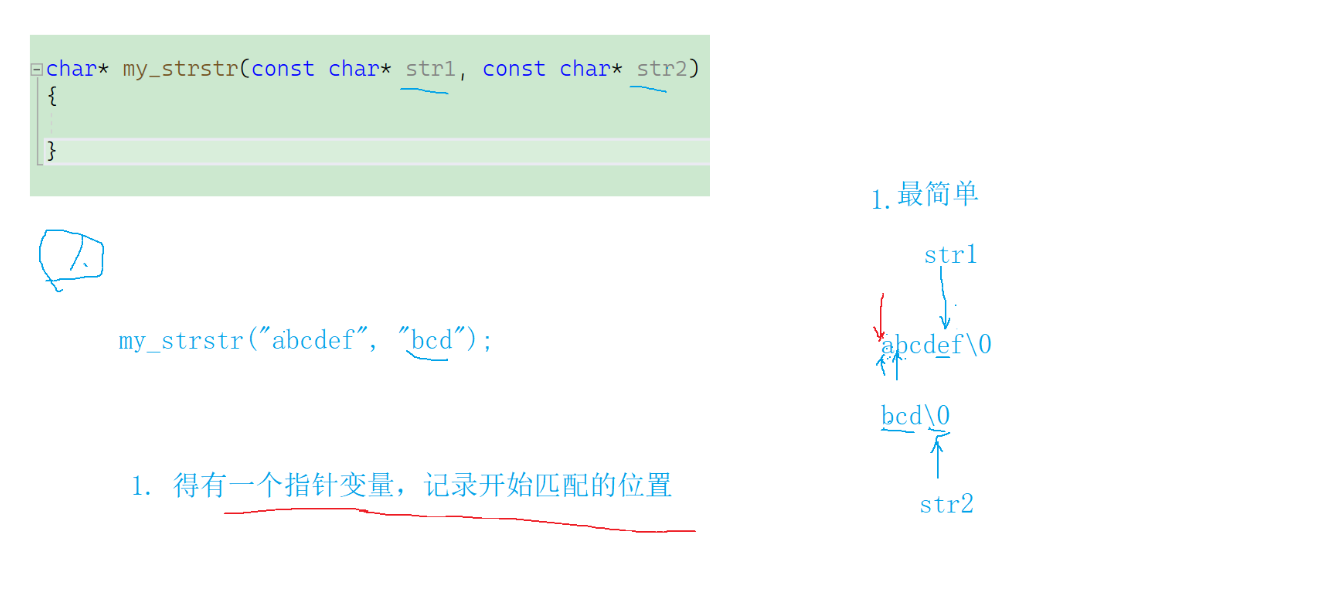
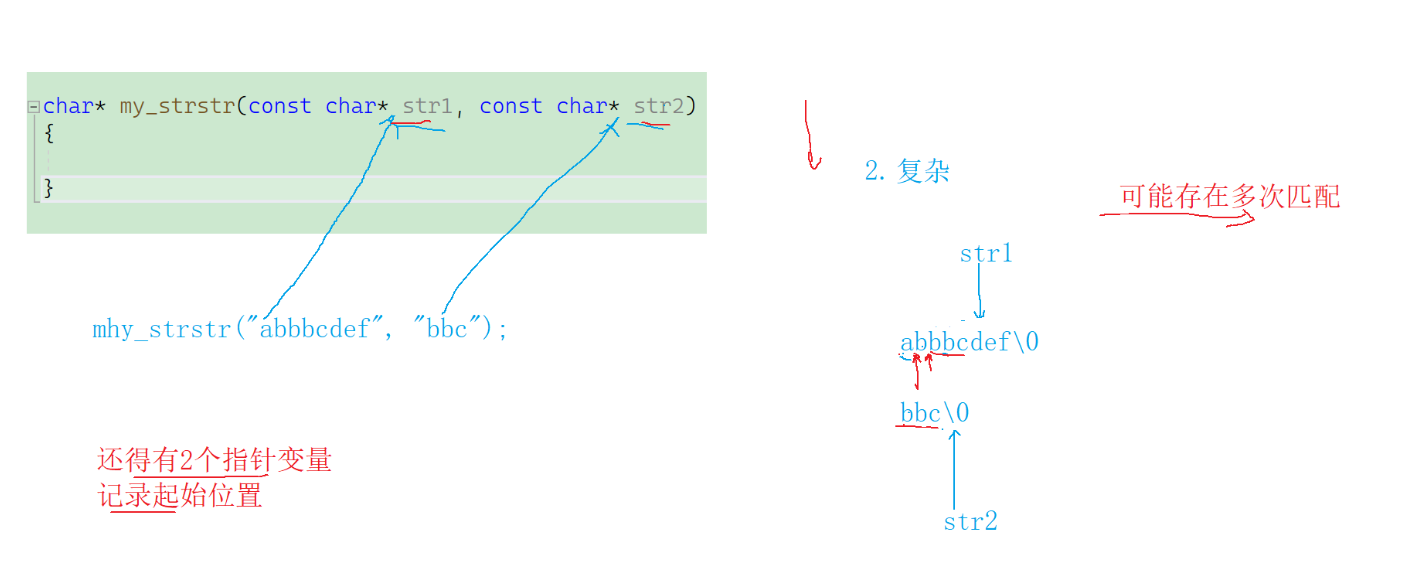
我们要模拟实现strstr函数,就得考虑以上三种搜索情况。
cpp
char* my_strstr(const char* str1, const char* str2)
{
	const char* s1 = NULL;
	const char* s2 = NULL;
	const char* cur = str1;
	if (*str2 == '\0')
	{
		return (char*)str1;
	}
	while (*cur)
	{
		s1 = cur;
		s2 = str2;
		while (*s1 != '\0' && *s2 != '\0' && *s1 == *s2)
		{
			s1++;
			s2++;
		}
		if (*s2 == '\0')
		{
			return (char*)cur;
		}
		cur++;
	}
	return NULL;
}

int main()
{
	char arr1[] = "this is an apple\n";
	//const char* p = "appl";
	char arr2[] = "is";
	char* ret = my_strstr(arr1, arr2);

	if (ret != NULL)
	{
		printf("%s\n", ret);
		printf("%p\n", &ret);
	}
	else
	{
		printf("找不到\n");
	}

	return 0;
}
十一、strtok函数的使用
cpp
char * strtok ( char * str, const char * delimiters );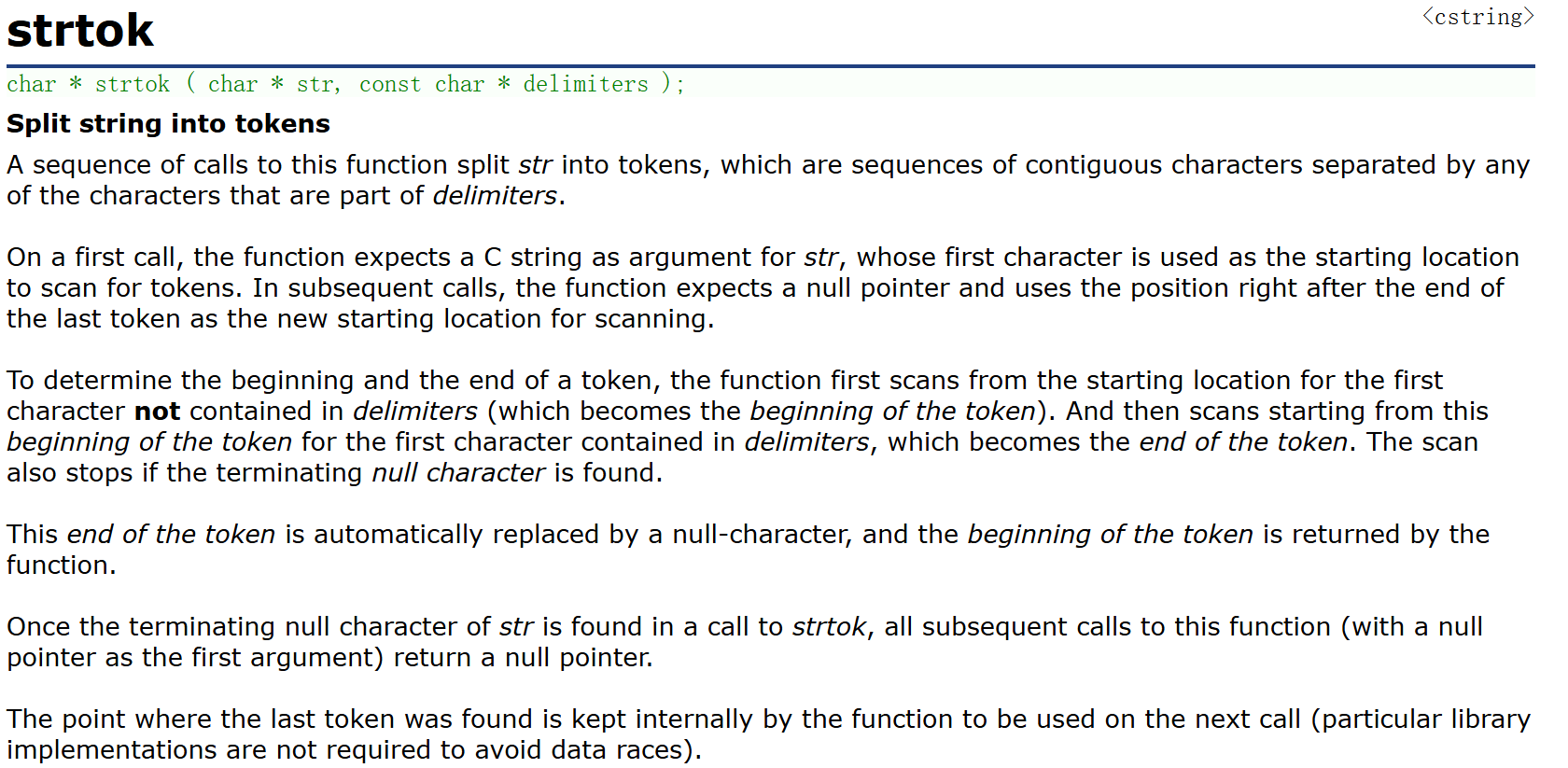
1.sep指向一个字符串,定义了用作分隔符的字符集合;
2.第一个参数指定一个字符串,它包含了0个或者多个分隔符分割的标记;
3.strtok函数找到str中的下一个标记(标记就是分隔符所分开的字符组),并将其用\0结尾,返回一个指向这个标记的指针;(注意:strtok函数会改变被操作的字符串,所以被strtok函数切分的字符串一般都是临时拷贝并且可修改。)
4.strtok函数的第一个参数不为NULL,函数将在同一个字符串中被保存的位置开始,查找下一个标记;
5.strtok的第一个参数为NULL,函数将在同一个字符串中被保存的位置开始,查找下一个标记;
6.如果字符串中不存在更多的标记,则返回NULL指针。
cpp
int main()
{
	char str[] = "I_LoveYou@constant.e";
	char arr1[30] = { 0 };
	strcpy(arr1, str);
	const char* set = "_@.";
	char* ret = NULL;
	ret = strtok(arr1, set);
	printf("%s\n", ret);
	ret = strtok(NULL, set);
	printf("%s\n", ret);
	ret = strtok(NULL, set);
	printf("%s\n", ret);
	ret = strtok(NULL, set);
	printf("%s\n", ret);
	return 0;
}
上面的代码需要一次又一次地使用赋值操作和printf,所以我们要优化一下代码:
cpp
int main()
{
	char str[] = "I_LoveYou@constant.e";
	char arr1[30] = { 0 };
	strcpy(arr1, str);
	const char* set = "_@.";
	char* ret = NULL;
	for (ret = strtok(arr1, set); ret != NULL; ret = strtok(NULL, set))
	{
		printf("%s\n", ret);
	}
	return 0;
}
十二、strerror函数的使用
(一)strerror函数规则
cpp
char * strerror ( int errnum );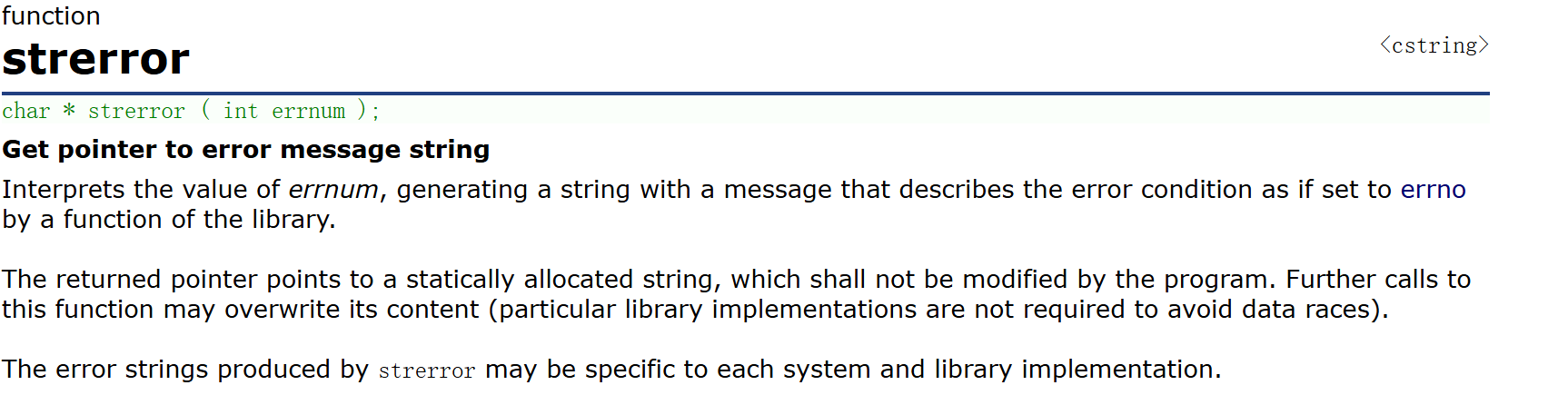
1.strerror函数可以把参数部分对应的错误码对应的错误信息的字符串地址返回来;
2.在不同系统和C语言标准库的实现都规定了一些错误码,一般是放在errno.h这个头文件中说明的,C语言程序启动的时候就会使用一个全局变量error来记录当前的错误码,只不过程序启动的时候error是0,表示没有错误,当我们在使用标准库中的函数的时候发生了某种错误,就会将相对应的错误码,存放在errno中,而一个错误码的数字是整数很难理解是什么意思,所以每一个错误码都是有对应的错误信息的。strerror函数就可以将错误的信息字符串地址返回。
(二)错误码值
cpp
#include<errno.h>
int main()
{
	int i = 0;
	for (i = 0; i <= 10; i++)
	{
		printf("%d = %s\n", i,strerror(i));
	}
	return 0;
}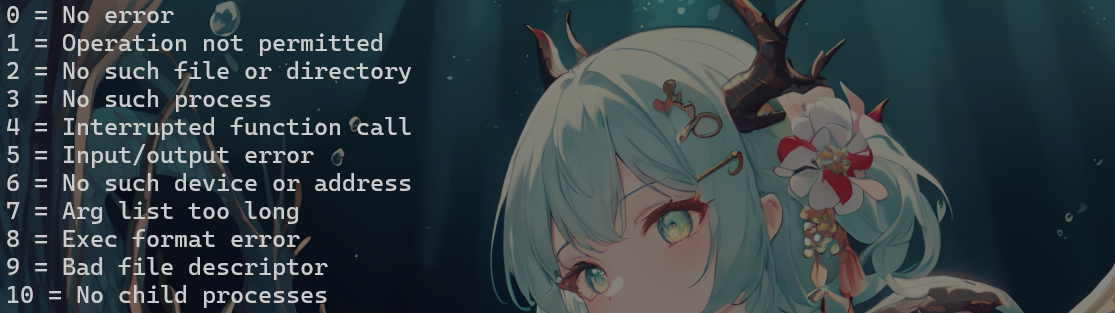
在Windows11+VS2022环境下输出的结果如下:
cpp
No error
Operation not permitted
No such file or directory
No such process
Interrupted function call
Input/output error
No such device or address
Arg list too long
Exec format error
Bad file descriptor
No child processes
举例:
cpp
int main()
{
	//fopen以读的形式打开文件的时候,如果文件不存在,就打开失败
	FILE* pf = fopen("test.txt", "r");
	if (pf == NULL)
	{
		printf("%s\n", strerror(errno));
		return 1;
	}
	//读文件

	//关闭文件
	fclose(pf);

	return 0;
}
(三)perror函数
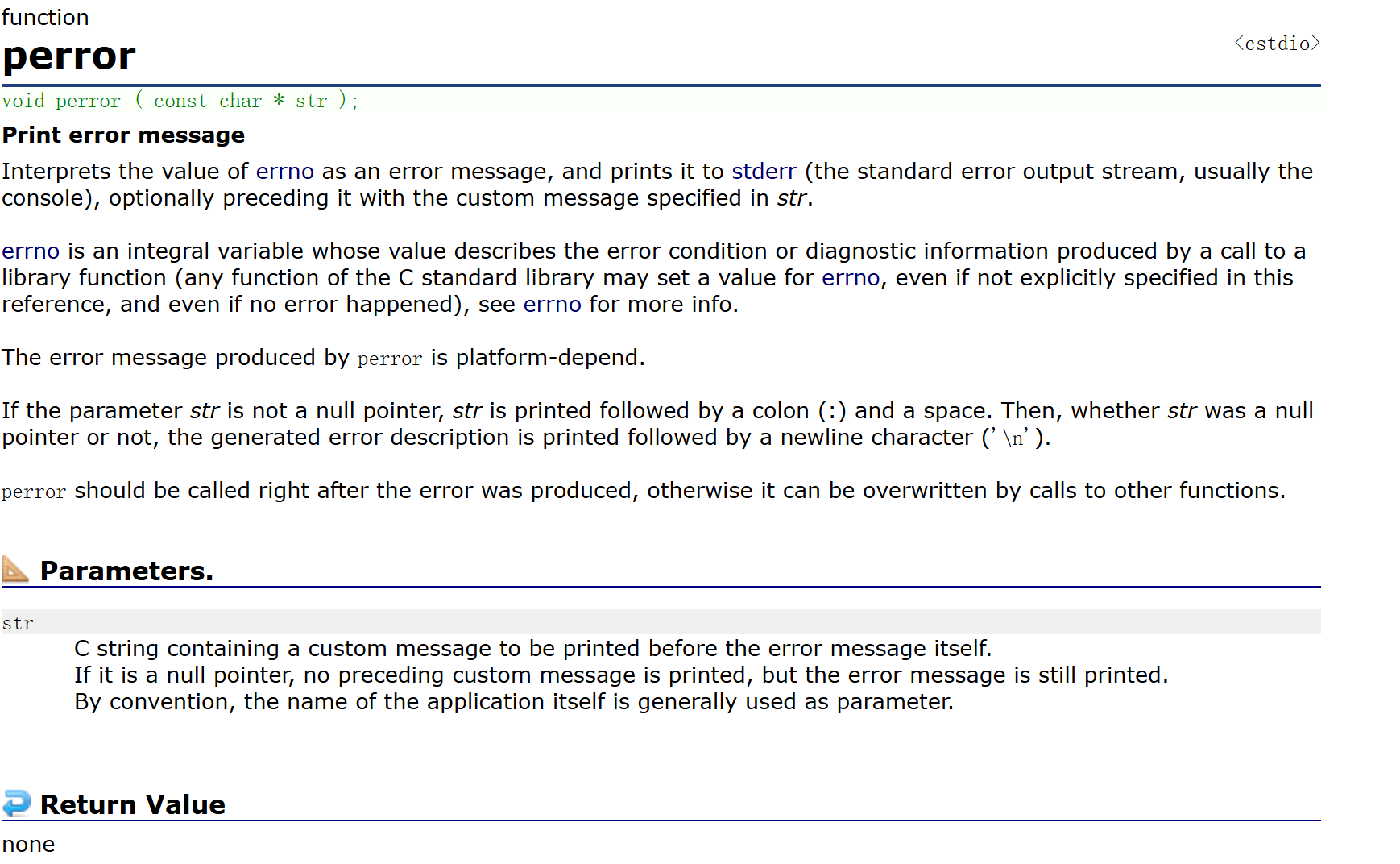
1.将errno的值解释为错误消息,并将其打印到stderr(标准错误输出流,通常为控制台),可选地在消息前添加str中指定的自定义消息;
2.errno 是描述库函数调用产生的错误状态或诊断信息的整型变量(C 标准库中的任何函数都可能设置 errno 值,即使本参考未明确说明,且即使未发生错误),详见 errno 说明;
perror生成的错误信息取决于平台特性;
3.若参数str非空指针,则先输出str,后跟冒号(:)和空格。随后无论str是否为空指针,均输出生成的错误描述并以换行符'\n'结束;
4.应在错误发生后立即调用perror,否则可能被其他函数调用覆盖。
5.C字符串,用于在错误消息本身之前打印自定义消息。
若为空指针,则不打印前置自定义消息,但仍会打印错误消息。
按惯例,通常使用应用程序本身的名称作为参数。
cpp
void perror ( const char * str );perror函数想防御一次性将上述代码中的第9行(printf那一行)完成了,直接将错误信息打印出来。perror函数打印完参数部分的字符串后,在打印一个冒号和一个空格,再打印错误信息。
cpp
#include <errno.h>
int main()
{
	FILE* pFile;
	pFile = fopen("unexist.ent", "r");
	if (pFile == NULL)
		perror("Error opening file unexist.ent");
	return 0;
}