CentOS 容器安装部署
前言
操作系统版本如下:
shell
[root@iZuf64pci0016fvnhb0tybZ yum.repos.d]# cat /etc/os-release
NAME="CentOS Stream"
VERSION="9"
ID="centos"
ID_LIKE="rhel fedora"
VERSION_ID="9"
PLATFORM_ID="platform:el9"
PRETTY_NAME="CentOS Stream 9"
ANSI_COLOR="0;31"
LOGO="fedora-logo-icon"
CPE_NAME="cpe:/o:centos:centos:9"
HOME_URL="https://centos.org/"
BUG_REPORT_URL="https://issues.redhat.com/"
REDHAT_SUPPORT_PRODUCT="Red Hat Enterprise Linux 9"
REDHAT_SUPPORT_PRODUCT_VERSION="CentOS Stream"
[root@iZuf64pci0016fvnhb0tybZ yum.repos.d]#
[root@iZuf64pci0016fvnhb0tybZ yum.repos.d]#
安装部署
删除默认相关包
yum remove docker
docker-client
docker-client-latest
docker-common
docker-latest
docker-latest-logrotate
docker-logrotate
docker-engine
shell
[root@iZuf64pci0016fvnhb0tybZ ~]# yum remove docker \
>                   docker-client \
>                   docker-client-latest \
>                   docker-common \
>                   docker-latest \
>                   docker-latest-logrotate \
>                   docker-logrotate \
>                   docker-engine
No match for argument: docker
No match for argument: docker-client
No match for argument: docker-client-latest
No match for argument: docker-common
No match for argument: docker-latest
No match for argument: docker-latest-logrotate
No match for argument: docker-logrotate
No match for argument: docker-engine
No packages marked for removal.
Dependencies resolved.
Nothing to do.
Complete!
[root@iZuf64pci0016fvnhb0tybZ ~]#
安装依赖包
yum install -y yum-utils
shell
[root@iZuf64pci0016fvnhb0tybZ ~]# yum install -y yum-utils
CentOS Stream 9 - BaseOS                                                                                                          39 MB/s | 8.8 MB     00:00
CentOS Stream 9 - AppStream                                                                                                       83 MB/s |  26 MB     00:00
CentOS Stream 9 - Extras packages                                                                                                183 kB/s |  20 kB     00:00
Dependencies resolved.
=================================================================================================================================================================
 Package                                           Architecture                    Version                                 Repository                       Size
=================================================================================================================================================================
Installing:
 yum-utils                                         noarch                          4.3.0-25.el9                            baseos                           39 k
Upgrading:
 dnf-plugins-core                                  noarch                          4.3.0-25.el9                            baseos                           36 k
 python3-dnf-plugins-core                          noarch                          4.3.0-25.el9                            baseos                          263 k

Transaction Summary
=================================================================================================================================================================
Install  1 Package
Upgrade  2 Packages

Total download size: 337 k
Downloading Packages:
(1/3): dnf-plugins-core-4.3.0-25.el9.noarch.rpm                                                                                  3.2 MB/s |  36 kB     00:00
(2/3): python3-dnf-plugins-core-4.3.0-25.el9.noarch.rpm                                                                           11 MB/s | 263 kB     00:00
(3/3): yum-utils-4.3.0-25.el9.noarch.rpm                                                                                         776 kB/s |  39 kB     00:00
-----------------------------------------------------------------------------------------------------------------------------------------------------------------
Total                                                                                                                            6.4 MB/s | 337 kB     00:00
Running transaction check
Transaction check succeeded.
Running transaction test
Transaction test succeeded.
Running transaction
  Preparing        :                                                                                                                                         1/1
  Upgrading        : python3-dnf-plugins-core-4.3.0-25.el9.noarch                                                                                            1/5
  Upgrading        : dnf-plugins-core-4.3.0-25.el9.noarch                                                                                                    2/5
  Installing       : yum-utils-4.3.0-25.el9.noarch                                                                                                           3/5
  Cleanup          : dnf-plugins-core-4.3.0-24.el9.noarch                                                                                                    4/5
  Cleanup          : python3-dnf-plugins-core-4.3.0-24.el9.noarch                                                                                            5/5
  Running scriptlet: python3-dnf-plugins-core-4.3.0-24.el9.noarch                                                                                            5/5
  Verifying        : yum-utils-4.3.0-25.el9.noarch                                                                                                           1/5
  Verifying        : dnf-plugins-core-4.3.0-25.el9.noarch                                                                                                    2/5
  Verifying        : dnf-plugins-core-4.3.0-24.el9.noarch                                                                                                    3/5
  Verifying        : python3-dnf-plugins-core-4.3.0-25.el9.noarch                                                                                            4/5
  Verifying        : python3-dnf-plugins-core-4.3.0-24.el9.noarch                                                                                            5/5

Upgraded:
  dnf-plugins-core-4.3.0-25.el9.noarch                                        python3-dnf-plugins-core-4.3.0-25.el9.noarch
Installed:
  yum-utils-4.3.0-25.el9.noarch

Complete!
[root@iZuf64pci0016fvnhb0tybZ ~]#
下载容器镜像源
cd /etc/yum.repos.d/
wget http://mirrors.aliyun.com/docker-ce/linux/centos/docker-ce.repo
shell
[root@iZuf64pci0016fvnhb0tybZ yum.repos.d]# pwd
/etc/yum.repos.d
[root@iZuf64pci0016fvnhb0tybZ yum.repos.d]# ll
total 12
-rw-r--r-- 1 root root 3896 Nov 20 16:52 centos-addons.repo
-rw-r--r-- 1 root root 2380 Nov 20 16:52 centos.repo
-rw-r--r-- 1 root root 2081 Dec 28 01:55 docker-ce.repo
[root@iZuf64pci0016fvnhb0tybZ yum.repos.d]#
安装容器
yum -y install docker-ce docker-ce-cli containerd.io
shell
[root@iZuf64pci0016fvnhb0tybZ yum.repos.d]# yum -y install docker-ce docker-ce-cli containerd.io
Docker CE Stable - x86_64 717 kB/s | 65 kB 00:00
Dependencies resolved.
=================================================================================================================================================================
Package Architecture Version Repository Size
=================================================================================================================================================================
Installing:
containerd.io x86_64 2.2.1-1.el9 docker-ce-stable 35 M
docker-ce x86_64 3:29.1.3-1.el9 docker-ce-stable 22 M
docker-ce-cli x86_64 1:29.1.3-1.el9 docker-ce-stable 8.3 M
Installing dependencies:
container-selinux noarch 4:2.242.0-1.el9 appstream 60 k
fuse-common x86_64 3.10.2-9.el9 baseos 8.3 k
fuse-overlayfs x86_64 1.16-1.el9 appstream 66 k
fuse3 x86_64 3.10.2-9.el9 appstream 54 k
fuse3-libs x86_64 3.10.2-9.el9 appstream 91 k
passt x86_64 0^20251210.gd04c480-1.el9 appstream 282 k
passt-selinux noarch 0^20251210.gd04c480-1.el9 appstream 26 k
Installing weak dependencies:
docker-buildx-plugin x86_64 0.30.1-1.el9 docker-ce-stable 17 M
docker-ce-rootless-extras x86_64 29.1.3-1.el9 docker-ce-stable 3.4 M
docker-compose-plugin x86_64 5.0.0-1.el9 docker-ce-stable 8.1 M
Transaction Summary
=================================================================================================================================================================
Install 13 Packages
Total download size: 95 M
Installed size: 369 M
Downloading Packages:
(1/13): fuse-common-3.10.2-9.el9.x86_64.rpm 142 kB/s | 8.3 kB 00:00
(2/13): fuse-overlayfs-1.16-1.el9.x86_64.rpm 967 kB/s | 66 kB 00:00
(3/13): fuse3-3.10.2-9.el9.x86_64.rpm 1.1 MB/s | 54 kB 00:00
(4/13): container-selinux-2.242.0-1.el9.noarch.rpm 475 kB/s | 60 kB 00:00
(5/13): fuse3-libs-3.10.2-9.el9.x86_64.rpm 1.3 MB/s | 91 kB 00:00
(6/13): passt-0^20251210.gd04c480-1.el9.x86_64.rpm 8.2 MB/s | 282 kB 00:00
(7/13): passt-selinux-0^20251210.gd04c480-1.el9.noarch.rpm 502 kB/s | 26 kB 00:00
(8/13): docker-buildx-plugin-0.30.1-1.el9.x86_64.rpm 26 MB/s | 17 MB 00:00
(9/13): docker-ce-29.1.3-1.el9.x86_64.rpm 23 MB/s | 22 MB 00:00
(10/13): docker-ce-cli-29.1.3-1.el9.x86_64.rpm 12 MB/s | 8.3 MB 00:00
(11/13): docker-ce-rootless-extras-29.1.3-1.el9.x86_64.rpm 7.9 MB/s | 3.4 MB 00:00
(12/13): containerd.io-2.2.1-1.el9.x86_64.rpm 12 MB/s | 35 MB 00:03
(13/13): docker-compose-plugin-5.0.0-1.el9.x86_64.rpm 4.5 MB/s | 8.1 MB 00:01
-----------------------------------------------------------------------------------------------------------------------------------------------------------------
Total 29 MB/s | 95 MB 00:03
Docker CE Stable - x86_64 60 kB/s | 1.6 kB 00:00
Importing GPG key 0x621E9F35:
Userid : "Docker Release (CE rpm) <docker@docker.com>"
Fingerprint: 060A 61C5 1B55 8A7F 742B 77AA C52F EB6B 621E 9F35
From : https://mirrors.aliyun.com/docker-ce/linux/centos/gpg
Key imported successfully
Running transaction check
Transaction check succeeded.
Running transaction test
Transaction test succeeded.
Running transaction
Preparing : 1/1
Installing : passt-0^20251210.gd04c480-1.el9.x86_64 1/13
Running scriptlet: passt-selinux-0^20251210.gd04c480-1.el9.noarch 2/13
Installing : passt-selinux-0^20251210.gd04c480-1.el9.noarch 2/13
Running scriptlet: passt-selinux-0^20251210.gd04c480-1.el9.noarch 2/13
Failed to resolve roleattributeset statement at /var/lib/selinux/targeted/tmp/modules/200/pasta/cil:16
Failed to resolve AST
/usr/sbin/semodule: Failed!
Installing : docker-buildx-plugin-0.30.1-1.el9.x86_64 3/13
Running scriptlet: docker-buildx-plugin-0.30.1-1.el9.x86_64 3/13
Installing : docker-compose-plugin-5.0.0-1.el9.x86_64 4/13
Running scriptlet: docker-compose-plugin-5.0.0-1.el9.x86_64 4/13
Installing : fuse3-libs-3.10.2-9.el9.x86_64 5/13
Running scriptlet: container-selinux-4:2.242.0-1.el9.noarch 6/13
Installing : container-selinux-4:2.242.0-1.el9.noarch 6/13
Running scriptlet: container-selinux-4:2.242.0-1.el9.noarch 6/13
Installing : containerd.io-2.2.1-1.el9.x86_64 7/13
Running scriptlet: containerd.io-2.2.1-1.el9.x86_64 7/13
Installing : docker-ce-cli-1:29.1.3-1.el9.x86_64 8/13
Running scriptlet: docker-ce-cli-1:29.1.3-1.el9.x86_64 8/13
Installing : fuse-common-3.10.2-9.el9.x86_64 9/13
Installing : fuse3-3.10.2-9.el9.x86_64 10/13
Installing : fuse-overlayfs-1.16-1.el9.x86_64 11/13
Running scriptlet: fuse-overlayfs-1.16-1.el9.x86_64 11/13
Installing : docker-ce-3:29.1.3-1.el9.x86_64 12/13
Running scriptlet: docker-ce-3:29.1.3-1.el9.x86_64 12/13
Installing : docker-ce-rootless-extras-29.1.3-1.el9.x86_64 13/13
Running scriptlet: docker-ce-rootless-extras-29.1.3-1.el9.x86_64 13/13
Running scriptlet: passt-selinux-0^20251210.gd04c480-1.el9.noarch 13/13
Running scriptlet: container-selinux-4:2.242.0-1.el9.noarch 13/13
Running scriptlet: docker-ce-rootless-extras-29.1.3-1.el9.x86_64 13/13
Verifying : fuse-common-3.10.2-9.el9.x86_64 1/13
Verifying : container-selinux-4:2.242.0-1.el9.noarch 2/13
Verifying : fuse-overlayfs-1.16-1.el9.x86_64 3/13
Verifying : fuse3-3.10.2-9.el9.x86_64 4/13
Verifying : fuse3-libs-3.10.2-9.el9.x86_64 5/13
Verifying : passt-0^20251210.gd04c480-1.el9.x86_64 6/13
Verifying : passt-selinux-0^20251210.gd04c480-1.el9.noarch 7/13
Verifying : containerd.io-2.2.1-1.el9.x86_64 8/13
Verifying : docker-buildx-plugin-0.30.1-1.el9.x86_64 9/13
Verifying : docker-ce-3:29.1.3-1.el9.x86_64 10/13
Verifying : docker-ce-cli-1:29.1.3-1.el9.x86_64 11/13
Verifying : docker-ce-rootless-extras-29.1.3-1.el9.x86_64 12/13
Verifying : docker-compose-plugin-5.0.0-1.el9.x86_64 13/13
Installed:
container-selinux-4:2.242.0-1.el9.noarch containerd.io-2.2.1-1.el9.x86_64 docker-buildx-plugin-0.30.1-1.el9.x86_64
docker-ce-3:29.1.3-1.el9.x86_64 docker-ce-cli-1:29.1.3-1.el9.x86_64 docker-ce-rootless-extras-29.1.3-1.el9.x86_64
docker-compose-plugin-5.0.0-1.el9.x86_64 fuse-common-3.10.2-9.el9.x86_64 fuse-overlayfs-1.16-1.el9.x86_64
fuse3-3.10.2-9.el9.x86_64 fuse3-libs-3.10.2-9.el9.x86_64 passt-0^20251210.gd04c480-1.el9.x86_64
passt-selinux-0^20251210.gd04c480-1.el9.noarch
Complete!
[root@iZuf64pci0016fvnhb0tybZ yum.repos.d]# 启动容器&设置随机启动
systemctl start docker
systemctl status docker
systemctl enable docker
shell
[root@iZuf64pci0016fvnhb0tybZ yum.repos.d]# systemctl start docker
[root@iZuf64pci0016fvnhb0tybZ yum.repos.d]#
[root@iZuf64pci0016fvnhb0tybZ yum.repos.d]# systemctl  status docker
● docker.service - Docker Application Container Engine
     Loaded: loaded (/usr/lib/systemd/system/docker.service; disabled; preset: disabled)
     Active: active (running) since Sun 2025-12-28 02:03:49 CST; 21s ago
TriggeredBy: ● docker.socket
       Docs: https://docs.docker.com
   Main PID: 3631 (dockerd)
      Tasks: 11
     Memory: 27.1M (peak: 29.4M)
        CPU: 366ms
     CGroup: /system.slice/docker.service
             └─3631 /usr/bin/dockerd -H fd:// --containerd=/run/containerd/containerd.sock

Dec 28 02:03:49 iZuf64pci0016fvnhb0tybZ dockerd[3631]: time="2025-12-28T02:03:49.117323953+08:00" level=info msg="Deleting nftables IPv4 rules" error="exit stat>
Dec 28 02:03:49 iZuf64pci0016fvnhb0tybZ dockerd[3631]: time="2025-12-28T02:03:49.129258758+08:00" level=info msg="Deleting nftables IPv6 rules" error="exit stat>
Dec 28 02:03:49 iZuf64pci0016fvnhb0tybZ dockerd[3631]: time="2025-12-28T02:03:49.553333252+08:00" level=info msg="Loading containers: done."
Dec 28 02:03:49 iZuf64pci0016fvnhb0tybZ dockerd[3631]: time="2025-12-28T02:03:49.564585965+08:00" level=info msg="Docker daemon" commit=fbf3ed2 containerd-snaps>
Dec 28 02:03:49 iZuf64pci0016fvnhb0tybZ dockerd[3631]: time="2025-12-28T02:03:49.564722552+08:00" level=info msg="Initializing buildkit"
Dec 28 02:03:49 iZuf64pci0016fvnhb0tybZ dockerd[3631]: time="2025-12-28T02:03:49.575174435+08:00" level=warning msg="git source cannot be enabled: failed to fin>
Dec 28 02:03:49 iZuf64pci0016fvnhb0tybZ dockerd[3631]: time="2025-12-28T02:03:49.578395123+08:00" level=info msg="Completed buildkit initialization"
Dec 28 02:03:49 iZuf64pci0016fvnhb0tybZ dockerd[3631]: time="2025-12-28T02:03:49.583835835+08:00" level=info msg="Daemon has completed initialization"
Dec 28 02:03:49 iZuf64pci0016fvnhb0tybZ dockerd[3631]: time="2025-12-28T02:03:49.583925551+08:00" level=info msg="API listen on /run/docker.sock"
Dec 28 02:03:49 iZuf64pci0016fvnhb0tybZ systemd[1]: Started Docker Application Container Engine.

[root@iZuf64pci0016fvnhb0tybZ yum.repos.d]#
[root@iZuf64pci0016fvnhb0tybZ yum.repos.d]# systemctl enable docker
Created symlink /etc/systemd/system/multi-user.target.wants/docker.service → /usr/lib/systemd/system/docker.service.
[root@iZuf64pci0016fvnhb0tybZ yum.repos.d]#
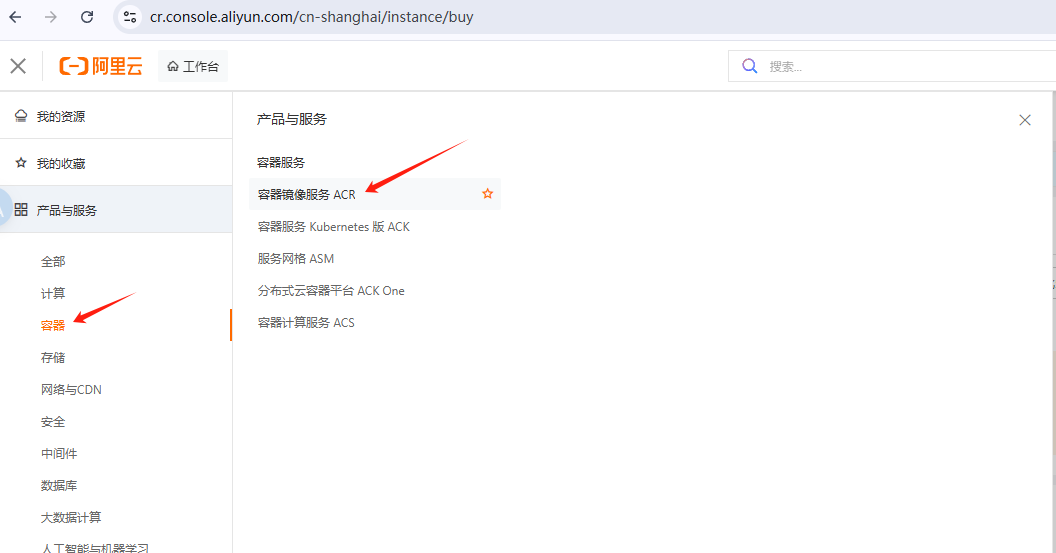
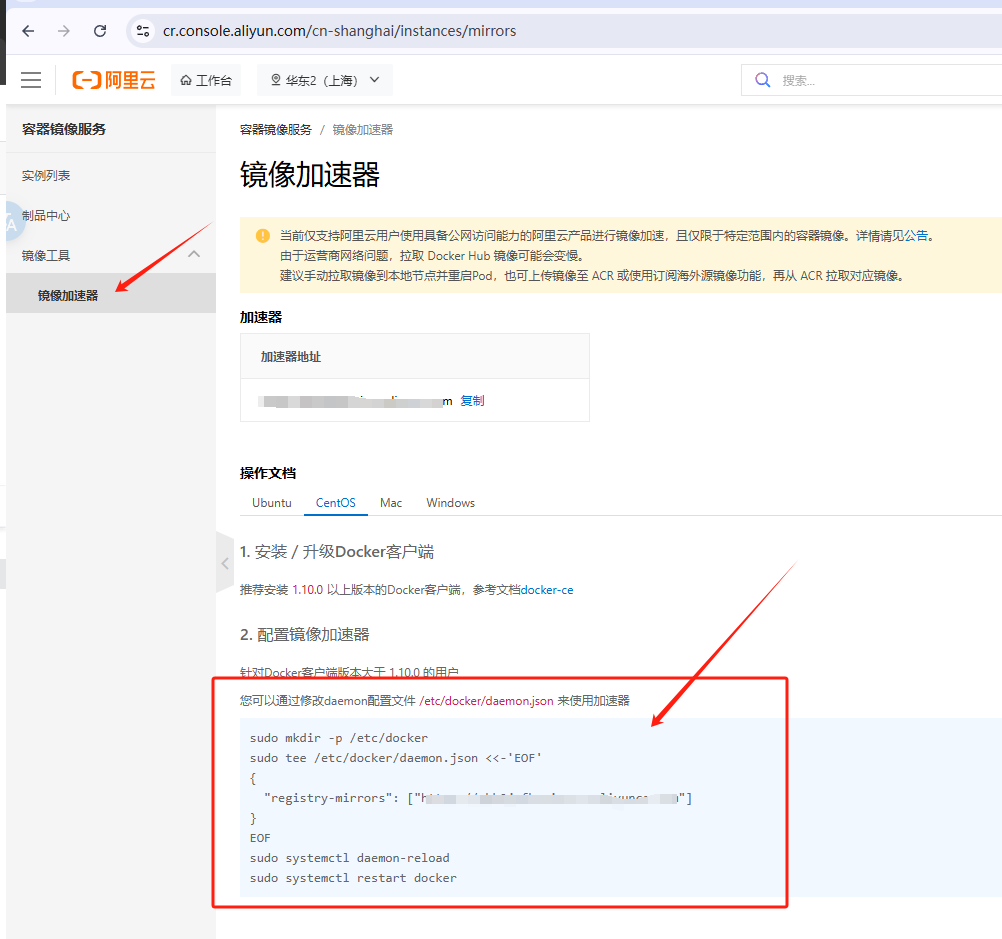
配置镜像加速器
访问阿里云官网(自行注册账号登录)
根据官网提示步骤,配置镜像加速器,即可。
查看版本&功能验证
docker --version
docker run hello-world
shell
[root@iZuf64pci0016fvnhb0tybZ yum.repos.d]# docker --version
Docker version 29.1.3, build f52814d
[root@iZuf64pci0016fvnhb0tybZ yum.repos.d]#
[root@iZuf64pci0016fvnhb0tybZ yum.repos.d]# docker run hello-world
Unable to find image 'hello-world:latest' locally
latest: Pulling from library/hello-world
2db29710123e: Pull complete
Digest: sha256:2498fce14358aa50ead0cc6c19990fc6ff866ce72aeb5546e1d59caac3d0d60f
Status: Downloaded newer image for hello-world:latest

Hello from Docker!
This message shows that your installation appears to be working correctly.

To generate this message, Docker took the following steps:
 1. The Docker client contacted the Docker daemon.
 2. The Docker daemon pulled the "hello-world" image from the Docker Hub.
    (amd64)
 3. The Docker daemon created a new container from that image which runs the
    executable that produces the output you are currently reading.
 4. The Docker daemon streamed that output to the Docker client, which sent it
    to your terminal.

To try something more ambitious, you can run an Ubuntu container with:
 $ docker run -it ubuntu bash

Share images, automate workflows, and more with a free Docker ID:
 https://hub.docker.com/

For more examples and ideas, visit:
 https://docs.docker.com/get-started/

[root@iZuf64pci0016fvnhb0tybZ yum.repos.d]#