PentestGPT的部署和使用本地大模型的调试记录
渗透测试需要经过测试方的授权,这是确保测试活动合法合规的基本前提。
授权是渗透测试合法性的核心, 因为渗透测试本质上是模拟攻击行为,若未获授权可能触犯《刑法》等法律法规,构成非法侵入计算机信息系统,即使测试者无恶意也可能承担法律责任。
最近一位小朋友和我讨论了PentestGPT的一些问题,所以也看了一下这个开源项目。
因为原项目是建议直接使用OpenAI的GPT来做为大模型算力的,而国内因为众所周知的原因,无法使用GPT。所以就需要调整为本地大模型。
虽然本人并不是搞这方面的专业人士,但做为技术圈内人,一些相关的内容也均了解一些,但在部署方面也碰到了一些问题,也深感该项目在使用文档方面的缺失和不足之处。
所以,写这一篇记录,以给后来者一些启发吧。
PentestGPT 是一款由南洋理工大学研究团队开发的自动化渗透测试工具,它利用大型语言模型(LLM)来指导和执行渗透测试流程。该工具旨在通过自动化常规任务、提供交互式操作和减少对专家知识的依赖,提升渗透测试的效率和可及性。
项目地址:https://github.com/GreyDGL/PentestGPT
一、按照文档介绍的方式部署
因为项目文档介绍的部署方式是linux环境下的docker部署,这对于很多初学者、开源项目研究者、以及想要对项目进行调试及二次开发的人员是不太友好的。
所以,对这一部分感兴趣的朋友,可以直接去项目文档查看。部署方式非常地方便,改本地大模型部分也有,但经过我的部署经历,感觉不太确定有没有用。
二、本地部署
本次本地部署即在真机环境下部署该项目。Windows或者linux在系统路径上可能会有一定的差别,不过大同小异,大家可以做适当调整即可。
1、版本信息
PentestGPT 1.0.0
python >=3.12
nmap
2、安装python/Conda
安装python很常规了,这个就不在多说了。
但如何使用python环境,这个需要多说几句:
PentestGPT是推荐使用poetry来管理虚拟环境的,但虚拟环境有多种方法,大同小异,比如我个人就使用MiniConda, 方便,尤其是方便使用不同的python版本。
这些都是可以的,甚至你可以使用自己python真实的环境来安装,因个人喜好而定,选择自己最方便的方法就好。
3、安装依赖
PentestGPT-1.0.0 需要安装两次依赖,因为有不同的模块需要使用嘛。
命令行进行项目目录
cd /project_dir
# 此 project_dir为你真实的项目目录
# 如我的windows 项目位于 D:\project\python\PentestGPT-1.0.0
# 那么这里就需要跳转到该目录根目录下
安装项目PentestGPT依赖
# 真实环境安装
python -m pip install .
# 或者
python -m pip install -e .
# 或者直接使用pip/pip3, 具体要看自己的python环境变量
pip install .

# 至于带不带-e 看大家需要不需要调试修改代码,详细可以查看-e的功能介绍。

# 执行完此步,可以在你的python scripts目录下看到编译完成的 pentestgpt等应用。
安装项目工具依赖
cd legacy
# 进入项目根目录下的legacy目录
# 然后继续执行上面一步的命令,安装相关工具的依赖
python -m pip install .
# 或者
python -m pip install -e .

# 执行完这一步,可以在你的python scripts目录下看到编译完成的pentestgpt-connection等工具应用
4、安装Ollama 及本地大模型
安装ollama
Ollama的安装相对也简单,如果有不明白的朋友,也可以直接去看本人以前的文章。当然了,这里也只是安装ollama而已,并不涉及到其他大模型调用框架,比如以前文章里面出现的open-webui等等。
只需要安装ollama就可以了。

而且,现在windows版的ollama已经有了自己的界面应用,在本地使用大模型的情况下,已经基本不需要再用其他框架了。
拉取大模型到本地
# 命令行一行命令就可以了
ollama run qwen3:1.7b

# 当然了,因为ollama已经有了图形界面,也可以在界面里面操作,对没有经验的朋友们还是非常友好的。
# 选好大模型和版本,直接拉到就可以了。
不过,也是因为看了ollama最新的介绍,才发现现在ollama已经有云版的大模型可以使用了,这样就不要求本地有非常强劲的GPU算力,就可以使用大的或者超大的模型。
但详细的并没有去研究,发现需要注册,并且有付费的可能。那免费的付费的肯定会有功能上的差异了。有使用过的朋友可以来说说。
5、设置本地大模型
这里,在本地运行已经可以运行了,有正常的程序响应。
那么,就需要接入我们的大模型了
先查看帮助信息
pentestgpt -h
Your OPENAI key is not set. Please set it in the environment variable.
If you want to use chatGPT with no API, use "text-davinci-002-render-sha" in chat_config.py
Your CHATGPT_COOKIE is not set. Please set it in the environment variable.
Your OPENAI_API_KEY is not set. Please set it in the environment variable.
Your OPENAI_API_KEY is not set. Please set it in the environment variable.
Your OPENAI_API_KEY is not set. Please set it in the environment variable.
Your GEMINI_API_KEY is not set. Please set it in the environment variable.
Your GEMINI_API_KEY is not set. Please set it in the environment variable.
Your DEEPSEEK_API_KEY is not set. Please set it in the environment variable.
Your DEEPSEEK_API_KEY is not set. Please set it in the environment variable.
usage: pentestgpt [-h] [--logDir LOGDIR] [--baseUrl BASEURL] [--models]
                  [--reasoning {gpt-4o,o3,o4-mini,gpt4all,gemini-2.5-flash,gemini-2.5-pro,deepseek-r1,deepseek-v3,ollama}]
                  [--parsing {gpt-4o,o3,o4-mini,gpt4all,gemini-2.5-flash,gemini-2.5-pro,deepseek-r1,deepseek-v3,ollama}]
                  [--logging] [--useAPI] [--ollama OLLAMA]
很明显,我们没有OPENAI的key。
我们来使用 命令查看支持哪些模型
pentestgpt --models
Your OPENAI key is not set. Please set it in the environment variable.
If you want to use chatGPT with no API, use "text-davinci-002-render-sha" in chat_config.py
Your CHATGPT_COOKIE is not set. Please set it in the environment variable.
Your OPENAI_API_KEY is not set. Please set it in the environment variable.
Your OPENAI_API_KEY is not set. Please set it in the environment variable.
Your OPENAI_API_KEY is not set. Please set it in the environment variable.
Your GEMINI_API_KEY is not set. Please set it in the environment variable.
Your GEMINI_API_KEY is not set. Please set it in the environment variable.
Your DEEPSEEK_API_KEY is not set. Please set it in the environment variable.
Your DEEPSEEK_API_KEY is not set. Please set it in the environment variable.

=== AVAILABLE MODELS ===

OpenAI Models:
  • gpt-4o
  • o3
  • o4-mini
  • gpt4all

Gemini Models:
  • gemini-2.5-flash
  • gemini-2.5-pro

Deepseek Models:
  • deepseek-r1
  • deepseek-v3

Local Models:
  • gpt4all
  • ollama

Other Models:

Default Configuration:
  • Reasoning Model: gpt-4o
  • Parsing Model: gpt-4o

Usage examples:
  • List models: pentestgpt --models
  • Use specific models: pentestgpt --reasoning o3 --parsing gpt-4o
  • Use Ollama: pentestgpt --ollama llama3.1:latest
  • Use Ollama with custom model: pentestgpt --ollama codellama:7b
很明显了,看完所有模型以后,我们直接在最后一行看到了我们需要的:
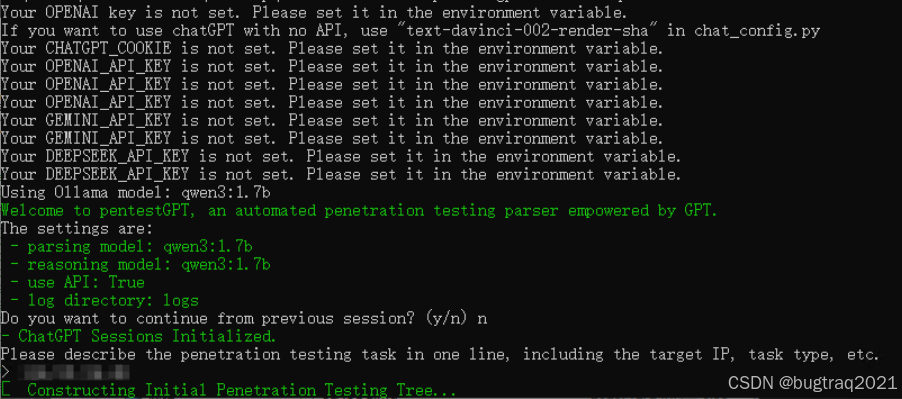
pentestgpt --ollama qwen3:1.7b

Your OPENAI key is not set. Please set it in the environment variable.
If you want to use chatGPT with no API, use "text-davinci-002-render-sha" in chat_config.py
Your CHATGPT_COOKIE is not set. Please set it in the environment variable.
Your OPENAI_API_KEY is not set. Please set it in the environment variable.
Your OPENAI_API_KEY is not set. Please set it in the environment variable.
Your OPENAI_API_KEY is not set. Please set it in the environment variable.
Your GEMINI_API_KEY is not set. Please set it in the environment variable.
Your GEMINI_API_KEY is not set. Please set it in the environment variable.
Your DEEPSEEK_API_KEY is not set. Please set it in the environment variable.
Your DEEPSEEK_API_KEY is not set. Please set it in the environment variable.
Using Ollama model: qwen3:1.7b
Welcome to pentestGPT, an automated penetration testing parser empowered by GPT.
The settings are:
 - parsing model: qwen3:1.7b
 - reasoning model: qwen3:1.7b
 - use API: True
 - log directory: logs
Do you want to continue from previous session? (y/n) n
- ChatGPT Sessions Initialized.
Please describe the penetration testing task in one line, including the target IP, task type, etc.
>
这时候去查看任务管理器,发现ollama已经在疯狂计算了。
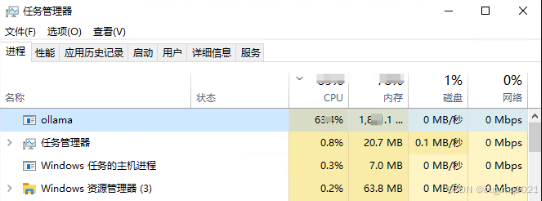
这也说明框架的基本功能已经开始运行起来了。