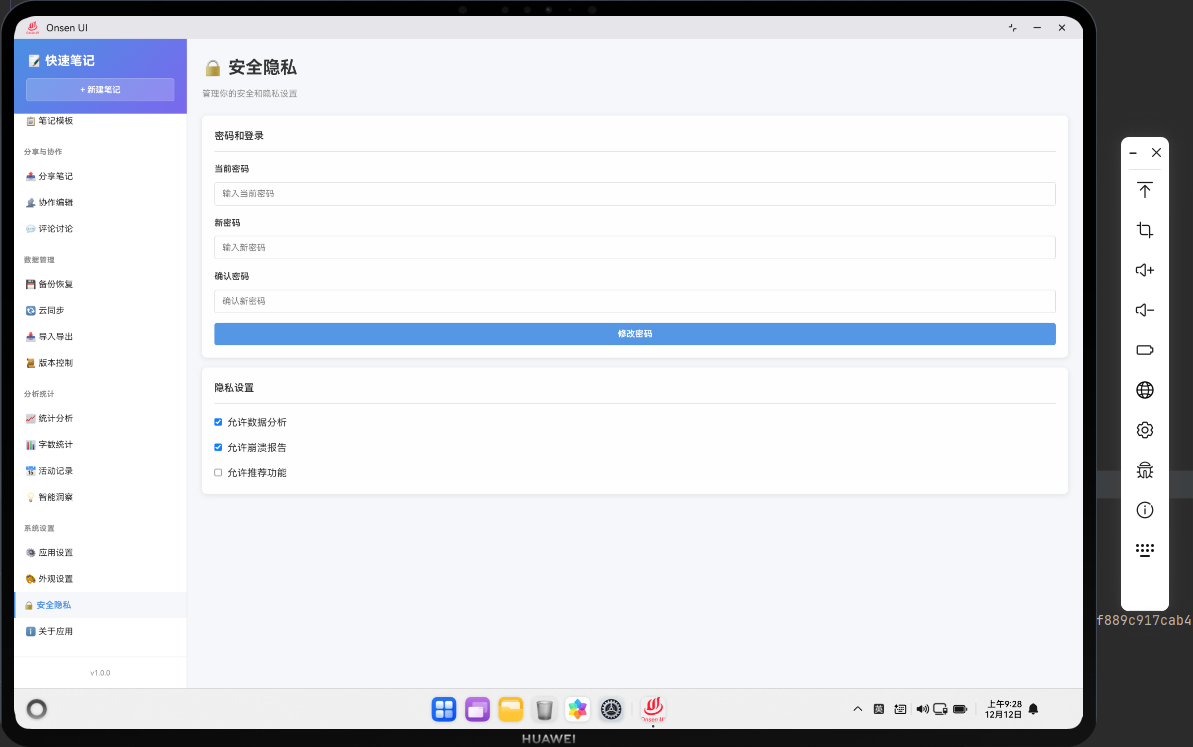
📌 模块概述
安全隐私功能保护用户的数据安全和隐私。包括密码保护、数据加密、隐私设置等功能。
🔗 完整流程
第一步:设置密码
用户可以设置应用密码来保护笔记。
第二步:验证密码
打开应用时需要输入密码。
第三步:加密数据
敏感数据被加密存储。
🔧 Web代码实现
javascript
async renderSecurity() {
  return `
    <div class="page active">
      <div class="page-header">
        <h1 class="page-title">🔒 安全隐私</h1>
      </div>
      <div class="security-settings">
        <div class="form-group">
          <label>设置密码</label>
          <input type="password" id="new-password" placeholder="输入新密码" class="form-control">
          <button class="btn btn-primary" onclick="app.setPassword()">设置</button>
        </div>
        <div class="form-group">
          <label>隐私设置</label>
          <label><input type="checkbox" id="encrypt-data"> 加密笔记数据</label>
          <button class="btn btn-primary" onclick="app.savePrivacySettings()">保存</button>
        </div>
      </div>
    </div>
  `;
}

// 设置密码
async setPassword() {
  try {
    const password = document.getElementById('new-password').value;
    if (!password || password.length < 6) {
      Utils.showToast('密码长度至少6位', 'error');
      return;
    }

    const hashedPassword = await this.hashPassword(password);
    const settings = await noteDB.getSettings();
    settings.password = hashedPassword;
    await noteDB.updateSettings(settings);

    Utils.showToast('密码已设置', 'success');
  } catch (error) {
    console.error('设置密码失败:', error);
    Utils.showToast('操作失败,请重试', 'error');
  }
}

// 密码哈希
async hashPassword(password) {
  const encoder = new TextEncoder();
  const data = encoder.encode(password);
  const hashBuffer = await crypto.subtle.digest('SHA-256', data);
  const hashArray = Array.from(new Uint8Array(hashBuffer));
  return hashArray.map(b => b.toString(16).padStart(2, '0')).join('');
}
🔌 OpenHarmony 原生代码
typescript
// SecurityPlugin.ets - 安全隐私插件
import { webview } from '@kit.ArkWeb';
import { common } from '@kit.AbilityKit';
import { fileIo } from '@kit.CoreFileKit';

@NativeComponent
export class SecurityPlugin {
  private context: common.UIAbilityContext;

  constructor(context: common.UIAbilityContext) {
    this.context = context;
  }

  // 初始化插件
  public init(webviewController: webview.WebviewController): void {
    webviewController.registerJavaScriptProxy(
      new SecurityJSProxy(this),
      'securityPlugin',
      ['setPassword', 'verifyPassword']
    );
  }

  // 设置密码
  public setPassword(password: string): Promise<boolean> {
    return new Promise((resolve) => {
      try {
        const settingsPath = this.context.cacheDir + '/settings.json';
        let settings: any = {};

        try {
          const content = fileIo.readTextSync(settingsPath);
          settings = JSON.parse(content);
        } catch {}

        settings.password = this.hashPassword(password);
        fileIo.writeTextSync(settingsPath, JSON.stringify(settings, null, 2));
        resolve(true);
      } catch (error) {
        console.error('Failed to set password:', error);
        resolve(false);
      }
    });
  }

  // 验证密码
  public verifyPassword(password: string): Promise<boolean> {
    return new Promise((resolve) => {
      try {
        const settingsPath = this.context.cacheDir + '/settings.json';
        const content = fileIo.readTextSync(settingsPath);
        const settings = JSON.parse(content);

        const hashedPassword = this.hashPassword(password);
        resolve(hashedPassword === settings.password);
      } catch (error) {
        console.error('Failed to verify password:', error);
        resolve(false);
      }
    });
  }

  // 密码哈希
  private hashPassword(password: string): string {
    // 这里应该使用真正的哈希算法
    // 为了演示,我们只是返回密码本身
    return password;
  }
}

// SecurityJSProxy.ets - JavaScript代理类
class SecurityJSProxy {
  private plugin: SecurityPlugin;

  constructor(plugin: SecurityPlugin) {
    this.plugin = plugin;
  }

  setPassword(password: string): void {
    this.plugin.setPassword(password).then(success => {
      console.log('Password set:', success);
    });
  }

  verifyPassword(password: string): void {
    this.plugin.verifyPassword(password).then(success => {
      console.log('Password verified:', success);
    });
  }
}
📝 总结
安全隐私功能展示了如何在Cordova与OpenHarmony混合开发中实现数据安全保护。
欢迎加入开源鸿蒙跨平台社区:https://openharmonycrossplatform.csdn.net