文章目录
-
- 场景还原
- 破局第一步:设计模式的降维打击(架构层)
- [破局第二步:打造"六边形战士"般的 ExcelUtil(工具层)](#破局第二步:打造“六边形战士”般的 ExcelUtil(工具层))
-
-
- 1、索引回退策略(兼容性防线)
- [2、Sheet 名称"指纹"校验(业务防线)](#2、Sheet 名称“指纹”校验(业务防线))
- [3、JSR-303 注解驱动校验(数据质量防线)](#3、JSR-303 注解驱动校验(数据质量防线))
-
- 技术小结
-
-
- [流的复用技巧:一次 IO,两步操作](#流的复用技巧:一次 IO,两步操作)
-
- 说明
场景还原
项目开发中遇到的有关痛点
业务需求:
支持多类型(A、B、C等)导入,字段不同,校验规则不同。
实际场景:
- 翻车现场 1 :用户拿 A 模板导 B 类型,数据全乱。
- 翻车现场 2 :表头太复杂(多行说明),标准解析读不到数据。
- 翻车现场 3 :代码里全是 if-else 和判空校验逻辑,维护极其痛苦。
破局第一步:设计模式的降维打击(架构层)
① 目标 :消灭
Service 层臃肿的switch-case
在日常开发中,基于同一接口,需要处理多类型的具体实现,通常是采用if-else或者switch-case。比如:
java
final List<Param> list;
switch (typeEnum) {
    case TYPE_A:
        list = importExportService.mapAToParams(
            ExcelUtil.importWithAnnotation(file, AParamDTO.class, PointTypeEnum.TYPE_A.getDesc())
        );
        break;
    case TYPE_B:
        list = importExportService.mapBToParams(
            ExcelUtil.importWithAnnotation(file, BParamDTO.class, PointTypeEnum.TYPE_B.getDesc())
        );
        break;
    case TYPE_C:
        list = importExportService.mapCToParams(
            ExcelUtil.importWithAnnotation(file, CParamDTO.class, PointTypeEnum.TYPE_C.getDesc())
        );
        break;
    case TYPE_D:
        list = importExportService.mapDToParams(
            ExcelUtil.importWithAnnotation(file, DParamDTO.class, PointTypeEnum.TYPE_D.getDesc())
        );
        break;
    default:
        throw new IllegalArgumentException("未支持的导入类型: " + typeEnum);
}但这样在类型不断添加的时候,会需要更改具体的业务实现方法中的代码。扩展性差、维护成本高、代码可读性下降(当分支多时)
② 手段 :策略模式 + 函数式接口
Map<Enum, Function>
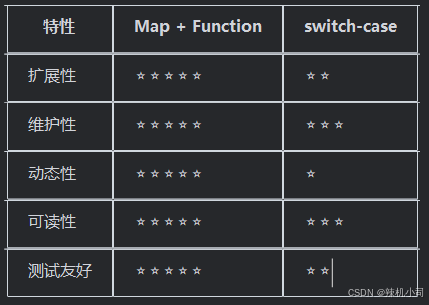
核心思想 :将"不同的导入逻辑"封装为 Function,通过Map路由,实现 OCP(开闭原则) 。
1、Service层实现类的方法中仅需如下代码即可,无需冗余的switch-case
java
// 使用示例
final List<Param> list = Optional.ofNullable(importMap.get(typeEnum))
        .orElseThrow(() -> new IllegalArgumentException("未支持的导入类型: " + typeEnum))
.apply(file);2、在实现类中添加初始化方法映射
java
/**
 * 映射方法.
 */
private Map<typeEnum, Function<MultipartFile, List<Param>>> importMap;

/**
 * 初始化方法映射.
 */
@PostConstruct
public void init() {
    importMap = Map.ofEntries(
            entry(typeEnum.TYPE_A,
                    file -> importExportService.mapAToParams(ExcelUtil.importWithAnnotation(file, AParamDTO.class, typeEnum.TYPE_A.getDesc()))),
            entry(typeEnum.TYPE_B,
                    file -> importExportService.mapBToParams(ExcelUtil.importWithAnnotation(file, BParamDTO.class, typeEnum.TYPE_B.getDesc()))),
            entry(typeEnum.TYPE_C,
                    file -> importExportService.mapCToParams(ExcelUtil.importWithAnnotation(file, CParamDTO.class, typeEnum.TYPE_C.getDesc()))),
            entry(typeEnum.TYPE_D,
                    file -> importExportService.mapDToParams(ExcelUtil.importWithAnnotation(file, DParamDTO.class, typeEnum.TYPE_D.getDesc())))
    );
}
破局第二步:打造"六边形战士"般的 ExcelUtil(工具层)
1、索引回退策略(兼容性防线)
众所周知,
EasyExcel如果在DTO里设置的是@ExcelProperty(index = 0)则直接按照index索引读取,不考虑表头。但如果设置的是@ExcelProperty(value = "姓名", index = 0),那么EasyExcel会默认读取value值进行匹配
基于以上的认知,目前我们项目的复杂点在于:
① excel表格拥有复杂的多表头(合并表头或复杂表头),即无法按照表头准确读取数据;
② 为保持项目简洁易维护,同一个 DTO 既要满足复杂导入又要标准导出(所以必须采用@ExcelProperty(value = "姓名", index = 0) 这种形式,保留导出的表头)
所以在导入EasyExcel 复杂表头下"按名匹配"失效,当标准映射失败时,降级为自定义的
索引回退策略保障数据的正确读取
java
    /**
     * 导入Excel并校验(使用注解校验).
     */
    public static <T> List<T> importWithAnnotation(final MultipartFile file,
                                                   final Class<T> targetClass) {
        validateFile(file);

        try {
            final List<T> dataList = readByIndexFallback(file, targetClass);

            if (CollectionUtils.isEmpty(dataList)) {
                throw new SystemRunTimeException("当前导入类型不匹配或Excel文件中没有有效数据");
            }

            final List<String> errors = validateWithAnnotations(dataList, targetClass);
            if (!errors.isEmpty()) {
                throw new SystemRunTimeException("导入数据校验失败:" + formatErrors(errors));
            }

            // 将数据列表倒序排列-确保数据页面展示和导入样式一致(页面按照创建时间倒序排序)
            Collections.reverse(dataList);
            return dataList;
        } catch (final SystemRunTimeException e) {
            throw e;
        } catch (final Exception e) {
            log.error("导入Excel文件失败", e);
            throw new SystemRunTimeException( "导入Excel文件失败: " + e.getMessage(), e);
        }
    }


    /**
     * 通过索引回退方式读取Excel数据.
     *
     * @param file       Excel文件
     * @param targetClass 目标数据类
     * @return 解析后的数据列表
     */
    private static <T> List<T> readByIndexFallback(final MultipartFile file, final Class<T> targetClass) {
        try {
            // 表头从第三行开始(根据自己的表头调整,不是复杂表头无需特殊处理)
            final List<Map<Integer, String>> raw = readExcelData(file, 3);
            if (raw == null || raw.isEmpty()) return Collections.emptyList();

            final Map<Integer, Field> indexFieldMap = buildIndexFieldMap(targetClass);
            return createInstances(raw, targetClass, indexFieldMap);
        } catch (final Exception ex) {
            log.warn("索引回退读取失败: {}", ex.getMessage());
            return Collections.emptyList();
        }
    }

    /**
     * 构建索引到字段的映射关系.
     *
     * @param targetClass 目标类
     * @return 索引字段映射
     */
    private static Map<Integer, Field> buildIndexFieldMap(final Class<?> targetClass) {
        final Map<Integer, Field> indexFieldMap = new HashMap<>();
        Class<?> c = targetClass;
        while (c != null && c != Object.class) {
            collectFieldsWithIndex(c, indexFieldMap);
            c = c.getSuperclass();
        }
        return indexFieldMap;
    }

    /**
     * 创建实例列表.
     *
     * @param raw           原始数据
     * @param targetClass   目标类
     * @param indexFieldMap 索引字段映射
     * @return 实例列表
     * @throws Exception 创建实例异常
     */
    private static <T> List<T> createInstances(final List<Map<Integer, String>> raw,
                                               final Class<T> targetClass,
                                               final Map<Integer, Field> indexFieldMap) throws Exception {
        final List<T> out = new ArrayList<>(raw.size());
        for (final Map<Integer, String> row : raw) {
            final T instance = createInstance(row, targetClass, indexFieldMap);
            out.add(instance);
        }
        return out;
    }

    /**
     * 创建单个实例.
     *
     * @param row           数据行
     * @param targetClass   目标类
     * @param indexFieldMap 索引字段映射
     * @return 实例对象
     * @throws Exception 创建实例异常
     */
    private static <T> T createInstance(final Map<Integer, String> row,
                                        final Class<T> targetClass,
                                        final Map<Integer, Field> indexFieldMap) throws Exception {
        final T instance = targetClass.getDeclaredConstructor().newInstance();
        populateInstanceFields(instance, row, indexFieldMap);
        return instance;
    }

/**
 * 填充实例字段值(简化版).
 *
 * @param instance      实例对象
 * @param row           数据行
 * @param indexFieldMap 索引字段映射
 */
private static <T> void populateInstanceFields(final T instance,
                                               final Map<Integer, String> row,
                                               final Map<Integer, Field> indexFieldMap) {
    for (final Map.Entry<Integer, String> e : row.entrySet()) {
        final Field f = indexFieldMap.get(e.getKey());
        if (f == null) continue;
        try {
            // 如果需要处理复杂的数据转换,可以在这里添加convert方法!!!
            f.setAccessible(true);
            f.set(instance, e.getValue());
        } catch (final Exception ignore) {
            // 忽略异常
        }
    }
}
2、Sheet 名称"指纹"校验(业务防线)
重点:防止张冠李戴!预读
Sheet名,不匹配直接拒绝
在上面的代码,读取数据基础上,因为我们同一个接口涉及到多个类型,所以可以增加一层 Sheet 名称 校验。(此处重点是readExcelData方法的更改!)
java
// 首先就需要在ExcelUtil类的导入方法处根据不同类型的枚举,去校验Sheet 名称
    /**
     * 导入Excel并校验(使用注解校验).
     * 自动读取DTO上的@NotBlank等注解进行校验
     *
     * @param file              上传文件
     * @param targetClass       目标DTO类(需标注@NotBlank等注解)
     * @param expectedSheetName 期望的Sheet名称,如果不为null则进行校验
     * @param <T>               泛型类型
     * @return 校验通过的数据列表
     */
    public static <T> List<T> importWithAnnotation(final MultipartFile file,
                                                   final Class<T> targetClass,
                                                   final String expectedSheetName) {
        // 基于上面的代码,透传到readByIndexFallback方法,然后继续透传到readExcelData方法
        final List<T> dataList = readByIndexFallback(file, targetClass, expectedSheetName);
    }

    /**
     * 读取Excel原始数据.
     *
     * @param file     Excel文件
     * @param headRows 表头行数
     * @return 原始数据映射列表
     * @throws IOException 读取异常
     */
    private static List<Map<Integer, String>> readExcelData(final MultipartFile file, final int headRows, final String expectedSheetName) throws IOException {
        try (ExcelReader excelReader = EasyExcel.read(file.getInputStream()).build()) {
            // 校验 Sheet 名称
            if (expectedSheetName != null) {
                final List<ReadSheet> sheets = excelReader.excelExecutor().sheetList();
                if (sheets == null || sheets.isEmpty()) {
                    throw new SystemRunTimeException(I"Excel文件中没有Sheet");
                }
                final String actualName = sheets.get(0).getSheetName();
                if (!Objects.equals(actualName, expectedSheetName)) {
                    throw new SystemRunTimeException(String.format("上传的文件模板与选择的类型不匹配,当前类型为【%s】,文件Sheet名称为【%s】",
                                    expectedSheetName, actualName));
                }
            }
            // 使用 SyncReadListener 读取数据
            final SyncReadListener listener = new SyncReadListener();
            excelReader.read(EasyExcel.readSheet(0).headRowNumber(headRows).registerReadListener(listener).build());
            return (List) listener.getList();
        }
    }
3、JSR-303 注解驱动校验(数据质量防线)
关键点在于:直接在
DTO类上使用@NotBlank@NotNull@Size@DecimalMax等注解,通过validator.validate()对每个对象进行校验,无需手动处理
这里我们针对不同数据量大小进行不同的校验方式:
①数据量少(< 1000 行) :全部批量读取完再校验
(代码更简洁、性能开销小、调试更方便)
java
    /**
     * 使用JSR-303注解进行校验.
     */
    private static <T> List<String> validateWithAnnotations(final List<T> dataList, final Class<?> targetClass) {
        final Validator validator = Validation
                .buildDefaultValidatorFactory()
                .getValidator();

        final List<String> errors = new ArrayList<>();
        final Map<String, Integer> indexMap = excelIndexMap(targetClass);
        IntStream.range(0, dataList.size())
                .forEach(i -> {
                    final T item = dataList.get(i);
                    // 这里的4,根据你的实际数据行设置(行号从第4行开始)
                    final int rowNum = i + 4;

                    final Set<ConstraintViolation<T>> set = validator.validate(item);
                    if (!set.isEmpty()) {
                        final List<String> msgs = new ArrayList<>();
                        msgs.add(
                                set.stream()
                                        .sorted(Comparator.comparingInt(v -> indexMap.getOrDefault(v.getPropertyPath().toString(), Integer.MAX_VALUE)))
                                        .map(ConstraintViolation::getMessage)
                                        .collect(Collectors.joining(";"))
                        );
                        errors.add(String.format("第%d行:%s", rowNum, String.join(";", msgs.stream().filter(s -> s != null && !s.isEmpty()).toList())));
                    }
                });

        return errors;
    }

    /**
     * 获取字段索引和字段映射.
     */
    private static Map<String, Integer> excelIndexMap(final Class<?> targetClass) {
        final Map<String, Integer> map = new HashMap<>();
        Class<?> c = targetClass;
        while (c != null && c != Object.class) {
            for (final Field f : c.getDeclaredFields()) {
                final ExcelProperty ep = f.getAnnotation(ExcelProperty.class);
                if (ep != null && ep.index() >= 0) {
                    map.put(f.getName(), ep.index());
                }
            }
            c = c.getSuperclass();
        }
        return map;
}②数据量大(> 1000 行) :边读边校验
(使用 ReadListener 实现流式校验,内存占用低、错误反馈速度)
java
// 调用ReadListener
final ExcelReadListener<T> listener = new ExcelReadListener<>();
        EasyExcel.read(file.getInputStream())
                .sheet(expectedSheetName)
                .registerReadListener(listener)
                .doRead();


// 自定义 ReadListener (类)
public class ExcelReadListener<T> implements ReadListener<T> {
    private List<T> dataList = new ArrayList<>();
    private List<String> errors = new ArrayList<>();

    @Override
    public void invoke(T data, AnalysisContext context) {
        // 校验单个对象
        Set<ConstraintViolation<T>> violations = validator.validate(data);
        if (!violations.isEmpty()) {
            int rowNum = context.getCurrentRowNum() + 4; // 行号从第4行开始
            String errorMsg = violations.stream()
                    .map(ConstraintViolation::getMessage)
                    .collect(Collectors.joining(";"));
            errors.add(String.format("第%d行:%s", rowNum, errorMsg));
        } else {
            dataList.add(data);
        }
    }

    @Override
    public void doAfterAllAnalysed(AnalysisContext context) {
        // 所有数据读取完成后处理
        if (!errors.isEmpty()) {
            throw new SystemRunTimeException(IMPORT_DATA_FAILED, "导入数据校验失败:" + String.join(";", errors));
        }
    }

    public List<T> getDataList() {
        return dataList;
    }

    public List<String> getErrors() {
        return errors;
    }
}
技术小结
流的复用技巧:一次 IO,两步操作
痛点背景: 为了防止用户上传错误的模板(例如用A模板导入B数据),我们需要先校验 Excel 的 Sheet 名称。
最直观(但低效)的做法是:
- 打开文件流 -> 读取
Sheet名 -> 关闭流。- 校验通过。
- 重新 打开文件流 -> 读取数据 -> 关闭流。
对于 MultipartFile ,虽然通常可以多次获取 InputStream ,但频繁的 IO 操作在大文件场景下是不可接受的浪费。更糟糕的是,如果输入流不支持 reset() (例如某些网络流),第二次读取会直接报错。
解决方案 :生命周期接管 EasyExcel 的设计其实允许我们将"元数据解析"和"数据读取"拆解开来,复用同一个ExcelReader实例。
java
// 1. 构建 ExcelReader,此时文件流已打开,元数据(Sheet列表等)已被解析到内存中
try (ExcelReader excelReader = EasyExcel.read(file.getInputStream()).build()) {

    // 2. 预检阶段:利用已解析的元数据进行校验
    // excelExecutor() 是 EasyExcel 暴露出的底层执行器,能拿到所有 Sheet 的信息
    List<ReadSheet> sheets = excelReader.excelExecutor().sheetList();
    if (sheets.isEmpty()) {
         throw new RuntimeException("空文件");
    }

    // 3. 业务校验:比对 Sheet 名称("指纹")
    String actualName = sheets.get(0).getSheetName();
    if (!expectedName.equals(actualName)) {
        throw new RuntimeException("模板错误!请上传【" + expectedName + "】模板");
    }

    // 4. 读取阶段:校验通过,复用同一个 excelReader 继续干活
    // SyncReadListener 是一个同步监听器,它会将读取到的数据暂存在内存 List 中
    SyncReadListener listener = new SyncReadListener();

    // 这里的 read() 并没有重新打开文件,而是继续从当前流的位置(或者重置流)开始解析指定 Sheet 的内容
    excelReader.read(EasyExcel.readSheet(0)
            .headRowNumber(headRows) // 指定从第几行开始读数据(跳过复杂的表头)
            .registerReadListener(listener)
            .build());

    return listener.getList(); // 返回原始数据 Map<Integer, String>
}
// try-with-resources 自动关闭 excelReader,释放文件流
技术价值:
- 零
IO浪费 :整个流程只打开一次文件流,只解析一次Excel结构。- 防御性强 :在真正消耗
CPU解析海量数据行之前,先通过轻量级的元数据校验进行快速失败(Fail-fast)。
说明
文中如有疑问欢迎讨论、指正,互相学习,感谢关注💡。