一、下载安装包
华为镜像源:https://mirrors.huaweicloud.com/mysql/Downloads/MySQL-8.0/
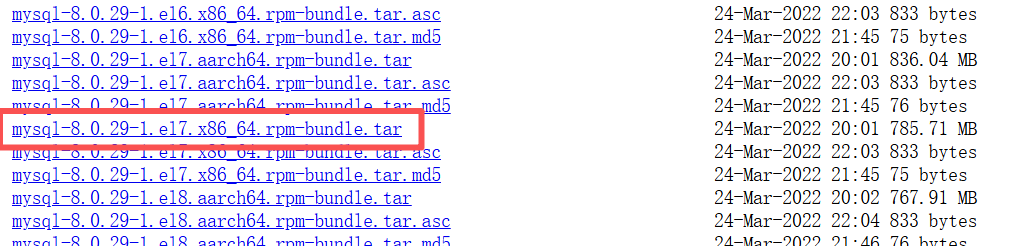
二、卸载系统自带的mariadb
查看系统中的mariadb
bash
rpm -qa|grep mariadb卸载mariadb
bash
rpm -e mariadb-libs --nodeps检查系统中是否存在mariadb
bash
rpm -qa|grep mariadb三、卸载系统自带的MySQL
关闭mysql服务
bash
systemctl stop mysqld.service查找安装mysql的rpm包
bash
rpm -qa | grep -i mysql 卸载mysql
找到了就卸载,没找到你卸载个锤子
下边的代码根据自己实际情况改
bash
yum remove mysql-community-libs-5.7.29-1.el7.x86_64 mysql-community-common-5.7.29-1.el7.x86_64 mysql-community-client-5.7.29-1.el7.x86_64 mysql-community-server-5.7.29-1.el7.x86_64查看是否卸载干净
bash
rpm -qa | grep -i mysql查找mysql相关目录 删除
bash
find / -name mysql该删的删,像Anacodna里的mysql就别动了
bash
rm -rf /etc/selinux/targeted/active/modules/100/mysql
rm -rf/usr/lib64/mysql
删除默认配置日志
bash
rm -rf /etc/my.cnf
rm -rf /var/log/mysqld.log
四、安装MySQL
创建MySQL目录
bash
mkdir /export/software/mysql上传压缩包到该文件夹
解压文件
bash
tar -xvf mysql-8.0.29-1.el7.x86_64.rpm-bundle.tar进行安装
bash
yum -y install libaio两种安装方法选一个就行
bash
# 全量安装:功能全
yum install /export/software/mysql/*.rpm

# 核心安装:能跑能用
rpm -ivh mysql-community-common-8.0.29-1.el7.x86_64.rpm mysql-community-libs-8.0.29-1.el7.x86_64.rpm mysql-community-client-8.0.29-1.el7.x86_64.rpm mysql-community-server-8.0.29-1.el7.x86_64.rpm
五、配置MySQL
初始化
bash
mysqld --initialize更改所属组
bash
chown mysql:mysql /var/lib/mysql -R启动MySQL
bash
systemctl start mysqld.service我的这块报错,说是已经有了MySQL8.2,不能降级装8.0.29,原因是之前安装的Anaconda自带了一个MySQL,需要先把Anaconda的MySQL停掉
root@feilink1 mysql# cat /var/log/mysqld.log | tail -50 2025-12-11T08:04:50.331212Z 0 System MY-015017 Server MySQL Server Initialization - start. 2025-12-11T08:04:50.332261Z 0 System MY-013169 Server /export/software/anaconda3/bin/mysqld (mysqld 8.4.0) initializing of server in progress as process 7632 2025-12-11T08:04:50.332393Z 0 ERROR MY-010338 Server Can't find error-message file '/export/software/anaconda3/english/errmsg.sys'. Check error-message file location and 'lc-messages-dir' configuration directive. 2025-12-11T08:04:50.333011Z 0 Warning MY-013242 Server --character-set-server: 'utf8' is currently an alias for the character set UTF8MB3, but will be an alias for UTF8MB4 in a future release. Please consider using UTF8MB4 in order to be unambiguous. 2025-12-11T08:04:50.333016Z 0 Warning MY-013244 Server --collation-server: 'utf8mb3_general_ci' is a collation of the deprecated character set UTF8MB3. Please consider using UTF8MB4 with an appropriate collation instead. 2025-12-11T08:04:50.336781Z 1 System MY-013576 InnoDB InnoDB initialization has started. 2025-12-11T08:04:50.481188Z 1 System MY-013577 InnoDB InnoDB initialization has ended. 2025-12-11T08:04:51.378300Z 6 Note MY-010454 Server A temporary password is generated for root@localhost: gh#Ob(GMo0ya 2025-12-11T08:04:52.613948Z 0 System MY-015018 Server MySQL Server Initialization - end. 2025-12-11T08:05:24.993219Z 0 System MY-010116 Server /usr/sbin/mysqld (mysqld 8.0.29) starting as process 7936 2025-12-11T08:05:24.997105Z 1 System MY-013576 InnoDB InnoDB initialization has started. 2025-12-11T08:05:25.085757Z 1 ERROR MY-013171 InnoDB Cannot boot server version 80029 on data directory built by version 80400. Downgrade is not supported mysqld: Can't open file: 'mysql.ibd' (errno: 0 - ) 2025-12-11T08:05:25.511718Z 1 ERROR MY-010334 Server Failed to initialize DD Storage Engine 2025-12-11T08:05:25.512465Z 0 ERROR MY-010020 Server Data Dictionary initialization failed. 2025-12-11T08:05:25.512616Z 0 ERROR MY-010119 Server Aborting 2025-12-11T08:05:25.514166Z 0 System MY-010910 Server /usr/sbin/mysqld: Shutdown complete (mysqld 8.0.29) MySQL Community Server - GPL. 2025-12-11T08:05:46.804765Z 0 System MY-010116 Server /usr/sbin/mysqld (mysqld 8.0.29) starting as process 8138 2025-12-11T08:05:46.808283Z 1 System MY-013576 InnoDB InnoDB initialization has started. 2025-12-11T08:05:46.967641Z 1 ERROR MY-013171 InnoDB Cannot boot server version 80029 on data directory built by version 80400. Downgrade is not supported mysqld: Can't open file: 'mysql.ibd' (errno: 0 - ) 2025-12-11T08:05:47.354085Z 1 ERROR MY-010334 Server Failed to initialize DD Storage Engine 2025-12-11T08:05:47.354355Z 0 ERROR MY-010020 Server Data Dictionary initialization failed. 2025-12-11T08:05:47.354426Z 0 ERROR MY-010119 Server Aborting 2025-12-11T08:05:47.354837Z 0 System MY-010910 Server /usr/sbin/mysqld: Shutdown complete (mysqld 8.0.29) MySQL Community Server - GPL. 2025-12-11T08:08:58.025098Z 0 System MY-015017 Server MySQL Server Initialization - start. 2025-12-11T08:08:58.025813Z 0 System MY-013169 Server /export/software/anaconda3/bin/mysqld (mysqld 8.4.0) initializing of server in progress as process 9466 2025-12-11T08:08:58.025841Z 0 ERROR MY-010338 Server Can't find error-message file '/export/software/anaconda3/english/errmsg.sys'. Check error-message file location and 'lc-messages-dir' configuration directive. 2025-12-11T08:08:58.026389Z 0 Warning MY-013242 Server --character-set-server: 'utf8' is currently an alias for the character set UTF8MB3, but will be an alias for UTF8MB4 in a future release. Please consider using UTF8MB4 in order to be unambiguous. 2025-12-11T08:08:58.026394Z 0 Warning MY-013244 Server --collation-server: 'utf8mb3_general_ci' is a collation of the deprecated character set UTF8MB3. Please consider using UTF8MB4 with an appropriate collation instead. 2025-12-11T08:08:58.029460Z 1 System MY-013576 InnoDB InnoDB initialization has started. 2025-12-11T08:08:58.178234Z 1 System MY-013577 InnoDB InnoDB initialization has ended. 2025-12-11T08:08:58.959295Z 6 Note MY-010454 Server A temporary password is generated for root@localhost: la4_bb*o?Y>C 2025-12-11T08:09:00.322790Z 0 System MY-015018 Server MySQL Server Initialization - end. 2025-12-11T08:09:04.312480Z 0 System MY-010116 Server /usr/sbin/mysqld (mysqld 8.0.29) starting as process 9576 2025-12-11T08:09:04.316521Z 1 System MY-013576 InnoDB InnoDB initialization has started. 2025-12-11T08:09:04.411941Z 1 ERROR MY-013171 InnoDB Cannot boot server version 80029 on data directory built by version 80400. Downgrade is not supported mysqld: Can't open file: 'mysql.ibd' (errno: 0 - ) 2025-12-11T08:09:04.831291Z 1 ERROR MY-010334 Server Failed to initialize DD Storage Engine 2025-12-11T08:09:04.831447Z 0 ERROR MY-010020 Server Data Dictionary initialization failed. 2025-12-11T08:09:04.831558Z 0 ERROR MY-010119 Server Aborting 2025-12-11T08:09:04.832009Z 0 System MY-010910 Server /usr/sbin/mysqld: Shutdown complete (mysqld 8.0.29) MySQL Community Server - GPL. root@feilink1 mysql#
bash
mv /export/software/anaconda3/bin/mysqld /export/software/anaconda3/bin/mysqld.bak
mv /export/software/anaconda3/bin/mysql /export/software/anaconda3/bin/mysql.bak
bash
systemctl stop mysqld
rm -rf /var/lib/mysql/*
mysqld --initialize --user=mysql
systemctl start mysqld
查看生成的临时root密码
bash
cat /var/log/mysqld.log | grep password如果像我这种安装多次的就选最后一个

登录MySQL
bash
mysql -uroot -p
# 生成的临时密码
修改root密码
sql
# 更新用户密码,设置为123456
# 第一次改密码必须要符合安全验证"大写+小写+数字+特殊字符"
alter user user() identified by "ShaTeMeWanYi666*";
# 选择数据库
use mysql;
# 授权
CREATE USER 'root'@'%' IDENTIFIED BY 'ShaTeMeWanYi666*';
GRANT ALL PRIVILEGES ON *.* TO 'root'@'%' WITH GRANT OPTION;
FLUSH PRIVILEGES;
如果你想改为123456这样的简单密码,需要设置一下
sql
SET GLOBAL validate_password.policy = 0;
SET GLOBAL validate_password.length = 3;
SET GLOBAL validate_password.check_user_name = OFF;
sql
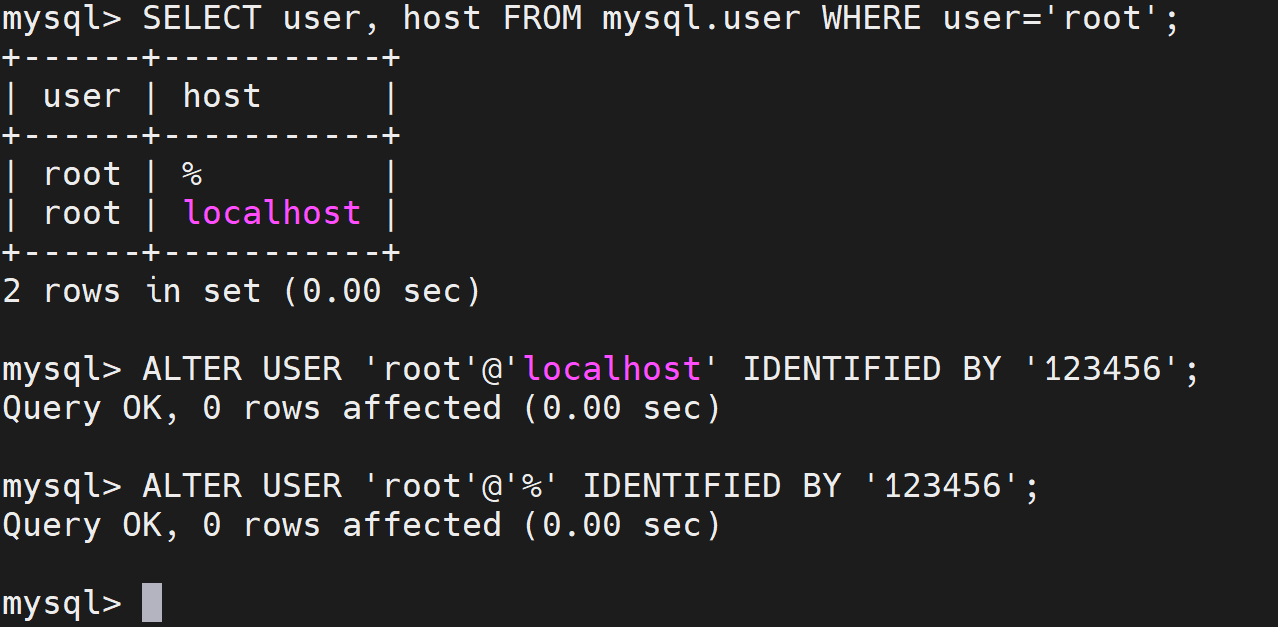
SELECT user, host FROM mysql.user WHERE user='root';我的只有两个,所以只改两个
sql
ALTER USER 'root'@'localhost' IDENTIFIED BY '123456';
ALTER USER 'root'@'%' IDENTIFIED BY '123456';
FLUSH PRIVILEGES;
先要更稳的话可以再加上两个root'@'127.0.0.1和root'@'::1
这几个的区别可以了解一下
sql
CREATE USER 'root'@'127.0.0.1' IDENTIFIED BY '123456';
GRANT ALL PRIVILEGES ON *.* TO 'root'@'127.0.0.1' WITH GRANT OPTION;
FLUSH PRIVILEGES;
sql
CREATE USER 'root'@'::1' IDENTIFIED BY '123456';
GRANT ALL PRIVILEGES ON *.* TO 'root'@'::1' WITH GRANT OPTION;
FLUSH PRIVILEGES;
六、查看、开启、关闭mysql服务
bash
# 查看mysql服务状态
systemctl status mysqld
# 关闭mysql服务
systemctl stop mysqld
# 查看mysql服务状态
systemctl status mysqld
# 开启mysql服务
systemctl start mysqld
# 查看mysql服务状态
systemctl status mysqld
七、设置为开机自启动
bash
systemctl enable mysqld查看是否设置自启动成功
bash
systemctl list-unit-files | grep mysqld前边这个enable了就行,后边那个不用管

骚年,准备好成为SQL Boy了么?