介绍
Zettlr是款适合写作者和研究人员使用的Markdown编辑器,免费开源,功能简洁,具备Markdown所有基本功能,内置各种运算符,还可以调用计数器,可以完美替代Word和收费的文字处理器。
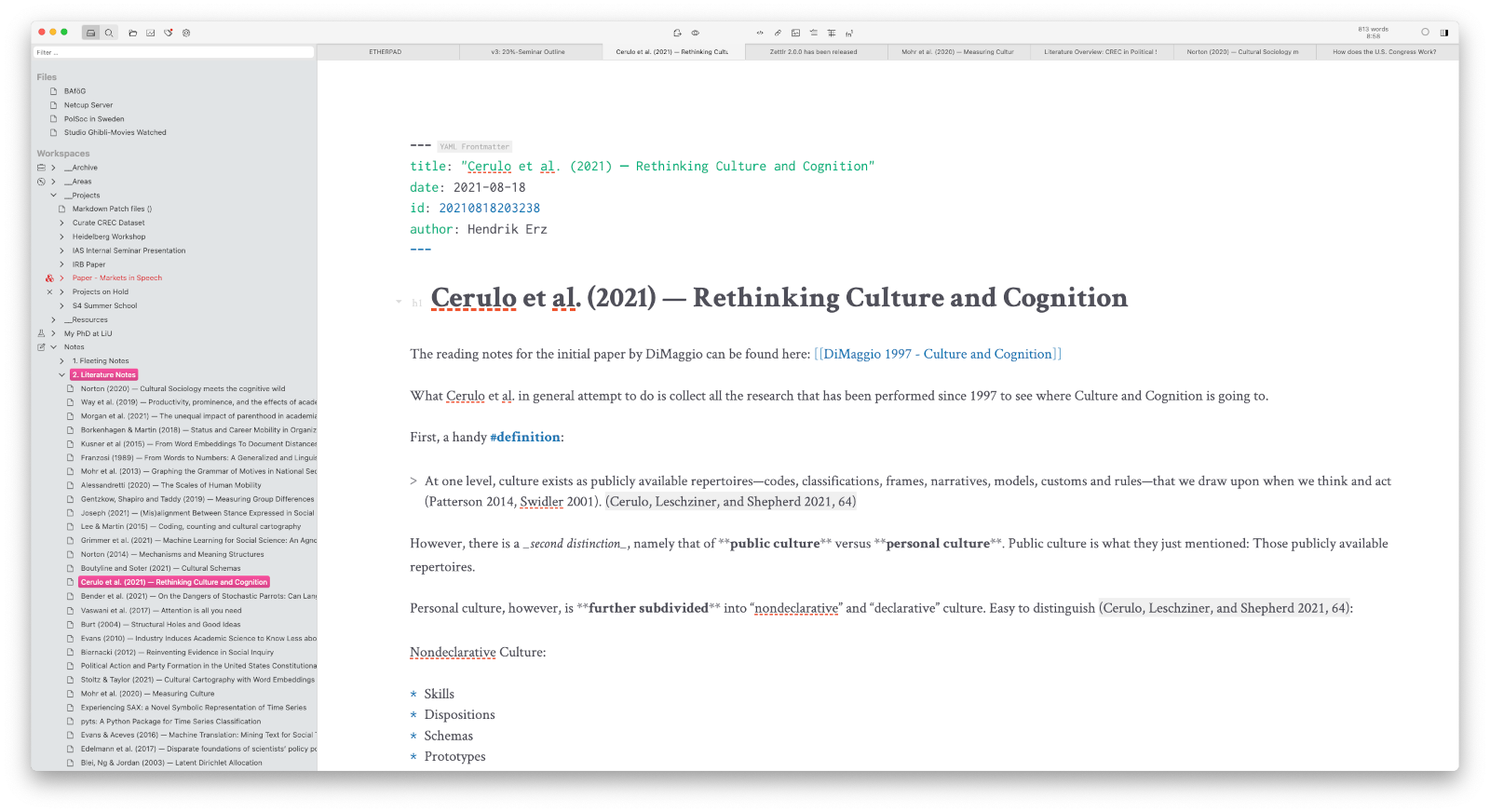
软件截图
软件特点
从应用程序中直接管理你的文件和文件夹。
在第一个视图中使用代码片段了解您的文件中的内容。
使用Quicklook快速预览文件而不关闭当前文件。
使用强大的搜索操作符搜索任何东西
用"计数器"这个词来概括你的写作量
使用舒适的工具栏访问最重要的命令
将您的文件导出到您最需要的格式,并与您的同事共享。
更新日志
Zettlr 4.0.0
Full TableEditor Rewrite
This release contains a full rewrite of the TableEditor. The old implementation
of the TableEditor had many bugs and inconveniences that made working with
Markdown tables barely less cumbersome than having to deal with raw Markdown
tables. Users criticized volatile data handling and experienced frequent data
loss. This is why we redesigned the TableEditor from the ground up. With this
release, we are finally able to give the new experience to you.
The most important improvement is that now data loss should be a thing of the
past. The new TableEditor makes full use of the available features of the editor
to keep the data as safe as possible. But we didn't want to stop there. Because
the TableEditor hadn't received a face lift in years, we asked ourselves what
else the TableEditor was missing.
From a user perspective, we have kept the design of the TableEditor as close to
the former UX as possible, while also fixing a few oddities. Specifically, the
buttons of the TableEditor have been fully redesigned to be more minimalist.
Also gone is the infamous "Save" button that was not able to help prevent data
loss. The new TableEditor now features proper syntax highlighting so that you
can more easily verify that you are authoring proper Markdown. In addition, the
new TableEditor is now faster, more memory efficient, and it should be simpler
to fill entire tables with data.
Lastly, one big improvement of the new TableEditor is that you don't have to use
it to be more efficient in authoring tables. Specifically, we decided to
implement all functionality fully keyboard-oriented. This means that for any
modification you may want to make there is now a shortcut. Adding and removing
rows and columns; clearing data from rows, columns, or the entire table;
aligning column text left, right, or center; swapping rows or columns; etc.
Anything is now possible either with the new built-in context menu, or a quick
keyboard shortcut.
There is only one thing we stopped to support: grid tables. Given that their
structure can be much more difficult to parse we wanted to err on the side of
caution. However, some keyboard shortcuts such as navigating between cells will
still work with grid tables. Since users will most of the time only edit simple
tables, we believe this to be an acceptable compromise --- while not completely
ruling out supporting grid tables, especially since Pandoc has started heavily
investing in an improvement of their grid table support.
In any case, we hope that the new TableEditor will finally fix the issues you
experienced over the past years --- and we would like to apologize that it took us
so long to fix all of these issues at once!
Changes to the snippet $FILENAME variable
In this update, we have implemented a change in which the $FILENAME variable
no longer includes the filename extension. This means that, while $FILENAME
has in the past resolved to my-file.md, it will now only include my-file.
If you rely on the $FILENAME-variable in any of your snippets, please make
sure to update it by adding the variable $EXTENSION behind it. In other
words, everywhere you need only the filename without its extension, you can
keep $FILENAME, but wherever you need both the file name and its file
extension, please use FILENAMEEXTENSION. (The latter variable includes
the leading period of the extension, so do not write FILENAME.EXTENSION.)
Image Viewer and PDF Viewer
This update brings with it a great new feature for Zettlr: A built-in image
viewer and PDF viewer. Once you have selected in the settings that you wish to
open images or PDF files in Zettlr instead of the default behavior to open it
externally, Zettlr will open them in editor panes just like the editors. You can
rearrange them just like you can other files, and you have some options
available to inspect the files.
For images, the viewer offers various options to zoom and fit the images so that
you can view every detail of them while having other files open side-by-side.
In addition, the image viewer offers four background modes to accommodate
transparency and difficult-to-view colors in the images better: transparent
(the default), a black background, white background, and a translucent
checkerboard background.
The PDF viewer likewise allows you to preview PDF files using Chromium's built-
in PDF viewer that you may already know if you have opened PDF files in Google
Chrome or Edge. Due to restrictions in how this works, however, you will have to
manually "enable" such a viewer before being able to scroll it by clicking into
it. Whether an iframe is interactive is indicated by a small border around the
iframe.
Note that both image and PDF viewers are just that: viewers. As Zettlr is a text
app, we do not plan on implementing any ways of editing images or PDF files. To
annotate your PDF files, please continue using your existing workflow.
New Citation Parser
This release of Zettlr ships with a fully rewritten citation parser. We have
decided to do so because the existing citation parser was very coarse. It would
only detect and indicate entire citation nodes, but it could not distinguish
between the various parts of citations (such as prefix, citekey, and suffix). In
addition, there were quite many inefficiencies in how Zettlr would parse
citations.
The new citation parser aims at fixing these issues. It now mounts individual
nodes into the document for all individual parts of a citation node.
Specifically, it now detects formatting characters, the @-sign, the suppress-
author-flag (a hyphen preceding the @-sign), prefix, suffix, and the locator
individually. This not just makes styling individual citation parts possible,
but also makes all processing within Zettlr more efficient and faster.
Especially in documents with a lot of citations, you should be able to observe a
performance improvement.
Lastly, we took this opportunity to align the parser more with how Pandoc
Citeproc processes citations. Most notably, this includes relaxing some
requirements such as having to place commas after the citekey, and support for
curly brackets, which allows you more flexibility in defining citekeys (e.g.,
@{AuthorYear}) and locators (e.g., {pp. 23-24, 66-69}),
If you prefer to style Zettlr using Custom CSS, you can now style the individual
parts of your citations, using the following CSS classes:
cm-citation: The entire citation node
cm-citation-mark: Formatting characters ({}\[\];) except the @-sign and
the suppress-author-flag
cm-citation-prefix: The citation prefix
cm-citation-suppress-author-flag: The suppress-author-flag
cm-citation-at-sign: The @-sign in front of your citekey
cm-citation-citekey: The actual cite key (sans surrounding curly brackets)
cm-citation-locator: The locator after your citekey
cm-citation-suffix: The citation suffix
Modified Zettelkasten Link Workflow
With this update, we have updated the Zettelkasten link insertion workflow. This
is due to the new capabilities of Zettlr to understand link labels. To do so, we
have removed the previous settings "Link with filename only" and "When linking
files, add the document name ...". Instead, we have added two new settings,
"Always use the file title as label for internal links" and "Use the file ID as
link target if possible."
The new workflow applies when you autocomplete a filename, and works as follows:
If "Use the file ID" is enabled, Zettlr will use a file's ID, if the file has
one, and fall back to the filename only where no ID is available. If it is
disabled, Zettlr will always use the filename to generate internal Wikilinks.
If "Always use the file title" is enabled, Zettlr will add the file's title
(YAML frontmatter title; first heading level 1; filename) as the link label.
If it is disabled, Zettlr will never add a link label automatically.
Footnote Workflow Improvements
This update improves the footnote handling workflow a lot. Until now, Zettlr was
only able to properly insert new footnotes. However, the footnote deletion
process still required you to manually delete both the footnote label and its
accompanying reference.
We have now implemented a few new functions that help you manage footnotes.
First, when you delete text by pressing Backspace, and you reach a footnote
label, Zettlr will now select the entire footnote label instead of deleting the
closing bracket of the label. When you press Backspace a second time, it will
remove the entire label at once. This gives y...
下载地址