一、总体介绍
1.先来看一下答题界面
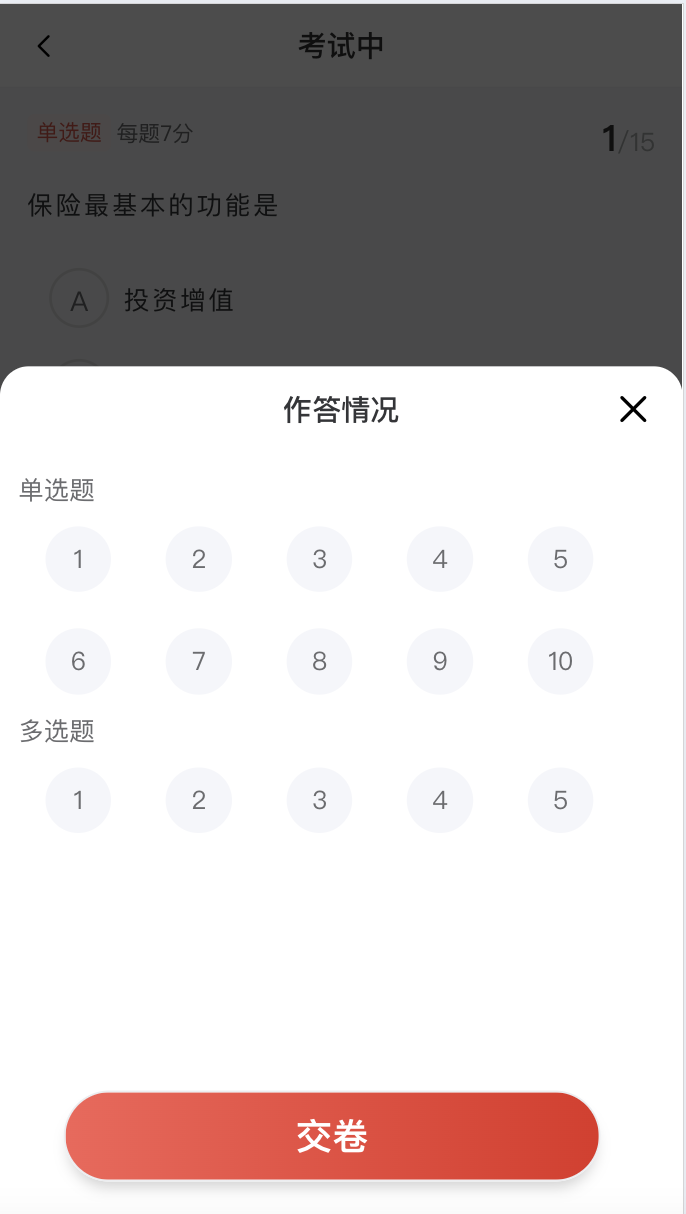
题目前会展示当前题目类型和题目分数以及当前题数,左下角可以查看当前答题情况。后端返回的数据是一个大数组,每一项包含题目、题目类型、所有答案选项(最多四个)、题目code、题目分值、正确答案。
只有最后一页和作答情况面板里展示交卷按钮,第一页的上一题按钮不可点,未作答完就给出提示,最后提交试卷展示分数。并且支持左右滑动切换题目。

2.先来缕一下整体思路
从后端拿到的数据questionList我们分为三个小数组,并给每一题都配置一个checked属性,记录当前题目有没有作答。
在第一张图里展示的题目就是用的questionList,第二张图使用的是三个小数组,小数组点击通过遍历唯一值questionCode定位到大数组中。(第一张图不使用小数组:a.需要展示当前题号/总题目数 b.后端返回的数据就是单选=>多选=>判断排列的 c.三个小数组每次都得从0开始,作答情况面板不好实现点击定位。)
响应式变量stemNum来记录当前作答题目是questionList中的哪一道,radio数组来记录当前的作答情况。
除此之外就是左右滑动、点击提交加防抖节流等等细节问题。
二、代码
1.先来看一下模版
 <div class="answerExam" @touchstart.passive="handleTouchStart" @touchmove.passive="handleTouchMove"
      @touchend.passive="handleTouchEnd">
      <div class="topic-con">
        <div class="stem">
          <div>
            <span class="type">{{
              questionList[stemNum]?.questionType == '1'
                ? "单选题"
                : questionList[stemNum]?.questionType == '2'
                  ? "多选题"
                  : "判断题"
            }}</span>
            <span class="score">
              {{ questionList[stemNum]?.questionType == '2' ? `每题至少两个答案,全部选对为${questionList[stemNum]?.questionScore}分` :
                `每题${questionList[stemNum]?.questionScore}分` }}
            </span>
          </div>
          <div>
            <span class="num">{{ stemNum + 1 }}</span><span class="sum">/{{ questionList.length }}</span>
          </div>
        </div>
        <div class="single" v-if="questionList[stemNum]?.questionType == '1'">
          <p>
            {{ questionList[stemNum].questionTitle }}
          </p>
          <van-radio-group style="padding: 12px;" @change="select()" v-model="radio[stemNum]">
            <van-radio name="A">
              <template #icon="props">
                <span :class="props.checked ? 'checked' : 'nochecked'">A</span>
              </template>
              {{ questionList[stemNum].optionA }}</van-radio>
            <van-radio name="B">
              <template #icon="props">
                <span :class="props.checked ? 'checked' : 'nochecked'">B</span>
              </template>
              {{ questionList[stemNum].optionB }}
            </van-radio>
            <van-radio name="C">
              <template #icon="props">
                <span :class="props.checked ? 'checked' : 'nochecked'">C</span>
              </template>
              {{ questionList[stemNum].optionC }}
            </van-radio>
            <van-radio name="D">
              <template #icon="props">
                <span :class="props.checked ? 'checked' : 'nochecked'">D</span>
              </template>
              {{ questionList[stemNum].optionD }}
            </van-radio>
          </van-radio-group>
        </div>
        <div class="multiple" v-if="questionList[stemNum]?.questionType == '2'">
          <p>{{ questionList[stemNum].questionTitle }}</p>
          <van-checkbox-group @change="select()" v-model="radio[stemNum]">
            <van-checkbox name="A">
              <template #icon="props">
                <span :class="props.checked ? 'checked' : 'nochecked'">A</span>
              </template>
              {{ questionList[stemNum].optionA }}
            </van-checkbox>
            <van-checkbox name="B">
              <template #icon="props">
                <span :class="props.checked ? 'checked' : 'nochecked'">B</span>
              </template>
              {{ questionList[stemNum].optionB }}
            </van-checkbox>
            <van-checkbox name="C">
              <template #icon="props">
                <span :class="props.checked ? 'checked' : 'nochecked'">C</span>
              </template>
              {{ questionList[stemNum].optionC }}
            </van-checkbox>
            <van-checkbox name="D">
              <template #icon="props">
                <span :class="props.checked ? 'checked' : 'nochecked'">D</span>
              </template>
              {{ questionList[stemNum].optionD }}
            </van-checkbox>
          </van-checkbox-group>
        </div>
        <div class="judge" v-if="questionList[stemNum]?.questionType == '3'">
          <p>{{ questionList[stemNum].questionTitle }}</p>
          <van-radio-group v-model="radio[stemNum]" @change="select()">
            <van-radio name="A">
              <template #icon="props">
                <span :class="props.checked ? 'checked' : 'nochecked'"></span>
              </template>
              {{ questionList[stemNum].optionA }}
            </van-radio>
            <van-radio name="B">
              <template #icon="props">
                <span :class="props.checked ? 'checked1' : 'nochecked1'"></span>
              </template>
              {{ questionList[stemNum].optionB }}
            </van-radio>
          </van-radio-group>
        </div>
      </div>
      <div class="botm-con">
        <div class="condition" @click="response">
          <van-icon name="description" size="20px" />作答情况
        </div>
        <van-button round class="prev-btn" @click="goPrev" :disabled="stemNum === 0"
          :class="{ disabled: stemNum === 0 }">
          上一题
        </van-button>
        <!-- 下一题/交卷按钮 -->
        <van-button v-if="stemNum < questionList.length - 1" round type="info" @click="goNext">
          下一题
        </van-button>

        <van-button v-else round type="info" @click="handin">
          交卷
        </van-button>
      </div>
      <van-action-sheet v-model:show="show" title="作答情况">
        <div class="content">
          <div class="sin-c">
            <p>单选题</p>
            <div :class="item.checked ? 'card' : 'nocard'" v-for="(item, index) in singglequest" :key="index"
              @click="clickstem(item.questionCode)">
              {{ index + 1 }}
            </div>
          </div>
          <div class="sin-c" v-if="multiplequest.length !== 0">
            <p>多选题</p>
            <div class="card-con">
              <div :class="item1.checked ? 'card' : 'nocard'" v-for="(item1, index1) in multiplequest" :key="index1"
                @click="clickstem(item1.questionCode)">
                {{ index1 + 1 }}
              </div>
            </div>
          </div>
          <div class="sin-c" v-if="judgequest.length !== 0">
            <p>判断题</p>
            <div class="card-con">
              <div :class="item2.checked ? 'card' : 'nocard'" v-for="(item2, index2) in judgequest" :key="index2"
                @click="clickstem(item2.questionCode)">
                {{ index2 + 1 }}
              </div>
            </div>
          </div>
          <div class="zuoda">
            <van-button round class="cardBtn" @click="handin">交卷</van-button>
          </div>
        </div>
      </van-action-sheet>
      <van-dialog v-model:show="showScore" confirmButtonColor='#E12D22' @confirm="scoreConfirm" @cancel="scoreCancel"
        confirmButtonText="确定">
        <div class="score-con">
          <img class="jiaojuan" src="../../assets/scoreIcon.png" alt="">
          <span class="jjspan">交卷成功</span>
          <div><span class="scorenum">{{ examScore }}</span> <span>分</span></div>
        </div>
      </van-dialog>
    </div>
挨个遍历questionList,最上面展示题目类型、每题分数、当前题数,单选和判断使用van-radio-group;多选是van-checkbox-group,van-checkbox,都使用自定义图标。
上一题、下一题、交卷按钮根据当前题数stemNum和questionList.length进行比较控制显隐和能否点击。
作答弹窗遍历的是三个小数组,每一题的checked控制样式(这里有一个小问题,多选题只选择一项会被认为没有答过此题,可以根据需求来定)
2.逻辑代码
(1)大数组拆分成三个小数组
const dividequestion = () => {
  questionList.value.forEach((item, index) => {
    if (item.questionType == "1") {
      item.checked = 0
      singglequest.value.push(item);
    } else if (item.questionType == "2") {
      item.checked = 0
      multiplequest.value.push(item);
    } else if (item.questionType == "3") {
      item.checked = 0
      judgequest.value.push(item);
    }
  });
}
(2)左右滑动和点击按钮切换题目
const handleTouchStart = () => {
  startX.value = event.touches[0].clientX;
}
const handleTouchMove = (event) => {
  // 可以在这里实时监控滑动
}
const handleTouchEnd = () => {
  endX.value = event.changedTouches[0].clientX;
  const deltaX = endX.value - startX.value;
  if (Math.abs(deltaX) > 15) {
    if (deltaX > 0) {
      if (stemNum.value > 0) {
        stemNum.value--;
      }
      // 向右滑动
    } else {
      if (stemNum.value < questionList.value.length - 1) {
        stemNum.value++;
      }

    }
  }
}
// 导航功能
const goPrev = debounce(() => {
  if (stemNum.value > 0) {
    stemNum.value--
  }
}, 300)
const goNext = debounce(() => {
  if (stemNum.value < questionList.value.length - 1) {
    stemNum.value++
  }
}, 300)
记录起止滑动的坐标,相减超过一定范围(这里定的是15px)才判断为切换题目,并且需要注意边界问题,然后就可以直接改变stemNum进行切换了。
(3)当选择了某个选项触发的事件
const select = () => {
  getnoSelect()
}
const getnoSelect = () => {
  questionList.value.forEach((item, index) => {
    if (radio.value[index] && item.questionType == '1') {
      singglequest.value.forEach((item1, index1) => {
        if (item1.questionCode == item.questionCode) {
          item1.checked = 1
        }
      })
    } else if (radio.value[index] && item.questionType == '2' && radio.value[index].length > 1) {
      multiplequest.value.forEach((item2, index2) => {
        if (item2.questionCode == item.questionCode) {
          item2.checked = 1
        }
      })
    } else if (radio.value[index] && item.questionType == '3') {
      judgequest.value.forEach((item3, index3) => {
        if (item3.questionCode == item.questionCode) {
          item3.checked = 1
        }
      })
    } else {
      multiplequest.value.forEach((item2, index2) => {
        if (item2.questionCode == item.questionCode) {
          item2.checked = 0
        }
      })
    }
  });
  console.log(questionList.value, multiplequest.value, judgequest.value, '选择情况')
}
这个函数是先遍历的questionList,然后判断是否有值、再看类型,再遍历对应的小数组将用户当前选择的那项设置为被选择了(多选只选一项不算),不过我试过了,就算不再遍历里面的小数组直接修改当前item.checked也是对的(引用数据类型指向同一地址),代码如下:
questionList.value.forEach((item, index) => {
    if (radio.value[index] && item.questionType == '1') {
      // singglequest.value.forEach((item1, index1) => {
      //   if (item1.questionCode == item.questionCode) {
      item.checked = 1
      console.log(item, 'item1被改变喽')
      // }
      // })
    } else if (radio.value[index] && item.questionType == '2' && radio.value[index].length > 1) {
      // multiplequest.value.forEach((item2, index2) => {
      //   if (item2.questionCode == item.questionCode) {
      item.checked = 1
      console.log(item, 'item2被改变喽')
      //   }
      // })
    } else if (radio.value[index] && item.questionType == '3') {
      // judgequest.value.forEach((item3, index3) => {
      //   if (item3.questionCode == item.questionCode) {
      item.checked = 1
      console.log(item, 'item3被改变喽')
      //   }
      // })
    } else {
      // multiplequest.value.forEach((item2, index2) => {
      //   if (item2.questionCode == item.questionCode) {
      item.checked = 0
      console.log(item, 'item2只选了一个')
      //   }
      // })
    }
  });
在点击弹窗出来的时候也要调用一次这个函数,保证数据实时有效
(4)点击弹窗面板上的题号跳转
const clickstem = (code) => {
  questionList.value.forEach((item, index) => {
    if (item.questionCode == code) {
      stemNum.value = index
    }
  })
  show.value = false
}
这里用的是唯一值questionCode找到大数组中的所在位置,然后赋值给stemNum
(5)交卷
这里就只展示一部分内容,我采用的结构是每一道题都将questionCode、abcd四个选项(选则1,否则0)这种结构传给后端
studentAnswerList.value = []
  for (let i = 0; i < questionList.value.length; i++) {
    let list = {
      questionCode: questionList.value[i].questionCode,
      selectedA: "0",
      selectedB: "0",
      selectedC: "0",
      selectedD: "0",
    };
    if (radio.value[i]) {
      if (questionList.value[i].questionType == '2') {
        radio.value[i].forEach((item, index) => {
          list[`selected${item}`] = "1";
        });
      } else {
        list[`selected${radio.value[i]}`] = "1";
      }
      studentAnswerList.value.push(list);
    } else {
      studentAnswerList.value.push(list);
    }
  }
0: "A"
1: "A"
10: (2) 'A', 'B'
radio数组输出是这种结构的
样式这里就不再放了哈,大家根据自己的项目去设置
完结~