我们正站在操作系统演进的第三次革命浪潮上。如果说第一次是从命令行到图形界面,第二次是从PC到移动端,那么第三次就是从传统OS到AI OS------一个以大语言模型为内核、以智能代理为应用的全新计算范式。
AI操作系统:不是概念,是必然
什么是AI操作系统?
AI操作系统(AI OS)不是简单地在传统OS上运行AI应用,而是将大语言模型嵌入操作系统内核,成为协调模型、工作流、代理、内存和上下文的智能层。
传统操作系统的核心职责是管理硬件资源(CPU、内存、I/O),而AI操作系统的核心职责是:
- 智能代理调度:像管理进程一样管理AI Agent
- 上下文管理:维护长期记忆和知识图谱
- 模型编排:协调多个LLM和专用模型
- 自然语言接口:用人类语言替代命令行和GUI
为什么现在需要AI OS?
AI操作系统的出现是为了解决当前AI应用开发的三大痛点:
- 碎片化:每个AI应用都要重新实现基础设施
- 资源浪费:多个LLM实例重复加载,内存占用巨大
- 交互复杂:用户需要在多个AI工具间切换
正如AIOS Foundation所指出的,AI OS提供了必要的基础设施,如内存管理、调度和工具服务,使得AI代理能够高效运行。
进展
1️⃣ AIOS - 学术派的AI Agent操作系统
GitHub : https://github.com/agiresearch/AIOS
特性
AIOS由AGI Research团队开发,是第一个将LLM嵌入操作系统层面的完整实现。它提供了类似传统OS的核心功能:
- LLM内核:将大语言模型作为OS的"CPU"
- 代理调度器:管理多个AI Agent的并发执行
- 上下文管理:统一的记忆和状态管理
- 工具服务:标准化的API调用接口
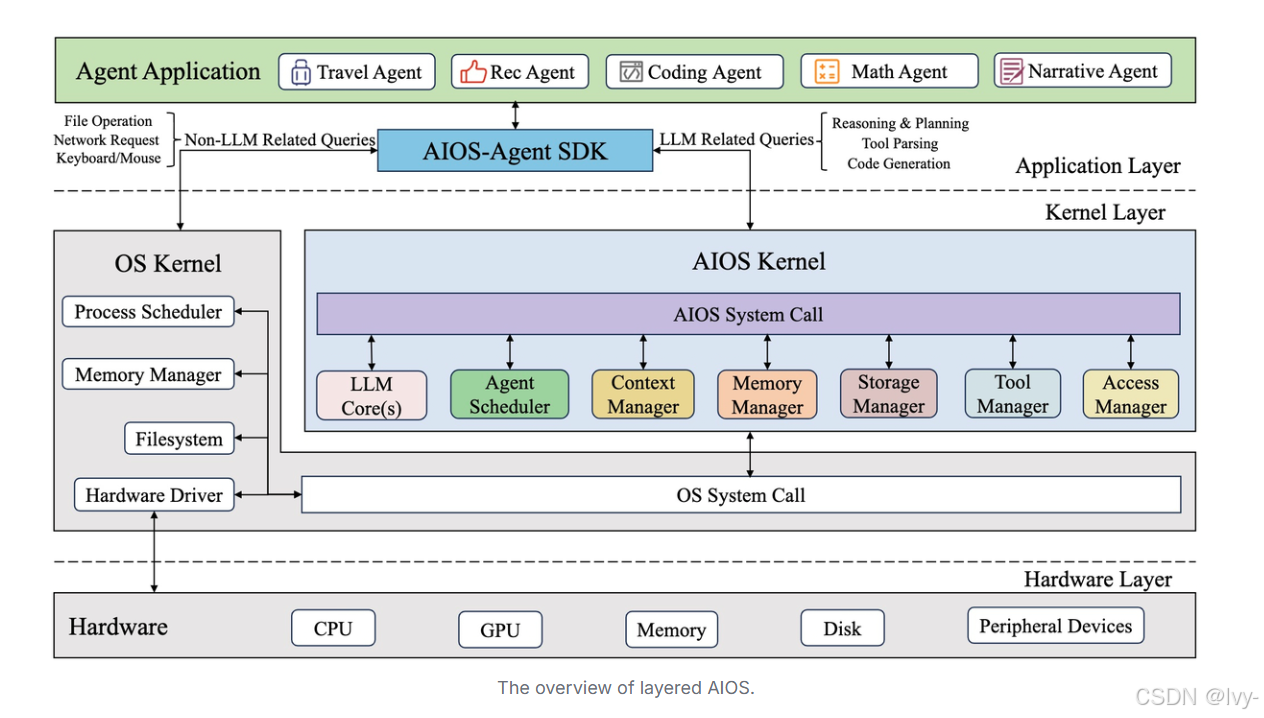
架构设计
┌─────────────────────────────────────────┐
│         Application Layer               │
│  (AI Agents, Workflows, Applications)   │
├─────────────────────────────────────────┤
│         AIOS Kernel Layer               │
│  ┌──────────┐  ┌──────────┐            │
│  │ Agent    │  │ Context  │            │
│  │Scheduler │  │ Manager  │            │
│  └──────────┘  └──────────┘            │
│  ┌──────────┐  ┌──────────┐            │
│  │   LLM    │  │  Memory  │            │
│  │  Engine  │  │ Manager  │            │
│  └──────────┘  └──────────┘            │
├─────────────────────────────────────────┤
│       Hardware Abstraction Layer        │
│     (GPU, CPU, Storage, Network)        │
└─────────────────────────────────────────┘
适用场景
- 🎓 学术研究:探索AI Agent架构和调度算法
- 🏢 企业级应用:需要管理大量AI代理的场景
- 🔬 实验平台:测试不同LLM的集成效果
2️⃣ OpenDAN - 个人化的AI操作系统
GitHub : https://github.com/fiatrete/OpenDAN-Personal-AI-OS
定位: Personal AI OS
核心理念
OpenDAN的目标是"Open and Do Anything Now with AI"------创建一个真正属于个人的AI操作系统。它强调本地运行 和隐私保护,可以在从PC到树莓派的各种设备上运行
概念与特性
1. AI Agent(智能代理)
- 由大语言模型驱动
- 拥有独立的记忆系统
- 可以执行复杂任务
2. AI Workflow(AI工作流)
- 将不同的AI Agent组织成工作流
- 支持复杂任务的自动化
3. 硬件优化
- 针对特定硬件优化
- 支持大多数开源AI应用的本地运行
快速开始示例
bash
# 安装OpenDAN
git clone https://github.com/fiatrete/OpenDAN-Personal-AI-OS.git
cd OpenDAN-Personal-AI-OS

# 使用Docker运行
docker-compose up -d

# 配置LLM核心
# OpenDAN至少需要一个LLM核心
# 在agent配置中设置LLM
架构特点
OpenDAN采用模块化设计,核心组件包括:
- Agent Runtime: 代理运行环境
- Knowledge Base: 个人知识库
- Workflow Engine: 工作流引擎
- Integration Layer: 与各种AI模型的集成层
适用场景
- 👤 个人用户:构建私人AI助手
- 🏠 智能家居:在本地设备上运行AI
- 🔒 隐私敏感:需要完全控制数据的场景
3️⃣ Agent S - 像人类一样使用计算机
GitHub : https://github.com/simular-ai/Agent-S
核心概念: Agent-Computer Interface (ACI)
突破性创新
Agent S是一个开源的代理框架,它的独特之处在于通过GUI实现自主的计算机交互------让AI像人类一样使用鼠标、键盘和屏幕。
核心能力
1. GUI自主交互
- 理解屏幕内容
- 执行点击、输入等操作
- 跨应用程序工作
2. 多模态理解
- 视觉识别(截图理解)
- 文本理解
- 上下文感知
3. 任务规划与执行
- 将复杂任务分解为步骤
- 自主决策下一步操作
- 错误恢复机制
技术架构
python
# Agent S 核心工作流程
┌──────────────┐
│ User Command │
└──────┬───────┘
       │
       ▼
┌──────────────────┐
│ Task Planner     │  # 任务规划
│ (LLM-based)      │
└──────┬───────────┘
       │
       ▼
┌──────────────────┐
│ Screen Analyzer  │  # 屏幕分析
│ (Vision Model)   │
└──────┬───────────┘
       │
       ▼
┌──────────────────┐
│ Action Executor  │  # 动作执行
│ (GUI Controller) │
└──────┬───────────┘
       │
       ▼
┌──────────────────┐
│ Result Validator │  # 结果验证
└──────────────────┘
适用场景
- 🤖 RPA增强:智能化的流程自动化
- 🧪 软件测试:自动化UI测试
- 📊 数据采集:跨应用的数据提取
- 🎮 游戏AI:自主游戏代理
对比
| 特性 | AIOS | OpenDAN | Agent S |
|---|---|---|---|
| 核心定位 | AI Agent OS | Personal AI OS | Computer Interaction Framework |
| LLM集成 | 内核级 | 模块级 | 应用级 |
| 部署方式 | 服务器/云端 | 本地设备 | 任意环境 |
| 主要接口 | API + CLI | CLI + Web | GUI自动化 |
| 内存管理 | ✅ 统一管理 | ✅ 个人知识库 | ⚠️ 任务级 |
| 代理调度 | ✅ 高级调度 | ✅ 工作流编排 | ⚠️ 单任务 |
| 隐私保护 | ⚠️ 取决于部署 | ✅ 完全本地 | ⚠️ 取决于配置 |
| 学习曲线 | 陡峭 | 中等 | 平缓 |
选型决策树
你的需求是什么?
│
├─ 需要管理多个AI代理的企业级应用
│  └─ 选择 AIOS
│     ✓ 强大的调度能力
│     ✓ 统一的资源管理
│     ✓ 学术支持
│
├─ 需要个人AI助手,注重隐私
│  └─ 选择 OpenDAN
│     ✓ 本地运行
│     ✓ 硬件优化
│     ✓ 易于定制
│
└─ 需要AI自动操作计算机
   └─ 选择 Agent S
      ✓ GUI自动化
      ✓ 跨应用工作
      ✓ 快速上手
代码
示例1:AIOS - 创建和调度AI Agent
python
# AIOS Agent 创建示例
from aios import AIOS, Agent

# 初始化AIOS
aios = AIOS(
    llm_name="gpt-4",
    max_agents=10,
    scheduler_type="fifo"  # 先进先出调度
)

# 创建一个研究助手Agent
research_agent = Agent(
    name="ResearchAssistant",
    task="Summarize recent papers on AI OS",
    llm=aios.get_llm(),
    tools=["web_search", "pdf_reader", "summarizer"]
)

# 创建一个代码助手Agent
code_agent = Agent(
    name="CodeAssistant",
    task="Review and optimize Python code",
    llm=aios.get_llm(),
    tools=["code_analyzer", "linter", "formatter"]
)

# 注册Agent到AIOS
aios.register_agent(research_agent)
aios.register_agent(code_agent)

# 并发执行多个Agent
results = aios.run_agents([
    research_agent,
    code_agent
])

# 查看结果
for agent_name, result in results.items():
    print(f"{agent_name}: {result}")
运行结果示例:
[AIOS Scheduler] Starting agent execution...
[AIOS Scheduler] ResearchAssistant: RUNNING
[AIOS Scheduler] CodeAssistant: QUEUED
[AIOS Memory] Allocated 2GB for ResearchAssistant
[ResearchAssistant] Searching web for papers...
[ResearchAssistant] Found 15 relevant papers
[ResearchAssistant] Generating summary...
[AIOS Scheduler] ResearchAssistant: COMPLETED
[AIOS Scheduler] CodeAssistant: RUNNING
[CodeAssistant] Analyzing code structure...
[CodeAssistant] Found 3 optimization opportunities
[AIOS Scheduler] CodeAssistant: COMPLETED

ResearchAssistant: Summary of 15 papers on AI OS...
CodeAssistant: Code review complete. 3 suggestions provided.
示例2:OpenDAN - 构建个人AI工作流
python
# OpenDAN Workflow 示例
from opendan import Agent, Workflow, KnowledgeBase

# 创建知识库
kb = KnowledgeBase(
    name="my_knowledge",
    storage_path="/home/user/opendan/kb"
)

# 添加个人文档到知识库
kb.add_documents([
    "/path/to/my/notes",
    "/path/to/my/documents"
])

# 创建个人助手Agent
assistant = Agent(
    name="PersonalAssistant",
    llm="llama-2-7b",  # 本地运行的LLM
    knowledge_base=kb,
    personality="helpful and concise"
)

# 创建邮件处理Agent
email_agent = Agent(
    name="EmailProcessor",
    llm="llama-2-7b",
    tools=["email_reader", "email_sender"]
)

# 创建工作流
morning_routine = Workflow(
    name="MorningRoutine",
    agents=[assistant, email_agent]
)

# 定义工作流步骤
morning_routine.add_step(
    agent=email_agent,
    task="Check and summarize new emails",
    next_step="brief_user"
)

morning_routine.add_step(
    name="brief_user",
    agent=assistant,
    task="Create morning briefing with email summary and calendar",
    output="voice"  # 语音输出
)

# 执行工作流
result = morning_routine.run()
print(result)
运行结果示例:
[OpenDAN] Loading LLM: llama-2-7b (local)
[OpenDAN] LLM loaded in 3.2s
[OpenDAN] Initializing knowledge base...
[OpenDAN] Indexed 1,234 documents

[Workflow: MorningRoutine] Starting...
[EmailProcessor] Connecting to email server...
[EmailProcessor] Found 12 new emails
[EmailProcessor] Generating summary...

[PersonalAssistant] Creating morning briefing...
[PersonalAssistant] Accessing calendar...
[PersonalAssistant] Generating voice output...

🔊 Good morning! You have 12 new emails:
   - 3 urgent: Client meeting rescheduled to 2pm
   - 5 newsletters
   - 4 team updates

   Your calendar today:
   - 10am: Team standup
   - 2pm: Client meeting (rescheduled)
   - 4pm: Code review session
示例3:Agent S - 自动化GUI操作
python
# Agent S GUI 自动化示例
from agent_s import AgentS, Task

# 初始化Agent S
agent = AgentS(
    model="gpt-4-vision",  # 需要视觉能力的模型
    screen_resolution=(1920, 1080)
)

# 定义复杂任务:在线购物比价
task = Task(
    description="""
    1. Open Chrome browser
    2. Search for 'wireless mouse' on Amazon
    3. Find the top 3 results and record prices
    4. Search for same products on eBay
    5. Compare prices and create a summary
    """,
    max_steps=50,
    timeout=300  # 5分钟超时
)

# 执行任务
result = agent.execute(task)

# 查看执行过程
for step in result.steps:
    print(f"Step {step.number}: {step.action}")
    print(f"  Result: {step.result}")
    print(f"  Screenshot: {step.screenshot_path}")

# 查看最终结果
print("\n=== Final Summary ===")
print(result.summary)
运行结果示例:
[Agent S] Initializing...
[Agent S] Screen resolution: 1920x1080
[Agent S] Vision model loaded: gpt-4-vision

[Agent S] Task started: Online shopping comparison
[Agent S] Analyzing screen...

Step 1: Click on Chrome icon
  Result: ✓ Chrome opened
  Screenshot: /tmp/agent_s/step_001.png

Step 2: Type 'amazon.com' in address bar
  Result: ✓ Navigated to Amazon
  Screenshot: /tmp/agent_s/step_002.png

Step 3: Click on search box
  Result: ✓ Search box focused
  Screenshot: /tmp/agent_s/step_003.png

Step 4: Type 'wireless mouse'
  Result: ✓ Text entered
  Screenshot: /tmp/agent_s/step_004.png

Step 5: Press Enter
  Result: ✓ Search results loaded
  Screenshot: /tmp/agent_s/step_005.png

Step 6: Extract price from first result
  Result: ✓ Price: $24.99 (Logitech M510)
  Screenshot: /tmp/agent_s/step_006.png

... (继续执行剩余步骤)

=== Final Summary ===
Price Comparison for Wireless Mouse:

Product: Logitech M510
- Amazon: $24.99
- eBay: $22.50
- Best Deal: eBay (save $2.49)

Product: Microsoft Bluetooth Mouse
- Amazon: $19.99
- eBay: $21.99
- Best Deal: Amazon (save $2.00)

Product: Razer Basilisk X
- Amazon: $49.99
- eBay: $47.99
- Best Deal: eBay (save $2.00)

Recommendation: Buy Logitech M510 on eBay for best overall value.
未来展望
技术趋势
1. 统一标准的出现
目前AI OS领域缺乏统一标准,每个项目都有自己的架构和API。未来可能会出现类似POSIX的AI OS标准,定义:
- Agent通信协议
- 内存管理接口
- 工具调用规范
- 安全和权限模型
2. 边缘AI OS的崛起
随着边缘计算和本地LLM的发展,像OpenDAN这样的本地AI OS将变得更加重要。预计2025-2026年将看到:
- 专用AI芯片的普及
- 更小更快的开源模型
- 隐私计算技术的成熟
3. 多模态融合
未来的AI OS将深度整合:
- 视觉理解(如Agent S)
- 语音交互
- 触觉反馈
- 脑机接口
面临的挑战
1. 性能与资源管理
挑战:LLM推理消耗大量计算资源,如何在有限资源下高效调度多个代理?
解决方向:
- 模型量化和剪枝
- 智能缓存和预测
- 分层调度算法
2. 安全与隐私
挑战:AI Agent拥有系统级权限,如何防止恶意行为?
解决方向:
- 沙箱隔离机制
- 权限最小化原则
- 行为审计和监控
3. 可解释性与可控性
挑战:AI决策的黑盒性质使得调试和控制困难。
解决方向:
- 决策过程可视化
- 人类在环(Human-in-the-loop)
- 可撤销的操作机制
开发者指南
立即开始
bash
# 1. 克隆所有项目进行学习
git clone https://github.com/agiresearch/AIOS.git
git clone https://github.com/fiatrete/OpenDAN-Personal-AI-OS.git
git clone https://github.com/simular-ai/Agent-S.git

# 2. 设置开发环境
cd AIOS && pip install -r requirements.txt
cd ../OpenDAN-Personal-AI-OS && docker-compose up -d
cd ../Agent-S && pip install -e .

# 3. 运行示例
python examples/basic_agent.py
学习路径
-
基础阶段(1-2周)
- 理解LLM基础原理
- 学习Agent概念和架构
- 运行简单示例
-
进阶阶段(1-2个月)
- 深入一个AI OS项目
- 贡献代码或文档
- 构建自己的Agent
-
专家阶段(3-6个月)
- 设计自己的AI OS架构
- 发表论文或技术博客
- 参与社区治理
参与
- AIOS: 关注学术论文,参与算法优化
- OpenDAN: 贡献硬件适配和本地化
- Agent S: 改进GUI识别和操作精度
结语
AI操作系统不是遥远的未来,而是正在发生的现实。AIOS、OpenDAN和Agent S这三个项目代表了不同的技术路径和应用场景,但它们都在朝着同一个目标前进:让AI成为计算机的原生能力,而不是附加功能。
作为开发者,现在是最好的时机:
- ✅ 技术栈尚未固化,创新空间巨大
- ✅ 开源社区活跃,容易获得支持
- ✅ 应用场景广阔,商业价值明显
行动起来,不要只是观望。 克隆一个仓库,运行第一个示例,提交第一个PR------你的代码可能会成为未来AI OS的一部分。
📚 参考资源
官方文档
- AIOS Documentation: https://github.com/agiresearch/AIOS/wiki
- OpenDAN Guide: https://github.com/fiatrete/OpenDAN-Personal-AI-OS/blob/main/doc/QuickStart.md
- Agent S Paper: https://iclr.cc/virtual/2025/poster/28525
推荐阅读
- "The AI Stack: Building the New Operating System Layer" 5
- "AI Operating Systems & Agentic OS Explained" 2
- "AIOS: Paving the Way for the Operating System of Autonomous AI Agents" 8
社区资源
- AIOS Foundation: https://www.aios.foundation/
- OpenDAN Official: https://www.opendan.ai/
- Agent S Research: https://www.simular.ai/
作者 : lvy+gpt
日期 : 2025年12月31日
标签: #AI操作系统 #开源 #AIOS #OpenDAN #AgentS #LLM #AI代理
💬 欢迎讨论:你最看好哪个AI OS项目?在评论区分享你的观点!
⭐ 如果觉得有用,请Star本文对应的GitHub仓库,让更多人看到