进程间通信介绍
++问题1:进程间通信是什么?++
两个或者多个进程实现数据层面的交互。由于进程独立性的存在,导致进程通信的成本比较高。
++问题2:进程间通信的原因?++
- 发送基本数据
- 发生命令,用一个进程控制另外一个进程
- 实现某种协同工作
- 通知事件
- ...
进程间通信的目的
- 数据传输:一个进程需要将它的数据发生给另外一个进程
- 资源共享:多个进程之间共享同样的资源
- 通知事件:一个进程需要向另一个或者一组进程发生消息,通知发生了某种事件(如进程终止时需要通知父进程)
- 进程控制:有些进程希望完全控制另一个进程的执行,此时控制进程希望能够拦截另一个进程的所有陷入和异常,并能够及时指定其状态改变。
进程之间是相互独立的,而进程间通信是有成本的。
++问题3:如何进行进程间通信?++
- 进程间通信的本质:必须让不同进程看到用一份"资源"
- "资源"是指特定形式的内存空间
- 这个"资源"一般是由操作系统提供,而不是其中一个进程(破坏进程的独立性)提供。
- 进程访问这块空间进程通信,本质就是访问操作系统。进程代表的就是用户,"资源"从创建------使用------释放,都是使用系统调用接口。
一般操作系统,会有一个独立的通信模块,隶属于文件系统,在系统中称为IPC通信模块。进程间通信是
进程间通信发展
- 管道
- System V进程间通信
- POSIX进程间通信
进程间通信分类
管道:
- 匿名管道pipe
- 命名管道
System V IPC
- System V 消息队列
- System V 共享内存
- System V 信号量
POSIX IPC
- 消息队列
- 共享内存
- 信号量
- 互斥量
- 条件变量
- 读写锁
基于文件级别通信的方式------管道
管道是Unix中最古老的进程间通信的形式,将从一个进程连接到另一个进程的一个数据流称为一个管道。
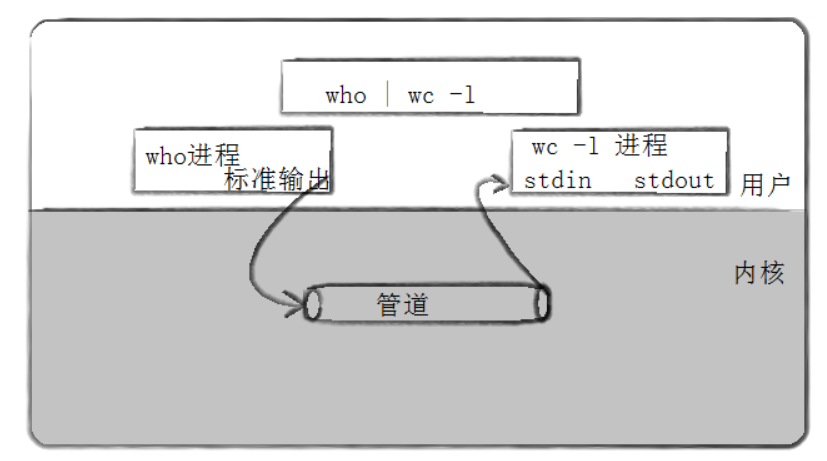
管道原理
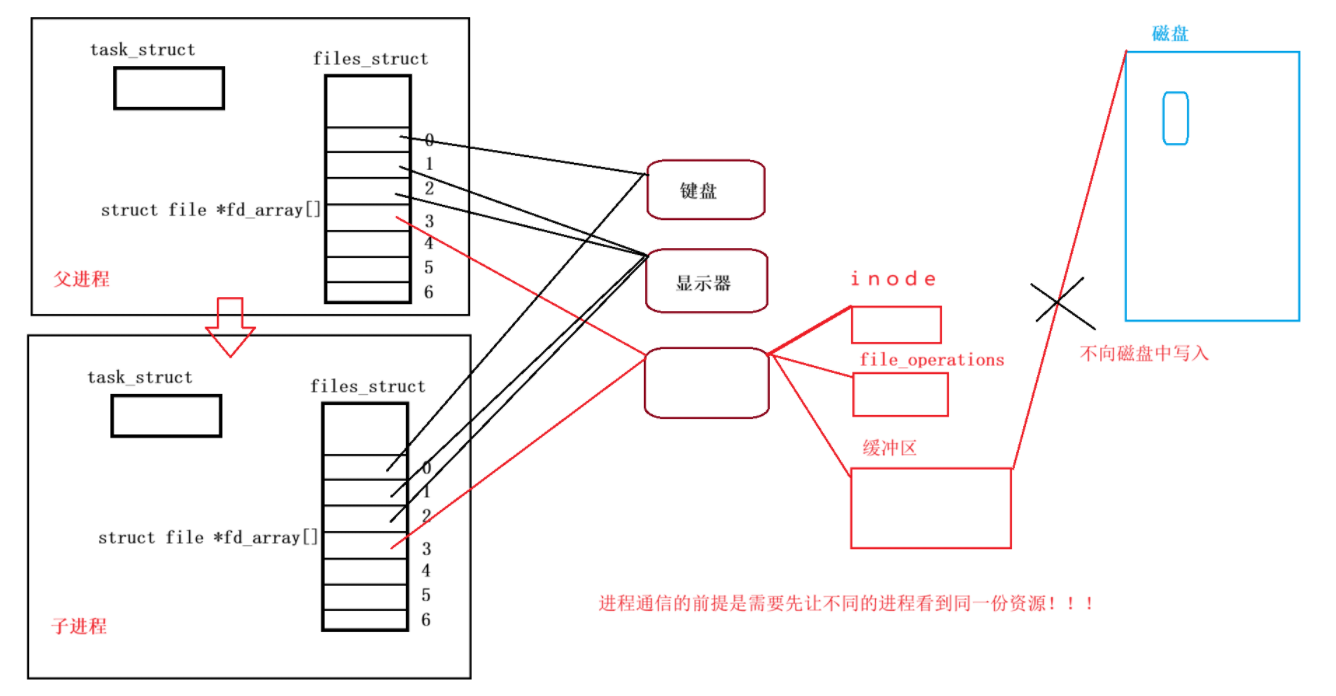
进程通信的本质前提是先让不同的进程看到同一份资源,即管道就是文件。在strcut file结构体中存在引用计数,父子进程存在相同的指针指向同一个文件时,引用计数会增加。
当父进程以读或者写的方式,打开一个文件的时候,子进程也会以同样的方式,以读或者写方式打开一个文件,此时就无法进行父进程写入,子进程写入的进程读取,所以需要通过下面的方式来进行通信:
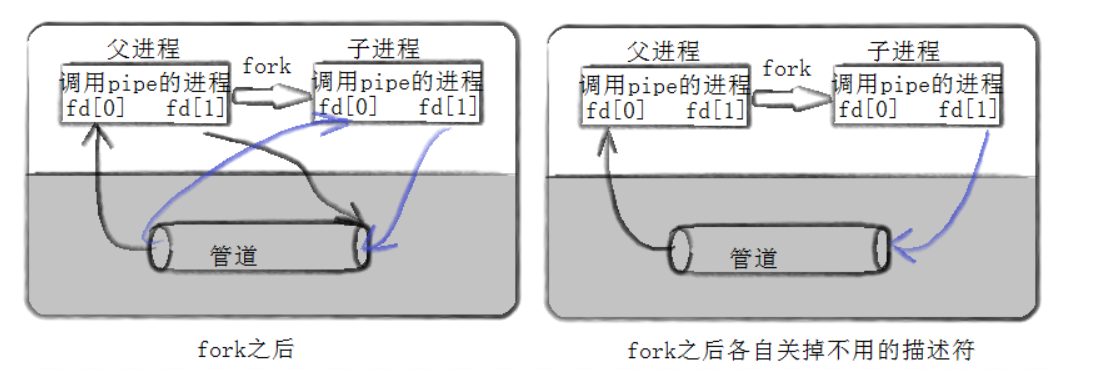
站在文件的角度:
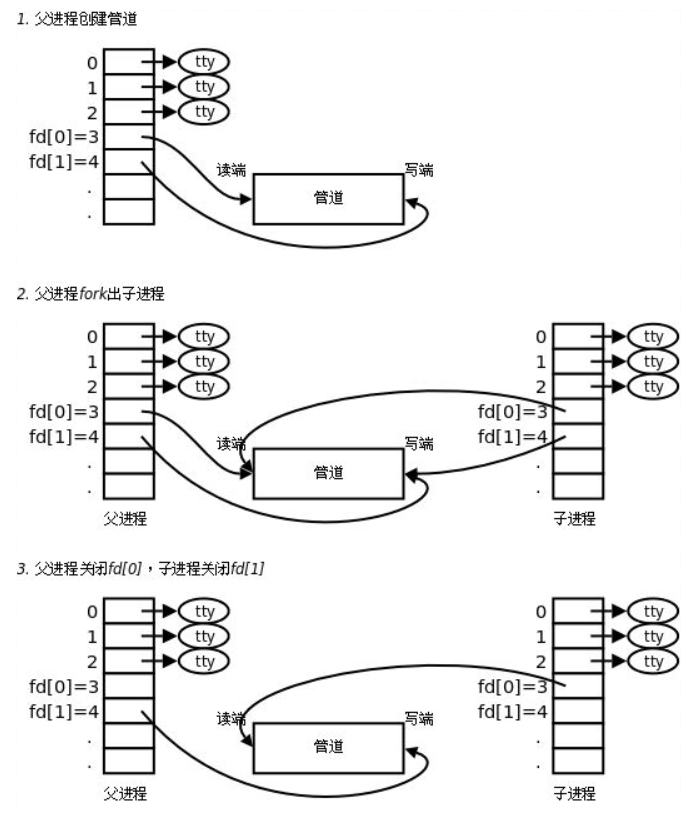
在内核角度分析:
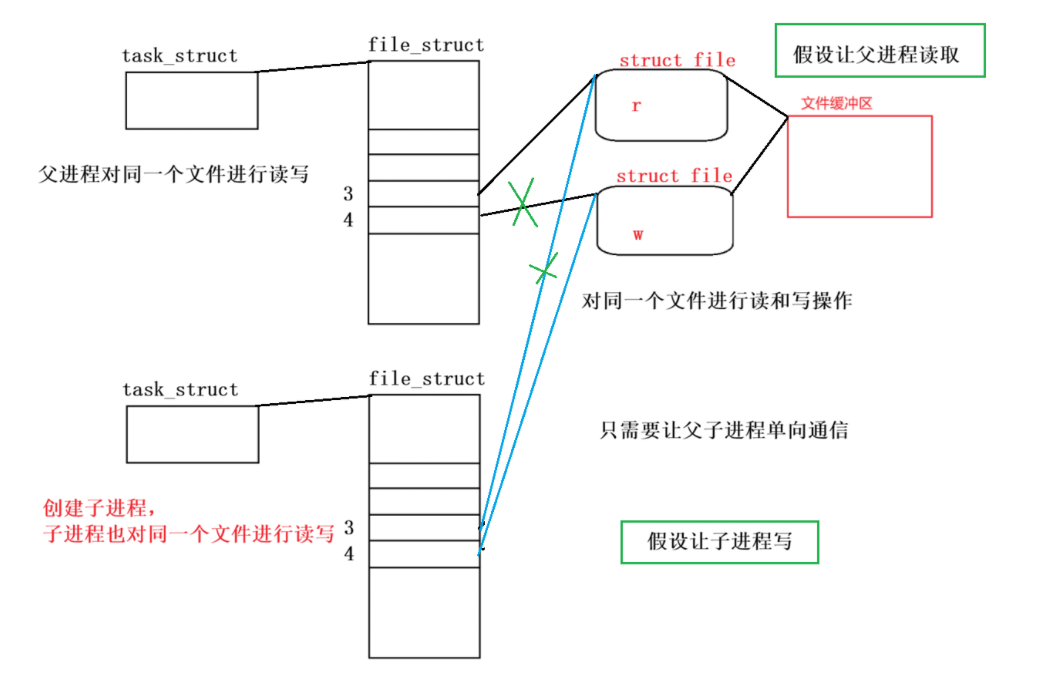
这种基于文件级别通信的方式只能进行单向通信,也就是管道通信的原理。
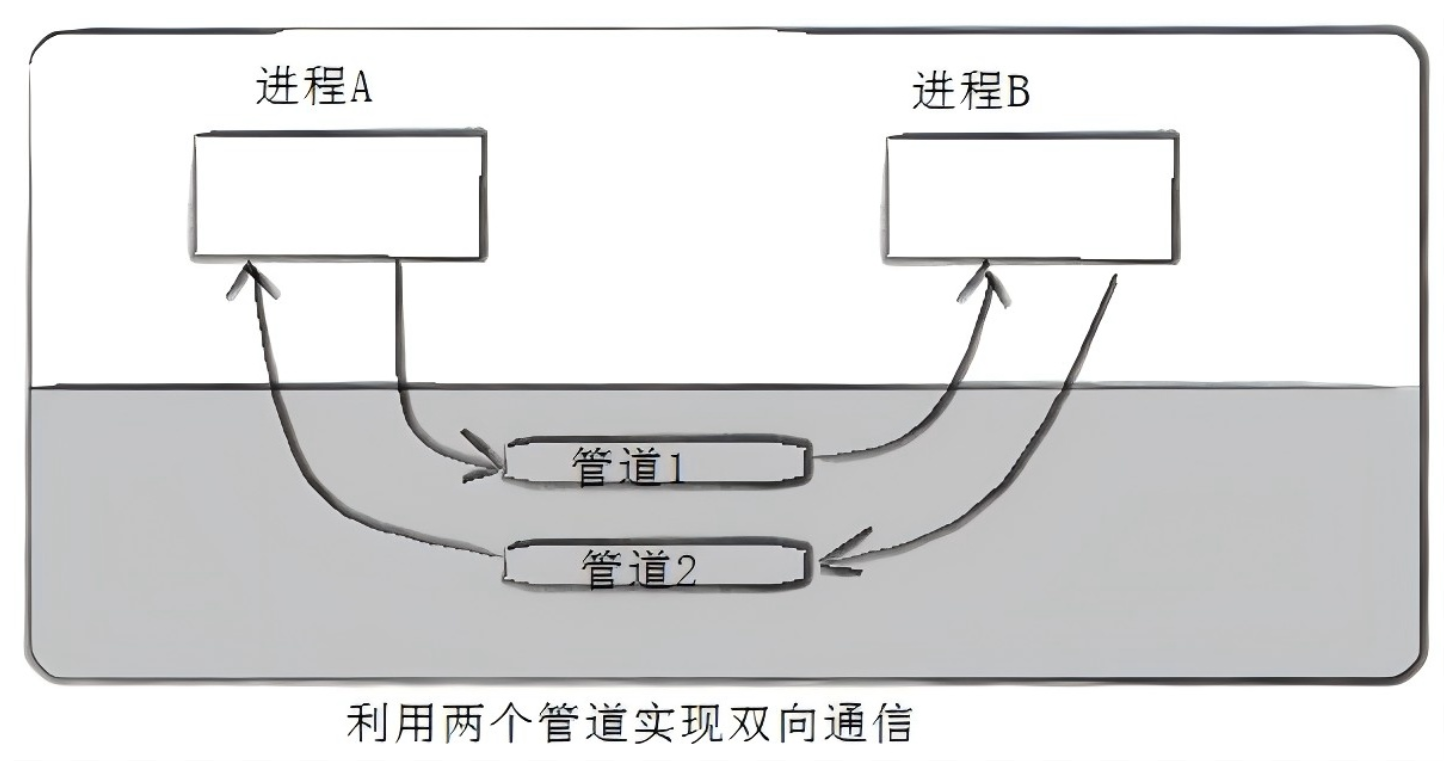
问题:如果需要使用管道进行双向通信------>可以使用多个管道。
【注意】如果两个进程之间没有任何关系,是不能通过管道的方式进行通信的,也就是说只有血缘关系之间可以进行通信的,常用于父子进程之间。
上面没有设置名字的管道称之为匿名管道。这里没有进行通信,只是建立了通信信道。
接口
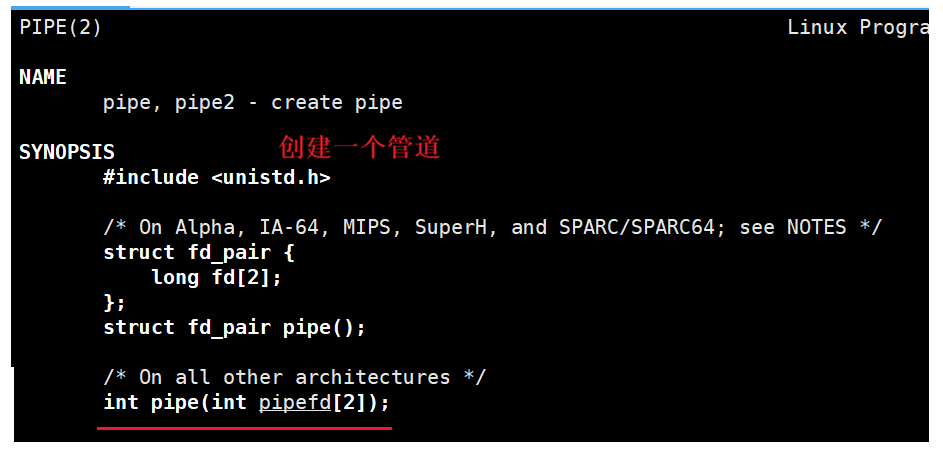
int pipe(int pipefd2);
- pipefd 是一个输出型参数,作用是分别以读取和写入的方式打开的文件描述符数字带出,让用户使用,pipefd0读下标,pipefd1写下标。
【功能】pipe函数在内核级创建文件
编码实现
cpp
#include<iostream>
#include<unistd.h>

using namespace std;

#define N 2

int main()
{
    int pipefd[2] = {0};
    int n = pipe(pipefd);
    if(n < 0) return 1;

    cout << "pipefd[0]: " << pipefd[0] << " ; " << "pipefd[1]: " << pipefd[1] << endl;

    return 0;
}
完成第一步工作,父进程创建管道。
cpp
    pid_t id = fork();
    if(id < 0) return 2;
    if(id == 0)
    {
        // child

    }
    // father
完成第二步工作,父进程创建子进程
cpp
int main()
{
    int pipefd[2] = {0};
    int n = pipe(pipefd);
    if(n < 0) return 1;

    // cout << "pipefd[0]: " << pipefd[0] << " ; " << "pipefd[1]: " << pipefd[1] << endl;

    // child->w, father->r
    pid_t id = fork();
    if(id < 0) return 2;
    if(id == 0)
    {
        // child
        close(pipefd[0]);
        // use pipe

        // close pipe
        close(pipefd[1]);
        exit(0);
    }
    // father
    close(pipefd[1]);
    // use pipe


    // close pipe
    close(pipefd[0]);

    return 0;
}
第三步,关闭子进程管道的读端,关闭父进程管道的写端。
cpp
#include<iostream>
#include<unistd.h>
#include<cstring>
#include<cstdlib>
#include<string>
#include<stdio.h>
#include<sys/types.h>
#include<sys/wait.h>


using namespace std;

#define N 2
#define NUM 1024

// child
void Writer(int wfd)
{
    string s = "hello, I am child";
    pid_t self = getpid();
    int number = 0;

    char buffer[NUM];
    while(true)
    {
        // create the sending string
        buffer[0] = 0; // clear string, reminder user for the array as the string
        snprintf(buffer, sizeof(buffer), "%s-%d-%d", s.c_str(), self, number);
        // cout << buffer << endl; // verification
        // send to the father process
        write(wfd, buffer, strlen(buffer));
        number++;
        sleep(1);
    }
}

// father
void Reader(int rfd)
{
    char buffer[NUM];

    while(true)
    {
        buffer[0] = 0;
        // receive child information
        ssize_t n = read(rfd, buffer, sizeof(buffer)); // sizeof != strlen
        if(n > 0)
        {
            buffer[n] = '\0'; // or buffer[n] = 0; as the string
            cout << "father get a message[" << getpid() << "]#" << buffer << endl;
        }
    }
}

int main()
{
    int pipefd[2] = {0};
    int n = pipe(pipefd);
    if(n < 0) return 1;

    // cout << "pipefd[0]: " << pipefd[0] << " ; " << "pipefd[1]: " << pipefd[1] << endl;

    // child->w, father->r
    pid_t id = fork();
    if(id < 0) return 2;
    if(id == 0)
    {
        // child
        close(pipefd[0]);
        // use pipe
        Writer(pipefd[1]);

        // close pipe
        close(pipefd[1]);
        exit(0);
    }
    // father
    close(pipefd[1]);
    // use pipe
    Reader(pipefd[0]);

    pid_t rid = waitpid(id, nullptr, 0);
    if(rid < 0) return 3; // fail

    // close pipe
    close(pipefd[0]);

    return 0;
}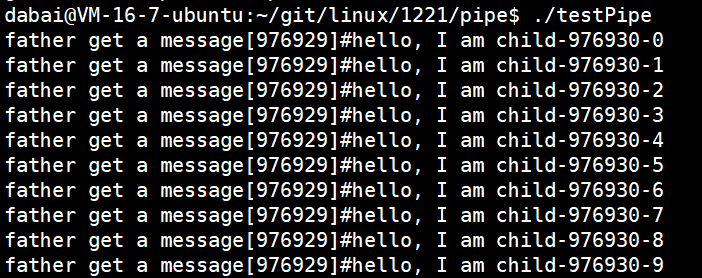
第四步,子进程向文件内写入数据,父进程向文件读取数据
管道的特征:
- 管道通信只能是具有血缘关系的进程进行进程间通信
- 管道只能单向通信
- 父子进程是会进行协同的,父子进程会对管道进行同步与互斥的,主要是为了保护管道文件的数据安全的(多线程)
- 管道是面向字节流(网络)
- 管道是基于文件的,而文件的生命周期随进程的。
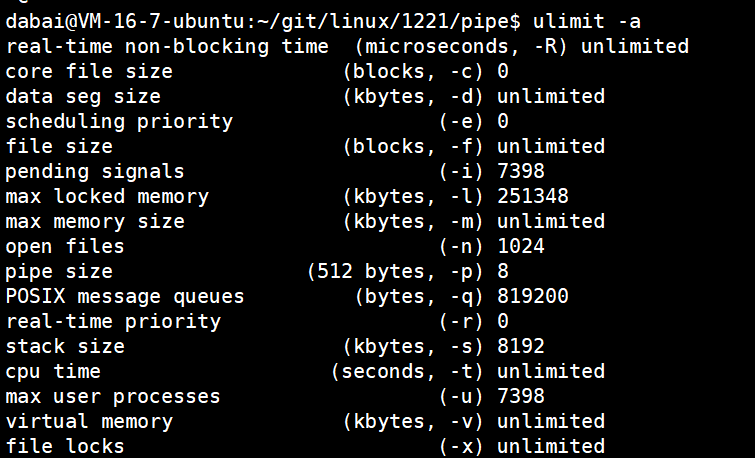
管道是有固定大小的(64kb)
指令:ulimit -a
【指令】查看操作系统对于资源的限制
管道中的4种情况:
- 读写端正常,管道如果为空,读端就要阻塞;
- 读写端正常,管道如果为满,写端就要阻塞
- 写端关闭,读端就会读到0,表明读到了文件(pipe)结尾,不会被阻塞。
- 写端正常,但是读端关闭,操作系统就要杀掉正在写入的进程,使用的方式是通过信号杀掉,这个信号是13号信号(SIGPIPE)
【注意】让子进程写入,父进程读取的原因就是因为当父进程读端关闭,操作系统就会杀掉正在写入的进程,也就是子进程。
操作系统是不会做低效、浪费等类似的工作的。
管道的应用场景
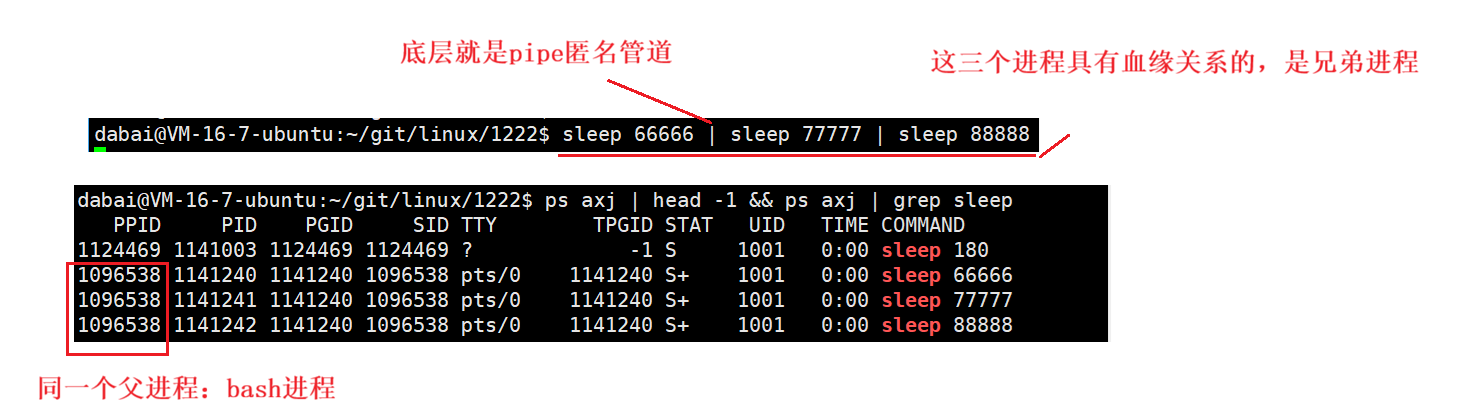
(1)指令中存在 | ,例如cat test.txt | head -10 | tail -5。
(2)自定义shell中管道应用
- 分析输入的命令行字符串,获取有多少个 | ,将命令分为多个子命令字符串
- malloc申请空间,pipe先申请多个管道。
- 循环fork创建多个子进程,每一个子进程的重定向情况:(1)最开始的进程进行输出重定向(dup2),将1->指定的一个管道写端。(2)中间的进程进行输入输出重定向,0标准输入重定向到上一个管道的读端,1标准输出重定向到下一个管道的写端。(3)最后的进程,进行输入重定向,将0标准输入重定向到最后一个管道的读端。
- 分别让不同的子进程执行不同的命令------底层是exec*------程序替换不会影响该进程曾经打开的文件,不会影响预先设置好的管道重定向。
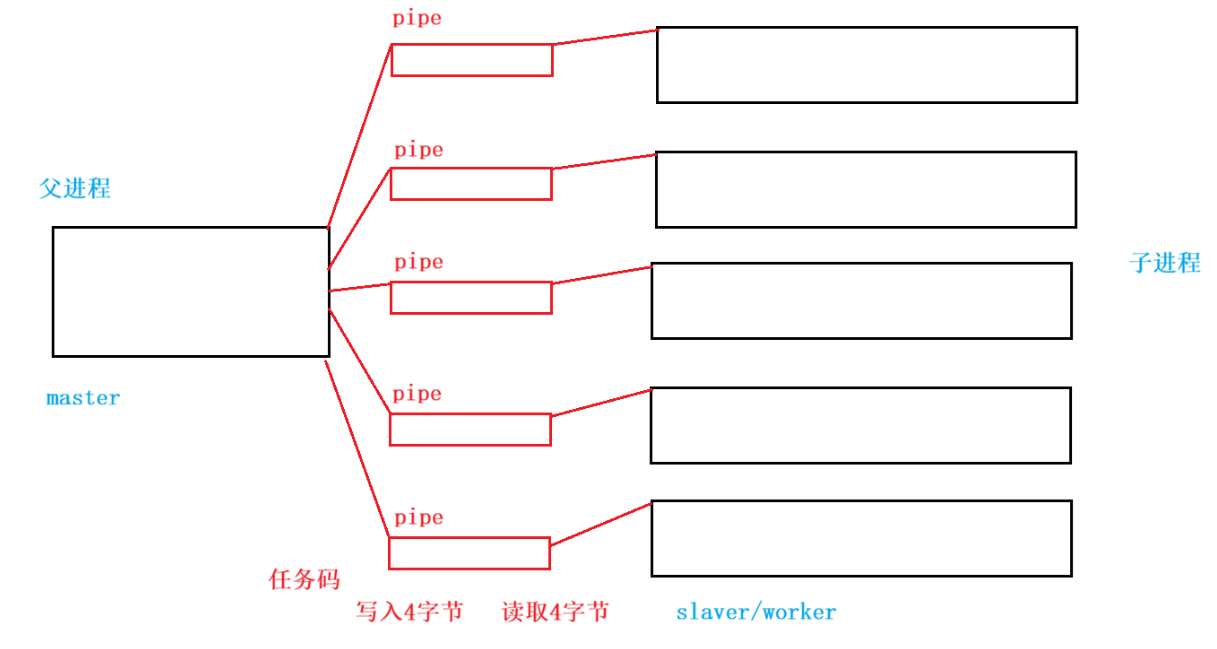
(3)使用管道实现一个简易版本的进程池
系统调用是有成本的,可以先创建一大批进程并储存好,当需要使用进程的时候,再使用已经创建好的进程,可以提供调用的效率,这种方式称为进程池。
ProcessPool.cc文件代码
cpp
#include "Task.hpp"
#include <string>
#include <vector>
#include <unistd.h>
#include <cstdlib>
#include <cassert>
#include <ctime>
#include <sys/types.h>
#include <sys/wait.h>

// process numbers
const int processnum = 5;
std::vector<task_t> tasks;

// pipe channel
class channel
{
public:
    channel(int cmdfd, int slaverid, const std::string& processname)
    :_cmdfd(cmdfd)
    ,_slaverid(slaverid)
    ,_processname(processname)
    {}
public:
    int _cmdfd;        // The file descriptor for sending the task
    pid_t _slaverid;   // The pid of the child process
    std::string _processname;  // The name of the child process >>> Facilitate the printing of logs
};

// void slaver(int rfd)
// {
//     while(true)
//     {
//         std::cout << getpid() << "--" << "read fd is : " << rfd << std::endl;
//         sleep(1);
//     }
// }

void slaver()
{
    while(true)
    {
        int cmdcode = 0;
        int n = read(0, &cmdcode, sizeof(int));
        if(n == sizeof(int))
        {
            // Execute the task list corresponding to the cmdcode
            std::cout << "slaver say@ get a command: " << getpid() << " : cmdcode : " << cmdcode << std::endl;
            if(cmdcode >= 0 && cmdcode < tasks.size())  tasks[cmdcode]();
        }
        if(n == 0)
        {
            break;
        }
    }
}

// 传参的三种方式(建议)
// 输入:const &
// 输出:*
// 输入输出:&
void InitProcessPool(std::vector<channel>* channels)
{
    std::vector<int> oldfds;
    for(int i = 0; i < processnum; ++i)
    {
        int pipefd[2] = {0}; // Temporary space
        int n = pipe(pipefd);
        assert(!n);
        (void)n;

        pid_t id = fork();
        if(id == 0)
        {
            for(auto fd : oldfds) close(fd);
            // child process(r)
            close(pipefd[1]);
            dup2(pipefd[0], 0);
            close(pipefd[0]);
            slaver();
            std::cout << "process : " << getpid() << " quit" << std::endl;
            // slaver(pipefd[0]);
            exit(0);
        }
        // father process(w)
        close(pipefd[0]);

        // Add the channel field
        std::string name = "process-" + std::to_string(i);
        channels->push_back(channel(pipefd[1], id, name));
        oldfds.push_back(pipefd[1]);
    }
}

void Debug(const std::vector<channel>& channels)
{
    // test code
    for(const auto &c : channels)
    {
        std::cout << c._cmdfd << " " << c._slaverid << " " << c._processname << std::endl;
    }
}

void Menu()
{
    std::cout << "##########################" << std::endl;
    std::cout << "##########################" << std::endl;
    std::cout << "# 1. task1       2.task2 #" << std::endl;
    std::cout << "# 3. task3       4.task4 #" << std::endl;
    std::cout << "# 0. quit                #" << std::endl;
    std::cout << "##########################" << std::endl;
    std::cout << "##########################" << std::endl;

}

void ctrlSlaver(const std::vector<channel>& channels)
{
    int which = 0;
    // for(int i = 1; i <= 100; ++i)
    //int cnt = 10;
    //while(cnt--)
    while(true)
    {
        Menu();
        std::cout << "Please Enter@ ";
        int select = 0;
        std::cin >> select;

        if(select <= 0 || select >= 5) break;

        // 1.select a task
        // int cmdcode = rand() % tasks.size();
        int cmdcode = select - 1;

        // 2.select a process(load balancing)
        // (1)random method
        // int processpos = rand() % channels.size();
        // (2)Rotation method - use which

        std::cout << "father say : " << "cmdcode: " << cmdcode << " " <<"already send to " << channels[which]._slaverid
        << "process name : " << channels[which]._processname << std::endl;

        // 3.send a task
        write(channels[which]._cmdfd, &cmdcode, sizeof(cmdcode));

        // (2)which
        which++;
        which %= channels.size();

        // sleep(1);
    }
}


void quitProcess(const std::vector<channel>& channels)
{
    for(const auto &c : channels) close(c._cmdfd);
    // sleep(10);
    for(const auto &c : channels) waitpid(c._slaverid, nullptr, 0);
    // sleep(10);
}

int main()
{
    LoadTask(&tasks);

    srand(time(nullptr) ^ getpid() ^ 1023);

    std::vector<channel> channels;
    // 1.initialize
    InitProcessPool(&channels);
    Debug(channels);

    // 2.start controlling the process child
    ctrlSlaver(channels);

    // 3.cleaning up and finalizing
    quitProcess(channels);


    sleep(1);
    return 0;
}
Task.hpp文件
cpp
#pragma once
#include <iostream>
#include <vector>


typedef void (*task_t)();

void task1()
{
    std::cout << "task1" << std::endl;
}

void task2()
{
    std::cout << "task2" << std::endl;

}

void task3()
{
    std::cout << "task3" << std::endl;

}

void task4()
{
    std::cout << "task4" << std::endl;
}

void LoadTask(std::vector<task_t> *tasks)
{
    tasks->push_back(task1);
    tasks->push_back(task2);
    tasks->push_back(task3);
    tasks->push_back(task4);
}
管道特点
- 只能用于具有共同祖先的进程(具有亲缘关系的进程)之间进行通信;通常一个管道由一个进程创建,然后该进程调用fork,此后父子进程之间就可以应用该管道。
- 管道提供流式服务
- 一般而言,进程退出,管道释放,所以管道的生命周期随进程
- 一般而言,内核会对管道操作进程同步与互斥。
- 管道是半双工的,数据只能向一个方向流动;需要双向通信的时候,需要建立起两个管道。
命名管道
- 管道应用的一个限制就是只能在具有共同祖先(具有亲缘关系)的进程间通信。
- 如果我们想在不相关的进程之间交换数据,可以使用FIFO文件来做这件事情,它经常被称为命令管道。
- 命名管道是一种特殊类型的文件。
如果毫不相干的进程进行进程间通信,可以使用命名管道。
创建一个命名管道
指令:mkfifo filename
【功能】创建一个命名管道
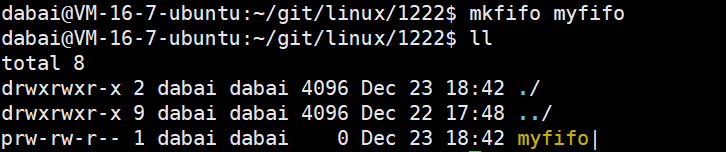


myfifo文件的大小始终为0.
理解命名管道
++问题1:如果两个不同的进程,打开同一个文件的时候,在内核中操作系统会打开几个文件?++
【答】操作系统会与打开匿名管道一样,在内核级打开一个命名管道。系统会单独创建一个管道文件,这个文件打开的时候不需要刷盘(不会保存在磁盘中),也就是说管道文件只是一个内存级文件。
进程间通信的前提,先让不同进程看到同一份资源。
++问题2:为什么确定两个进程打开的是同一个文件?++
【答】只需要让两个进程看到同一个路径下的同一个文件名,就会打开同一个文件,这种文件称为命名管道。
路径 + 文件名称 = 同一个文件,路径+文件名具有唯一性
使用命名管道进行编码
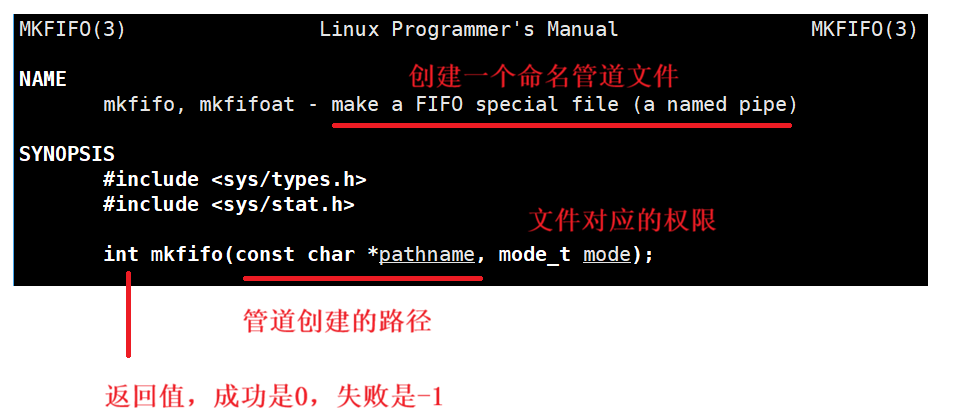
- int mkfifo(const char* filename, mode_t mode);
【功能】在程序中创建命名管道
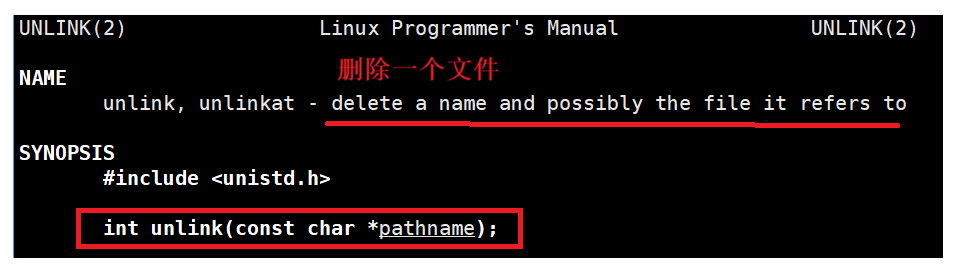
- int unlink(const char* pathname);
【功能】删除文件
server.cc服务端
cpp
#include"comm.hpp"

using namespace std;

// Manage pipe files

int main()
{
    Init init;

    // Open the channel
    int fd= open(FIFO_FILE, O_RDONLY);
    if(fd < 0)
    {
        perror("open");
        exit(FIFO_OPEN_ERR);
    }

    cout << "server open file done" << endl;

    // Start communication
    while(true)
    {
        char buffer[1024] = {0};
        int x = read(fd, buffer, sizeof(buffer));
        if(x > 0)
        {
            buffer[x] = 0;
            cout << "client say# " << buffer << endl;
        }
        else if(x == 0)
        {
            cout << "client quit, me too" << endl;
            break;
        }
        else break;
    }

    close(fd);


    return 0;
}
client.cc客户端
cpp
#include"comm.hpp"

using namespace std;

int main()
{
    int fd = open(FIFO_FILE, O_WRONLY);
    if(fd <= 0)
    {
        perror("open");
        exit(FIFO_OPEN_ERR);
    }

    cout << "client open file done" << endl;

    string line;
    while(true)
    {
        cout << "Please Enter@: ";
        getline(cin, line);

        write(fd, line.c_str(), line.size());
    }

    close(fd);


    return 0;
}
comm.hpp
cpp
#pragma once

#include <sys/types.h>
#include <sys/stat.h>
#include <iostream>
#include <cerrno>
#include <cstring>
#include <cstdlib>
#include <unistd.h>
#include <fcntl.h>
#include <string>

#define FIFO_FILE "./myfifo"
#define MODE 0664

enum
{
    FIFO_CREATE_ERR = 1,
    FIFO_DELETE_ERR,
    FIFO_OPEN_ERR
};

class Init
{
public:
    Init()
    {
        // Create a channel
        int n = mkfifo(FIFO_FILE, MODE);
        if (n == -1)
        {
            perror("mkfifo");
            exit(FIFO_CREATE_ERR);
        }
    }
    ~Init()
    {
        int m = unlink(FIFO_FILE);
        if (m == -1)
        {
            perror("unlink");
            exit(FIFO_DELETE_ERR);
        }
    }
};
makefile
cpp
.PHONY:all
all:server client
server:server.cc
	g++ -o $@ $^ -g -std=c++11
client:client.cc
	g++ -o $@ $^ -g -std=c++11
.PHONY:clean
clean:
	rm -f server client
穿插概念------日志
一般的日志信息,日志时间,日志的等级,日志的内容,文件的名称和行号
常见的日志等级有
- info:常规消息
- warning:报警信息
- Error:比较严重,可能需要立即处理
- Fatal:致命的问题
- Debug:调试
下面实现一个简单的日志函数
cpp
#pragma once

#include <iostream>
#include <stdarg.h>
#include <time.h>
#include <sys/types.h>
#include <sys/stat.h>
#include <fcntl.h>
#include <unistd.h>
#include <stdlib.h>

#define SIZE 1024

#define Info 0
#define Debug 1
#define Warning 2
#define Error 3
#define Fatal 4


#define Screen     1
#define Onefile    2
#define Classfile  3

#define logFile "log.txt"

class Log
{
public:
    Log()
    {
        printMethod = Screen;
        path = "./log/";
    }

    void Enable(int method)
    {
        printMethod = method;
    }


    std::string levelToString(int level)
    {
        switch (level)
        {
        case Info:
            return "Info";
        case Debug:
            return "Debug";
        case Warning:
            return "Warning";
        case Error:
            return "Error";
        case Fatal:
            return "Fatal";
        default:
            return "None";
        }
    }

    // void logmessage(int level, const char *format, ...)
    // {
    //     time_t t = time(nullptr);
    //     struct tm *ctime = localtime(&t);
    //     char leftbuffer[SIZE];
    //     snprintf(leftbuffer, sizeof(leftbuffer), "[%s][%d-%d-%d %d:%d:%d]", levelToString(level).c_str(),
    //              ctime->tm_year + 1900, ctime->tm_mon + 1, ctime->tm_mday, ctime->tm_hour, ctime->tm_min, ctime->tm_sec);

    //     char rightbuffer[SIZE * 2];
    //     va_list s;
    //     va_start(s, format);
    //     vsnprintf(rightbuffer, sizeof(rightbuffer), format, s);
    //     va_end(s);

    //     // 格式:默认部分+自定义部分
    //     char logtxt[SIZE * 4];
    //     snprintf(logtxt, sizeof(logtxt), "%s %s\n", leftbuffer, rightbuffer);

    //     // printf("%s", logtxt); // 打印
    //     printLog(level, logtxt);
    // }

    void printLog(const int level, const std::string& logtxt)
    {
        switch(printMethod)
        {
            case Screen :
                std::cout << logtxt << std::endl;
            break;
            case Onefile:
                printOneFile(logFile, logtxt);
            break;
            case Classfile:
                printClassFile(level, logtxt);
            break;
            default: break;
        }
    }

    void printOneFile(const std::string &logname, const std::string& logtxt)
    {
        std::string _logname = path + logname;
        int fd = open(_logname.c_str(), O_WRONLY | O_CREAT | O_APPEND, 0666);
        if(fd < 0) return;
        write(fd, logtxt.c_str(), logtxt.size());
        close(fd);
    }

    void printClassFile(const int level, const std::string& logtxt)
    {
        std::string filename = logFile;
        filename += ".";
        filename += levelToString(level);

        printOneFile(filename, logtxt);
    }


    ~Log()
    {}

    void operator()(int level, const char *format, ...)
    {
        time_t t = time(nullptr);
        struct tm *ctime = localtime(&t);
        char leftbuffer[SIZE];
        snprintf(leftbuffer, sizeof(leftbuffer), "[%s][%d-%d-%d %d:%d:%d]", levelToString(level).c_str(),
                 ctime->tm_year + 1900, ctime->tm_mon + 1, ctime->tm_mday, ctime->tm_hour, ctime->tm_min, ctime->tm_sec);

        char rightbuffer[SIZE * 2];
        va_list s;
        va_start(s, format);
        vsnprintf(rightbuffer, sizeof(rightbuffer), format, s);
        va_end(s);

        // 格式:默认部分+自定义部分
        char logtxt[SIZE * 4];
        snprintf(logtxt, sizeof(logtxt), "%s %s\n", leftbuffer, rightbuffer);

        // printf("%s", logtxt); // 打印
        printLog(level, logtxt);
    }
private:
    int printMethod;
    std::string path;
};
穿插日志功能的命名管道代码
server.cc服务端
cpp
#include"comm.hpp"
#include "log.hpp"

using namespace std;

// Manage pipe files

int main()
{
    Init init;
    Log log;
    log.Enable(Onefile);

    // Open the channel
    int fd= open(FIFO_FILE, O_RDONLY);
    if(fd < 0)
    {
        // log.logmessage(Fatal, "error string: %s, error code: %d", strerror(errno), errno);
        log(Fatal, "error string: %s, error code: %d", strerror(errno), errno);
        exit(FIFO_OPEN_ERR);
    }

    cout << "server open file done" << endl;

    // log.logmessage(Info, "server open file done, error string: %s, error code : %d", strerror(errno), errno);
    log(Info, "server open file done, error string: %s, error code : %d", strerror(errno), errno);


    // Start communication
    while(true)
    {
        char buffer[1024] = {0};
        int x = read(fd, buffer, sizeof(buffer));
        if(x > 0)
        {
            buffer[x] = 0;
            cout << "client say# " << buffer << endl;
        }
        else if(x == 0)
        {
            log(Debug, "client quit, me too, error string: %s, error code : %d", strerror(errno), errno);
            break;
        }
        else break;
    }

    close(fd);


    return 0;
}
client.cc客户端
cpp
#include"comm.hpp"

using namespace std;

int main()
{
    int fd = open(FIFO_FILE, O_WRONLY);
    if(fd <= 0)
    {
        perror("open");
        exit(FIFO_OPEN_ERR);
    }

    cout << "client open file done" << endl;

    string line;
    while(true)
    {
        cout << "Please Enter@: ";
        getline(cin, line);

        write(fd, line.c_str(), line.size());
    }

    close(fd);


    return 0;
}
comm.hpp
cpp
#pragma once

#include <sys/types.h>
#include <sys/stat.h>
#include <iostream>
#include <cerrno>
#include <cstring>
#include <cstdlib>
#include <unistd.h>
#include <fcntl.h>
#include <string>

#define FIFO_FILE "./myfifo"
#define MODE 0664

enum
{
    FIFO_CREATE_ERR = 1,
    FIFO_DELETE_ERR,
    FIFO_OPEN_ERR
};

class Init
{
public:
    Init()
    {
        // Create a channel
        int n = mkfifo(FIFO_FILE, MODE);
        if (n == -1)
        {
            perror("mkfifo");
            exit(FIFO_CREATE_ERR);
        }
    }
    ~Init()
    {
        int m = unlink(FIFO_FILE);
        if (m == -1)
        {
            perror("unlink");
            exit(FIFO_DELETE_ERR);
        }
    }
};