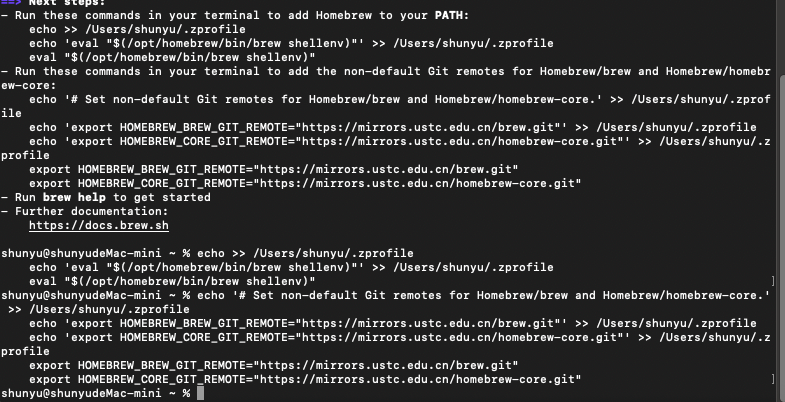
先command+空格,打开聚焦搜索,然后搜索terminal

bash
/bin/bash -c "$(curl -fsSL https://raw.githubusercontent.com/Homebrew/install/HEAD/install.sh)"如果碰巧你也跟我一样卡了半天没有动

可以考虑换个源,例如中科大homebrew
bash
export HOMEBREW_BREW_GIT_REMOTE="https://mirrors.ustc.edu.cn/brew.git"
export HOMEBREW_CORE_GIT_REMOTE="https://mirrors.ustc.edu.cn/homebrew-core.git"
export HOMEBREW_BOTTLE_DOMAIN="https://mirrors.ustc.edu.cn/homebrew-bottles"
export HOMEBREW_API_DOMAIN="https://mirrors.ustc.edu.cn/homebrew-bottles/api"

/bin/bash -c "$(curl -fsSL https://mirrors.ustc.edu.cn/misc/brew-install.sh)"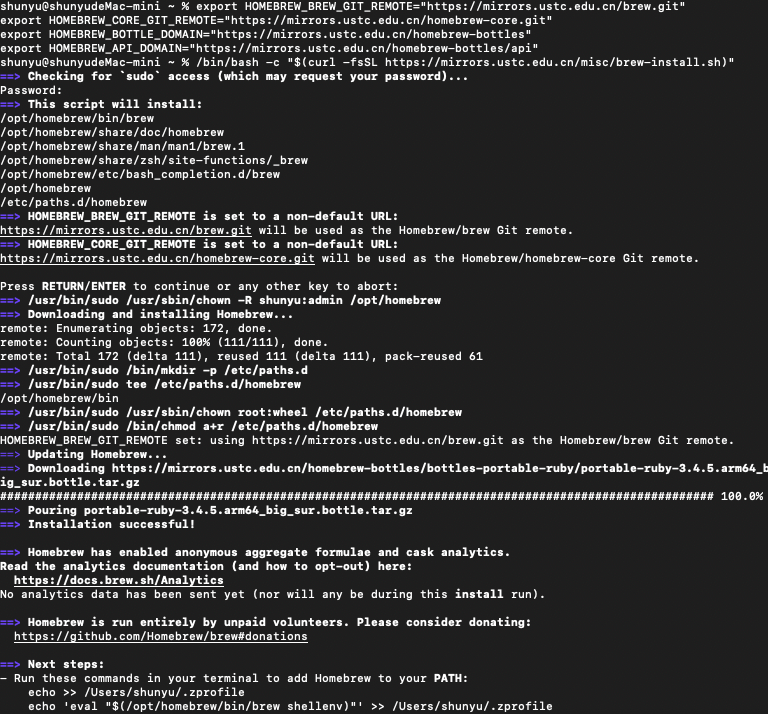
其他设置(直接复制就行
bash
echo >> /Users/shunyu/.zprofile
echo 'eval "$(/opt/homebrew/bin/brew shellenv)"' >> /Users/shunyu/.zprofile
eval "$(/opt/homebrew/bin/brew shellenv)"

echo 'export HOMEBREW_BREW_GIT_REMOTE="https://mirrors.ustc.edu.cn/brew.git"' >> /Users/shunyu/.zprofile
echo 'export HOMEBREW_CORE_GIT_REMOTE="https://mirrors.ustc.edu.cn/homebrew-core.git"' >> /Users/shunyu/.zprofile
export HOMEBREW_BREW_GIT_REMOTE="https://mirrors.ustc.edu.cn/brew.git"
export HOMEBREW_CORE_GIT_REMOTE="https://mirrors.ustc.edu.cn/homebrew-core.git"