Java 实现一套跨平台、高可靠的系统信息采集方案。
文章目录
- 跨平台终端信息采集
-
- 核心设计理念
- 主要功能特性
-
- [1. 智能的网络接口过滤](#1. 智能的网络接口过滤)
- [2. 多维度的硬件识别](#2. 多维度的硬件识别)
- [3. 强大的跨平台兼容性](#3. 强大的跨平台兼容性)
- 技术亮点:命令执行与结果解析
- 如何使用?
- 总结与注意事项
跨平台终端信息采集
在开发资产管理、安全审计或分布式系统监控时,获取终端设备的唯一标识(如 MAC 地址、磁盘序列号、CPU ID)是一项基础且关键的需求。然而,不同操作系统的查询命令各异,且 Java 原生 API 在某些场景下受限。
SystemInfoCollector 提供了一套优雅的解决方案:"Java 原生优先 + 系统命令兜底"。
- 代码如下:
java
import java.io.BufferedReader;
import java.io.IOException;
import java.io.InputStreamReader;
import java.net.InetAddress;
import java.net.NetworkInterface;
import java.util.Enumeration;
import java.util.function.Function;
import java.util.regex.Matcher;
import java.util.regex.Pattern;
import org.slf4j.Logger;
import org.slf4j.LoggerFactory;
/**
* 终端信息采集工具类
* localIp本地IP、mac地址、pcName字段信息优先使用Java方式获取
* 失败则使用命令方式获取
*
* @author xdr630
* @since 2.0.0 2025/12/24
*/
public final class SystemInfoCollectorSystemInfoCollector {
private static final Logger LOGGER = LoggerFactory.getLogger(SystemInfoCollector.class);
private static final String VERSION = "1.6.0";
private static final String OS_NAME = System.getProperty("os.name").toLowerCase();
private static final boolean IS_WINDOWS = OS_NAME.contains("win");
private static final boolean IS_LINUX =
OS_NAME.contains("linux") || OS_NAME.contains("nix") || OS_NAME.contains("nux") || OS_NAME.contains("aix");
private static final boolean IS_MAC = OS_NAME.contains("mac");
private static final String MAC_ADDRESS_PREFIX = "MACAddress=";
private static final String SERIAL_NUMBER = "SerialNumber";
private static final String PROCESSOR_ID = "ProcessorId";
private static final String CPU_SERIAL_ALL_ZERO = "0000000000000000";
private static final String VOLUME_SERIAL_NUMBER = "VolumeSerialNumber";
private static final String FILE_SYSTEM = "FileSystem";
private static final String SIZE = "Size";
private static final int VOLUME_SERIAL_NUMBER_LENGTH = 8;
private static final int UUID_LABEL_PARTS_LENGTH = 4;
private static final String DOT = ".";
private static final String COLON = ":";
private static final String HYPHEN = "-";
private static final Pattern IPV4_PATTERN =
Pattern.compile("^((25[0-5]|2[0-4][0-9]|[01]?[0-9][0-9]?)\\.){3}(25[0-5]|2[0-4][0-9]|[01]?[0-9][0-9]?)$");
/**
* 常见虚拟/容器/桥接/隧道网卡前缀
*/
private static final String[] VIRTUAL_IFACE_PREFIXES = {
// VirtualBox
"vbox",
// VMware
"vmnet",
// 容器虚拟网卡
"veth",
// docker bridge
"br-",
// docker0 等
"docker",
// macOS VPN / tunnel
"utun",
// macOS 本地链路
"llw",
// macOS AirDrop/WiFi Direct
"awdl"};
private SystemInfoCollector() {
}
/**
* 获取插件版本-version
*
* @return 插件版本
*/
public static String getVersion() {
return VERSION;
}
/**
* 获取系统名称-systemName
*
* @return 系统名称
*/
public static String getSystemName() {
return System.getProperty("os.name");
}
/**
* 判断网卡名称是否是 虚拟/容器/桥接网卡
*/
private static boolean isVirtualLikeInterfaceName(String ifaceName) {
if (ifaceName == null || ifaceName.isEmpty()) {
return false;
}
String name = ifaceName.toLowerCase();
for (String prefix : VIRTUAL_IFACE_PREFIXES) {
if (name.startsWith(prefix)) {
return true;
}
}
return false;
}
/**
* 判断网卡是否是一个"合适的网卡"
* 规则:已启动、非回环、非虚拟、名称不在黑名单,可选要求有 IPv4
*/
private static boolean isUsableInterface(NetworkInterface iface, boolean requireIpv4) {
try {
if (iface == null) {
return false;
}
if (!iface.isUp() || iface.isLoopback() || iface.isVirtual()) {
return false;
}
if (isVirtualLikeInterfaceName(iface.getName())) {
return false;
}
if (!requireIpv4) {
return true;
}
Enumeration<InetAddress> addresses = iface.getInetAddresses();
while (addresses.hasMoreElements()) {
InetAddress addr = addresses.nextElement();
String ip = addr.getHostAddress();
if (isValidIp(ip)) {
return true;
}
}
return false;
} catch (Exception e) {
LOGGER.debug("判断网卡可用性异常: {}", iface, e);
return false;
}
}
/**
* 获取本地IP-localIp
* 优先使用Java方式获取,失败则使用命令方式获取
*/
public static String getLocalIp() {
String ip = getLocalIpByJava();
if (ip == null || ip.isEmpty()) {
LOGGER.warn("Java方式获取IP未获得有效结果,尝试命令方式");
ip = getLocalIpByCommand();
}
if (ip == null || ip.isEmpty()) {
LOGGER.error("获取本地IP失败,Java方式与命令方式均未获取到有效IP");
throw new RuntimeException("Failed to get localIp");
}
return ip;
}
/**
* 使用Java方式获取本地IP,失败返回 null
*/
private static String getLocalIpByJava() {
try {
// 获取所有网络接口
Enumeration<NetworkInterface> interfaces = NetworkInterface.getNetworkInterfaces();
while (interfaces.hasMoreElements()) {
NetworkInterface iface = interfaces.nextElement();
// 需要至少有一个 IPv4 的可用网卡
if (!isUsableInterface(iface, true)) {
continue;
}
// 获取接口的IP地址
Enumeration<InetAddress> addresses = iface.getInetAddresses();
while (addresses.hasMoreElements()) {
InetAddress addr = addresses.nextElement();
// 只返回IPv4地址
String ip = addr.getHostAddress();
if (isValidIp(ip)) {
return ip;
}
}
}
// 如果没找到,返回本地主机IP
String fallback = InetAddress.getLocalHost().getHostAddress();
return isValidIp(fallback) ? fallback : null;
} catch (Exception e) {
LOGGER.debug("Java方式获取IP异常", e);
return null;
}
}
/**
* 使用命令方式获取本地IP,失败返回 null
*/
private static String getLocalIpByCommand() {
try {
if (IS_WINDOWS) {
// Windows 系统:使用 WMI 查询 IP 地址
return getWindowsLocalIp();
} else if (IS_LINUX) {
// Linux 系统:使用 ifconfig 命令
return getLinuxLocalIp();
} else if (IS_MAC) {
// MacOS 系统:使用 ifconfig 命令
return getMacLocalIp();
} else {
LOGGER.warn("不支持的操作系统获取IP: {}", OS_NAME);
return null;
}
} catch (Exception e) {
LOGGER.debug("命令方式获取IP异常", e);
return null;
}
}
/**
* Windows 系统:获取本地 IP 地址
*
* @return 本地 IP 地址
*/
private static String getWindowsLocalIp() {
String command = "wmic nicconfig where IPEnabled=true get IPAddress";
return executeWindowsCommand(command, line -> {
if (line.contains(DOT)) {
String[] parts = line.split(",");
for (String part : parts) {
part = part.replaceAll("[{}\"]", "").trim();
if (isValidIp(part)) {
return part;
}
}
}
return null;
});
}
/**
* 检查 IP 地址是否有效
*
* @param ip IP 地址
* @return 是否有效
*/
private static boolean isValidIp(String ip) {
if (ip == null) {
return false;
}
Matcher matcher = IPV4_PATTERN.matcher(ip);
return matcher.matches();
}
/**
* Linux 系统:获取本地 IP 地址
*
* @return 本地 IP 地址
*/
private static String getLinuxLocalIp() {
String command =
"ifconfig | grep -E 'flags=|inet |broadcast ' | grep -i RUNNING -A 1 | grep 'inet ' | grep -m 1 " +
"'broadcast ' | awk '{print $2}'";
return executeCommandAndParseOutput(command, line -> line);
}
/**
* MacOS 系统:获取本地 IP 地址
*
* @return 本地 IP 地址
*/
private static String getMacLocalIp() {
String command =
"ifconfig | grep -E 'flags=|inet |broadcast ' | grep -i RUNNING -A 1 | grep 'inet ' | grep -m 1 " +
"'broadcast ' | awk '{print $2}'";
return executeCommandAndParseOutput(command, line -> line);
}
/**
* 执行 Windows 命令并解析输出
*
* @param command 命令
* @param outputProcessor 输出处理函数
* @return 处理后的输出结果
*/
private static String executeWindowsCommand(String command, Function<String, String> outputProcessor) {
try {
Process process = Runtime.getRuntime().exec(command);
try (BufferedReader reader = new BufferedReader(new InputStreamReader(process.getInputStream()))) {
String line;
while ((line = reader.readLine()) != null) {
String result = outputProcessor.apply(line.trim());
if (result != null) {
return result;
}
}
}
} catch (IOException e) {
throw new RuntimeException("Failed to execute command: " + command, e);
}
return null;
}
/**
* Linux或MacOS下执行命令并解析输出
*
* @param command 命令
* @return 输出结果
*/
private static String executeCommandAndParseOutput(String command, Function<String, String> outputProcessor) {
try {
Process process = Runtime.getRuntime().exec(new String[]{"sh", "-c", command});
try (BufferedReader reader = new BufferedReader(new InputStreamReader(process.getInputStream()))) {
String line;
while ((line = reader.readLine()) != null) {
if (!line.trim().isEmpty()) {
String out = outputProcessor.apply(line.trim());
if (out != null) {
return out;
}
}
}
}
} catch (IOException e) {
throw new RuntimeException("Failed to execute command: " + command, e);
}
return null;
}
/**
* 获取本机 MAC 地址-mac
* 优先使用Java方式获取MAC地址,失败则使用命令方式获取MAC地址
*
* @return 本机 MAC 地址
*/
public static String getMac() {
String mac = getMacByJava();
if (mac == null || mac.isEmpty()) {
LOGGER.warn("Java方式获取MAC未获得有效结果,尝试命令方式");
mac = getMacByCommand();
}
if (mac == null || mac.isEmpty()) {
LOGGER.error("获取本机MAC失败,Java方式与命令方式均未获取到有效MAC");
throw new RuntimeException("Failed to get MAC address");
}
return mac;
}
/**
* 使用Java方式获取MAC地址,失败返回 null
*/
private static String getMacByJava() {
try {
// 获取第一个非回环的网络接口
Enumeration<NetworkInterface> interfaces = NetworkInterface.getNetworkInterfaces();
while (interfaces.hasMoreElements()) {
NetworkInterface iface = interfaces.nextElement();
// 要求是一个"有 IPv4 的可用网卡",避免拿到一些无IP或特殊用途网卡
if (!isUsableInterface(iface, true)) {
continue;
}
// 获取MAC地址
byte[] macBytes = iface.getHardwareAddress();
if (macBytes != null && macBytes.length > 0) {
return formatMac(macBytes);
}
}
} catch (Exception e) {
LOGGER.debug("Java方式获取MAC异常", e);
}
return null;
}
/**
* 使用命令方式获取MAC地址,失败返回 null
*/
private static String getMacByCommand() {
try {
if (IS_WINDOWS) {
// Windows 系统:使用 WMI 查询 MAC 地址
return formatMac(getWindowsMac());
} else if (IS_LINUX) {
// Linux 系统:使用 ifconfig 命令
return formatMac(getLinuxMac());
} else if (IS_MAC) {
// MacOS 系统:使用 ifconfig 命令
return formatMac(getMacOsMac());
} else {
LOGGER.warn("不支持的操作系统获取MAC: {}", OS_NAME);
return null;
}
} catch (Exception e) {
LOGGER.debug("命令方式获取MAC异常", e);
return null;
}
}
/**
* 格式化 MAC 地址为无分隔符的形式
*
* @param mac MAC 地址
* @return 无分隔符的 MAC 地址
*/
private static String formatMac(String mac) {
if (mac == null || mac.isEmpty()) {
return null;
}
// 移除所有分隔符(如 ":", "-")
return mac.replaceAll("[:\\-]", "");
}
/**
* 格式化MAC地址字节数组为字符串
*/
private static String formatMac(byte[] macBytes) {
StringBuilder sb = new StringBuilder();
for (byte b : macBytes) {
sb.append(String.format("%02X", b));
}
return sb.toString();
}
/**
* Windows 系统:获取 MAC 地址
*
* @return MAC 地址
*/
private static String getWindowsMac() {
// 筛选出物理适配器,并且是已启用的状态
String command = "wmic nic where \"PhysicalAdapter=True and NetEnabled=True\" get MACAddress /format:value";
return executeWindowsCommand(command, line -> {
if (line.startsWith(MAC_ADDRESS_PREFIX) && line.length() > MAC_ADDRESS_PREFIX.length()) {
// 清除前缀
String macAddress = line.substring(MAC_ADDRESS_PREFIX.length()).trim();
return macAddress.replace(COLON, HYPHEN);
}
return null;
});
}
/**
* Linux 系统:获取 MAC 地址
*
* @return MAC 地址
*/
private static String getLinuxMac() {
String command =
"ifconfig | grep -E 'flags=|inet |broadcast |ether ' | grep -i RUNNING -A 2 | grep -A 1 -E 'broadcast" +
" " + "|inet ' | grep -m 1 'ether ' | awk '{print $2}'";
return executeCommandAndParseOutput(command, line -> line);
}
/**
* MacOS 系统:获取 MAC 地址
*
* @return MAC 地址
*/
private static String getMacOsMac() {
String command =
"ifconfig | grep -E 'flags=|inet |broadcast |ether ' | grep -i RUNNING -A 2 | grep -B 1 -E 'broadcast" +
" " + "|inet ' | grep -m 1 'ether ' | awk '{print $2}'";
return executeCommandAndParseOutput(command, line -> line);
}
/**
* 获取CPU序列号-cpuSerial
*
* @return CPU 序列号
*/
public static String getCpuSerial() {
try {
if (IS_WINDOWS) {
// Windows 系统:使用 wmic 命令获取 CPU 序列号
return getWindowsCpuSerial();
} else if (IS_LINUX) {
// Linux 系统:使用 dmidecode 命令获取 CPU 序列号
return getLinuxCpuSerial();
} else if (IS_MAC) {
// macOS 系统:使用 system_profiler 命令获取 CPU 序列号
return getMacCpuSerial();
} else {
throw new UnsupportedOperationException("Unsupported operating system: " + OS_NAME);
}
} catch (Exception e) {
LOGGER.error("获取CPU序列号失败", e);
throw new RuntimeException("Failed to get cpuSerial", e);
}
}
/**
* Windows 系统:获取 CPU 序列号
*
* @return CPU 序列号
*/
private static String getWindowsCpuSerial() {
String command = "wmic cpu get ProcessorId";
return executeWindowsCommand(command, line -> {
if (!line.isEmpty() && !line.contains(PROCESSOR_ID)) {
return line;
}
return null;
});
}
/**
* Linux 系统:获取 CPU 序列号
*
* @return CPU 序列号
*/
private static String getLinuxCpuSerial() {
String command = "dmidecode -t 4 | grep -m 1 ID | awk '{print $2$3$4$5$6$7$8$9}'";
return executeCommandAndParseOutput(command, line -> {
// 去掉所有空格
String cpuSerial = line.replaceAll("\\s+", "");
// 如果 CPU 序列号全为 0,则返回 null
if (CPU_SERIAL_ALL_ZERO.equals(cpuSerial)) {
return null;
}
return cpuSerial;
});
}
/**
* macOS 系统:获取 CPU 序列号
*
* @return CPU 序列号
*/
private static String getMacCpuSerial() {
String command = "system_profiler SPHardwareDataType | grep -m 1 'Serial Number' | awk '{print $4}'";
return executeCommandAndParseOutput(command, line -> {
// 去掉所有空格
return line.trim().replaceAll("\\s+", "");
});
}
/**
* 获取硬盘序列号-hardSerial
*/
public static String getHardSerial() {
try {
if (IS_WINDOWS) {
// Windows 系统
return getWindowsHardSerial();
} else if (IS_LINUX) {
// Linux 系统
return getLinuxHardSerial();
} else if (IS_MAC) {
// macOS 系统
return getMacHardSerial();
} else {
throw new UnsupportedOperationException("Unsupported operating system: " + OS_NAME);
}
} catch (Exception e) {
LOGGER.error("获取硬盘序列号失败", e);
throw new RuntimeException("Failed to get hardSerial", e);
}
}
/**
* Windows 系统:获取硬盘序列号
*
* @return 硬盘序列号,如:6479_A75B_B090_09E0
*/
private static String getWindowsHardSerial() {
String command = "wmic diskdrive get serialnumber";
return executeWindowsCommand(command, line -> {
if (!line.trim().isEmpty() && !line.contains(SERIAL_NUMBER)) {
// 去掉末尾的点(如果存在)
return line.trim().endsWith(DOT) ? line.trim().substring(0, line.length() - 1) : line.trim();
}
return null;
});
}
/**
* Linux 系统:获取硬盘序列号
*
* @return 硬盘序列号,如:ac7b3398-162e-4775-b
*/
private static String getLinuxHardSerial() {
// Linux amd 执行后:SERIAL=""
String command =
"lsblk -p -P -o NAME,SERIAL,UUID,TYPE,MOUNTPOINT | grep -i boot -B 1 | grep -i disk | awk '{print $2}'";
return executeCommandAndParseOutput(command, line -> {
String result = line.trim().replace("SERIAL=", "").replace("\"", "");
// 去掉末尾的点(如果存在)
if (result.endsWith(DOT)) {
result = result.substring(0, result.length() - 1);
}
// 如果序列号为空,返回 null
return result.isEmpty() ? null : result;
});
}
/**
* macOS 系统:获取硬盘序列号
*
* @return 硬盘序列号
*/
private static String getMacHardSerial() {
String command = "system_profiler SPHardwareDataType | grep -m 1 'Hardware UUID' | awk '{print $3}'";
return executeCommandAndParseOutput(command, line -> {
String result = line.trim();
// 去掉末尾的点(如果存在)
if (result.endsWith(DOT)) {
result = result.substring(0, result.length() - 1);
}
return result;
});
}
/**
* 获取系统盘盘符-drive
*
* @return 系统盘盘符,如:C 或 /dev/sda1
* @throws RuntimeException 获取失败时抛出异常
*/
public static String getDrive() {
try {
if (IS_WINDOWS) {
// Windows 系统
return getWindowsDrive();
} else if (IS_LINUX) {
// Linux 系统
return getLinuxDrive();
} else if (IS_MAC) {
// macOS 系统
return getMacDrive();
} else {
throw new UnsupportedOperationException("Unsupported operating system: " + OS_NAME);
}
} catch (Exception e) {
LOGGER.error("获取系统盘盘符失败", e);
throw new RuntimeException("Failed to get drive", e);
}
}
/**
* Windows 系统:获取盘符
*
* @return 盘符,如:C
*/
private static String getWindowsDrive() {
// 获取系统盘盘符(如 C:)
String systemDrive = System.getenv("SystemDrive");
if (systemDrive == null || systemDrive.isEmpty()) {
LOGGER.error("SystemDrive environment variable is empty");
return null;
}
// 去掉冒号
return systemDrive.replace(COLON, "");
}
/**
* Linux 系统:获取盘符
*
* @return 盘符,如:/dev/sda1
*/
private static String getLinuxDrive() {
String command =
"lsblk -p -P -o NAME,PARTUUID,FSTYPE,SIZE,UUID,TYPE,MOUNTPOINT | grep -E '/boot\"$' | grep -i part | " +
"awk " + "'{print $1,$2,$3,$4}'";
return executeCommandAndParseOutput(command, line -> {
String[] split = line.split("\"");
return split.length > 1 ? split[1] : null;
});
}
/**
* macOS 系统:获取盘符
*
* @return 盘符
*/
private static String getMacDrive() {
String command = "system_profiler SPSoftwareDataType | grep -m 1 'Boot Volume'";
return executeCommandAndParseOutput(command, line -> {
String[] split = line.split(": ");
return split.length > 1 ? split[1] : null;
});
}
/**
* 获取系统盘分区格式-fileSystem
*
* @return 系统盘分区格式,如:NTFS 或 xf4
* @throws RuntimeException 如果无法获取分区格式
*/
public static String getFileSystem() {
try {
if (IS_WINDOWS) {
// Windows 系统
return getWindowsFileSystem();
} else if (IS_LINUX) {
// Linux 系统
return getLinuxFileSystem();
} else if (IS_MAC) {
// macOS 系统
return getMacFileSystem();
} else {
throw new UnsupportedOperationException("Unsupported operating system: " + OS_NAME);
}
} catch (Exception e) {
LOGGER.error("获取系统盘分区格式失败", e);
throw new RuntimeException("Failed to get fileSystem", e);
}
}
/**
* Windows 系统:获取分区格式
*
* @return 分区格式,如:NTFS
*/
private static String getWindowsFileSystem() {
// 获取系统盘盘符(如 C:)
String systemDrive = System.getenv("SystemDrive");
if (systemDrive == null || systemDrive.isEmpty()) {
LOGGER.error("SystemDrive environment variable is empty");
return null;
}
// 获取系统盘的分区信息
String command = "wmic logicaldisk where deviceid='" + systemDrive + "' get filesystem";
return executeWindowsCommand(command, line -> {
if (!line.isEmpty() && !line.contains(FILE_SYSTEM)) {
return line;
}
return null;
});
}
/**
* Linux 系统:获取分区格式
*
* @return 分区格式
*/
private static String getLinuxFileSystem() {
String command =
"lsblk -p -P -o NAME,PARTUUID,FSTYPE,SIZE,UUID,TYPE,MOUNTPOINT | grep -E '/boot\"$' | grep -i part | " +
"awk " + "'{print $1,$2,$3,$4}'";
return executeCommandAndParseOutput(command, line -> {
String[] split = line.split("\"");
return split.length > 5 ? split[5] : null;
});
}
/**
* macOS 系统:获取分区格式
*
* @return 分区格式
*/
private static String getMacFileSystem() {
String command = "system_profiler SPStorageDataType | grep -w -A 5 -B 1 'Mount Point: /'";
return executeCommandAndParseOutput(command, line -> {
String number = "";
String[] lines = line.split("\n");
for (String l : lines) {
l = l.trim();
if (l.startsWith("File System:")) {
String[] split = l.split(" ");
if (split.length > 2) {
number = split[2];
}
}
}
return number.isEmpty() ? null : number;
});
}
/**
* 获取系统盘分区容量
*
* @return 系统盘分区容量,如:119G
* @throws RuntimeException 如果无法获取分区容量
*/
public static String getPartitionSize() {
try {
if (IS_WINDOWS) {
// Windows 系统
return getWindowsPartitionSize();
} else if (IS_LINUX) {
// Linux 系统
return getLinuxPartitionSize();
} else if (IS_MAC) {
// macOS 系统
return getMacPartitionSize();
} else {
throw new UnsupportedOperationException("Unsupported operating system: " + OS_NAME);
}
} catch (Exception e) {
LOGGER.error("获取系统盘分区容量失败", e);
throw new RuntimeException("Failed to get partition size", e);
}
}
/**
* Windows 系统:获取分区容量
*
* @return 分区容量
*/
private static String getWindowsPartitionSize() {
// 获取系统盘盘符(如 C:)
String systemDrive = System.getenv("SystemDrive");
if (systemDrive == null || systemDrive.isEmpty()) {
LOGGER.error("SystemDrive environment variable is empty");
return null;
}
// 获取系统盘的分区信息
String command = "wmic logicaldisk where deviceid='" + systemDrive + "' get size";
return executeWindowsCommand(command, line -> {
if (!line.isEmpty() && !line.contains(SIZE)) {
long sizeBytes = Long.parseLong(line);
return (sizeBytes / 1024 / 1024 / 1024) + "G";
}
return null;
});
}
/**
* Linux 系统:获取分区容量
*
* @return 分区容量
*/
private static String getLinuxPartitionSize() {
String command =
"lsblk -p -P -o NAME,PARTUUID,FSTYPE,SIZE,UUID,TYPE,MOUNTPOINT | grep -E '/boot\"$' | grep -i part | " +
"awk " + "'{print $1,$2,$3,$4}'";
return executeCommandAndParseOutput(command, output -> {
String[] split = output.split("\"");
return split.length > 7 ? split[7] : null;
});
}
/**
* macOS 系统:获取分区容量
*
* @return 分区容量
*/
private static String getMacPartitionSize() {
String command = "system_profiler SPStorageDataType | grep -w -A 5 -B 1 'Mount Point: /'";
return executeCommandAndParseOutput(command, line -> {
String size = "";
String[] lines = line.split("\n");
for (String l : lines) {
l = l.trim();
if (l.startsWith("Capacity:")) {
String[] split = l.split(" ");
if (split.length > 2) {
size = split[1] + "G";
}
}
}
return size;
});
}
/**
* 获取系统盘卷标号-systemDisk
*
* @return 系统盘卷标号
*/
public static String getSystemDisk() {
try {
if (IS_WINDOWS) {
// Windows 系统
return getWindowsSystemDisk();
} else if (IS_LINUX) {
// Linux 系统
return getLinuxSystemDisk();
} else if (IS_MAC) {
// macOS 系统
return getMacSystemDisk();
} else {
throw new UnsupportedOperationException("Unsupported operating system: " + OS_NAME);
}
} catch (Exception e) {
LOGGER.error("获取系统盘卷标号失败", e);
throw new RuntimeException("Failed to get systemDisk", e);
}
}
/**
* Windows 系统:获取系统盘卷标号
*
* @return 系统盘卷标号,格式为 "XXXX-XXXX",如:8AD0-CC8B
*/
private static String getWindowsSystemDisk() {
// 获取系统盘盘符(如 C:)
String systemDrive = System.getenv("SystemDrive");
if (systemDrive == null || systemDrive.isEmpty()) {
LOGGER.error("SystemDrive environment variable is empty");
return null;
}
// 获取系统盘的卷标号
String command = "wmic logicaldisk where deviceid='" + systemDrive + "' get VolumeSerialNumber";
return executeWindowsCommand(command, line -> {
if (!line.isEmpty() && !line.contains(VOLUME_SERIAL_NUMBER)) {
if (line.length() == VOLUME_SERIAL_NUMBER_LENGTH) {
// 格式化为 XXXX-XXXX
return line.substring(0, 4) + HYPHEN + line.substring(4);
}
}
return null;
});
}
/**
* Linux 系统:获取系统盘卷标号
*
* @return 系统盘卷标号
*/
private static String getLinuxSystemDisk() {
// 使用 lsblk 命令获取系统盘卷标号
// Linux amd执行后:UUID="" LABEL=""
String command =
"lsblk -p -P -o NAME,UUID,LABEL,TYPE,MOUNTPOINT | grep -i boot -B 1 | grep -i disk | awk '{print $2," +
"$3}'";
return executeCommandAndParseOutput(command, line -> {
String[] parts = line.trim().split("\"");
if (parts.length >= UUID_LABEL_PARTS_LENGTH) {
// UUID
String uuid = parts[1];
// LABEL
String label = parts[3];
// 返回 UUID 或 LABEL
return !uuid.isEmpty() ? uuid : label;
}
return null;
});
}
/**
* macOS 系统:获取系统盘卷标号
*
* @return 系统盘卷标号
*/
private static String getMacSystemDisk() {
String command = "system_profiler SPStorageDataType | grep -w -A 5 -B 1 'Mount Point: /'";
return executeCommandAndParseOutput(command, line -> {
String number = "";
String[] lines = line.split("\n");
for (String l : lines) {
l = l.trim();
if (l.startsWith("Volume UUID:")) {
String[] split = l.split(" ");
if (split.length > 2) {
number = split[2];
}
}
}
return number.isEmpty() ? null : number;
});
}
/**
* 获取PC终端设备名称-pcName
*
* @return PC终端设备名称
*/
public static String getPcName() {
String pcName = getPcNameByJava();
if (pcName == null || pcName.isEmpty()) {
LOGGER.warn("Java方式获取PC终端设备名称未获得有效结果,尝试命令方式");
pcName = getPcNameByCommand();
}
if (pcName == null || pcName.isEmpty()) {
LOGGER.error("获取PC终端设备名称失败,Java方式与命令方式均未获取到有效名称");
throw new RuntimeException("Failed to get pcName");
}
return pcName;
}
/**
* 使用Java方式获取PC终端设备名称-pcName
*
* @return PC终端设备名称,失败返回 null
*/
private static String getPcNameByJava() {
try {
return InetAddress.getLocalHost().getHostName();
} catch (Exception e) {
LOGGER.debug("Java方式获取PC终端设备名称异常", e);
return null;
}
}
/**
* 使用命令方式获取PC终端设备名称-pcName
*
* @return PC终端设备名称,失败返回 null
*/
public static String getPcNameByCommand() {
String command = "hostname";
try {
if (IS_WINDOWS) {
// Windows 系统:使用 hostname 命令获取设备名称
return executeWindowsCommand(command, line -> line.isEmpty() ? null : line);
} else if (IS_LINUX) {
// Linux 系统:使用 hostname 命令获取设备名称
return executeCommandAndParseOutput(command, line -> line);
} else if (IS_MAC) {
// MacOS 系统:使用 scutil 命令获取设备名称
return executeCommandAndParseOutput("scutil --get ComputerName", line -> line);
} else {
LOGGER.warn("不支持的操作系统获取PC终端设备名称: {}", OS_NAME);
return null;
}
} catch (Exception e) {
LOGGER.debug("命令方式获取PC终端设备名称异常", e);
return null;
}
}
/**
* 获取PC终端设备序列号(仅 Mac 系统有,其他系统返回 "null")
*
* @return PC 终端设备序列号,如果获取失败或非 Mac 系统则返回 "null"
*/
public static String getPcSerial() {
if (!IS_MAC) {
// 非 Mac 系统直接返回 "null"
return "null";
}
try {
// MacOS 系统:使用 system_profiler 命令获取设备序列号
String command = "system_profiler SPHardwareDataType | grep -m 1 'Provisioning UDID' | awk '{print $3}'";
return executeCommandAndParseOutput(command, line -> line);
} catch (Exception e) {
LOGGER.error("获取PC终端设备序列号失败", e);
throw new RuntimeException("Failed to get pcSerial on MacOS.", e);
}
}
}核心设计理念
该工具类的核心逻辑遵循以下优先级:
- Java 原生 API:跨平台性好,执行效率高,作为首选方案。
- 系统原生命令:当 Java API 无法获取深层硬件信息(如磁盘序列号)或执行失败时,根据识别到的操作系统(Windows/Linux/macOS)自动调用底层命令。
主要功能特性
1. 智能的网络接口过滤
获取 IP 或 MAC 地址时,最头疼的就是搜出一堆 vbox、docker 或 utun 等虚拟网卡信息。SystemInfoCollector 内置了黑名单过滤机制:
- 自动识别虚拟网卡:排除常见容器(Docker)、虚拟机(VMware/VirtualBox)及隧道网卡。
- 状态校验:仅针对已启动(Up)且非回环(Loopback)的物理网卡进行信息采集。
2. 多维度的硬件识别
工具类不仅能获取基础信息,还能深入挖掘硬件指纹:
- CPU 序列号 :通过
wmic(Win)、dmidecode(Linux) 或system_profiler(Mac) 获取。 - 硬盘序列号:精确获取物理硬盘的唯一标识。
- 系统盘详情:包括盘符、分区格式(NTFS/APFS等)、总容量以及卷标序列号。
3. 强大的跨平台兼容性
代码内部通过 OS_NAME 常量实现了对主流系统的全覆盖:
- Windows : 利用
wmic命令进行底层查询。 - Linux : 结合
lsblk、ifconfig和awk进行文本解析。 - macOS : 使用特有的
system_profiler和scutil工具。
技术亮点:命令执行与结果解析
为了保证代码的可维护性,工具类采用了一个 函数式接口(Function) 来处理命令输出。这种设计将"执行过程"与"结果过滤"解耦:
java
// 以 Windows 获取磁盘序列号为例
private static String getWindowsHardSerial() {
    String command = "wmic diskdrive get serialnumber";
    return executeWindowsCommand(command, line -> {
        if (!line.trim().isEmpty() && !line.contains(SERIAL_NUMBER)) {
            return line.trim(); // 具体的过滤逻辑由 Lambda 表达式完成
        }
        return null;
    });
}
如何使用?
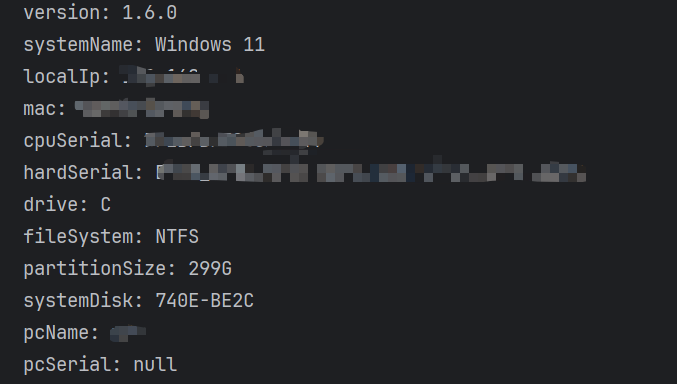
由于所有方法均设计为 static,集成非常简单,无需实例化:
java
public class SystemInfoCollectorTest {

    public static void main(String[] args) {
        System.out.println("version: " + SystemInfoCollector.getVersion());
        System.out.println("systemName: " + SystemInfoCollector.getSystemName());
        System.out.println("localIp: " + SystemInfoCollector.getLocalIp());
        System.out.println("mac: " + SystemInfoCollector.getMac());
        System.out.println("cpuSerial: " + SystemInfoCollector.getCpuSerial());
        System.out.println("hardSerial: " + SystemInfoCollector.getHardSerial());
        System.out.println("drive: " + SystemInfoCollector.getDrive());
        System.out.println("fileSystem: " + SystemInfoCollector.getFileSystem());
        System.out.println("partitionSize: " + SystemInfoCollector.getPartitionSize());
        System.out.println("systemDisk: " + SystemInfoCollector.getSystemDisk());
        System.out.println("pcName: " + SystemInfoCollector.getPcName());
        System.out.println("pcSerial: " + SystemInfoCollector.getPcSerial());
    }

}
总结与注意事项
SystemInfoCollector 是一个封装严密、容错性强的工具类,非常适合需要快速集成硬件采集功能的 Java 项目。
tips:
- 在 Linux 环境下,某些硬件命令(如
dmidecode)可能需要sudo权限才能获取完整信息。- 工具类默认对 IP 地址进行了 IPv4 格式校验,若环境仅支持 IPv6,需微调正则表达式。