前言
消息队列是一种很常见的ipc通信概念,实现它有多种方式,在不同平台下的处理都不太一样。比方说接下来会演示的基于文件的队列,以及基于Unix Domain Socket实现的QLocalSocket。
要想深入理解消息队列,我觉得还是得理解它的概念。
一、消息队列
实际业务中,经常会出现一种叫生产者-消费者的设计模型,甚至还会有一个生产者对应多个消费者的情况。比方说,我有一个获取摄像头数据的线程(生产)和一个拿到数据进行渲染的线程(消费),它们之间需要进行数据传递。此时我们想象,有一个输送数据的队列,生产者不断往队列后面塞入数据,消费者不断在前面拿到数据,把他们消费掉。
这种队列的传递方式,就可以理解为消息队列。至于它具体怎么实现的,方法有很多。
当然,作为通信手段,传统的还是先用文本来进行交流。比方说,我们可以用一个本地的txt文件,一行行地往里面新增文本,一行行地从头开始读取消费。
更多的就不赘述了,因为我也不是了解得很深入,只是知道有这个东西。
二、示例代码
以下是通过一个文件来实现的消息队列,以及他对应的界面类:
cpp
#ifndef FILEQUEUEWINDOW_H
#define FILEQUEUEWINDOW_H

#include <QWidget>
#include <QTextEdit>
#include <QLineEdit>
#include <QPushButton>
#include <QVBoxLayout>
#include <QHBoxLayout>
#include <QTimer>
#include <QDateTime>
#include <QFile>
#include <QTextStream>
#include <QDir>

class FileQueueWindow : public QWidget
{
    Q_OBJECT

public:
    explicit FileQueueWindow(const QString &role, QWidget *parent = nullptr);

private slots:
    void onSendMessage();
    void onReadMessage();
    void onTimerTimeout();

private:
    void appendLog(const QString &msg);
    void setupFileQueue();

    QString m_role;
    QTextEdit *m_logView;
    QLineEdit *m_inputEdit;
    QPushButton *m_sendButton;
    QPushButton *m_readButton;
    QTimer *m_timer;
    QString m_queueFilePath;
    QFile *m_queueFile;
};

#endif // FILEQUEUEWINDOW_H
cpp
#include "filequeuewindow.h"
#include <QLabel>

FileQueueWindow::FileQueueWindow(const QString &role, QWidget *parent)
    : QWidget(parent)
    , m_role(role)
    , m_timer(nullptr)
    , m_queueFile(nullptr)
    , m_queueFilePath("ipc_test_queue.txt")
{
    setWindowTitle("File Queue - " + role);
    resize(600, 500);

    m_logView = new QTextEdit();
    m_logView->setReadOnly(true);
    m_inputEdit = new QLineEdit();
    m_inputEdit->setPlaceholderText("Enter message to queue...");
    m_sendButton = new QPushButton("Enqueue Message");
    m_readButton = new QPushButton("Dequeue Message");

    QVBoxLayout *mainLayout = new QVBoxLayout();
    mainLayout->addWidget(m_logView);
    mainLayout->addWidget(m_inputEdit);
    mainLayout->addWidget(m_sendButton);
    mainLayout->addWidget(m_readButton);

    setLayout(mainLayout);

    connect(m_sendButton, &QPushButton::clicked, this, &FileQueueWindow::onSendMessage);
    connect(m_readButton, &QPushButton::clicked, this, &FileQueueWindow::onReadMessage);

    setupFileQueue();

    if (m_role == "Server") {
        // Server periodically checks for messages
        m_timer = new QTimer(this);
        connect(m_timer, &QTimer::timeout, this, &FileQueueWindow::onTimerTimeout);
        m_timer->start(1000); // Check every second
    }

    appendLog("File Queue " + m_role + " initialized");
}

void FileQueueWindow::setupFileQueue()
{
    // Ensure directory exists
    QDir dir = QFileInfo(m_queueFilePath).dir();
    if (!dir.exists()) {
        dir.mkpath(".");
    }
}

void FileQueueWindow::onSendMessage()
{
    QString msg = m_inputEdit->text();
    if (msg.isEmpty()) return;

    QFile file(m_queueFilePath);
    if (!file.open(QIODevice::Append)) {
        appendLog("Failed to open file for appending: " + file.errorString());
        return;
    }

    QTextStream out(&file);
    out << msg << "\n";
    out.flush();
    file.close();

    appendLog("Enqueued message: " + msg);
    m_inputEdit->clear();
}

void FileQueueWindow::onReadMessage()
{
    QFile file(m_queueFilePath);
    if (!file.exists()) {
        appendLog("Queue file does not exist");
        return;
    }

    if (!file.open(QIODevice::ReadWrite)) {
        appendLog("Failed to open file for reading: " + file.errorString());
        return;
    }

    // Read all lines
    QStringList lines;
    QTextStream in(&file);
    while (!in.atEnd()) {
        QString line = in.readLine().trimmed();
        if (!line.isEmpty()) {
            lines.append(line);
        }
    }

    if (lines.isEmpty()) {
        appendLog("No messages in queue");
        file.close();
        return;
    }

    // Take the first line
    QString firstLine = lines.takeFirst();

    // Rewrite remaining lines back to file
    file.resize(0); // Clear file
    QTextStream out(&file);
    for (const QString &line : lines) {
        out << line << "\n";
    }
    out.flush();
    file.close();

    appendLog("Dequeued message: " + firstLine);
}

void FileQueueWindow::onTimerTimeout()
{
    QFile file(m_queueFilePath);
    if (!file.exists()) return;

    if (!file.open(QIODevice::ReadWrite)) return;

    // Read all lines
    QStringList lines;
    QTextStream in(&file);
    while (!in.atEnd()) {
        QString line = in.readLine().trimmed();
        if (!line.isEmpty()) {
            lines.append(line);
        }
    }

    if (!lines.isEmpty()) {
        // Take the first line
        QString firstLine = lines.takeFirst();

        // Rewrite remaining lines back to file
        file.resize(0); // Clear file
        QTextStream out(&file);
        for (const QString &line : lines) {
            out << line << "\n";
        }
        out.flush();

        appendLog("Server received: " + firstLine);
    }

    file.close();
}

void FileQueueWindow::appendLog(const QString &msg)
{
    m_logView->append(QDateTime::currentDateTime().toString("hh:mm:ss") + " | " + msg);
}
演示效果:
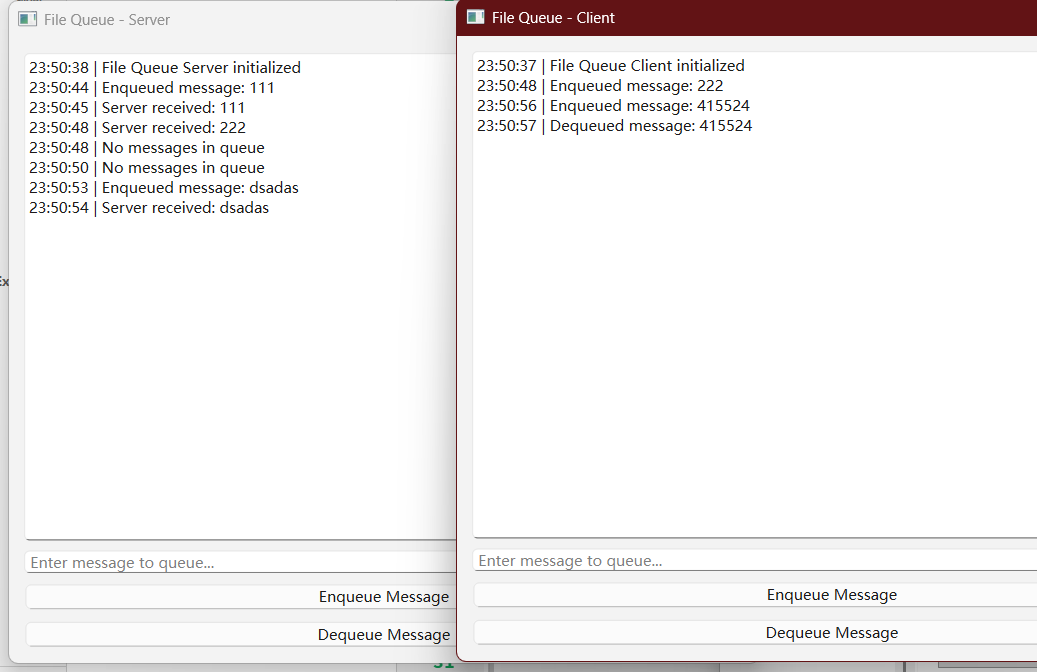
因为"服务端"这边用了定时器的方式,每隔一秒钟获取一次文件中的消息,所以它会自动显示"客户端"输入的数据。
文件操作的方式也很简单,读取单条消息的时候,是按行读取的:
cpp
    QTextStream in(&file);
    while (!in.atEnd()) {
        QString line = in.readLine().trimmed();
        if (!line.isEmpty()) {
            lines.append(line);
        }
    }
三、总结
消息队列就说到这里了。ipc方式也基本上说到这里。
但别误会,这并不是全部的ipc方式。我先总结一下当前我所掌握的:
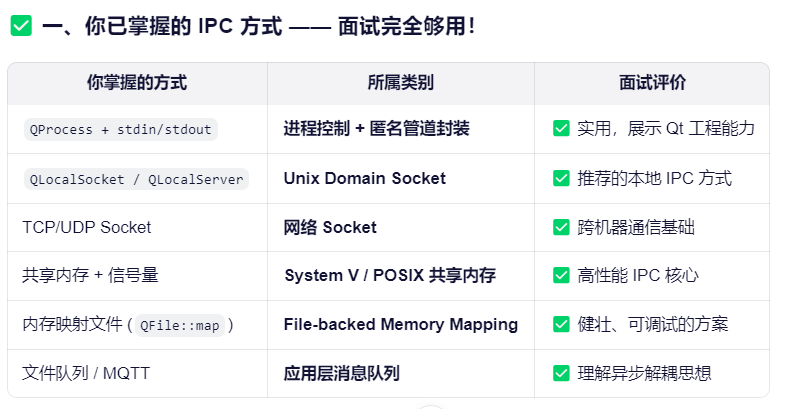
除此之外,还需要了解一下砸linux系统下的原生IPC方式。
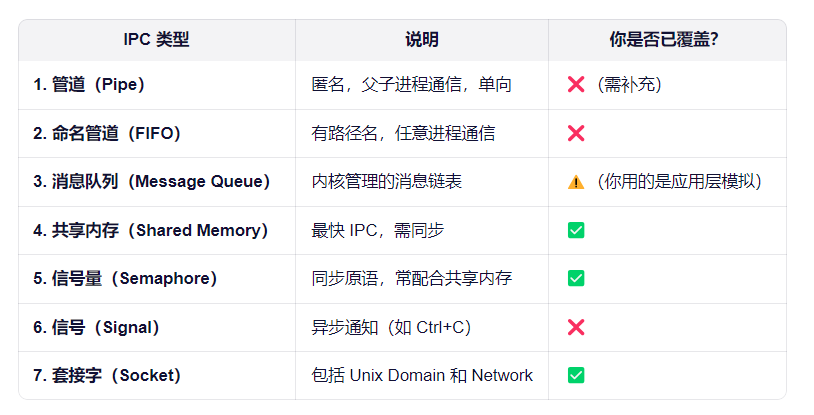
下面简单理解一下还没深入使用过的linux ipc方式吧,起码有个概念的了解。
1.管道(Pipe)------ pipe()
用途:父子进程间单向通信
特点:
匿名(无文件路径)
半双工(一端读,一端写)
内核缓冲区(通常 64KB)
C 示例:
cpp
int fd[2];
pipe(fd);           // fd[0]=读端, fd[1]=写端
if (fork() == 0) {
    close(fd[0]);   // 子进程写
    write(fd[1], "hello", 5);
} else {
    close(fd[1]);   // 父进程读
    char buf[10];
    read(fd[0], buf, 10);
}
Qt 中:QProcess 的 setReadChannel() 底层就是用 pipe 实现的!
我们其实已经间接用过!
2.命名管道(FIFO)------ mkfifo()
用途:任意两个无关进程通信
特点:
有文件路径(如 /tmp/myfifo)
行为像普通文件,但打开时阻塞直到两端都打开
数据不落盘,纯内存缓冲
创建:
cpp
mkfifo /tmp/myfifoC 使用:
cpp
// 进程 A(写)
int fd = open("/tmp/myfifo", O_WRONLY);
write(fd, "msg", 3);

// 进程 B(读)
int fd = open("/tmp/myfifo", O_RDONLY);
read(fd, buf, size);
💡 命名管道 ≈ 文件队列的"内核版":
它是内核实现的 FIFO 队列,之前我们是用普通文件模拟的。
** 3. 信号(Signal)------ kill(), signal()**
用途:异步事件通知(非数据传输!)
常见信号:
cpp
SIGINT(Ctrl+C)
SIGTERM(优雅退出)
SIGKILL(强制杀死)
不能传数据(只能传信号编号),不适合通信,适合控制。
Qt 中:可通过 QSocketNotifier 监听信号,但一般用 QTimer 或事件循环替代。
⚠️ 信号 ≠ IPC 数据通道,它更像"中断"。
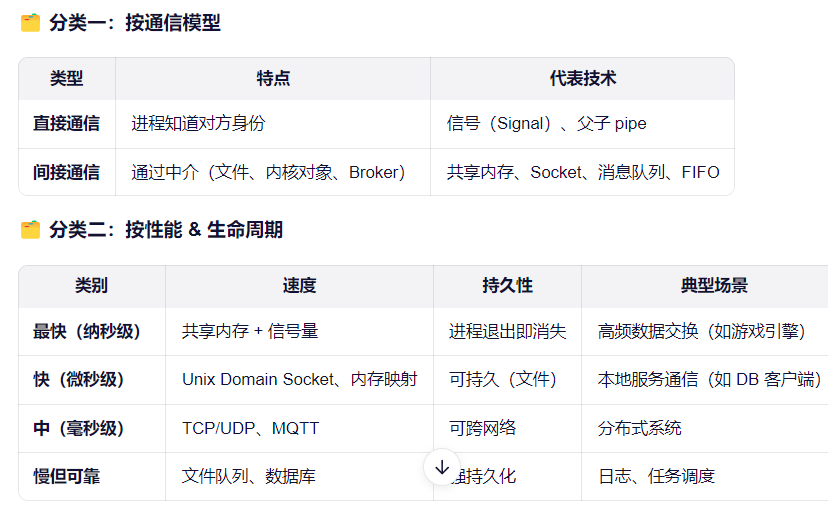
如果有人问我,你对多进程通信方式有什么了解?我大概会这样说:
我对Windows下的qt比较熟悉,对于多进程通信,我知道通过qprocess和标准输入输出,可以实现两个进程间的通信。然后是本地socket,也就是QLocalSocket通信,它使用上和QTcpSocket很像,但效率和开销会更小,适合本地通信。然后就是Tcp的通信,它也可以在本地使用,Udp也可以,就是不那么可靠。如果是跨机器的通信会优先考虑。除此之外,我还了解共享内存和信号量的使用,它们本质上是向系统申请一块动态的内存进行读写。相似的还有内存映射,它需要有一个文件作为映射的媒介。如果是直接操作文件的话,我们可以利用文件来实现消息队列的方式。最后,我还了解几种Linux下的Ipc方式,比如匿名管道、命名管道、消息队列、信号等。我相信自己了解这些Ipc方式后,在面对大部分常见的Ipc通信业务场景时,都能有效地面对和解决。
最后的最后,给自己说一句,2026加油吧!!