目录
[1. BERT 主题建模:比传统方法更懂中文评论](#1. BERT 主题建模:比传统方法更懂中文评论)
[2. 多模态分析:不止于文字,多维挖掘数据价值](#2. 多模态分析:不止于文字,多维挖掘数据价值)
[二、Python 代码实战:从数据加载到主题可视化](#二、Python 代码实战:从数据加载到主题可视化)
一、核心原理速懂
1. BERT 主题建模:比传统方法更懂中文评论
传统主题模型(如 LDA)靠统计词频找主题,容易忽略语境(比如 "古城夜景" 和 "夜景一般" 的 "夜景" 语义差异)。而 BERT 作为预训练语言模型,能深度理解中文语义:
- 先将评论文本转化为计算机能识别的 "语义向量"(捕捉词语上下文关系);
- 再通过聚类算法(如 K-Means)将语义相似的向量归为一类,每类就是一个核心主题;
- 最后从每类中提取高频关键词,就能清晰看到游客关注的核心话题(比如 "古建筑""美食""交通")。
2. 多模态分析:不止于文字,多维挖掘数据价值
前阵子获取的大众点评数据包含 "用户名、时间、情感、评分、评论" 等 8 列,这就是天然的多模态数据:
- 文本模态:评论内容(分词后、去停用词)→ 用 BERT 挖主题;
- 数值模态:评分→ ;
- 分类模态:情感(正面 / 负面)→ 看不同主题的情感倾向(比如 "交通" 主题是否负面评论多);
- 时间模态:评论时间→ 分析主题随时间变化(比如节假日游客更关注 "拥挤度")。
二、Python 代码实战:从数据加载到主题可视化
第一步:安装依赖库
python
# 核心库:BERT向量生成、主题聚类、数据处理、可视化
pip install torch transformers scikit-learn pandas numpy matplotlib seaborn openpyxl
第二步:完整代码(含注释)
python
import pandas as pd
import numpy as np
import matplotlib.pyplot as plt
from sklearn.cluster import KMeans
from sklearn.metrics import silhouette_score
from transformers import BertTokenizer, BertModel
import torch
import seaborn as sns
from collections import Counter

# ----------------------1. 数据加载与预处理----------------------
# 读取Excel数据(A-H列自动识别)
df = pd.read_excel("景区评论数据_分词后.xlsx", engine="openpyxl")

# 筛选有效数据(仅保留有"分词结果_去停用词"和"评分""情感"的行)
df = df.dropna(subset=["分词结果_去停用词", "评分", "情感", "时间"])
df.reset_index(drop=True, inplace=True)

# 准备文本数据(将分词结果拼接成完整句子,适配BERT输入)
df["text_for_bert"] = df["分词结果_去停用词"].apply(lambda x: " ".join(eval(x)) if isinstance(x, str) else "")

# ----------------------2. BERT生成语义向量----------------------
# 加载中文BERT模型(轻量版,速度快,适合小数据)
tokenizer = BertTokenizer.from_pretrained("bert-base-chinese")
model = BertModel.from_pretrained("bert-base-chinese")

# 定义向量生成函数(批量处理,避免内存溢出)
def get_bert_embeddings(texts, batch_size=32):
    embeddings = []
    for i in range(0, len(texts), batch_size):
        batch_texts = texts[i:i+batch_size]
        # BERT输入编码(max_length=50:评论长度限制为50词,按需调整)
        inputs = tokenizer(
            batch_texts,
            padding=True,
            truncation=True,
            max_length=50,
            return_tensors="pt"
        )
        # 生成向量(取[CLS] token的输出作为句子语义向量)
        with torch.no_grad():
            outputs = model(**inputs)
            batch_embeds = outputs.last_hidden_state[:, 0, :].numpy()
        embeddings.extend(batch_embeds)
    return np.array(embeddings)

# 生成所有评论的BERT向量
print("正在生成BERT语义向量...")
texts = df["text_for_bert"].tolist()
bert_vectors = get_bert_embeddings(texts)

# ----------------------3. K-Means聚类找主题(自动选最优聚类数)----------------------
# 计算不同聚类数的轮廓系数(越大聚类效果越好)
silhouette_scores = []
k_range = range(2, 8)  # 假设主题数在2-7之间
for k in k_range:
    kmeans = KMeans(n_clusters=k, random_state=42)
    cluster_labels = kmeans.fit_predict(bert_vectors)
    silhouette_scores.append(silhouette_score(bert_vectors, cluster_labels))

# 可视化轮廓系数,选最优k
plt.figure(figsize=(8, 4))
plt.plot(k_range, silhouette_scores, marker="o")
plt.xlabel("主题数量k")
plt.ylabel("轮廓系数")
plt.title("阆中古镇评论-最优主题数选择")
plt.savefig("最优主题数.png", dpi=300, bbox_inches="tight")
plt.show()

# 最优k值(取轮廓系数最大的k)
best_k = k_range[silhouette_scores.index(max(silhouette_scores))]
print(f"最优主题数:{best_k}")

# 最终聚类
kmeans = KMeans(n_clusters=best_k, random_state=42)
df["主题标签"] = kmeans.fit_predict(bert_vectors)

# ----------------------4. 提取主题关键词(每类Top10关键词)----------------------
def get_topic_keywords(df, topic_id, top_n=10):
    # 筛选该主题的所有评论分词结果
    topic_texts = df[df["主题标签"] == topic_id]["分词结果_去停用词"]
    # 统计所有词的频率
    word_counts = Counter()
    for text in topic_texts:
        word_counts.update(eval(text) if isinstance(text, str) else [])
    # 返回Top10高频词
    return word_counts.most_common(top_n)

# 输出所有主题的关键词
topics_keywords = {}
for i in range(best_k):
    keywords = get_topic_keywords(df, i)
    topics_keywords[f"主题{i+1}"] = [word for word, count in keywords]
    print(f"\n主题{i+1}关键词:{topics_keywords[f'主题{i+1}']}")

# ----------------------5. 多模态分析(主题+情感+评分+时间)----------------------
# 5.1 主题与情感分布(看每个主题的正负情感占比)
topic_emotion = pd.crosstab(df["主题标签"], df["情感"], normalize="index") * 100
print("\n主题-情感分布(%):")
print(topic_emotion)

# 可视化:堆叠柱状图
plt.figure(figsize=(10, 6))
topic_emotion.plot(kind="bar", stacked=True, colormap="RdYlGn")
plt.xlabel("主题标签")
plt.ylabel("情感占比(%)")
plt.title("阆中古镇各主题情感分布")
plt.xticks(ticks=range(best_k), labels=[f"主题{i+1}" for i in range(best_k)], rotation=0)
plt.legend(title="情感")
plt.savefig("主题-情感分布.png", dpi=300, bbox_inches="tight")
plt.show()

# 5.2 主题与评分关联(看每个主题的平均评分)
topic_rating = df.groupby("主题标签")["评分"].agg(["mean", "count"]).round(2)
topic_rating.columns = ["平均评分", "评论数量"]
print("\n主题-评分统计:")
print(topic_rating)

# 可视化:柱状图
plt.figure(figsize=(10, 6))
sns.barplot(x=topic_rating.index, y="平均评分", data=topic_rating, palette="Blues")
plt.xlabel("主题标签")
plt.ylabel("平均评分")
plt.title("阆中古镇各主题平均评分")
plt.xticks(ticks=range(best_k), labels=[f"主题{i+1}" for i in range(best_k)], rotation=0)
# 在柱子上标注评论数量
for i, count in enumerate(topic_rating["评论数量"]):
    plt.text(i, topic_rating["平均评分"][i] + 0.1, f"n={count}", ha="center")
plt.savefig("主题-平均评分.png", dpi=300, bbox_inches="tight")
plt.show()

# 5.3 主题随时间变化(按月份统计各主题评论数)
# 时间格式转换(假设时间列是字符串,转为datetime)
df["时间"] = pd.to_datetime(df["时间"], errors="coerce")
df["月份"] = df["时间"].dt.to_period("M")  # 按月份分组

# 统计每月各主题评论数
topic_time = pd.crosstab(df["月份"], df["主题标签"])
print("\n主题-时间分布:")
print(topic_time)

# 可视化:折线图
plt.figure(figsize=(12, 6))
topic_time.plot(kind="line", marker="o")
plt.xlabel("时间(月份)")
plt.ylabel("评论数量")
plt.title("阆中古镇各主题随时间变化趋势")
plt.legend(title="主题标签", labels=[f"主题{i+1}" for i in range(best_k)])
plt.xticks(rotation=45)
plt.tight_layout()
plt.savefig("主题-时间趋势.png", dpi=300, bbox_inches="tight")
plt.show()

# ----------------------6. 结果保存(便于后续分析)----------------------
# 给主题标签添加关键词备注
df["主题名称"] = df["主题标签"].apply(lambda x: f"主题{x+1}:{'-'.join(topics_keywords[f'主题{x+1}'][:3])}")
# 保存到新Excel
df.to_excel("阆中古镇评论_主题分析结果.xlsx", index=False, engine="openpyxl")
print("\n分析结果已保存到:阆中古镇评论_主题分析结果.xlsx")
三、结果解读指南
- 主题识别:看 "主题关键词",比如主题 1 关键词是 "古建筑 - 张飞庙 - 中天楼",说明这是 "历史景点打卡" 主题;主题 2 是 "醋 - 张飞牛肉 - 美食",就是 "当地美食体验" 主题。
- 情感倾向:如果 "交通" 主题负面情感占比高,说明游客对交通便利性满意度低;
- 评分关联:如果 "美食" 主题平均评分 4.8 分(满分 5 分),说明美食是核心优势;
- 时间趋势:如果节假日 "拥挤 - 排队" 主题评论增多,说明景区需要优化客流管控。
四、小贴士
- 若评论数据量较大(万级以上),可换 "bert-base-chinese-finetuned-sentiment" 微调模型,速度更快;
- 停用词可自定义(比如添加 "阆中""古镇" 等无意义高频词),让关键词更精准;
- 多模态还能拓展:比如结合用户画像(用户名是否重复)分析回头客关注的主题。
附------调试日志
'(MaxRetryError("HTTPSConnectionPool(host='huggingface.co', port=443): Max retries exceeded with url: /bert-base-chinese/resolve/main/vocab.txt (Caused by ConnectTimeoutError(<HTTPSConnection(host='huggingface.co', port=443) at 0x26b0ca029a0>, 'Connection to huggingface.co timed out. (connect timeout=10)'))"), '(Request ID: 39283957-dc99-419f-a54b-f6196b397ed2)')' thrown while requesting HEAD https://huggingface.co/bert-base-chinese/resolve/main/vocab.txt Retrying in 1s Retry 1/5.
无法连接到 HuggingFace 服务器下载 BERT 模型 (网络超时),解决方法是手动下载 BERT 模型到本地,再加载,步骤如下:
步骤 1:手动下载bert-base-chinese模型文件
打开浏览器,访问bert-base-chinese的 HuggingFace 仓库:https://huggingface.co/bert-base-chinese/tree/main
(这个网址也打不开,开了梯子才行)
下载以下 5 个核心文件到本地文件夹(比如命名为bert-base-chinese-local):
config.jsonpytorch_model.bintokenizer_config.jsonvocab.txtspecial_tokens_map.json
步骤 2:修改代码,从本地加载模型
把原来加载tokenizer和model的代码,替换为本地路径加载:
python
# 原来的代码(注释掉)
# tokenizer = BertTokenizer.from_pretrained("bert-base-chinese")
# model = BertModel.from_pretrained("bert-base-chinese")

# 新代码:从本地文件夹加载
tokenizer = BertTokenizer.from_pretrained("./bert-base-chinese-local")  # 本地文件夹路径
model = BertModel.from_pretrained("./bert-base-chinese-local")
额外说明
- 如果是国内网络,也可以通过国内镜像源加速下载(但手动下载更稳定);
- 确保本地文件夹路径正确(比如代码和
bert-base-chinese-local文件夹在同一目录下)。

这个报错的原因是轮廓系数(silhouette_score)的计算要求聚类数至少为 2,但当前代码中某一次聚类后只得到了 1 个类别。
问题分析
轮廓系数的计算逻辑是 "衡量样本与自身聚类的相似度,以及与其他聚类的差异",因此必须至少有 2 个聚类类别才能计算。出现该错误通常是因为:
- 数据量过少(比如有效评论数不足 10 条),K-Means 无法分成多个类别;
- 聚类数
k的取值不合理(比如k大于样本数); - 文本语义过于单一,所有评论的 BERT 向量都高度相似,聚类后只能得到 1 类。
数据中存在大量重复的 BERT 向量(即多条评论的语义完全一致),导致 K-Means 聚类时无法分成 2 个类别,最终只得到 1 个簇。
分词结果_去停用词列的内容是 "空格分隔的字符串",不是 "列表格式的字符串" ,所以ast.literal_eval解析失败,导致text_for_bert全为空。
解决方法:直接按空格拆分分词结果(不需要ast.literal_eval),修改parse_segmented_text函数
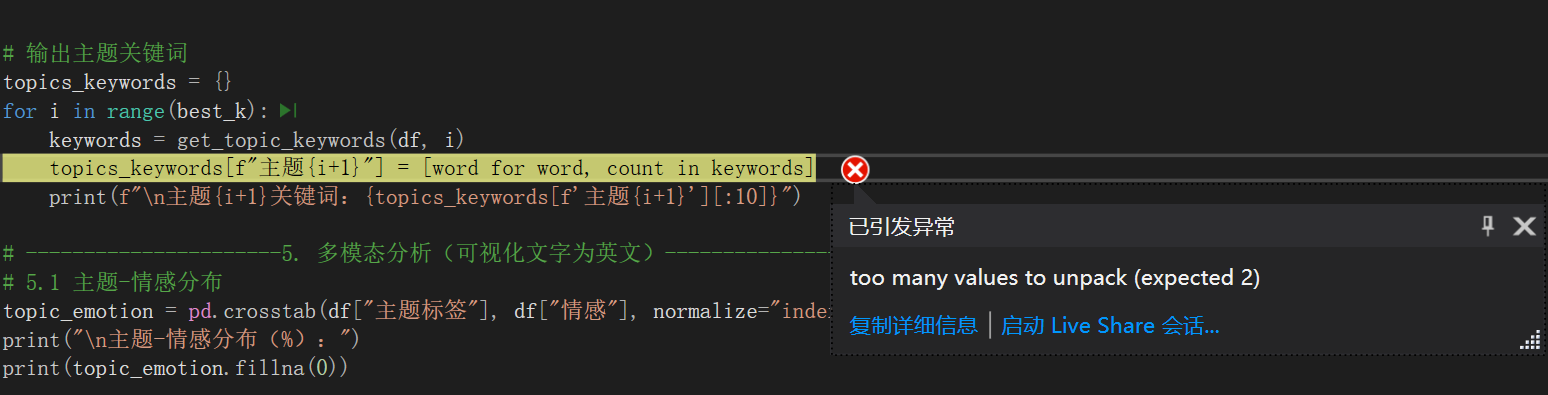
这个报错 "too many values to unpack (expected 2)" 的原因是:get_topic_keywords函数返回的结果格式不符合预期(需要返回 "(词,词频)" 的二元组,但实际返回的是单个元素)。
问题分析
你之前可能修改了get_topic_keywords函数(比如改用了 TF-IDF 方案),导致它返回的是单个词的列表 ,而非原来的 "(词,词频)" 二元组列表,因此在[word for word, count in keywords]这一步无法拆包。
代码运行结果:
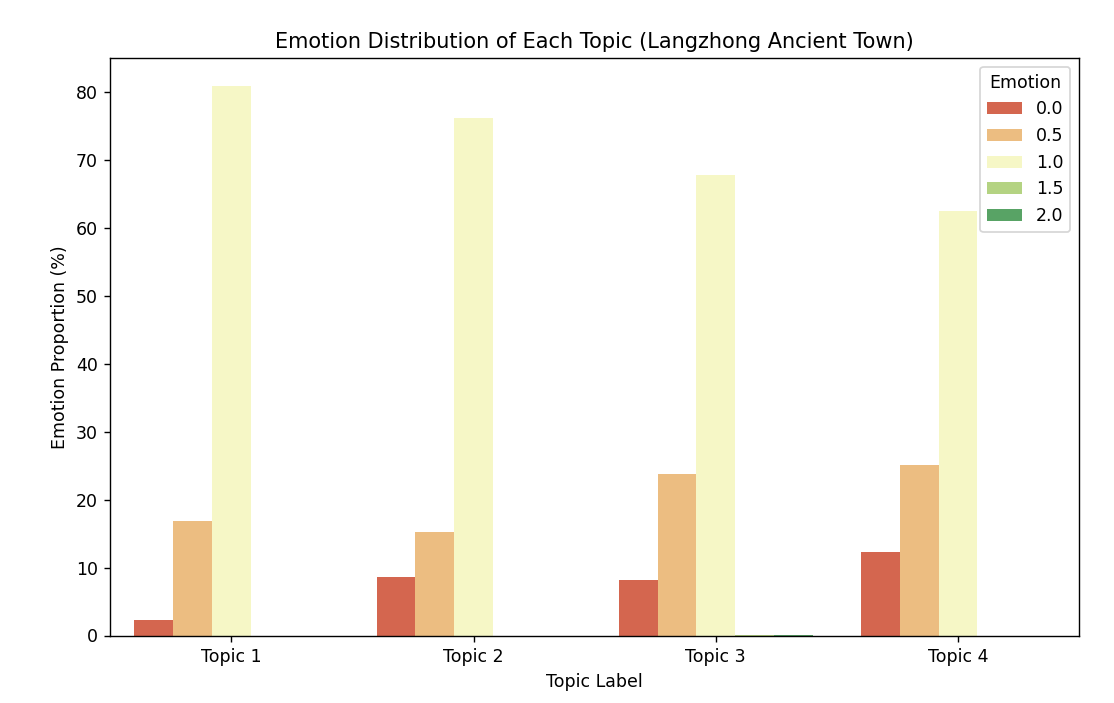
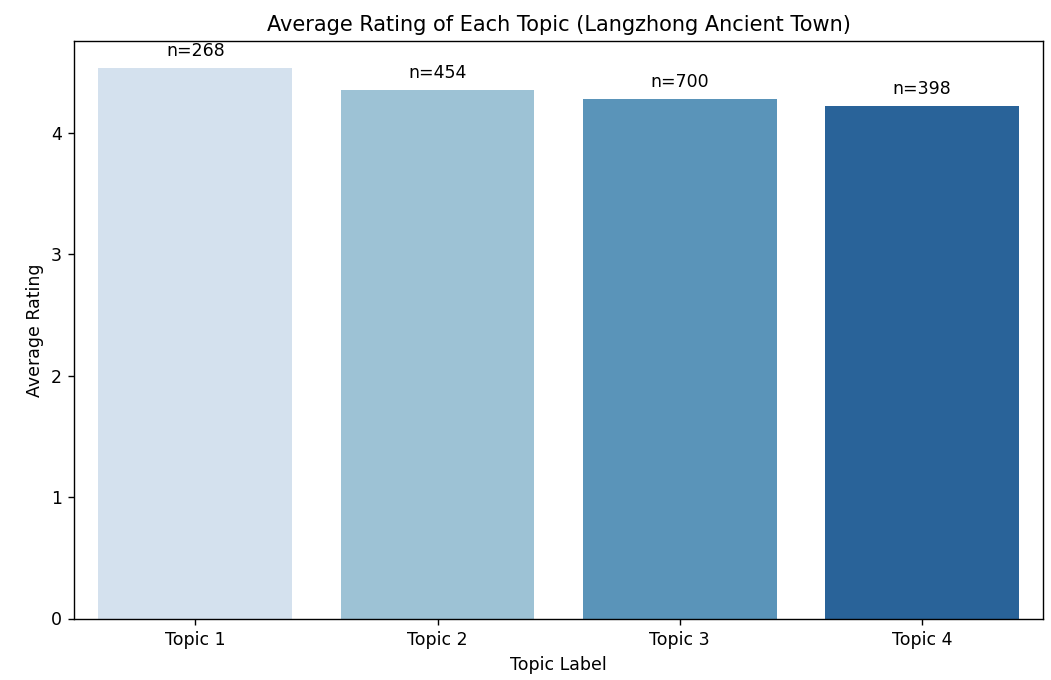
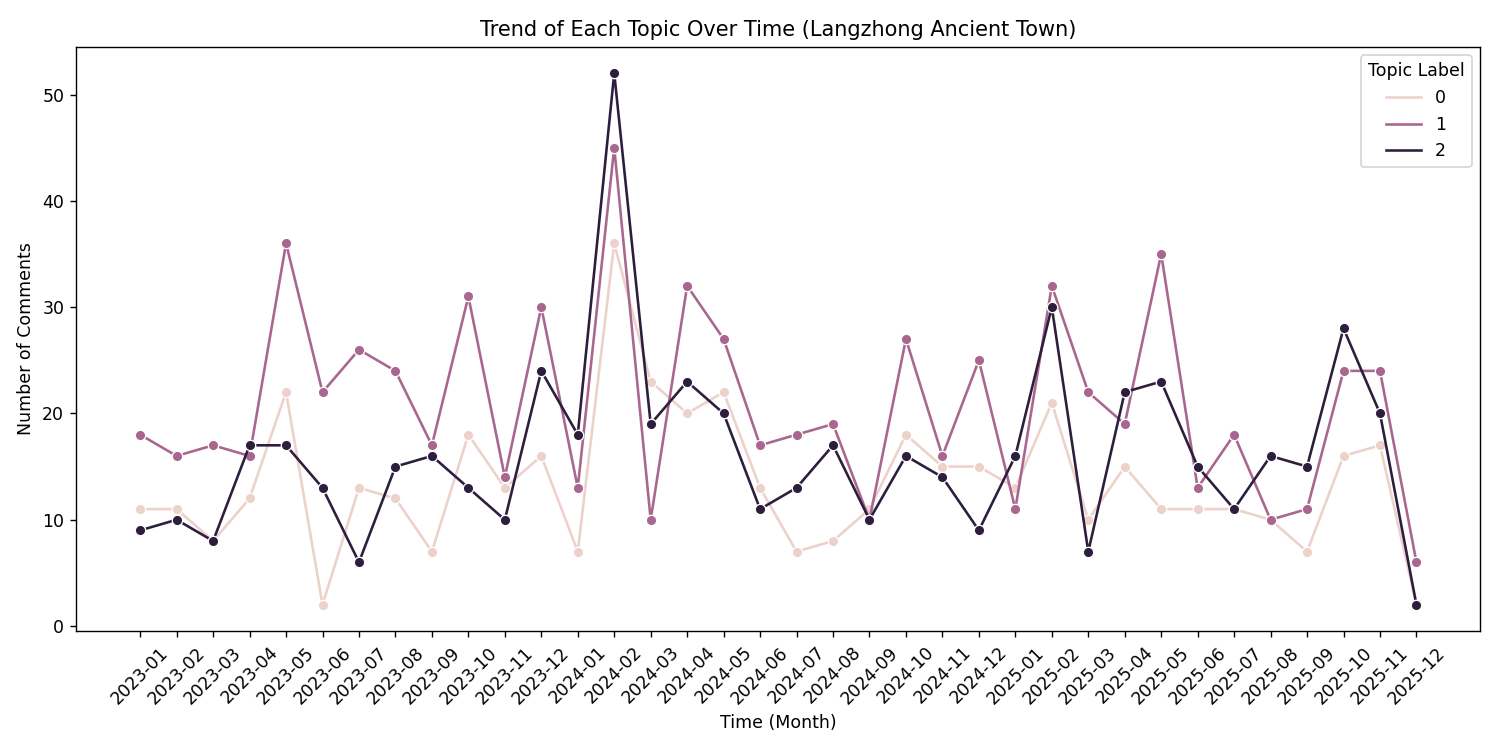
输出:
解析后的text_for_bert内容(前5条):
0 值得 一去 古色古香 不愧 5 级 景区 靠近 江边 木质 建筑 朴实 真的 很大 感觉 逛...
1 听说 春节 发源地 很大 一天 可能 逛 完会 一点 说实话 景区 里面 打造 有点 失败 ...
2 不妨 来到 时间 放慢 些 三月份 汉服 文化节 宜宾 赶过去 看 几个 朋友 一起 拍照 ...
3 适合 慢下来 真的 好大 古老 墙 小院 开发 挺 好 道路 适合 行人 管理 不错 唯一 ...
4 感觉 古镇 差不多 专门 开 2 小时 车 感觉 集市 买 牛肉 味道 不错
Name: text_for_bert, dtype: object
正在生成BERT语义向量...
原始向量数:1820,去重后向量数:1820
手动指定主题数:3
主题1关键词:'张飞', '牛肉', '地方', '嘉陵江', '四大', '春节', '历史', '古镇', '感觉', '真的'
主题2关键词:'古镇', '里面', '牛肉', '不错', '景点', '感觉', '地方', '比较', '没有', '张飞'
主题3关键词:'牛肉', '张飞', '景点', '保宁', '嘉陵江', '特色', '四大', '中国', '历史', '不错'
主题-情感分布(%):
情感 0.0 0.5 1.0 1.5 2.0
主题标签
0 8.884298 15.495868 75.619835 0.000000 0.000000
1 7.989348 23.435419 68.308921 0.133156 0.133156
2 8.205128 22.051282 69.743590 0.000000 0.000000
主题-评分统计:
平均评分 评论数量
主题标签
0 4.35 484
1 4.29 751
2 4.34 585
主题-时间分布:
主题标签 0 1 2
月份
2023-01 11 18 9
2023-02 11 16 10
2023-03 8 17 8
2023-04 12 16 17
2023-05 22 36 17
2023-06 2 22 13
2023-07 13 26 6
2023-08 12 24 15
2023-09 7 17 16
2023-10 18 31 13
2023-11 13 14 10
2023-12 16 30 24
2024-01 7 13 18
2024-02 36 45 52
2024-03 23 10 19
2024-04 20 32 23
2024-05 22 27 20
2024-06 13 17 11
2024-07 7 18 13
2024-08 8 19 17
2024-09 11 10 10
2024-10 18 27 16
2024-11 15 16 14
2024-12 15 25 9
2025-01 13 11 16
2025-02 21 32 30
2025-03 10 22 7
2025-04 15 19 22
2025-05 11 35 23
2025-06 11 13 15
2025-07 11 18 11
2025-08 10 10 16
2025-09 7 11 15
2025-10 16 24 28
2025-11 17 24 20
2025-12 2 6 2
python
import pandas as pd
import numpy as np
import matplotlib.pyplot as plt
from sklearn.cluster import KMeans
from sklearn.metrics import silhouette_score
from sklearn.preprocessing import StandardScaler
from sklearn.feature_extraction.text import TfidfVectorizer
from transformers import BertTokenizer, BertModel
import torch
import seaborn as sns
from collections import Counter

# ----------------------1. 数据加载与预处理(含停用词过滤)----------------------
# 读取Excel数据
df = pd.read_excel("景区评论数据_分词后.xlsx", engine="openpyxl")

# 筛选有效数据
df = df.dropna(subset=["分词结果_去停用词", "评分", "情感", "时间"])
df.reset_index(drop=True, inplace=True)

# 定义需要去除的停用词
stopwords = {"古城", "很", "都", "阆中", "去", "人", "很多", "还", "不"}

# 解析分词结果并过滤停用词
def parse_and_remove_stopwords(x):
    if not isinstance(x, str):
        return ""
    words = x.strip().split()
    filtered_words = [word for word in words if word not in stopwords]
    return " ".join(filtered_words) if len(filtered_words) > 0 else ""

df["text_for_bert"] = df["分词结果_去停用词"].apply(parse_and_remove_stopwords)

# 过滤空文本
df = df[df["text_for_bert"] != ""].reset_index(drop=True)
if len(df) == 0:
    raise ValueError("无有效评论文本,请检查分词结果列格式")

# 打印解析后的结果(验证)
print("解析后的text_for_bert内容(前5条):")
print(df["text_for_bert"].head(5))

# ----------------------2. BERT生成语义向量----------------------
# 加载本地BERT模型
tokenizer = BertTokenizer.from_pretrained("./bert-base-chinese-local")
model = BertModel.from_pretrained("./bert-base-chinese-local")
model.eval()  # 设为评估模式

# 批量生成BERT语义向量
def get_bert_embeddings(texts, batch_size=32):
    embeddings = []
    for i in range(0, len(texts), batch_size):
        batch_texts = texts[i:i+batch_size]
        inputs = tokenizer(
            batch_texts,
            padding=True,
            truncation=True,
            max_length=50,
            return_tensors="pt"
        )
        with torch.no_grad():
            outputs = model(**inputs)
            # 取[CLS]位置的向量作为句子表示
            batch_embeds = outputs.last_hidden_state[:, 0, :].numpy()
        embeddings.extend(batch_embeds)
    return np.array(embeddings)

print("\n正在生成BERT语义向量...")
texts = df["text_for_bert"].tolist()
bert_vectors = get_bert_embeddings(texts)

# 向量标准化(提升聚类稳定性)
scaler = StandardScaler()
bert_vectors_scaled = scaler.fit_transform(bert_vectors)

# ----------------------3. K-Means聚类(手动指定主题数为4)----------------------
# 对向量去重
_, unique_indices = np.unique(bert_vectors_scaled, axis=0, return_index=True)
bert_vectors_unique = bert_vectors_scaled[np.sort(unique_indices)]
print(f"\n原始向量数:{len(bert_vectors_scaled)},去重后向量数:{len(bert_vectors_unique)}")

# 手动指定主题数(避免分类过粗)
best_k = 3
print(f"手动指定主题数:{best_k}")

# 最终聚类并映射回原始数据
kmeans_final = KMeans(n_clusters=best_k, random_state=42, n_init=20)
unique_labels = kmeans_final.fit_predict(bert_vectors_unique)

vector_label_map = dict(zip(tuple(map(tuple, bert_vectors_unique)), unique_labels))
df["主题标签"] = [vector_label_map.get(tuple(vec), 0) for vec in bert_vectors_scaled]

# ----------------------4. 提取主题关键词(TF-IDF方案)----------------------
def get_topic_keywords(df, topic_id, top_n=10):
    # 提取该主题的所有评论(过滤停用词)
    topic_texts = df[df["主题标签"] == topic_id]["分词结果_去停用词"].apply(
        lambda x: " ".join([w for w in x.strip().split() if w not in stopwords])
    )
    # 过滤空文本
    topic_texts = topic_texts[topic_texts != ""]
    if len(topic_texts) == 0:
        return []
    # 用TF-IDF计算词权重(越低越能代表主题)
    tfidf = TfidfVectorizer()
    tfidf_matrix = tfidf.fit_transform(topic_texts)
    # 提取TopN关键词
    word_tfidf = dict(zip(tfidf.get_feature_names_out(), tfidf.idf_))
    sorted_words = sorted(word_tfidf.items(), key=lambda x: x[1], reverse=False)[:top_n]
    return [word for word, score in sorted_words]

# 输出主题关键词
topics_keywords = {}
for i in range(best_k):
    keywords = get_topic_keywords(df, i)
    topics_keywords[f"主题{i+1}"] = keywords
    print(f"\n主题{i+1}关键词:{topics_keywords[f'主题{i+1}'][:10]}")

# ----------------------5. 多模态分析(修复绘图渲染)----------------------
# 5.1 主题-情感分布
topic_emotion = pd.crosstab(df["主题标签"], df["情感"], normalize="index") * 100
print("\n主题-情感分布(%):")
print(topic_emotion.fillna(0))

# 改用seaborn绘图(确保渲染)
plt.figure(figsize=(10, 6))
# 转换为长数据格式
topic_emotion_long = topic_emotion.reset_index().melt(
    id_vars="主题标签", var_name="Emotion", value_name="Proportion"
)
sns.barplot(
    x="主题标签", y="Proportion", hue="Emotion",
    data=topic_emotion_long, palette="RdYlGn"
)
plt.xlabel("Topic Label")
plt.ylabel("Emotion Proportion (%)")
plt.title("Emotion Distribution of Each Topic (Langzhong Ancient Town)")
plt.xticks(ticks=range(best_k), labels=[f"Topic {i+1}" for i in range(best_k)], rotation=0)
plt.legend(title="Emotion")
plt.savefig("主题-情感分布.png", dpi=300, bbox_inches="tight")
# 强制渲染
plt.draw()
plt.pause(0.5)
plt.show()

# 5.2 主题-评分统计
topic_rating = df.groupby("主题标签")["评分"].agg(["mean", "count"]).round(2)
topic_rating.columns = ["平均评分", "评论数量"]
print("\n主题-评分统计:")
print(topic_rating.fillna(0))

plt.figure(figsize=(10, 6))
sns.barplot(x=topic_rating.index, y="平均评分", data=topic_rating, palette="Blues")
plt.xlabel("Topic Label")
plt.ylabel("Average Rating")
plt.title("Average Rating of Each Topic (Langzhong Ancient Town)")
plt.xticks(ticks=range(best_k), labels=[f"Topic {i+1}" for i in range(best_k)], rotation=0)
for i, (mean_val, count) in enumerate(zip(topic_rating["平均评分"], topic_rating["评论数量"])):
    plt.text(i, mean_val + 0.1, f"n={count}", ha="center")
plt.savefig("主题-平均评分.png", dpi=300, bbox_inches="tight")
plt.draw()
plt.pause(0.5)
plt.show()
# 5.3 主题-时间趋势
df["时间"] = pd.to_datetime(df["时间"], errors="coerce")
df = df.dropna(subset=["时间"])
if len(df) >=1:
    # 将Period类型转为字符串
    df["月份"] = df["时间"].dt.to_period("M").astype(str)
    topic_time = pd.crosstab(df["月份"], df["主题标签"])
    print("\n主题-时间分布:")
    print(topic_time.fillna(0))

    plt.figure(figsize=(12, 6))
    # 转换为长数据格式
    topic_time_long = topic_time.reset_index().melt(
        id_vars="月份", var_name="Topic Label", value_name="Comment Count"
    )
    sns.lineplot(
        x="月份", y="Comment Count", hue="Topic Label",
        data=topic_time_long, marker="o"
    )
    plt.xlabel("Time (Month)")
    plt.ylabel("Number of Comments")
    plt.title("Trend of Each Topic Over Time (Langzhong Ancient Town)")
    plt.xticks(rotation=45)
    plt.tight_layout()
    plt.savefig("主题-时间趋势.png", dpi=300, bbox_inches="tight")
    plt.draw()
    plt.pause(0.5)
    plt.show()
else:
    print("无有效时间数据,跳过时间趋势分析")

# ----------------------6. 结果保存----------------------
df["主题名称"] = df["主题标签"].apply(lambda x: f"主题{x+1}:{'-'.join(topics_keywords[f'主题{x+1}'][:3])}")
df.to_excel("阆中古镇评论_主题分析结果.xlsx", index=False, engine="openpyxl")
print("\n分析结果已保存到:阆中古镇评论_主题分析结果.xlsx")