《MCP完整语法指南:从零掌握Model Context Protocol的所有语法和模式》
目录
1 MCP基础概念
1.1 MCP是什么?
MCP (Model Context Protocol) = 模型上下文协议
MCP的核心目标:
┌─────────────────────────────────────────┐
│ 标准化AI应用之间的通信方式               │
│                                         │
│ Server(数据/工具提供方)                │
│        ↕ (JSON-RPC 2.0)                 │
│ Client(数据/工具消费方)                │
│        ↕ (stdio / HTTP)                 │
│ LLM (实际生成者)                        │
└─────────────────────────────────────────┘
1.2 MCP的四大功能
| 功能 | 符号 | 作用 | 使用场景 |
|---|---|---|---|
| Resources | 📁 | 提供被动数据 | 文档、配置、文件 |
| Tools | 🔧 | 执行主动操作 | API调用、计算、搜索 |
| Prompts | 💬 | 提供提示词 | 提示词管理、LLM指引 |
| Sampling | 🤖 | 请求LLM采样 | LLM调用、参数调整 |
1.3 MCP的通信协议
┌─────────────────────────┐
│  JSON-RPC 2.0 协议      │
├─────────────────────────┤
│ method: "resources/list"│  【关键】固定的方法名
│ params: {...}           │  【关键】参数
│ id: 1                   │  【关键】请求ID
└─────────────────────────┘
2 通信架构
2.1 stdio通信方式(本地)
python
# 【Server端】启动stdio服务
from mcp.server.stdio import stdio_server

async def main():
    async with stdio_server() as (read_stream, write_stream):
        await app.run(read_stream, write_stream, app.create_initialization_options())

# 【Client端】连接stdio服务
from mcp.client.stdio import stdio_client, StdioServerParameters

params = StdioServerParameters(
    command=sys.executable,      # Python解释器
    args=["server.py"],          # Server脚本
    env=None                     # 环境变量
)

async with stdio_client(params) as (reader, writer):
    async with ClientSession(reader, writer) as session:
        await session.initialize()
2.2 完整的握手流程
┌─ Client                                Server
│
├─ 1. 启动Server进程 (stdio)
│  └─ 建立stdin/stdout通道
│
├─ 2. Client初始化
│  ├─ async with ClientSession(reader, writer)
│  └─ await session.initialize()
│
├─ 3. Server响应初始化
│  └─ 返回初始化配置
│
├─ 4. 发送通知
│  ├─ await session.send_notification(
│  │      method="notifications/initialized"
│  │  )
│  └─ 握手完成 ✅
│
└─ 5. 开始通信
   ├─ list_resources()
   ├─ read_resource(uri)
   ├─ list_tools()
   ├─ call_tool(name, args)
   ├─ list_prompts()
   ├─ get_prompt(name, args)
   └─ 采样请求...
3 Server端语法
3.1 Server初始化
python
from mcp.server import Server
import mcp.types as types
from mcp.server.stdio import stdio_server
import asyncio

# 【步骤1】创建Server实例
app = Server("my-server-name")

# 【步骤2】定义处理器(装饰器模式)
@app.list_resources()
async def list_resources() -> list[types.Resource]:
    pass

@app.read_resource()
async def read_resource(uri: str) -> str:
    pass

@app.list_tools()
async def list_tools() -> list[types.Tool]:
    pass

@app.call_tool()
async def call_tool(name: str, arguments: dict) -> list[types.TextContent]:
    pass

@app.list_prompts()
async def list_prompts() -> list[types.Prompt]:
    pass

@app.get_prompt()
async def get_prompt(name: str, arguments: dict = None) -> types.GetPromptResult:
    pass

# 【步骤3】启动Server
async def main():
    async with stdio_server() as (read_stream, write_stream):
        await app.run(read_stream, write_stream, app.create_initialization_options())

if __name__ == "__main__":
    asyncio.run(main())
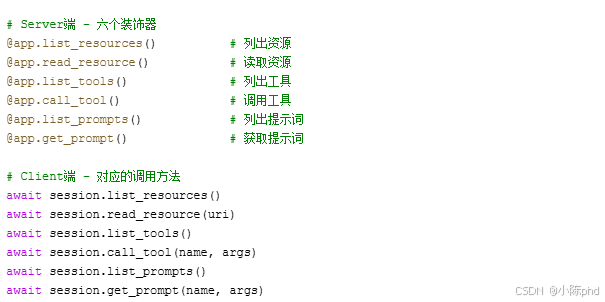
3.2 Server端的四个装饰器
3.2.1 Resources装饰器
python
# 【装饰器1】list_resources
@app.list_resources()
async def list_resources() -> list[types.Resource]:
    """
    【必须】返回所有可用资源的列表

    返回值格式:List[types.Resource]
    每个Resource包含:
    - uri: str              (唯一标识)
    - name: str             (显示名称)
    - description: str      (可选,描述)
    - mimeType: str         (可选,MIME类型)
    """
    return [
        types.Resource(
            uri="file:///path/to/file.txt",
            name="example.txt",
            description="Example file",
            mimeType="text/plain"
        )
    ]

# 【装饰器2】read_resource
@app.read_resource()
async def read_resource(uri: str) -> str:
    """
    【必须】读取指定URI的资源内容

    输入:uri (str)
    输出:资源内容 (str)
    """
    path = uri.replace("file://", "")
    with open(path, 'r') as f:
        return f.read()
3.2.2 Tools装饰器
python
# 【装饰器3】list_tools
@app.list_tools()
async def list_tools() -> list[types.Tool]:
    """
    【必须】返回所有可用工具的列表

    每个Tool包含:
    - name: str                    (工具唯一标识)
    - description: str             (工具描述)
    - inputSchema: dict            (参数JSON Schema)
    """
    return [
        types.Tool(
            name="calculator",
            description="执行数学运算",
            inputSchema={
                "type": "object",
                "properties": {
                    "a": {"type": "number"},
                    "b": {"type": "number"},
                    "operation": {
                        "type": "string",
                        "enum": ["add", "subtract", "multiply", "divide"]
                    }
                },
                "required": ["a", "b", "operation"]
            }
        )
    ]

# 【装饰器4】call_tool
@app.call_tool()
async def call_tool(
    name: str,
    arguments: dict
) -> list[types.TextContent]:
    """
    【必须】执行指定工具

    输入:
    - name: 工具名称
    - arguments: 工具参数

    输出:List[types.TextContent]
    """
    if name == "calculator":
        a = arguments.get("a")
        b = arguments.get("b")
        operation = arguments.get("operation")

        results = {
            "add": a + b,
            "subtract": a - b,
            "multiply": a * b,
            "divide": a / b if b != 0 else "Error"
        }

        return [types.TextContent(
            type="text",
            text=f"结果: {results[operation]}"
        )]

    return [types.TextContent(
        type="text",
        text=f"未知工具: {name}"
    )]
3.2.3 Prompts装饰器
python
# 【装饰器5】list_prompts
@app.list_prompts()
async def list_prompts() -> list[types.Prompt]:
    """
    【必须】返回所有可用提示词模板

    每个Prompt包含:
    - name: str                    (模板唯一标识)
    - description: str             (模板描述)
    - arguments: List[PromptArgument]  (参数列表)
    """
    return [
        types.Prompt(
            name="code-review",
            description="代码审查模板",
            arguments=[
                types.PromptArgument(
                    name="code",
                    description="需要审查的代码",
                    required=True
                ),
                types.PromptArgument(
                    name="language",
                    description="编程语言",
                    required=True
                ),
                types.PromptArgument(
                    name="focus",
                    description="审查重点",
                    required=False
                )
            ]
        )
    ]

# 【装饰器6】get_prompt
@app.get_prompt()
async def get_prompt(
    name: str,
    arguments: dict = None
) -> types.GetPromptResult:
    """
    【必须】根据参数生成具体的提示词

    返回值:GetPromptResult
    包含messages列表,每个message是PromptMessage
    """
    if name == "code-review":
        code = arguments.get("code") if arguments else ""
        language = arguments.get("language", "Unknown")
        focus = arguments.get("focus", "general")

        return types.GetPromptResult(
            messages=[
                types.PromptMessage(
                    role="assistant",
                    content=types.TextContent(
                        type="text",
                        text=f"你是{language}代码审查专家,专注于{focus}方面。"
                    )
                ),
                types.PromptMessage(
                    role="user",
                    content=types.TextContent(
                        type="text",
                        text=f"请审查以下代码:\n{code}"
                    )
                )
            ]
        )

    raise ValueError(f"未知模板: {name}")
4 Client端语法
4.1 Client初始化
python
import sys
import asyncio
from mcp import ClientSession
from mcp.client.stdio import stdio_client, StdioServerParameters
from mcp.types import Notification

async def main():
    # 【步骤1】定义Server参数
    params = StdioServerParameters(
        command=sys.executable,      # Python解释器路径
        args=["server.py"],          # Server脚本路径
        env=None                     # 环境变量
    )

    # 【步骤2】建立通信通道
    async with stdio_client(params) as (reader, writer):
        # 【步骤3】创建Client会话
        async with ClientSession(reader, writer) as session:
            # 【步骤4】初始化握手
            await session.initialize()

            # 【步骤5】发送初始化通知
            notification = Notification(
                method="notifications/initialized",
                params={}
            )
            await session.send_notification(notification)

            # 【步骤6】现在可以调用各种方法
            # ...后续操作...

if __name__ == "__main__":
    asyncio.run(main())
4.2 Client调用Resources
python
async with ClientSession(reader, writer) as session:
    await session.initialize()

    # 【方法1】列出所有资源
    response = await session.list_resources()
    for resource in response.resources:
        print(f"资源: {resource.name}")
        print(f"URI: {resource.uri}")
        print(f"描述: {resource.description}")

    # 【方法2】读取指定资源
    content = await session.read_resource("file:///path/to/file.txt")
    print(f"内容: {content}")
4.3 Client调用Tools
python
async with ClientSession(reader, writer) as session:
    await session.initialize()

    # 【方法1】列出所有工具
    response = await session.list_tools()
    for tool in response.tools:
        print(f"工具: {tool.name}")
        print(f"描述: {tool.description}")
        print(f"参数: {tool.inputSchema}")

    # 【方法2】调用指定工具
    result = await session.call_tool(
        name="calculator",
        arguments={
            "a": 5,
            "b": 3,
            "operation": "add"
        }
    )
    print(f"结果: {result.content[0].text}")
4.4 Client调用Prompts
python
async with ClientSession(reader, writer) as session:
    await session.initialize()

    # 【方法1】列出所有提示词模板
    response = await session.list_prompts()
    for prompt in response.prompts:
        print(f"模板: {prompt.name}")
        print(f"描述: {prompt.description}")
        print(f"参数: {prompt.arguments}")

    # 【方法2】获取参数化的提示词
    result = await session.get_prompt(
        name="code-review",
        arguments={
            "code": "def hello(): pass",
            "language": "Python",
            "focus": "performance"
        }
    )

    # 【步骤3】处理返回的messages
    for message in result.messages:
        print(f"角色: {message.role}")
        print(f"内容: {message.content.text}")
5 四大功能完整语法
5.1 Resources完整示例
python
# ═════════════════════════════════════════
# Server端
# ═════════════════════════════════════════
import os
from pathlib import Path

DOC_DIR = str(Path(__file__).parent / "docs")

@app.list_resources()
async def list_resources() -> list[types.Resource]:
    """列出docs目录下的所有文件"""
    files = [f for f in os.listdir(DOC_DIR) if f.endswith(".txt")]
    return [
        types.Resource(
            uri=f"file://{os.path.join(DOC_DIR, fname)}",
            name=fname,
            description=f"Documentation: {fname}",
            mimeType="text/plain"
        )
        for fname in files
    ]

@app.read_resource()
async def read_resource(uri: str) -> str:
    """读取指定文件内容"""
    from urllib.parse import unquote
    path = unquote(uri.replace("file://", ""))
    with open(path, 'r', encoding='utf-8') as f:
        return f.read()

# ═════════════════════════════════════════
# Client端
# ═════════════════════════════════════════
async with ClientSession(reader, writer) as session:
    await session.initialize()

    # 发现资源
    resources = await session.list_resources()

    # 读取每个资源
    for res in resources.resources:
        content = await session.read_resource(res.uri)
        print(f"{res.name}: {len(content)} 字符")
5.2 Tools完整示例
python
# ═════════════════════════════════════════
# Server端
# ═════════════════════════════════════════
@app.list_tools()
async def list_tools() -> list[types.Tool]:
    return [
        types.Tool(
            name="search",
            description="搜索知识库",
            inputSchema={
                "type": "object",
                "properties": {
                    "query": {
                        "type": "string",
                        "description": "搜索关键词"
                    },
                    "limit": {
                        "type": "integer",
                        "description": "返回结果数量"
                    }
                },
                "required": ["query"]
            }
        )
    ]

@app.call_tool()
async def call_tool(name: str, arguments: dict) -> list[types.TextContent]:
    if name == "search":
        query = arguments.get("query")
        limit = arguments.get("limit", 10)

        # 【实现搜索逻辑】
        results = search_knowledge_base(query, limit)

        return [types.TextContent(
            type="text",
            text=f"找到 {len(results)} 个结果:\n" +
                 "\n".join(f"- {r['title']}" for r in results)
        )]

    return [types.TextContent(type="text", text="工具不存在")]

# ═════════════════════════════════════════
# Client端
# ═════════════════════════════════════════
async with ClientSession(reader, writer) as session:
    await session.initialize()

    # 发现工具
    tools = await session.list_tools()

    # 使用工具
    result = await session.call_tool(
        name="search",
        arguments={"query": "Python", "limit": 5}
    )
    print(result.content[0].text)
5.3 Prompts完整示例
python
# ═════════════════════════════════════════
# Server端
# ═════════════════════════════════════════
@app.list_prompts()
async def list_prompts() -> list[types.Prompt]:
    return [
        types.Prompt(
            name="summarize",
            description="总结文本内容",
            arguments=[
                types.PromptArgument(
                    name="text",
                    description="要总结的文本",
                    required=True
                ),
                types.PromptArgument(
                    name="style",
                    description="总结风格",
                    required=False
                )
            ]
        )
    ]

@app.get_prompt()
async def get_prompt(name: str, arguments: dict = None) -> types.GetPromptResult:
    if name == "summarize":
        text = arguments.get("text", "") if arguments else ""
        style = arguments.get("style", "bullet") if arguments else "bullet"

        style_guide = {
            "bullet": "用要点列表形式",
            "paragraph": "用段落形式",
            "one-line": "用一句话"
        }

        return types.GetPromptResult(
            messages=[
                types.PromptMessage(
                    role="system",
                    content=types.TextContent(
                        type="text",
                        text=f"你是一个内容总结专家。{style_guide.get(style)}"
                    )
                ),
                types.PromptMessage(
                    role="user",
                    content=types.TextContent(
                        type="text",
                        text=f"请总结以下内容:\n{text}"
                    )
                )
            ]
        )

    raise ValueError(f"未知模板: {name}")

# ═════════════════════════════════════════
# Client端 + LLM集成
# ═════════════════════════════════════════
from openai import OpenAI

llm_client = OpenAI(api_key="your_key")

async with ClientSession(reader, writer) as session:
    await session.initialize()

    # 获取提示词
    prompt_result = await session.get_prompt(
        name="summarize",
        arguments={
            "text": "长文本内容...",
            "style": "bullet"
        }
    )

    # 转换为LLM格式
    messages = [
        {
            "role": msg.role,
            "content": msg.content.text
        }
        for msg in prompt_result.messages
    ]

    # 调用LLM
    response = llm_client.chat.completions.create(
        model="gpt-4",
        messages=messages
    )

    print(response.choices[0].message.content)
5.4 Sampling完整示例
python
# ═════════════════════════════════════════
# Server端
# ═════════════════════════════════════════
import json

@app.get_prompt()
async def get_prompt(name: str, arguments: dict = None) -> types.GetPromptResult:
    if name == "with-sampling":
        question = arguments.get("question", "") if arguments else ""

        # 【关键】构建采样请求
        sampling_request = {
            "method": "sampling/createMessage",
            "params": {
                "messages": [
                    {
                        "role": "user",
                        "content": {"type": "text", "text": question}
                    }
                ],
                "systemPrompt": "你是一个专业的助手",
                "temperature": 0.7,
                "maxTokens": 1000,
                "modelPreferences": {
                    "hints": [{"name": "gpt-4"}],
                    "intelligencePriority": 0.9
                }
            }
        }

        return types.GetPromptResult(
            messages=[
                types.PromptMessage(
                    role="assistant",
                    content=types.TextContent(
                        type="text",
                        text=json.dumps(sampling_request, ensure_ascii=False)
                    )
                )
            ]
        )

# ═════════════════════════════════════════
# Client端
# ═════════════════════════════════════════
async with ClientSession(reader, writer) as session:
    await session.initialize()

    # 获取采样请求
    prompt_result = await session.get_prompt(
        name="with-sampling",
        arguments={"question": "什么是MCP?"}
    )

    # 解析采样请求
    sampling_request = json.loads(prompt_result.messages[0].content.text)

    # 【可选】用户可以调整参数
    sampling_request["params"]["temperature"] = 0.3  # 更保守

    # 【关键】执行采样
    params = sampling_request["params"]
    response = llm_client.chat.completions.create(
        model="gpt-4",
        messages=params["messages"],
        temperature=params.get("temperature", 0.7),
        max_tokens=params.get("maxTokens", 1000)
    )

    print(response.choices[0].message.content)
6 高级模式
6.1 FastMCP简化语法
python
# ═════════════════════════════════════════
# FastMCP (推荐用于简单场景)
# ═════════════════════════════════════════
from mcp.server.fastmcp import FastMCP

# 【步骤1】创建FastMCP实例
mcp = FastMCP("my-service")

# 【步骤2】用装饰器定义工具(自动生成JSON Schema)
@mcp.tool()
async def calculator(operation: str, a: float, b: float) -> str:
    """执行数学运算

    Args:
        operation: 运算类型 (add, subtract, multiply, divide)
        a: 第一个数字
        b: 第二个数字

    Returns:
        str: 计算结果
    """
    if operation == "add":
        return f"结果: {a + b}"
    elif operation == "divide":
        if b == 0:
            return "错误: 除数不能为零"
        return f"结果: {a / b}"
    # ...其他操作

# 【步骤3】启动
if __name__ == "__main__":
    mcp.run(transport="stdio")
6.2 错误处理模式
python
# ═════════════════════════════════════════
# Server端错误处理
# ═════════════════════════════════════════
@app.call_tool()
async def call_tool(name: str, arguments: dict) -> list[types.TextContent]:
    """【鲁棒】包含完整的错误处理"""

    try:
        # 【步骤1】验证工具存在
        if name not in AVAILABLE_TOOLS:
            raise ValueError(f"工具不存在: {name}")

        # 【步骤2】验证参数
        required_args = TOOLS_CONFIG[name].get("required", [])
        for arg in required_args:
            if arg not in arguments:
                raise ValueError(f"缺少必需参数: {arg}")

        # 【步骤3】类型验证和转换
        try:
            a = float(arguments.get("a", 0))
            b = float(arguments.get("b", 0))
        except (TypeError, ValueError):
            raise ValueError("参数必须是数字")

        # 【步骤4】执行工具
        result = execute_tool(name, a, b)

        return [types.TextContent(
            type="text",
            text=f"成功: {result}"
        )]

    except ValueError as e:
        # 【关键】返回错误消息而不是抛出异常
        return [types.TextContent(
            type="text",
            text=f"错误: {str(e)}"
        )]

    except Exception as e:
        # 【关键】捕获未预期的异常
        return [types.TextContent(
            type="text",
            text=f"内部错误: {str(e)}"
        )]

# ═════════════════════════════════════════
# Client端错误处理
# ═════════════════════════════════════════
async with ClientSession(reader, writer) as session:
    await session.initialize()

    try:
        # 【步骤1】验证Server连接
        tools = await session.list_tools()
        if not tools.tools:
            print("⚠️ Server没有提供任何工具")

        # 【步骤2】调用工具
        result = await session.call_tool(
            name="calculator",
            arguments={"a": 5, "b": "invalid"}  # 故意传入错误类型
        )

        # 【步骤3】检查结果
        if result.content:
            text = result.content[0].text
            if "错误" in text:
                print(f"⚠️ Server返回错误: {text}")
            else:
                print(f"✅ 成功: {text}")

    except Exception as e:
        print(f"❌ 调用失败: {e}")
6.3 类型系统
python
# ═════════════════════════════════════════
# MCP中的所有类型
# ═════════════════════════════════════════

# Resource相关
types.Resource(
    uri: str,                    # 【必须】资源唯一标识
    name: str,                   # 【必须】显示名称
    description: Optional[str],  # 【可选】描述
    mimeType: Optional[str]      # 【可选】MIME类型
)

# Tool相关
types.Tool(
    name: str,                   # 【必须】工具名称
    description: str,            # 【必须】工具描述
    inputSchema: dict            # 【必须】参数JSON Schema
)

# Prompt相关
types.Prompt(
    name: str,                   # 【必须】模板名称
    description: str,            # 【必须】模板描述
    arguments: List[PromptArgument]  # 【必须】参数列表
)

types.PromptArgument(
    name: str,                   # 【必须】参数名
    description: str,            # 【必须】参数描述
    required: bool               # 【必须】是否必需
)

# Message相关
types.PromptMessage(
    role: str,                   # 【必须】"assistant" 或 "user"
    content: TextContent         # 【必须】内容
)

types.TextContent(
    type: str,                   # 【必须】"text"
    text: str                    # 【必须】文本内容
)

# 结果相关
types.GetPromptResult(
    messages: List[PromptMessage]  # 【必须】消息列表
)

types.ListResourcesResult(
    resources: List[Resource]      # 【必须】资源列表
)

types.ListToolsResult(
    tools: List[Tool]              # 【必须】工具列表
)

types.ListPromptsResult(
    prompts: List[Prompt]          # 【必须】提示词列表
)

# 内容相关
types.ToolResult(
    type: str,                     # "text" 或 "image"
    text: Optional[str],           # 文本内容
    image: Optional[dict]          # 图片数据
)
7 错误处理
7.1 常见错误及解决方案
python
# ═════════════════════════════════════════
# 【错误1】装饰器名称错误
# ═════════════════════════════════════════

# ❌ 错误
@app.list_tool()  # 应该是 list_tools()
async def list_tool():
    pass

# ✅ 正确
@app.list_tools()
async def list_tools():
    pass

# ═════════════════════════════════════════
# 【错误2】参数类型错误
# ═════════════════════════════════════════

# ❌ 错误
@app.call_tool()
async def call_tool(name, arguments):  # 缺少类型注解
    pass

# ✅ 正确
@app.call_tool()
async def call_tool(name: str, arguments: dict) -> list[types.TextContent]:
    pass

# ═════════════════════════════════════════
# 【错误3】返回值格式错误
# ═════════════════════════════════════════

# ❌ 错误
return "直接返回字符串"  # 应该返回list[types.TextContent]

# ✅ 正确
return [types.TextContent(type="text", text="结果")]

# ═════════════════════════════════════════
# 【错误4】JSON Schema格式错误
# ═════════════════════════════════════════

# ❌ 错误
inputSchema={
    "type": "object",
    "properties": {
        "a": "number"  # ❌ 应该是 {"type": "number"}
    }
}

# ✅ 正确
inputSchema={
    "type": "object",
    "properties": {
        "a": {"type": "number"}
    },
    "required": ["a"]
}

# ═════════════════════════════════════════
# 【错误5】消息格式错误
# ═════════════════════════════════════════

# ❌ 错误
types.PromptMessage(
    role="user",
    content="直接传字符串"  # ❌ 应该是TextContent对象
)

# ✅ 正确
types.PromptMessage(
    role="user",
    content=types.TextContent(
        type="text",
        text="实际内容"
    )
)
8 完整工作流
8.1 端到端示例
python
# ═══════════════════════════════════════════════
# 完整的代码审查系统示例
# ═══════════════════════════════════════════════

# ───────────────────────────────────────────────
# 第1部分:Server端定义
# ───────────────────────────────────────────────
from mcp.server import Server
import mcp.types as types
from mcp.server.stdio import stdio_server
import asyncio
import json

app = Server("code-review-server")

# 1️⃣ 定义Resources - 提供审查规则
REVIEW_RULES = {
    "file:///rules/python.md": "Python代码审查规则",
    "file:///rules/javascript.md": "JavaScript代码审查规则"
}

@app.list_resources()
async def list_resources() -> list[types.Resource]:
    return [
        types.Resource(
            uri=uri,
            name=uri.split("/")[-1],
            description=desc,
            mimeType="text/markdown"
        )
        for uri, desc in REVIEW_RULES.items()
    ]

@app.read_resource()
async def read_resource(uri: str) -> str:
    if uri == "file:///rules/python.md":
        return "# Python代码审查规则\n1. 遵循PEP8\n2. 类型注解..."
    return "规则不存在"

# 2️⃣ 定义Tools - 执行审查操作
@app.list_tools()
async def list_tools() -> list[types.Tool]:
    return [
        types.Tool(
            name="lint",
            description="执行静态检查",
            inputSchema={
                "type": "object",
                "properties": {
                    "code": {"type": "string"},
                    "language": {"type": "string"}
                },
                "required": ["code", "language"]
            }
        ),
        types.Tool(
            name="test-coverage",
            description="检查测试覆盖率",
            inputSchema={
                "type": "object",
                "properties": {
                    "code": {"type": "string"}
                },
                "required": ["code"]
            }
        )
    ]

@app.call_tool()
async def call_tool(name: str, arguments: dict) -> list[types.TextContent]:
    if name == "lint":
        code = arguments.get("code", "")
        language = arguments.get("language", "")
        # 【实现】调用linter
        issues = lint_code(code, language)
        return [types.TextContent(
            type="text",
            text=f"发现 {len(issues)} 个问题:\n" +
                 "\n".join(f"- {issue}" for issue in issues)
        )]

    elif name == "test-coverage":
        code = arguments.get("code", "")
        coverage = calculate_coverage(code)
        return [types.TextContent(
            type="text",
            text=f"测试覆盖率: {coverage}%"
        )]

    return [types.TextContent(type="text", text="工具不存在")]

# 3️⃣ 定义Prompts - 提供审查提示词
@app.list_prompts()
async def list_prompts() -> list[types.Prompt]:
    return [
        types.Prompt(
            name="code-review",
            description="代码审查",
            arguments=[
                types.PromptArgument(name="code", description="代码", required=True),
                types.PromptArgument(name="language", description="语言", required=True),
                types.PromptArgument(name="focus", description="重点", required=False)
            ]
        )
    ]

@app.get_prompt()
async def get_prompt(name: str, arguments: dict = None) -> types.GetPromptResult:
    if name == "code-review":
        code = arguments.get("code", "") if arguments else ""
        language = arguments.get("language", "Python") if arguments else "Python"
        focus = arguments.get("focus", "quality") if arguments else "quality"

        return types.GetPromptResult(
            messages=[
                types.PromptMessage(
                    role="assistant",
                    content=types.TextContent(
                        type="text",
                        text=f"你是一个资深的{language}代码审查专家,专注于{focus}。"
                    )
                ),
                types.PromptMessage(
                    role="user",
                    content=types.TextContent(
                        type="text",
                        text=f"请审查以下代码:\n{code}"
                    )
                )
            ]
        )

    raise ValueError(f"未知模板: {name}")

# 启动Server
async def main():
    async with stdio_server() as (read_stream, write_stream):
        await app.run(read_stream, write_stream, app.create_initialization_options())

if __name__ == "__main__":
    asyncio.run(main())

# ───────────────────────────────────────────────
# 第2部分:Client端调用
# ───────────────────────────────────────────────
import sys
from mcp import ClientSession
from mcp.client.stdio import stdio_client, StdioServerParameters
from openai import OpenAI

class CodeReviewClient:
    def __init__(self):
        self.session = None
        self.llm = OpenAI(api_key="sk-...")

    async def connect(self, server_script):
        """连接Server"""
        params = StdioServerParameters(
            command=sys.executable,
            args=[server_script]
        )

        async with stdio_client(params) as (reader, writer):
            self.session = await ClientSession(reader, writer).__aenter__()
            await self.session.initialize()

    async def review_code(self, code: str, language: str):
        """执行代码审查流程"""

        # 【步骤1】获取审查规则(Resource)
        resources = await self.session.list_resources()
        relevant_rule = [r for r in resources.resources
                        if language.lower() in r.name.lower()]

        if relevant_rule:
            rule_content = await self.session.read_resource(relevant_rule[0].uri)
            print(f"📋 审查规则:\n{rule_content[:200]}...")

        # 【步骤2】执行静态检查(Tool)
        lint_result = await self.session.call_tool(
            name="lint",
            arguments={"code": code, "language": language}
        )
        print(f"🔍 静态检查:\n{lint_result.content[0].text}")

        # 【步骤3】检查测试覆盖率(Tool)
        coverage_result = await self.session.call_tool(
            name="test-coverage",
            arguments={"code": code}
        )
        print(f"📊 测试覆盖率:\n{coverage_result.content[0].text}")

        # 【步骤4】使用Prompt获取LLM指引
        prompt_result = await self.session.get_prompt(
            name="code-review",
            arguments={"code": code, "language": language, "focus": "quality"}
        )

        # 【步骤5】调用LLM进行审查
        messages = [
            {
                "role": msg.role,
                "content": msg.content.text
            }
            for msg in prompt_result.messages
        ]

        # 添加前面的检查结果
        messages.append({
            "role": "user",
            "content": f"前面的检查结果:\n{lint_result.content[0].text}\n{coverage_result.content[0].text}"
        })

        response = self.llm.chat.completions.create(
            model="gpt-4",
            messages=messages
        )

        print(f"✨ LLM审查意见:\n{response.choices[0].message.content}")

# 使用
async def main():
    client = CodeReviewClient()
    await client.connect("server.py")

    sample_code = """
def factorial(n):
    if n <= 1:
        return 1
    return n * factorial(n - 1)
    """

    await client.review_code(sample_code, "Python")

if __name__ == "__main__":
    asyncio.run(main())
8.2 调试工作流
python
# ═══════════════════════════════════════════════
# 调试技巧
# ═══════════════════════════════════════════════

# 1️⃣ 打印所有可用的功能
async with ClientSession(reader, writer) as session:
    await session.initialize()

    print("【Resources】")
    resources = await session.list_resources()
    for r in resources.resources:
        print(f"  - {r.name}")

    print("\n【Tools】")
    tools = await session.list_tools()
    for t in tools.tools:
        print(f"  - {t.name}")

    print("\n【Prompts】")
    prompts = await session.list_prompts()
    for p in prompts.prompts:
        print(f"  - {p.name}")

# 2️⃣ 验证返回值
result = await session.call_tool(name="test", arguments={})
print(f"类型: {type(result)}")
print(f"内容: {result.content}")
for item in result.content:
    print(f"  - 类型: {item.type}")
    print(f"  - 文本: {item.text}")

# 3️⃣ 打印JSON Schema
tools = await session.list_tools()
for tool in tools.tools:
    print(f"\n工具: {tool.name}")
    print(f"Schema: {json.dumps(tool.inputSchema, indent=2, ensure_ascii=False)}")

# 4️⃣ 测试参数验证
import json
tool_schema = tools.tools[0].inputSchema
properties = tool_schema.get("properties", {})
required = tool_schema.get("required", [])

for param in required:
    print(f"【必需参数】 {param}: {properties[param]}")

for param in properties:
    if param not in required:
        print(f"【可选参数】 {param}: {properties[param]}")
总结
语法速查表
| 功能 | Server方法 | Client方法 | 返回类型 |
|---|---|---|---|
| Resources | @app.list_resources() | session.list_resources() | ListResource |
| Resources | @app.read_resource() | session.read_resource(uri) | str |
| Tools | @app.list_tools() | session.list_tools() | ListTool |
| Tools | @app.call_tool() | session.call_tool(name, args) | ListTextContent |
| Prompts | @app.list_prompts() | session.list_prompts() | ListPrompt |
| Prompts | @app.get_prompt() | session.get_prompt(name, args) | GetPromptResult |
| Sampling | 返回采样请求 | 解析并执行采样 | LLM回复 |
最佳实践
- ✅ 始终使用类型注解 - 帮助IDE和类型检查
- ✅ 返回正确的类型 - Server必须返回ListTextContent
- ✅ 完整的JSON Schema - 帮助Client验证参数
- ✅ 清晰的描述 - 让用户理解功能
- ✅ 错误处理 - 返回错误信息而不是抛异常
- ✅ 使用sys.executable - 跨环境兼容性
- ✅ 异步编程 - 所有I/O操作使用await