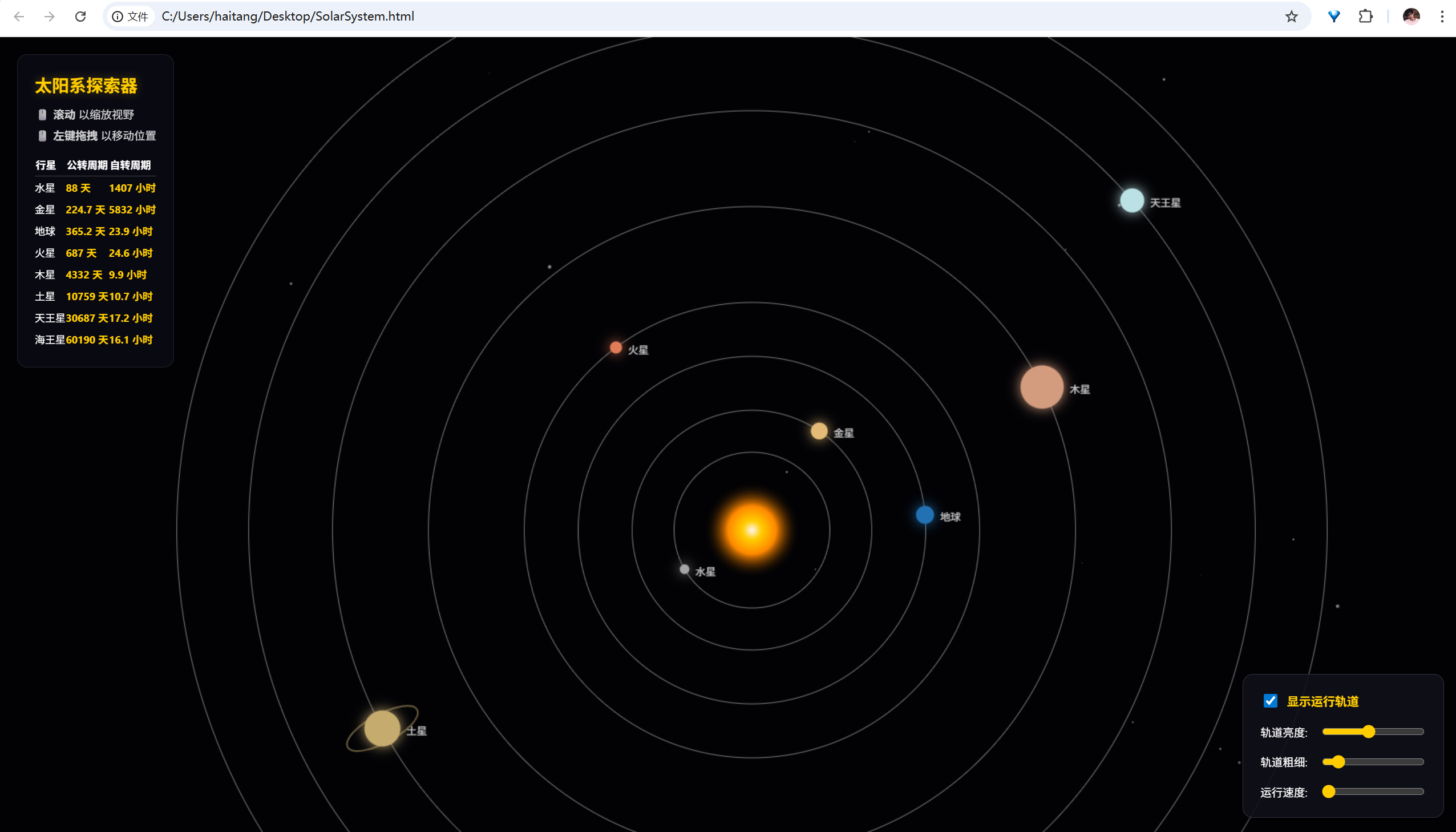
使用 html 和 js 制作太阳系八大行星运行轨道演示动画
代码如下:
html
<!DOCTYPE html>
<html lang="zh-CN">
<head>
    <meta charset="UTF-8">
    <meta name="viewport" content="width=device-width, initial-scale=1.0">
    <title>动态太阳系交互模型 - 沉浸版</title>
    <style>
        body { margin: 0; background: #020205; color: white; font-family: 'Segoe UI', Tahoma, Geneva, Verdana, sans-serif; overflow: hidden; }
        canvas { display: block; cursor: move; }

        /* 通用面板样式 */
        .panel {
            position: absolute;
            background: rgba(10, 10, 20, 0.85);
            border: 1px solid rgba(255, 255, 255, 0.1);
            backdrop-filter: blur(8px);
            transition: transform 0.4s cubic-bezier(0.4, 0, 0.2, 1);
            z-index: 10;
        }

        /* 左侧面板 */
        #ui-panel {
            top: 20px; left: 20px;
            padding: 20px; border-radius: 12px;
            max-width: 320px;
        }
        #ui-panel.collapsed { transform: translateX(-110%); }

        /* 右侧面板 */
        #controls {
            bottom: 20px; right: 20px;
            padding: 20px; border-radius: 12px;
            display: flex; flex-direction: column; gap: 15px;
        }
        #controls.collapsed { transform: translateX(110%); }

        /* 折叠按钮样式 */
        .toggle-btn {
            position: absolute;
            width: 30px; height: 30px;
            background: rgba(40, 40, 60, 0.9);
            border: 1px solid rgba(255, 255, 255, 0.2);
            border-radius: 50%;
            color: #ffcc00;
            cursor: pointer;
            display: flex; align-items: center; justify-content: center;
            font-size: 16px; transition: 0.3s;
            pointer-events: auto;
        }
        .toggle-btn:hover { background: #ffcc00; color: #000; }

        #btn-left { right: -40px; top: 0; }
        #btn-right { left: -40px; bottom: 0; }

        h1 { margin: 0 0 10px 0; font-size: 20px; color: #ffcc00; }
        p { font-size: 13px; margin: 5px 0; opacity: 0.8; }
        table { width: 100%; border-collapse: collapse; margin-top: 15px; font-size: 12px; }
        th { text-align: left; border-bottom: 1px solid #444; padding-bottom: 5px; }
        td { padding: 4px 0; }
        .val { color: #ffcc00; font-weight: bold; }

        .ctrl-item { display: flex; align-items: center; justify-content: space-between; gap: 15px; font-size: 13px; }
        input[type=range] { width: 120px; cursor: pointer; accent-color: #ffcc00; }
        .check-group { font-size: 14px; cursor: pointer; display: flex; align-items: center; gap: 8px; font-weight: bold; color: #ffcc00; }
    </style>
</head>
<body>

    <div id="ui-panel" class="panel">
        <div id="btn-left" class="toggle-btn" onclick="togglePanel('ui-panel')">◀</div>
        <h1>太阳系探索器</h1>
        <p>🖱️ <b>滚动</b> 以缩放视野</p>
        <p>🖱️ <b>左键拖拽</b> 以移动位置</p>
        <div id="planet-info"></div>
    </div>

    <div id="controls" class="panel">
        <div id="btn-right" class="toggle-btn" onclick="togglePanel('controls')">▶</div>
        <label class="check-group">
            <input type="checkbox" id="orbit-toggle" checked> 显示运行轨道
        </label>

        <div class="ctrl-item">
            轨道亮度: <input type="range" id="orbit-opacity" min="0" max="1" step="0.05" value="0.3">
        </div>

        <div class="ctrl-item">
            轨道粗细: <input type="range" id="orbit-width" min="0.5" max="5" step="0.5" value="1">
        </div>

        <div class="ctrl-item">
            运行速度: <input type="range" id="speed-slider" min="0" max="10" step="0.5" value="1">
        </div>
    </div>

    <canvas id="solarCanvas"></canvas>

    <script>
        const canvas = document.getElementById('solarCanvas');
        const ctx = canvas.getContext('2d');

        let width, height, scale = 0.8, offsetX = 0, offsetY = 0;
        let speedMult = 1, showOrbits = true, orbitOpacity = 0.3, orbitStrokeWidth = 1;
        let isDragging = false, lastMouseX, lastMouseY;

        const planets = [
            { name: "水星", color: "#A5A5A5", dist: 65, radius: 4, rev: 88, rot: 1407, angle: Math.random()*7 },
            { name: "金星", color: "#E3BB76", dist: 100, radius: 7, rev: 224.7, rot: -5832, angle: Math.random()*7 },
            { name: "地球", color: "#2271B3", dist: 145, radius: 7.5, rev: 365.2, rot: 23.9, angle: Math.random()*7 },
            { name: "火星", color: "#E27B58", dist: 190, radius: 5, rev: 687, rot: 24.6, angle: Math.random()*7 },
            { name: "木星", color: "#D39C7E", dist: 270, radius: 18, rev: 4332, rot: 9.9, angle: Math.random()*7 },
            { name: "土星", color: "#C5AB6E", dist: 350, radius: 15, rev: 10759, rot: 10.7, ring: true, angle: Math.random()*7 },
            { name: "天王星", color: "#BBE1E4", dist: 420, radius: 10, rev: 30687, rot: -17.2, angle: Math.random()*7 },
            { name: "海王星", color: "#6081FF", dist: 480, radius: 10, rev: 60190, rot: 16.1, angle: Math.random()*7 }
        ];

        const stars = Array.from({ length: 400 }, () => ({
            x: Math.random() * 4000 - 2000,
            y: Math.random() * 4000 - 2000,
            size: Math.random() * 1.5
        }));

        // 切换面板显示状态
        function togglePanel(id) {
            const el = document.getElementById(id);
            const btn = el.querySelector('.toggle-btn');
            el.classList.toggle('collapsed');

            // 更新箭头方向
            if(id === 'ui-panel') {
                btn.innerText = el.classList.contains('collapsed') ? '▶' : '◀';
            } else {
                btn.innerText = el.classList.contains('collapsed') ? '◀' : '▶';
            }
        }

        function init() {
            resize();
            createTable();
            window.addEventListener('resize', resize);
            window.addEventListener('wheel', e => {
                e.preventDefault();
                scale = Math.min(Math.max(scale - e.deltaY * 0.001, 0.05), 5);
            }, { passive: false });

            canvas.addEventListener('mousedown', e => { isDragging = true; lastMouseX = e.clientX; lastMouseY = e.clientY; });
            window.addEventListener('mousemove', e => {
                if (isDragging) {
                    offsetX += e.clientX - lastMouseX;
                    offsetY += e.clientY - lastMouseY;
                    lastMouseX = e.clientX; lastMouseY = e.clientY;
                }
            });
            window.addEventListener('mouseup', () => isDragging = false);

            document.getElementById('speed-slider').oninput = e => speedMult = e.target.value;
            document.getElementById('orbit-toggle').onchange = e => showOrbits = e.target.checked;
            document.getElementById('orbit-opacity').oninput = e => orbitOpacity = e.target.value;
            document.getElementById('orbit-width').oninput = e => orbitStrokeWidth = e.target.value;

            animate();
        }

        function resize() {
            width = window.innerWidth; height = window.innerHeight;
            canvas.width = width; canvas.height = height;
        }

        function draw() {
            ctx.fillStyle = "#020205";
            ctx.fillRect(0, 0, width, height);
            ctx.save();
            ctx.translate(width / 2 + offsetX, height / 2 + offsetY);
            ctx.scale(scale, scale);

            stars.forEach(s => {
                ctx.globalAlpha = 0.5; ctx.fillStyle = "white";
                ctx.beginPath(); ctx.arc(s.x, s.y, s.size, 0, Math.PI * 2); ctx.fill();
            });
            ctx.globalAlpha = 1.0;

            const sunGradient = ctx.createRadialGradient(0, 0, 0, 0, 0, 40);
            sunGradient.addColorStop(0, "#FFF5F2"); sunGradient.addColorStop(0.2, "#FFCC00");
            sunGradient.addColorStop(1, "transparent");
            ctx.beginPath(); ctx.arc(0, 0, 50, 0, Math.PI * 2); ctx.fillStyle = sunGradient; ctx.fill();

            planets.forEach(p => {
                if (showOrbits) {
                    ctx.beginPath();
                    ctx.arc(0, 0, p.dist, 0, Math.PI * 2);
                    ctx.strokeStyle = `rgba(255, 255, 255, ${orbitOpacity})`;
                    ctx.lineWidth = orbitStrokeWidth / scale;
                    ctx.stroke();
                }

                p.angle += (0.01 * (365 / p.rev)) * speedMult;
                const x = Math.cos(p.angle) * p.dist;
                const y = Math.sin(p.angle) * p.dist;

                if (p.ring) {
                    ctx.beginPath(); ctx.ellipse(x, y, p.radius * 2.2, p.radius * 0.8, p.angle, 0, Math.PI * 2);
                    ctx.strokeStyle = "rgba(197, 171, 110, 0.5)"; ctx.lineWidth = 2/scale; ctx.stroke();
                }

                ctx.beginPath(); ctx.arc(x, y, p.radius, 0, Math.PI * 2);
                ctx.fillStyle = p.color; ctx.shadowBlur = 15; ctx.shadowColor = p.color; ctx.fill();
                ctx.shadowBlur = 0;
                ctx.fillStyle = "rgba(255, 255, 255, 0.8)"; ctx.font = `${12 / scale}px sans-serif`;
                ctx.fillText(p.name, x + p.radius + 5, y + 5);
            });
            ctx.restore();
        }

        function createTable() {
            const infoDiv = document.getElementById('planet-info');
            let html = `<table><tr><th>行星</th><th>公转</th><th>自转</th></tr>`;
            planets.forEach(p => {
                html += `<tr><td>${p.name}</td><td class="val">${p.rev}d</td><td class="val">${Math.abs(p.rot)}h</td></tr>`;
            });
            infoDiv.innerHTML = html + `</table>`;
        }

        function animate() { draw(); requestAnimationFrame(animate); }
        init();
    </script>
</body>
</html>
将该文件保存为SolarSystem.html ,然后浏览器打开
效果: