一、概念
|-----------|-----------------------|
| versions | 声明依赖项和插件的版本,然后引用这些变量。 |
| libraries | 声明依赖项的别名 |
| bundles | 声明依赖项的组名 |
| plugins | 声明插件 |
- 属性名单词之间用连词符号(而不是驼峰命名法),调用起来每个连词符号通过点调用,这样方便分类命名。
- 只有libraries节点中的属性名可以直接调用,其它节点调用起来是 libs.节点名.属性称(因此其它节点可以出现重名)。
二、单个依赖
原来
Groovy
dependencies {
    implementation 'androidx.core:core-ktx:1.9.0'
}
现在
Kotlin
[versions]
demo = "1.9.0"

[libraries]
#写法一
demo-compiler1 = "com.example:demo-compiler:1.9.0"
#写法二(推荐)
demo-compiler2 = { module = "com.example:demo-compiler", version = "1.9.0" }
#写法三
demo-compiler3 = { module = "com.example:demo-compiler", version.ref = "demo" }
#写法四
demo-compiler4 = { group = "com.example", name = "demo-compiler", version = "1.9.0" }
#写法五
demo-compiler5 = { group = "com.example", name = "demo-compiler", version.ref = "demo" }
Kotlin
dependencies {
    implementation(libs.demo.compiler1)
}
三、群组
Kotlin
[libraries]
compose-lifecycle = { ... }
compose-activity = { ... }
compose-viewmodel = { ... }

[bundles]
compose = ["compose-lifecycle", "compose-activity", "compose-viewmodel"]
Kotlin
dependencies {
    implementation(libs.bundles.compose)
}
四、插件
原来
Groovy
// 项目
plugins {
   id("com.android.application") version "7.4.1" apply false
}

// 模块
plugins {
   id("com.android.application")    //聚合写法
}
apply plugin: 'com.android.library'    //单个写法
现在
Kotlin
[versions]
androidGradlePlugin = "7.4.1"

[plugins]
android-application = { id = "com.android.application", version.ref = "androidGradlePlugin" }
Kotlin
// 项目
plugins {
   alias(libs.plugins.android.application) apply false
}

// 模块
plugins {
   alias(libs.plugins.android.application)    //聚合写法
}
apply plugin: libs.plugins.android.library    //单个写法
五、历史遗留问题
仅针对老项目,新版AndroidStudio默认就使用TOML。
5.1 文件创建
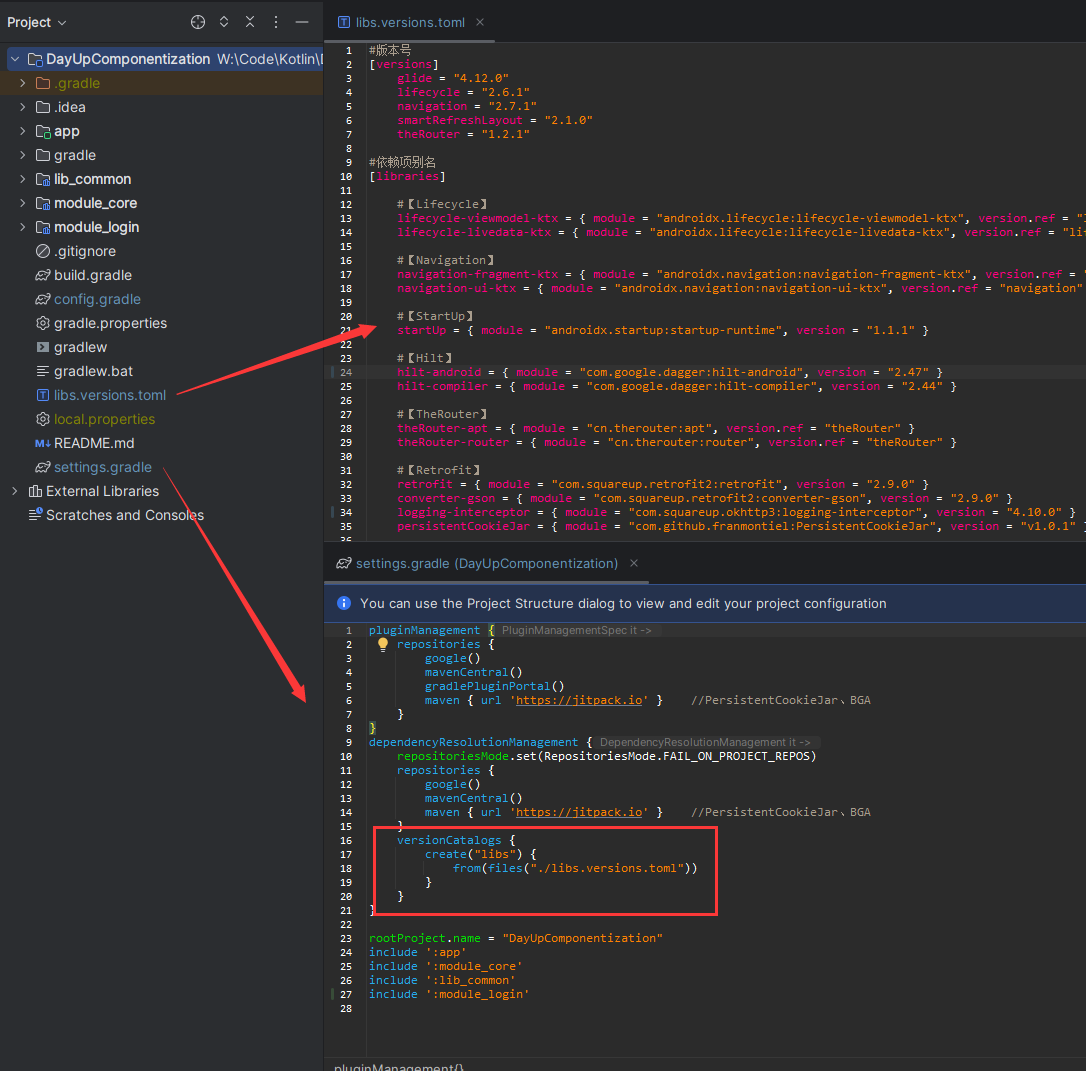
在项目上右键→New→File→Vewsion Catalogs,取名 libs,会自动加后缀 .version.toml(没有就直接创建文件取完整名称)。在 settings.gradle 中的 <dependencyResolutionManagement> 标签下使用 <versionCatalogs> 引入所创建的文件。
5.2 无法升级 AGP 问题
将 Project 的 build.gradle 中 application 和 library 还原成默认书写方式。
Groovy
id 'com.android.application' version '8.3.0' apply false
id 'com.android.library' version '8.3.0' apply false