一、需求说明
有n个前缀为"26年*月份工时定额目标"的文件,文件格式一致,需要更新每份文件中F列的数据。计划编写VBA代码,实现在宏文件中点击一个按钮,实现excel文件列数据自动更新。
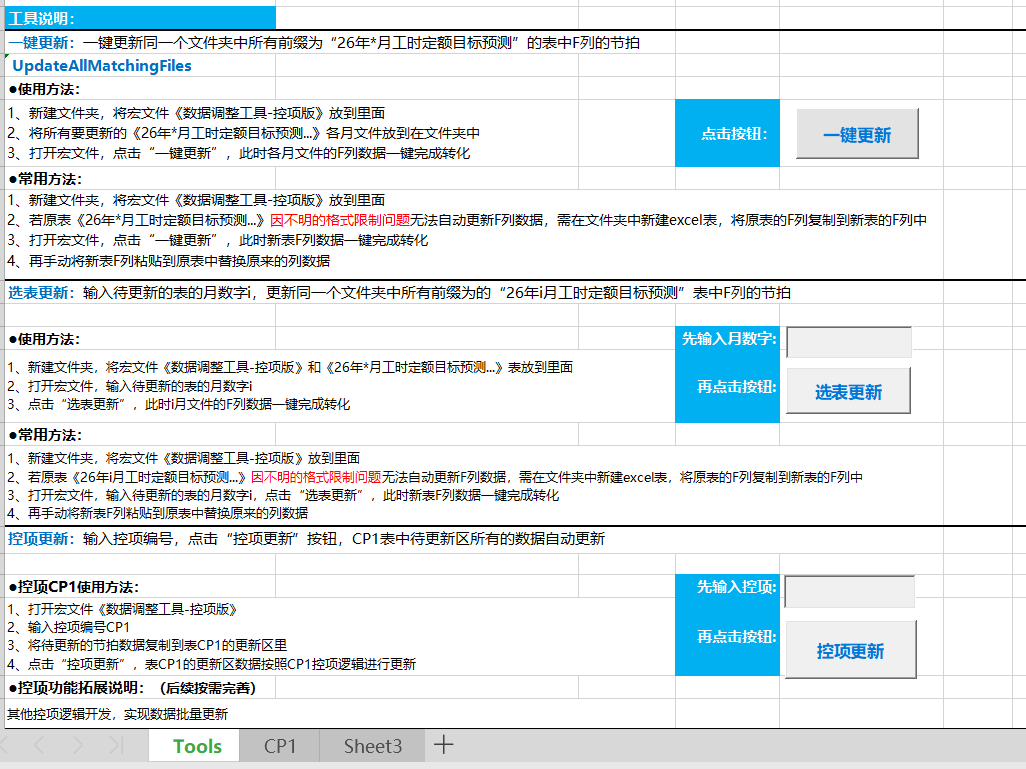
为满足后续需求,设计三种功能按钮,可以按需点击实现对应更新:
1、一键更新:
一键更新同一个文件夹中所有前缀为"26年*月工时定额目标预测"的表中F列的数据
2、选表更新:
输入待更新的表的月数字i,更新同一个文件夹中所有前缀为的"26年i月工时定额目标预测"表中F列的数据
3、控项更新:
输入控项编号,点击"控项更新"按钮,控制项编号表中待更新区所有的数据自动更新
二、VBA代码
1、VBA代码结构目录
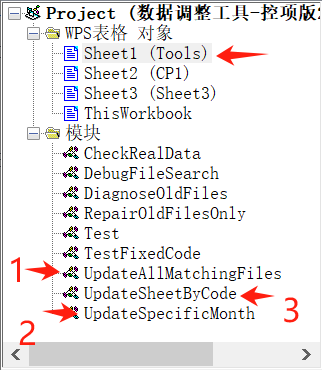
宏文件中,一键更新、选表更新、控项更新三种按钮都设置在sheet1(Tools)表中。
2、sheet1(Tools)的VBA:
' === 一键更新功能 ===
Private Sub CommandButton1_Click()
' 直接调用存放在模块"UpdateAllMatchingFiles"中的主程序
    UpdateAllMatchingFiles.UpdateAllMatchingFiles

End Sub

' === 选表更新功能 ===
Private Sub CommandButton2_Click()
    Dim monthNum As String
    monthNum = Trim(Me.TextBox1.value)

    ' 验证输入
    If monthNum = "" Or Not IsNumeric(monthNum) Then
        MsgBox "请输入1-12的月份数字!", vbExclamation
        Exit Sub
    End If

    Dim monthInt As Integer
    monthInt = CInt(monthNum)

    If monthInt < 1 Or monthInt > 12 Then
        MsgBox "月份必须在1-12之间!", vbExclamation
        Exit Sub
    End If

    ' 获取除数
    Dim divisor As Double
    divisor = ThisWorkbook.Sheets(1).Range("E2").value
    If divisor = 0 Then divisor = 1

    ' 调用模块中的函数
    UpdateSpecificMonth.UpdateSpecificMonth monthInt, divisor
End Sub

Private Sub TextBox1_KeyPress(ByVal KeyAscii As MSForms.ReturnInteger)
    ' 只允许输入数字
    ' 如果不是数字 且 不是退格键
    If Not (IsNumeric(Chr(KeyAscii)) Or KeyAscii = 8) Then
    '设置为0表示"取消这个按键"
        KeyAscii = 0
    End If
End Sub

' === 控项更新的代码 ===
Private Sub CommandButton3_Click()
    Dim targetCode As String

    ' 1. 获取编号
    targetCode = Trim(Me.TextBox2.value)
    If targetCode = "" Then
        MsgBox "请输入编号!", vbExclamation
        Me.TextBox2.SetFocus
        Exit Sub
    End If

    ' 2. 确认对话框
    'Dim confirmMsg As String
    'confirmMsg = "将更新编号: " & targetCode & vbCrLf & _
    '             "更新范围: A3:L60" & vbCrLf & vbCrLf & _
    '             "是否继续?"

    'If MsgBox(confirmMsg, vbYesNo + vbQuestion, "确认更新") = vbNo Then Exit Sub

    ' 3. 调用模块中的函数
    Call UpdateSheetByCode.UpdateSheetByCode(targetCode)
End Sub

'实时响应的事件
Private Sub TextBox2_KeyPress(ByVal KeyAscii As MSForms.ReturnInteger)
    ' 输入验证:允许字母、数字、退格
    Dim char As String
    char = Chr(KeyAscii)

    Select Case KeyAscii
        Case 8, 13 ' 退格、回车
            Exit Sub
        Case 65 To 90, 97 To 122 ' A-Z, a-z
            ' 允许字母
        Case 48 To 57 ' 0-9
            ' 允许数字
        Case Else
            KeyAscii = 0
            Beep
    End Select
End Sub
'实时响应的事件
' 文本框输入后检查工作表是否存在
Private Sub TextBox2_Change()
    Dim targetCode As String
    targetCode = Trim(Me.TextBox2.value)

    If Len(targetCode) > 0 Then
        ' 检查是否有对应工作表
        Dim sheetExists As Boolean
        sheetExists = False

        For Each ws In ThisWorkbook.Worksheets
            If UCase(ws.Name) = UCase(targetCode) Then
                sheetExists = True
                Exit For
            End If
        Next ws

        ' 在按钮上显示状态
        If sheetExists Then
            Me.CommandButton3.Caption = "更新 [" & targetCode & "]"
            Me.CommandButton3.BackColor = &H8000000F ' 正常颜色
        Else
            Me.CommandButton3.Caption = "工作表不存在"
            Me.CommandButton3.BackColor = &H8080FF ' 红色提示
        End If
    Else
        Me.CommandButton3.Caption = "更新"
        Me.CommandButton3.BackColor = &H8000000F
    End If
End Sub
3、一键更新功能VBA:
'一键更新按钮功能的代码
Sub UpdateAllMatchingFiles()
    Dim d As Double, f As String, i As Long ' d:原工时除以值,f:文件名,i:循环用临时变量
    Dim count As Integer '更新的文件个数
    d = ThisWorkbook.Sheets(1).Range("E2").value
    count = 0
    If d = 0 Then d = 1

    Application.ScreenUpdating = False
    ' 初始化f变量,获取第一个文件名
    f = Dir(ThisWorkbook.Path & "\26年*月份工时定额目标*.xls*")

    Do While f <> ""
        With Workbooks.Open(ThisWorkbook.Path & "\" & f).Sheets(1)
    '        ' 先尝试读取F4单元格
    '        If .Range("F4").value = "" Then
    '            ' 如果F4为空,可能是旧文件,尝试其他列
    '            Dim col As Long
    '            For col = 1 To 10 ' 检查A-J列
    '                If .Cells(4, col).value <> "" And IsNumeric(.Cells(4, col).value) Then
                        ' 在这个列处理数据
    '                     For i = 4 To 100
    '                        If .Cells(i, col).value <> "" And IsNumeric(.Cells(i, col).value) Then
    '                            .Cells(i, col).value = .Cells(i, col).value / d
    '                            .Cells(i, col).NumberFormat = "0.00"
    '                        End If
    '                    Next i
    '                    Exit For
    '                End If
    '            Next col
    '        Else
                ' 正常处理F列
                For i = 4 To 100
                    If .Cells(i, "F").value <> "" And IsNumeric(.Cells(i, "F").value) Then
                        .Cells(i, "F").value = .Cells(i, "F").value / d
                        .Cells(i, "F").NumberFormat = "0.00"
                    End If
                Next i
    '        End If

            .Parent.Save    ' 保存工作簿
            .Parent.Close   ' 关闭工作簿
        End With
        f = Dir()           ' 获取下一个文件名
        count = count + 1
    Loop

    Application.ScreenUpdating = True
    MsgBox "完成!", vbInformation
End Sub
4、选表更新功能VBA:
' 选表更新按钮功能的代码
Sub UpdateSpecificMonth(monthNum As Integer, divisor As Double)
    Dim filePath As String, fileName As String
    Dim wb As Workbook
    Dim ws As Worksheet
    Dim i As Long
    Dim count As Integer

    Application.ScreenUpdating = False

    filePath = ThisWorkbook.Path & "\"
    fileName = Dir(filePath & "26年" & monthNum & "月份工时定额目标*.xls*")
    count = 0

    Do While fileName <> ""
        Set wb = Workbooks.Open(filePath & fileName)
        Set ws = wb.Sheets(1)

        For i = 4 To 100
            If ws.Cells(i, "F").value <> "" And IsNumeric(ws.Cells(i, "F").value) Then
                ws.Cells(i, "F").value = ws.Cells(i, "F").value / divisor
                ws.Cells(i, "F").NumberFormat = "0.00"
            End If
        Next i

        wb.Save
        wb.Close

        count = count + 1
        fileName = Dir()
    Loop

    Application.ScreenUpdating = True

    If count > 0 Then
        MsgBox monthNum & "月文件更新完成!处理" & count & "个文件", vbInformation
    Else
        MsgBox "未找到" & monthNum & "月的文件!", vbExclamation
    End If
End Sub
5、控项更新功能VBA:
Option Explicit

' === 控项更新功能 ===
' 功能:根据编号更新对应工作表
Public Function UpdateSheetByCode(targetCode As String) As Boolean
    On Error GoTo ErrorHandler
    Dim ws As Worksheet     '循环变量(临时)
    Dim wsData As Worksheet '数据源工作表(Sheet1)
    Set wsData = ThisWorkbook.Sheets("Tools") ' 数据源在Tools(即Sheet1中)

    ' 1. 在F2:F4查找编号
    Dim foundRow As Long, i As Long
    foundRow = 0

    For i = 2 To 4
        If UCase(Trim(wsData.Cells(i, "F").value)) = UCase(targetCode) Then
            foundRow = i
            Exit For
        End If
    Next i

    If foundRow = 0 Then
        MsgBox "未找到编号: " & targetCode, vbExclamation
        UpdateSheetByCode = False
        Exit Function
    End If

    ' 2. 获取除数
    Dim divisor As Double
    divisor = wsData.Cells(foundRow, "E").value

    If divisor = 0 Then
        MsgBox "编号 " & targetCode & " 的除数为零!", vbExclamation
        UpdateSheetByCode = False
        Exit Function
    End If

    ' 3. 查找目标工作表
    Dim targetSheet As Worksheet
    Set targetSheet = Nothing
    'ws.Name:当前遍历到的工作表名称
    'UCase输入编号转大写,因用户输入的编号可能大小写混合
    For Each ws In ThisWorkbook.Worksheets
        If UCase(ws.Name) = UCase(targetCode) Then
            '将目标工作表赋值给变量
            Set targetSheet = ws
            Exit For
        End If
    Next ws

    If targetSheet Is Nothing Then
        MsgBox "未找到名为 """ & targetCode & """ 的工作表!", vbExclamation
        UpdateSheetByCode = False
        Exit Function
    End If

    ' 4. 更新A3:L60数据
    Application.ScreenUpdating = False
    Application.Calculation = xlCalculationManual

    Dim row As Long, col As Long
    Dim processedCount As Long
    processedCount = 0

    For row = 3 To 60
        For col = 1 To 12 ' A=1, B=2, ..., L=12
            With targetSheet.Cells(row, col)
                If .value <> "" And IsNumeric(.value) Then
                    .value = .value / divisor
                    processedCount = processedCount + 1
                End If
            End With
        Next col
    Next row

    ' 设置格式
    targetSheet.Range("A3:L60").NumberFormat = "0.00"

    Application.Calculation = xlCalculationAutomatic
    Application.ScreenUpdating = True

    MsgBox "更新成功!" & vbCrLf & _
           "工作表: " & targetSheet.Name & vbCrLf & _
           "除数: " & divisor & vbCrLf & _
           "更新单元格: " & processedCount, vbInformation

    UpdateSheetByCode = True
    Exit Function

ErrorHandler:
    Application.Calculation = xlCalculationAutomatic
    Application.ScreenUpdating = True
    MsgBox "更新出错: " & Err.Description, vbCritical
    UpdateSheetByCode = False
End Function


VBAProject (您的文件.xlsm)
├── Microsoft Excel 对象
│   ├── Sheet1 (代码)                    ← 控件事件放这里
│   │   ├── CommandButton3_Click
│   │   ├── TextBox2_KeyPress
│   │   └── TextBox2_Change
│   ├── Sheet2
│   ├── Sheet3 (CP1)                     ← 您的工作表
│   ├── Sheet4 (CP2)
│   └── ThisWorkbook
└── 模块
    └── 模块1 (代码)                      ← 业务逻辑放这里
        └── UpdateSheetByCode 函数
三、相关知识
1、Dir() 函数的工作机制
f = Dir(ThisWorkbook.Path & "\26年*月份工时定额目标*.xls*")
    ......
    Do While f <> ""
        With Workbooks.Open(ThisWorkbook.Path & "\" & f).Sheets(1)
 End With
        f = Dir()
        count = count + 1
    Loop
1)第一次调用(初始化):
f = Dir(ThisWorkbook.Path & "\26年*月份工时定额目标*.xls*")作用:搜索指定路径下第一个匹配的文件
返回:第一个符合条件的文件名(如"26年1月份工时定额目标.xlsx")
系统内部:Windows会记住这次搜索条件和当前位置
2)后续调用(不带参数):
f = Dir() ' 注意:没有参数!作用:获取下一个匹配的文件名
返回:第二个、第三个...符合条件的文件名
当没有更多文件时:返回空字符串 ""
通配符说明:
*:匹配任意多个字符
?:匹配单个字符
为什么能"记住"位置?
Dir() 函数在Windows API层面维护了一个内部指针:
带参数的Dir(路径):重置指针,开始新的搜索
不带参数的Dir():继续上次的搜索,获取下一个结果
2、Call调用函数
为什么调用模块中的函数要用Call,而不是直接UpdateSheetByCode.UpdateSheetByCode(targetCode)?
答:明确:一看就知道是调用过程;规范:VBA官方推荐;易读:参数放在括号内,清晰
更规范的4种调用方式:
    方式	                代码示例	                    说明
1. 标准调用	UpdateSpecificMonth monthInt, divisor	       最常用
2. Call语句	Call UpdateSpecificMonth(monthInt, divisor)	   明确调用
3. 带括号	UpdateSpecificMonth(monthInt, divisor)	       函数风格
4. 模块限定	Module1.UpdateSpecificMonth monthInt, divisor  最明确
3、 文本框的实时输入过滤器
控制用户只能输入特定字符
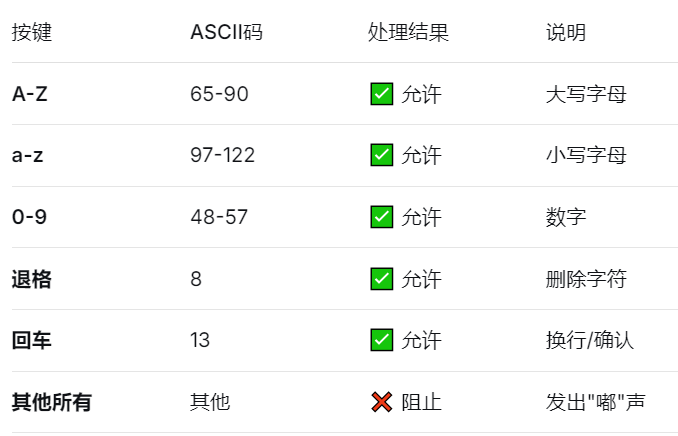
允许输入:字母(A-Z,a-z) + 数字(0-9) + 退格 + 回车
禁止输入:符号(!@#$%等) + 空格 + 中文 + 特殊字符
实时响应的事件
Private Sub TextBox2_KeyPress(ByVal KeyAscii As MSForms.ReturnInteger)
    ' 输入验证:允许字母、数字、退格
    Dim char As String
    char = Chr(KeyAscii)

    Select Case KeyAscii
        Case 8, 13 ' 退格、回车
            Exit Sub
        Case 65 To 90, 97 To 122 ' A-Z, a-z
            ' 允许字母
        Case 48 To 57 ' 0-9
            ' 允许数字
        Case Else
            KeyAscii = 0
            Beep
    End Select
End Sub
ASCII对照表
4、Option Explicit
Option Explicit 是 VBA的编译器指令,意思是"强制显式声明变量"。
能够:1. 防止拼写错误 2. 明确变量类型,提高性能 3. 代码自文档化
' ❌ 没有 Option Explicit(危险)
Sub NoOptionExplicit()
    userName = "张三"  ' 自动创建变量userName(Variant类型)
    userNmae = "李四"  ' 拼写错误!创建了新变量userNmae
    ' 结果:userName="张三", userNmae="李四"(逻辑错误难以发现)
End Sub

' ✅ 有 Option Explicit(安全)
Option Explicit

Sub WithOptionExplicit()
    Dim userName As String  ' 必须显式声明
    userName = "张三"
    userNmae = "李四"  ' ❌ 编译错误:变量未定义
    ' 立即发现拼写错误!
End Sub
四、后记
处理工作表实在是太繁琐了,当前利用VBA见指打指毕竟效率太低,且没有工作数据对进行逻辑关联性系统分析、过程动态管控、视图界面友好、预警推送等设计和开发,仍然处于基础的数据处理阶段。任务艰巨,学习的内容还有很多!需要继续拓宽视野,学习更好的开发模式和更先进技术!