背景
Excel 表格每一行是一个人的信息,同一个人可能有多行。多列数据中,对同一个人会有不变的 姓名,学号,年龄等信息。有部分列包含不同信息,比如不同学科。现在需要把同一个人不同行中间的相同的信息合并,比如合并 姓名,学号等。
解决办法
前期准备
- 备份表格。把原始excel 表格存储为 xlsm 格式 (启用宏)。
- xlsm 表格表头设置 数据-> 筛选,并对学号进行排序,保证同一个人的信息相邻。
打开宏编辑
File -> Options -> Customize Ribbon
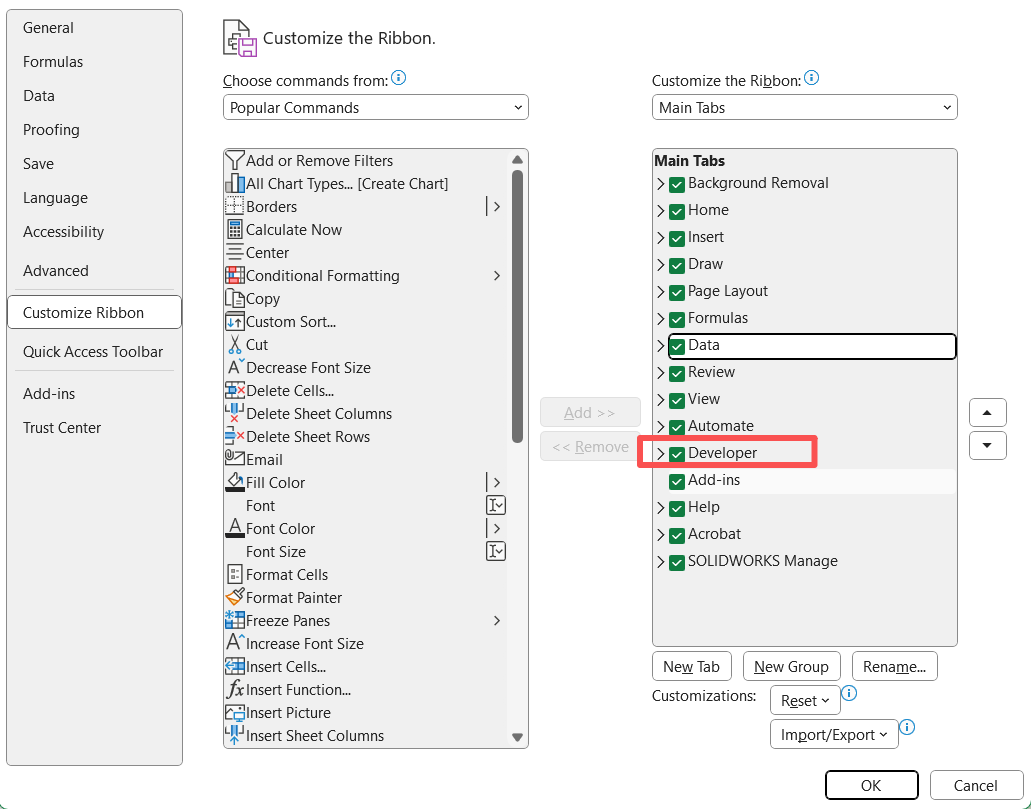
在开发工具中打开 Visual Basic 编辑框

新建脚本
左侧选中需要数据处理的 sheet,右键 insert -> Module,也可以从上方选项卡插入module。右侧会弹出对话框用来编写程序,图中已经粘贴上了。通过 GPT 协助编程,主要说明如下一段。
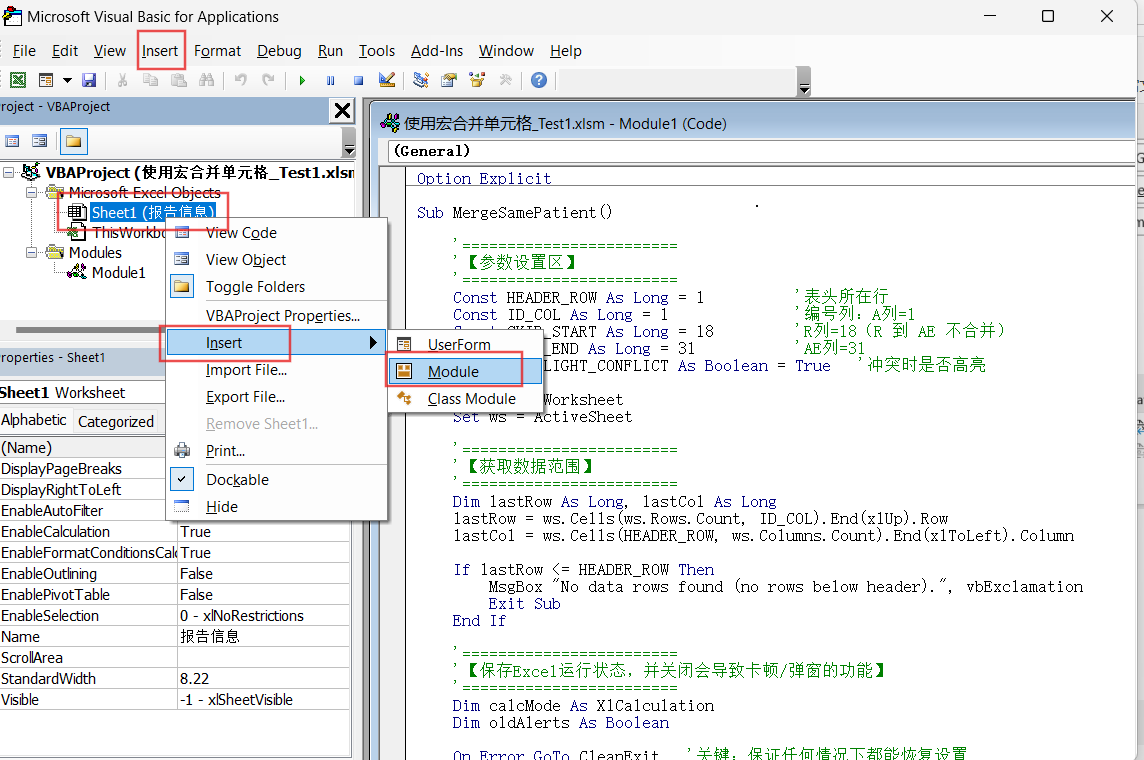
VB 编程
在代码中,'后面的文字时注释
定义函数名称 MergeSamePatient
Sub MergeSamePatient()定义表头所在行和学号所在列
    Const HEADER_ROW As Long = 1          '表头所在行
    Const ID_COL As Long = 1              '编号列:A列=1
定义例外列,不合并的列,比如 R到AE 这几列不合并不处理
    Const SKIP_START As Long = 18         'R列=18(R 到 AE 不合并)
    Const SKIP_END As Long = 31           'AE列=31
本程序中 取消合并单元格时的弹窗提示,不然需要一直点同意
    '>>>【关闭合并提示弹窗】<<<
    oldAlerts = Application.DisplayAlerts
    Application.DisplayAlerts = False
程序末尾回复合并单元格的弹窗
    '>>>【恢复弹窗设置】<<<
    Application.DisplayAlerts = oldAlerts
完整的代码
Option Explicit

Sub MergeByID_CheckConsistency_SkipRtoAE()

    '========================
    '【参数设置区】
    '========================
    Const HEADER_ROW As Long = 1          '表头所在行
    Const ID_COL As Long = 1              '编号列:A列=1
    Const SKIP_START As Long = 18         'R列=18(R 到 AE 不合并)
    Const SKIP_END As Long = 31           'AE列=31
    Const HIGHLIGHT_CONFLICT As Boolean = True   '冲突时是否高亮

    Dim ws As Worksheet
    Set ws = ActiveSheet

    '========================
    '【获取数据范围】
    '========================
    Dim lastRow As Long, lastCol As Long
    lastRow = ws.Cells(ws.Rows.Count, ID_COL).End(xlUp).Row
    lastCol = ws.Cells(HEADER_ROW, ws.Columns.Count).End(xlToLeft).Column

    If lastRow <= HEADER_ROW Then
        MsgBox "No data rows found (no rows below header).", vbExclamation
        Exit Sub
    End If

    '========================
    '【保存Excel运行状态,并关闭会导致卡顿/弹窗的功能】
    '========================
    Dim calcMode As XlCalculation
    Dim oldAlerts As Boolean

    On Error GoTo CleanExit   '关键:保证任何情况下都能恢复设置

    Application.ScreenUpdating = False        '关闭屏幕刷新(加速)
    Application.EnableEvents = False          '关闭事件响应(加速)
    calcMode = Application.Calculation
    Application.Calculation = xlCalculationManual  '关闭自动计算(加速)

    '>>>【这里是你要插入的第一段代码:关闭合并提示弹窗】<<<
    oldAlerts = Application.DisplayAlerts
    Application.DisplayAlerts = False

    '========================
    '【创建/清空冲突报告表】
    '========================
    Dim rpt As Worksheet
    On Error Resume Next
    Set rpt = ThisWorkbook.Worksheets("Conflict_Report")
    On Error GoTo CleanExit

    If rpt Is Nothing Then
        Set rpt = ThisWorkbook.Worksheets.Add(After:=ws)
        rpt.Name = "Conflict_Report"
    Else
        rpt.Cells.Clear
    End If

    rpt.Range("A1:D1").Value = Array("ID", "Column", "DistinctValues", "RowRange")
    Dim rptRow As Long
    rptRow = 2

    '========================
    '【按编号分组处理(假设已按编号排序,同一编号连续)】
    '========================
    Dim startRow As Long, endRow As Long
    startRow = HEADER_ROW + 1

    Do While startRow <= lastRow

        Dim idVal As String, nextId As String
        idVal = CStr(ws.Cells(startRow, ID_COL).Value2)

        '找到同一编号的块 endRow
        endRow = startRow
        Do While endRow < lastRow
            nextId = CStr(ws.Cells(endRow + 1, ID_COL).Value2)
            If nextId <> idVal Then Exit Do
            endRow = endRow + 1
        Loop

        '只有重复出现(多行)才需要合并判断
        If endRow > startRow Then

            Dim c As Long, rr As Long
            For c = 1 To lastCol

                '跳过 R--AE 列(不合并,保持原样)
                If c < SKIP_START Or c > SKIP_END Then

                    '用字典统计"该组该列"的不同取值
                    '注意:空白也算一种取值(""),因此 "空 + 非空" 会导致 dict.Count>1,不合并
                    Dim dict As Object
                    Set dict = CreateObject("Scripting.Dictionary")

                    Dim key As String
                    For rr = startRow To endRow
                        key = Trim$(ws.Cells(rr, c).Text)   '空白->"";同时去掉前后空格
                        If Not dict.Exists(key) Then dict.Add key, 1
                    Next rr

                    If dict.Count = 1 Then
                        '完全一致(可能是全空,也可能是全同一文本/数字)=> 合并
                        With ws.Range(ws.Cells(startRow, c), ws.Cells(endRow, c))
                            .Merge
                            .VerticalAlignment = xlCenter
                        End With
                    Else
                        '不一致 => 不合并,保留原样;可选:高亮并写入报告
                        If HIGHLIGHT_CONFLICT Then
                            ws.Range(ws.Cells(startRow, c), ws.Cells(endRow, c)).Interior.Color = RGB(255, 235, 238)
                        End If

                        Dim headerName As String
                        headerName = CStr(ws.Cells(HEADER_ROW, c).Value2)

                        Dim k As Variant, vals As String, showVal As String
                        vals = ""
                        For Each k In dict.Keys
                            showVal = CStr(k)
                            If Len(showVal) = 0 Then showVal = "<BLANK>"
                            If Len(vals) = 0 Then vals = showVal Else vals = vals & "; " & showVal
                        Next k

                        rpt.Cells(rptRow, 1).Value = idVal
                        rpt.Cells(rptRow, 2).Value = headerName
                        rpt.Cells(rptRow, 3).Value = vals
                        rpt.Cells(rptRow, 4).Value = startRow & "-" & endRow
                        rptRow = rptRow + 1
                    End If

                End If
            Next c

            '编号列本身必然相同(同一编号块),直接合并(也会被 DisplayAlerts 抑制弹窗)
            With ws.Range(ws.Cells(startRow, ID_COL), ws.Cells(endRow, ID_COL))
                .Merge
                .VerticalAlignment = xlCenter
            End With

        End If

        startRow = endRow + 1
    Loop

    rpt.Columns("A:D").AutoFit

CleanExit:
    '========================
    '【恢复Excel运行状态(无论成功/失败都会执行)】
    '========================

    '>>>【这里是你要插入的第二段代码:恢复弹窗设置】<<<
    Application.DisplayAlerts = oldAlerts

    Application.Calculation = calcMode
    Application.EnableEvents = True
    Application.ScreenUpdating = True

    If Err.Number <> 0 Then
        MsgBox "Macro stopped due to error: " & Err.Description, vbExclamation
        Err.Clear
    Else
        MsgBox "Done! (Skipped R--AE). Conflicts listed in 'Conflict_Report'.", vbInformation
    End If

End Sub
把上面的代码复制到 VB 代码框中,保存代码。
运行代码
在 developer 中打开 Macros 宏 对话框,选中刚才自行定义的宏,右侧点击运行。
