本文以Qt Material Style Widgets库为例,详细介绍如何把第三方库中的控件应用到自己的工程中。
-
github下载第三方库文件:https://github.com/laserpants/qt-material-widgets
-
在Qt Creater中打开这个project,选择Release模式 并且通过mingw64位的编译器进行编译,就会得到一个以.a结尾的静态库文件:
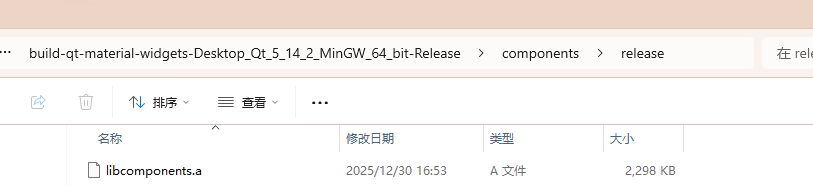
如果采用msvc 模式的编译器,它就会得到以**.lib**结尾的静态库文件。
本工程中:components是封装组件的目录,examples是对封装组件的使用示例
- 将这个库导入到自己的project中
在项目的目录下创建名为SDK的文件夹。 然后在SDK文件夹下创建名为MaterialSDK的文件夹。 然后在MaterialSDK的文件夹下创建名为staticlib和components的文件夹。 最后将libcomponents.a复制到staticlib文件夹下,将组件库中的components的代码和资源复制到components文件夹下。再把components下的cpp文件和h文件添加到你的工程中。
cpp
SOURCES += \
    SDK/MaterialSDK/components/qtmaterialappbar.cpp \
    SDK/MaterialSDK/components/qtmaterialautocomplete.cpp \
    SDK/MaterialSDK/components/qtmaterialautocomplete_internal.cpp \
    SDK/MaterialSDK/components/qtmaterialavatar.cpp \
    SDK/MaterialSDK/components/qtmaterialbadge.cpp \
    SDK/MaterialSDK/components/qtmaterialcheckbox.cpp \
    SDK/MaterialSDK/components/qtmaterialcircularprogress.cpp \
    SDK/MaterialSDK/components/qtmaterialcircularprogress_internal.cpp \
    SDK/MaterialSDK/components/qtmaterialdialog.cpp \
    SDK/MaterialSDK/components/qtmaterialdialog_internal.cpp \
    SDK/MaterialSDK/components/qtmaterialdrawer.cpp \
    SDK/MaterialSDK/components/qtmaterialdrawer_internal.cpp \
    SDK/MaterialSDK/components/qtmaterialfab.cpp \
    SDK/MaterialSDK/components/qtmaterialflatbutton.cpp \
    SDK/MaterialSDK/components/qtmaterialflatbutton_internal.cpp \
    SDK/MaterialSDK/components/qtmaterialiconbutton.cpp \
    SDK/MaterialSDK/components/qtmateriallist.cpp \
    SDK/MaterialSDK/components/qtmateriallistitem.cpp \
    SDK/MaterialSDK/components/qtmaterialmenu.cpp \
    SDK/MaterialSDK/components/qtmaterialmenu_internal.cpp \
    SDK/MaterialSDK/components/qtmaterialpaper.cpp \
    SDK/MaterialSDK/components/qtmaterialprogress.cpp \
    SDK/MaterialSDK/components/qtmaterialprogress_internal.cpp \
    SDK/MaterialSDK/components/qtmaterialradiobutton.cpp \
    SDK/MaterialSDK/components/qtmaterialraisedbutton.cpp \
    SDK/MaterialSDK/components/qtmaterialscrollbar.cpp \
    SDK/MaterialSDK/components/qtmaterialscrollbar_internal.cpp \
    SDK/MaterialSDK/components/qtmaterialslider.cpp \
    SDK/MaterialSDK/components/qtmaterialslider_internal.cpp \
    SDK/MaterialSDK/components/qtmaterialsnackbar.cpp \
    SDK/MaterialSDK/components/qtmaterialsnackbar_internal.cpp \
    SDK/MaterialSDK/components/qtmaterialtable.cpp \
    SDK/MaterialSDK/components/qtmaterialtabs.cpp \
    SDK/MaterialSDK/components/qtmaterialtabs_internal.cpp \
    SDK/MaterialSDK/components/qtmaterialtextfield.cpp \
    SDK/MaterialSDK/components/qtmaterialtextfield_internal.cpp \
    SDK/MaterialSDK/components/qtmaterialtoggle.cpp \
    SDK/MaterialSDK/components/qtmaterialtoggle_internal.cpp

HEADERS += \
    SDK/MaterialSDK/components/qtmaterialappbar.h \
    SDK/MaterialSDK/components/qtmaterialappbar_p.h \
    SDK/MaterialSDK/components/qtmaterialautocomplete.h \
    SDK/MaterialSDK/components/qtmaterialautocomplete_internal.h \
    SDK/MaterialSDK/components/qtmaterialautocomplete_p.h \
    SDK/MaterialSDK/components/qtmaterialavatar.h \
    SDK/MaterialSDK/components/qtmaterialavatar_p.h \
    SDK/MaterialSDK/components/qtmaterialbadge.h \
    SDK/MaterialSDK/components/qtmaterialbadge_p.h \
    SDK/MaterialSDK/components/qtmaterialcheckbox.h \
    SDK/MaterialSDK/components/qtmaterialcheckbox_p.h \
    SDK/MaterialSDK/components/qtmaterialcircularprogress.h \
    SDK/MaterialSDK/components/qtmaterialcircularprogress_internal.h \
    SDK/MaterialSDK/components/qtmaterialcircularprogress_p.h \
    SDK/MaterialSDK/components/qtmaterialdialog.h \
    SDK/MaterialSDK/components/qtmaterialdialog_internal.h \
    SDK/MaterialSDK/components/qtmaterialdialog_p.h \
    SDK/MaterialSDK/components/qtmaterialdrawer.h \
    SDK/MaterialSDK/components/qtmaterialdrawer_internal.h \
    SDK/MaterialSDK/components/qtmaterialdrawer_p.h \
    SDK/MaterialSDK/components/qtmaterialfab.h \
    SDK/MaterialSDK/components/qtmaterialfab_p.h \
    SDK/MaterialSDK/components/qtmaterialflatbutton.h \
    SDK/MaterialSDK/components/qtmaterialflatbutton_internal.h \
    SDK/MaterialSDK/components/qtmaterialflatbutton_p.h \
    SDK/MaterialSDK/components/qtmaterialiconbutton.h \
    SDK/MaterialSDK/components/qtmaterialiconbutton_p.h \
    SDK/MaterialSDK/components/qtmateriallist.h \
    SDK/MaterialSDK/components/qtmateriallist_p.h \
    SDK/MaterialSDK/components/qtmateriallistitem.h \
    SDK/MaterialSDK/components/qtmateriallistitem_p.h \
    SDK/MaterialSDK/components/qtmaterialmenu.h \
    SDK/MaterialSDK/components/qtmaterialmenu_internal.h \
    SDK/MaterialSDK/components/qtmaterialmenu_p.h \
    SDK/MaterialSDK/components/qtmaterialpaper.h \
    SDK/MaterialSDK/components/qtmaterialpaper_p.h \
    SDK/MaterialSDK/components/qtmaterialprogress.h \
    SDK/MaterialSDK/components/qtmaterialprogress_internal.h \
    SDK/MaterialSDK/components/qtmaterialprogress_p.h \
    SDK/MaterialSDK/components/qtmaterialradiobutton.h \
    SDK/MaterialSDK/components/qtmaterialradiobutton_p.h \
    SDK/MaterialSDK/components/qtmaterialraisedbutton.h \
    SDK/MaterialSDK/components/qtmaterialraisedbutton_p.h \
    SDK/MaterialSDK/components/qtmaterialscrollbar.h \
    SDK/MaterialSDK/components/qtmaterialscrollbar_internal.h \
    SDK/MaterialSDK/components/qtmaterialscrollbar_p.h \
    SDK/MaterialSDK/components/qtmaterialslider.h \
    SDK/MaterialSDK/components/qtmaterialslider_internal.h \
    SDK/MaterialSDK/components/qtmaterialslider_p.h \
    SDK/MaterialSDK/components/qtmaterialsnackbar.h \
    SDK/MaterialSDK/components/qtmaterialsnackbar_internal.h \
    SDK/MaterialSDK/components/qtmaterialsnackbar_p.h \
    SDK/MaterialSDK/components/qtmaterialtable.h \
    SDK/MaterialSDK/components/qtmaterialtable_p.h \
    SDK/MaterialSDK/components/qtmaterialtabs.h \
    SDK/MaterialSDK/components/qtmaterialtabs_internal.h \
    SDK/MaterialSDK/components/qtmaterialtabs_p.h \
    SDK/MaterialSDK/components/qtmaterialtextfield.h \
    SDK/MaterialSDK/components/qtmaterialtextfield_internal.h \
    SDK/MaterialSDK/components/qtmaterialtextfield_p.h \
    SDK/MaterialSDK/components/qtmaterialtoggle.h \
    SDK/MaterialSDK/components/qtmaterialtoggle_internal.h \
SDK/MaterialSDK/components/qtmaterialtoggle_p.h - 添加库文件到当前project,注意,你当前的project也必须是mingw 编译(至于是debug模式还是release模式无所谓,两者都能运行),也就是说你用什么编译器生成的库文件,你应用的project也要用对应的的编译器,不然就会报错:找不到库文件。
cpp
unix|win32: LIBS += -L$$PWD/SDK/MaterialSDK/staticlib/ -lcomponents

INCLUDEPATH += $$PWD/SDK/MaterialSDK/staticlib
DEPENDPATH += $$PWD/SDK/MaterialSDK/staticlib
5.在当前project中调用控件
cpp
// widget.cpp
#include "widget.h"
#include "ui_widget.h"
#include<SDK/MaterialSDK/components/qtmaterialtoggle.h>
#include<SDK/MaterialSDK/components/qtmaterialflatbutton.h>
#include<SDK/MaterialSDK/components/qtmaterialflatbutton_internal.h>
using namespace Material;

Widget::Widget(QWidget *parent)
    : QWidget(parent)
    , ui(new Ui::Widget)
{
    ui->setupUi(this);
    QtMaterialToggle *toggle=new QtMaterialToggle(this);
    QtMaterialFlatButton *btn=new QtMaterialFlatButton(this);
    btn->setForegroundColor(QColor(0,198,231));
    btn->setGeometry(100,100,200,40);
    btn->setText("I am flat btn");
    btn->applyPreset(Material::FlatPreset);
    QFont font;
    font.setFamily("Calibri Light");
    font.setPixelSize(25);
    btn->setFont(font);

}

Widget::~Widget()
{
    delete ui;
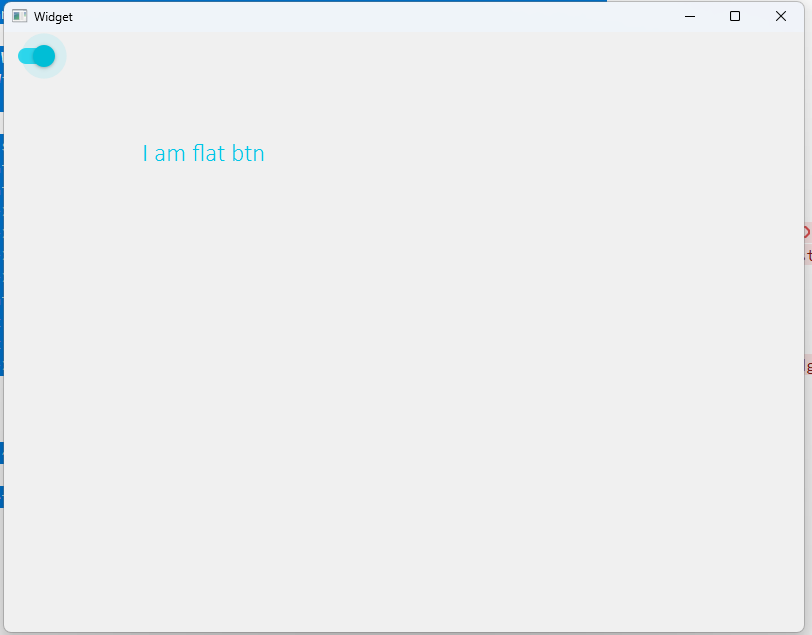
}
此系列笔者会继续学习,持续更新,敬请期待!