最近公司要做一个RAG问答,向量搜索相关的项目。我做了一下技术调研、技术预研。
调研完,我打算用python来做LLM推理、RAG构建。我放弃Java那端的AI技术生态了。
选择向量库的话我们选择milvus就行,embedding选择siv/Qwen3-Embedding-0 。
需求
RAG构建一个简易问答,连接检索milvus库。
技术栈
- Python
- Milvus
- siv/Qwen3-Embedding-0
- Qwen2.5-7b
- GPU-4090-49GB/双卡
项目核心文件
项目有 5 个核心 Python 文件:
- encoder.py - 文本编码器(生成 embedding)
- milvus_utils.py - Milvus 数据库工具
- ask_llm.py - LLM 交互
- insert.py - 数据导入脚本
- app.py - Streamlit 主应用
主要组件
用户提问 → Embedding 生成 → Milvus 向量搜索 → 检索相关文档 → LLM 生成答案
encoder.py
这个组件是负责将用户的提问文本转换为向量,调用了我们GPU本地大模型生成的文本向量。
python
import streamlit as st
import requests

# 使用 Streamlit 的缓存装饰器,避免重复创建缓存字典
@st.cache_resource
def get_embedding_cache():
    return {}

# 初始化缓存
embedding_cache = get_embedding_cache()

def emb_text(host: str, model: str, text: str):
    # 1. 检查缓存中是否已有该文本的 embedding
    if text in embedding_cache:
        return embedding_cache[text]
    else:
        # 2. 调用 Ollama API 生成 embedding
        response = requests.post(
            f"{host}/api/embeddings",
            json={
                "model": model,      # 模型名称,如 siv/Qwen3-Embedding-0.6B-GGUF:Q8_0
                "prompt": text,       # 要编码的文本
            },
        )
        # 3. 提取向量数据
        embedding = response.json()["embedding"]
        # 4. 存入缓存
        embedding_cache[text] = embedding
        return embedding
milvus_utils.py - Milvus 数据库工具
这个文件封装了 Milvus 向量数据库的操作。
核心功能:
- 连接 Milvus 数据库
- 创建 collection(表)
- 向量相似度搜索
python
import streamlit as st
from pymilvus import MilvusClient

# 缓存 Milvus 客户端,避免重复连接
@st.cache_resource
def get_milvus_client(uri: str, token: str = None) -> MilvusClient:
    return MilvusClient(uri=uri, token=token)

def create_collection(
    milvus_client: MilvusClient,
    collection_name: str,
    dim: int,
    drop_old: bool = True
):
    # 1. 如果 collection 已存在且允许删除,先删除
    if milvus_client.has_collection(collection_name) and drop_old:
        milvus_client.drop_collection(collection_name)

    # 2. 再次检查,防止重复创建
    if milvus_client.has_collection(collection_name):
        raise RuntimeError(
            f"Collection {collection_name} already exists. "
            "Set drop_old=True to create a new one instead."
        )

    # 3. 创建新 collection
    return milvus_client.create_collection(
        collection_name=collection_name,
        dimension=dim,              # 向量维度(如 1024)
        metric_type="IP",           # 距离度量(内积)
        consistency_level="Strong",   # 一致性级别
        auto_id=True,               # 自动生成 ID
    )

def get_search_results(milvus_client, collection_name, query_vector, output_fields):
    # 向量相似度搜索
    search_res = milvus_client.search(
        collection_name=collection_name,
        data=[query_vector],         # 查询向量
        limit=3,                    # 返回最相似的 3 条
        search_params={
            "metric_type": "COSINE",  # 使用余弦相似度
            "params": {}
        },
        output_fields=output_fields,    # 返回的字段(如 content)
    )
    return search_res
ask_llm.py - LLM 交互
这个文件负责调用 LLM 生成答案。
核心功能:
- 构建提示词(Prompt)
- 调用 Ollama API 生成答案
python
import requests

def get_llm_answer(host: str, model: str, context: str, question: str):
    # 1. 系统提示词:定义 AI 的角色
    SYSTEM_PROMPT = """
    Human: You are an AI assistant. You are able to find answers
    to the questions from the contextual passage snippets provided.
    """

    # 2. 用户提示词:将检索到的上下文和问题组合
    USER_PROMPT = f"""
    Use the following pieces of information enclosed in <context> tags
    to provide an answer to the question enclosed in <question> tags.
    <context>
    {context}
    </context>
    <question>
    {question}
    </question>
    """

    # 3. 调用 Ollama API
    response = requests.post(
        f"{host}/api/chat",
        json={
            "model": model,      # 模型名称,如 qwen2.5:7b
            "messages": [
                {"role": "system", "content": SYSTEM_PROMPT},
                {"role": "user", "content": USER_PROMPT},
            ],
            "stream": False,     # 不使用流式输出
        },
    )

    # 4. 提取答案
    answer = response.json()["message"]["content"]
    return answer
app.py
这是 Streamlit Web 应用的主文件,提供用户界面。
python
import os
import streamlit as st

# 设置页面布局为宽屏
st.set_page_config(layout="wide")

from encoder import emb_text
from milvus_utils import get_milvus_client, get_search_results
from ask_llm import get_llm_answer

from dotenv import load_dotenv

# 加载环境变量
load_dotenv()
COLLECTION_NAME = os.getenv("COLLECTION_NAME")
MILVUS_ENDPOINT = os.getenv("MILVUS_ENDPOINT")
MILVUS_TOKEN = os.getenv("MILVUS_TOKEN")
OLLAMA_HOST = os.getenv("OLLAMA_HOST", "http://10.xx.xx.xx:11434")
OLLAMA_MODEL = os.getenv("OLLAMA_MODEL", "qwen2.5:7b")
EMBEDDING_MODEL = os.getenv("EMBEDDING_MODEL", "qwen2.5:7b")

# 显示 Logo
st.image("./pics/Milvus_Logo_Official.png", width=200)

# 使用 HTML/CSS 自定义样式
st.markdown(
    """
    <style>
    .title {
        text-align: center;
        font-size: 50px;
        font-weight: bold;
        margin-bottom: 20px;
    }
    .description {
        text-align: center;
        font-size: 18px;
        color: gray;
        margin-bottom: 40px;
    }
    </style>
    <div class="title">RAG Demo</div>
    <div class="description">
        This chatbot is built with Milvus vector database,
        supported by local Ollama model.<br>
        It supports conversation based on knowledge from
        the Milvus development guide document.
    </div>
    """,
    unsafe_allow_html=True,
)

# 获取 Milvus 客户端
milvus_client = get_milvus_client(uri=MILVUS_ENDPOINT, token=MILVUS_TOKEN)

# 存储检索结果
retrieved_lines_with_distances = []

# 创建表单
with st.form("my_form"):
    # 文本输入框
    question = st.text_area("Enter your question:")
    # 提交按钮
    submitted = st.form_submit_button("Submit")

    if question and submitted:
        # 1. 生成查询的 embedding
        query_vector = emb_text(OLLAMA_HOST, EMBEDDING_MODEL, question)

        # 2. 在 Milvus 中搜索
        search_res = get_search_results(
            milvus_client, COLLECTION_NAME, query_vector, ["content"]
        )

        # 3. 提取检索到的内容和距离
        retrieved_lines_with_distances = [
            (res["entity"]["content"], res["distance"])
            for res in search_res[0]
        ]

        # 4. 将检索结果组合成上下文
        context = "\n".join(
            [line_with_distance[0]
             for line_with_distance in retrieved_lines_with_distances]
        )

        # 5. 调用 LLM 生成答案
        answer = get_llm_answer(OLLAMA_HOST, OLLAMA_MODEL, context, question)

        # 6. 显示对话(聊天风格)
        st.chat_message("user").write(question)
        st.chat_message("assistant").write(answer)

# 在侧边栏显示检索结果
st.sidebar.subheader("Retrieved Lines with Distances:")
for idx, (line, distance) in enumerate(retrieved_lines_with_distances, 1):
    st.sidebar.markdown("---")
    st.sidebar.markdown(f"**Result {idx}:**")
    st.sidebar.markdown(f"> {line}")
    st.sidebar.markdown(f"*Distance: {distance:.2f}*")
流程
markdown
用户提问
    ↓
[app.py] 生成查询 embedding (encoder.py)
    ↓
[app.py] 在 Milvus 中搜索相似向量 (milvus_utils.py)
    ↓
[app.py] 提取检索到的文档片段
    ↓
[app.py] 组合成上下文
    ↓
[app.py] 调用 LLM 生成答案 (ask_llm.py)
    ↓
[app.py] 显示答案和检索结果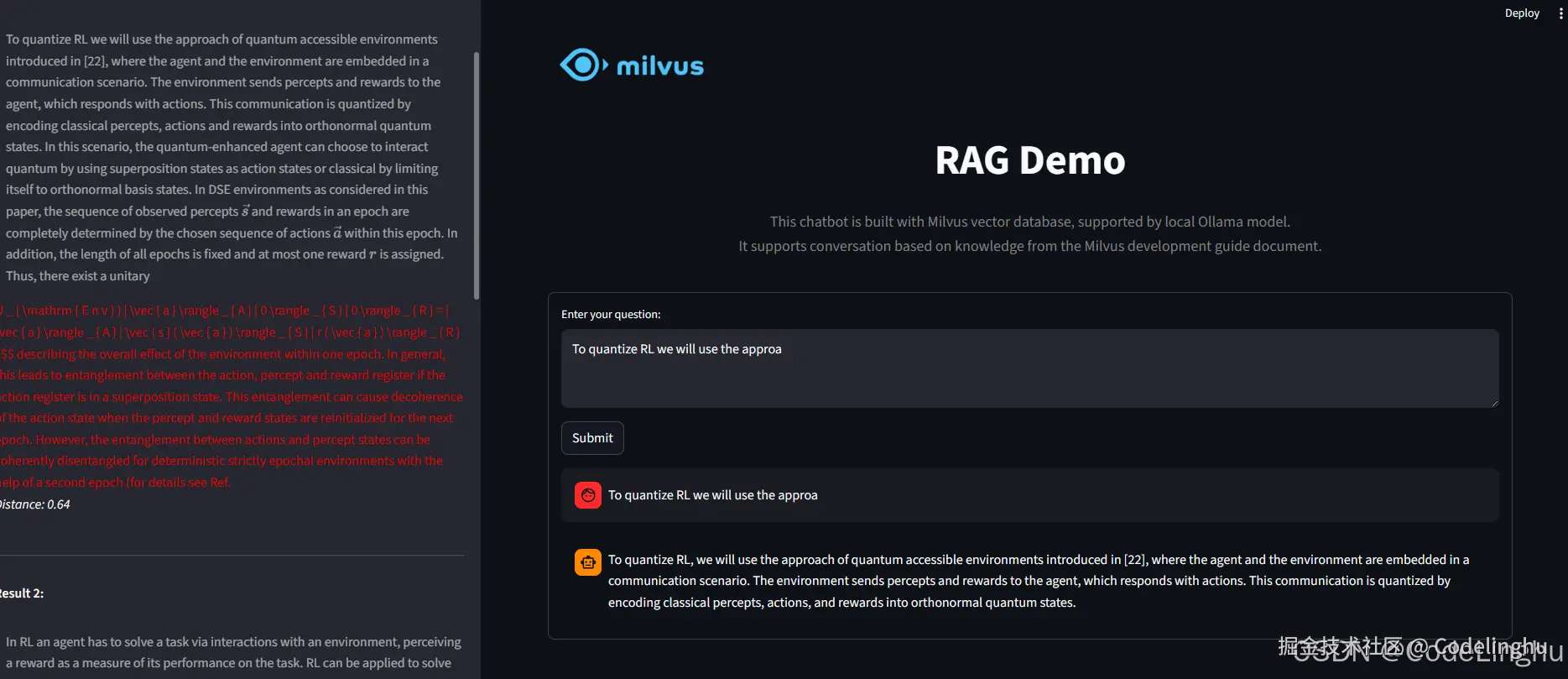
这个代码我开源出来,大家有需要自取: