背景
升级了Jenkins 2.528.3 LTS,编译一个老项目的前端,Jenkins终端报错,错误定位不难,主要记录安装Jenkins的Linux服务器上使用Node的方法。
报错
- Error: vite: Rollup failed to resolve import "vue3-json-viewer/dist/index.css" from "src/main.js".
html
[36mvite v3.2.7 [32mbuilding for production...[36m[39m
transforming...
[32m✓[39m 4 modules transformed.
[31m[vite]: Rollup failed to resolve import "vue3-json-viewer/dist/index.css" from "src/main.js".
This is most likely unintended because it can break your application at runtime.
If you do want to externalize this module explicitly add it to
`build.rollupOptions.external`[39m
[31merror during build:
Error: [vite]: Rollup failed to resolve import "vue3-json-viewer/dist/index.css" from "src/main.js".
This is most likely unintended because it can break your application at runtime.
If you do want to externalize this module explicitly add it to
`build.rollupOptions.external`
    at onRollupWarning (file:///root/.jenkins/workspace/admin-frontend%E5%89%8D%E7%AB%AF/node_modules/vite/dist/node/chunks/dep-2faf2534.js:45909:19)
    at onwarn (file:///root/.jenkins/workspace/admin-frontend%E5%89%8D%E7%AB%AF/node_modules/vite/dist/node/chunks/dep-2faf2534.js:45680:13)
    at Object.onwarn (file:///root/.jenkins/workspace/admin-frontend%E5%89%8D%E7%AB%AF/node_modules/rollup/dist/es/shared/rollup.js:23263:13)
    at ModuleLoader.handleResolveId (file:///root/.jenkins/workspace/admin-frontend%E5%89%8D%E7%AB%AF/node_modules/rollup/dist/es/shared/rollup.js:22158:26)
    at file:///root/.jenkins/workspace/admin-frontend%E5%89%8D%E7%AB%AF/node_modules/rollup/dist/es/shared/rollup.js:22119:26[39m
Build step 'Execute shell' marked build as failure
SSH: Current build result is [FAILURE], not going to run.
Finished: FAILURE
定位
- 旧版本(可能是 2.3.x 或更早):
bash
dist/
├── index.css
└── index.js- 新版本(2.4.1):
bash
dist/
├── vue3-json-viewer.css  # 文件名变了!
└── vue3-json-viewer.js
解决
- 方式一:修改main.js
- 替换index.css 为 vue3-json-viewer.css

- 方式二:修改package.json
- 替换"^2.2.2" 为 "2.2.2" 。使用2.2.2 固定版本

命令
Jenkins服务器信息
- Ubuntu24.04
- Jenkins 2.528.3 LTS
- NodeJS16 自动安装
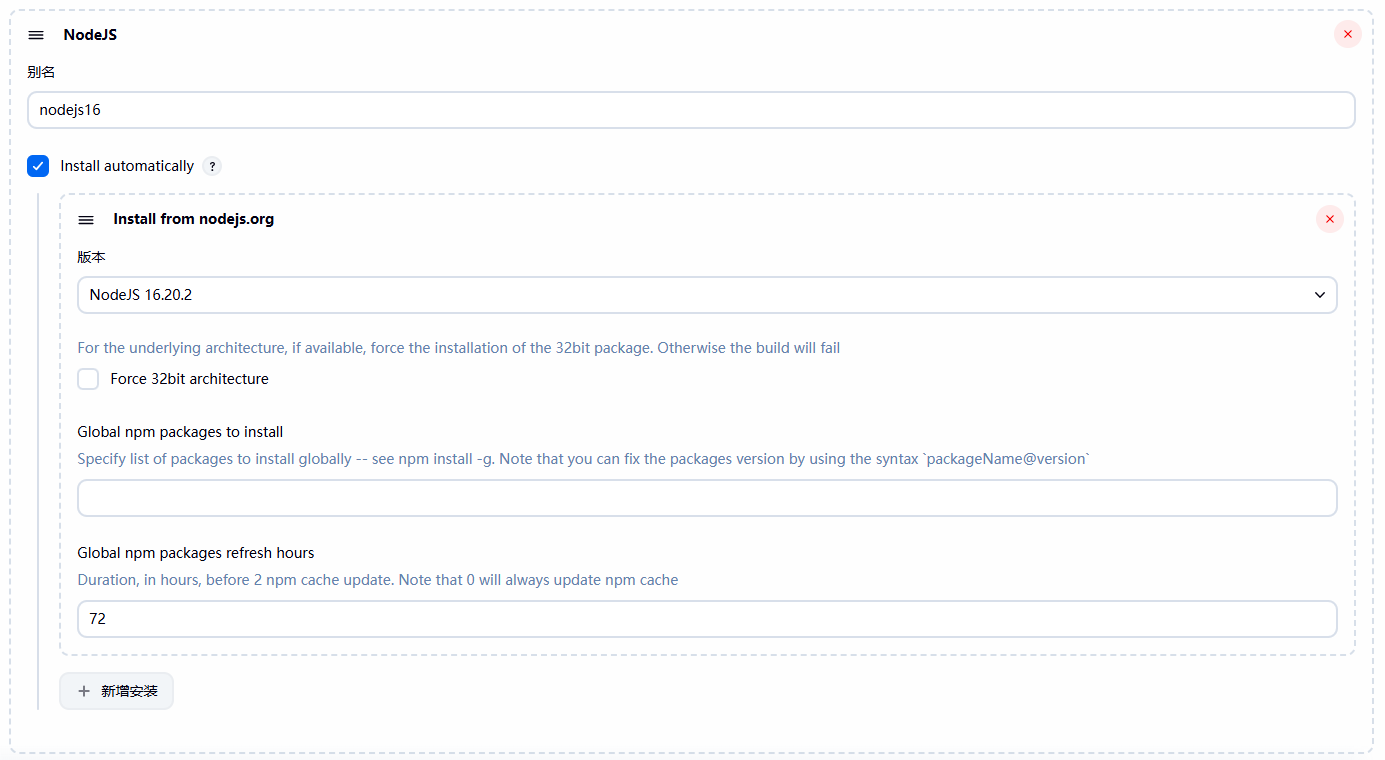
服务器Node命令
- 定义当前会话下node和npm环境变量
- NodeJS16的路径:"~/.jenkins/" 是我安装Jenkins的工作根目录
bash
root@ubuntu24:~/.jenkins/tools/jenkins.plugins.nodejs.tools.NodeJSInstallation/nodejs16/bin# tree
.
├── corepack -> ../lib/node_modules/corepack/dist/corepack.js
├── node
├── npm -> ../lib/node_modules/npm/bin/npm-cli.js
└── npx -> ../lib/node_modules/npm/bin/npx-cli.js

1 directory, 4 files- 添加环境变量
bash
export PATH="/root/.jenkins/tools/jenkins.plugins.nodejs.tools.NodeJSInstallation/nodejs16/bin:$PATH"
bash
root@ubuntu24:~/.jenkins/tools/jenkins.plugins.nodejs.tools.NodeJSInstallation/nodejs16/bin# node --version
v16.20.2
root@ubuntu24:~/.jenkins/tools/jenkins.plugins.nodejs.tools.NodeJSInstallation/nodejs16/bin# npm --version
8.19.4- 查看当前安装包信息
bash
cd /root/.jenkins/workspace/admin-frontend前端
[root@localhost admin-frontend前端]# npm list vue3-json-viewer
xunku-vue-plus@4.8.1 /root/.jenkins/workspace/admin-frontend前端
└── vue3-json-viewer@2.2.2- 使用国内镜像源编译
bash
# 清除已下载包和缓存
#rm -rf dist node_modules
#npm cache clean --force

# 设置 npm 淘宝镜像
npm config set registry https://registry.npmmirror.com/
npm config set disturl https://npmmirror.com/dist

# 安装并打包
npm install --legacy-peer-deps \
&& npm run build:prod \
&& cd dist && tar -zcvf dist.tar.gz *