C9 错误处理
- [9.1 panic! 不可恢复的错误](#9.1 panic! 不可恢复的错误)
- [9.2 Result枚举类型](#9.2 Result枚举类型)
-
- [9.2.1 定义](#9.2.1 定义)
- [9.2.2 如何处理Result的结果:match表达式](#9.2.2 如何处理Result的结果:match表达式)
- [9.2.3 unwrap 取代match](#9.2.3 unwrap 取代match)
- [9.2.4 except:可以指定信息的unwrap](#9.2.4 except:可以指定信息的unwrap)
- [9.3 传播错误](#9.3 传播错误)
-
- [9.3.1传播错误: 将错误传给调用者](#9.3.1传播错误: 将错误传给调用者)
- [9.3.2 ?运算符](#9.3.2 ?运算符)
- [9.3.3 ?与from函数](#9.3.3 ?与from函数)
- [9.3.4 ?只能用于返回Result函数](#9.3.4 ?只能用于返回Result函数)
- [9.4 什么时候应该使用panic!](#9.4 什么时候应该使用panic!)
-
- [9.4.1 总体原则](#9.4.1 总体原则)
9.1 panic! 不可恢复的错误
- 错误的分类
- 可恢复:例如文件未找到,可以再次changs
- 不可恢复:代码有bug,例如索引超出范围
- Rust没有类似的异常机制
- 可恢复错误:Result<T,E>
- 不可恢复:panic! 宏
- 当panic发生时
- 程序展开调用栈(工作量大)
- rust沿着调用栈往回走
- 清理每个遇到的函数中的数据
- 立即中止调用栈
- 不进行清理,直接停止程序
- 内存需要os进行清理
- 想让二进制文件更小,将"展开"改为"中止"
- 在Cargo.toml中的profile部分设置
- RUST_BACKTRACE=1
- RUST_BACKTRACE=full
- 程序展开调用栈(工作量大)
9.2 Result枚举类型
一般而言,错误的发生不一定要中止程序运行,例如:文件不存在,常见操作是创建这个文件,而不是直接panic
=> Result类型处理可能失败的情况
9.2.1 定义
rust
// T和E是泛型类型参数
// Ok和Err关联不同的数据,Ok关联T类型的数据,Err关联E类型的数据
enum Result<T,E> {
	Ok(T),
	Err(E),
}
9.2.2 如何处理Result的结果:match表达式
- 与Option类似
- 例子
rust
use std::fs::File;

fn main()
{
    let f = File::open("hello.txt");

    let f_file = match f {
        Ok(file) => file,
        Err(error) =>{
            panic!("Error opening file {:?}", error);
        }
    };
}- 匹配不同的错误
rust
error.Kind()
// 返回值ErrorKind 枚举,由标准库提供,用于描述io操作可能会一起的不同的错误
rust
use std::{fs::File, io::ErrorKind};

fn main()
{
    let f = File::open("Hello.txt");

    let f_file = match f {
        Ok(file) => file,
        Err(error) =>{
        		// 根据error.kind()不同的类型做出不同的判断
            match error.kind() {
            		// 当是NotFound的时候创建这个file
            		// 于此同时创建file也可能会发生error
                ErrorKind::NotFound => match File::create("Hello.txt") {
                    Ok(file) => file,
                    Err(e) => panic!("Error for creating file {:?}", e),
                }
                // 不关心其他的error类型,统一用other_error 代替,名字可以替换
                other_error => panic!("Error for opening file {:?}", other_error),
            }
        }
    };
}
运行后创建Hello.txt
- match表达式有点原始
- 闭包(closure)。Result<T,E>有很多方法
- 接收闭包作为参数
- 使用match实现
- 代码简洁
rust
use std::{fs::File, io::ErrorKind};

fn main()
{
    let f = File::open("Hello.txt").unwrap_or_else(|error| {
        if error.kind() == ErrorKind::NotFound {
            File::create("Hello.txt").unwrap_or_else(|error| {
                panic!("Error for creating file {:?}", error);
            })
        }
        else {
            panic!("Error for opening file:{:?}", error)
        }
    });
}
9.2.3 unwrap 取代match
- unwrap:match表达式的快捷方法
- 如果Result是Ok,则返回Ok里面的值
- 如果Result是Err,则调用panic!
- 缺点:
错误信息不可以自定义
对比
rust
use std::fs::File;

fn main()
{
    let f = File::open("hello.txt");

    let f_file = match f {
        Ok(file) => file,
        Err(error) =>{
            panic!("Error opening file {:?}", error);
        }
    };
}
rust
use std::fs::File;

fn main()
{
    let f = File::open("hello.txt");

    let f_file = f.unwrap();
}
输出:
rust
thread 'main' (25764) panicked at src\main.rs:7:20:
called `Result::unwrap()` on an `Err` value: Os { code: 2, kind: NotFound, message: "The system cannot find the file specified." }
note: run with `RUST_BACKTRACE=1` environment variable to display a backtrace
error: process didn't exit successfully: `target\debug\hello_cargo.exe` (exit code: 101)
9.2.4 except:可以指定信息的unwrap
- except:与unwrap类似,但是可以指定错误信息
- 例子
rust
use std::fs::File;

fn main()
{
    let f = File::open("hello.txt");

    let f_file = f.expect("Error for opening file");
}
输出:
rust
thread 'main' (12996) panicked at src\main.rs:7:20:
Error for opening file: Os { code: 2, kind: NotFound, message: "The system cannot find the file specified." }
note: run with `RUST_BACKTRACE=1` environment variable to display a backtrace
error: process didn't exit successfully: `target\debug\hello_cargo.exe` (exit code: 101)
9.3 传播错误
9.3.1传播错误: 将错误传给调用者
rust
use std::{fs::File, io, io::Read};

fn main()
{
    let res = read_username_from_file();
}

fn read_username_from_file() -> Result<String, io::Error>{
    // open the file and handle error
    let f = File::open("Hello.txt");
    let mut f = match f {
        Ok(ff) => ff,
        Err(e) => return Err(e),
    };

    // read string from file
    let mut s = String::new();
    match f.read_to_string(&mut s) {
        Ok(_) => Ok(s),
        Err(e) => Err(e),
    }
}
9.3.2 ?运算符
- 传播错误的快捷方式
- 返回值:
- 如果Result是Ok:Ok中的值就是表达式的结果,然后继续执行程序
- 如果Result是Err:Err就是
整个函数的返回值,就相当于使用return
对比:
rust
let f = File::open("Hello.txt");
let mut f = match f {
    Ok(ff) => ff,
    Err(e) => return Err(e),
};
将变量加上mut,在最后加上?
rust
let mut f = File::open("Hello.txt")?;
};
举例:
rust
use std::{fs::File, io, io::Read};

fn main()
{
    let res = read_username_from_file();
}

fn read_username_from_file() -> Result<String, io::Error>{
    // open the file and handle error
    let mut f = File::open("Hello.txt")?;

    // read string from file
    let mut s = String::new();
    f.read_to_string(&mut s)?;

    return Ok(s);
}
9.3.3 ?与from函数
- Trait std::convert::From上的from函数
- 用于错误转换:将一个错误类型转换为另一个错误类型
- 被?所处理的错误,会隐式的被from函数处理
- 应用:针对不太错误原因,返回同一种错误类型
- 要求:每个错误类型实现了转换为所返回的错误类型的from函数
再次修改,链式调用
- 要求:每个错误类型实现了转换为所返回的错误类型的from函数
rust
use std::{fs::File, io, io::Read};

fn main()
{
    let res = read_username_from_file();
}

fn read_username_from_file() -> Result<String, io::Error>{
    let mut s = String::new();
    File::open("Hello.txt")?.read_to_string(&mut s)?;
    return Ok(s);
}
9.3.4 ?只能用于返回Result函数
- main函数的返回类型是()
- 如果直接在main函数中使用()会报错
rust
use std::{fs::File};

fn main()
{
    let mut f = File::open("Hello.txt")?
}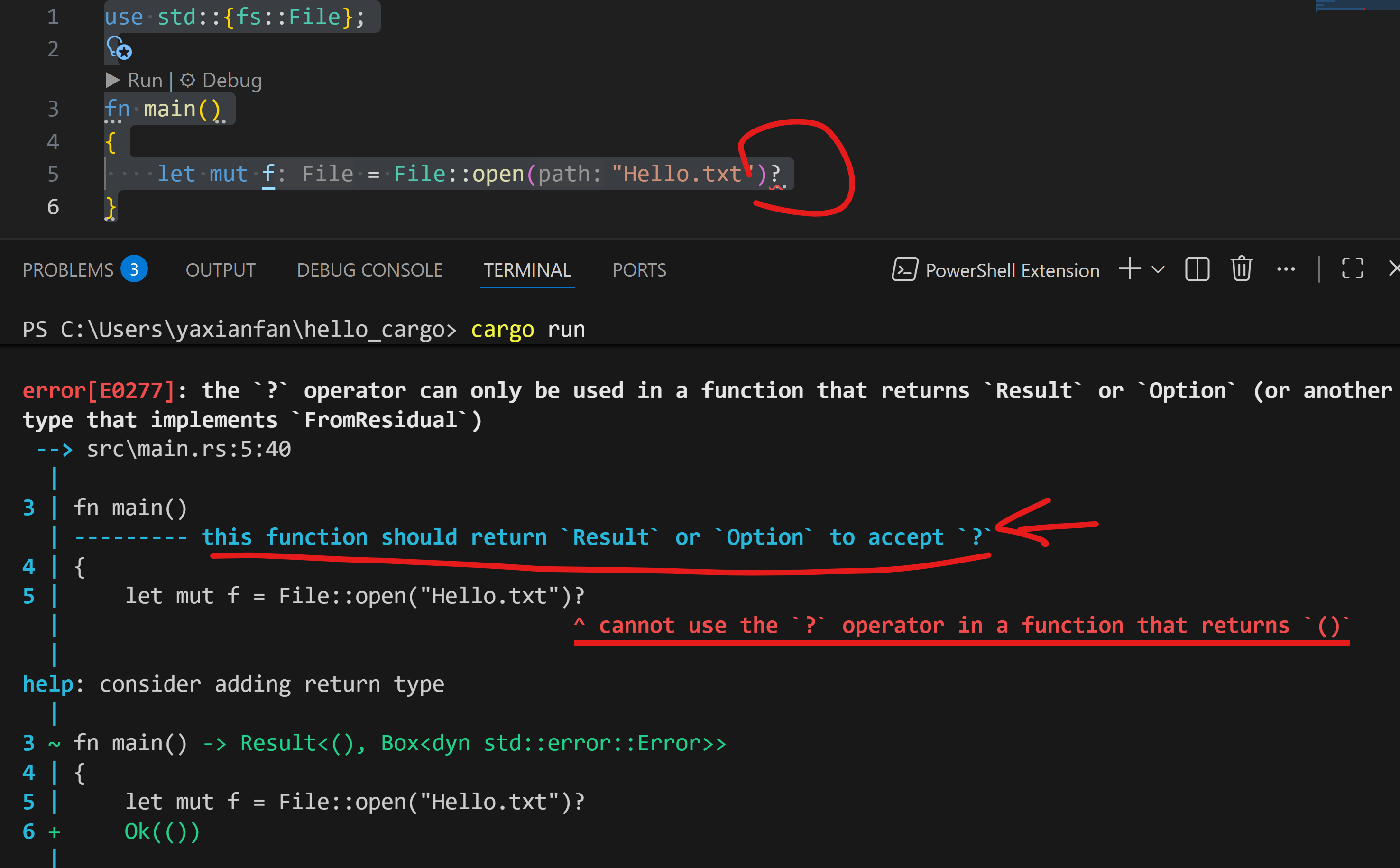
根据help的提示,可以修改代码:
rust
use std::{fs::File};

fn main() ->  Result<(), Box<dyn std::error::Error>>
{
    let mut f = File::open("Hello.txt")?;
    Ok(())
}- Box
<dyn std::error::Error>是trait对象,可以简单理解为"任何困难的错误类型"
9.4 什么时候应该使用panic!
9.4.1 总体原则
- 原则
- 在定义一个可能失败的函数时,优先考虑返回Result
- 否则就panic!
- 场景建议
- 调用你的代码,传入无意义的参数值:panic!
- 调用外部不可控代码,返回非法状态,你无法修复:panic!
- 如果失败是可预期的:Result
- 当你的代码对值进行操作,首先应该验证这些值,当这些值不合法时:panic!
TODO但是我感觉我在代码中可能用不到?
例子
rust
if guess < || guess > 100 {
	println!("The secret number should be between 1 and 100");
	continue;
}
如果很多函数都需要这个验证=>创建一个新的类型,将验证逻辑放在构造事例的函数里
只有通过验证的才能创建相应的实例,否则不能创建实例
rust
pub struct Guess{
    value: i32,
}

impl Guess{
    // 相当于构造函数
    pub fn new(value: i32) -> Guess {
    		// 验证逻辑
        if value < 1 || value > 100 {
            panic!("The secret number should be between 1 and 100");
        }
        // 创建实例
        Guess { value}
    }

		// 类似C#的getter,用于读取字段值,因为在struct中value是私有字段
    pub fn value(&self) -> i32 {
        self.value
    }
}


fn main()
{
	let num = 12;
	let guess = Guess::new(num);

	// num2 不合法,会触发panic
	let num2 = -1;
	let guess2 = Guess::new(num2);
}- getter:返回字段数据
- 字段是私有的:外部无法直接对字段赋值
rust
impl Guess{

	pub fn value(&self) -> i32 {
	        self.value
	    }
}