目录
一.专栏简介
本专栏是我学习《head first》设计模式的笔记。这本书中是用Java语言为基础的,我将用C++语言重写一遍,并且详细讲述其中的设计模式,涉及是什么,为什么,怎么做,自己的心得等等。希望阅读者在读完我的这个专题后,也能在开发中灵活且正确的使用,或者在面对面试官时,能够自信地说自己熟悉常用设计模式。
本章将开始命令模式的学习。
二.前言
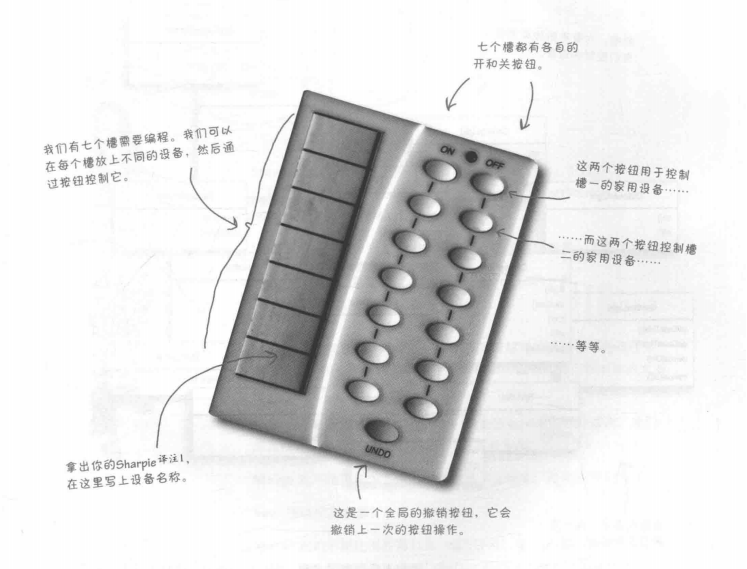
在书中我们需要实现一个遥控器来调用各个家具厂商提供给我们的api,令遥控器可以对这些厂商的家具进行控制,也就是开和关。遥控器的图片如下:
三.看看厂商类
关于我们需要从遥控器控制的对象的接口,这些类应该会给我们带来一些想法。
我用C++写了一下这些类成员函数调用时的输出打印,代码如下:
cpp
#pragma once

#include <iostream>
using namespace std;

class OutdoorLight
{
public:
	void on()
	{
		cout << "OutdoorLight on" << endl;
	}
	void off()
	{
		cout << "OutdoorLight off" << endl;
	}
};

class CeilingLight
{
public:
	void on()
	{
		cout << "CeilingLight on" << endl;
	}
	void off()
	{
		cout << "CeilingLight off" << endl;
	}
	void dim()
	{
		cout << "CeilingLight dim" << endl;
	}
};

class TV
{
public:
	void on()
	{
		cout << "TV on" << endl;
	}
	void off()
	{
		cout << "TV off" << endl;
	}
	void setInputChannel(int channel)
	{
		cout << "TV setInputChannel : " << channel << endl;
	}
	void setVolume(int volume)
	{
		cout << "TV setVolume : " << volume << endl;
	}
};

class Stereo
{
public:
	void on()
	{
		cout << "Stereo on" << endl;
	}
	void off()
	{
		cout << "Stereo off" << endl;
	}
	void setCd(int cd)
	{
		cout << "Stereo setCd : " << cd << endl;
	}
	void setDvd(int dvd)
	{
		cout << "Stereo setDvd : " << dvd << endl;
	}
	void setRadio(int radio)
	{
		cout << "Stereo setRadio : " << radio << endl;
	}
	void setVolume(int volume)
	{
		cout << "Stereo setVolume : " << volume << endl;
	}
};

class ApplianceControl
{
public:
	void on()
	{
		cout << "ApplianceControl on" << endl;
	}
	void off()
	{
		cout << "ApplianceControl off" << endl;
	}
};

class FaucetControl
{
public:
	void openValve()
	{
		cout << "FaucetControl openValve" << endl;
	}
	void closeValve()
	{
		cout << "FaucetControl closeValve" << endl;
	}
};

struct Time
{
	int hour;
	int minute;
	int second;
};

class GardenLight
{
public:
	void setDuskTime(const Time& t)
	{
		cout << "setDuskTime : " << t.hour << " h " << t.minute << " m " << t.second << " s" << endl;
	}
	void setDawnTime(const Time& t)
	{
		cout << "setDawnTime : " << t.hour << " h " << t.minute << " m " << t.second << " s" << endl;
	}
	void manualOn()
	{
		cout << "GardenLight manualOn" << endl;
	}
	void manualOff()
	{
		cout << "GardenLight manualOff" << endl;
	}
};

class CeilingFan
{
public:
	void high()
	{
		cout << "CeilingFan high" << endl;
		_speed = 3;
	}
	void medium()
	{
		cout << "CeilingFan medium" << endl;
		_speed = 2;
	}
	void low()
	{
		cout << "CeilingFan low" << endl;
		_speed = 1;
	}
	void off()
	{
		cout << "CeilingFan off" << endl;
		_speed = 0;
	}
	int getSpeed()
	{
		return _speed;
	}
private:
	int _speed = 0;
};

class GarageDoor
{
public:
	void up()
	{
		cout << "GarageDoor up" << endl;
	}
	void down()
	{
		cout << "GarageDoor down" << endl;
	}
	void stop()
	{
		cout << "GarageDoor stop" << endl;
	}
	void lightOn()
	{
		cout << "GarageDoor lightOn" << endl;
	}
	void lightOff()
	{
		cout << "GarageDoor lightOff" << endl;
	}
};

class Hottub
{
public:
	void circulate()
	{
		cout << "Hottub circulate" << endl;
	}
	void jetsOn()
	{
		cout << "Hottub jetsOn" << endl;
	}
	void jetsOff()
	{
		cout << "Hottub jetsOff" << endl;
	}
	void setTemperature(int temperature)
	{
		cout << "Hottub setTemperature : " << temperature << endl;
	}
};

class Sprinkler
{
public:
	void waterOn()
	{
		cout << "Sprinkler waterOn" << endl;
	}
	void waterOff()
	{
		cout << "Sprinkler waterOff" << endl;
	}
};

class Light
{
public:
	void on()
	{
		cout << "Light on" << endl;
	}
	void off()
	{
		cout << "light off" << endl;
	}
};

class SecurityControl
{
public:
	void arm()
	{
		cout << "SecurityControl arm" << endl;
	}
	void disarm()
	{
		cout << "SecurityControl disarm" << endl;
	}
};

class Thermostat
{
public:
	void setTemperature(int temperature)
	{
		cout << "Hottub setTemperature : " << temperature << endl;
	}
};看起来我们有诸多类,而行业中在通用接口上付出的努力并不多。不仅如此,听起来将来还会有更多这样的类。设计一个遥控器API很有意思,我们继续吧。
四.我们的第一个命令对象
实现command接口(抽象类)
代码如下:
cpp
class Command
{
public:
	virtual void execute() = 0;
};
实现一条开灯命令
现在,假设你要实现一条开灯的命令。根据厂商类,light类有两个方法:on()和off()。
command.h:
cpp
class LightOnCommand : public Command
{
public:
	LightOnCommand(Light* light);
	void execute();
private:
	Light* _light;
};
command.cpp:
cpp
LightOnCommand::LightOnCommand(Light* light):
	_light(light)
{
}

void LightOnCommand::execute()
{
	_light->on();
}
这是一条命令,因此需要实现Command接口。构造器被传入命令要控制的特定灯(比如说客厅的灯),并藏在灯实例变量中。当execute被调用时,灯对象成为请求的接收者。接收者也就是最后做事的人。execute()方法调用接收对象上的on()方法,该对象就是我们正在控制的灯。
使用命令对象:
我们来简化一下:假设我们只有一个遥控器,它只有一个按钮以及相应的槽来放置要控制的设备。
command.h:
cpp
class SimpleRemoteControl
{
public:
	SimpleRemoteControl();
	void setCommand(Command* command);
	void buttonWasPressed();
private:
	Command* slot;
};
command.cpp:
cpp
SimpleRemoteControl::SimpleRemoteControl() :
	slot(nullptr)
{
}

void SimpleRemoteControl::setCommand(Command* command)
{
	slot = command;
}

void SimpleRemoteControl::buttonWasPressed()
{
	slot->execute();
}
我们有一个槽 slot持有命令,命令控制一个设备。我们有一个方法setCommand(),用于设置槽的命令,如果这段代码的客户要改变遥控器按钮的行为,可以多次调用这个方法。当按钮被按下,buttonWasPressed()被调用。我们要做的是把当前命令绑定到槽,并调用其execute()方法。
创建一个简单的测试来使用遥控器:
main.cpp:
cpp
#include  "command.h"

int main()
{
	SimpleRemoteControl* remote = new SimpleRemoteControl();
	Light* light = new Light();
	LightOnCommand* lightOn = new LightOnCommand(light);

	remote->setCommand(lightOn);
	remote->buttonWasPressed();

	return 0;
}
用命令模式的说法,这个main 函数是客户。遥控器是调用者,会被传入一个可以用来做出请求的命令对象。
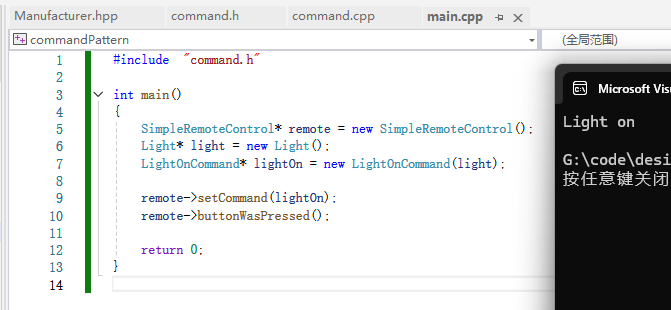
运行结果:
五.再来定义一个命令对象
这里也就是书中的练习。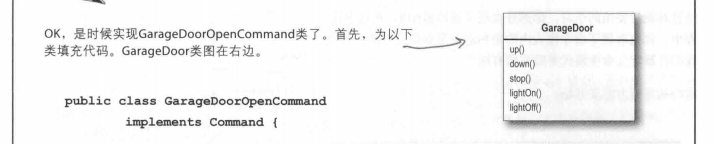
代码如下:
command.h:
cpp
class GarageDoorOpenCommand : public Command
{
public:
	GarageDoorOpenCommand(GarageDoor* door);
	void execute() override;
private:
	GarageDoor* _door;
};
command.cpp:
cpp
GarageDoorOpenCommand::GarageDoorOpenCommand(GarageDoor* door):
	_door(door)
{
}

void GarageDoorOpenCommand::execute()
{
	_door->up();
}
main.cpp:
cpp
#include  "command.h"

int main()
{
	SimpleRemoteControl* remote = new SimpleRemoteControl();
	Light* light = new Light();
	GarageDoor* door = new GarageDoor();
	LightOnCommand* lightOn = new LightOnCommand(light);
	GarageDoorOpenCommand* doorOpen = new  GarageDoorOpenCommand(door);

	remote->setCommand(lightOn);
	remote->buttonWasPressed();
	remote->setCommand(doorOpen);
	remote->buttonWasPressed();

	return 0;
}
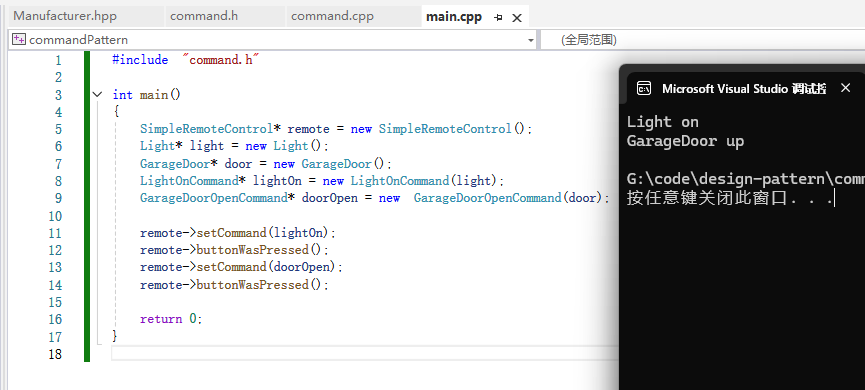
运行结果:
六.定义命令模式
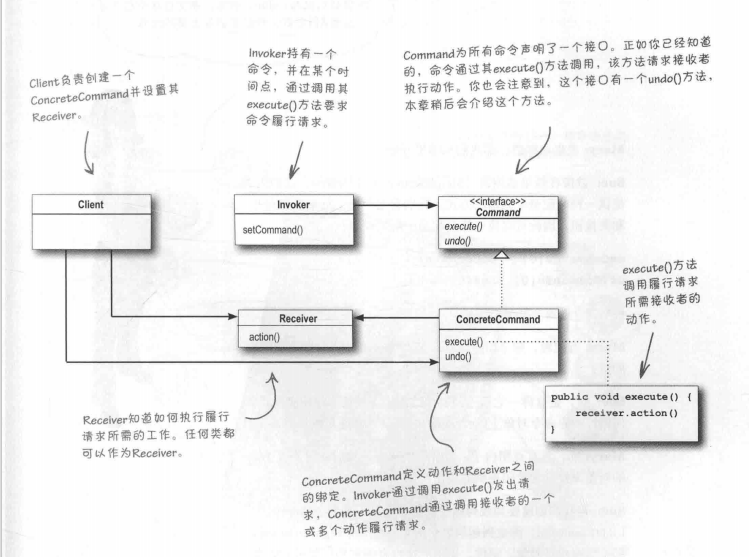
命令模式官方定义:命令模式把请求封装为对象,以便用不同的请求、队列或者日志请求来参数化其他对象,并支持可撤销的操作。
命令模式类图如下:
七.分配命令到槽
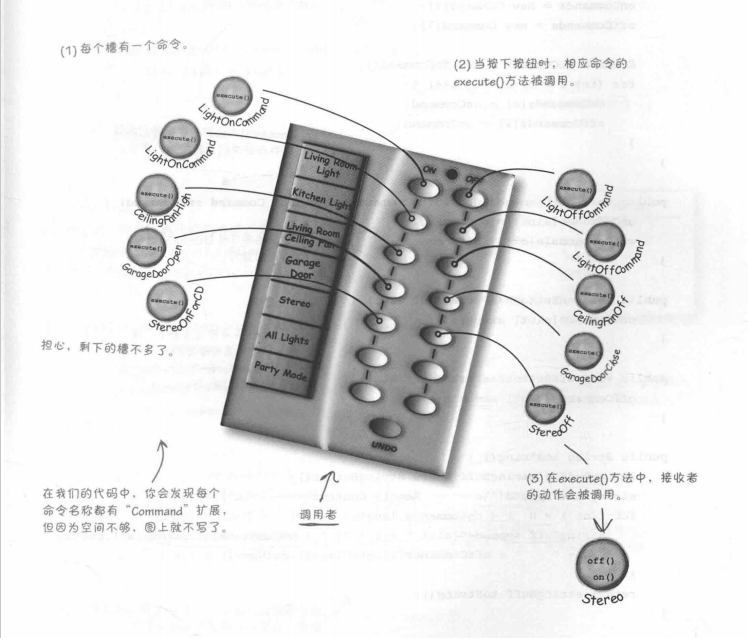
我们打算分配命令到遥控器的每个槽,使得遥控器成为调用者。当按钮被按下时,相应命令上的execute()方法会被调用,导致接收者(像灯、吊扇和音响)上的动作被调用。
八.实现遥控器和命令并且测试
我们改写了调用者,并且新增了命令,然后测试。
Manufacturer.hpp:
cpp
#pragma once

#include <iostream>
using namespace std;

class Light
{
public:
	virtual void on() = 0;
	virtual void off() = 0;
};

class OutdoorLight : public Light
{
public:
	void on() override
	{
		cout << "OutdoorLight on" << endl;
	}
	void off() override
	{
		cout << "OutdoorLight off" << endl;
	}
};

class CeilingLight : public Light
{
public:
	void on() override
	{
		cout << "CeilingLight on" << endl;
	}
	void off() override
	{
		cout << "CeilingLight off" << endl;
	}
	void dim()
	{
		cout << "CeilingLight dim" << endl;
	}
};

struct Time
{
	int hour;
	int minute;
	int second;
};

class GardenLight : public Light
{
public:
	void setDuskTime(const Time& t)
	{
		cout << "setDuskTime : " << t.hour << " h " << t.minute << " m " << t.second << " s" << endl;
	}
	void setDawnTime(const Time& t)
	{
		cout << "setDawnTime : " << t.hour << " h " << t.minute << " m " << t.second << " s" << endl;
	}
	void on() override
	{
		cout << "GardenLight manualOn" << endl;
	}
	void off() override
	{
		cout << "GardenLight manualOff" << endl;
	}
};

class TV
{
public:
	void on()
	{
		cout << "TV on" << endl;
	}
	void off()
	{
		cout << "TV off" << endl;
	}
	void setInputChannel(int channel)
	{
		cout << "TV setInputChannel : " << channel << endl;
	}
	void setVolume(int volume)
	{
		cout << "TV setVolume : " << volume << endl;
	}
};

class Stereo
{
public:
	void on()
	{
		cout << "Stereo on" << endl;
	}
	void off()
	{
		cout << "Stereo off" << endl;
	}
	void setCd(int cd)
	{
		cout << "Stereo setCd : " << cd << endl;
	}
	void setDvd(int dvd)
	{
		cout << "Stereo setDvd : " << dvd << endl;
	}
	void setRadio(int radio)
	{
		cout << "Stereo setRadio : " << radio << endl;
	}
	void setVolume(int volume)
	{
		cout << "Stereo setVolume : " << volume << endl;
	}
};

class ApplianceControl
{
public:
	void on()
	{
		cout << "ApplianceControl on" << endl;
	}
	void off()
	{
		cout << "ApplianceControl off" << endl;
	}
};

class FaucetControl
{
public:
	void openValve()
	{
		cout << "FaucetControl openValve" << endl;
	}
	void closeValve()
	{
		cout << "FaucetControl closeValve" << endl;
	}
};


class CeilingFan
{
public:
	void high()
	{
		cout << "CeilingFan high" << endl;
		_speed = 3;
	}
	void medium()
	{
		cout << "CeilingFan medium" << endl;
		_speed = 2;
	}
	void low()
	{
		cout << "CeilingFan low" << endl;
		_speed = 1;
	}
	void off()
	{
		cout << "CeilingFan off" << endl;
		_speed = 0;
	}
	int getSpeed()
	{
		return _speed;
	}
private:
	int _speed = 0;
};

class GarageDoor
{
public:
	void up()
	{
		cout << "GarageDoor up" << endl;
	}
	void down()
	{
		cout << "GarageDoor down" << endl;
	}
	void stop()
	{
		cout << "GarageDoor stop" << endl;
	}
	void lightOn()
	{
		cout << "GarageDoor lightOn" << endl;
	}
	void lightOff()
	{
		cout << "GarageDoor lightOff" << endl;
	}
};

class Hottub
{
public:
	void circulate()
	{
		cout << "Hottub circulate" << endl;
	}
	void jetsOn()
	{
		cout << "Hottub jetsOn" << endl;
	}
	void jetsOff()
	{
		cout << "Hottub jetsOff" << endl;
	}
	void setTemperature(int temperature)
	{
		cout << "Hottub setTemperature : " << temperature << endl;
	}
};

class Sprinkler
{
public:
	void waterOn()
	{
		cout << "Sprinkler waterOn" << endl;
	}
	void waterOff()
	{
		cout << "Sprinkler waterOff" << endl;
	}
};

class SecurityControl
{
public:
	void arm()
	{
		cout << "SecurityControl arm" << endl;
	}
	void disarm()
	{
		cout << "SecurityControl disarm" << endl;
	}
};

class Thermostat
{
public:
	void setTemperature(int temperature)
	{
		cout << "Hottub setTemperature : " << temperature << endl;
	}
};
command.h:
cpp
#pragma once

#include  "Manufacturer.hpp"
#include <vector>

#define SLOTCOUNT 7

class Command
{
public:
	virtual void execute() = 0;
};

class  NoCommand : public Command
{
public:
	void execute() override;
};

// 调用者
class RemoteControl
{
public:
	RemoteControl();
	void setCommand(int slot, Command* onCommand, Command* offCommand);
	void onButtonWasPressed(int slot);
	void offButtonWasPressed(int slot);
	void print();
private:
	vector<Command*> onCommands;
	vector<Command*> offCommands;
};

class LightOnCommand : public Command
{
public:
	LightOnCommand(Light* light);
	void execute() override;
private:
	Light* _light;							// 接收者
};

class LightOffCommand : public Command
{
public:
	LightOffCommand(Light* light);
	void execute() override;
private:
	Light* _light;
};

class GarageDoorOpenCommand : public Command
{
public:
	GarageDoorOpenCommand(GarageDoor* door);
	void execute() override;
private:
	GarageDoor* _door;						// 接收者
};

class GarageDoorCloseCommand : public Command
{
public:
	GarageDoorCloseCommand(GarageDoor* door);
	void execute() override;
private:
	GarageDoor* _door;						// 接收者
};

class StereoOnWithCDCommand : public Command
{
public:
	StereoOnWithCDCommand(Stereo* stereo);
	void execute();
private:
	Stereo* _stereo;
};

class StereoOffWithCDCommand : public Command
{
public:
	StereoOffWithCDCommand(Stereo* stereo);
	void execute();
private:
	Stereo* _stereo;
};

class CeilingFanOnCommand : public Command
{
public:
	CeilingFanOnCommand(CeilingFan* ceilingFan);
	void execute();
private:
	CeilingFan* _ceilingFan;
};

class CeilingFanOffCommand : public Command
{
public:
	CeilingFanOffCommand(CeilingFan* ceilingFan);
	void execute();
private:
	CeilingFan* _ceilingFan;
};
command.cpp:
cpp
#include "command.h"

RemoteControl::RemoteControl()
{
	onCommands.resize(SLOTCOUNT);
	offCommands.resize(SLOTCOUNT);

	Command* noCommand = new  NoCommand();
	for (int pos = 0;pos < SLOTCOUNT;++pos)
	{
		onCommands[pos] = noCommand;
		offCommands[pos] = noCommand;
	}
}

void RemoteControl::setCommand(int slot, Command* onCommand, Command* offCommand)
{
	onCommands[slot] = onCommand;
	offCommands[slot] = offCommand;
}

void RemoteControl::onButtonWasPressed(int slot)
{
	onCommands[slot]->execute();
}

void RemoteControl::offButtonWasPressed(int slot)
{
	offCommands[slot]->execute();
}

void RemoteControl::print()
{
	for (int pos = 0;pos < SLOTCOUNT;++pos)
	{
		cout << "onCommands[" << pos << "] : " << typeid(*onCommands[pos]).name() << endl;
		cout << "offCommands[" << pos << "] : " << typeid(*offCommands[pos]).name() << endl;
	}
}

LightOnCommand::LightOnCommand(Light* light) :
	_light(light)
{
}

void LightOnCommand::execute()
{
	_light->on();
}

GarageDoorOpenCommand::GarageDoorOpenCommand(GarageDoor* door):
	_door(door)
{
}

void GarageDoorOpenCommand::execute()
{
	_door->up();
}

void NoCommand::execute()
{
	cout << "do nothing" << endl;
}

LightOffCommand::LightOffCommand(Light* light):
	_light(light)
{
}

void LightOffCommand::execute()
{
	_light->off();
}

StereoOnWithCDCommand::StereoOnWithCDCommand(Stereo* stereo):
	_stereo(stereo)
{
}

void StereoOnWithCDCommand::execute()
{
	_stereo->on();
	_stereo->setCd(3);
	_stereo->setVolume(11);
}

CeilingFanOnCommand::CeilingFanOnCommand(CeilingFan* ceilingFan):
	_ceilingFan(ceilingFan)
{
}

void CeilingFanOnCommand::execute()
{
	_ceilingFan->high();
}

CeilingFanOffCommand::CeilingFanOffCommand(CeilingFan* ceilingFan):
	_ceilingFan(ceilingFan)
{
}

void CeilingFanOffCommand::execute()
{
	_ceilingFan->off();
}

GarageDoorCloseCommand::GarageDoorCloseCommand(GarageDoor* door):
	_door(door)
{
}

void GarageDoorCloseCommand::execute()
{
	_door->down();
}

StereoOffWithCDCommand::StereoOffWithCDCommand(Stereo* stereo):
	_stereo(stereo)
{
}

void StereoOffWithCDCommand::execute()
{
	_stereo->off();
}
main.cpp:
cpp
#include  "command.h"

int main()
{
	RemoteControl* remoteControl = new RemoteControl();
	Light* outdoorLight = new OutdoorLight();
	Light* kitchenLight = new CeilingLight();
	CeilingFan* ceilingFan = new CeilingFan();
	GarageDoor* garageDoor = new GarageDoor();
	Stereo* stereo = new Stereo();

	LightOnCommand* outdoorLightOnCommand = new LightOnCommand(outdoorLight);
	LightOffCommand* outdoorLightOffCommand = new LightOffCommand(outdoorLight);
	LightOnCommand* kitchenLightOnCommand = new LightOnCommand(kitchenLight);
	LightOffCommand* kitchenLightOffCommand = new LightOffCommand(kitchenLight);

	CeilingFanOnCommand* ceilingFanOnCommand = new CeilingFanOnCommand(ceilingFan);
	CeilingFanOffCommand* ceilingFanOffCommand = new CeilingFanOffCommand(ceilingFan);

	GarageDoorOpenCommand* garageDoorOpenCommand = new GarageDoorOpenCommand(garageDoor);
	GarageDoorCloseCommand* garageDoorCloseCommand = new GarageDoorCloseCommand(garageDoor);

	StereoOnWithCDCommand* stereoOnWithCDCommand = new StereoOnWithCDCommand(stereo);
	StereoOffWithCDCommand* stereoOffWithCDCommand = new StereoOffWithCDCommand(stereo);

	remoteControl->setCommand(0, outdoorLightOnCommand, outdoorLightOffCommand);
	remoteControl->setCommand(1, kitchenLightOnCommand, kitchenLightOffCommand);
	remoteControl->setCommand(2, ceilingFanOnCommand, ceilingFanOffCommand);
	remoteControl->setCommand(3, garageDoorOpenCommand, garageDoorCloseCommand);
	remoteControl->setCommand(4, stereoOnWithCDCommand, stereoOffWithCDCommand);

	remoteControl->print();

	remoteControl->onButtonWasPressed(0);
	remoteControl->offButtonWasPressed(0);
	remoteControl->onButtonWasPressed(1);
	remoteControl->offButtonWasPressed(1);
	remoteControl->onButtonWasPressed(2);
	remoteControl->offButtonWasPressed(2);
	remoteControl->onButtonWasPressed(3);
	remoteControl->offButtonWasPressed(3);
	remoteControl->onButtonWasPressed(4);
	remoteControl->offButtonWasPressed(4);

	return 0;
}
运行结果:
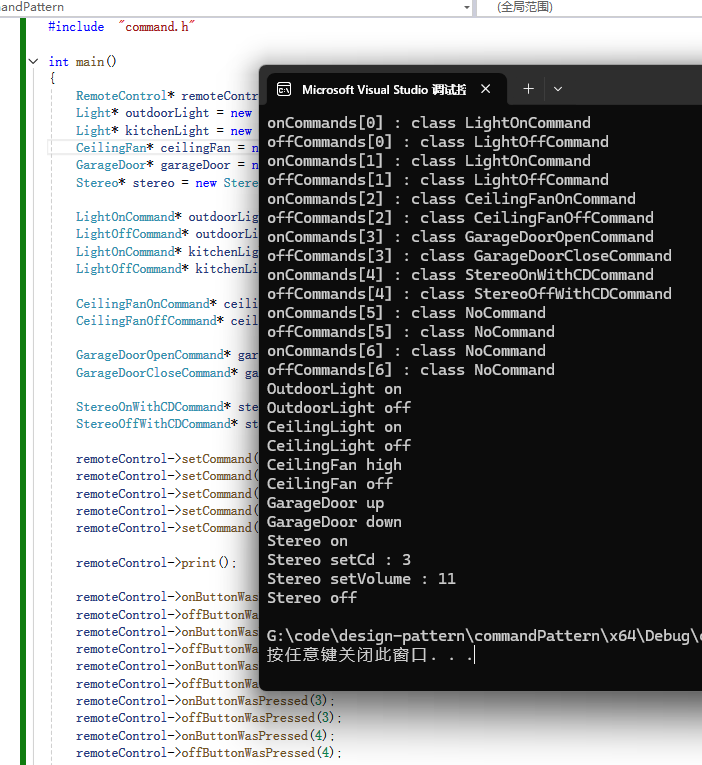
NoCommand对象是一个空对象(null object)的例子。当你不想返回一个有意义的对象时,以及你要把处理null的责任从客户移除时,空对象就很有用。
另外,我们也可以用lambda表达式改写。我们可以用C++的lambda表达式来跳过创建那些具体命令对象的步骤。用了lambda表达式,不用实例化具体命令对象,而是用函数对象代替。换句话说,我们可以用函数对象作为命令。另外,这样做之后,我们也就可以删除所有命令类。我们看看用lambda表达式改写之后的代码:
main.cpp:
main函数中:
cpp
remoteControl->setCommand(5, [outdoorLight]() { outdoorLight->on(); });
// 测试lambda表达式改写
remoteControl->onButtonWasPressed(5);
command.h:
cpp
// 调用者
class RemoteControl
{
public:
	RemoteControl();
	void setCommand(int slot, Command* onCommand, Command* offCommand);
	void setCommand(int slot, function<void()>);
	void onButtonWasPressed(int slot);
	void offButtonWasPressed(int slot);
	void print();
private:
	vector<Command*> onCommands;
	vector<Command*> offCommands;
	vector<function<void()>> lambdas;
};
command.cpp:
cpp
void RemoteControl::setCommand(int slot, function<void()> onFunc)
{
	lambdas[slot] = onFunc;
}
一旦我们替换具体命令为lambda表达式,我们可以删除所有具体命令类。如果我们为每个具体命令如此做了,遥控器应用的类总数就会从22减少到9。
九.实现撤销
command.h:
cpp
#pragma once

#include  "Manufacturer.hpp"
#include <vector>
#include <functional>

#define SLOTCOUNT 7

class Command
{
public:
	virtual void execute() = 0;
	virtual void undo() = 0;
};

class  NoCommand : public Command
{
public:
	void execute() override;
	void undo() override;
};

// 调用者
class RemoteControl
{
public:
	RemoteControl();
	void setCommand(int slot, Command* onCommand, Command* offCommand);
	void setCommand(int slot, function<void()>);
	void onButtonWasPressed(int slot);
	void offButtonWasPressed(int slot);
	void undoButtonWasPushed();
	void print();
private:
	vector<Command*> onCommands;
	vector<Command*> offCommands;
	vector<function<void()>> lambdas;
	Command* undoCommand;
};

class LightOnCommand : public Command
{
public:
	LightOnCommand(Light* light);
	void execute() override;
	void undo() override;
private:
	Light* _light;							// 接收者
};

class LightOffCommand : public Command
{
public:
	LightOffCommand(Light* light);
	void execute() override;
	void undo() override;
private:
	Light* _light;
};

class GarageDoorOpenCommand : public Command
{
public:
	GarageDoorOpenCommand(GarageDoor* door);
	void execute() override;
	void undo() override;
private:
	GarageDoor* _door;						// 接收者
};

class GarageDoorCloseCommand : public Command
{
public:
	GarageDoorCloseCommand(GarageDoor* door);
	void execute() override;
	void undo() override;
private:
	GarageDoor* _door;						// 接收者
};

class StereoOnWithCDCommand : public Command
{
public:
	StereoOnWithCDCommand(Stereo* stereo);
	void execute();
	void undo() override;
private:
	Stereo* _stereo;
};

class StereoOffWithCDCommand : public Command
{
public:
	StereoOffWithCDCommand(Stereo* stereo);
	void execute();
	void undo() override;
private:
	Stereo* _stereo;
};

class CeilingFanOnCommand : public Command
{
public:
	CeilingFanOnCommand(CeilingFan* ceilingFan);
	void execute();
	void undo() override;
private:
	CeilingFan* _ceilingFan;
};

class CeilingFanOffCommand : public Command
{
public:
	CeilingFanOffCommand(CeilingFan* ceilingFan);
	void execute();
	void undo() override;
private:
	CeilingFan* _ceilingFan;
};
command.cpp:
cpp
#include "command.h"

RemoteControl::RemoteControl()
{
	onCommands.resize(SLOTCOUNT);
	offCommands.resize(SLOTCOUNT);
	lambdas.resize(SLOTCOUNT);

	Command* noCommand = new  NoCommand();
	for (int pos = 0;pos < SLOTCOUNT;++pos)
	{
		onCommands[pos] = noCommand;
		offCommands[pos] = noCommand;
		//lambdas[pos] = []() { cout << "do nothing" << endl; };
	}
	undoCommand = noCommand;
}

void RemoteControl::setCommand(int slot, Command* onCommand, Command* offCommand)
{
	onCommands[slot] = onCommand;
	offCommands[slot] = offCommand;
}

void RemoteControl::setCommand(int slot, function<void()> onFunc)
{
	lambdas[slot] = onFunc;
}

void RemoteControl::onButtonWasPressed(int slot)
{
	if (slot == 5) lambdas[slot]();
	else onCommands[slot]->execute();
	undoCommand = onCommands[slot];
}

void RemoteControl::offButtonWasPressed(int slot)
{
	offCommands[slot]->execute();
	undoCommand = offCommands[slot];
}

void RemoteControl::undoButtonWasPushed()
{
	undoCommand->undo();
}

void RemoteControl::print()
{
	for (int pos = 0;pos < SLOTCOUNT;++pos)
	{
		cout << "onCommands[" << pos << "] : " << typeid(*onCommands[pos]).name() << endl;
		cout << "offCommands[" << pos << "] : " << typeid(*offCommands[pos]).name() << endl;
	}
}

LightOnCommand::LightOnCommand(Light* light) :
	_light(light)
{
}

void LightOnCommand::execute()
{
	_light->on();
}

void LightOnCommand::undo()
{
	_light->off();
}

GarageDoorOpenCommand::GarageDoorOpenCommand(GarageDoor* door):
	_door(door)
{
}

void GarageDoorOpenCommand::execute()
{
	_door->up();
}

void GarageDoorOpenCommand::undo()
{
	_door->down();
}

void NoCommand::execute()
{
	cout << "do nothing" << endl;
}

void NoCommand::undo()
{
	cout << "do nothing" << endl;
}

LightOffCommand::LightOffCommand(Light* light):
	_light(light)
{
}

void LightOffCommand::execute()
{
	_light->off();
}

void LightOffCommand::undo()
{
	_light->on();
}

StereoOnWithCDCommand::StereoOnWithCDCommand(Stereo* stereo):
	_stereo(stereo)
{
}

void StereoOnWithCDCommand::execute()
{
	_stereo->on();
	_stereo->setCd(3);
	_stereo->setVolume(11);
}

void StereoOnWithCDCommand::undo()
{
	_stereo->off();
}

CeilingFanOnCommand::CeilingFanOnCommand(CeilingFan* ceilingFan):
	_ceilingFan(ceilingFan)
{
}

void CeilingFanOnCommand::execute()
{
	_ceilingFan->high();
}

void CeilingFanOnCommand::undo()
{
	_ceilingFan->off();
}

CeilingFanOffCommand::CeilingFanOffCommand(CeilingFan* ceilingFan):
	_ceilingFan(ceilingFan)
{
}

void CeilingFanOffCommand::execute()
{
	_ceilingFan->off();
}

void CeilingFanOffCommand::undo()
{
	switch (_ceilingFan->getSpeed())
	{
	case 1: _ceilingFan->low(); break;
	case 2: _ceilingFan->medium(); break;
	case 3: _ceilingFan->high(); break;
	}
}

GarageDoorCloseCommand::GarageDoorCloseCommand(GarageDoor* door):
	_door(door)
{
}

void GarageDoorCloseCommand::execute()
{
	_door->down();
}

void GarageDoorCloseCommand::undo()
{
	_door->up();
}

StereoOffWithCDCommand::StereoOffWithCDCommand(Stereo* stereo):
	_stereo(stereo)
{
}

void StereoOffWithCDCommand::execute()
{
	_stereo->off();
}

void StereoOffWithCDCommand::undo()
{
	_stereo->on();
	_stereo->setCd(3);
	_stereo->setVolume(11);
}
main.cpp:
cpp
#include  "command.h"

int main()
{
	RemoteControl* remoteControl = new RemoteControl();
	Light* outdoorLight = new OutdoorLight();
	Light* kitchenLight = new CeilingLight();
	CeilingFan* ceilingFan = new CeilingFan();
	GarageDoor* garageDoor = new GarageDoor();
	Stereo* stereo = new Stereo();

	LightOnCommand* outdoorLightOnCommand = new LightOnCommand(outdoorLight);
	LightOffCommand* outdoorLightOffCommand = new LightOffCommand(outdoorLight);
	LightOnCommand* kitchenLightOnCommand = new LightOnCommand(kitchenLight);
	LightOffCommand* kitchenLightOffCommand = new LightOffCommand(kitchenLight);

	CeilingFanOnCommand* ceilingFanOnCommand = new CeilingFanOnCommand(ceilingFan);
	CeilingFanOffCommand* ceilingFanOffCommand = new CeilingFanOffCommand(ceilingFan);

	GarageDoorOpenCommand* garageDoorOpenCommand = new GarageDoorOpenCommand(garageDoor);
	GarageDoorCloseCommand* garageDoorCloseCommand = new GarageDoorCloseCommand(garageDoor);

	StereoOnWithCDCommand* stereoOnWithCDCommand = new StereoOnWithCDCommand(stereo);
	StereoOffWithCDCommand* stereoOffWithCDCommand = new StereoOffWithCDCommand(stereo);

	remoteControl->setCommand(0, outdoorLightOnCommand, outdoorLightOffCommand);
	remoteControl->setCommand(1, kitchenLightOnCommand, kitchenLightOffCommand);
	remoteControl->setCommand(2, ceilingFanOnCommand, ceilingFanOffCommand);
	remoteControl->setCommand(3, garageDoorOpenCommand, garageDoorCloseCommand);
	remoteControl->setCommand(4, stereoOnWithCDCommand, stereoOffWithCDCommand);
	remoteControl->setCommand(5, [outdoorLight]() { outdoorLight->on(); });

	remoteControl->print();

	remoteControl->onButtonWasPressed(0);
	remoteControl->offButtonWasPressed(0);
	remoteControl->undoButtonWasPushed();
	remoteControl->onButtonWasPressed(1);
	remoteControl->offButtonWasPressed(1);
	remoteControl->onButtonWasPressed(2);
	remoteControl->offButtonWasPressed(2);
	remoteControl->onButtonWasPressed(3);
	remoteControl->offButtonWasPressed(3);
	remoteControl->onButtonWasPressed(4);
	remoteControl->offButtonWasPressed(4);
	remoteControl->undoButtonWasPushed();

	// 测试lambda表达式改写
	remoteControl->onButtonWasPressed(5);

	return 0;
}
运行结果:
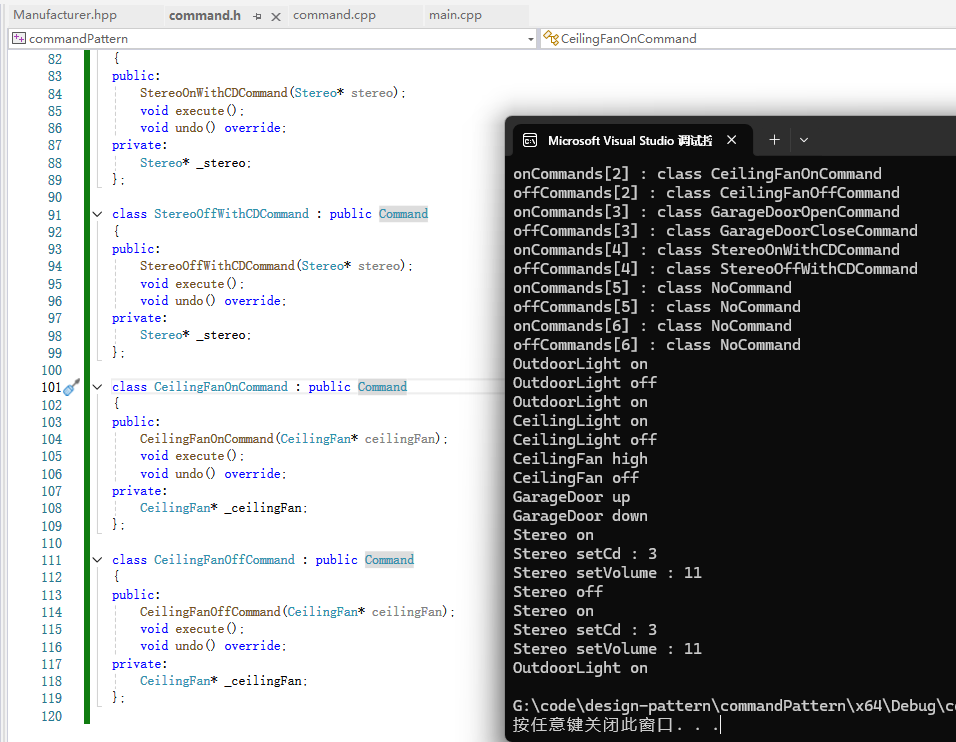
撤销功能成功运行。
十.总结
命令模式中我们还可以实现宏命令,也就是一个命令中组合了一组接收者,这个命令被调用者调用时就会令者一组接收者挨个干活。命令模式还可以运用在请求队列,也就是生产者消费者模型中;还可以运用在日志请求,在Command中加上storage和load方法即可。以下是一些总结:
- 命令模式把做出请求的对象从知道如何执行请求的对象解耦。
- 命令对象处在解耦的中心,封装接收者以及一个(或一组)动作。
- 调用者通过调用命令对象的execute()做出请求,这会使得接收者的动作被调用。
- 调用者可以用命令参数化,甚至可以在运行时动态地进行。
- 通过实现一个undo()方法来把对象重建到最后一次执行execute()前的状态,命令可以支持撤销。
- 宏命令是命令模式的一种简单的延伸。它允许调用多个命令。同样,宏命令很容易支持undo()。
- 在实践中,"聪明"命令对象并不少见。这些对象自己实现请求,而不是委托给接收者。
- 命令也可以用来实现日志和事务系统。