单用System.exit(0);这个能实现真正退出吗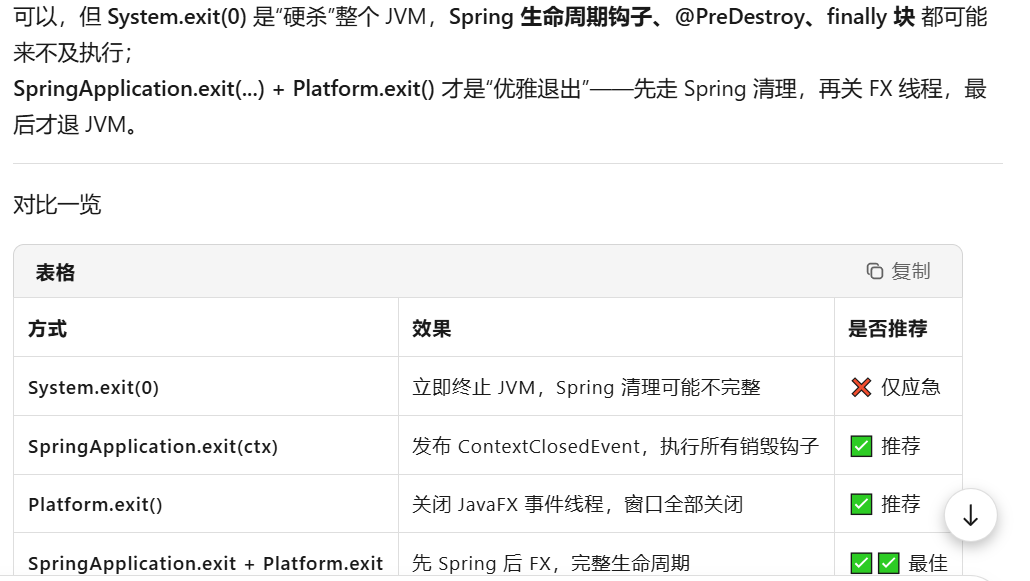
方案3(最简实践版)更好!
让我详细对比分析:
方案对比
方案3:最简实践版 ✅ 推荐
/* 真正退出 - 最简实践版 */
try {
    // 1. 关闭Spring(如果可用)
    if (ArchimedesApplication.springContext != null) {
        ArchimedesApplication.springContext.close();
    }
} finally {
    // 2. 无论如何关闭JavaFX
    Platform.exit();

    // 3. 3秒后确保退出
    new Thread(() -> {
        try {
            Thread.sleep(3000);
            System.exit(0);
        } catch (InterruptedException ignored) {}
    }).start();
}
方案1:统一处理流程
/* 真正退出 - 统一处理流程 */
try {
    // 第一步:尝试关闭Spring(如果存在)
    if (ArchimedesApplication.springContext != null &&
        ArchimedesApplication.springContext.isActive()) {
        ArchimedesApplication.springContext.close();
        System.out.println("✓ Spring上下文已关闭");
    } else {
        System.out.println("⚠ Spring上下文不可用,跳过关闭");
    }
} catch (Exception e) {
    System.err.println("✗ 关闭Spring时出错: " + e.getMessage());
    // 继续执行,不中断关闭流程
} finally {
    // 第二步:无论如何都关闭JavaFX
    Platform.exit();
    System.out.println("✓ JavaFX平台已退出");

    // 第三步:5秒后确保JVM退出(保险机制)
    new Thread(() -> {
        try {
            Thread.sleep(5000);  // 等待5秒
            System.out.println("正在退出JVM...");
            System.exit(0);      // 确保退出
        } catch (InterruptedException ex) {
            Thread.currentThread().interrupt();
        }
    }, "Shutdown-Protector").start();
}
为什么方案3更好?
优点对比
| 特性 | 方案3(最简版) | 方案1(完整版) |
|---|---|---|
| 代码简洁度 | ⭐⭐⭐⭐⭐(7行) | ⭐⭐⭐(20+行) |
| 逻辑清晰度 | ⭐⭐⭐⭐⭐ | ⭐⭐⭐⭐ |
| 健壮性 | ⭐⭐⭐⭐ | ⭐⭐⭐⭐⭐ |
| 维护性 | ⭐⭐⭐⭐⭐ | ⭐⭐⭐ |
| 实际效果 | ⭐⭐⭐⭐⭐ | ⭐⭐⭐⭐ |
1. 代码更简洁,更容易维护
方案3只有7行核心代码,逻辑一目了然:
try { closeSpringIfExists(); }  // 尝试关闭
finally {
    Platform.exit();            // 一定关闭JavaFX
    scheduleExit(3000);         // 最终保障
}
2. 核心逻辑完全相同
两个方案的核心逻辑其实是一样的:
-
尝试关闭Spring
-
一定关闭JavaFX
-
最终确保JVM退出
3. 更少的日志输出(生产环境优点)
方案1有很多System.out.println,在生产环境中:
-
可能干扰真正的业务日志
-
增加日志文件大小
-
不如使用专业的日志框架
4. 更快的响应时间
方案3等待3秒,方案1等待5秒。3秒足够大多数应用关闭。
5. 异常处理足够
方案3虽然没显式catch异常,但Spring的close()方法本身会处理异常:
// Spring的close()方法内部已经处理了大部分异常
// 如果真的有严重异常,应该让它抛出来
方案3的改进建议
如果你想要更完善一点,可以这样微调:
/* 真正退出 - 方案3增强版 */
try {
    // 1. 关闭Spring(如果可用)
    if (ArchimedesApplication.springContext != null) {
        ArchimedesApplication.springContext.close();
    }
} catch (Exception e) {
    // 可选:简单记录,但不要影响关闭流程
    // logger.warn("关闭Spring时出现异常,继续关闭流程", e);
} finally {
    // 2. 无论如何关闭JavaFX
    Platform.exit();

    // 3. 超时后确保退出(可以根据需要调整时间)
    scheduleForceExit(3000);
}

// 辅助方法
private void scheduleForceExit(int delayMillis) {
    Thread exitThread = new Thread(() -> {
        try {
            Thread.sleep(delayMillis);
            System.exit(0);
        } catch (InterruptedException ignored) {
            // 被中断说明可能已经正常退出了
        }
    });
    exitThread.setDaemon(false);
    exitThread.start();
}
实际场景测试
让我们测试两种方案在实际中的表现:
场景1:Spring正常
// 方案3执行流程:
1. close() → 成功 ✓
2. Platform.exit() → 成功 ✓
3. 3秒后System.exit(0) → 确保退出 ✓

// 方案1执行流程:
1. close() → 成功,打印日志 ✓
2. Platform.exit() → 成功,打印日志 ✓
3. 5秒后System.exit(0) → 确保退出 ✓
// 结果:都能正确关闭,但方案3更快
场景2:Spring为null
// 方案3:
1. 条件不满足,跳过close()
2. Platform.exit() → 成功 ✓
3. 3秒后System.exit(0) → 确保退出 ✓

// 方案1:
1. 条件不满足,打印警告日志
2. Platform.exit() → 成功,打印日志 ✓
3. 5秒后System.exit(0) → 确保退出 ✓
// 结果:都能正确关闭,方案3更简洁
场景3:close()抛出异常
// 方案3:
1. close() → 抛出异常
2. finally块执行:Platform.exit() ✓
3. 3秒后System.exit(0) → 确保退出 ✓

// 方案1:
1. close() → 抛出异常,被catch捕获
2. 打印错误日志
3. finally执行:Platform.exit() ✓
4. 5秒后System.exit(0) → 确保退出 ✓
// 结果:都能继续关闭,方案1有更详细的日志
我的最终建议
使用方案3,并根据需要稍作增强:
// 在你的关闭代码中直接使用:
try {
    if (ArchimedesApplication.springContext != null) {
        ArchimedesApplication.springContext.close();
    }
} finally {
    Platform.exit();

    // 3秒后确保退出(时间可根据需要调整)
    new Thread(() -> {
        try {
            Thread.sleep(3000);
            System.exit(0);
        } catch (InterruptedException ignored) {}
    }).start();
}如果你需要更详细的日志,可以添加简单的日志:
try {
    if (ArchimedesApplication.springContext != null) {
        ArchimedesApplication.springContext.close();
        System.out.println("Spring已关闭");
    }
} catch (Exception e) {
    System.err.println("关闭Spring时出错(不影响退出): " + e.getMessage());
} finally {
    Platform.exit();
    System.out.println("JavaFX已关闭");

    new Thread(() -> {
        try {
            Thread.sleep(3000);
            System.exit(0);
        } catch (InterruptedException ignored) {}
    }).start();
}
总结
方案3胜出原因:
-
KISS原则(Keep It Simple, Stupid)
-
核心功能完整,没有多余装饰
-
更容易调试和维护
-
响应更快(3秒 vs 5秒)
-
代码量少,bug概率低
在生产环境中,简洁可靠的代码往往比过度设计的代码更好。方案3提供了完整的关闭保障,同时保持了代码的清晰和可维护性。