PaddleOCR,github 60K star,OCR效果非常好,目前是最好的OCR软件。
官网:PaddleOCR - 文档解析与智能文字识别 | 支持API调用与MCP服务 - 飞桨星河社区
除了在官网直接提交文档进行文字识别,还可以使用api调用官方的api服务,尤其是现在免费调用额度已经提高到每个模型每天3000页啦!
PaddleOCR三个模型的介绍
PaddleOCR-VL 介绍
PaddleOCR-VL 是一款先进、高效的文档解析模型,专为文档中的元素识别设计。其核心组件为 PaddleOCR-VL-0.9B,这是一种紧凑而强大的视觉语言模型(VLM),它由 NaViT 风格的动态分辨率视觉编码器与 ERNIE-4.5-0.3B 语言模型组成,能够实现精准的元素识别。该模型支持 109 种语言,并在识别复杂元素(如文本、表格、公式和图表)方面表现出色,同时保持极低的资源消耗。通过在广泛使用的公开基准与内部基准上的全面评测,PaddleOCR-VL 在页级级文档解析与元素级识别均达到 SOTA 表现。它显著优于现有的基于Pipeline方案和文档解析多模态方案以及先进的通用多模态大模型,并具备更快的推理速度。这些优势使其非常适合在真实场景中落地部署。
PP-OCRv5 介绍
OCR(光学字符识别,Optical Character Recognition)是一项将图片中的文字内容转换为可编辑文本的技术,广泛应用于文档数字化、信息提取、数据处理等场景。OCR 能够识别印刷体、手写体等多种类型的文本,帮助用户高效获取图像中的关键信息。
PP-OCRv5 是 PP-OCR 系列最新一代的文字识别解决方案,专为多场景、多文字类型的识别任务设计。相比前代版本,PP-OCRv5 在文字类型支持和应用场景适应性方面实现了全面升级。该方案不仅能够返回文本行的坐标信息,还可输出对应文本内容及其置信度,有效提升了文字检测与识别的准确性和实用性,
PP-StructureV3 产线介绍
PP-StructureV3是一套高效、全面的文档解析解决方案,能够从各类文档图像和PDF文件中提取结构化信息。通过结合光学字符识别(OCR)、图像处理和深度学习等前沿技术,PP-StructureV3能够识别并提取文档中的文本块、标题、段落、图片、表格、公式、图表等多种元素,将复杂的文档内容转化为机器可读的数据格式(如Markdown、JSON),极大提升了文档数据处理的效率和准确性。
调用说明
每个模型每天3000页额度,每次调用为100页额度,如果超过100页,只会返回前100页的识别结果。
超过额度系统会返回 429 (Too Many Requests) 错误码
返回的错误码说明
| 错误码 | 说明 | 解决建议 |
|---|---|---|
| 403 | Token 错误 | 检查 Token 是否正确,或 URL 是否与 Token 匹配 |
| 429 | 超出单日解析最大页数 | 请使用其他模型或稍后再试 |
| 500 | 传参错误 | 请确保参数类型及 fileType 正确 |
| 503 | 当前请求过多 | 请稍后再试 |
| 504 | 网关超时 | 请稍后再试 |
python调用api
其中的url使用星河社区url,每个用户会给一个单独的url和token。比如我的PaddleOCR-VL API_URL = "https://e3vdv522q82encq6.aistudio-app.com/layout-parsing" ,PP-OCRv5则是:API_URL = "https://a35cc4ma17eea0x4.aistudio-app.com/ocr"
python
# Please make sure the requests library is installed
# pip install requests
import base64
import os
import requests

# API_URL 及 TOKEN 请访问 [PaddleOCR 官网](https://aistudio.baidu.com/paddleocr/task) 在 API 调用示例中获取。
API_URL = "<your url>"
TOKEN = "<access token>"

file_path = "<local file path>"

with open(file_path, "rb") as file:
    file_bytes = file.read()
    file_data = base64.b64encode(file_bytes).decode("ascii")

headers = {
    "Authorization": f"token {TOKEN}",
    "Content-Type": "application/json"
}

required_payload = {
    "file": file_data,
    "fileType": <file type>,  # For PDF documents, set `fileType` to 0; for images, set `fileType` to 1
}

optional_payload = {
    "useDocOrientationClassify": False,
    "useDocUnwarping": False,
    "useChartRecognition": False,
}

payload = {**required_payload, **optional_payload}

response = requests.post(API_URL, json=payload, headers=headers)
print(response.status_code)
assert response.status_code == 200
result = response.json()["result"]

output_dir = "output"
os.makedirs(output_dir, exist_ok=True)

for i, res in enumerate(result["layoutParsingResults"]):
    md_filename = os.path.join(output_dir, f"doc_{i}.md")
    with open(md_filename, "w", encoding="utf-8") as md_file:
        md_file.write(res["markdown"]["text"])
    print(f"Markdown document saved at {md_filename}")
    for img_path, img in res["markdown"]["images"].items():
        full_img_path = os.path.join(output_dir, img_path)
        os.makedirs(os.path.dirname(full_img_path), exist_ok=True)
        img_bytes = requests.get(img).content
        with open(full_img_path, "wb") as img_file:
            img_file.write(img_bytes)
        print(f"Image saved to: {full_img_path}")
    for img_name, img in res["outputImages"].items():
        img_response = requests.get(img)
        if img_response.status_code == 200:
            # Save image to local
            filename = os.path.join(output_dir, f"{img_name}_{i}.jpg")
            with open(filename, "wb") as f:
                f.write(img_response.content)
            print(f"Image saved to: {filename}")
        else:
            print(f"Failed to download image, status code: {img_response.status_code}")
实践
api调用
url和token获取
代码里面的token和url都可以从官网获取:
登录账户后,点击官网首页API按钮,给出的代码就已经包含了用户的url和token。
api代码中还有两个地方需要填写,
其一为:file_path = "<local file path>" ,即待文字识别的图片或pdf文件。
其二为"fileType": <file type>, 如果是 PDF 文档,填0,如果是图片,填1
调用代码
代码参考如下:
python
# Please make sure the requests library is installed
# pip install requests
import base64
import os
import requests

API_URL = "https://e3vdv522q82encq6.aistudio-app.com/layout-parsing"
TOKEN = "6cac**"

file_path = "<local file path>"

with open(file_path, "rb") as file:
    file_bytes = file.read()
    file_data = base64.b64encode(file_bytes).decode("ascii")

headers = {
    "Authorization": f"token {TOKEN}",
    "Content-Type": "application/json"
}

required_payload = {
    "file": file_data,
    "fileType": <file type>,  # For PDF documents, set `fileType` to 0; for images, set `fileType` to 1
}

optional_payload = {
    "useDocOrientationClassify": False,
    "useDocUnwarping": False,
    "useChartRecognition": False,
}

payload = {**required_payload, **optional_payload}

response = requests.post(API_URL, json=payload, headers=headers)
print(response.status_code)
assert response.status_code == 200
result = response.json()["result"]

output_dir = "output"
os.makedirs(output_dir, exist_ok=True)

for i, res in enumerate(result["layoutParsingResults"]):
    md_filename = os.path.join(output_dir, f"doc_{i}.md")
    with open(md_filename, "w", encoding="utf-8") as md_file:
        md_file.write(res["markdown"]["text"])
    print(f"Markdown document saved at {md_filename}")
    for img_path, img in res["markdown"]["images"].items():
        full_img_path = os.path.join(output_dir, img_path)
        os.makedirs(os.path.dirname(full_img_path), exist_ok=True)
        img_bytes = requests.get(img).content
        with open(full_img_path, "wb") as img_file:
            img_file.write(img_bytes)
        print(f"Image saved to: {full_img_path}")
    for img_name, img in res["outputImages"].items():
        img_response = requests.get(img)
        if img_response.status_code == 200:
            # Save image to local
            filename = os.path.join(output_dir, f"{img_name}_{i}.jpg")
            with open(filename, "wb") as f:
                f.write(img_response.content)
            print(f"Image saved to: {filename}")
        else:
            print(f"Failed to download image, status code: {img_response.status_code}")
输出信息
输出:
901
Markdown document saved at output\doc_0.md
19307
Image saved to: output\imgs/img_in_image_box_112_116_523_426.jpg
34806
Image saved to: output\imgs/img_in_image_box_790_467_1278_840.jpg
313812
Image saved to: output\layout_det_res_0.jpg
可以看到输出了1个md文件和3个图片,是因为图片里面有一部分被识别为图片了。
原图
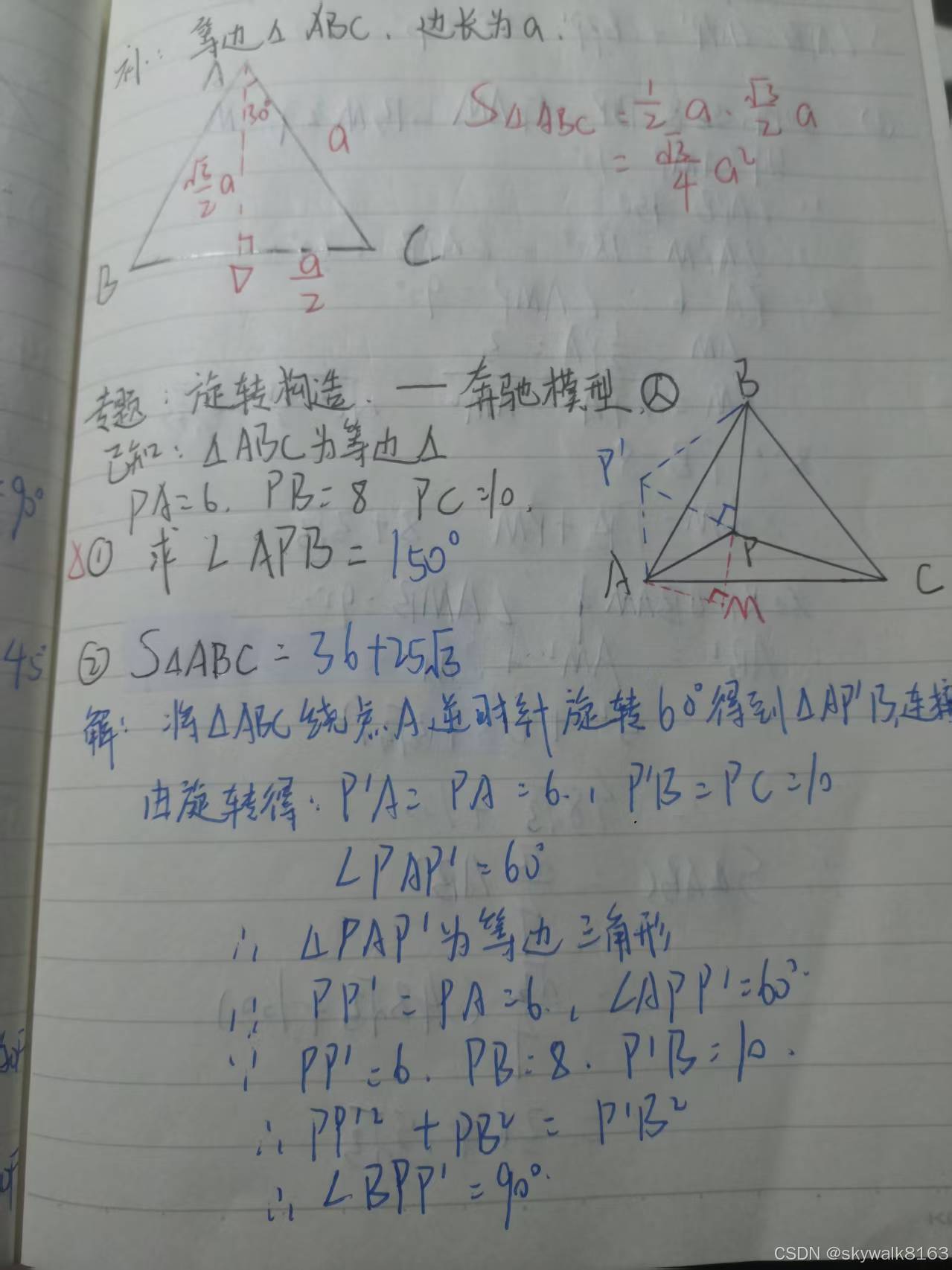
执行效果
补:等边△ABC,边长为a

<div style="text-align: center;"><img src="imgs/img_in_image_box_112_116_523_426.jpg" alt="Image" width="32%" /></div>


 $$ S_{\Delta A B C}=\frac{1}{2}a\cdot\frac{\sqrt{3}}{2}a=\frac{\sqrt{3}}{4}a^{2} $$

专题:旋转构造、—奔驰模型

已知:△ABC为等边△

 $ PA=6, PB=8 PC=10 $

① 求  $ ∠APB=150° $

<div style="text-align: center;"><img src="imgs/img_in_image_box_790_467_1278_840.jpg" alt="Image" width="38%" /></div>


 $$ \textcircled{2}S_{\Delta}A B C=36+25\sqrt{3} $$

解:将△ABC绕点A逆时针旋转 $ 60^{\circ} $ 得到△AP',连接由旋转得: $ P^{\prime}A = PA = 6 \cdot 1 $ , $ P^{\prime}B = PC = 10 $

 $ \angle PAP^{\prime} = 60^{\circ} $

 $ \therefore \triangle PAP^{\prime} $ 为等边三角形

 $ PP^{\prime} = PA = 6 $ , $ \angle APP^{\prime} = 60^{\circ} $

 $ PP^{\prime} = 6 $ ,PB = 8, $ P^{\prime}B = 10 $

 $ \therefore PP^{\prime\prime2} + PB^{2} = P^{\prime}B^{2} $

 $ \therefore \angle BPP^{\prime} = 90^{\circ} $
效果还是可以的,我这里看着输出有点乱是因为手里的md渲染软件表现拉胯。