简介
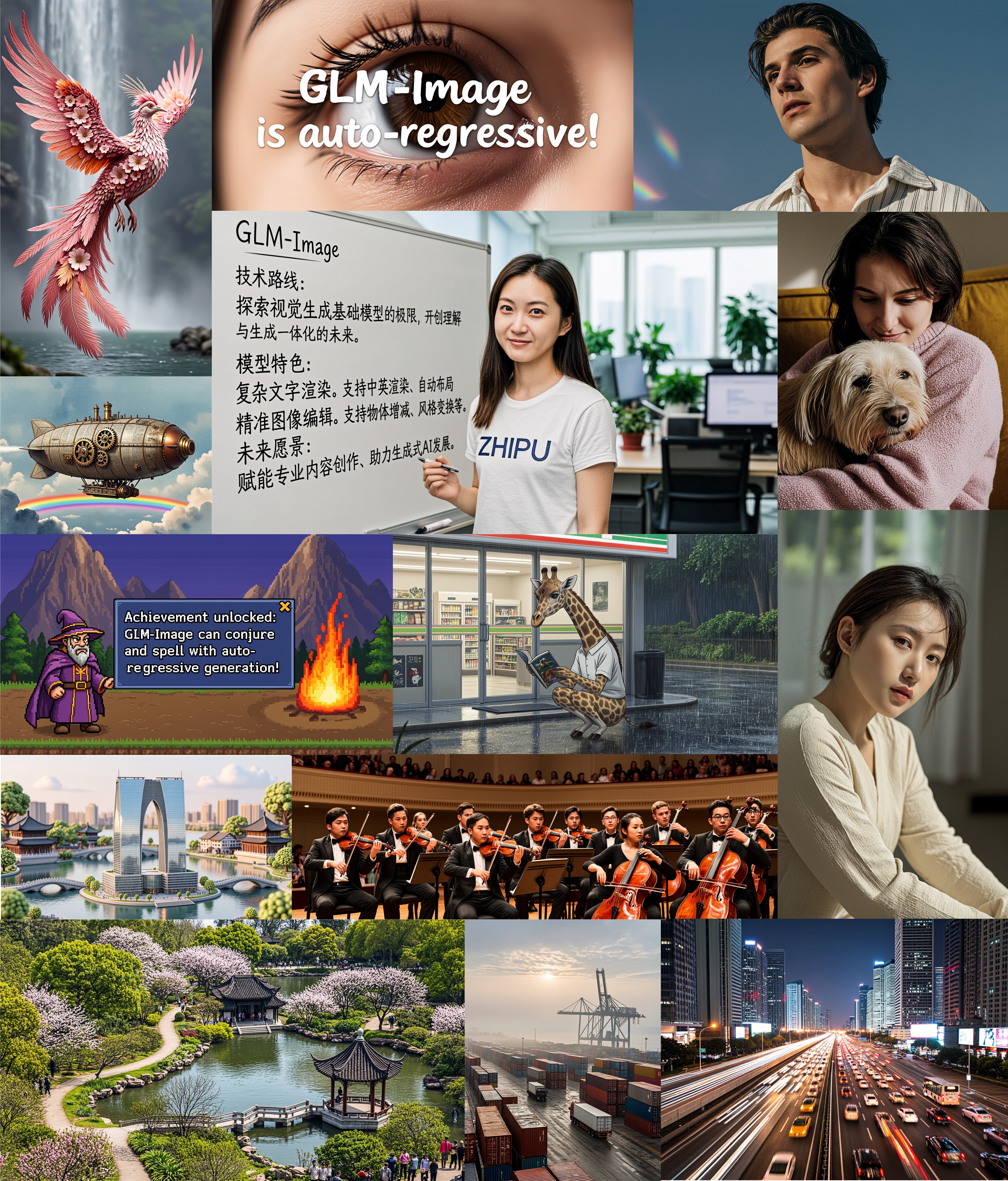
GLM-Image是一种采用混合自回归+扩散解码器架构的图像生成模型。在常规图像生成质量方面,GLM‑Image与主流潜在扩散方法相当,但在文本渲染和知识密集型生成场景中展现出显著优势。该模型在需要精确语义理解和复杂信息表达的任务上表现尤为突出,同时保持高保真度和细粒度细节生成的强大能力。除文生图功能外,GLM‑Image还支持丰富的图生图任务,包括图像编辑、风格迁移、身份保持生成以及多主体一致性生成等。
模型架构:采用混合自回归+扩散解码器设计。
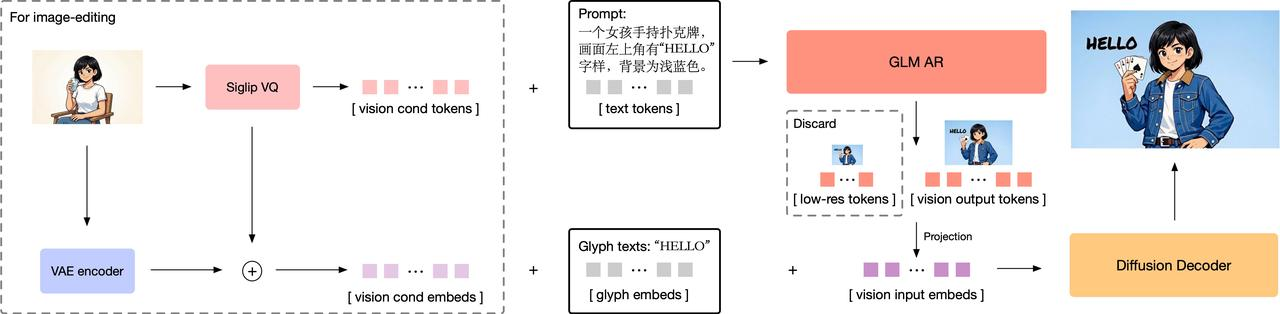
- 自回归生成器:一个90亿参数的模型,基于GLM-4-9B-0414初始化,通过扩展词汇表整合了视觉标记。该模型首先生成约256个标记的紧凑编码,随后扩展至1K--4K个标记,对应输出1K--2K张高分辨率图像。
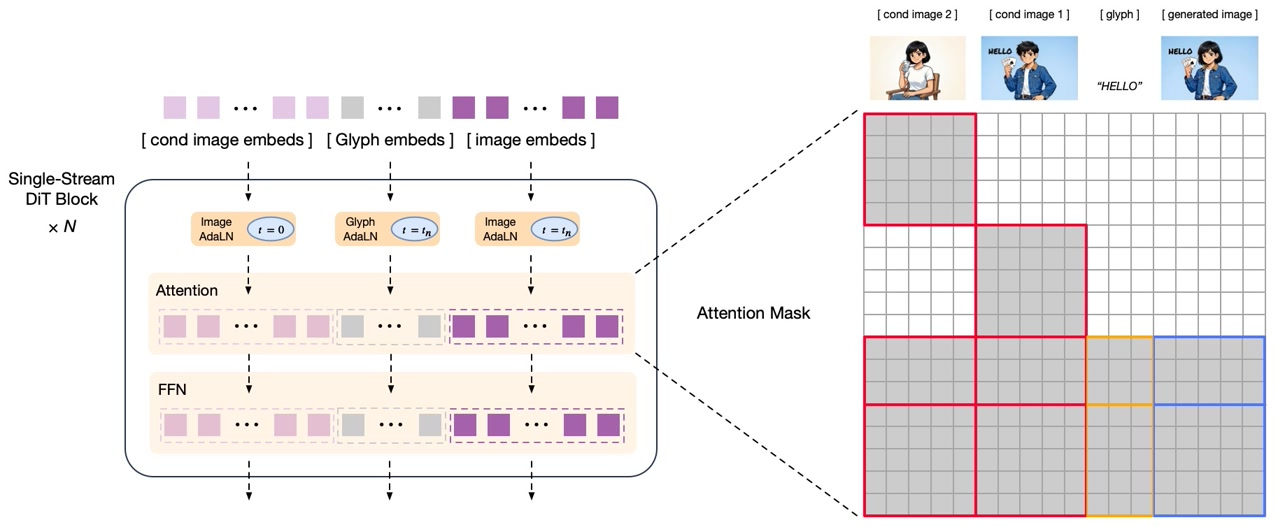
- 扩散解码器:70亿参数的潜空间图像解码器,采用单流DiT架构。配备字形编码器文本模块,显著提升图像内文本渲染的准确性。
基于解耦强化学习的后训练:该模型采用GRPO算法引入细粒度模块化反馈策略,显著提升语义理解与视觉细节质量。
- 自回归模块:提供聚焦美学与语义对齐的低频反馈信号,增强指令跟随能力与艺术表现力
- 解码器模块:针对细节保真度与文本准确度的高频反馈,实现高度真实的纹理与更精确的文本渲染
GLM-Image支持单一模型内同时实现文生图与图生图功能:
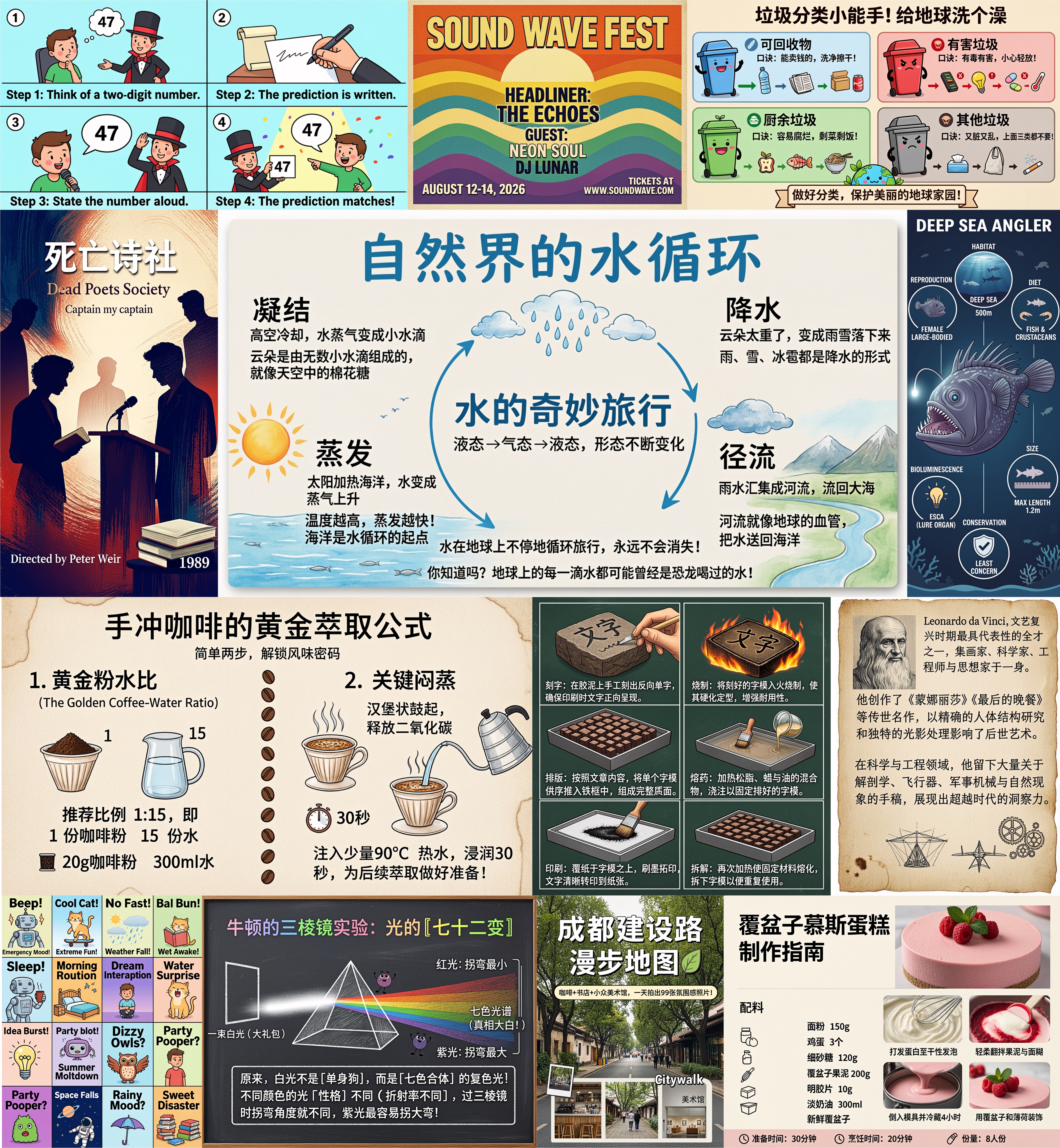
- 文生图:根据文本描述生成高细节图像,在信息密集型场景表现尤为突出
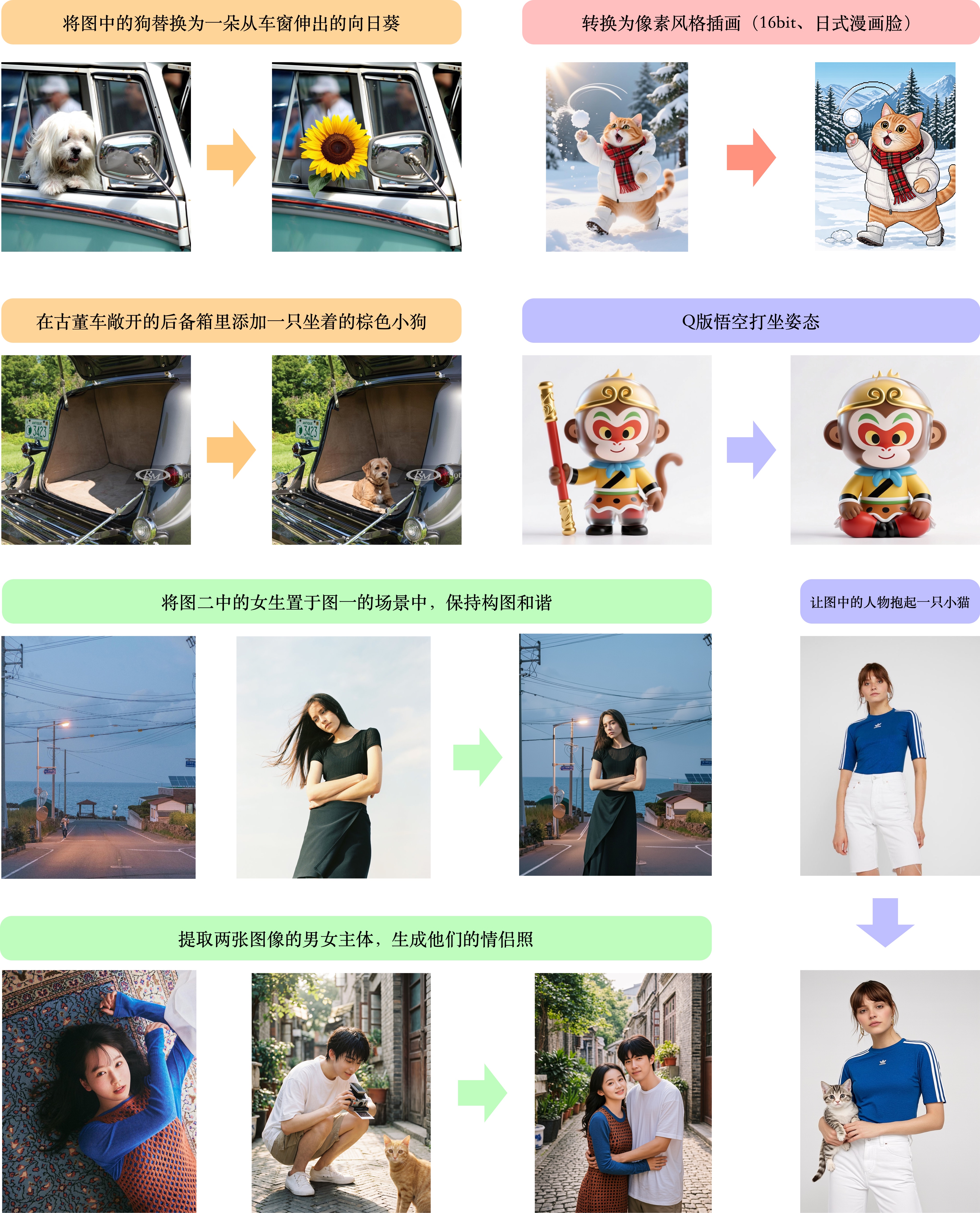
- 图生图:支持广泛任务,包括图像编辑、风格迁移、多主体一致性保持以及人物/物体的身份保留生成
完整GLM-Image模型实现详见huggingface/transformers与diffusers代码库
效果展示
密集文本与知识驱动的文生图
图生图
快速开始
transformers + diffusers Pipeline
从源代码安装 transformers 和 diffusers:
shell
pip install git+https://github.com/huggingface/transformers.git
pip install git+https://github.com/huggingface/diffusers.git- 文本生成图像
python
import torch
from diffusers.pipelines.glm_image import GlmImagePipeline

pipe = GlmImagePipeline.from_pretrained("zai-org/GLM-Image", torch_dtype=torch.bfloat16, device_map="cuda")
prompt = "A beautifully designed modern food magazine style dessert recipe illustration, themed around a raspberry mousse cake. The overall layout is clean and bright, divided into four main areas: the top left features a bold black title 'Raspberry Mousse Cake Recipe Guide', with a soft-lit close-up photo of the finished cake on the right, showcasing a light pink cake adorned with fresh raspberries and mint leaves; the bottom left contains an ingredient list section, titled 'Ingredients' in a simple font, listing 'Flour 150g', 'Eggs 3', 'Sugar 120g', 'Raspberry puree 200g', 'Gelatin sheets 10g', 'Whipping cream 300ml', and 'Fresh raspberries', each accompanied by minimalist line icons (like a flour bag, eggs, sugar jar, etc.); the bottom right displays four equally sized step boxes, each containing high-definition macro photos and corresponding instructions, arranged from top to bottom as follows: Step 1 shows a whisk whipping white foam (with the instruction 'Whip egg whites to stiff peaks'), Step 2 shows a red-and-white mixture being folded with a spatula (with the instruction 'Gently fold in the puree and batter'), Step 3 shows pink liquid being poured into a round mold (with the instruction 'Pour into mold and chill for 4 hours'), Step 4 shows the finished cake decorated with raspberries and mint leaves (with the instruction 'Decorate with raspberries and mint'); a light brown information bar runs along the bottom edge, with icons on the left representing 'Preparation time: 30 minutes', 'Cooking time: 20 minutes', and 'Servings: 8'. The overall color scheme is dominated by creamy white and light pink, with a subtle paper texture in the background, featuring compact and orderly text and image layout with clear information hierarchy."
image = pipe(
    prompt=prompt,
    height=32 * 32,
    width=36 * 32,
    num_inference_steps=50,
    guidance_scale=1.5,
    generator=torch.Generator(device="cuda").manual_seed(42),
).images[0]

image.save("output_t2i.png")- 图片到图片生成
python
import torch
from diffusers.pipelines.glm_image import GlmImagePipeline
from PIL import Image

pipe = GlmImagePipeline.from_pretrained("zai-org/GLM-Image", torch_dtype=torch.bfloat16, device_map="cuda")
image_path = "cond.jpg"
prompt = "Replace the background of the snow forest with an underground station featuring an automatic escalator."
image = Image.open(image_path).convert("RGB")
image = pipe(
    prompt=prompt,
    image=[image],  # can input multiple images for multi-image-to-image generation such as [image, image1]
    height=33 * 32, # Must set height even it is same as input image
    width=32 * 32, # Must set width even it is same as input image
    num_inference_steps=50,
    guidance_scale=1.5,
    generator=torch.Generator(device="cuda").manual_seed(42),
).images[0]

image.save("output_i2i.png")
SGLang Pipeline
从源码安装transformers和diffusers:
pip install "sglang[diffusion] @ git+https://github.com/sgl-project/sglang.git#subdirectory=python"
pip install git+https://github.com/huggingface/transformers.git
pip install git+https://github.com/huggingface/diffusers.git-
文本生成图像
sglang serve --model-path zai-org/GLM-Image
curl http://localhost:30000/v1/images/generations
-H "Content-Type: application/json"
-d '{
"model": "zai-org/GLM-Image",
"prompt": "a beautiful girl with glasses.",
"n": 1,
"response_format": "b64_json",
"size": "1024x1024"
}' | python3 -c "import sys, json, base64; open('output_t2i.png', 'wb').write(base64.b64decode(json.load(sys.stdin)['data'][0]['b64_json']))" -
图像到图像生成
sglang serve --model-path zai-org/GLM-Image
curl -s -X POST "http://localhost:30000/v1/images/edits"
-F "model=zai-org/GLM-Image"
-F "image=@cond.jpg"
-F "prompt=Replace the background of the snow forest with an underground station featuring an automatic escalator."
-F "response_format=b64_json" | python3 -c "import sys, json, base64; open('output_i2i.png', 'wb').write(base64.b64decode(json.load(sys.stdin)['data'][0]['b64_json']))"
注意
- 请确保所有需要在图像中呈现的文本在模型输入时用引号括起来,我们强烈建议使用GLM-4.7来优化提示词以获得更高质量的图像。详情请查看我们的GitHub脚本。
- GLM‑Image中使用的AR模型默认配置为
do_sample=True,温度为0.9,top_p为0.75。较高的温度会产生更多样化和丰富的输出,但也可能导致输出稳定性有所下降。 - 目标图像分辨率必须能被32整除,否则会报错。
- 由于目前对该架构的推理优化有限,运行成本仍然相对较高。需要单个GPU内存超过80GB,或者多GPU配置。
- vLLM-Omni和SGLang(带AR加速)的支持正在集成中------敬请期待。关于推理成本,您可以在我们的GitHub上查看。
模型性能
文本渲染
| Model | Open Source | CVTG-2K ||| LongText-Bench |||
| Model | Open Source | Word Accuracy | NED | CLIPScore | AVG | EN | ZH |
|---|---|---|---|---|---|---|---|
| Seedream 4.5 | ✗ | 0.8990 | 0.9483 | 0.8069 | 0.988 | 0.989 | 0.987 |
| Seedream 4.0 | ✗ | 0.8451 | 0.9224 | 0.7975 | 0.924 | 0.921 | 0.926 |
| Nano Banana 2.0 | ✗ | 0.7788 | 0.8754 | 0.7372 | 0.965 | 0.981 | 0.949 |
| GPT Image 1 High | ✗ | 0.8569 | 0.9478 | 0.7982 | 0.788 | 0.956 | 0.619 |
| Qwen-Image | ✓ | 0.8288 | 0.9116 | 0.8017 | 0.945 | 0.943 | 0.946 |
| Qwen-Image-2512 | ✓ | 0.8604 | 0.9290 | 0.7819 | 0.961 | 0.956 | 0.965 |
| Z-Image | ✓ | 0.8671 | 0.9367 | 0.7969 | 0.936 | 0.935 | 0.936 |
| Z-Image-Turbo | ✓ | 0.8585 | 0.9281 | 0.8048 | 0.922 | 0.917 | 0.926 |
| GLM-Image | ✓ | 0.9116 | 0.9557 | 0.7877 | 0.966 | 0.952 | 0.979 |
文本转图像
| Model | Open Source | OneIG-Bench || TIIF-Bench || DPG-Bench |
| Model | Open Source | EN | ZH | short | long | DPG-Bench |
|---|---|---|---|---|---|---|
| Seedream 4.5 | ✗ | 0.576 | 0.551 | 90.49 | 88.52 | 88.63 |
| Seedream 4.0 | ✗ | 0.576 | 0.553 | 90.45 | 88.08 | 88.54 |
| Nano Banana 2.0 | ✗ | 0.578 | 0.567 | 91.00 | 88.26 | 87.16 |
| GPT Image 1 High | ✗ | 0.533 | 0.474 | 89.15 | 88.29 | 85.15 |
| DALL-E 3 | ✗ | - | - | 74.96 | 70.81 | 83.50 |
| Qwen-Image | ✓ | 0.539 | 0.548 | 86.14 | 86.83 | 88.32 |
| Qwen-Image-2512 | ✓ | 0.530 | 0.515 | 83.24 | 84.93 | 87.20 |
| Z-Image | ✓ | 0.546 | 0.535 | 80.20 | 83.01 | 88.14 |
| Z-Image-Turbo | ✓ | 0.528 | 0.507 | 77.73 | 80.05 | 84.86 |
| FLUX.1 Dev | ✓ | 0.434 | - | 71.09 | 71.78 | 83.52 |
| SD3 Medium | ✓ | - | - | 67.46 | 66.09 | 84.08 |
| SD XL | ✓ | 0.316 | - | 54.96 | 42.13 | 74.65 |
| BAGEL | ✓ | 0.361 | 0.370 | 71.50 | 71.70 | - |
| Janus-Pro | ✓ | 0.267 | 0.240 | 66.50 | 65.01 | 84.19 |
| Show-o2 | ✓ | 0.308 | - | 59.72 | 58.86 | - |
| GLM-Image | ✓ | 0.528 | 0.511 | 81.01 | 81.02 | 84.78 |
许可证
GLM-Image模型整体采用MIT许可证发布。
本项目整合了来自X-Omni/X-Omni-En的VQ分词器权重和VIT权重,这些组件遵循Apache许可证2.0版本。
VQ分词器和VIT权重仍受原始Apache-2.0条款约束。用户在使用该组件时应遵守相应许可证规定。