1.视频处理参数
cs
namespace dotnet_start.Model.Request;

/// <summary>
/// 视频截图
/// </summary>
public class VideoSnapshot
{
    /// <summary>
    /// 视频文件
    /// </summary>
    public required IFormFile Video { get; set; }

    /// <summary>
    /// 每隔多少秒截一帧
    /// </summary>
    public int Second { get; set; } = 1;
}
cs
namespace dotnet_start.Model.Request;

/// <summary>
/// 视频截取
/// </summary>
public class VideoCut
{
    /// <summary>
    /// 视频文件
    /// </summary>
    public required IFormFile Video { get; set; }

    /// <summary>
    /// 开始时间
    /// </summary>
    public int Start { get; set; } = 0;

    /// <summary>
    /// 截止时间
    /// </summary>
    public int Duration { get; set; }
}
cs
namespace dotnet_start.Model.Request;

/// <summary>
/// 视频水印
/// </summary>
public class VideoWatermark
{
    /// <summary>
    /// 视频文件
    /// </summary>
    public required IFormFile Video { get; set; }

    /// <summary>
    /// 水印文件,必须是png
    /// </summary>
    public required IFormFile Watermark { get; set; }
}
2.视频处理服务
cs
using System.Diagnostics;
using System.IO.Compression;
using dotnet_start.Model.Request;
using Path = System.IO.Path;

namespace dotnet_start.Services;

public class VideoProcessService(ILogger<VideoProcessService> logger)
{
    private readonly ILogger<VideoProcessService> _logger = logger;

    private static string CreateTempPath(string extension)
    {
        var tempDir = Path.Combine(Path.GetTempPath(), extension);
        Directory.CreateDirectory(tempDir);
        return tempDir;
    }

    private static async Task<string> SaveUploadedFileAsync(IFormFile file, CancellationToken cancellationToken)
    {
        var ext = Path.GetExtension(file.FileName);
        var path = Path.Combine(Path.GetTempPath(), $"{Guid.NewGuid():N}{ext}");

        await using var fs = new FileStream(path, FileMode.CreateNew);
        await file.CopyToAsync(fs, cancellationToken);
        return path;
    }

    /// <summary>
    /// 获取视频总时长
    /// </summary>
    /// <param name="videoPath">视频路径</param>
    /// <param name="cancellationToken">取消</param>
    /// <returns>时长</returns>
    /// <exception cref="InvalidOperationException"></exception>
    private static async Task<double> GetVideoDurationAsync(string videoPath, CancellationToken cancellationToken)
    {
        var psi = new ProcessStartInfo
        {
            FileName = "ffprobe",
            Arguments =
                "-v error " +
                "-show_entries format=duration " +
                "-of default=noprint_wrappers=1:nokey=1 " +
                $"\"{videoPath}\"",
            RedirectStandardOutput = true,
            RedirectStandardError = true,
            UseShellExecute = false,
            CreateNoWindow = true
        };

        using var process = new Process();
        process.StartInfo = psi;
        process.Start();
        var output = await process.StandardOutput.ReadToEndAsync(cancellationToken);
        await process.WaitForExitAsync(cancellationToken);
        return !double.TryParse(output.Trim(), out var duration) ? throw new InvalidOperationException("failed to parse video duration") : duration;
    }

    /// <summary>
    /// 获取视频分辨率
    /// </summary>
    /// <param name="videoPath">视频路径</param>
    /// <param name="cancellationToken">取消</param>
    /// <returns>分辨率</returns>
    /// <exception cref="InvalidOperationException"></exception>
    private static async Task<(int Width, int Height)> GetVideoResolutionAsync(string videoPath, CancellationToken cancellationToken)
    {
        var psi = new ProcessStartInfo
        {
            FileName = "ffprobe",
            Arguments =
                "-v error " +
                "-select_streams v:0 " +
                "-show_entries stream=width,height " +
                "-of csv=s=,:p=0 " +
                $"\"{videoPath}\"",
            RedirectStandardOutput = true,
            UseShellExecute = false,
            CreateNoWindow = true
        };

        using var process = new Process();
        process.StartInfo = psi;
        process.Start();

        var output = await process.StandardOutput.ReadToEndAsync(cancellationToken);
        await process.WaitForExitAsync(cancellationToken);

        var line = output.Trim();
        var parts = line.Split(',');

        if (parts.Length != 2 ||
            !int.TryParse(parts[0], out var width) ||
            !int.TryParse(parts[1], out var height))
        {
            throw new InvalidOperationException($"invalid resolution format: {line}");
        }

        return (width, height);
    }


    private void SafeDeleteFile(string path)
    {
        try
        {
            if (!File.Exists(path)) return;
            File.Delete(path);
            _logger.LogDebug("成功删除文件==={Path}", path);
        }
        catch (Exception ex)
        {
            _logger.LogWarning(ex, "Failed to delete temp file {Path}", path);
        }
    }


    private void SafeDeleteDir(string dir)
    {
        try
        {
            if (!Directory.Exists(dir)) return;
            Directory.Delete(dir, recursive: true);
            _logger.LogDebug("成功删除目录==={dir}", dir);
        }
        catch (Exception ex)
        {
            _logger.LogWarning(ex, "Failed to delete temp directory {Dir}", dir);
        }
    }

    private async Task RunFfmpegAsync(string args, CancellationToken cancellationToken)
    {
        var psi = new ProcessStartInfo
        {
            FileName = "ffmpeg",
            Arguments = args,
            RedirectStandardError = true,
            RedirectStandardOutput = true,
            UseShellExecute = false,
            CreateNoWindow = true
        };

        using var process = new Process();
        process.StartInfo = psi;
        process.Start();

        var stderr = await process.StandardError.ReadToEndAsync(cancellationToken);
        var stdout = await process.StandardOutput.ReadToEndAsync(cancellationToken);
        _logger.LogDebug("ffmpeg stdout: {Stdout}", stdout);

        await process.WaitForExitAsync(cancellationToken);

        if (process.ExitCode != 0)
        {
            _logger.LogError("ffmpeg failed: {Error}", stderr);
            throw new InvalidOperationException($"ffmpeg failed: {stderr}");
        }
    }

    /// <summary>
    /// 视频截图
    /// </summary>
    /// <param name="param">参数</param>
    /// <param name="cancellationToken">取消</param>
    /// <returns>视频路径</returns>
    public async Task<string> SnapshotAsync(VideoSnapshot param, CancellationToken cancellationToken)
    {
        var videoPath = await SaveUploadedFileAsync(param.Video, cancellationToken);
        _logger.LogDebug("上传视频文件==={videoPath}", videoPath);
        string? tempDir = null;

        var startTime = Stopwatch.StartNew();

        try
        {
            tempDir = CreateTempPath($"snapshots_{Guid.NewGuid():N}");
            _logger.LogDebug("临时文件路径==={TempDir}", tempDir);

            var outputPattern = Path.Combine(tempDir, "snapshot_%04d.jpg");

            var args = $"-i \"{videoPath}\" -vf fps=1/{param.Second} -q:v 2 -y \"{outputPattern}\"";
            await RunFfmpegAsync(args, cancellationToken);

            var count = Directory
                .EnumerateFiles(tempDir, "*.jpg", SearchOption.TopDirectoryOnly)
                .LongCount();

            // 打包 ZIP
            var zipPath = Path.Combine(Path.GetTempPath(), $"snapshots_{DateTimeOffset.UtcNow.ToUnixTimeSeconds()}.zip");
            ZipFile.CreateFromDirectory(tempDir, zipPath);

            startTime.Stop();
            _logger.LogDebug("视频截图zip路径==={ZipPath}, 截图数量={Count},耗时==={Elapsed}s", zipPath, count, startTime.Elapsed.TotalSeconds);
            return zipPath;
        }
        finally
        {
            SafeDeleteFile(videoPath);
            if (!string.IsNullOrEmpty(tempDir))
            {
                SafeDeleteDir(tempDir);
            }
        }
    }

    /// <summary>
    /// 视频截取
    /// </summary>
    /// <param name="param">参数</param>
    /// <param name="cancellationToken">取消</param>
    /// <returns>视频路径</returns>
    public async Task<string> CutAsync(VideoCut param, CancellationToken cancellationToken)
    {
        // 保存上传视频
        var videoPath = await SaveUploadedFileAsync(param.Video, cancellationToken);
        _logger.LogDebug("上传视频文件路径==={videoPath}", videoPath);
        var startTime = Stopwatch.StartNew();

        try
        {
            var videoDuration = await GetVideoDurationAsync(videoPath, cancellationToken);

            var start = (double)param.Start;
            var wantDuration = (double)param.Duration;

            var maxDuration = videoDuration - start;
            if (maxDuration <= 0)
            {
                throw new InvalidOperationException("start time exceeds video duration");
            }

            var actualDuration = wantDuration > maxDuration ? maxDuration : wantDuration;

            var startStr = start.ToString("0.###");
            var durationStr = actualDuration.ToString("0.###");

            var outputPath = Path.Combine(Path.GetTempPath(), $"cut_{DateTimeOffset.UtcNow.ToUnixTimeSeconds()}.mp4");

            var args =
                $"-i \"{videoPath}\" " +
                $"-ss {startStr} " +
                $"-to {durationStr} " +
                "-c copy -y " +
                $"\"{outputPath}\"";

            await RunFfmpegAsync(args, cancellationToken);

            startTime.Stop();
            _logger.LogDebug("视频截取耗时==={Elapsed}s", startTime.Elapsed.TotalSeconds);
            _logger.LogDebug("Cut video saved to: {OutputPath}", outputPath);

            return outputPath;
        }
        finally
        {
            SafeDeleteFile(videoPath);
        }
    }

    /// <summary>
    /// 视频水印
    /// </summary>
    /// <param name="param">参数</param>
    /// <param name="cancellationToken">取消</param>
    /// <returns>视频路径</returns>
    public async Task<string> WatermarkAsync(VideoWatermark param, CancellationToken cancellationToken)
    {
        var videoPath = await SaveUploadedFileAsync(param.Video, cancellationToken);
        var watermarkPath = await SaveUploadedFileAsync(param.Watermark, cancellationToken);
        _logger.LogDebug("视频==={videoPath},水印==={watermarkPath}", videoPath, watermarkPath);

        var startTime = Stopwatch.StartNew();

        try
        {
            var videoResolution = await GetVideoResolutionAsync(videoPath, cancellationToken);
            var targetWidth = (int)(videoResolution.Width * 0.15);
            targetWidth = Math.Clamp(targetWidth, 100, 400);
            var filter =
                $"[1:v]scale={targetWidth}:-1[wm];" +
                $"[0:v][wm]overlay=main_w-overlay_w-10:10";

            // 水印视频路径
            var outputPath = Path.Combine(Path.GetTempPath(), $"watermark_{DateTimeOffset.UtcNow.ToUnixTimeSeconds()}.mp4");

            var args =
                $"-i \"{videoPath}\" " +
                $"-i \"{watermarkPath}\" " +
                $"-filter_complex \"{filter}\" " +
                "-c:v libx264 " +
                "-movflags +faststart " +
                "-y " +
                $"\"{outputPath}\"";

            await RunFfmpegAsync(args, cancellationToken);

            startTime.Stop();
            _logger.LogDebug("视频水印耗时==={Elapsed}s,文件路径==={OutputPath}", startTime.Elapsed.TotalSeconds, outputPath);
            return outputPath;
        }
        finally
        {
            SafeDeleteFile(videoPath);
            SafeDeleteFile(watermarkPath);
        }
    }
}
3.视频处理控制器
cs
using dotnet_start.Model.Request;
using dotnet_start.Services;
using Microsoft.AspNetCore.Mvc;
using Path = System.IO.Path;
using SysFile = System.IO.File;

namespace dotnet_start.Controllers;

[Route("video")]
public class VideoProcessController : ControllerBase
{
    private readonly ILogger<VideoProcessController> _logger;
    private readonly VideoProcessService _service;

    public VideoProcessController(ILogger<VideoProcessController> logger, VideoProcessService service)
    {
        _logger = logger;
        _service = service;
    }

    private void AfterRespCompleted(string filepath, string message)
    {
        HttpContext.Response.OnCompleted(() =>
        {
            try
            {
                if (SysFile.Exists(filepath))
                {
                    SysFile.Delete(filepath);
                    _logger.LogDebug("{message}==={zipPath}", message, filepath);
                }
            }
            catch (Exception e)
            {
                _logger.LogError(e, "{message}==={filepath}失败", message, filepath);
            }

            return Task.CompletedTask;
        });
    }

    private static bool IsPng(IFormFile file)
    {
        Span<byte> header = stackalloc byte[8];
        using var stream = file.OpenReadStream();
        if (stream.Read(header) < 8)
            return false;

        // PNG 魔数: 89 50 4E 47 0D 0A 1A 0A
        return header.SequenceEqual(new byte[]
        {
            0x89, 0x50, 0x4E, 0x47,
            0x0D, 0x0A, 0x1A, 0x0A
        });
    }

    [HttpPost("snapshot")]
    public async Task<IActionResult> Snapshot([FromForm] VideoSnapshot request, CancellationToken cancellationToken)
    {
        if (request.Video.Length == 0)
        {
            throw new ArgumentException("video file is required");
        }

        if (request.Second < 1)
        {
            throw new ArgumentException("second must be >= 1");
        }

        var zipPath = await _service.SnapshotAsync(request, cancellationToken);
        var fileName = Path.GetFileName(zipPath);
        _logger.LogDebug("视频截图zip=={zipPath},名称==={fileName}", zipPath, fileName);
        AfterRespCompleted(zipPath, "删除视频截图zip");

        return PhysicalFile(zipPath, "application/zip", fileName);
    }

    [HttpPost("cut")]
    public async Task<IActionResult> Cut([FromForm] VideoCut request, CancellationToken cancellationToken)
    {
        if (request.Video.Length == 0)
        {
            throw new ArgumentException("video file is required");
        }

        if (request.Start < 0)
        {
            throw new ArgumentException("start must be >= 5");
        }

        if (request.Duration < 5 || request.Duration <= request.Start)
        {
            throw new ArgumentException("duration must be >= 5 and > start");
        }

        var videoPath = await _service.CutAsync(request, cancellationToken);
        var fileName = Path.GetFileName(videoPath);
        _logger.LogDebug("截取视频路径=={videoPath},文件名==={fileName}", videoPath, fileName);
        AfterRespCompleted(videoPath, "删除截取视频目录");

        var stream = new FileStream(
            videoPath,
            FileMode.Open,
            FileAccess.Read,
            FileShare.Read,
            bufferSize: 64 * 1024,
            useAsync: true
        );

        return File(stream, "video/mp4", fileName, enableRangeProcessing: true);
    }

    [HttpPost("watermark")]
    public async Task<IActionResult> Watermark([FromForm] VideoWatermark request, CancellationToken cancellationToken)
    {
        if (request.Video.Length == 0)
        {
            throw new ArgumentException("video file is required");
        }

        if (request.Watermark.Length == 0)
        {
            throw new ArgumentException("watermark file is required");
        }

        if (!request.Watermark.ContentType.Equals(MimeType.Png, StringComparison.OrdinalIgnoreCase)
            || !IsPng(request.Watermark))
        {
            throw new ArgumentException("watermark file must be image/png");
        }

        var videoPath = await _service.WatermarkAsync(request, cancellationToken);
        var fileName = Path.GetFileName(videoPath);
        _logger.LogDebug("水印视频路径=={videoPath},文件名==={fileName}", videoPath, fileName);
        AfterRespCompleted(videoPath, "删除水印视频");

        var stream = new FileStream(
            videoPath,
            FileMode.Open,
            FileAccess.Read,
            FileShare.Read,
            bufferSize: 64 * 1024,
            useAsync: true
        );

        return File(stream, "video/mp4", fileName, enableRangeProcessing: true);
    }
}
4.使用apifox进行测试
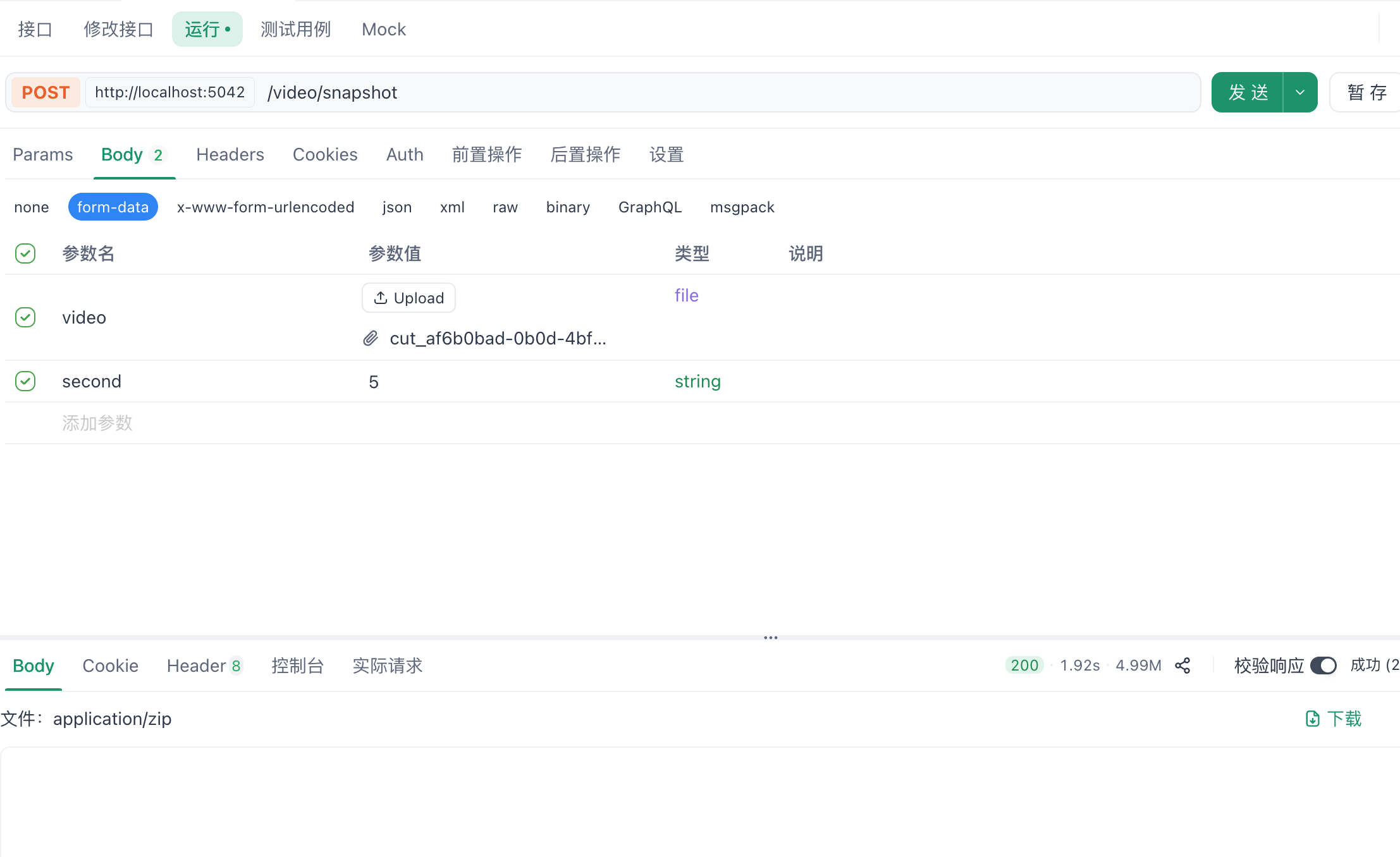
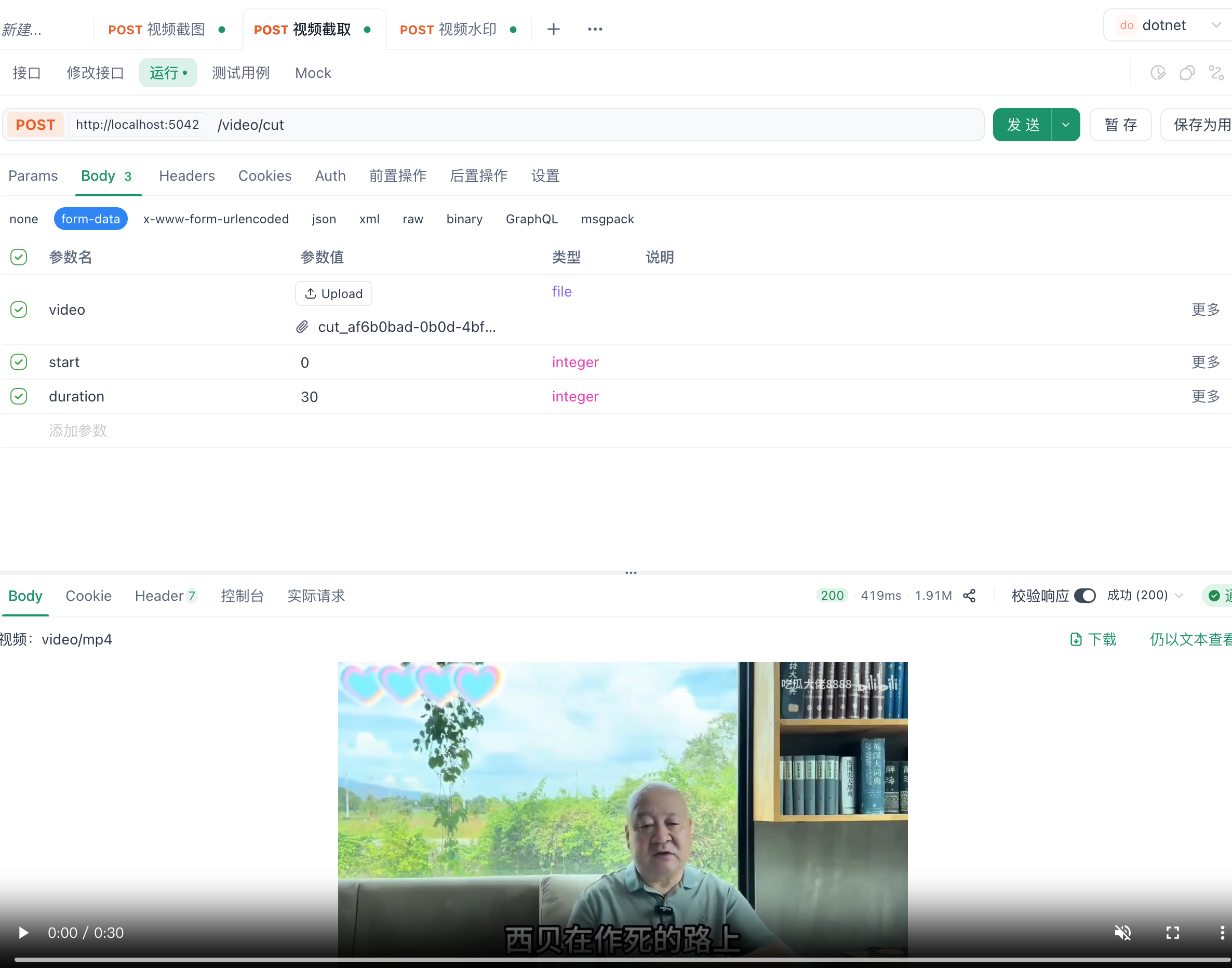
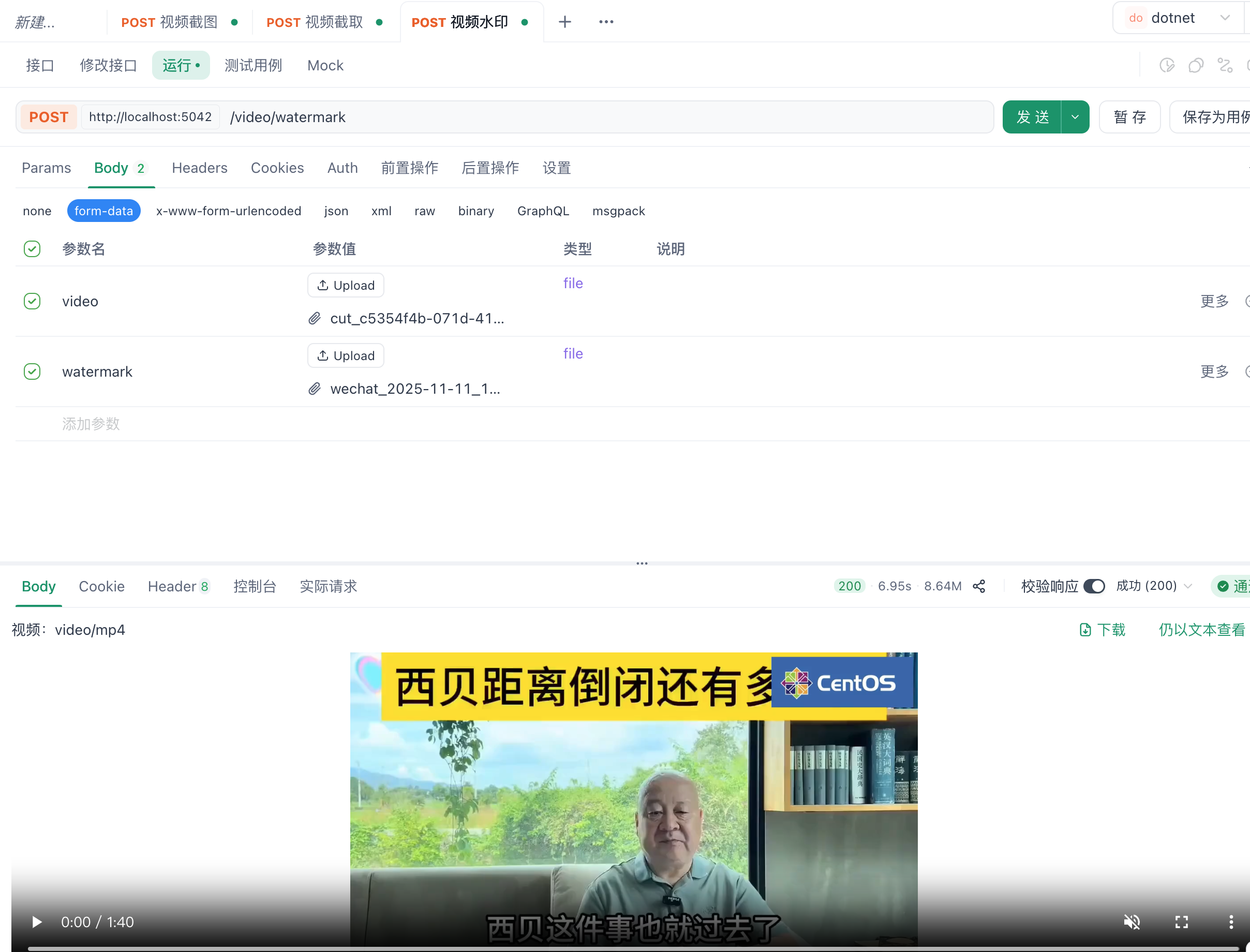
5.控制台截图

6.其他事项
注意:上述代码依赖 ffmpeg 工具,请先确保它已在您的系统中安装并配置好环境变量。如果您尚未安装,可参考官方文档或相关教程完成安装,本文不再详细介绍。
 https://ffmpeg.org/
7.特别声明
本文中所使用的视频截图均来源于第三方网站,仅用于技术说明或示例展示。截图的使用不代表作者认同其内容、观点或立场,亦不构成任何推荐或背书。相关版权归原作者所有。