有没有想过,把你写的爬虫装进手机里?
比如:
-
想听歌时,后台自动爬取音乐的资源并播放;
-
想搜图时,后台自动爬取 高清图接口并下载;
-
想看人时,一键聚合搜索社交用户数据。
今天我们将实战一个MoonMusic。它的核心不是 UI,而是强大的异步数据采集层。
🔧 核心技术栈
-
数据采集 (Crawler): httpx (异步 HTTP 请求), BeautifulSoup4 (HTML 解析)
-
并发控制 (Concurrency): asyncio (协程调度)
-
数据可视化 (GUI): Flet (基于 Flutter 的 Python UI 框架)
-
部署 (Deploy): Android APK / iOS IPA
第一部分:硬核爬虫设计
1. 逆向 API 分析与封装
我们通过抓包(F12 Network),分析出了各大平台的搜索接口。为了统一调用,我们定义了一个 CrawlerService 类。
2. asyncio.gather 实现真·并发
这是本项目的技术高光时刻。用户输入一个关键词,我们同时向 3-5 个平台发起请求
3. 反爬与 Cookie 管理
为了应对大厂的反爬策略,我们设计了 DataHelper 类来专门管理 Cookie 和 Headers。
-
支持从 config.json 动态读取 Cookie(比如 VIP 账号)。
-
随机 User-Agent 生成。
-
Referer 防盗链处理。
📱 第二部分:Flet 可视化 (The Visualization)
有了强大的爬虫后端,我们需要一个"皮肤"来展示数据。Flet 允许我们用 Python 写出类似 Flutter 的原生界面。
1. 列表渲染 (ListView)
爬虫返回的 JSON 数据,直接映射为 Flet 的 UI 组件列表。
2. 移动端音频流处理
对于爬取到的 .mp3 或 .m4a 链接,我们不使用 Pygame(兼容性差),而是直接调用 Flet 的 ft.Audio,它底层调用的是 Android 的 ExoPlayer,支持流式播放。
📦 第三部分:从 Python 脚本到 Android APK
这是爬虫工程师最想学的技能:如何让你的脚本脱离电脑运行?
-
环境:安装 flet 库。
-
命令:在项目根目录运行:
bashflet build apk -
原理:Flet 会自动拉取 Flutter 引擎,将你的 Python 爬虫代码编译成字节码,并打包进 APK 中。
📥 运行与源码
本项目是一个绝佳的"爬虫 + GUI"练手案例,涵盖了逆向、并发、UI 设计和移动端打包。
效果图:

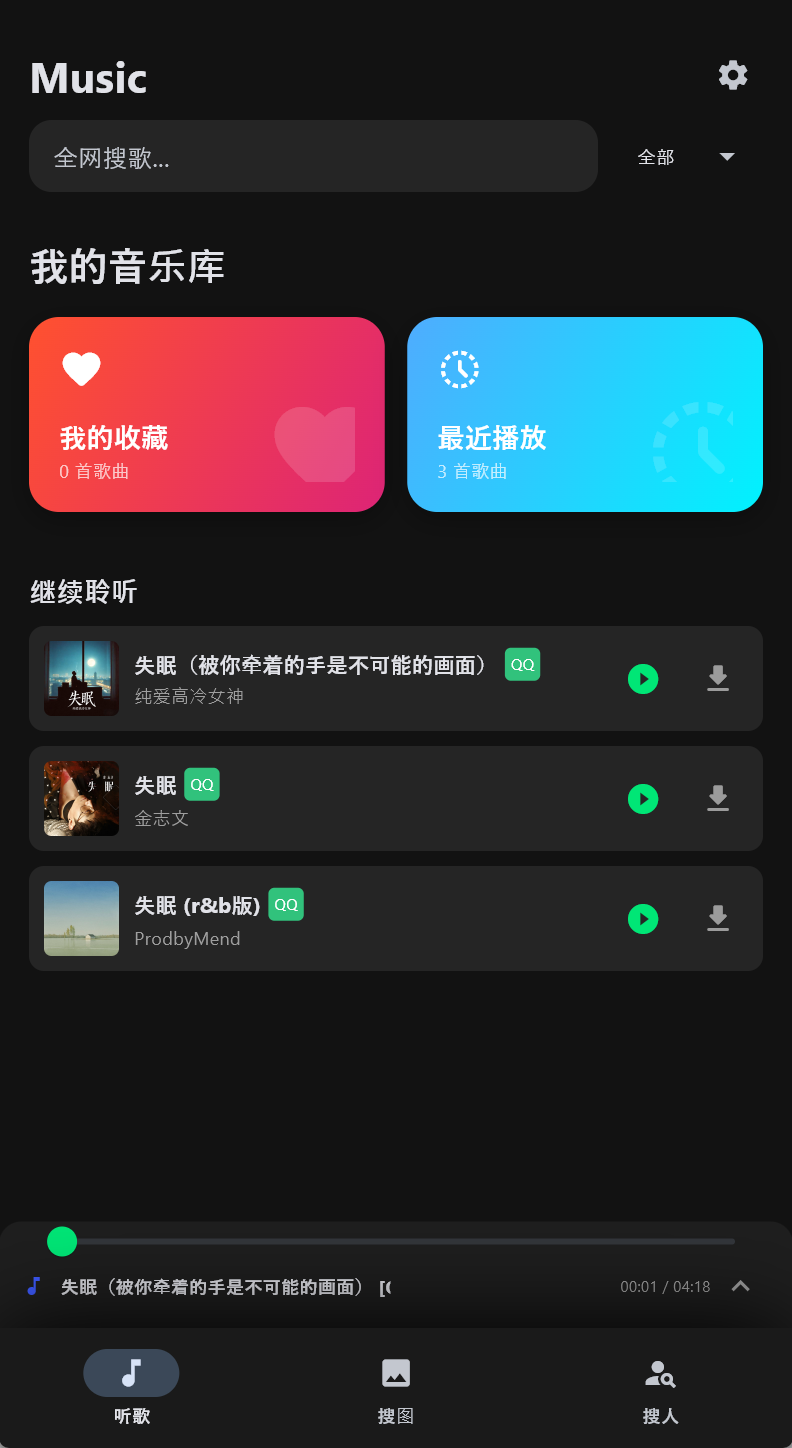


代码(建议去GitHub链接看,分层更清晰详细,当前代码不全):
python
import warnings


warnings.filterwarnings("ignore", category=UserWarning, module="pygame")
warnings.filterwarnings("ignore", category=DeprecationWarning)

import flet as ft
import httpx
import asyncio
import json
import base64
import os
import random
import re
import time
import uuid
import urllib.parse
from bs4 import BeautifulSoup
import pygame
from mutagen.mp3 import MP3


# ==========================================
# 4. Service 层
# ==========================================

class CrawlerService:
    def __init__(self, helper):
        self.helper = helper

    async def search_netease(self, keyword):
        url = "https://music.163.com/api/search/get/web"
        params = {"s": keyword, "type": 1, "offset": 0, "total": "true", "limit": 10}
        async with httpx.AsyncClient(verify=False) as client:
            try:
                headers = self.helper.get_headers("netease")
                resp = await client.post(url, headers=headers, data=params)
                data = resp.json()
                songs = data['result']['songs']
                results = []
                for s in songs:
                    pic_url = s.get('album', {}).get('picUrl', '')
                    if not pic_url and s.get('artists'): pic_url = s['artists'][0].get('img1v1Url', '')
                    results.append({
                        "name": s['name'],
                        "artist": s['artists'][0]['name'],
                        "id": s['id'],
                        "media_id": s['id'],
                        "pic": pic_url,
                        "url": f"http://music.163.com/song/media/outer/url?id={s['id']}.mp3",
                        "source": "网易"
                    })
                return results
            except:
                return []

    async def get_qq_purl(self, songmid, media_id=None):
        if not media_id: media_id = songmid
        guid = str(random.randint(1000000000, 9999999999))
        file_types = [{"prefix": "M500", "ext": "mp3", "mid": media_id},
                      {"prefix": "C400", "ext": "m4a", "mid": media_id}]
        url = "https://u.y.qq.com/cgi-bin/musicu.fcg"
        data = {
            "req": {"module": "CDN.SrfCdnDispatchServer", "method": "GetCdnDispatch",
                    "param": {"guid": guid, "calltype": 0, "userip": ""}},
            "req_0": {
                "module": "vkey.GetVkeyServer",
                "method": "CgiGetVkey",
                "param": {
                    "guid": guid,
                    "songmid": [songmid] * 2,
                    "songtype": [0] * 2,
                    "uin": self.helper.qq_uin,
                    "loginflag": 1,
                    "platform": "20",
                    "filename": [f"{ft['prefix']}{ft['mid']}.{ft['ext']}" for ft in file_types]
                }
            }
        }
        async with httpx.AsyncClient(verify=False) as client:
            try:
                headers = self.helper.get_headers("qq")
                resp = await client.get(url, params={"data": json.dumps(data)}, headers=headers)
                js = resp.json()
                midurlinfos = js.get('req_0', {}).get('data', {}).get('midurlinfo', [])
                sip = js.get('req_0', {}).get('data', {}).get('sip', [])
                for info in midurlinfos:
                    if info.get('purl'):
                        base = sip[0] if sip else "http://ws.stream.qqmusic.qq.com/"
                        return f"{base}{info['purl']}"
                return ""
            except:
                return ""

    async def search_qq(self, keyword):
        search_url = f"https://c.y.qq.com/soso/fcgi-bin/client_search_cp?p=1&n=10&w={keyword}&format=json"
        async with httpx.AsyncClient(verify=False) as client:
            try:
                headers = self.helper.get_headers("qq")
                resp = await client.get(search_url, headers=headers)
                text = resp.text
                if text.startswith("callback("):
                    text = text[9:-1]
                elif text.endswith(")"):
                    text = text[text.find("(") + 1:-1]
                data = json.loads(text)
                songs = data['data']['song']['list']
                results = []
                for s in songs:
                    songmid = s['songmid']
                    media_mid = s.get('media_mid', s.get('strMediaMid', songmid))
                    albummid = s['albummid']
                    pic = f"https://y.gtimg.cn/music/photo_new/T002R300x300M000{albummid}.jpg" if albummid else ""
                    results.append({
                        "name": s['songname'],
                        "artist": s['singer'][0]['name'],
                        "id": songmid,
                        "media_id": media_mid,
                        "pic": pic,
                        "url": "",
                        "source": "QQ"
                    })
                return results
            except:
                return []

    async def search_kugou(self, keyword):
        search_url = f"http://mobilecdn.kugou.com/api/v3/search/song?format=json&keyword={keyword}&page=1&pagesize=6"
        async with httpx.AsyncClient(verify=False) as client:
            try:
                headers = self.helper.get_headers("kugou")
                resp = await client.get(search_url, headers=headers)
                data = resp.json()
                songs = data['data']['info']
                tasks = []
                for s in songs:
                    tasks.append(client.get(
                        f"http://www.kugou.com/yy/index.php?r=play/getdata&hash={s['hash']}&album_id={s.get('album_id', '')}",
                        headers=headers))
                detail_resps = await asyncio.gather(*tasks, return_exceptions=True)
                results = []
                for r in detail_resps:
                    if isinstance(r, httpx.Response):
                        try:
                            d = r.json()['data']
                            if d['play_url']:
                                results.append({
                                    "name": d['audio_name'],
                                    "artist": d['author_name'],
                                    "id": d['hash'],
                                    "media_id": d['hash'],
                                    "pic": d['img'],
                                    "url": d['play_url'],
                                    "source": "酷狗"
                                })
                        except:
                            pass
                return results
            except:
                return []

    async def search_all(self, keyword, platform="all"):
        tasks = []
        if platform in ["all", "netease"]: tasks.append(self.search_netease(keyword))
        if platform in ["all", "qq"]: tasks.append(self.search_qq(keyword))
        if platform in ["all", "kugou"]: tasks.append(self.search_kugou(keyword))
        results = await asyncio.gather(*tasks)
        merged = []
        if results:
            max_len = max(len(r) for r in results)
            for i in range(max_len):
                for r in results:
                    if i < len(r): merged.append(r[i])
        return merged

    async def search_images_bing(self, keyword):
        url = f"https://www.bing.com/images/search?q={keyword}&form=HDRSC2&first=1"
        async with httpx.AsyncClient(verify=False, follow_redirects=True) as client:
            try:
                headers = {
                    "User-Agent": "Mozilla/5.0 (Windows NT 10.0; Win64; x64) AppleWebKit/537.36 (KHTML, like Gecko) Chrome/120.0.0.0 Safari/537.36",
                    "Accept": "text/html,application/xhtml+xml,application/xml;q=0.9,image/webp,image/apng,*/*;q=0.8",
                    "Accept-Language": "zh-CN,zh;q=0.9,en;q=0.8",
                    "Referer": "https://www.bing.com/"
                }
                resp = await client.get(url, headers=headers, timeout=8)
                soup = BeautifulSoup(resp.text, 'html.parser')

                results = []
                iusc_links = soup.select('a.iusc')
                for link in iusc_links:
                    try:
                        m_str = link.get('m')
                        if m_str:
                            m_data = json.loads(m_str)
                            img_url = m_data.get('turl') or m_data.get('murl')
                            full_url = m_data.get('murl')
                            if img_url:
                                results.append({"url": full_url, "thumb": img_url})
                    except:
                        continue

                if not results:
                    imgs = soup.select('img.mimg')
                    for img in imgs:
                        src = img.get('src') or img.get('data-src')
                        if src and src.startswith('http'):
                            results.append({"url": src, "thumb": src})

                random.shuffle(results)
                return results[:24]
            except Exception as e:
                print(f"搜图出错: {e}")
                return []

    async def search_social_users(self, keyword, platform="all"):
        results = []

        # 内部函数:B站
        async def fetch_bili(client):
            try:
                bili_url = f"https://api.bilibili.com/x/web-interface/search/type?search_type=bili_user&keyword={urllib.parse.quote(keyword)}"
                headers = self.helper.get_headers("bilibili")
                if "Cookie" not in headers: headers["Cookie"] = "buvid3=infoc;"
                resp = await client.get(bili_url, headers=headers)
                data = resp.json()
                local_res = []
                if data.get('code') == 0 and data.get('data') and data['data'].get('result'):
                    for user in data['data']['result'][:4]:
                        local_res.append({
                            "platform": "Bilibili",
                            "name": user['uname'],
                            "desc": f"粉丝: {user.get('fans', 0)} | {user.get('usign', '')[:20]}...",
                            "pic": user['upic'].replace("http://", "https://"),
                            "url": f"https://space.bilibili.com/{user['mid']}"
                        })
                return local_res
            except:
                return []

        # 内部函数:微博
        async def fetch_weibo(client):
            try:
                encoded_q = urllib.parse.quote(keyword)
                weibo_url = f"https://m.weibo.cn/api/container/getIndex?containerid=100103type%3D3%26q%3D{encoded_q}&page_type=searchall"
                headers = {
                    "User-Agent": "Mozilla/5.0 (Linux; Android 10; K) AppleWebKit/537.36 (KHTML, like Gecko) Chrome/120.0.0.0 Mobile Safari/537.36",
                    "Referer": "https://m.weibo.cn/"
                }
                resp = await client.get(weibo_url, headers=headers)
                data = resp.json()
                local_res = []
                cards = data.get('data', {}).get('cards', [])
                count = 0
                for card in cards:
                    if count >= 3: break
                    if 'card_group' in card:
                        for item in card['card_group']:
                            if item.get('card_type') == 11 and 'user' in item:
                                u = item['user']
                                local_res.append({
                                    "platform": "微博",
                                    "name": u.get('screen_name'),
                                    "desc": f"粉丝: {u.get('followers_count', 0)} | {u.get('description', '')[:20]}",
                                    "pic": u.get('profile_image_url', ''),
                                    "url": f"https://m.weibo.cn/u/{u.get('id')}"
                                })
                                count += 1
                return local_res
            except:
                return []

        # 使用短超时 4s,防止长时间阻塞
        async with httpx.AsyncClient(verify=False, timeout=4.0) as client:
            tasks = []
            if platform in ["all", "bilibili"]:
                tasks.append(fetch_bili(client))
            if platform in ["all", "weibo"]:
                tasks.append(fetch_weibo(client))

            # 并行执行
            if tasks:
                task_results = await asyncio.gather(*tasks, return_exceptions=True)
                for tr in task_results:
                    if isinstance(tr, list):
                        results.extend(tr)

            # 直达卡片
            if platform in ["all", "douyin"]:
                results.append({
                    "platform": "抖音",
                    "name": f"搜索: {keyword}",
                    "desc": "点击直接跳转抖音网页版搜索",
                    "pic": "https://lf1-cdn-tos.bytegoofy.com/goofy/ies/douyin_web/public/favicon.ico",
                    "url": f"https://www.douyin.com/search/{urllib.parse.quote(keyword)}"
                })

            if platform in ["all", "xiaohongshu"]:
                results.append({
                    "platform": "小红书",
                    "name": f"搜索: {keyword}",
                    "desc": "点击直接跳转小红书搜索页",
                    "pic": "https://ci.xiaohongshu.com/fd579468-69cb-4190-8457-377eb60c1d68",
                    "url": f"https://www.xiaohongshu.com/search_result?keyword={urllib.parse.quote(keyword)}"
                })

        return results

if __name__ == "__main__":
    ft.run(main)
GitHub 仓库:
Github:MoonPointer-Byte/MoonMusic
核心文件说明:
-
services/crawler.py: 爬虫核心逻辑(建议重点阅读)
-
core/player.py: 播放器逻辑
-
main.py: UI 界面逻辑
⚠️ 郑重声明
-
技术边界:本文仅探讨 httpx 异步请求技术与 App 打包流程。
-
仅供学习交流:本文所涉及的网易云音乐数据爬取相关内容,仅为个人学习交流目的而创作。旨在分享技术探索过程、帮助初学者理解网络数据获取原理,绝无任何商业用途。若您将相关技术用于商业活动,由此引发的一切法律责任与经济纠纷,均与作者无关。
-
数据使用限制:通过文中方法获取的网易云音乐数据,应严格遵循数据来源平台的使用规则及相关法律法规。禁止将这些数据用于非法目的,如侵犯他人知识产权、恶意传播、用于不正当竞争等行为。否则,您需自行承担相应的法律后果。
-
技术风险提示:文中所描述的技术手段可能会因网易云音乐平台的更新、反爬虫策略调整等因素而失效。在尝试复现相关操作时,您可能会遇到各种技术问题,甚至导致账号受限、设备异常等情况。作者无法对这些风险提供任何担保或承担责任,请您谨慎操作。
-
**法律责任自负:**网络数据爬取涉及诸多法律问题,不同地区的法律法规对数据获取、使用的规定存在差异。在使用本文技术前,请确保您已充分了解并遵守当地法律法规。若因您的操作违反法律规定而产生法律纠纷,作者不承担任何法律责任,一切后果由您自行承担。
-
内容准确性与时效性:尽管作者在创作过程中尽力确保内容的准确性,但由于技术的快速发展和平台的不断变化,文中信息可能存在过时或不准确的情况。如果您发现内容存在错误或需要更新,请及时指出,但作者不承担因内容不准确或过时给您造成的任何损失。
⚠️ 版权声明
本文章及所属内容完全属于MoonPointer-Byte也就是本作者,其余用户可以进行学习,但不可商用,任何后续问题本作者不承担任何责任!!!