yolo26已经正式发布了,第一时间手搓C++代码实现YOLO26部署,首先看yolov11网络结构,发现输出shape是1x84x8400

再看看YOLO26网络结构:
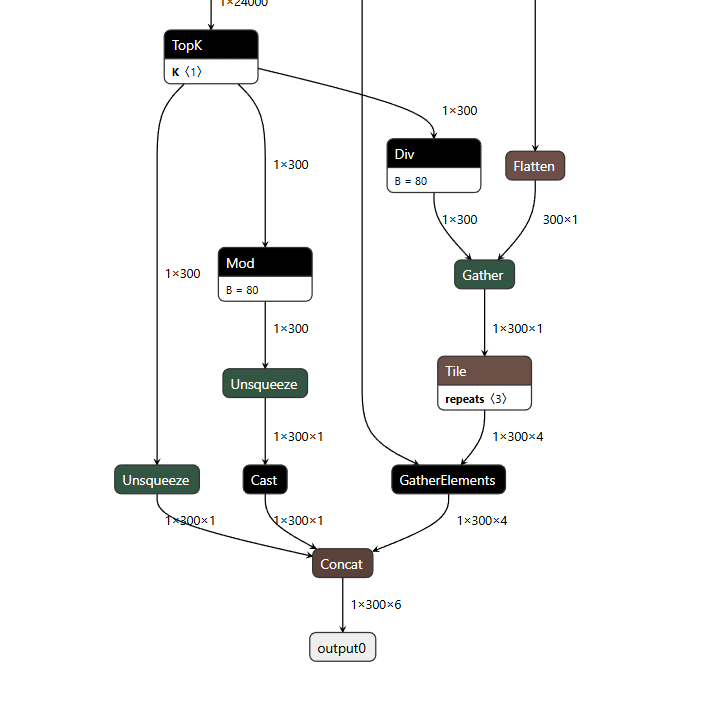
可见yolo11和yolo26输出是不一样的是不能共用代码。
模型使用官方yolo26n.pt转换成的onnx,转换命令
yolo export model=yolo26n.pt format=onnx opset=12
如果你是自己训练的模型可以替换即可,但是需要yolo26框架才行
测试环境:
windows10 x64
vs2019
cmake==3.30.1
onnxruntime-gpu==1.20.1
opencv==4.12.0
使用步骤:
首先cmake生成exe文件,然后将onnxruntime.dll和onnxruntime_providers_shared.dll放到exe一起,不然会提示报错0x0000007b,这是因为系统目录也有个onnxruntime.dll引发冲突,并把car.mp4也放到exe一起。运行直接输入 yolo26.exe C:\Users\Administrator\Desktop\yolo26-onnx-cplus\models\yolo26n.onnx 注意onnx路径要是你真实路径我的onnx路径是我桌面上地址
调用代码:
#include "YOlo26Manager.h"
#include <iostream>
#include <opencv2/opencv.hpp>


void demo_image()
{
    std::string model_path = "yolo26.onnx";
    Yolo26Manager detector(model_path);
    cv::Mat image = cv::imread("car.jpg");
    std::vector<Detection> detections = detector.Inference(image);
    cv::Mat resultImg = detector.DrawImage(image, detections);
    cv::imshow("yolo26", resultImg);
    cv::waitKey(0);
}

// int main(int argc, char const *argv[])
// {
//     demo_image();
//     return 0;
// }


int main(int argc, char const *argv[])
{
    std::string model_path = argv[1];
    cv::namedWindow("yolo26", cv::WINDOW_AUTOSIZE);
    Yolo26Manager detector(model_path,false);
    cv::VideoCapture cap("car.mp4");//这个地方也可以修改成视频路径或者摄像头索引
    if (!cap.isOpened())
    {
        std::cerr << "ERROR! Unable to open camera\n";
        return -1;
    }
    cv::Mat frame;
    std::cout << "Start detect" << std::endl << "Press any key to terminate" << std::endl;

    for (;;)
    {
        cap.read(frame);
        if (frame.empty())
        {
            std::cerr << "ERROR! blank frame grabbed\n";
            break;
        }

        auto timer = cv::getTickCount();
        std::vector<Detection> detections = detector.Inference(frame);
        double fps = cv::getTickFrequency() / ((double)cv::getTickCount() - timer);
        cv::putText(frame, "FPS: " + std::to_string(fps), cv::Point(10, 30), cv::FONT_HERSHEY_SIMPLEX, 1, cv::Scalar(0, 255, 0), 2, 8);
        cv::Mat resultImg = detector.DrawImage(frame, detections);
        cv::imshow("yolo26", resultImg);
        if (cv::waitKey(5) >= 0)
            break;
    }

    return 0;
}
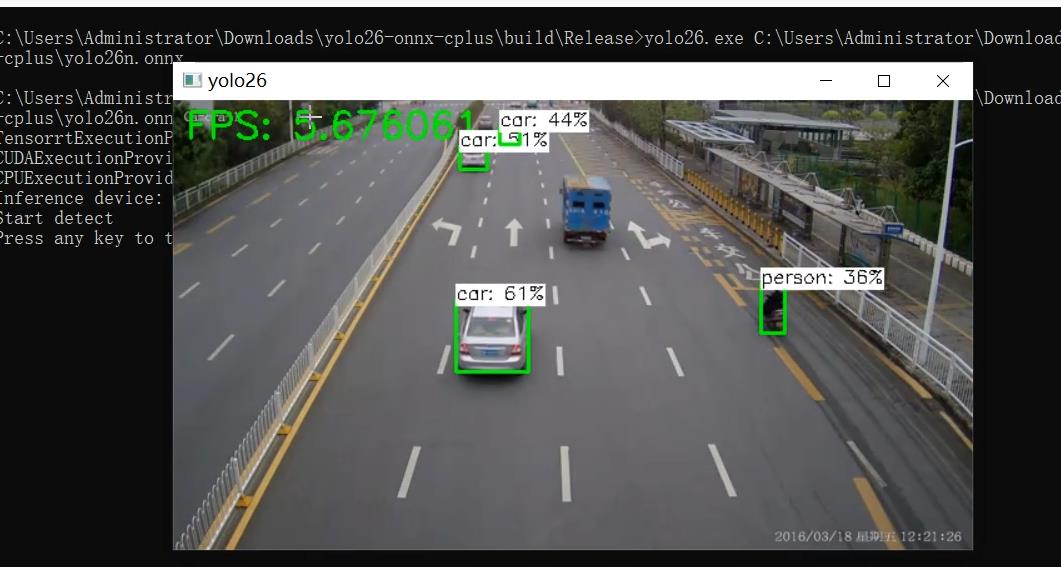
最后测试效果:
源码地址:https://download.csdn.net/download/FL1623863129/92565316