一、介绍管道
管道是Unix中最古老的进程间通信的形式。
我们把从一个进程连接到另一个进程的一个数据流称为一个"管道"
管道分为匿名管道和命名管道,下面一一介绍
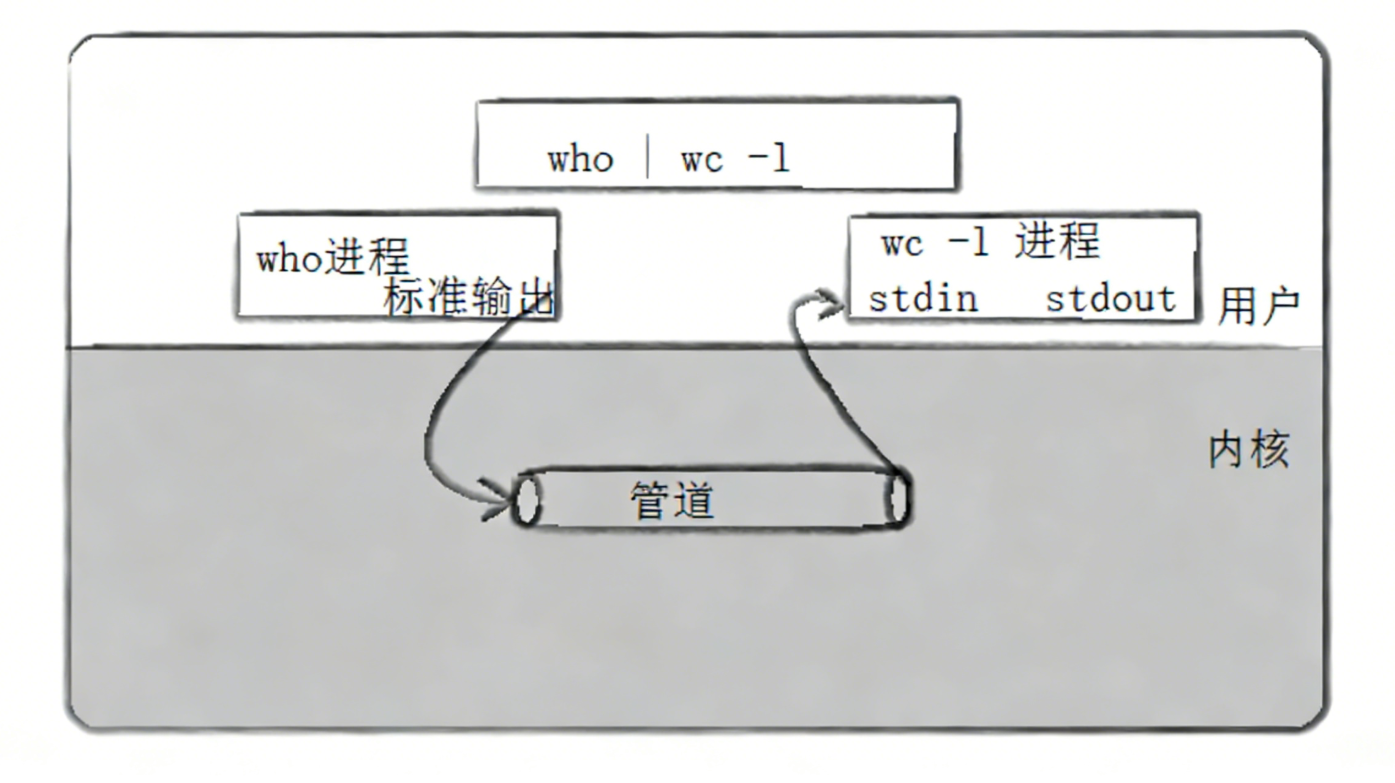
站在内核角度看管道的本质(仿照文件设计了一套通信):
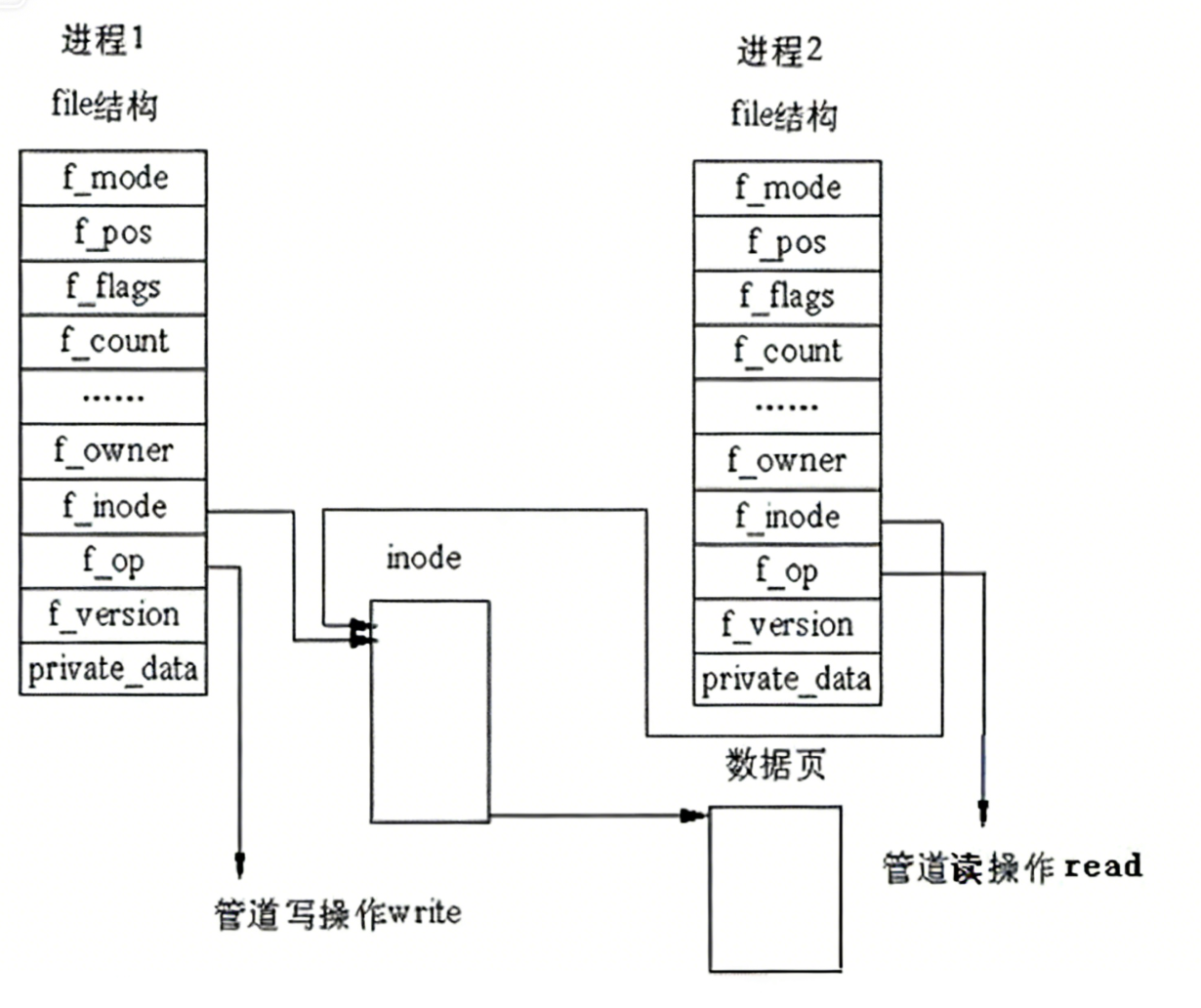
管道只能进程单向通信(单工通信)
- 双工通信:吵架的时候
- 半双工通信:人类正常沟通
- 单工通信:老师上课的时候,输出信息
二、匿名管道
1.介绍原理
没有名字的管道,用于父子间管道通信的实现
匿名管道是一个纯内存级的文件,不需要打开磁盘文件之类的!不需要文件名。
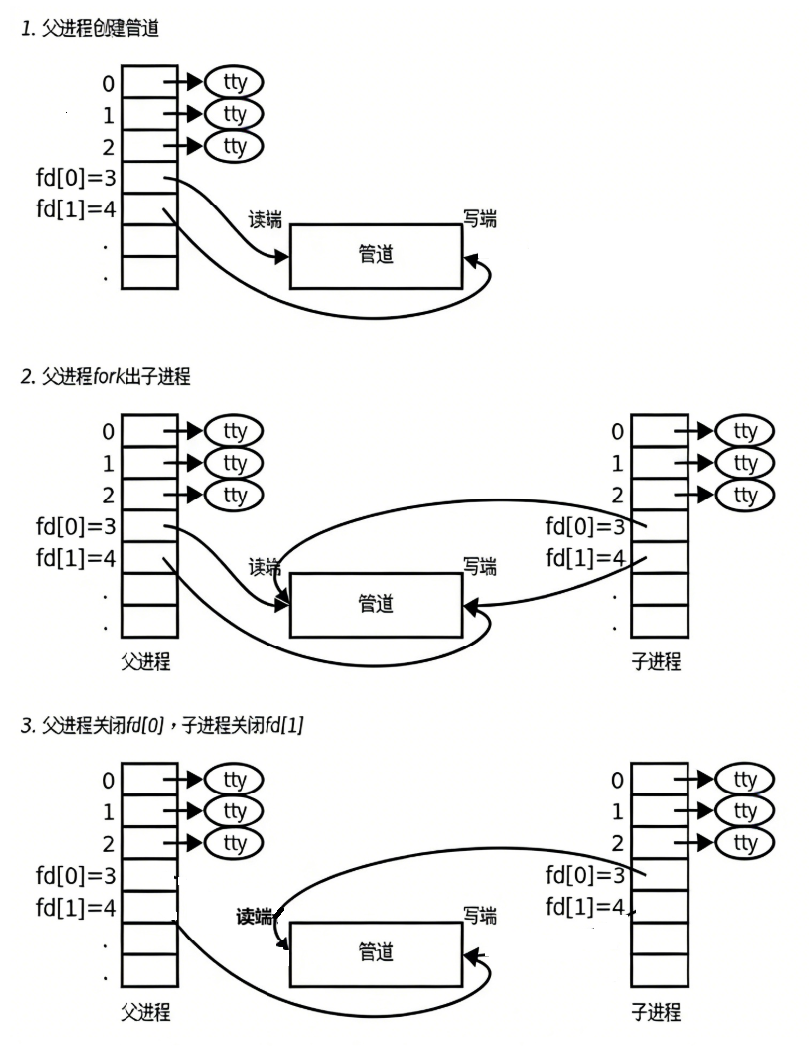
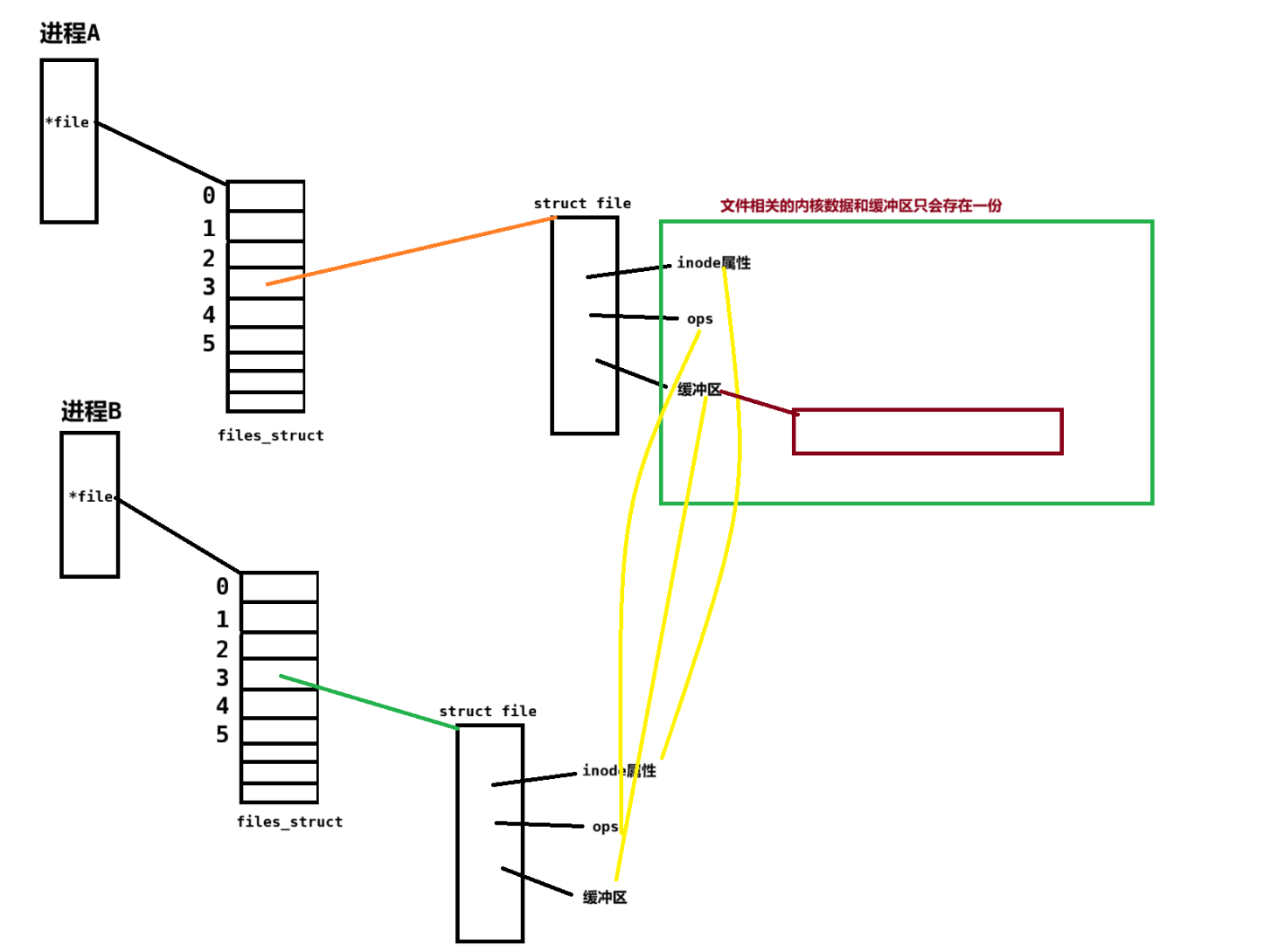
本质:子进程会拷贝父进程的pcb和files_struct,files_struct表中的内容也会拷贝(指向同一个struct file)相当于一个浅拷贝,如下图:
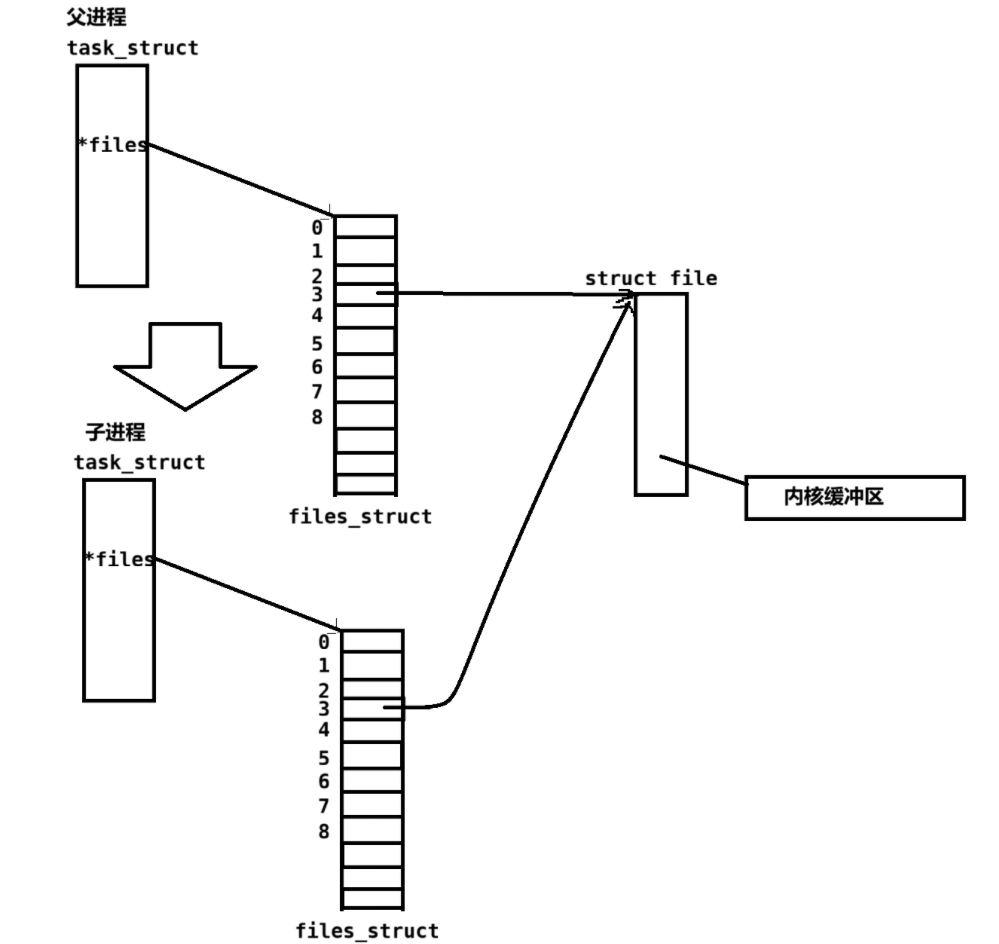
所有可以这样:
2.pipe函数
cpp
#include <unistd.h>
int pipe(int pipefd[2]);
参数:pipefd是一个输出型参数,需要传入一个pipefd数据,0位置的fd用于读端口,1位置的fd用于写端口(把1想象成一个笔🖊,把0想象成嘴巴(需要读))
返回值:
成功,返回0
失败,返回-1
bashOn success, zero is returned. On error, -1 is returned, errno is set to indicate the error, and pipefd is left unchanged.
3.匿名管道的5种特性
- 管道只能单向通信,单工通信
- 匿名管道只能用来进行具有血缘关系进程之间(常用父子进程)
- 管道是面向字节流的
- 管道的生命周期随进程
- 管道通信,对于多进程而言,是自带互斥(任何时刻只允许一个人访问资源)与同步(访问资源具有一定的顺序性)机制的。
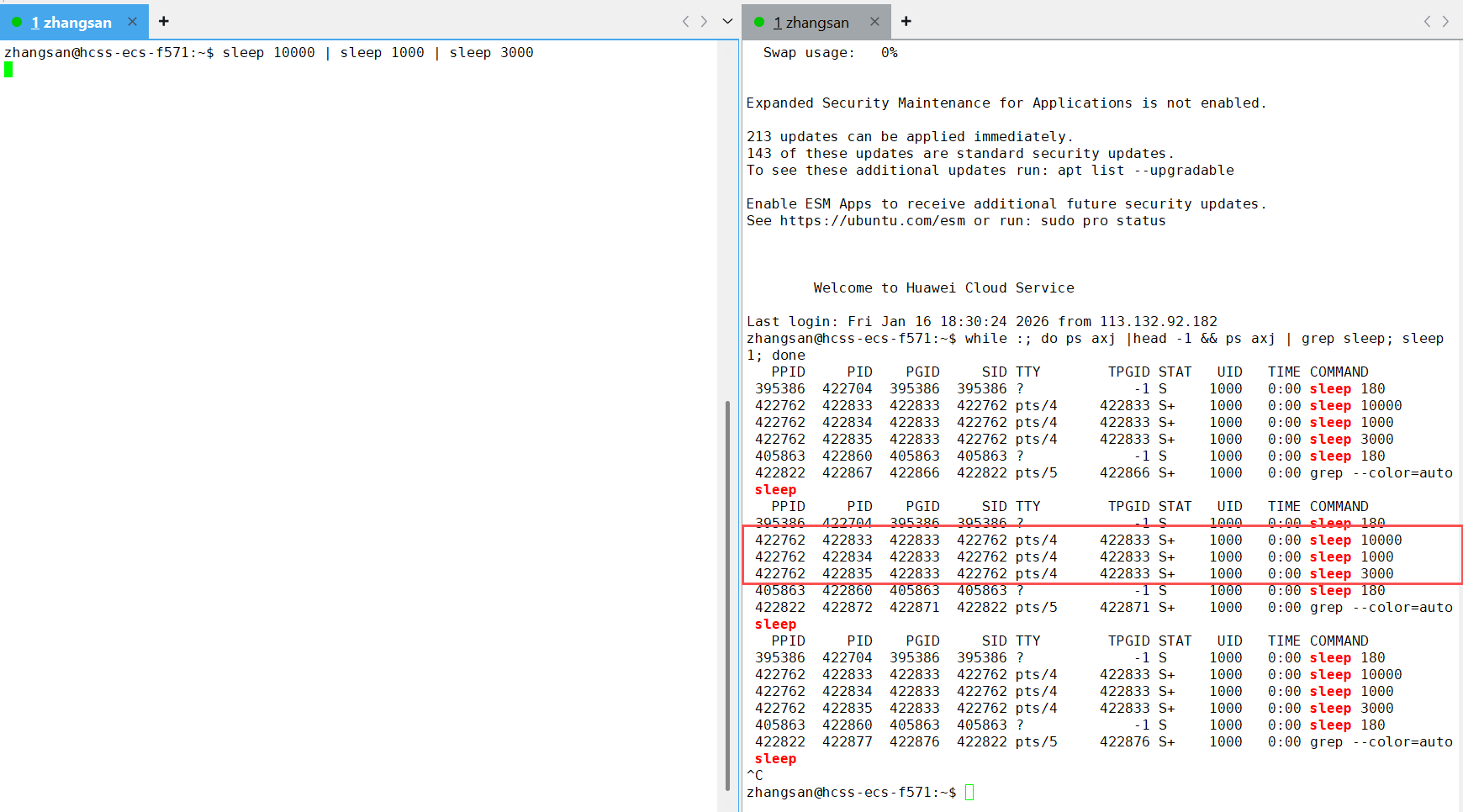
可以看到sleep进程之间是兄弟进程的关系
4.管道通信的4种情况
- 子进程写得慢,父进程就要阻塞等待,等管道有数据,父进程才能读
- 子进程写得快,父进程不读,管道一旦被写满,子进程就必须阻塞了
- 读端在读,写端关闭,管道读完管道中剩余的数据,再读,就会读取"",read返回值为0,表明读管道读到了文件结尾
- 写端一直在写,读端不读而是直接关闭fd,OS会直接杀掉进程。
下面给出测试代码,模拟对应的情况即可
cpp
#include <stdio.h>
#include <unistd.h>
#include <stdlib.h>
#include <sys/wait.h>
#include <string.h>
int main()
{
    // 1 创建管道
    int pipefd[2] = {0};
    int n = pipe(pipefd);
    if(n < 0)
    {
        perror("pipe");
        return 1;
    }
    printf("pipefd[0]: %d pipefd[1]:%d\n", pipefd[0], pipefd[1]); // 3, 4

    // 2.创建子进程
    pid_t id = fork();
    if(id == 0)
    {
        // child:w
        close(pipefd[0]); // 关闭读
        char* msg = "hello word";
        // write(pipefd[1], msg, strlen(msg));
        int cnt = 5;
        char outbuffer[1024];
        char ch = 'A';
        int size = 0;
        while(1)
        {
            // write(pipefd[1],&ch,1);
            // size++;
            // printf("%d\n", size);
            // 细节:当字符过多的时候,outbuffer只会使用1023个,最后一个位置一定是'\0'
            snprintf(outbuffer, sizeof(outbuffer),"c->f# %s %d %d", msg, cnt--, getpid());
            write(pipefd[1], outbuffer, strlen(outbuffer)); // 系统调用,不用考虑读入'\0'
            sleep(1);
            // close(pipefd[1]);
            // break;
            // if(cnt % 3 == 0)
            //     sleep(1);
        }
        printf("write endpo quit!\n");
        close(pipefd[1]);
        exit(0); // 终止进程
    }
    // 父进程:r
    close(pipefd[1]);
    char inbuffer[1024];
    while(1)
    {
        inbuffer[0] = 0;
        // sleep(100);
        ssize_t n = read(pipefd[0],inbuffer, sizeof(inbuffer) - 1);//系统调用不会给最后一个位置设置'\0',所以这里需要留出最后一个位置'\0'
        if(n > 0)
        {
            inbuffer[n] = '\0'; // 最后一个位置设置为'\0'
            printf("%s\n", inbuffer);
        }
        // inbuffer[n] = '\0'; // 最后一个位置设置为'\0'
        // printf("%s: %ld\n", inbuffer, n);
        // sleep(1);
        else if(n == 0) //
        {
            printf("read pipe end of file\n");
            break;
        }
        else
        {
            perror("read");
            break;
        }
        close(pipefd[0]);
        break;
    }
    // sleep(10);
    int status = 0;
    pid_t rid = waitpid(id, &status, 0);
    if(rid > 0)
    {
        printf("child quit code: %d, signal: %d\n", (status >> 8)&0xFF, status & 0x7f);
    }
    (void)rid; // 防止编译器报警


    return 0;
}
5.进程池
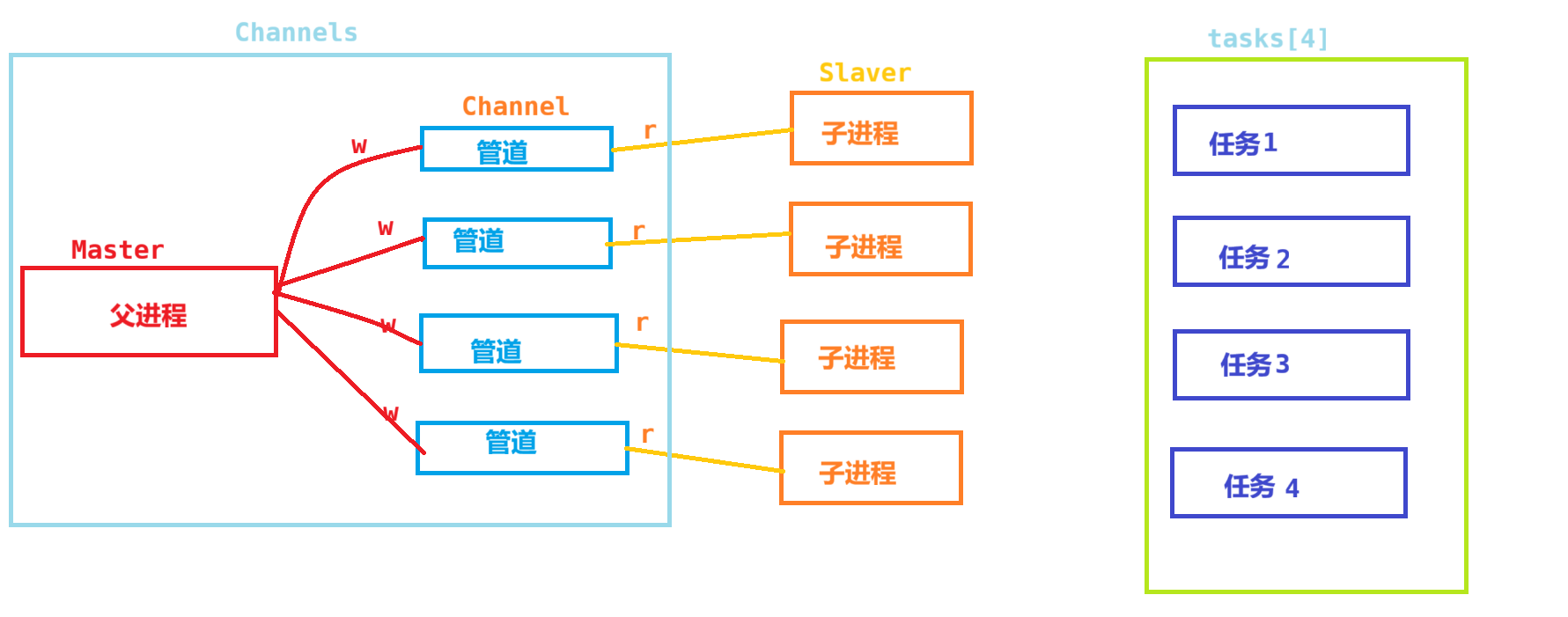
这里实现的是Mast-slaver版本的,用一个父进程控制一批进程,来完成任务。
理解一下进程池:顾名思义,就是在一个池子里面有许多进程,当有任务来的时候,直接用池中的进程来完成任务即可,不需要再创建进程了,这样就可以提高完成任务的效率了。
整体逻辑图:
代码实现:
cpp
#include <iostream>
#include <cstdio>
#include <cstdlib>
#include <string>
#include <vector>
#include <unistd.h>
#include <functional>
#include <time.h>
#include <sys/wait.h>

///////////////////////////////////子进程要完成的任务////////////////
void SyncDisk()
{
    std::cout << getpid() <<  ":刷新数据到磁盘" << std::endl;
    sleep(1);
}

void Download()
{
    std::cout << getpid() <<  ":下载数据到系统中"<<std::endl;
    sleep(1);
}
void PrintLog()
{
    std::cout << getpid() <<  ":打印日志到本地" << std::endl;
    sleep(1);
}
void UpdateStatus()
{
    std::cout << getpid() <<  ":更新一次用户的状态" << std::endl;
    sleep(1);
}
typedef void(*task_t)(); // 函数指针
task_t tasks[4] = {SyncDisk, Download, PrintLog, UpdateStatus};
//////////////////////////////////进程池////////////////////

enum
{
    OK = 0,
    PIPE_ERROR,
    FORK_ERROR
};

// 子进程
void DoTask(int fd)
{
    while(true)
    {
        int task_code = 0;
        ssize_t n = read(fd, &task_code, sizeof(task_code));
        if(n == sizeof(task_code))
        {
            if(task_code >= 0 && task_code < 4)
            {
                tasks[task_code](); // 执行任务表中的任务
            }
        }
        else if(n == 0)
        {
            // 父进程关闭了写端
            // 父进程要结束,我也应该要退出了
            std::cout << getpid() <<  ":task quit ..." << std::endl;
            break;
        }
        else
        {
            perror("read");
            break;
        }
    }
    // printf("%d\n", fd);
    // sleep(1);
}

const int gprocessnum = 5;
// typedef std::function<void (int)> task_t;
using cb_t = std::function<void(int)>;

class ProcessPool
{
private:
    class Channel // 通道,父进程管理
    {
    public:
        Channel(int wfd, pid_t pid) : _wfd(wfd), _sub_pid(pid)
        {
            _sub_name = "sub-channel-" + std::to_string(_sub_pid);
        }
        void printInfo()
        {
            printf("wfd: %d, who: %d, channel name: %s\n", _wfd, _sub_pid, _sub_name.c_str());
        }
        ~Channel()
        {
        }
        void Write(int itask)
        {
             ssize_t n = write(_wfd, &itask, sizeof(itask)); // 约定4字节发送
             (void)n;
        }
        std::string Name()
        {
            return _sub_name;
        }
        void Closepipe()
        {
            std::cout << "关闭wfd" << _wfd << std::endl;
            close(_wfd);
        }
        void Wait()
        {
            pid_t rid = waitpid(_sub_pid, nullptr, 0);
            (void)rid;
            std::cout << "回收子进程:" << _sub_pid << std::endl;
        }
    private:
        int _wfd;              // 1. wfd
        pid_t _sub_pid;        // 2. 子进程是谁
        std::string _sub_name; // 3. 子进程的名字

        int cnt;
    };

public:
    ProcessPool()
    {
        srand((unsigned int)time(NULL) ^ getpid());
    }
    ~ProcessPool() {}
    void Init(cb_t cb)
    {
        CreateProcessChannel(cb);
    }
    void Debug()
    {
        for (auto &c : channels)
        {
            c.printInfo();
        }
    }

    void Run()
    {
        int cnt = 10;
        // while(1)
        // {
        //     sleep(100);
        // }
        while (cnt--)
        {
            std::cout <<"-------------------------------------------" << std::endl;
            // 1.选择一个channel(管道+子进程),本质是选择一个下标数字
            int index = SelectChannel();
            std::cout << "who index:" << index << std::endl;

            // 2.选择任务
            int itask = SelectTask();
            std::cout << "itask:" << itask << std::endl;


            // 3.发送一个任务给指定的channel
            printf("发送 %d to %s\n", itask, channels[index].Name().c_str());
            SandTask2Salver(itask, index);
            sleep(1); // 1秒一个任务
        }
    }
    void Quit()
    {
        //version3 1:1=r:w
        for(auto &channel : channels)
        {
            channel.Closepipe();
            channel.Wait();
        }
        // version2:逆序回收
        // int end = channels.size() - 1;
        // while(end >= 0)
        // {
        //     channels[end].Closepipe();
        //     channels[end].Wait();
        //     end--;
        // }
        // bug演示
        // for(auto &channel : channels)
        // {
        //     channel.Closepipe();
        //     channel.Wait();
        // }


        // //1. 让子进程退出
        // for(auto &channel : channels)
        // {
        //     channel.Closepipe();
        // }
        // //2. 回收
        // for(auto &channel : channels)
        // {
        //     channel.Wait();
        // }

    }
private:
    void SandTask2Salver(int itask, int index)
    {
        if(itask >= 4 || itask < 0)
            return;
        if(index < 0 || index >= channels.size())
            return;
        channels[index].Write(itask);
    }
    int SelectChannel()
    {
        static int index = 0;
        int selected = index;
        index++;
        index %= channels.size();
        return selected;
    }
    int SelectTask()
    {
        int itask = rand() % 4;
        return itask;
    }
    void CreateProcessChannel(cb_t cb)
    {
        // 1.创建多个管道和多个进程
        for (int i = 0; i < gprocessnum; i++)
        {
            int pipefd[2] = {0};
            int n = pipe(pipefd);
            if (n < 0)
            {
                std::cerr << "pipe create error" << std::endl;
                exit(PIPE_ERROR);
            }
            pid_t id = fork();
            if (id < 0)
            {
                std::cerr << "fork error" << std::endl;
                exit(FORK_ERROR);
            }
            else if (id == 0)
            {
                // child  r
                // 子进程关闭历史fd,影响的是自己的fd表
                if(!channels.empty())
                {
                    for(auto &channel : channels)
                    {
                        channel.Closepipe();
                    }
                }
                close(pipefd[1]);
                cb(pipefd[0]); // 回调
                exit(OK);      // 退出
            }
            else
            {
            }
            // 父进程  w
            close(pipefd[0]);
            channels.emplace_back(pipefd[1], id); // 直接在channels对象中构造,减少拷贝
            // Channel ch(pipefd[1], id);
            // channels.push_back(ch);
            sleep(1);
            std::cout << "创建子进程成功:" << id << "成功..." << std::endl;
        }
    }

private:
    // 0.未来组织所有channel的容器
    std::vector<Channel> channels;
};

int main()
{
    // 1.初始化进程池
    ProcessPool pp;
    pp.Init(DoTask);
    pp.Debug();

    // 2. 父进程控制子进程
    pp.Run();

    // 3. 释放回收所有资源
    pp.Quit();
    return 0;
}
里面的一个细节强调一下:
当父进程和子进程形成一个通道后,(父进程4写,子进程3读)父进程再创建一个子进程,这个子进程会拷贝父进程的files_struct表里面的信息(父进程5写,子进程3读,4写),第一个进程的写端也会被拷贝下来,这样就会导致:第一个通道就会有两个文件描述符指向它
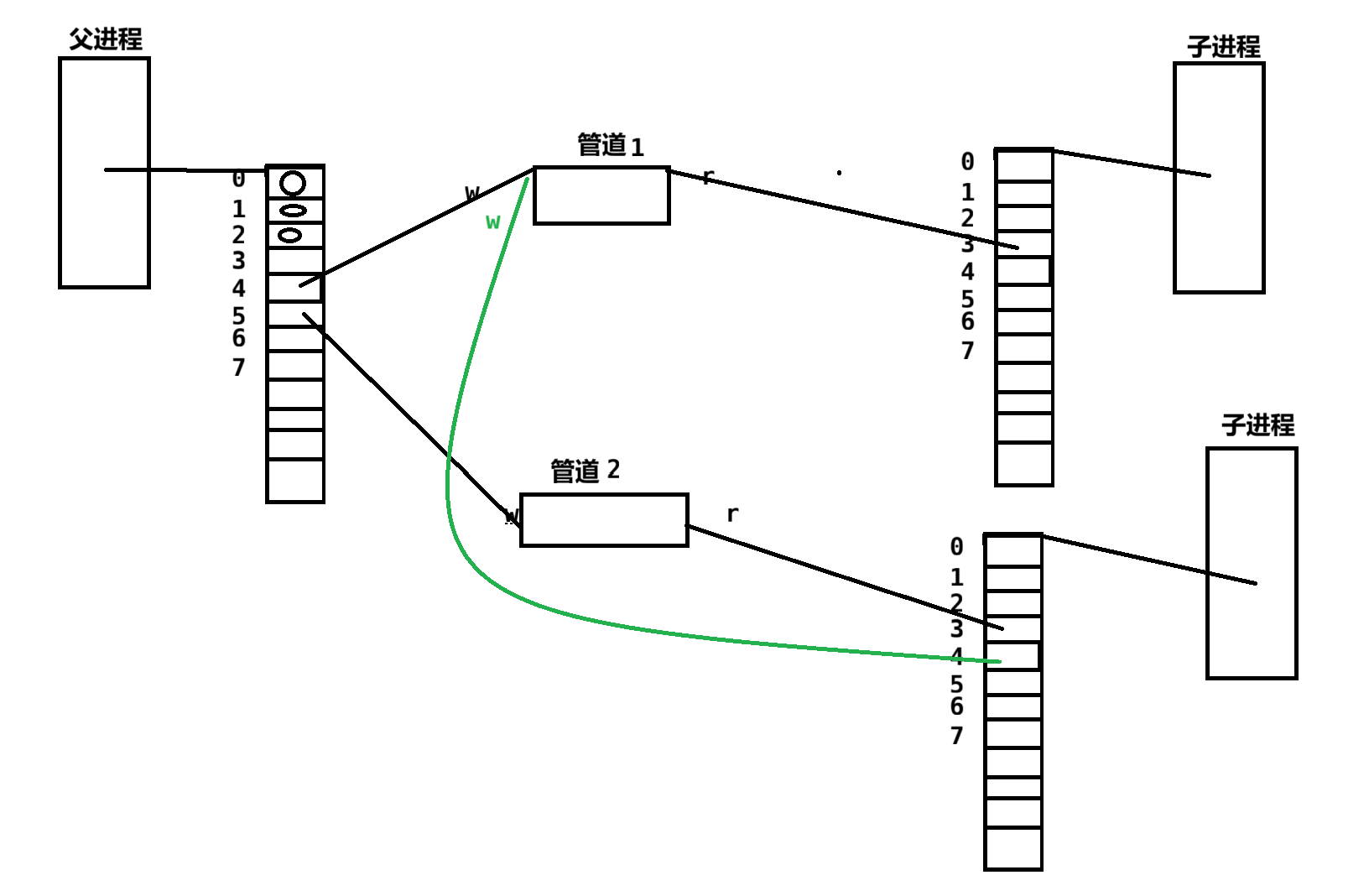
这样就不是1:1的w:r,以此类推,3,4号管道的写端都不是一个。所有可以在子进程中手动关闭拷贝下来的读端。这样就可以正常实现一个进程结束就直接关闭回收。
三、命名管道
- 匿名管道应用的一个限制就是只能在具有共同祖先(具有亲缘关系)的进程间通信。
- 如果我们想在不相关的进程之间交换数据,可以使用 FIFO 文件来做这项工作,它经常被称为命名管道。
- 命名管道是一种特殊类型的文件
同理:命名管道也满足管道通信的4种情况
1.介绍原理
两个进程的struct_file结构体指向同一个文件(相同inode,路径也相同)。这个文件不会将数据刷新到磁盘。
2.mkfifo函数
命名管道可以从命令行上创建,命令行方法是使用下面这个命令:
bash
mkfifo filename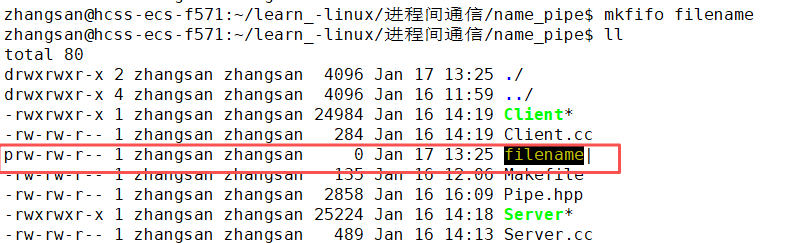
函数:
cpp
#include <sys/types.h>
#include <sys/stat.h>
int mkfifo(const char *pathname, mode_t mode);
**参数:**pathname文件路径,mode文件的权限
返回值:成功返回0,失败返回-1
cpp
On success mkfifo() return 0. On error, -1 is returned and errno is set to indicate the error.3.匿名管道和命名管道的区别
- 匿名管道由 pipe 函数创建并打开。
- 命名管道由 mkfifo 函数创建,打开用 open
- FIFO(命名管道)与 pipe(匿名管道)之间唯一的区别在它们创建与打开的方式不同,一旦这些工作完成之后,它们具有相同的语义。
4.用命名管道实现server和client之间通信
server负责创建命名管道,并以读的方式打开。
client负责以写的方式打开命名管道。
client发送信息,server负责接收信息。
单独用一个文件来维护命名管道Pipe.hpp文件
这里对管道的路径使用自己默认的。
细节:
命名管道的 "同步阻塞" 特性
命名管道(FIFO)的设计初衷是让不相关的进程也能进行通信,它在打开时会有一个 **"配对" 机制 **:
- 当你以只读(
O_RDONLY)方式open一个 FIFO 时,这个调用会阻塞 ,直到有另一个进程以只写(O_WRONLY)方式打开它。 - 反之,当你以只写(
O_WRONLY)方式open一个 FIFO 时,这个调用也会阻塞 ,直到有另一个进程以只读(O_RDONLY)方式打开它。
这就像 "握手" 一样,必须等双方都就位了,管道才算真正连通,通信才能开始。
这样设计是为了避免 "单边通信" 的问题:
- 如果读端先打开,但没有写端,那么读端去读数据时永远读不到任何内容,会陷入无意义的等待。
- 如果写端先打开,但没有读端,那么写端写入的数据会因为没有接收方而直接丢失。
通过 open 时的阻塞,FIFO 保证了通信双方在真正开始传输数据前,都已经准备就绪。
Pipe.hh文件
cpp
#pragma once

#include <iostream>
#include <string>
#include <cstdlib>
#include <cstring>
#include <sys/types.h>
#include <sys/stat.h>
#include <errno.h>
#include <unistd.h>
#include <fcntl.h>


const std::string gcommfile = "./fifo";

#define ForRead 1
#define ForWrite 2
class Fifo
{
public:
    Fifo(const std::string &commfile = gcommfile):_commfile(commfile),_mode(0666),_fd(-1)
    {}
    //1.创建管道
    void Bulid()
    {
        if(IsExit())
        return;
        umask(0);
        int n = mkfifo(_commfile.c_str(),_mode);
        if(n < 0)
        {
            std::cerr << "mkfifo error:" << strerror(errno) << "errno" << errno << std::endl;
            exit(1);
        }
        std::cerr << "mkfifo success:" << strerror(errno) << "errno" << errno << std::endl;
    }
    //2.打开管道
    void Open(int mode)
    {
        // 在通信没有开始之前,如果读端打开,写端没有打开,读端open就会阻塞,直到写端打开
        // 为了区分对写端关闭的情况或者读关闭
        if(mode == ForRead)
            _fd = open(_commfile.c_str(), O_RDONLY);
        else if(mode == ForWrite)
            _fd = open(_commfile.c_str(),O_WRONLY);
        else
        {}
        if(_fd < 0)
        {
            std::cerr << "open error" << strerror(errno) << "errno" << errno <<std::endl;
            exit(2);
        }
        else
        {
            std::cout <<"open sucess" << std::endl;
        }
    }
    void Send(const std::string &msgin)
    {
        ssize_t n = write(_fd, msgin.c_str(), msgin.size());
        (void)n;
    }
    int Recv(std::string *msgout)
    {
        char buffer[128];
        ssize_t n = read(_fd, buffer, sizeof(buffer) - 1);
        if(n > 0)
        {
            buffer[n] = 0;
            *msgout = buffer;
            return n;
        }
        else if(n == 0)
        {
            return 0;
        }
        else
        {
            return -1;
        }
    }
    //3.删除管道
    void Delete()
    {
        if(!IsExit())
        return;
        int n = unlink(_commfile.c_str());
        (void)n;
        std::cout << "Unlink" << _commfile << std::endl;
    }
    ~Fifo()
    {}
private:
    bool IsExit()
    {
        struct stat st;
        int n = stat(_commfile.c_str(),&st);
        if(n == 0)
        {
            return true;
        }
        else
        {
            errno = 0;
            return false;
        }
        // int fd = open(_commfile.c_str(), O_RDONLY);
        // // return fd >= 0;
        // if(fd < 0)
        // {
        //     return 0;
        // }
        // else
        // {
        //     close(fd);
        //     return 1;
        // }
    }
private:
    std::string _commfile;
    mode_t _mode;
    int _fd;
};
Server.cc文件
cpp
#include <iostream>
#include "Pipe.hpp"
int main()
{
    // 创建管道,打开管道
    Fifo pipefile;
    std::cout << "22222" << std::endl;
    pipefile.Bulid();
    std::cout << 1111111 << std::endl;

    pipefile.Open(ForRead);
    // sleep(1);
    std::string msg;
    while(true)
    {
        int n = pipefile.Recv(&msg);
        if(n > 0)
            std::cout << "Client Say:" << msg << std::endl;
        else
            break;
    }
    pipefile.Delete();

    return 0;
}
Client.cc文件
cpp
#include <iostream>
#include "Pipe.hpp"
int main()
{
    Fifo fileclient;
    fileclient.Open(ForWrite);
    while(true)
    {
        std::cout << "please Enter@";
        std::string msg;
        std::getline(std::cin, msg);
        fileclient.Send(msg);

    }

    return 0;
}
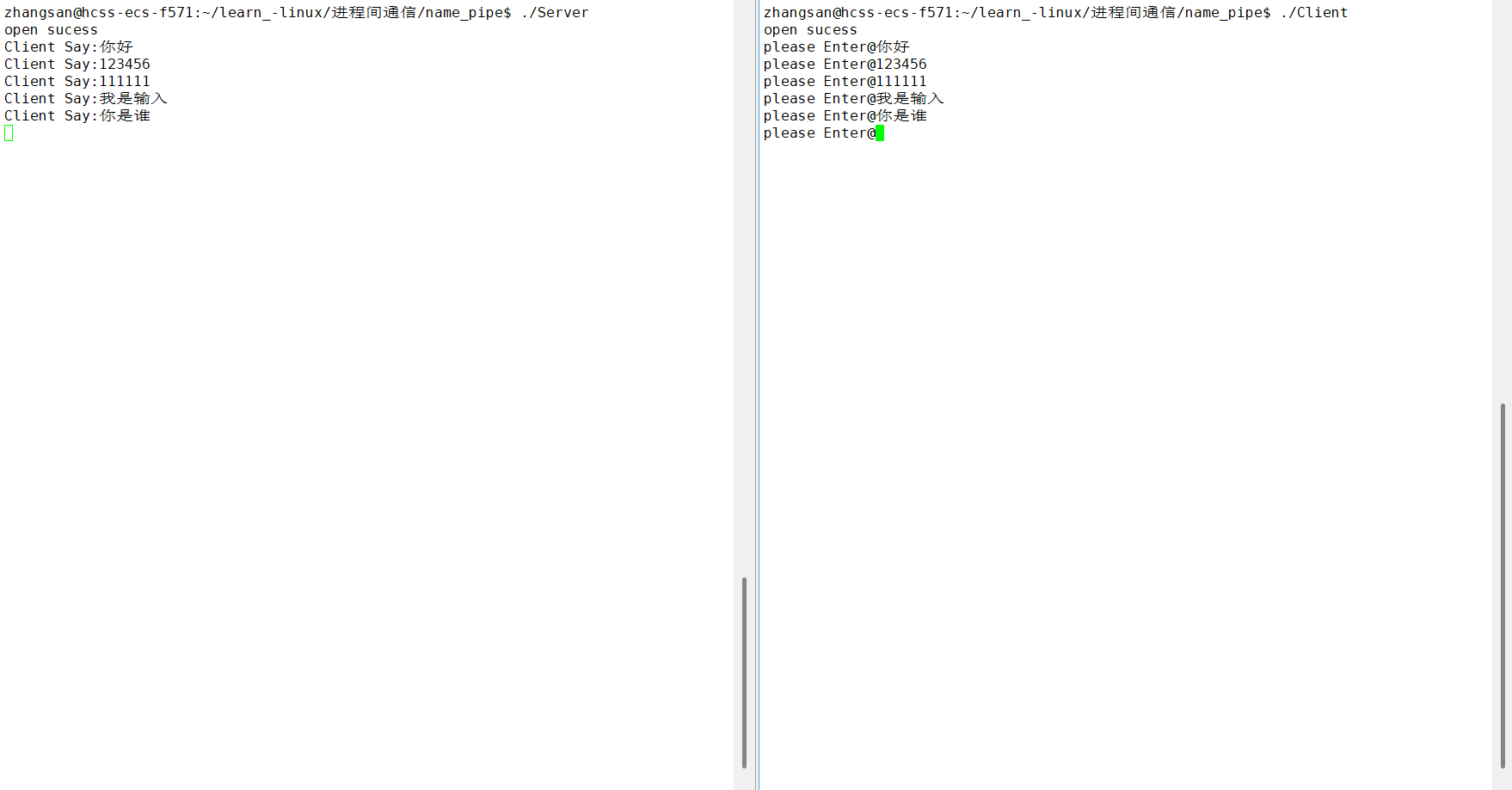
测试样例: