一,问题情景:
在终端输入
sudo apt-get update输出类似于
Err:6 http://archive.ubuntu.com/ubuntu jammy-backports InRelease
  Temporary failure resolving 'archive.ubuntu.com'
Reading package lists... Done
W: Failed to fetch http://archive.ubuntu.com/ubuntu/dists/jammy/InRelease  Temporary failure resolving 'archive.ubuntu.com'
W: Failed to fetch http://archive.ubuntu.com/ubuntu/dists/jammy-updates/InRelease  Temporary failure resolving 'archive.ubuntu.com'
W: Failed to fetch http://archive.ubuntu.com/ubuntu/dists/jammy-backports/InRelease  Temporary failure resolving 'archive.ubuntu.com'
W: Failed to fetch http://security.ubuntu.com/ubuntu/dists/jammy-security/InRelease  Temporary failure resolving 'security.ubuntu.com'
W: Failed to fetch http://packages.ros.org/ros2/ubuntu/dists/jammy/InRelease  Temporary failure resolving 'packages.ros.org'
W: Failed to fetch https://packages.microsoft.com/repos/code/dists/stable/InRelease  Temporary failure resolving 'packages.microsoft.com'
W: Some index files failed to download. They have been ignored, or old ones used instead.然后再输入(向 Google 的 DNS 服务器(8.8.8.8)发送 3 个网络测试数据包,并显示每次的回复结果。)
ping -c 3 8.8.8.8如果输出
ping: connect: Network is unreachable网络不可达 意味着你的系统没有有效的网络连接。这不是DNS问题,而是更基本的网络连接问题。
二,问题解决:
1,查看所有网络接口
在终端输入ip addr show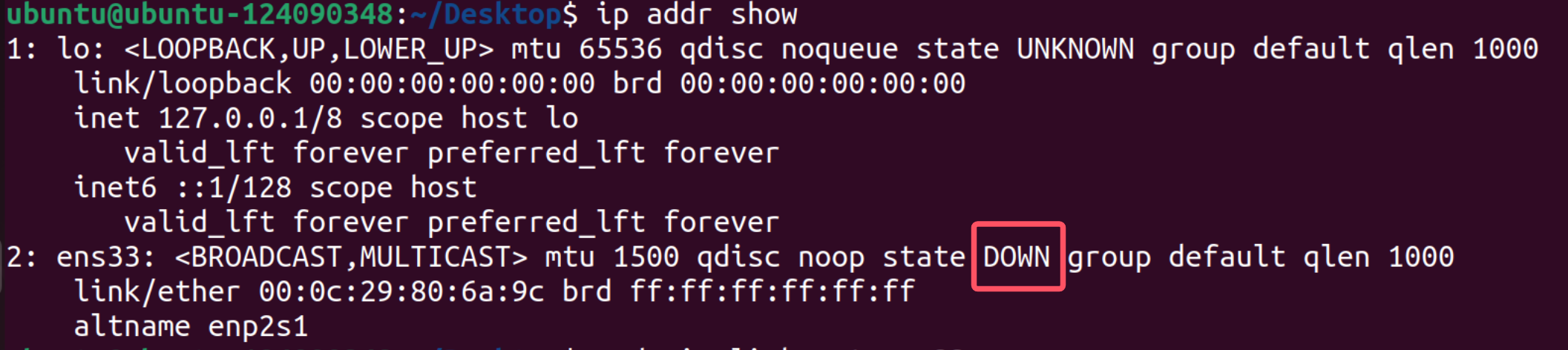
网络接口 ens33 状态是 DOWN (禁用状态),并且没有分配IP地址。
2,激活网络接口
# 启用ens33接口
sudo ip link set ens33 up

# 再次检查状态
ip addr show ens33
接口现在状态为 UP 了,但只获取到了IPv6地址(fe80::...),没有获取到IPv4地址。这是典型的有线网络连接问题。
3,尝试获取IPv4地址
# 使用dhclient获取IPv4地址
sudo dhclient -v ens33

# 或者使用dhcpcd(如果安装了)
sudo dhcpcd ens33

# 检查结果
ip addr show ens33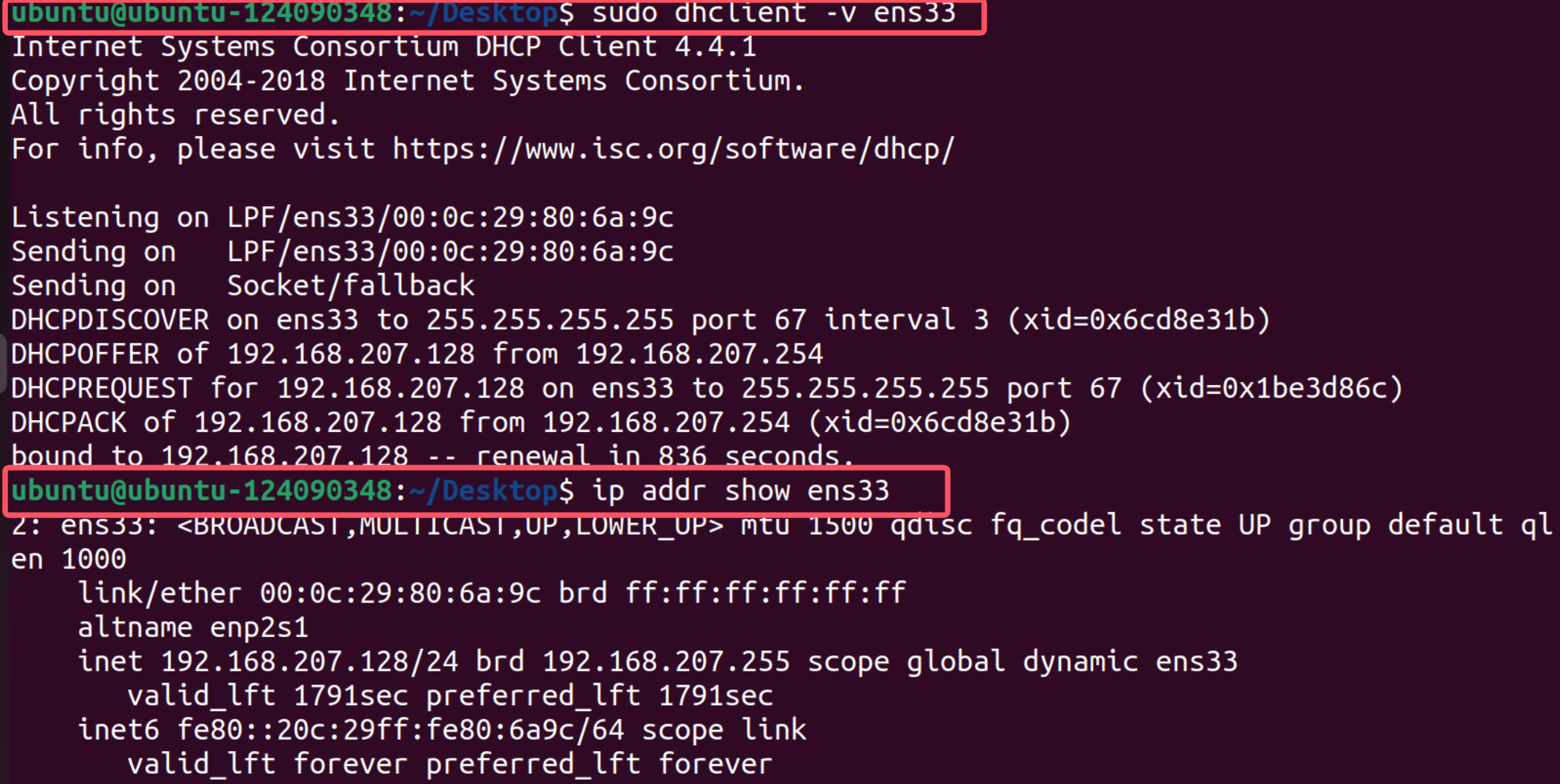
太好了! 现在网络已经通了!DHCP成功获取到了IP地址:192.168.207.128/24,网关是192.168.207.254。