文章目录
- 1.序列化&&反序列化
- 2.业务逻辑
- 3.具体剖析
-
- [3.1 公共协议:Protocol.hpp](#3.1 公共协议:Protocol.hpp)
- [3.2 业务逻辑:Several.hpp](#3.2 业务逻辑:Several.hpp)
- [3.3 Tcp服务封装:TcpServer.hpp](#3.3 Tcp服务封装:TcpServer.hpp)
- 4.服务端启动
- 5.客户端启动
- 6.效果展示
- 希望读者们多多三连支持
- 小编会继续更新
- 你们的鼓励就是我前进的动力!
1.序列化&&反序列化
🤔什么是序列化反序列化?
序列化: 把程序内存中的数据结构 / 对象(比如
C++的Json::Value、Python的字典),转换成可存储 / 可传输的格式(比如JSON字符串、二进制流)的过程。
反序列化: 把存储 / 传输格式的数据,还原回程序可直接操作的内存数据结构 / 对象的过程。
😕为什么要序列化反序列化?
可以理解为定制了一个协议,对于网络来说需要以统一的格式进行传输,程序
A(比如你的服务端)要给程序B(比如客户端)发送数据,内存中的对象无法直接通过网络传输,必须先序列化成通用格式(比如JSON字符串、Protobuf二进制流),传输到对方后再反序列化为对方程序的内存对象
2.业务逻辑
序列化反序列化主要发生在应用层 ,虽然 C++ 有提供第三方的 Json 库,以及还有 Protobuf 可以使用,但是我们这里将通过自定义协议 的方式制定一个简单的网络计算器来理解序列化反序列的过程
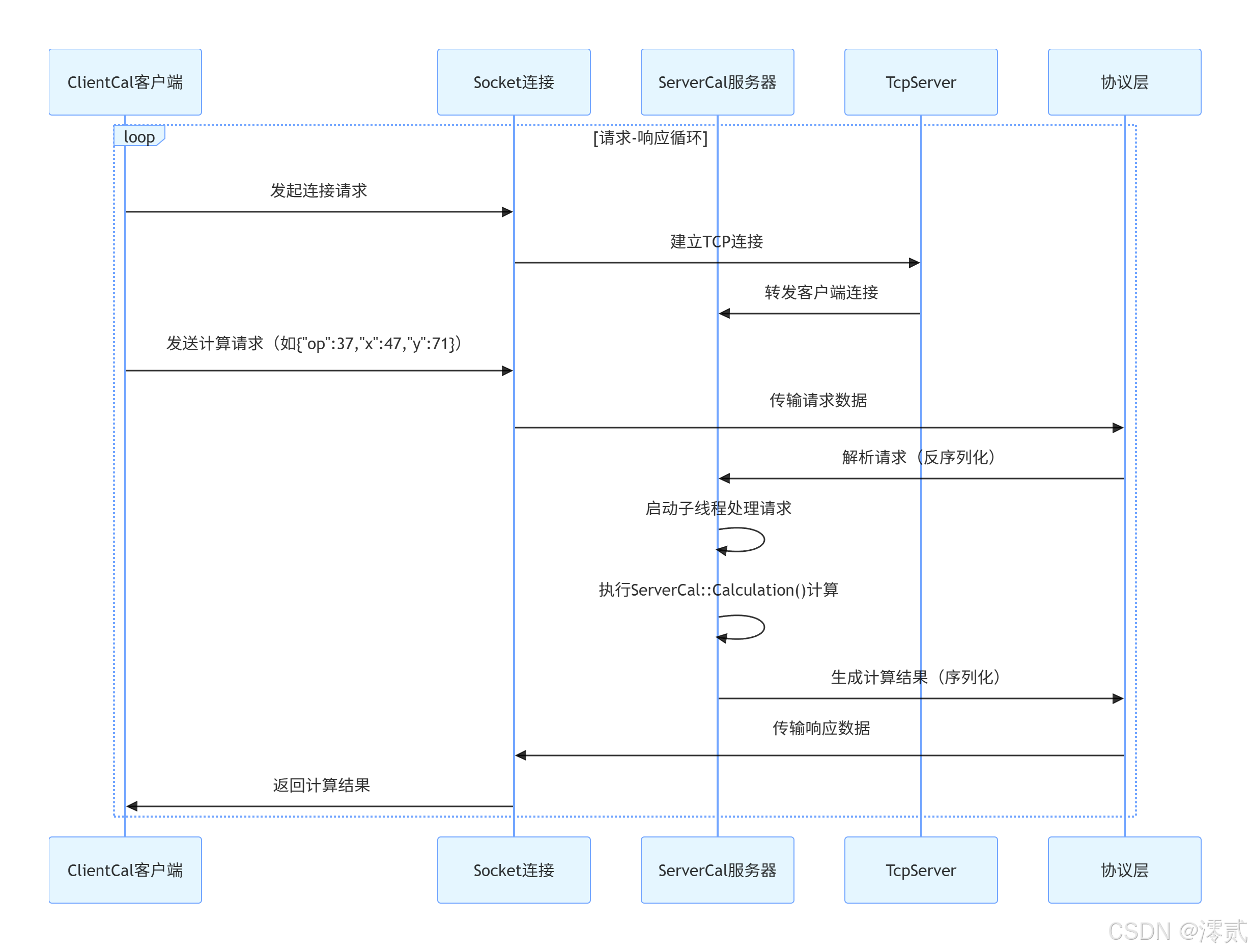

这是简易的业务实现逻辑图,我们将依据这个进行说明
由于代码量较多,具体可查看Gitee仓库:https://gitee.com/zhang-zhanhua-000/linux/tree/master/Slzt&&Dlzt
3.具体剖析
这里我们将针对重点部分进行讲解,Socket.hpp 是对通用的创建套接字、绑定、设置监听、收发等功能进行封装,就不过多解释
3.1 公共协议:Protocol.hpp
cpp
#pragma once

#include <iostream>
#include <string>
#include <jsoncpp/json/json.h>

// #define MySelf 1

const std::string blank_space_sep = " ";
const std::string protocol_sep = "\n";

std::string Encode(std::string &content)
{
    std::string package = std::to_string(content.size());
    package += protocol_sep;
    package += content;
    package += protocol_sep;

    return package;
}

// "len"\n"x op y"\nXXXXXX
// "protocolnumber"\n"len"\n"x op y"\nXXXXXX
bool Decode(std::string &package, std::string *content)
{
    std::size_t pos = package.find(protocol_sep);
    if(pos == std::string::npos) return false;
    std::string len_str = package.substr(0, pos);
    std::size_t len = std::stoi(len_str);
    // package = len_str + content_str + 2
    std::size_t total_len = len_str.size() + len + 2;
    if(package.size() < total_len) return false;

    *content = package.substr(pos+1, len);
    // earse 移除报文 package.erase(0, total_len);
    package.erase(0, total_len);

    return true;
}


// json, protobuf
class Request
{
public:
    Request(int data1, int data2, char oper) : x(data1), y(data2), op(oper)
    {
    }
    Request()
    {}
public:
    bool Serialize(std::string *out)
    {
#ifdef MySelf
        // 构建报文的有效载荷
        // struct => string, "x op y"
        std::string s = std::to_string(x);
        s += blank_space_sep;
        s += op;
        s += blank_space_sep;
        s += std::to_string(y);
        *out = s;
        return true;
#else
        Json::Value root;
        root["x"] = x;
        root["y"] = y;
        root["op"] = op;
        // Json::FastWriter w;
        Json::StyledWriter w;
        *out = w.write(root);
        return true;
#endif
    }
    bool Deserialize(const std::string &in) // "x op y"
    {
#ifdef MySelf
        std::size_t left = in.find(blank_space_sep);
        if (left == std::string::npos)
            return false;
        std::string part_x = in.substr(0, left);

        std::size_t right = in.rfind(blank_space_sep);
        if (right == std::string::npos)
            return false;
        std::string part_y = in.substr(right + 1);

        if (left + 2 != right)
            return false;
        op = in[left + 1];
        x = std::stoi(part_x);
        y = std::stoi(part_y);
        return true;
#else
        Json::Value root;
        Json::Reader r;
        r.parse(in, root);

        x = root["x"].asInt();
        y = root["y"].asInt();
        op = root["op"].asInt();
        return true;
#endif
    }
    void DebugPrint()
    {
        std::cout << "新请求构建完成:  " << x << op << y << "=?" << std::endl;
    }
public:
    // x op y
    int x;
    int y;
    char op; // + - * / %
};

class Response
{
public:
    Response(int res, int c) : result(res), code(c)
    {
    }

    Response()
    {}
public:
    bool Serialize(std::string *out)
    {
#ifdef MySelf
        // "result code"
        // 构建报文的有效载荷
        std::string s = std::to_string(result);
        s += blank_space_sep;
        s += std::to_string(code);
        *out = s;
        return true;
#else
        Json::Value root;
        root["result"] = result;
        root["code"] = code;
        // Json::FastWriter w;
        Json::StyledWriter w;
        *out = w.write(root);
        return true;
#endif
    }
    bool Deserialize(const std::string &in) // "result code"
    {
#ifdef MySelf
        std::size_t pos = in.find(blank_space_sep);
        if (pos == std::string::npos)
            return false;
        std::string part_left = in.substr(0, pos);
        std::string part_right = in.substr(pos+1);

        result = std::stoi(part_left);
        code = std::stoi(part_right);

        return true;
#else
        Json::Value root;
        Json::Reader r;
        r.parse(in, root);

        result = root["result"].asInt();
        code = root["code"].asInt();
        return true;
#endif

    }
    void DebugPrint()
    {
        std::cout << "结果响应完成, result: " << result << ", code: "<< code << std::endl;
    }
public:
    int result;
    int code; // 0,可信,否则!0具体是几,表明对应的错误原因
};
这段代码由 #ifdef、#else、#endif,三者构成完整的条件编译分支,当 #define MySelf 1 定义时进入 #ifdef 分支,否则进入 #else,#endif 结束条件编译分支,标志着条件编译逻辑的闭合
报文封包与解包
cpp
std::string Encode(std::string &content)
{
    std::string package = std::to_string(content.size());
    package += protocol_sep;
    package += content;
    package += protocol_sep;

    return package;
}Encode:将传入的「业务有效内容」(如序列化后的请求 / 响应数据)封装为完整报文
cpp
// "len""\n"x op y"\nXXXXXX
bool Decode(std::string &package, std::string *content)
{
    std::size_t pos = package.find(protocol_sep);
    if(pos == std::string::npos) return false;
    std::string len_str = package.substr(0, pos);
    std::size_t len = std::stoi(len_str);
    // package = len_str + content_str + 2
    std::size_t total_len = len_str.size() + len + 2;
    if(package.size() < total_len) return false;

    *content = package.substr(pos+1, len);
    // earse 移除报文 package.erase(0, total_len);
    package.erase(0, total_len);

    return true;
}Decode:核心是通过先解析长度 、再校验完整性 、最后提取内容 的逻辑实现完整报文提取,首先在传入的报文字符串package中查找第一个分隔符\n,若找不到则说明报文连完整长度字段都没有,直接返回解析失败;找到后截取该分隔符之前的字符串作为长度字段len_str,将其转换为整数len(即业务内容的真实长度),接着计算完整报文的总长度total_len(长度字段自身长度+业务内容长度+2个\n分隔符长度),若当前package的长度小于total_len,说明报文不完整(业务内容未传输完毕),返回失败等待后续数据补充;若报文完整,则跳过第一个\n,精准截取长度为len的业务内容并通过content指针输出,最后从package中删除已解析的完整报文段,避免粘包导致重复解析,返回解析成功,整个过程通过 长度预判 +完整性校验 确保只提取完整有效的业务内容
序列化反序列化分为 Request 和 Response 两个类
- 请求数据类
Request:- 序列化方法
Serialize
- 序列化方法
cpp
bool Serialize(std::string *out)
{
#ifdef MySelf
    // 构建报文的有效载荷:"x op y"
    std::string s = std::to_string(x);
    s += blank_space_sep;
    s += op;
    s += blank_space_sep;
    s += std::to_string(y);
    *out = s;
    return true;
#else
    Json::Value root;
    root["x"] = x;
    root["y"] = y;
    root["op"] = op;
    Json::StyledWriter w;
    *out = w.write(root);
    return true;
#endif
}
功能 :将 Request 对象中的成员变量(x、y、op)转换为字符串格式(业务有效内容),方便后续通过 Encode 封装为网络报文
两种实现方案(由 MySelf 宏控制):
MySelf宏定义时(自定义格式):拼接为"x op y"格式的字符串(如"10 + 20"),使用空格分隔字段;MySelf宏未定义时(Json格式):创建Json::Value对象(root),将x、y、op存入对应的Json字段;使用Json::StyledWriter将Json对象转换为带格式化缩进的字符串;通过指针参数out输出序列化后的字符
返回值 :bool 类型,当前固定返回 true,预留了后续错误处理的扩展接口
- 反序列化方法
Deserialize
cpp
bool Deserialize(const std::string &in)
{
#ifdef MySelf
    std::size_t left = in.find(blank_space_sep);
    if (left == std::string::npos)
        return false;
    std::string part_x = in.substr(0, left);

    std::size_t right = in.rfind(blank_space_sep);
    if (right == std::string::npos)
        return false;
    std::string part_y = in.substr(right + 1);

    if (left + 2 != right)
        return false;
    op = in[left + 1];
    x = std::stoi(part_x);
    y = std::stoi(part_y);
    return true;
#else
    Json::Value root;
    Json::Reader r;
    r.parse(in, root);

    x = root["x"].asInt();
    y = root["y"].asInt();
    op = root["op"].asInt();
    return true;
#endif
}
功能 :将序列化后的字符串(in)转换为Request对象,提取出x、y、op并赋值给成员变量,用于服务器解析客户端发送的请求数据
两种实现方案(由 MySelf 宏控制):
MySelf宏定义时(自定义格式):
查找第一个和最后一个空格的位置,分割出part_x(第一个操作数字符串)和part_y(第二个操作数字符串);- 校验两个空格之间是否只有一个字符(运算符),若不符合则返回
false - 将
part_x、part_y转换为整数(std::stoi),赋值给x、y,空格间的字符赋值给op
- 校验两个空格之间是否只有一个字符(运算符),若不符合则返回
MySelf宏未定义时(Json格式):创建Json::Reader对象(r),解析输入字符串in为Json对象root;通过asInt()方法从Json对象中提取对应字段的值,赋值给x、y、op
返回值 :bool 类型,自定义格式下会校验字段有效性,Json 格式下当前未处理解析失败的情况,预留扩展接口
- 响应数据类
Response- 序列化方法
Serialize
- 序列化方法
cpp
bool Serialize(std::string *out)
{
#ifdef MySelf
    // 构建报文的有效载荷:"result code"
    std::string s = std::to_string(result);
    s += blank_space_sep;
    s += std::to_string(code);
    *out = s;
    return true;
#else
    Json::Value root;
    root["result"] = result;
    root["code"] = code;
    Json::StyledWriter w;
    *out = w.write(root);
    return true;
#endif
}
功能 :将 Response 对象中的 result 和 code 转换为字符串格式,方便后续封包传输
两种实现方案:
-
自定义格式:拼接为
"result code"格式(如"30 0",表示计算结果30,无错误) -
Json格式:将result和code存入Json对象,转换为格式化字符串输出- 反序列化方法
Deserialize
- 反序列化方法
cpp
bool Deserialize(const std::string &in)
{
#ifdef MySelf
    std::size_t pos = in.find(blank_space_sep);
    if (pos == std::string::npos)
        return false;
    std::string part_left = in.substr(0, pos);
    std::string part_right = in.substr(pos+1);

    result = std::stoi(part_left);
    code = std::stoi(part_right);

    return true;
#else
    Json::Value root;
    Json::Reader r;
    r.parse(in, root);

    result = root["result"].asInt();
    code = root["code"].asInt();
    return true;
#endif
}
功能 :将服务器返回的序列化字符串转换为 Response 对象,提取计算结果和错误码,供客户端解析
两种实现方案:
- 自定义格式:查找空格分隔符,分割出结果字段和错误码字段,转换为整数赋值
Json格式:解析输入字符串为Json对象,提取对应字段的值赋值给成员变量
3.2 业务逻辑:Several.hpp
cpp
#pragma once
#include <iostream>
#include "Protocol.hpp"

enum
{
    Div_Zero = 1,
    Mod_Zero,
    Other_Oper
};

class ServerCal
{
public:
    ServerCal()
    {
    }

    Response CalculatorHelper(const Request &req)
    {
        Response resp(0, 0);
        switch (req.op)
        {
        case '+':
            resp.result = req.x + req.y;
            break;
        case '-':
            resp.result = req.x - req.y;
            break;
        case '*':
            resp.result = req.x * req.y;
            break;
        case '/':
        {
            if (req.y == 0)
                resp.code = Div_Zero;
            else
                resp.result = req.x / req.y;
        }
        break;
        case '%':
        {
            if (req.y == 0)
                resp.code = Mod_Zero;
            else
                resp.result = req.x % req.y;
        }
        break;
        default:
            resp.code = Other_Oper;
            break;
        }
        return resp;
    }

    std::string Calculator(std::string& package)
    {
        std::string content;
        bool r = Decode(package, &content);
        if(!r) return "";

        Request req;
        r = req.Deserialize(content);
        if(!r) return "";

        content = "";
        Response reps = CalculatorHelper(req);

        reps.Serialize(&content);
        content = Encode(content);

        return content;
    }

    ~ServerCal()
    {}
};这是业务逻辑头文件,核心封装了ServerCal类,依赖协议层Protocol.hpp,完成客户端算术请求的完整处理:首先定义了Div_Zero(除数为0)、Mod_Zero(模数为0)、Other_Oper(无效运算符)三个异常错误码,类内提供两个核心方法,其中CalculatorHelper 作为内部辅助方法,接收结构化的Request请求对象,通过switch语句匹配+、-、*、/、%运算符执行对应算术运算,同时处理除法/取余的零值异常和无效运算符场景,封装运算结果与错误码到Response响应对象并返回;而Calculator作为对外暴露的唯一接口,衔接协议层与业务层,按「报文解包(Decode)→ 请求反序列化(Request::Deserialize)→ 执行算术运算(CalculatorHelper)→ 响应序列化(Response::Serialize)→ 报文封包(Encode)」的完整流程处理传入的网络报文,最终返回可直接用于网络传输的完整响应报文
3.3 Tcp服务封装:TcpServer.hpp
cpp
#pragma once
#include <functional>
#include <string>
#include <signal.h>
#include "log.hpp"
#include "Socket.hpp"

using func_t = std::function<std::string(std::string &package)>;

class TcpServer
{
public:
    TcpServer(uint16_t port, func_t callback) : port_(port), callback_(callback)
    {
    }
    bool InitServer()
    {
        listensock_.Socket();
        listensock_.Bind(port_);
        listensock_.Listen();
        logger(Info, "init server .... done");
        return true;
    }
    void Start()
    {
        signal(SIGCHLD, SIG_IGN);
        signal(SIGPIPE, SIG_IGN);
        while (true)
        {
            std::string clientip;
            uint16_t clientport;
            int sockfd = listensock_.Accept(&clientip, &clientport);
            if (sockfd < 0)
                continue;
            logger(Info, "accept a new link, sockfd: %d, clientip: %s, clientport: %d", sockfd, clientip.c_str(), clientport);
            // 提供服务
            if (fork() == 0)
            {
                listensock_.Close();
                std::string inbuffer_stream;
                // 数据计算
                while (true)
                {
                    char buffer[1280];
                    ssize_t n = read(sockfd, buffer, sizeof(buffer));
                    if (n > 0)
                    {
                        buffer[n] = 0;
                        inbuffer_stream += buffer;

                        logger(Debug, "debug:\n%s", inbuffer_stream.c_str());

                        while (true)
                        {
                            std::string info = callback_(inbuffer_stream);
                            if (info.empty())
                                break;
                            logger(Debug, "debug, response:\n%s", info.c_str());
                            logger(Debug, "debug:\n%s", inbuffer_stream.c_str());
                            write(sockfd, info.c_str(), info.size());
                        }
                    }
                    else if (n == 0)
                        break;
                    else
                        break;
                }

                exit(0);
            }
            close(sockfd);
        }
    }
    ~TcpServer()
    {
    }

private:
    uint16_t port_;
    Sock listensock_;
    func_t callback_;
};这里大部分都是包装好的方法直接使用封装好的,重点说下:func_t 是通过 C++11 中的 using 关键字定义的 std::function 函数对象类型别名,具体定义为 using func_t = std::function<std::string(std::string &package)>,它可以接收符合该签名的任意可调用对象(如 ServerCal::Calculator 方法),使得开发者无需修改 TcpServer 的网络层代码,只需替换不同的业务回调函数,即可实现不同功能的 TCP 服务器,极大提升了代码的可复用性和扩展性
4.服务端启动
ServerCal.cpp:
cpp
#include "TcpServer.hpp"
#include "ServerCal.hpp"
#include <unistd.h>
// #include "Daemon.hpp"

static void Usage(const std::string &proc)
{
    std::cout << "\nUsage: " << proc << " port\n" << std::endl;
}

// ./servercal 8080
int main(int argc, char *argv[])
{
    if(argc != 2)
    {
        Usage(argv[0]);
        exit(0);
    }
    uint16_t port = std::stoi(argv[1]);
    ServerCal cal;
    TcpServer *tsvp = new TcpServer(port, std::bind(&ServerCal::Calculator, &cal, std::placeholders::_1));
    tsvp->InitServer();
    // Daemon();
    daemon(0, 0);
    tsvp->Start();

    return 0;
}
由于前面完整封装好了大部分功能,所以启动直接调用就好了,但是这里我想重点强调一下 bind,不用 bind 的话就得在 callback 处直接创建对象来调用此方法,但是这样如果逻辑修改就要多个文件修改,很麻烦,保证无需修改 TcpServer 的网络层代码,所以用包装类+
🤔直接传成员对象的函数 ServerCal::Calculator 不行吗,为什么要用 bind?
- 语法层面: 类的成员函数无法直接转换为普通函数指针
std::function
普通函数(全局函数、静态成员函数)的地址是一个「独立的内存地址」,可以直接赋值给std::function或函数指针;而 非静态成员函数 的原型中,隐含了一个「隐藏参数this指针」(编译器自动添加),用于指向调用该成员函数的对象实例
简单说:
- 普通函数签名:
std::string func(std::string &package)(无隐藏参数) - 成员函数签名:
std::string ServerCal::Calculator(ServerCal *this, std::string &package)(隐含this指针)
TcpServer 期望接收的是「符合 std::string (std::string &) 签名的可调用对象」,而直接传递 &ServerCal::Calculator,其签名与期望不匹配,编译器会直接报错(语法不合法)
- 逻辑层面: 缺少对象上下文,成员函数无法执行
成员函数是「属于类的对象实例」的,脱离了具体对象,成员函数无法访问类的非静态成员变量/方法(因为没有this指针指向具体对象)
即使语法允许传递成员函数,直接传递 &ServerCal::Calculator 也只是传递了"函数的逻辑",没有传递"该函数要作用的对象(cal)",服务器调用该函数时,会因为缺少具体对象而无法执行
5.客户端启动
cpp
#include <iostream>
#include <string>
#include <ctime>
#include <cassert>
#include <unistd.h>
#include "Socket.hpp"
#include "Protocol.hpp"

static void Usage(const std::string &proc)
{
    std::cout << "\nUsage: " << proc << " serverip serverport\n"
              << std::endl;
}

// ./clientcal ip port
int main(int argc, char *argv[])
{
    if (argc != 3)
    {
        Usage(argv[0]);
        exit(0);
    }
    std::string serverip = argv[1];
    uint16_t serverport = std::stoi(argv[2]);

    Sock sockfd;
    sockfd.Socket();
    bool r = sockfd.Connect(serverip, serverport);
    if(!r) return 1;

    srand(time(nullptr) ^ getpid());
    int cnt = 1;
    const std::string opers = "+-*/%=-=&^";

    std::string inbuffer_stream;
    while(cnt <= 10)
    {
        std::cout << "===============第" << cnt << "次测试....., " << "===============" << std::endl;
        int x = rand() % 100 + 1;
        usleep(1234);
        int y = rand() % 100;
        usleep(4321);
        char oper = opers[rand()%opers.size()];
        Request req(x, y, oper);
        req.DebugPrint();

        std::string package;
        req.Serialize(&package);

        package = Encode(package);

        write(sockfd.Fd(), package.c_str(), package.size());
        // std::cout << "这是最新的发出去的请求: " << n << "\n" << package;
        // n = write(sockfd.Fd(), package.c_str(), package.size());
        // std::cout << "这是最新的发出去的请求: \n" << n << "\n" << package;
        // n = write(sockfd.Fd(), package.c_str(), package.size());
        // std::cout << "这是最新的发出去的请求: \n" << n << "\n" << package;
        // n = write(sockfd.Fd(), package.c_str(), package.size());
        // std::cout << "这是最新的发出去的请求: \n" << n << "\n" << package;


        char buffer[4096];
        ssize_t n = read(sockfd.Fd(), buffer, sizeof(buffer)); // 我们也无法保证我们能读到一个完整的报文
        if(n > 0)
        {
            buffer[n] = 0;
            inbuffer_stream += buffer; // "len"\n"result code"\n
            std::cout << inbuffer_stream << std::endl;
            std::string content;
            bool r = Decode(inbuffer_stream, &content); // "result code"
            assert(r);

            Response resp;
            r = resp.Deserialize(content);
            assert(r);

            resp.DebugPrint();
        }

        std::cout << "=================================================" << std::endl;
        sleep(1);

        cnt++;
    }


    sockfd.Close();
    return 0;
}
这里就是很简单的测试代码,向指定 TCP 服务器连续发送 10 次随机计算请求(包含随机操作数、随机运算符),并接收服务器返回的计算响应结果进行解析和打印,整体流程贴合网络通信的「序列化→编码→发送→接收→解码→反序列化」规范
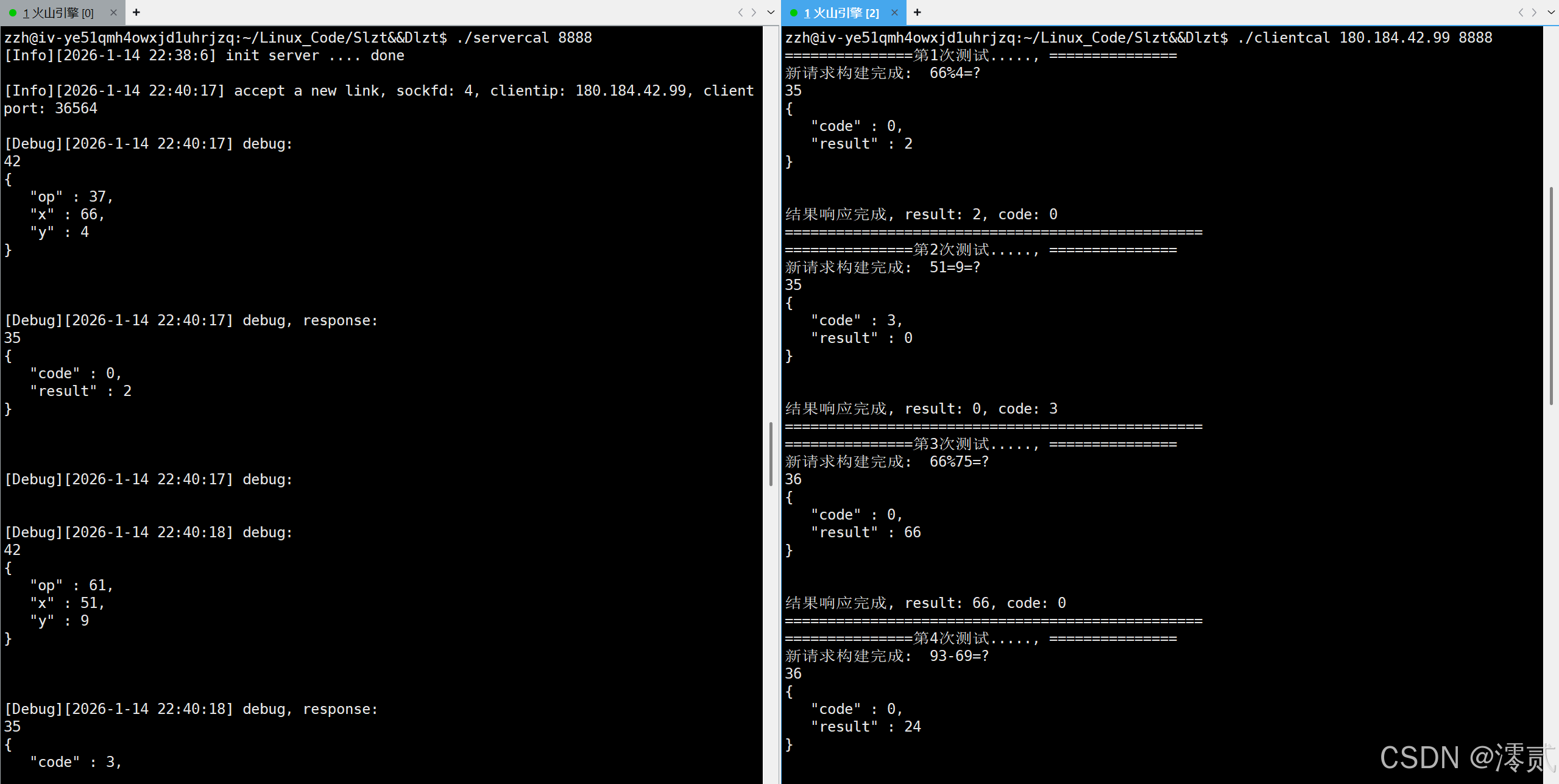
6.效果展示
希望读者们多多三连支持
小编会继续更新
你们的鼓励就是我前进的动力!