一、Extension概述
Extension允许在不修改原始类的情况下为其添加新功能。
不能修改
扩展
新增
获得
原始类
添加方法
Extension
使用Extension
|| 特性 | 说明 |
|------|------|
| 不修改源码 | 无需访问原始类定义 |
| 静态解析 | 编译时确定调用 |
| 可链式调用 | 支持流畅API设计 |
| 支持泛型 | 可用于泛型类型 |
二、示例代码
定义Extension
选择目标类型
添加扩展方法
直接调用新方法
dart
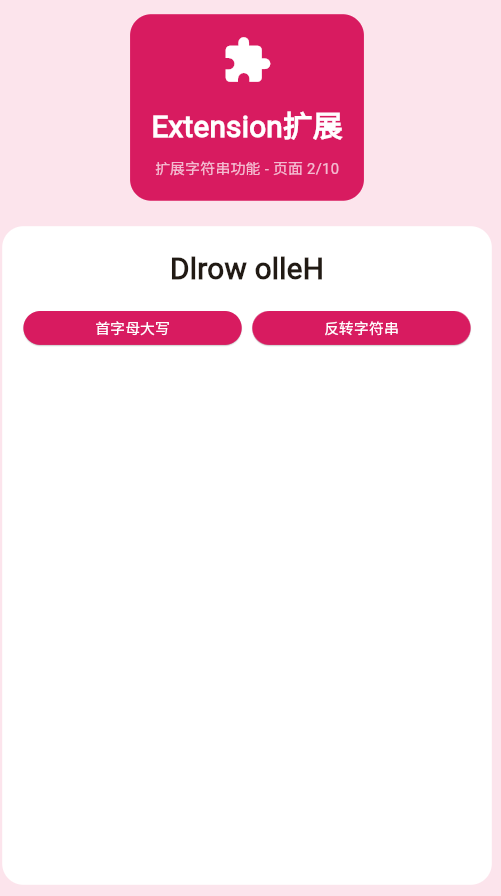
class _Page02ExtensionDemo extends StatefulWidget {
  const _Page02ExtensionDemo();

  @override
  State<_Page02ExtensionDemo> createState() => _Page02ExtensionDemoState();
}

class _Page02ExtensionDemoState extends State<_Page02ExtensionDemo> {
  String _inputText = 'hello world';

  void _transformText() {
    setState(() {
      _inputText = _inputText.capitalizeFirst();
    });
  }

  void _reverseText() {
    setState(() {
      _inputText = _inputText.reverseString();
    });
  }

  @override
  Widget build(BuildContext context) {
    return Container(
      color: Colors.pink.shade50,
      padding: const EdgeInsets.all(20),
      child: Column(
        children: [
          Container(
            padding: const EdgeInsets.all(20),
            decoration: BoxDecoration(
              color: Colors.pink.shade600,
              borderRadius: BorderRadius.circular(20),
            ),
            child: const Column(
              children: [
                Icon(Icons.extension, size: 48, color: Colors.white),
                SizedBox(height: 16),
                Text(
                  'Extension扩展',
                  style: TextStyle(fontSize: 28, fontWeight: FontWeight.bold, color: Colors.white),
                ),
                SizedBox(height: 8),
                Text('扩展字符串功能 - 页面 2/5', style: TextStyle(color: Colors.white70)),
              ],
            ),
          ),
          const SizedBox(height: 24),
          Expanded(
            child: Container(
              padding: const EdgeInsets.all(20),
              decoration: BoxDecoration(color: Colors.white, borderRadius: BorderRadius.circular(20)),
              child: Column(
                children: [
                  Text(
                    _inputText,
                    style: const TextStyle(fontSize: 28, fontWeight: FontWeight.bold),
                  ),
                  const SizedBox(height: 20),
                  Row(
                    children: [
                      Expanded(
                        child: ElevatedButton(
                          onPressed: _transformText,
                          style: ElevatedButton.styleFrom(backgroundColor: Colors.pink.shade600),
                          child: const Text('首字母大写', style: TextStyle(color: Colors.white)),
                        ),
                      ),
                      const SizedBox(width: 10),
                      Expanded(
                        child: ElevatedButton(
                          onPressed: _reverseText,
                          style: ElevatedButton.styleFrom(backgroundColor: Colors.pink.shade600),
                          child: const Text('反转字符串', style: TextStyle(color: Colors.white)),
                        ),
                      ),
                    ],
                  ),
                ],
              ),
            ),
          ),
        ],
      ),
    );
  }
}

extension StringExtension on String {
  String capitalizeFirst() {
    if (isEmpty) return this;
    return this[0].toUpperCase() + substring(1);
  }

  String reverseString() {
    return split('').reversed.join('');
  }
}
三、工作流程
字符串 Extension 界面 用户 字符串 Extension 界面 用户 点击转换按钮 调用capitalizeFirst() 处理字符串 返回结果 返回新字符串 更新显示 显示结果
四、应用场景
| 场景 | 示例 |
|---|---|
| 字符串处理 | 格式化、验证 |
| 数字扩展 | 货币格式、进度百分比 |
| Widget扩展 | 通用样式方法 |
| 集合操作 | 分组、过滤快捷方法 |
五、最佳实践
- ✅ 命名清晰表达用途
- ✅ 单一职责原则
- ✅ 提供文档注释
- ❌ 避免过度使用
欢迎加入开源鸿蒙跨平台社区:https://openharmonycrossplatform.csdn.net