Flutter宠物日常记录应用开发教程
项目简介
这是一款功能完整的宠物日常记录应用,帮助宠物主人记录和管理宠物的日常生活、健康状况和成长历程。应用采用Material Design 3设计风格,支持多宠物管理、日常记录、健康档案、数据统计等功能,界面温馨可爱,操作简便。
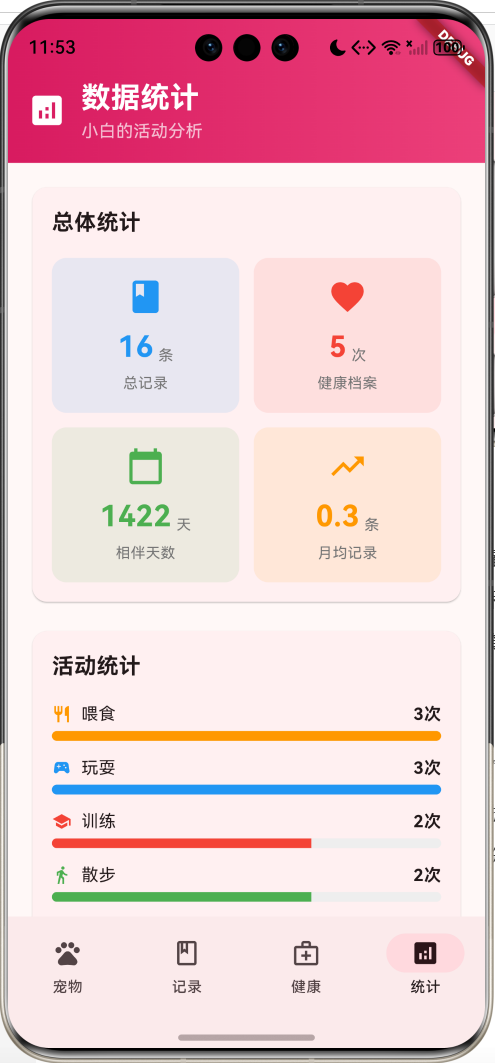
运行效果图
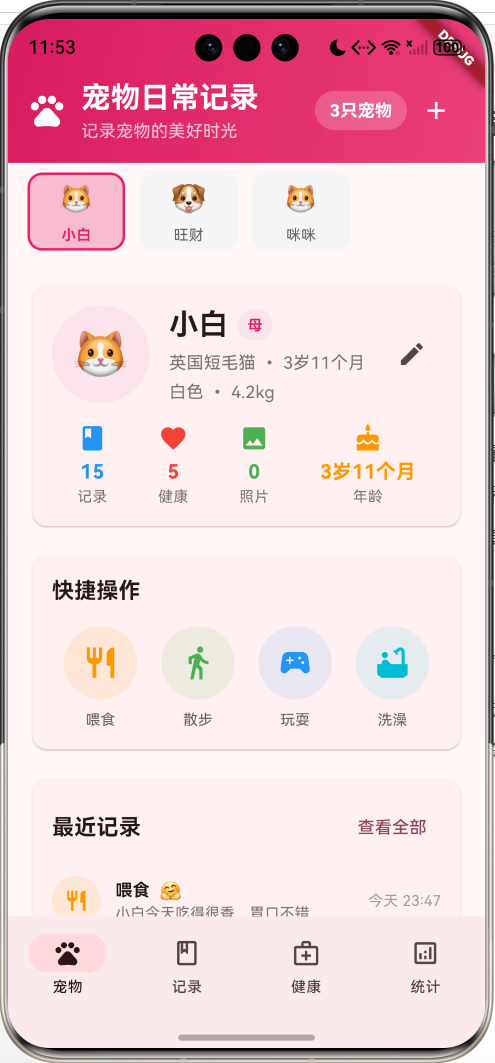
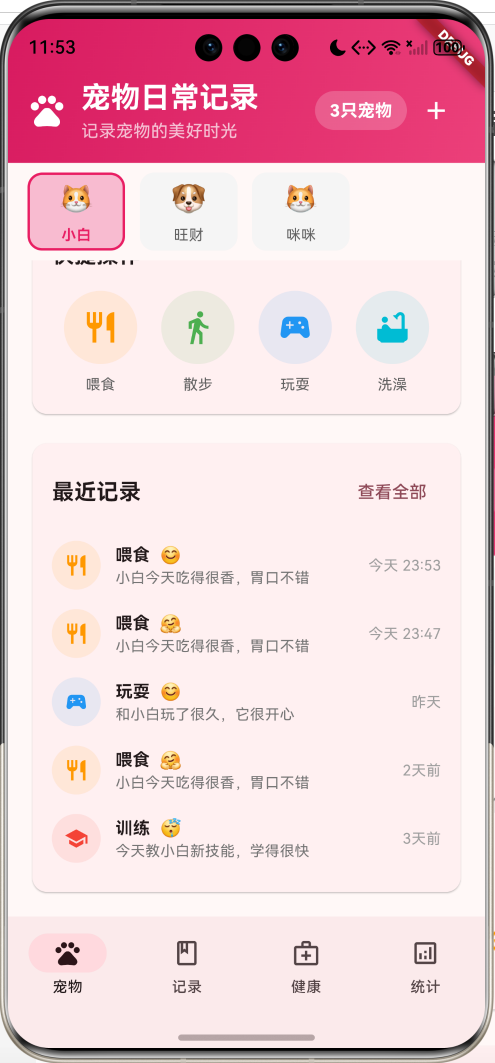
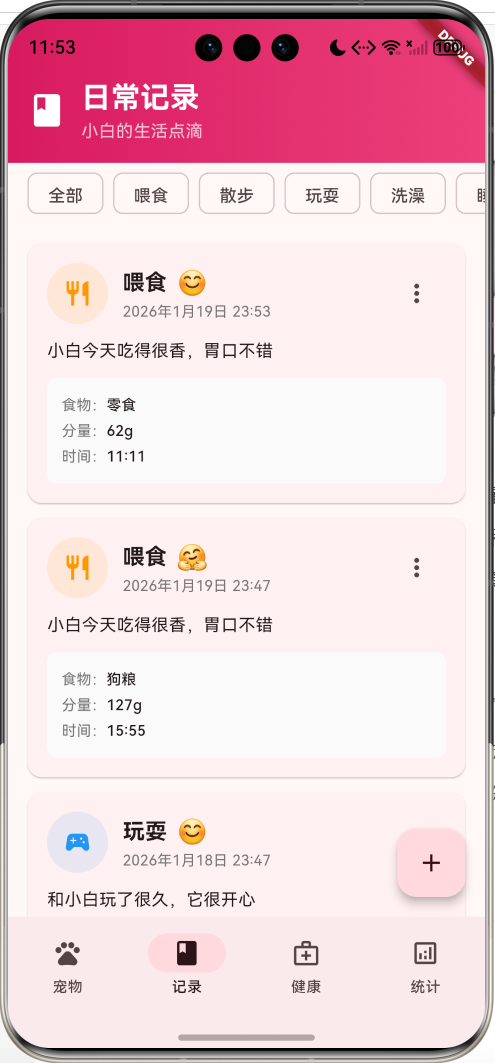
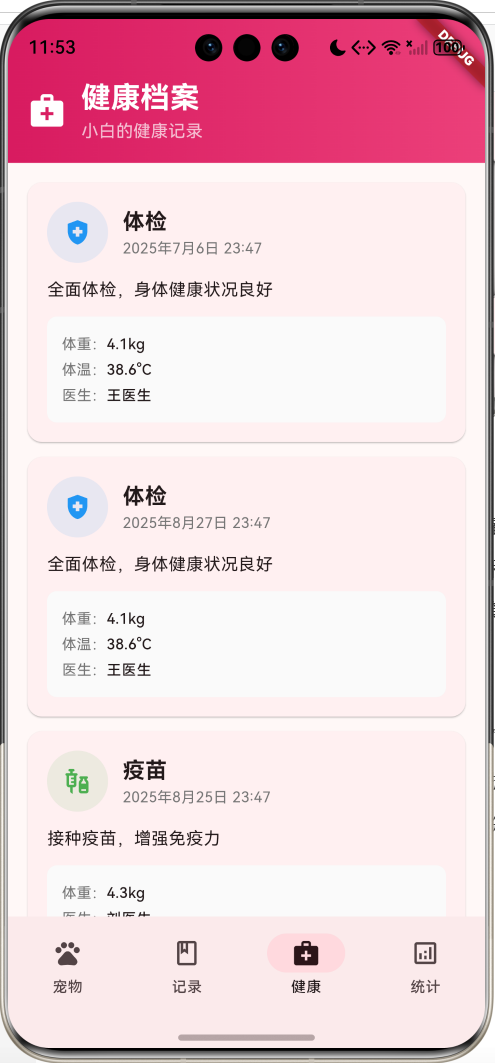
核心特性
- 多宠物管理:支持添加多只宠物,切换查看不同宠物信息
- 宠物档案:详细的宠物基本信息,包括品种、年龄、体重等
- 日常记录:记录喂食、散步、玩耍、洗澡等日常活动
- 快捷操作:一键快速记录常见活动
- 心情记录:为每次记录添加宠物心情表情
- 健康档案:记录体检、疫苗、驱虫等健康信息
- 数据统计:活动统计、健康统计、成长数据分析
- 记录详情:丰富的记录详情,包括时间、分量、天气等
- 渐变设计:温馨的粉色渐变UI设计
技术栈
- Flutter 3.x
- Material Design 3
- 状态管理(setState)
- 日期时间处理
- 数据建模
项目架构
PetHomePage
PetsPage
RecordsPage
HealthPage
StatsPage
AddPetDialog
PetProfile
QuickActions
AddRecordDialog
RecordCard
HealthRecordCard
OverallStats
ActivityStats
HealthStats
Pet Model
DailyRecord Model
HealthRecord Model
数据模型设计
Pet(宠物模型)
dart
class Pet {
  final int id;                      // 宠物ID
  String name;                       // 宠物名字(可修改)
  final String species;              // 种类(猫、狗、鸟等)
  final String breed;                // 品种
  final DateTime birthday;           // 生日
  final String gender;               // 性别(公/母)
  final double weight;               // 体重
  final String color;                // 颜色
  String avatar;                     // 头像表情
  final List<DailyRecord> records;   // 日常记录列表
  final List<HealthRecord> healthRecords; // 健康记录列表
  final List<String> photos;         // 照片列表

  int get ageInMonths;               // 年龄(月数)
  String get ageString;              // 年龄字符串
}设计要点:
- ID用于唯一标识
- name可修改(编辑功能)
- 完整的基本信息记录
- 自动计算年龄
- 关联日常记录和健康记录
DailyRecord(日常记录模型)
dart
class DailyRecord {
  final int id;                      // 记录ID
  final DateTime date;               // 记录日期
  final String type;                 // 记录类型
  final String content;              // 记录内容
  final String? mood;                // 心情表情
  final List<String> photos;         // 照片列表
  final Map<String, dynamic> details; // 详细信息
}记录类型:
- 喂食:食物种类、分量、时间
- 散步:时长、距离、天气
- 玩耍:玩具、时长
- 洗澡:清洁护理
- 睡觉:休息时间
- 训练:技能学习
HealthRecord(健康记录模型)
dart
class HealthRecord {
  final int id;                      // 记录ID
  final DateTime date;               // 记录日期
  final String type;                 // 健康类型
  final String description;          // 描述
  final double? weight;              // 体重
  final double? temperature;         // 体温
  final String? veterinarian;        // 兽医
  final String? medication;          // 用药
  final DateTime? nextVisit;         // 下次复查
}健康类型:
- 体检:全面健康检查
- 疫苗:疫苗接种
- 驱虫:体内外驱虫
- 洗牙:口腔清洁
- 治疗:疾病治疗
宠物种类和图标
| 种类 | 表情 | 常见品种 |
|---|---|---|
| 猫 | 🐱 | 英国短毛猫、波斯猫、暹罗猫 |
| 狗 | 🐶 | 金毛、拉布拉多、泰迪 |
| 鸟 | 🐦 | 鹦鹉、金丝雀、文鸟 |
| 鱼 | 🐠 | 金鱼、锦鲤、热带鱼 |
| 兔 | 🐰 | 垂耳兔、侏儒兔、安哥拉兔 |
核心功能实现
1. 宠物档案管理
宠物档案是应用的核心,展示宠物的基本信息和统计数据。
dart
Widget _buildPetProfile(Pet pet) {
  return Card(
    child: Padding(
      padding: const EdgeInsets.all(16),
      child: Column(
        children: [
          Row(
            children: [
              // 宠物头像
              Container(
                width: 80,
                height: 80,
                decoration: BoxDecoration(
                  color: Colors.pink.shade50,
                  borderRadius: BorderRadius.circular(40),
                ),
                child: Center(
                  child: Text(
                    _getPetAvatar(pet.species),
                    style: const TextStyle(fontSize: 40),
                  ),
                ),
              ),
              const SizedBox(width: 16),
              // 基本信息
              Expanded(
                child: Column(
                  crossAxisAlignment: CrossAxisAlignment.start,
                  children: [
                    Row(
                      children: [
                        Text(pet.name, style: TextStyle(fontSize: 24, fontWeight: FontWeight.bold)),
                        Container(
                          decoration: BoxDecoration(
                            color: pet.gender == '公' ? Colors.blue.shade50 : Colors.pink.shade50,
                            borderRadius: BorderRadius.circular(12),
                          ),
                          child: Text(pet.gender),
                        ),
                      ],
                    ),
                    Text('${pet.breed} • ${pet.ageString}'),
                    Text('${pet.color} • ${pet.weight}kg'),
                  ],
                ),
              ),
            ],
          ),
          // 统计数据
          Row(
            mainAxisAlignment: MainAxisAlignment.spaceAround,
            children: [
              _buildStatItem('记录', '${pet.records.length}', Icons.book, Colors.blue),
              _buildStatItem('健康', '${pet.healthRecords.length}', Icons.favorite, Colors.red),
              _buildStatItem('照片', '${pet.photos.length}', Icons.photo, Colors.green),
              _buildStatItem('年龄', pet.ageString, Icons.cake, Colors.orange),
            ],
          ),
        ],
      ),
    ),
  );
}档案特点:
- 大头像显示宠物种类表情
- 性别标识用不同颜色区分
- 四个关键统计数据
- 自动计算年龄显示
2. 年龄计算
自动计算宠物年龄,支持月龄和年龄显示。
dart
int get ageInMonths {
  final now = DateTime.now();
  return (now.year - birthday.year) * 12 + (now.month - birthday.month);
}

String get ageString {
  final months = ageInMonths;
  if (months < 12) {
    return '$months个月';
  } else {
    final years = months ~/ 12;
    final remainingMonths = months % 12;
    return remainingMonths > 0 ? '$years岁${remainingMonths}个月' : '$years岁';
  }
}年龄显示规则:
- 不满1岁:显示月数(如"8个月")
- 满1岁:显示年岁(如"2岁3个月")
- 整年龄:只显示年数(如"3岁")
3. 快捷操作
提供常用活动的快捷记录功能。
dart
Widget _buildQuickActions() {
  return Card(
    child: Column(
      children: [
        Text('快捷操作', style: TextStyle(fontWeight: FontWeight.bold)),
        Row(
          mainAxisAlignment: MainAxisAlignment.spaceAround,
          children: [
            _buildActionButton('喂食', Icons.restaurant, Colors.orange, () => _quickRecord('喂食')),
            _buildActionButton('散步', Icons.directions_walk, Colors.green, () => _quickRecord('散步')),
            _buildActionButton('玩耍', Icons.sports_esports, Colors.blue, () => _quickRecord('玩耍')),
            _buildActionButton('洗澡', Icons.bathtub, Colors.cyan, () => _quickRecord('洗澡')),
          ],
        ),
      ],
    ),
  );
}

void _quickRecord(String type) {
  if (_selectedPet == null) return;

  setState(() {
    _selectedPet!.records.insert(0, DailyRecord(
      id: _selectedPet!.records.length + 1,
      date: DateTime.now(),
      type: type,
      content: _getRecordContent(type, _selectedPet!.name),
      mood: '😊',
      details: _getRecordDetails(type, Random()),
    ));
  });

  ScaffoldMessenger.of(context).showSnackBar(
    SnackBar(content: Text('$type记录已添加'), backgroundColor: Colors.green),
  );
}快捷操作特点:
- 一键添加常用记录
- 自动生成记录内容
- 随机生成详细信息
- 即时反馈提示
4. 日常记录管理
详细的日常记录功能,支持多种记录类型和丰富的详情信息。
dart
Widget _buildDetailedRecordCard(DailyRecord record) {
  return Card(
    child: Padding(
      padding: const EdgeInsets.all(16),
      child: Column(
        crossAxisAlignment: CrossAxisAlignment.start,
        children: [
          Row(
            children: [
              // 记录类型图标
              Container(
                width: 50,
                height: 50,
                decoration: BoxDecoration(
                  color: _getRecordTypeColor(record.type).withValues(alpha: 0.1),
                  borderRadius: BorderRadius.circular(25),
                ),
                child: Icon(
                  _getRecordTypeIcon(record.type),
                  color: _getRecordTypeColor(record.type),
                  size: 24,
                ),
              ),
              const SizedBox(width: 12),
              // 记录信息
              Expanded(
                child: Column(
                  crossAxisAlignment: CrossAxisAlignment.start,
                  children: [
                    Row(
                      children: [
                        Text(record.type, style: TextStyle(fontSize: 18, fontWeight: FontWeight.bold)),
                        if (record.mood != null) Text(record.mood!, style: TextStyle(fontSize: 20)),
                      ],
                    ),
                    Text(_formatDateTime(record.date)),
                  ],
                ),
              ),
            ],
          ),
          const SizedBox(height: 12),
          Text(record.content),
          if (record.details.isNotEmpty) _buildRecordDetails(record.details),
        ],
      ),
    ),
  );
}记录类型颜色和图标:
dart
Color _getRecordTypeColor(String type) {
  switch (type) {
    case '喂食': return Colors.orange;
    case '散步': return Colors.green;
    case '玩耍': return Colors.blue;
    case '洗澡': return Colors.cyan;
    case '睡觉': return Colors.purple;
    case '训练': return Colors.red;
    default: return Colors.grey;
  }
}

IconData _getRecordTypeIcon(String type) {
  switch (type) {
    case '喂食': return Icons.restaurant;
    case '散步': return Icons.directions_walk;
    case '玩耍': return Icons.sports_esports;
    case '洗澡': return Icons.bathtub;
    case '睡觉': return Icons.bedtime;
    case '训练': return Icons.school;
    default: return Icons.pets;
  }
}
5. 记录详情信息
为不同类型的记录生成相应的详细信息。
dart
static Map<String, dynamic> _getRecordDetails(String type, Random random) {
  switch (type) {
    case '喂食':
      return {
        'food': ['猫粮', '狗粮', '罐头', '零食'][random.nextInt(4)],
        'amount': '${random.nextInt(100) + 50}g',
        'time': '${random.nextInt(12) + 7}:${random.nextInt(60).toString().padLeft(2, '0')}',
      };
    case '散步':
      return {
        'duration': '${random.nextInt(60) + 15}分钟',
        'distance': '${(random.nextDouble() * 2 + 0.5).toStringAsFixed(1)}公里',
        'weather': ['晴天', '多云', '阴天'][random.nextInt(3)],
      };
    case '玩耍':
      return {
        'toy': ['球', '绳子', '老鼠玩具', '飞盘'][random.nextInt(4)],
        'duration': '${random.nextInt(45) + 15}分钟',
      };
    default:
      return {};
  }
}

Widget _buildRecordDetails(Map<String, dynamic> details) {
  return Container(
    padding: const EdgeInsets.all(12),
    decoration: BoxDecoration(
      color: Colors.grey.shade50,
      borderRadius: BorderRadius.circular(8),
    ),
    child: Column(
      children: details.entries.map((entry) {
        return Row(
          children: [
            Text('${_getDetailLabel(entry.key)}:'),
            Text(entry.value.toString(), style: TextStyle(fontWeight: FontWeight.w500)),
          ],
        );
      }).toList(),
    ),
  );
}详情信息类型:
- 喂食:食物类型、分量、时间
- 散步:时长、距离、天气
- 玩耍:玩具类型、时长
- 洗澡:清洁用品、时长
- 睡觉:睡眠时长、地点
- 训练:训练内容、进度
6. 健康档案管理
专门的健康记录管理,包含医疗信息和复查提醒。
dart
Widget _buildHealthRecordCard(HealthRecord record) {
  return Card(
    child: Padding(
      padding: const EdgeInsets.all(16),
      child: Column(
        children: [
          Row(
            children: [
              Container(
                decoration: BoxDecoration(
                  color: _getHealthTypeColor(record.type).withValues(alpha: 0.1),
                  borderRadius: BorderRadius.circular(25),
                ),
                child: Icon(_getHealthTypeIcon(record.type)),
              ),
              Expanded(
                child: Column(
                  children: [
                    Text(record.type, style: TextStyle(fontWeight: FontWeight.bold)),
                    Text(_formatDateTime(record.date)),
                  ],
                ),
              ),
            ],
          ),
          Text(record.description),
          _buildHealthDetails(record),
          // 复查提醒
          if (record.nextVisit != null)
            Container(
              decoration: BoxDecoration(
                color: Colors.orange.shade50,
                borderRadius: BorderRadius.circular(8),
              ),
              child: Row(
                children: [
                  Icon(Icons.schedule, color: Colors.orange),
                  Text('下次复查:${_formatDateTime(record.nextVisit!)}'),
                ],
              ),
            ),
        ],
      ),
    ),
  );
}健康记录详情:
dart
Widget _buildHealthDetails(HealthRecord record) {
  final details = <String, String>{};

  if (record.weight != null) details['体重'] = '${record.weight!.toStringAsFixed(1)}kg';
  if (record.temperature != null) details['体温'] = '${record.temperature!.toStringAsFixed(1)}°C';
  if (record.veterinarian != null) details['医生'] = record.veterinarian!;
  if (record.medication != null) details['用药'] = record.medication!;

  return Container(
    child: Column(
      children: details.entries.map((entry) {
        return Row(
          children: [
            Text('${entry.key}:'),
            Text(entry.value, style: TextStyle(fontWeight: FontWeight.w500)),
          ],
        );
      }).toList(),
    ),
  );
}
7. 数据统计分析
提供多维度的数据统计,帮助了解宠物的活动规律和健康状况。
dart
Widget _buildOverallStats() {
  final totalRecords = _selectedPet!.records.length;
  final totalHealth = _selectedPet!.healthRecords.length;
  final daysWithPet = DateTime.now().difference(_selectedPet!.birthday).inDays;
  final avgRecordsPerDay = totalRecords > 0 ? (totalRecords / daysWithPet * 30).toStringAsFixed(1) : '0';

  return Card(
    child: Column(
      children: [
        Text('总体统计', style: TextStyle(fontWeight: FontWeight.bold)),
        Row(
          children: [
            _buildStatCard('总记录', '$totalRecords', '条', Icons.book, Colors.blue),
            _buildStatCard('健康档案', '$totalHealth', '次', Icons.favorite, Colors.red),
          ],
        ),
        Row(
          children: [
            _buildStatCard('相伴天数', '$daysWithPet', '天', Icons.calendar_today, Colors.green),
            _buildStatCard('月均记录', avgRecordsPerDay, '条', Icons.trending_up, Colors.orange),
          ],
        ),
      ],
    ),
  );
}活动统计分析:
dart
Widget _buildActivityStats() {
  final activityStats = <String, int>{};
  for (final record in _selectedPet!.records) {
    activityStats[record.type] = (activityStats[record.type] ?? 0) + 1;
  }

  return Card(
    child: Column(
      children: [
        Text('活动统计', style: TextStyle(fontWeight: FontWeight.bold)),
        ...activityStats.entries.map((entry) {
          final maxValue = activityStats.values.reduce((a, b) => a > b ? a : b);
          final percentage = entry.value / maxValue;
          return Column(
            children: [
              Row(
                children: [
                  Icon(_getRecordTypeIcon(entry.key)),
                  Text(entry.key),
                  Spacer(),
                  Text('${entry.value}次'),
                ],
              ),
              LinearProgressIndicator(
                value: percentage,
                backgroundColor: Colors.grey.shade200,
                valueColor: AlwaysStoppedAnimation(_getRecordTypeColor(entry.key)),
              ),
            ],
          );
        }),
      ],
    ),
  );
}健康统计分析:
dart
Widget _buildHealthStats() {
  final healthStats = <String, int>{};
  for (final record in _selectedPet!.healthRecords) {
    healthStats[record.type] = (healthStats[record.type] ?? 0) + 1;
  }

  final latestWeight = _selectedPet!.healthRecords
      .where((r) => r.weight != null)
      .fold<HealthRecord?>(null, (latest, current) {
    if (latest == null || current.date.isAfter(latest.date)) {
      return current;
    }
    return latest;
  });

  return Card(
    child: Column(
      children: [
        Text('健康统计', style: TextStyle(fontWeight: FontWeight.bold)),
        if (latestWeight != null)
          Row(
            children: [
              Container(
                child: Column(
                  children: [
                    Icon(Icons.monitor_weight, color: Colors.blue),
                    Text('${latestWeight.weight!.toStringAsFixed(1)}kg'),
                    Text('最新体重'),
                  ],
                ),
              ),
              Container(
                child: Column(
                  children: [
                    Icon(Icons.health_and_safety, color: Colors.green),
                    Text('${healthStats.length}'),
                    Text('健康项目'),
                  ],
                ),
              ),
            ],
          ),
        ...healthStats.entries.map((entry) {
          return Row(
            children: [
              Icon(_getHealthTypeIcon(entry.key)),
              Text(entry.key),
              Spacer(),
              Text('${entry.value}次'),
            ],
          );
        }),
      ],
    ),
  );
}
8. 添加宠物功能
支持添加新宠物,包含完整的基本信息录入。
dart
void _showAddPetDialog() {
  final nameController = TextEditingController();
  final breedController = TextEditingController();
  final weightController = TextEditingController();
  String selectedSpecies = '猫';
  String selectedGender = '公';
  String selectedColor = '白色';

  showDialog(
    context: context,
    builder: (context) {
      return StatefulBuilder(
        builder: (context, setDialogState) {
          return AlertDialog(
            title: Text('添加宠物'),
            content: SingleChildScrollView(
              child: Column(
                children: [
                  TextField(
                    controller: nameController,
                    decoration: InputDecoration(labelText: '宠物名字'),
                  ),
                  Row(
                    children: [
                      DropdownButtonFormField<String>(
                        value: selectedSpecies,
                        decoration: InputDecoration(labelText: '种类'),
                        items: ['猫', '狗', '鸟', '鱼', '兔'].map((species) {
                          return DropdownMenuItem(value: species, child: Text(species));
                        }).toList(),
                        onChanged: (value) {
                          setDialogState(() { selectedSpecies = value!; });
                        },
                      ),
                      DropdownButtonFormField<String>(
                        value: selectedGender,
                        decoration: InputDecoration(labelText: '性别'),
                        items: ['公', '母'].map((gender) {
                          return DropdownMenuItem(value: gender, child: Text(gender));
                        }).toList(),
                        onChanged: (value) {
                          setDialogState(() { selectedGender = value!; });
                        },
                      ),
                    ],
                  ),
                  TextField(
                    controller: breedController,
                    decoration: InputDecoration(labelText: '品种'),
                  ),
                  Row(
                    children: [
                      TextField(
                        controller: weightController,
                        keyboardType: TextInputType.number,
                        decoration: InputDecoration(labelText: '体重(kg)'),
                      ),
                      DropdownButtonFormField<String>(
                        value: selectedColor,
                        decoration: InputDecoration(labelText: '颜色'),
                        items: ['白色', '黑色', '棕色', '灰色', '金黄色', '花色'].map((color) {
                          return DropdownMenuItem(value: color, child: Text(color));
                        }).toList(),
                        onChanged: (value) {
                          setDialogState(() { selectedColor = value!; });
                        },
                      ),
                    ],
                  ),
                ],
              ),
            ),
            actions: [
              TextButton(onPressed: () => Navigator.pop(context), child: Text('取消')),
              ElevatedButton(
                onPressed: () {
                  if (nameController.text.isNotEmpty) {
                    setState(() {
                      final newPet = Pet(
                        id: _pets.length + 1,
                        name: nameController.text,
                        species: selectedSpecies,
                        breed: breedController.text,
                        birthday: DateTime.now().subtract(Duration(days: 365)),
                        gender: selectedGender,
                        weight: double.tryParse(weightController.text) ?? 0.0,
                        color: selectedColor,
                        avatar: _getPetAvatar(selectedSpecies),
                      );
                      _pets.add(newPet);
                      _selectedPet = newPet;
                    });
                    Navigator.pop(context);
                  }
                },
                child: Text('添加'),
              ),
            ],
          );
        },
      );
    },
  );
}添加宠物特点:
- 完整的基本信息录入
- 下拉菜单选择种类、性别、颜色
- 数字输入体重
- 自动设置头像表情
- 表单验证和错误处理
9. 添加记录功能
支持添加详细的日常记录,包含记录类型、内容和心情。
dart
void _showAddRecordDialog() {
  if (_selectedPet == null) return;

  final contentController = TextEditingController();
  String selectedType = '喂食';
  String selectedMood = '😊';

  showDialog(
    context: context,
    builder: (context) {
      return StatefulBuilder(
        builder: (context, setDialogState) {
          return AlertDialog(
            title: Text('添加记录'),
            content: SingleChildScrollView(
              child: Column(
                children: [
                  // 记录类型选择
                  DropdownButtonFormField<String>(
                    value: selectedType,
                    decoration: InputDecoration(labelText: '记录类型'),
                    items: ['喂食', '散步', '玩耍', '洗澡', '睡觉', '训练'].map((type) {
                      return DropdownMenuItem(
                        value: type,
                        child: Row(
                          children: [
                            Icon(_getRecordTypeIcon(type), size: 20),
                            Text(type),
                          ],
                        ),
                      );
                    }).toList(),
                    onChanged: (value) {
                      setDialogState(() { selectedType = value!; });
                    },
                  ),
                  // 记录内容输入
                  TextField(
                    controller: contentController,
                    maxLines: 3,
                    decoration: InputDecoration(
                      labelText: '记录内容',
                      hintText: '描述一下今天的情况...',
                    ),
                  ),
                  // 心情选择
                  Row(
                    children: [
                      Text('心情:'),
                      ...['😊', '😴', '🥰', '😋', '🤗', '😢'].map((mood) {
                        return GestureDetector(
                          onTap: () {
                            setDialogState(() { selectedMood = mood; });
                          },
                          child: Container(
                            decoration: BoxDecoration(
                              color: selectedMood == mood ? Colors.pink.shade100 : Colors.transparent,
                              borderRadius: BorderRadius.circular(8),
                            ),
                            child: Text(mood, style: TextStyle(fontSize: 20)),
                          ),
                        );
                      }),
                    ],
                  ),
                ],
              ),
            ),
            actions: [
              TextButton(onPressed: () => Navigator.pop(context), child: Text('取消')),
              ElevatedButton(
                onPressed: () {
                  if (contentController.text.isNotEmpty) {
                    setState(() {
                      _selectedPet!.records.insert(0, DailyRecord(
                        id: _selectedPet!.records.length + 1,
                        date: DateTime.now(),
                        type: selectedType,
                        content: contentController.text,
                        mood: selectedMood,
                      ));
                    });
                    Navigator.pop(context);
                  }
                },
                child: Text('添加'),
              ),
            ],
          );
        },
      );
    },
  );
}
10. 时间格式化
智能的时间显示,根据时间差显示不同格式。
dart
String _formatTime(DateTime date) {
  final now = DateTime.now();
  final difference = now.difference(date);

  if (difference.inDays == 0) {
    return '今天 ${date.hour.toString().padLeft(2, '0')}:${date.minute.toString().padLeft(2, '0')}';
  } else if (difference.inDays == 1) {
    return '昨天';
  } else if (difference.inDays < 7) {
    return '${difference.inDays}天前';
  } else {
    return '${date.month}月${date.day}日';
  }
}

String _formatDateTime(DateTime date) {
  return '${date.year}年${date.month}月${date.day}日 ${date.hour.toString().padLeft(2, '0')}:${date.minute.toString().padLeft(2, '0')}';
}时间显示规则:
- 今天:显示"今天 HH:MM"
- 昨天:显示"昨天"
- 一周内:显示"X天前"
- 更早:显示"MM月DD日"
- 详细时间:显示完整日期时间
UI组件设计
1. 渐变头部
dart
Container(
  padding: const EdgeInsets.fromLTRB(16, 48, 16, 16),
  decoration: BoxDecoration(
    gradient: LinearGradient(
      colors: [Colors.pink.shade600, Colors.pink.shade400],
      begin: Alignment.topLeft,
      end: Alignment.bottomRight,
    ),
  ),
  child: Row(
    children: [
      Icon(Icons.pets, color: Colors.white, size: 32),
      Column(
        children: [
          Text('宠物日常记录', style: TextStyle(color: Colors.white, fontSize: 24)),
          Text('记录宠物的美好时光', style: TextStyle(color: Colors.white70)),
        ],
      ),
      Container(
        decoration: BoxDecoration(
          color: Colors.white.withValues(alpha: 0.2),
          borderRadius: BorderRadius.circular(16),
        ),
        child: Text('${_pets.length}只宠物', style: TextStyle(color: Colors.white)),
      ),
    ],
  ),
)
2. 宠物选择器
dart
Widget _buildPetSelector() {
  return Container(
    height: 80,
    child: ListView.builder(
      scrollDirection: Axis.horizontal,
      itemCount: _pets.length,
      itemBuilder: (context, index) {
        final pet = _pets[index];
        final isSelected = pet.id == _selectedPet?.id;

        return GestureDetector(
          onTap: () { setState(() { _selectedPet = pet; }); },
          child: Container(
            decoration: BoxDecoration(
              color: isSelected ? Colors.pink.shade100 : Colors.grey.shade100,
              borderRadius: BorderRadius.circular(12),
              border: isSelected ? Border.all(color: Colors.pink, width: 2) : null,
            ),
            child: Column(
              children: [
                Text(_getPetAvatar(pet.species), style: TextStyle(fontSize: 24)),
                Text(pet.name, style: TextStyle(
                  fontWeight: isSelected ? FontWeight.bold : FontWeight.normal,
                  color: isSelected ? Colors.pink : Colors.grey.shade700,
                )),
              ],
            ),
          ),
        );
      },
    ),
  );
}
3. 统计卡片
dart
Widget _buildStatCard(String label, String value, String unit, IconData icon, Color color) {
  return Container(
    decoration: BoxDecoration(
      color: color.withValues(alpha: 0.1),
      borderRadius: BorderRadius.circular(12),
    ),
    child: Column(
      children: [
        Icon(icon, color: color, size: 32),
        Row(
          children: [
            Text(value, style: TextStyle(fontSize: 24, fontWeight: FontWeight.bold, color: color)),
            Text(unit, style: TextStyle(fontSize: 12, color: Colors.grey)),
          ],
        ),
        Text(label, style: TextStyle(fontSize: 12, color: Colors.grey)),
      ],
    ),
  );
}
4. NavigationBar底部导航
dart
NavigationBar(
  selectedIndex: _selectedIndex,
  onDestinationSelected: (index) {
    setState(() { _selectedIndex = index; });
  },
  destinations: const [
    NavigationDestination(
      icon: Icon(Icons.pets_outlined),
      selectedIcon: Icon(Icons.pets),
      label: '宠物',
    ),
    NavigationDestination(
      icon: Icon(Icons.book_outlined),
      selectedIcon: Icon(Icons.book),
      label: '记录',
    ),
    NavigationDestination(
      icon: Icon(Icons.medical_services_outlined),
      selectedIcon: Icon(Icons.medical_services),
      label: '健康',
    ),
    NavigationDestination(
      icon: Icon(Icons.analytics_outlined),
      selectedIcon: Icon(Icons.analytics),
      label: '统计',
    ),
  ],
)
功能扩展建议
1. 照片管理
添加宠物照片上传和管理功能。
dart
import 'package:image_picker/image_picker.dart';
import 'dart:io';

class PhotoManager {
  static final ImagePicker _picker = ImagePicker();

  // 拍照或选择照片
  static Future<String?> pickImage() async {
    final XFile? image = await _picker.pickImage(
      source: ImageSource.gallery,
      maxWidth: 1024,
      maxHeight: 1024,
      imageQuality: 80,
    );

    if (image != null) {
      return image.path;
    }
    return null;
  }

  // 拍照
  static Future<String?> takePhoto() async {
    final XFile? image = await _picker.pickImage(
      source: ImageSource.camera,
      maxWidth: 1024,
      maxHeight: 1024,
      imageQuality: 80,
    );

    if (image != null) {
      return image.path;
    }
    return null;
  }
}

// 照片网格显示
class PhotoGrid extends StatelessWidget {
  final List<String> photos;
  final Function(String) onPhotoTap;

  @override
  Widget build(BuildContext context) {
    return GridView.builder(
      gridDelegate: SliverGridDelegateWithFixedCrossAxisCount(
        crossAxisCount: 3,
        crossAxisSpacing: 8,
        mainAxisSpacing: 8,
      ),
      itemCount: photos.length + 1,
      itemBuilder: (context, index) {
        if (index == photos.length) {
          return GestureDetector(
            onTap: () async {
              final imagePath = await PhotoManager.pickImage();
              if (imagePath != null) {
                onPhotoTap(imagePath);
              }
            },
            child: Container(
              decoration: BoxDecoration(
                color: Colors.grey.shade200,
                borderRadius: BorderRadius.circular(8),
              ),
              child: Icon(Icons.add_a_photo, color: Colors.grey),
            ),
          );
        }

        return GestureDetector(
          onTap: () => _showPhotoDetail(context, photos[index]),
          child: ClipRRect(
            borderRadius: BorderRadius.circular(8),
            child: Image.file(
              File(photos[index]),
              fit: BoxFit.cover,
            ),
          ),
        );
      },
    );
  }

  void _showPhotoDetail(BuildContext context, String photoPath) {
    showDialog(
      context: context,
      builder: (context) {
        return Dialog(
          child: Column(
            mainAxisSize: MainAxisSize.min,
            children: [
              Image.file(File(photoPath)),
              Row(
                mainAxisAlignment: MainAxisAlignment.spaceEvenly,
                children: [
                  TextButton(
                    onPressed: () => Navigator.pop(context),
                    child: Text('关闭'),
                  ),
                  TextButton(
                    onPressed: () {
                      // 删除照片
                      Navigator.pop(context);
                    },
                    child: Text('删除', style: TextStyle(color: Colors.red)),
                  ),
                ],
              ),
            ],
          ),
        );
      },
    );
  }
}

// 在记录中添加照片
void _addPhotoToRecord(DailyRecord record) async {
  final imagePath = await PhotoManager.pickImage();
  if (imagePath != null) {
    setState(() {
      record.photos.add(imagePath);
    });
  }
}
2. 提醒功能
设置喂食、用药、体检等提醒。
dart
import 'package:flutter_local_notifications/flutter_local_notifications.dart';

class ReminderService {
  static final FlutterLocalNotificationsPlugin _notifications =
      FlutterLocalNotificationsPlugin();

  static Future<void> init() async {
    const androidSettings = AndroidInitializationSettings('@mipmap/ic_launcher');
    const iosSettings = DarwinInitializationSettings();
    const settings = InitializationSettings(
      android: androidSettings,
      iOS: iosSettings,
    );

    await _notifications.initialize(settings);
  }

  // 设置喂食提醒
  static Future<void> setFeedingReminder({
    required Pet pet,
    required List<TimeOfDay> feedingTimes,
  }) async {
    for (int i = 0; i < feedingTimes.length; i++) {
      final time = feedingTimes[i];
      await _notifications.zonedSchedule(
        pet.id * 100 + i,
        '喂食提醒',
        '该给${pet.name}喂食了',
        _nextInstanceOfTime(time),
        NotificationDetails(
          android: AndroidNotificationDetails(
            'feeding_reminder',
            '喂食提醒',
            importance: Importance.high,
            priority: Priority.high,
          ),
        ),
        androidScheduleMode: AndroidScheduleMode.exactAllowWhileIdle,
        uiLocalNotificationDateInterpretation:
            UILocalNotificationDateInterpretation.absoluteTime,
        matchDateTimeComponents: DateTimeComponents.time,
      );
    }
  }

  // 设置用药提醒
  static Future<void> setMedicationReminder({
    required Pet pet,
    required String medication,
    required TimeOfDay time,
    required int durationDays,
  }) async {
    for (int i = 0; i < durationDays; i++) {
      final scheduledDate = DateTime.now().add(Duration(days: i));
      await _notifications.zonedSchedule(
        pet.id * 1000 + i,
        '用药提醒',
        '${pet.name}该服用${medication}了',
        TZDateTime.from(
          DateTime(scheduledDate.year, scheduledDate.month, scheduledDate.day,
                  time.hour, time.minute),
          local,
        ),
        NotificationDetails(
          android: AndroidNotificationDetails(
            'medication_reminder',
            '用药提醒',
            importance: Importance.high,
            priority: Priority.high,
          ),
        ),
        androidScheduleMode: AndroidScheduleMode.exactAllowWhileIdle,
        uiLocalNotificationDateInterpretation:
            UILocalNotificationDateInterpretation.absoluteTime,
      );
    }
  }

  // 设置体检提醒
  static Future<void> setCheckupReminder({
    required Pet pet,
    required DateTime checkupDate,
  }) async {
    await _notifications.zonedSchedule(
      pet.id * 10000,
      '体检提醒',
      '${pet.name}该去体检了',
      TZDateTime.from(checkupDate, local),
      NotificationDetails(
        android: AndroidNotificationDetails(
          'checkup_reminder',
          '体检提醒',
          importance: Importance.high,
          priority: Priority.high,
        ),
      ),
      androidScheduleMode: AndroidScheduleMode.exactAllowWhileIdle,
      uiLocalNotificationDateInterpretation:
          UILocalNotificationDateInterpretation.absoluteTime,
    );
  }
}

// 提醒设置页面
class ReminderSettingsPage extends StatefulWidget {
  final Pet pet;

  @override
  State<ReminderSettingsPage> createState() => _ReminderSettingsPageState();
}

class _ReminderSettingsPageState extends State<ReminderSettingsPage> {
  List<TimeOfDay> _feedingTimes = [
    TimeOfDay(hour: 8, minute: 0),
    TimeOfDay(hour: 18, minute: 0),
  ];

  @override
  Widget build(BuildContext context) {
    return Scaffold(
      appBar: AppBar(title: Text('${widget.pet.name}的提醒设置')),
      body: ListView(
        children: [
          ListTile(
            leading: Icon(Icons.restaurant),
            title: Text('喂食提醒'),
            subtitle: Text('${_feedingTimes.length}个时间点'),
            trailing: Icon(Icons.arrow_forward_ios),
            onTap: _showFeedingTimesDialog,
          ),
          ListTile(
            leading: Icon(Icons.medical_services),
            title: Text('用药提醒'),
            trailing: Icon(Icons.arrow_forward_ios),
            onTap: _showMedicationDialog,
          ),
          ListTile(
            leading: Icon(Icons.health_and_safety),
            title: Text('体检提醒'),
            trailing: Icon(Icons.arrow_forward_ios),
            onTap: _showCheckupDialog,
          ),
        ],
      ),
    );
  }

  void _showFeedingTimesDialog() {
    showDialog(
      context: context,
      builder: (context) {
        return AlertDialog(
          title: Text('喂食时间'),
          content: Column(
            mainAxisSize: MainAxisSize.min,
            children: [
              ..._feedingTimes.asMap().entries.map((entry) {
                final index = entry.key;
                final time = entry.value;
                return ListTile(
                  title: Text('${time.hour.toString().padLeft(2, '0')}:${time.minute.toString().padLeft(2, '0')}'),
                  trailing: IconButton(
                    icon: Icon(Icons.delete),
                    onPressed: () {
                      setState(() {
                        _feedingTimes.removeAt(index);
                      });
                      Navigator.pop(context);
                    },
                  ),
                  onTap: () async {
                    final newTime = await showTimePicker(
                      context: context,
                      initialTime: time,
                    );
                    if (newTime != null) {
                      setState(() {
                        _feedingTimes[index] = newTime;
                      });
                      Navigator.pop(context);
                    }
                  },
                );
              }),
              ListTile(
                leading: Icon(Icons.add),
                title: Text('添加时间'),
                onTap: () async {
                  final time = await showTimePicker(
                    context: context,
                    initialTime: TimeOfDay.now(),
                  );
                  if (time != null) {
                    setState(() {
                      _feedingTimes.add(time);
                    });
                    Navigator.pop(context);
                  }
                },
              ),
            ],
          ),
          actions: [
            TextButton(
              onPressed: () => Navigator.pop(context),
              child: Text('取消'),
            ),
            ElevatedButton(
              onPressed: () {
                ReminderService.setFeedingReminder(
                  pet: widget.pet,
                  feedingTimes: _feedingTimes,
                );
                Navigator.pop(context);
                ScaffoldMessenger.of(context).showSnackBar(
                  SnackBar(content: Text('喂食提醒已设置')),
                );
              },
              child: Text('保存'),
            ),
          ],
        );
      },
    );
  }
}
3. 数据同步
支持云端数据同步和备份。
dart
import 'package:cloud_firestore/cloud_firestore.dart';
import 'package:firebase_auth/firebase_auth.dart';

class CloudSyncService {
  static final FirebaseFirestore _firestore = FirebaseFirestore.instance;
  static final FirebaseAuth _auth = FirebaseAuth.instance;

  // 上传宠物数据
  static Future<void> uploadPetData(Pet pet) async {
    final user = _auth.currentUser;
    if (user == null) return;

    await _firestore
        .collection('users')
        .doc(user.uid)
        .collection('pets')
        .doc(pet.id.toString())
        .set({
      'name': pet.name,
      'species': pet.species,
      'breed': pet.breed,
      'birthday': pet.birthday.toIso8601String(),
      'gender': pet.gender,
      'weight': pet.weight,
      'color': pet.color,
      'avatar': pet.avatar,
      'updatedAt': FieldValue.serverTimestamp(),
    });
  }

  // 上传记录数据
  static Future<void> uploadRecords(Pet pet) async {
    final user = _auth.currentUser;
    if (user == null) return;

    final batch = _firestore.batch();

    for (final record in pet.records) {
      final docRef = _firestore
          .collection('users')
          .doc(user.uid)
          .collection('pets')
          .doc(pet.id.toString())
          .collection('records')
          .doc(record.id.toString());

      batch.set(docRef, {
        'date': record.date.toIso8601String(),
        'type': record.type,
        'content': record.content,
        'mood': record.mood,
        'details': record.details,
        'photos': record.photos,
      });
    }

    await batch.commit();
  }

  // 下载宠物数据
  static Future<List<Pet>> downloadPetData() async {
    final user = _auth.currentUser;
    if (user == null) return [];

    final snapshot = await _firestore
        .collection('users')
        .doc(user.uid)
        .collection('pets')
        .get();

    final pets = <Pet>[];

    for (final doc in snapshot.docs) {
      final data = doc.data();
      final pet = Pet(
        id: int.parse(doc.id),
        name: data['name'],
        species: data['species'],
        breed: data['breed'],
        birthday: DateTime.parse(data['birthday']),
        gender: data['gender'],
        weight: data['weight'].toDouble(),
        color: data['color'],
        avatar: data['avatar'],
      );

      // 下载记录
      final recordsSnapshot = await doc.reference.collection('records').get();
      for (final recordDoc in recordsSnapshot.docs) {
        final recordData = recordDoc.data();
        pet.records.add(DailyRecord(
          id: int.parse(recordDoc.id),
          date: DateTime.parse(recordData['date']),
          type: recordData['type'],
          content: recordData['content'],
          mood: recordData['mood'],
          details: Map<String, dynamic>.from(recordData['details'] ?? {}),
          photos: List<String>.from(recordData['photos'] ?? []),
        ));
      }

      pets.add(pet);
    }

    return pets;
  }

  // 自动同步
  static Future<void> autoSync(List<Pet> pets) async {
    try {
      for (final pet in pets) {
        await uploadPetData(pet);
        await uploadRecords(pet);
      }
    } catch (e) {
      print('同步失败: $e');
    }
  }
}

// 同步状态指示器
class SyncIndicator extends StatefulWidget {
  @override
  State<SyncIndicator> createState() => _SyncIndicatorState();
}

class _SyncIndicatorState extends State<SyncIndicator> {
  bool _isSyncing = false;
  DateTime? _lastSyncTime;

  @override
  Widget build(BuildContext context) {
    return Row(
      children: [
        if (_isSyncing)
          SizedBox(
            width: 16,
            height: 16,
            child: CircularProgressIndicator(strokeWidth: 2),
          )
        else
          Icon(
            Icons.cloud_done,
            size: 16,
            color: _lastSyncTime != null ? Colors.green : Colors.grey,
          ),
        SizedBox(width: 4),
        Text(
          _lastSyncTime != null
              ? '已同步 ${_formatSyncTime(_lastSyncTime!)}'
              : '未同步',
          style: TextStyle(fontSize: 12, color: Colors.grey),
        ),
      ],
    );
  }

  String _formatSyncTime(DateTime time) {
    final now = DateTime.now();
    final difference = now.difference(time);

    if (difference.inMinutes < 1) {
      return '刚刚';
    } else if (difference.inHours < 1) {
      return '${difference.inMinutes}分钟前';
    } else if (difference.inDays < 1) {
      return '${difference.inHours}小时前';
    } else {
      return '${difference.inDays}天前';
    }
  }
}
4. 体重追踪
添加体重变化趋势图表。
dart
import 'package:fl_chart/fl_chart.dart';

class WeightTracker extends StatelessWidget {
  final Pet pet;

  const WeightTracker({required this.pet});

  @override
  Widget build(BuildContext context) {
    final weightRecords = pet.healthRecords
        .where((r) => r.weight != null)
        .toList()
        ..sort((a, b) => a.date.compareTo(b.date));

    if (weightRecords.isEmpty) {
      return Card(
        child: Padding(
          padding: EdgeInsets.all(32),
          child: Center(
            child: Text('暂无体重记录'),
          ),
        ),
      );
    }

    return Card(
      child: Padding(
        padding: EdgeInsets.all(16),
        child: Column(
          crossAxisAlignment: CrossAxisAlignment.start,
          children: [
            Text('体重变化', style: TextStyle(fontSize: 18, fontWeight: FontWeight.bold)),
            SizedBox(height: 16),
            SizedBox(
              height: 200,
              child: LineChart(
                LineChartData(
                  lineBarsData: [
                    LineChartBarData(
                      spots: weightRecords.asMap().entries.map((entry) {
                        return FlSpot(
                          entry.key.toDouble(),
                          entry.value.weight!,
                        );
                      }).toList(),
                      isCurved: true,
                      color: Colors.pink,
                      barWidth: 3,
                      dotData: FlDotData(show: true),
                      belowBarData: BarAreaData(
                        show: true,
                        color: Colors.pink.withValues(alpha: 0.1),
                      ),
                    ),
                  ],
                  titlesData: FlTitlesData(
                    bottomTitles: AxisTitles(
                      sideTitles: SideTitles(
                        showTitles: true,
                        getTitlesWidget: (value, meta) {
                          final index = value.toInt();
                          if (index >= 0 && index < weightRecords.length) {
                            final date = weightRecords[index].date;
                            return Text('${date.month}/${date.day}');
                          }
                          return Text('');
                        },
                      ),
                    ),
                    leftTitles: AxisTitles(
                      sideTitles: SideTitles(
                        showTitles: true,
                        getTitlesWidget: (value, meta) {
                          return Text('${value.toStringAsFixed(1)}kg');
                        },
                      ),
                    ),
                    topTitles: AxisTitles(sideTitles: SideTitles(showTitles: false)),
                    rightTitles: AxisTitles(sideTitles: SideTitles(showTitles: false)),
                  ),
                  gridData: FlGridData(show: true),
                  borderData: FlBorderData(show: true),
                ),
              ),
            ),
            SizedBox(height: 16),
            _buildWeightStats(weightRecords),
          ],
        ),
      ),
    );
  }

  Widget _buildWeightStats(List<HealthRecord> records) {
    final currentWeight = records.last.weight!;
    final initialWeight = records.first.weight!;
    final weightChange = currentWeight - initialWeight;
    final changePercentage = (weightChange / initialWeight * 100);

    return Row(
      mainAxisAlignment: MainAxisAlignment.spaceAround,
      children: [
        Column(
          children: [
            Text('当前体重', style: TextStyle(color: Colors.grey)),
            Text('${currentWeight.toStringAsFixed(1)}kg',
                 style: TextStyle(fontSize: 20, fontWeight: FontWeight.bold)),
          ],
        ),
        Column(
          children: [
            Text('体重变化', style: TextStyle(color: Colors.grey)),
            Text(
              '${weightChange >= 0 ? '+' : ''}${weightChange.toStringAsFixed(1)}kg',
              style: TextStyle(
                fontSize: 20,
                fontWeight: FontWeight.bold,
                color: weightChange >= 0 ? Colors.green : Colors.red,
              ),
            ),
          ],
        ),
        Column(
          children: [
            Text('变化率', style: TextStyle(color: Colors.grey)),
            Text(
              '${changePercentage >= 0 ? '+' : ''}${changePercentage.toStringAsFixed(1)}%',
              style: TextStyle(
                fontSize: 20,
                fontWeight: FontWeight.bold,
                color: changePercentage >= 0 ? Colors.green : Colors.red,
              ),
            ),
          ],
        ),
      ],
    );
  }
}

// 添加体重记录
class AddWeightDialog extends StatefulWidget {
  final Pet pet;
  final Function(double) onWeightAdded;

  @override
  State<AddWeightDialog> createState() => _AddWeightDialogState();
}

class _AddWeightDialogState extends State<AddWeightDialog> {
  final _weightController = TextEditingController();
  DateTime _selectedDate = DateTime.now();

  @override
  Widget build(BuildContext context) {
    return AlertDialog(
      title: Text('记录体重'),
      content: Column(
        mainAxisSize: MainAxisSize.min,
        children: [
          TextField(
            controller: _weightController,
            keyboardType: TextInputType.numberWithOptions(decimal: true),
            decoration: InputDecoration(
              labelText: '体重(kg)',
              border: OutlineInputBorder(),
            ),
          ),
          SizedBox(height: 16),
          ListTile(
            leading: Icon(Icons.calendar_today),
            title: Text('记录日期'),
            subtitle: Text('${_selectedDate.year}年${_selectedDate.month}月${_selectedDate.day}日'),
            onTap: () async {
              final date = await showDatePicker(
                context: context,
                initialDate: _selectedDate,
                firstDate: DateTime.now().subtract(Duration(days: 365)),
                lastDate: DateTime.now(),
              );
              if (date != null) {
                setState(() {
                  _selectedDate = date;
                });
              }
            },
          ),
        ],
      ),
      actions: [
        TextButton(
          onPressed: () => Navigator.pop(context),
          child: Text('取消'),
        ),
        ElevatedButton(
          onPressed: () {
            final weight = double.tryParse(_weightController.text);
            if (weight != null && weight > 0) {
              widget.onWeightAdded(weight);
              Navigator.pop(context);
            }
          },
          child: Text('保存'),
        ),
      ],
    );
  }
}
5. 疫苗管理
专门的疫苗接种管理和提醒。
dart
class Vaccine {
  final String name;
  final DateTime dueDate;
  final DateTime? completedDate;
  final bool isRequired;
  final String description;

  Vaccine({
    required this.name,
    required this.dueDate,
    this.completedDate,
    required this.isRequired,
    required this.description,
  });

  bool get isOverdue => completedDate == null && DateTime.now().isAfter(dueDate);
  bool get isCompleted => completedDate != null;
  bool get isDueSoon => !isCompleted &&
      DateTime.now().difference(dueDate).inDays.abs() <= 7;
}

class VaccineManager extends StatefulWidget {
  final Pet pet;

  @override
  State<VaccineManager> createState() => _VaccineManagerState();
}

class _VaccineManagerState extends State<VaccineManager> {
  List<Vaccine> _vaccines = [];

  @override
  void initState() {
    super.initState();
    _generateVaccineSchedule();
  }

  void _generateVaccineSchedule() {
    final ageInMonths = widget.pet.ageInMonths;
    final birthday = widget.pet.birthday;

    _vaccines = [
      // 幼犬/幼猫疫苗
      if (widget.pet.species == '狗') ...[
        Vaccine(
          name: '六联疫苗(第一针)',
          dueDate: birthday.add(Duration(days: 45)),
          isRequired: true,
          description: '预防犬瘟热、细小病毒等',
        ),
        Vaccine(
          name: '六联疫苗(第二针)',
          dueDate: birthday.add(Duration(days: 66)),
          isRequired: true,
          description: '加强免疫',
        ),
        Vaccine(
          name: '狂犬疫苗',
          dueDate: birthday.add(Duration(days: 90)),
          isRequired: true,
          description: '预防狂犬病',
        ),
      ],
      if (widget.pet.species == '猫') ...[
        Vaccine(
          name: '三联疫苗(第一针)',
          dueDate: birthday.add(Duration(days: 60)),
          isRequired: true,
          description: '预防猫瘟、猫鼻支等',
        ),
        Vaccine(
          name: '三联疫苗(第二针)',
          dueDate: birthday.add(Duration(days: 84)),
          isRequired: true,
          description: '加强免疫',
        ),
        Vaccine(
          name: '狂犬疫苗',
          dueDate: birthday.add(Duration(days: 90)),
          isRequired: true,
          description: '预防狂犬病',
        ),
      ],
      // 年度疫苗
      for (int year = 1; year <= 10; year++)
        Vaccine(
          name: '年度疫苗($year岁)',
          dueDate: birthday.add(Duration(days: 365 * year)),
          isRequired: true,
          description: '年度免疫加强',
        ),
    ];

    // 检查已完成的疫苗
    for (final healthRecord in widget.pet.healthRecords) {
      if (healthRecord.type == '疫苗') {
        final vaccine = _vaccines.firstWhere(
          (v) => v.name.contains('疫苗') &&
                 v.dueDate.difference(healthRecord.date).inDays.abs() <= 30,
          orElse: () => _vaccines.first,
        );
        _vaccines[_vaccines.indexOf(vaccine)] = Vaccine(
          name: vaccine.name,
          dueDate: vaccine.dueDate,
          completedDate: healthRecord.date,
          isRequired: vaccine.isRequired,
          description: vaccine.description,
        );
      }
    }
  }

  @override
  Widget build(BuildContext context) {
    final overdueVaccines = _vaccines.where((v) => v.isOverdue).toList();
    final dueSoonVaccines = _vaccines.where((v) => v.isDueSoon).toList();
    final completedVaccines = _vaccines.where((v) => v.isCompleted).toList();
    final upcomingVaccines = _vaccines.where((v) =>
        !v.isCompleted && !v.isOverdue && !v.isDueSoon).toList();

    return Scaffold(
      appBar: AppBar(title: Text('${widget.pet.name}的疫苗管理')),
      body: ListView(
        padding: EdgeInsets.all(16),
        children: [
          if (overdueVaccines.isNotEmpty) ...[
            _buildVaccineSection('逾期疫苗', overdueVaccines, Colors.red),
            SizedBox(height: 16),
          ],
          if (dueSoonVaccines.isNotEmpty) ...[
            _buildVaccineSection('即将到期', dueSoonVaccines, Colors.orange),
            SizedBox(height: 16),
          ],
          if (upcomingVaccines.isNotEmpty) ...[
            _buildVaccineSection('计划疫苗', upcomingVaccines, Colors.blue),
            SizedBox(height: 16),
          ],
          if (completedVaccines.isNotEmpty) ...[
            _buildVaccineSection('已完成', completedVaccines, Colors.green),
          ],
        ],
      ),
    );
  }

  Widget _buildVaccineSection(String title, List<Vaccine> vaccines, Color color) {
    return Card(
      child: Padding(
        padding: EdgeInsets.all(16),
        child: Column(
          crossAxisAlignment: CrossAxisAlignment.start,
          children: [
            Row(
              children: [
                Icon(Icons.vaccines, color: color),
                SizedBox(width: 8),
                Text(title, style: TextStyle(fontSize: 18, fontWeight: FontWeight.bold)),
                Spacer(),
                Container(
                  padding: EdgeInsets.symmetric(horizontal: 8, vertical: 4),
                  decoration: BoxDecoration(
                    color: color.withValues(alpha: 0.1),
                    borderRadius: BorderRadius.circular(12),
                  ),
                  child: Text('${vaccines.length}', style: TextStyle(color: color)),
                ),
              ],
            ),
            SizedBox(height: 12),
            ...vaccines.map((vaccine) => _buildVaccineItem(vaccine, color)),
          ],
        ),
      ),
    );
  }

  Widget _buildVaccineItem(Vaccine vaccine, Color color) {
    return Padding(
      padding: EdgeInsets.symmetric(vertical: 8),
      child: Row(
        children: [
          Icon(
            vaccine.isCompleted ? Icons.check_circle : Icons.schedule,
            color: color,
            size: 20,
          ),
          SizedBox(width: 12),
          Expanded(
            child: Column(
              crossAxisAlignment: CrossAxisAlignment.start,
              children: [
                Text(vaccine.name, style: TextStyle(fontWeight: FontWeight.w500)),
                Text(
                  vaccine.isCompleted
                      ? '已完成:${_formatDate(vaccine.completedDate!)}'
                      : '计划日期:${_formatDate(vaccine.dueDate)}',
                  style: TextStyle(fontSize: 12, color: Colors.grey),
                ),
                Text(vaccine.description, style: TextStyle(fontSize: 12, color: Colors.grey)),
              ],
            ),
          ),
          if (!vaccine.isCompleted)
            ElevatedButton(
              onPressed: () => _markAsCompleted(vaccine),
              style: ElevatedButton.styleFrom(
                backgroundColor: color,
                foregroundColor: Colors.white,
              ),
              child: Text('完成'),
            ),
        ],
      ),
    );
  }

  void _markAsCompleted(Vaccine vaccine) {
    showDialog(
      context: context,
      builder: (context) {
        DateTime selectedDate = DateTime.now();
        return AlertDialog(
          title: Text('标记为已完成'),
          content: Column(
            mainAxisSize: MainAxisSize.min,
            children: [
              Text('疫苗:${vaccine.name}'),
              SizedBox(height: 16),
              ListTile(
                leading: Icon(Icons.calendar_today),
                title: Text('接种日期'),
                subtitle: Text('${selectedDate.year}年${selectedDate.month}月${selectedDate.day}日'),
                onTap: () async {
                  final date = await showDatePicker(
                    context: context,
                    initialDate: selectedDate,
                    firstDate: DateTime.now().subtract(Duration(days: 30)),
                    lastDate: DateTime.now(),
                  );
                  if (date != null) {
                    selectedDate = date;
                  }
                },
              ),
            ],
          ),
          actions: [
            TextButton(
              onPressed: () => Navigator.pop(context),
              child: Text('取消'),
            ),
            ElevatedButton(
              onPressed: () {
                setState(() {
                  final index = _vaccines.indexOf(vaccine);
                  _vaccines[index] = Vaccine(
                    name: vaccine.name,
                    dueDate: vaccine.dueDate,
                    completedDate: selectedDate,
                    isRequired: vaccine.isRequired,
                    description: vaccine.description,
                  );
                });

                // 添加到健康记录
                widget.pet.healthRecords.add(HealthRecord(
                  id: widget.pet.healthRecords.length + 1,
                  date: selectedDate,
                  type: '疫苗',
                  description: vaccine.name,
                  veterinarian: '兽医',
                ));

                Navigator.pop(context);
                ScaffoldMessenger.of(context).showSnackBar(
                  SnackBar(content: Text('疫苗记录已更新')),
                );
              },
              child: Text('确认'),
            ),
          ],
        );
      },
    );
  }

  String _formatDate(DateTime date) {
    return '${date.year}年${date.month}月${date.day}日';
  }
}
6. 社交分享
分享宠物照片和成长记录到社交平台。
dart
import 'package:share_plus/share_plus.dart';
import 'dart:io';
import 'dart:typed_data';
import 'dart:ui' as ui;
import 'package:flutter/rendering.dart';

class SocialShareService {
  // 分享宠物档案
  static Future<void> sharePetProfile(Pet pet) async {
    final text = '''
🐾 我的宠物档案 🐾

名字:${pet.name}
品种:${pet.breed}
年龄:${pet.ageString}
性别:${pet.gender}
体重:${pet.weight}kg

已记录 ${pet.records.length} 条日常记录
健康档案 ${pet.healthRecords.length} 次

#宠物日记 #${pet.species}咪 #宠物生活
    ''';

    await Share.share(text);
  }

  // 分享记录
  static Future<void> shareRecord(Pet pet, DailyRecord record) async {
    final text = '''
📝 ${pet.name}的${record.type}记录

${record.content}

时间:${_formatDateTime(record.date)}
心情:${record.mood ?? '😊'}

#宠物日记 #${pet.name} #${record.type}
    ''';

    if (record.photos.isNotEmpty) {
      await Share.shareXFiles(
        record.photos.map((path) => XFile(path)).toList(),
        text: text,
      );
    } else {
      await Share.share(text);
    }
  }

  // 生成分享图片
  static Future<void> generateShareImage(Pet pet, DailyRecord record) async {
    // 创建分享卡片Widget
    final shareCard = ShareCard(pet: pet, record: record);

    // 转换为图片
    final imageBytes = await _widgetToImage(shareCard);

    // 保存临时文件
    final tempDir = await getTemporaryDirectory();
    final file = File('${tempDir.path}/share_${DateTime.now().millisecondsSinceEpoch}.png');
    await file.writeAsBytes(imageBytes);

    // 分享图片
    await Share.shareXFiles([XFile(file.path)]);
  }

  static Future<Uint8List> _widgetToImage(Widget widget) async {
    final repaintBoundary = RenderRepaintBoundary();
    final renderView = RenderView(
      child: RenderPositionedBox(
        alignment: Alignment.center,
        child: repaintBoundary,
      ),
      configuration: ViewConfiguration.fromView(ui.window),
      window: ui.window,
    );

    final pipelineOwner = PipelineOwner();
    final buildOwner = BuildOwner(focusManager: FocusManager());

    pipelineOwner.rootNode = renderView;
    renderView.prepareInitialFrame();

    final rootElement = RenderObjectToWidgetAdapter<RenderBox>(
      container: repaintBoundary,
      child: widget,
    ).attachToRenderTree(buildOwner);

    buildOwner.buildScope(rootElement);
    buildOwner.finalizeTree();
    pipelineOwner.flushLayout();
    pipelineOwner.flushCompositingBits();
    pipelineOwner.flushPaint();

    final image = await repaintBoundary.toImage(pixelRatio: 2.0);
    final byteData = await image.toByteData(format: ui.ImageByteFormat.png);

    return byteData!.buffer.asUint8List();
  }

  static String _formatDateTime(DateTime date) {
    return '${date.year}年${date.month}月${date.day}日 ${date.hour.toString().padLeft(2, '0')}:${date.minute.toString().padLeft(2, '0')}';
  }
}

// 分享卡片Widget
class ShareCard extends StatelessWidget {
  final Pet pet;
  final DailyRecord record;

  const ShareCard({required this.pet, required this.record});

  @override
  Widget build(BuildContext context) {
    return Container(
      width: 400,
      height: 600,
      decoration: BoxDecoration(
        gradient: LinearGradient(
          colors: [Colors.pink.shade400, Colors.pink.shade600],
          begin: Alignment.topLeft,
          end: Alignment.bottomRight,
        ),
      ),
      child: Padding(
        padding: EdgeInsets.all(24),
        child: Column(
          children: [
            // 头部
            Row(
              children: [
                Container(
                  width: 60,
                  height: 60,
                  decoration: BoxDecoration(
                    color: Colors.white,
                    borderRadius: BorderRadius.circular(30),
                  ),
                  child: Center(
                    child: Text(
                      _getPetAvatar(pet.species),
                      style: TextStyle(fontSize: 30),
                    ),
                  ),
                ),
                SizedBox(width: 16),
                Expanded(
                  child: Column(
                    crossAxisAlignment: CrossAxisAlignment.start,
                    children: [
                      Text(
                        pet.name,
                        style: TextStyle(
                          fontSize: 24,
                          fontWeight: FontWeight.bold,
                          color: Colors.white,
                        ),
                      ),
                      Text(
                        '${pet.breed} • ${pet.ageString}',
                        style: TextStyle(
                          fontSize: 14,
                          color: Colors.white70,
                        ),
                      ),
                    ],
                  ),
                ),
              ],
            ),
            SizedBox(height: 32),

            // 记录内容
            Container(
              padding: EdgeInsets.all(20),
              decoration: BoxDecoration(
                color: Colors.white,
                borderRadius: BorderRadius.circular(16),
              ),
              child: Column(
                crossAxisAlignment: CrossAxisAlignment.start,
                children: [
                  Row(
                    children: [
                      Icon(
                        _getRecordTypeIcon(record.type),
                        color: _getRecordTypeColor(record.type),
                      ),
                      SizedBox(width: 8),
                      Text(
                        record.type,
                        style: TextStyle(
                          fontSize: 18,
                          fontWeight: FontWeight.bold,
                        ),
                      ),
                      Spacer(),
                      if (record.mood != null)
                        Text(
                          record.mood!,
                          style: TextStyle(fontSize: 24),
                        ),
                    ],
                  ),
                  SizedBox(height: 12),
                  Text(
                    record.content,
                    style: TextStyle(fontSize: 16),
                  ),
                  SizedBox(height: 12),
                  Text(
                    SocialShareService._formatDateTime(record.date),
                    style: TextStyle(
                      fontSize: 12,
                      color: Colors.grey,
                    ),
                  ),
                ],
              ),
            ),

            Spacer(),

            // 底部标识
            Row(
              mainAxisAlignment: MainAxisAlignment.center,
              children: [
                Icon(Icons.pets, color: Colors.white70, size: 16),
                SizedBox(width: 8),
                Text(
                  '宠物日常记录',
                  style: TextStyle(
                    color: Colors.white70,
                    fontSize: 14,
                  ),
                ),
              ],
            ),
          ],
        ),
      ),
    );
  }

  String _getPetAvatar(String species) {
    switch (species) {
      case '猫': return '🐱';
      case '狗': return '🐶';
      case '鸟': return '🐦';
      case '鱼': return '🐠';
      case '兔': return '🐰';
      default: return '🐾';
    }
  }

  IconData _getRecordTypeIcon(String type) {
    switch (type) {
      case '喂食': return Icons.restaurant;
      case '散步': return Icons.directions_walk;
      case '玩耍': return Icons.sports_esports;
      case '洗澡': return Icons.bathtub;
      case '睡觉': return Icons.bedtime;
      case '训练': return Icons.school;
      default: return Icons.pets;
    }
  }

  Color _getRecordTypeColor(String type) {
    switch (type) {
      case '喂食': return Colors.orange;
      case '散步': return Colors.green;
      case '玩耍': return Colors.blue;
      case '洗澡': return Colors.cyan;
      case '睡觉': return Colors.purple;
      case '训练': return Colors.red;
      default: return Colors.grey;
    }
  }
}

// 分享按钮组件
class ShareButton extends StatelessWidget {
  final Pet pet;
  final DailyRecord? record;

  const ShareButton({required this.pet, this.record});

  @override
  Widget build(BuildContext context) {
    return PopupMenuButton<String>(
      icon: Icon(Icons.share),
      onSelected: (value) async {
        switch (value) {
          case 'profile':
            await SocialShareService.sharePetProfile(pet);
            break;
          case 'record':
            if (record != null) {
              await SocialShareService.shareRecord(pet, record!);
            }
            break;
          case 'image':
            if (record != null) {
              await SocialShareService.generateShareImage(pet, record!);
            }
            break;
        }
      },
      itemBuilder: (context) => [
        PopupMenuItem(
          value: 'profile',
          child: Row(
            children: [
              Icon(Icons.pets),
              SizedBox(width: 8),
              Text('分享宠物档案'),
            ],
          ),
        ),
        if (record != null) ...[
          PopupMenuItem(
            value: 'record',
            child: Row(
              children: [
                Icon(Icons.book),
                SizedBox(width: 8),
                Text('分享记录'),
              ],
            ),
          ),
          PopupMenuItem(
            value: 'image',
            child: Row(
              children: [
                Icon(Icons.image),
                SizedBox(width: 8),
                Text('生成分享图片'),
              ],
            ),
          ),
        ],
      ],
    );
  }
}
7. 数据导出
导出宠物数据为PDF报告。
dart
import 'package:pdf/pdf.dart';
import 'package:pdf/widgets.dart' as pw;
import 'package:printing/printing.dart';

class PetReportGenerator {
  static Future<void> generatePetReport(Pet pet) async {
    final pdf = pw.Document();

    pdf.addPage(
      pw.MultiPage(
        pageFormat: PdfPageFormat.a4,
        build: (context) => [
          _buildHeader(pet),
          pw.SizedBox(height: 20),
          _buildBasicInfo(pet),
          pw.SizedBox(height: 20),
          _buildRecordsSummary(pet),
          pw.SizedBox(height: 20),
          _buildHealthSummary(pet),
          pw.SizedBox(height: 20),
          _buildRecentRecords(pet),
        ],
      ),
    );

    await Printing.layoutPdf(
      onLayout: (format) async => pdf.save(),
      name: '${pet.name}的宠物报告',
    );
  }

  static pw.Widget _buildHeader(Pet pet) {
    return pw.Container(
      padding: pw.EdgeInsets.all(20),
      decoration: pw.BoxDecoration(
        color: PdfColors.pink100,
        borderRadius: pw.BorderRadius.circular(10),
      ),
      child: pw.Row(
        children: [
          pw.Container(
            width: 60,
            height: 60,
            decoration: pw.BoxDecoration(
              color: PdfColors.white,
              borderRadius: pw.BorderRadius.circular(30),
            ),
            child: pw.Center(
              child: pw.Text(
                _getPetEmoji(pet.species),
                style: pw.TextStyle(fontSize: 30),
              ),
            ),
          ),
          pw.SizedBox(width: 20),
          pw.Expanded(
            child: pw.Column(
              crossAxisAlignment: pw.CrossAxisAlignment.start,
              children: [
                pw.Text(
                  '${pet.name}的宠物报告',
                  style: pw.TextStyle(
                    fontSize: 24,
                    fontWeight: pw.FontWeight.bold,
                  ),
                ),
                pw.Text(
                  '生成时间:${DateTime.now().toString().split('.')[0]}',
                  style: pw.TextStyle(fontSize: 12, color: PdfColors.grey700),
                ),
              ],
            ),
          ),
        ],
      ),
    );
  }

  static pw.Widget _buildBasicInfo(Pet pet) {
    return pw.Container(
      padding: pw.EdgeInsets.all(16),
      decoration: pw.BoxDecoration(
        border: pw.Border.all(color: PdfColors.grey300),
        borderRadius: pw.BorderRadius.circular(8),
      ),
      child: pw.Column(
        crossAxisAlignment: pw.CrossAxisAlignment.start,
        children: [
          pw.Text(
            '基本信息',
            style: pw.TextStyle(fontSize: 18, fontWeight: pw.FontWeight.bold),
          ),
          pw.SizedBox(height: 12),
          pw.Row(
            children: [
              pw.Expanded(
                child: pw.Column(
                  crossAxisAlignment: pw.CrossAxisAlignment.start,
                  children: [
                    _buildInfoRow('姓名', pet.name),
                    _buildInfoRow('种类', pet.species),
                    _buildInfoRow('品种', pet.breed),
                  ],
                ),
              ),
              pw.Expanded(
                child: pw.Column(
                  crossAxisAlignment: pw.CrossAxisAlignment.start,
                  children: [
                    _buildInfoRow('性别', pet.gender),
                    _buildInfoRow('年龄', pet.ageString),
                    _buildInfoRow('体重', '${pet.weight}kg'),
                  ],
                ),
              ),
            ],
          ),
        ],
      ),
    );
  }

  static pw.Widget _buildInfoRow(String label, String value) {
    return pw.Padding(
      padding: pw.EdgeInsets.symmetric(vertical: 4),
      child: pw.Row(
        children: [
          pw.SizedBox(
            width: 60,
            child: pw.Text(
              '$label:',
              style: pw.TextStyle(color: PdfColors.grey600),
            ),
          ),
          pw.Text(
            value,
            style: pw.TextStyle(fontWeight: pw.FontWeight.bold),
          ),
        ],
      ),
    );
  }

  static pw.Widget _buildRecordsSummary(Pet pet) {
    final activityStats = <String, int>{};
    for (final record in pet.records) {
      activityStats[record.type] = (activityStats[record.type] ?? 0) + 1;
    }

    return pw.Container(
      padding: pw.EdgeInsets.all(16),
      decoration: pw.BoxDecoration(
        border: pw.Border.all(color: PdfColors.grey300),
        borderRadius: pw.BorderRadius.circular(8),
      ),
      child: pw.Column(
        crossAxisAlignment: pw.CrossAxisAlignment.start,
        children: [
          pw.Text(
            '活动统计',
            style: pw.TextStyle(fontSize: 18, fontWeight: pw.FontWeight.bold),
          ),
          pw.SizedBox(height: 12),
          pw.Text('总记录数:${pet.records.length}'),
          pw.SizedBox(height: 8),
          ...activityStats.entries.map((entry) {
            return pw.Padding(
              padding: pw.EdgeInsets.symmetric(vertical: 2),
              child: pw.Row(
                mainAxisAlignment: pw.MainAxisAlignment.spaceBetween,
                children: [
                  pw.Text(entry.key),
                  pw.Text('${entry.value}次'),
                ],
              ),
            );
          }),
        ],
      ),
    );
  }

  static pw.Widget _buildHealthSummary(Pet pet) {
    return pw.Container(
      padding: pw.EdgeInsets.all(16),
      decoration: pw.BoxDecoration(
        border: pw.Border.all(color: PdfColors.grey300),
        borderRadius: pw.BorderRadius.circular(8),
      ),
      child: pw.Column(
        crossAxisAlignment: pw.CrossAxisAlignment.start,
        children: [
          pw.Text(
            '健康档案',
            style: pw.TextStyle(fontSize: 18, fontWeight: pw.FontWeight.bold),
          ),
          pw.SizedBox(height: 12),
          pw.Text('健康记录数:${pet.healthRecords.length}'),
          pw.SizedBox(height: 8),
          ...pet.healthRecords.take(5).map((record) {
            return pw.Padding(
              padding: pw.EdgeInsets.symmetric(vertical: 4),
              child: pw.Row(
                children: [
                  pw.SizedBox(
                    width: 80,
                    child: pw.Text(record.type),
                  ),
                  pw.Expanded(
                    child: pw.Text(record.description),
                  ),
                  pw.Text(
                    '${record.date.month}/${record.date.day}',
                    style: pw.TextStyle(color: PdfColors.grey600),
                  ),
                ],
              ),
            );
          }),
        ],
      ),
    );
  }

  static pw.Widget _buildRecentRecords(Pet pet) {
    final recentRecords = pet.records.take(10).toList();

    return pw.Container(
      padding: pw.EdgeInsets.all(16),
      decoration: pw.BoxDecoration(
        border: pw.Border.all(color: PdfColors.grey300),
        borderRadius: pw.BorderRadius.circular(8),
      ),
      child: pw.Column(
        crossAxisAlignment: pw.CrossAxisAlignment.start,
        children: [
          pw.Text(
            '最近记录',
            style: pw.TextStyle(fontSize: 18, fontWeight: pw.FontWeight.bold),
          ),
          pw.SizedBox(height: 12),
          ...recentRecords.map((record) {
            return pw.Padding(
              padding: pw.EdgeInsets.symmetric(vertical: 6),
              child: pw.Column(
                crossAxisAlignment: pw.CrossAxisAlignment.start,
                children: [
                  pw.Row(
                    mainAxisAlignment: pw.MainAxisAlignment.spaceBetween,
                    children: [
                      pw.Text(
                        record.type,
                        style: pw.TextStyle(fontWeight: pw.FontWeight.bold),
                      ),
                      pw.Text(
                        '${record.date.month}/${record.date.day} ${record.date.hour}:${record.date.minute.toString().padLeft(2, '0')}',
                        style: pw.TextStyle(color: PdfColors.grey600),
                      ),
                    ],
                  ),
                  pw.SizedBox(height: 4),
                  pw.Text(
                    record.content,
                    style: pw.TextStyle(fontSize: 12),
                  ),
                ],
              ),
            );
          }),
        ],
      ),
    );
  }

  static String _getPetEmoji(String species) {
    switch (species) {
      case '猫': return '🐱';
      case '狗': return '🐶';
      case '鸟': return '🐦';
      case '鱼': return '🐠';
      case '兔': return '🐰';
      default: return '🐾';
    }
  }
}
8. 智能分析
基于记录数据提供智能分析和建议。
dart
class PetAnalyzer {
  // 分析宠物活动模式
  static Map<String, dynamic> analyzeActivityPattern(Pet pet) {
    final records = pet.records;
    if (records.isEmpty) return {};

    // 按小时统计活动
    final hourlyActivity = <int, int>{};
    for (final record in records) {
      final hour = record.date.hour;
      hourlyActivity[hour] = (hourlyActivity[hour] ?? 0) + 1;
    }

    // 找出最活跃的时间段
    final mostActiveHour = hourlyActivity.entries
        .reduce((a, b) => a.value > b.value ? a : b)
        .key;

    // 按类型统计
    final typeStats = <String, int>{};
    for (final record in records) {
      typeStats[record.type] = (typeStats[record.type] ?? 0) + 1;
    }

    final mostFrequentActivity = typeStats.entries
        .reduce((a, b) => a.value > b.value ? a : b)
        .key;

    // 计算活动频率
    final daysWithRecords = records.map((r) =>
        DateTime(r.date.year, r.date.month, r.date.day)).toSet().length;
    final avgRecordsPerDay = records.length / daysWithRecords;

    return {
      'mostActiveHour': mostActiveHour,
      'mostFrequentActivity': mostFrequentActivity,
      'avgRecordsPerDay': avgRecordsPerDay,
      'totalActiveDays': daysWithRecords,
      'hourlyActivity': hourlyActivity,
      'typeStats': typeStats,
    };
  }

  // 健康状况分析
  static Map<String, dynamic> analyzeHealthStatus(Pet pet) {
    final healthRecords = pet.healthRecords;
    if (healthRecords.isEmpty) return {};

    // 体重变化趋势
    final weightRecords = healthRecords
        .where((r) => r.weight != null)
        .toList()
        ..sort((a, b) => a.date.compareTo(b.date));

    String weightTrend = 'stable';
    if (weightRecords.length >= 2) {
      final firstWeight = weightRecords.first.weight!;
      final lastWeight = weightRecords.last.weight!;
      final change = lastWeight - firstWeight;

      if (change > 0.5) {
        weightTrend = 'increasing';
      } else if (change < -0.5) {
        weightTrend = 'decreasing';
      }
    }

    // 疫苗接种状态
    final vaccineRecords = healthRecords.where((r) => r.type == '疫苗').length;
    final lastVaccine = healthRecords
        .where((r) => r.type == '疫苗')
        .fold<HealthRecord?>(null, (latest, current) {
      if (latest == null || current.date.isAfter(latest.date)) {
        return current;
      }
      return latest;
    });

    final daysSinceLastVaccine = lastVaccine != null
        ? DateTime.now().difference(lastVaccine.date).inDays
        : null;

    // 体检频率
    final checkupRecords = healthRecords.where((r) => r.type == '体检').length;
    final ageInMonths = pet.ageInMonths;
    final recommendedCheckups = ageInMonths < 12 ? 4 : 2; // 幼宠更频繁

    return {
      'weightTrend': weightTrend,
      'vaccineCount': vaccineRecords,
      'daysSinceLastVaccine': daysSinceLastVaccine,
      'checkupCount': checkupRecords,
      'checkupStatus': checkupRecords >= recommendedCheckups ? 'good' : 'needs_attention',
      'lastCheckup': healthRecords
          .where((r) => r.type == '体检')
          .fold<DateTime?>(null, (latest, current) {
        if (latest == null || current.date.isAfter(latest)) {
          return current.date;
        }
        return latest;
      }),
    };
  }

  // 生成个性化建议
  static List<String> generateRecommendations(Pet pet) {
    final recommendations = <String>[];
    final activityAnalysis = analyzeActivityPattern(pet);
    final healthAnalysis = analyzeHealthStatus(pet);

    // 活动建议
    if (activityAnalysis['avgRecordsPerDay'] != null) {
      final avgRecords = activityAnalysis['avgRecordsPerDay'] as double;
      if (avgRecords < 2) {
        recommendations.add('建议增加与${pet.name}的互动时间,每天至少记录2-3次活动');
      }
    }

    final typeStats = activityAnalysis['typeStats'] as Map<String, int>?;
    if (typeStats != null) {
      if ((typeStats['散步'] ?? 0) < (typeStats['喂食'] ?? 0) * 0.5) {
        recommendations.add('${pet.name}需要更多运动,建议增加散步频率');
      }

      if ((typeStats['玩耍'] ?? 0) < 5) {
        recommendations.add('多与${pet.name}玩耍可以增进感情,建议每周至少玩耍5次');
      }
    }

    // 健康建议
    if (healthAnalysis['daysSinceLastVaccine'] != null) {
      final days = healthAnalysis['daysSinceLastVaccine'] as int;
      if (days > 365) {
        recommendations.add('${pet.name}的疫苗可能需要更新,建议咨询兽医');
      }
    }

    if (healthAnalysis['checkupStatus'] == 'needs_attention') {
      recommendations.add('建议定期带${pet.name}进行健康体检,幼宠每3个月一次,成年宠物每6个月一次');
    }

    final weightTrend = healthAnalysis['weightTrend'] as String?;
    if (weightTrend == 'increasing') {
      recommendations.add('${pet.name}的体重有上升趋势,注意控制饮食和增加运动');
    } else if (weightTrend == 'decreasing') {
      recommendations.add('${pet.name}的体重有下降趋势,建议咨询兽医检查健康状况');
    }

    // 年龄相关建议
    if (pet.ageInMonths < 6) {
      recommendations.add('${pet.name}还是幼宠,需要更多关注和频繁的健康检查');
    } else if (pet.ageInMonths > 84) { // 7岁以上
      recommendations.add('${pet.name}已进入老年期,建议增加健康监测频率');
    }

    return recommendations;
  }
}

// 智能分析页面
class PetAnalysisPage extends StatelessWidget {
  final Pet pet;

  const PetAnalysisPage({required this.pet});

  @override
  Widget build(BuildContext context) {
    final activityAnalysis = PetAnalyzer.analyzeActivityPattern(pet);
    final healthAnalysis = PetAnalyzer.analyzeHealthStatus(pet);
    final recommendations = PetAnalyzer.generateRecommendations(pet);

    return Scaffold(
      appBar: AppBar(title: Text('${pet.name}的智能分析')),
      body: ListView(
        padding: EdgeInsets.all(16),
        children: [
          _buildActivityAnalysis(activityAnalysis),
          SizedBox(height: 16),
          _buildHealthAnalysis(healthAnalysis),
          SizedBox(height: 16),
          _buildRecommendations(recommendations),
        ],
      ),
    );
  }

  Widget _buildActivityAnalysis(Map<String, dynamic> analysis) {
    return Card(
      child: Padding(
        padding: EdgeInsets.all(16),
        child: Column(
          crossAxisAlignment: CrossAxisAlignment.start,
          children: [
            Text('活动分析', style: TextStyle(fontSize: 18, fontWeight: FontWeight.bold)),
            SizedBox(height: 12),
            if (analysis['mostActiveHour'] != null)
              Text('最活跃时间:${analysis['mostActiveHour']}:00'),
            if (analysis['mostFrequentActivity'] != null)
              Text('最频繁活动:${analysis['mostFrequentActivity']}'),
            if (analysis['avgRecordsPerDay'] != null)
              Text('日均记录:${(analysis['avgRecordsPerDay'] as double).toStringAsFixed(1)}次'),
            if (analysis['totalActiveDays'] != null)
              Text('活跃天数:${analysis['totalActiveDays']}天'),
          ],
        ),
      ),
    );
  }

  Widget _buildHealthAnalysis(Map<String, dynamic> analysis) {
    return Card(
      child: Padding(
        padding: EdgeInsets.all(16),
        child: Column(
          crossAxisAlignment: CrossAxisAlignment.start,
          children: [
            Text('健康分析', style: TextStyle(fontSize: 18, fontWeight: FontWeight.bold)),
            SizedBox(height: 12),
            if (analysis['weightTrend'] != null)
              Text('体重趋势:${_getWeightTrendText(analysis['weightTrend'])}'),
            if (analysis['vaccineCount'] != null)
              Text('疫苗记录:${analysis['vaccineCount']}次'),
            if (analysis['checkupCount'] != null)
              Text('体检记录:${analysis['checkupCount']}次'),
            if (analysis['checkupStatus'] != null)
              Text('体检状态:${analysis['checkupStatus'] == 'good' ? '良好' : '需要关注'}'),
          ],
        ),
      ),
    );
  }

  Widget _buildRecommendations(List<String> recommendations) {
    return Card(
      child: Padding(
        padding: EdgeInsets.all(16),
        child: Column(
          crossAxisAlignment: CrossAxisAlignment.start,
          children: [
            Text('个性化建议', style: TextStyle(fontSize: 18, fontWeight: FontWeight.bold)),
            SizedBox(height: 12),
            if (recommendations.isEmpty)
              Text('${pet.name}的状态很好,继续保持!')
            else
              ...recommendations.map((recommendation) {
                return Padding(
                  padding: EdgeInsets.symmetric(vertical: 4),
                  child: Row(
                    crossAxisAlignment: CrossAxisAlignment.start,
                    children: [
                      Icon(Icons.lightbulb, color: Colors.orange, size: 16),
                      SizedBox(width: 8),
                      Expanded(child: Text(recommendation)),
                    ],
                  ),
                );
              }),
          ],
        ),
      ),
    );
  }

  String _getWeightTrendText(String trend) {
    switch (trend) {
      case 'increasing': return '上升';
      case 'decreasing': return '下降';
      case 'stable': return '稳定';
      default: return '未知';
    }
  }
}
性能优化建议
1. 列表优化
使用ListView.builder和分页加载优化长列表性能。
dart
class OptimizedRecordsList extends StatefulWidget {
  final Pet pet;

  @override
  State<OptimizedRecordsList> createState() => _OptimizedRecordsListState();
}

class _OptimizedRecordsListState extends State<OptimizedRecordsList> {
  final ScrollController _scrollController = ScrollController();
  int _displayedRecords = 20;
  bool _isLoading = false;

  @override
  void initState() {
    super.initState();
    _scrollController.addListener(_onScroll);
  }

  void _onScroll() {
    if (_scrollController.position.pixels >=
        _scrollController.position.maxScrollExtent * 0.9) {
      _loadMoreRecords();
    }
  }

  Future<void> _loadMoreRecords() async {
    if (_isLoading || _displayedRecords >= widget.pet.records.length) return;

    setState(() {
      _isLoading = true;
    });

    // 模拟网络延迟
    await Future.delayed(Duration(milliseconds: 500));

    setState(() {
      _displayedRecords = min(_displayedRecords + 20, widget.pet.records.length);
      _isLoading = false;
    });
  }

  @override
  Widget build(BuildContext context) {
    final records = widget.pet.records.take(_displayedRecords).toList();

    return ListView.builder(
      controller: _scrollController,
      itemCount: records.length + (_isLoading ? 1 : 0),
      itemBuilder: (context, index) {
        if (index == records.length) {
          return Center(
            child: Padding(
              padding: EdgeInsets.all(16),
              child: CircularProgressIndicator(),
            ),
          );
        }

        return _buildRecordCard(records[index]);
      },
    );
  }

  @override
  void dispose() {
    _scrollController.dispose();
    super.dispose();
  }
}
2. 图片缓存
使用cached_network_image缓存网络图片。
dart
import 'package:cached_network_image/cached_network_image.dart';

class CachedPetImage extends StatelessWidget {
  final String imageUrl;
  final double? width;
  final double? height;

  const CachedPetImage({
    required this.imageUrl,
    this.width,
    this.height,
  });

  @override
  Widget build(BuildContext context) {
    return CachedNetworkImage(
      imageUrl: imageUrl,
      width: width,
      height: height,
      fit: BoxFit.cover,
      placeholder: (context, url) => Container(
        color: Colors.grey.shade200,
        child: Center(
          child: CircularProgressIndicator(),
        ),
      ),
      errorWidget: (context, url, error) => Container(
        color: Colors.grey.shade200,
        child: Icon(Icons.pets, color: Colors.grey),
      ),
    );
  }
}
3. 数据持久化优化
使用Hive进行高性能本地存储。
dart
import 'package:hive/hive.dart';
import 'package:hive_flutter/hive_flutter.dart';

@HiveType(typeId: 0)
class Pet extends HiveObject {
  @HiveField(0)
  final int id;

  @HiveField(1)
  String name;

  @HiveField(2)
  final String species;

  // ... 其他字段
}

@HiveType(typeId: 1)
class DailyRecord extends HiveObject {
  @HiveField(0)
  final int id;

  @HiveField(1)
  final DateTime date;

  // ... 其他字段
}

class HiveStorage {
  static late Box<Pet> _petBox;
  static late Box<DailyRecord> _recordBox;

  static Future<void> init() async {
    await Hive.initFlutter();

    // 注册适配器
    Hive.registerAdapter(PetAdapter());
    Hive.registerAdapter(DailyRecordAdapter());

    // 打开数据库
    _petBox = await Hive.openBox<Pet>('pets');
    _recordBox = await Hive.openBox<DailyRecord>('records');
  }

  static Future<void> savePet(Pet pet) async {
    await _petBox.put(pet.id, pet);
  }

  static List<Pet> getAllPets() {
    return _petBox.values.toList();
  }

  static Future<void> saveRecord(DailyRecord record) async {
    await _recordBox.put(record.id, record);
  }

  static List<DailyRecord> getRecordsForPet(int petId) {
    return _recordBox.values.where((r) => r.petId == petId).toList();
  }
}
4. 状态管理优化
使用Provider进行状态管理。
dart
import 'package:provider/provider.dart';

class PetProvider extends ChangeNotifier {
  List<Pet> _pets = [];
  Pet? _selectedPet;
  bool _isLoading = false;

  List<Pet> get pets => _pets;
  Pet? get selectedPet => _selectedPet;
  bool get isLoading => _isLoading;

  Future<void> loadPets() async {
    _isLoading = true;
    notifyListeners();

    try {
      _pets = await HiveStorage.getAllPets();
      if (_pets.isNotEmpty && _selectedPet == null) {
        _selectedPet = _pets.first;
      }
    } catch (e) {
      print('加载宠物数据失败: $e');
    } finally {
      _isLoading = false;
      notifyListeners();
    }
  }

  Future<void> addPet(Pet pet) async {
    try {
      await HiveStorage.savePet(pet);
      _pets.add(pet);
      _selectedPet ??= pet;
      notifyListeners();
    } catch (e) {
      print('添加宠物失败: $e');
    }
  }

  Future<void> addRecord(DailyRecord record) async {
    if (_selectedPet == null) return;

    try {
      await HiveStorage.saveRecord(record);
      _selectedPet!.records.insert(0, record);
      notifyListeners();
    } catch (e) {
      print('添加记录失败: $e');
    }
  }

  void selectPet(Pet pet) {
    _selectedPet = pet;
    notifyListeners();
  }
}

// 在main.dart中使用
void main() async {
  WidgetsFlutterBinding.ensureInitialized();
  await HiveStorage.init();

  runApp(
    ChangeNotifierProvider(
      create: (context) => PetProvider()..loadPets(),
      child: PetDiaryApp(),
    ),
  );
}

// 在Widget中使用
class PetHomePage extends StatelessWidget {
  @override
  Widget build(BuildContext context) {
    return Consumer<PetProvider>(
      builder: (context, petProvider, child) {
        if (petProvider.isLoading) {
          return Center(child: CircularProgressIndicator());
        }

        return Scaffold(
          body: _buildContent(petProvider),
        );
      },
    );
  }
}
测试建议
1. 单元测试
测试核心业务逻辑。
dart
import 'package:flutter_test/flutter_test.dart';

void main() {
  group('Pet Model Tests', () {
    test('age calculation is correct', () {
      final birthday = DateTime(2022, 1, 1);
      final pet = Pet(
        id: 1,
        name: '测试宠物',
        species: '猫',
        breed: '测试品种',
        birthday: birthday,
        gender: '公',
        weight: 5.0,
        color: '白色',
        avatar: '🐱',
      );

      // 假设当前时间是2023年7月1日
      final expectedMonths = 18;
      expect(pet.ageInMonths, expectedMonths);
      expect(pet.ageString, '1岁6个月');
    });

    test('pet statistics are calculated correctly', () {
      final pet = Pet(
        id: 1,
        name: '测试宠物',
        species: '猫',
        breed: '测试品种',
        birthday: DateTime.now().subtract(Duration(days: 365)),
        gender: '公',
        weight: 5.0,
        color: '白色',
        avatar: '🐱',
      );

      // 添加测试记录
      pet.records.addAll([
        DailyRecord(id: 1, date: DateTime.now(), type: '喂食', content: '测试'),
        DailyRecord(id: 2, date: DateTime.now(), type: '玩耍', content: '测试'),
        DailyRecord(id: 3, date: DateTime.now(), type: '喂食', content: '测试'),
      ]);

      expect(pet.records.length, 3);
    });
  });

  group('PetAnalyzer Tests', () {
    test('activity pattern analysis works correctly', () {
      final pet = Pet(
        id: 1,
        name: '测试宠物',
        species: '猫',
        breed: '测试品种',
        birthday: DateTime.now().subtract(Duration(days: 365)),
        gender: '公',
        weight: 5.0,
        color: '白色',
        avatar: '🐱',
      );

      // 添加测试记录
      pet.records.addAll([
        DailyRecord(id: 1, date: DateTime(2023, 1, 1, 8, 0), type: '喂食', content: '早餐'),
        DailyRecord(id: 2, date: DateTime(2023, 1, 1, 8, 30), type: '玩耍', content: '玩球'),
        DailyRecord(id: 3, date: DateTime(2023, 1, 1, 18, 0), type: '喂食', content: '晚餐'),
      ]);

      final analysis = PetAnalyzer.analyzeActivityPattern(pet);

      expect(analysis['mostActiveHour'], 8);
      expect(analysis['mostFrequentActivity'], '喂食');
      expect(analysis['totalActiveDays'], 1);
    });
  });
}
2. Widget测试
测试UI组件。
dart
import 'package:flutter_test/flutter_test.dart';
import 'package:flutter/material.dart';

void main() {
  testWidgets('Pet profile displays correct information', (tester) async {
    final pet = Pet(
      id: 1,
      name: '测试宠物',
      species: '猫',
      breed: '英国短毛猫',
      birthday: DateTime.now().subtract(Duration(days: 365)),
      gender: '公',
      weight: 5.0,
      color: '白色',
      avatar: '🐱',
    );

    await tester.pumpWidget(
      MaterialApp(
        home: Scaffold(
          body: _buildPetProfile(pet),
        ),
      ),
    );

    expect(find.text('测试宠物'), findsOneWidget);
    expect(find.text('英国短毛猫'), findsOneWidget);
    expect(find.text('公'), findsOneWidget);
    expect(find.text('5.0kg'), findsOneWidget);
  });

  testWidgets('Add record dialog works correctly', (tester) async {
    await tester.pumpWidget(
      MaterialApp(
        home: Scaffold(
          body: Builder(
            builder: (context) {
              return ElevatedButton(
                onPressed: () => _showAddRecordDialog(context),
                child: Text('添加记录'),
              );
            },
          ),
        ),
      ),
    );

    // 点击按钮打开对话框
    await tester.tap(find.text('添加记录'));
    await tester.pumpAndSettle();

    // 验证对话框元素
    expect(find.text('添加记录'), findsOneWidget);
    expect(find.text('记录类型'), findsOneWidget);
    expect(find.text('记录内容'), findsOneWidget);

    // 输入内容
    await tester.enterText(find.byType(TextField), '测试记录内容');

    // 点击添加按钮
    await tester.tap(find.text('添加'));
    await tester.pumpAndSettle();

    // 验证对话框关闭
    expect(find.text('添加记录'), findsNothing);
  });
}
3. 集成测试
测试完整的用户流程。
dart
import 'package:flutter_test/flutter_test.dart';
import 'package:integration_test/integration_test.dart';

void main() {
  IntegrationTestWidgetsFlutterBinding.ensureInitialized();

  testWidgets('Complete pet management flow', (tester) async {
    await tester.pumpWidget(PetDiaryApp());
    await tester.pumpAndSettle();

    // 添加宠物
    await tester.tap(find.byIcon(Icons.add));
    await tester.pumpAndSettle();

    await tester.enterText(find.byType(TextField).first, '测试宠物');
    await tester.tap(find.text('添加'));
    await tester.pumpAndSettle();

    // 验证宠物已添加
    expect(find.text('测试宠物'), findsOneWidget);

    // 切换到记录页面
    await tester.tap(find.text('记录'));
    await tester.pumpAndSettle();

    // 添加记录
    await tester.tap(find.byIcon(Icons.add));
    await tester.pumpAndSettle();

    await tester.enterText(find.byType(TextField), '测试记录');
    await tester.tap(find.text('添加'));
    await tester.pumpAndSettle();

    // 验证记录已添加
    expect(find.text('测试记录'), findsOneWidget);

    // 切换到统计页面
    await tester.tap(find.text('统计'));
    await tester.pumpAndSettle();

    // 验证统计数据
    expect(find.text('总记录'), findsOneWidget);
    expect(find.text('1'), findsOneWidget);
  });
}
部署指南
1. Android打包
bash
# 生成签名密钥
keytool -genkey -v -keystore ~/pet-diary-key.jks -keyalg RSA -keysize 2048 -validity 10000 -alias pet-diary

# 配置android/key.properties
storePassword=<密码>
keyPassword=<密码>
keyAlias=pet-diary
storeFile=<密钥文件路径>

# 构建APK
flutter build apk --release

# 构建App Bundle
flutter build appbundle --release
2. iOS打包
bash
# 安装依赖
cd ios && pod install && cd ..

# 构建iOS应用
flutter build ios --release

# 在Xcode中打开项目
open ios/Runner.xcworkspace
3. 应用配置
应用名称和图标:
yaml
# pubspec.yaml
flutter_launcher_icons:
  android: true
  ios: true
  image_path: "assets/icon/pet_diary_icon.png"
  adaptive_icon_background: "#FFE0F0"
adaptive_icon_foreground: "assets/icon/pet_diary_foreground.png"权限配置:
Android (android/app/src/main/AndroidManifest.xml):
xml
<uses-permission android:name="android.permission.CAMERA" />
<uses-permission android:name="android.permission.WRITE_EXTERNAL_STORAGE" />
<uses-permission android:name="android.permission.READ_EXTERNAL_STORAGE" />
iOS (ios/Runner/Info.plist):
xml
<key>NSCameraUsageDescription</key>
<string>需要相机权限来拍摄宠物照片</string>
<key>NSPhotoLibraryUsageDescription</key>
<string>需要相册权限来选择宠物照片</string>
项目总结
技术亮点
- 多宠物管理:支持添加多只宠物,灵活切换查看
- 丰富的记录类型:6种日常活动类型,详细记录信息
- 健康档案管理:专业的健康记录和疫苗管理
- 智能数据分析:活动模式分析和个性化建议
- 直观的统计展示:多维度数据统计和可视化
- 快捷操作:一键快速记录常用活动
- 心情记录:表情符号记录宠物心情状态
- 年龄自动计算:智能计算和显示宠物年龄
- Material Design 3:现代化的UI设计
- 温馨的配色:粉色系渐变设计,温馨可爱
学习收获
通过本项目,你将掌握:
- 复杂数据建模:多层级数据结构设计
- 状态管理:多页面状态同步和管理
- 日期时间处理:年龄计算、时间格式化
- 数据统计分析:统计算法和数据可视化
- UI组件设计:卡片、列表、对话框等组件
- 导航管理:底部导航和页面切换
- 表单处理:复杂表单的设计和验证
- 数据持久化:本地存储方案设计
应用场景
本应用适用于:
- 宠物主人:记录宠物日常生活和健康状况
- 宠物医院:辅助宠物健康管理
- 宠物寄养:记录寄养期间的宠物状态
- 宠物繁殖:记录种宠的生活和健康数据
- 宠物训练:记录训练进度和效果
- 宠物保险:提供健康记录作为理赔依据
本项目提供了完整的宠物日常记录功能,代码结构清晰,易于扩展。你可以在此基础上添加照片管理、提醒功能、数据同步等高级功能,打造一款功能丰富的宠物管理应用。
重要提示 :本应用使用模拟数据演示功能,实际使用建议集成真实的数据持久化方案和云端同步功能。
欢迎加入开源鸿蒙跨平台社区:https://openharmonycrossplatform.csdn.net