笑话生成器是一个有趣的娱乐功能。这篇文章我们来实现一个笑话生成器,包括分类选择、笑话加载、答案揭晓、以及复制功能。通过这个功能,我们能展示如何构建一个简单的内容展示应用 。
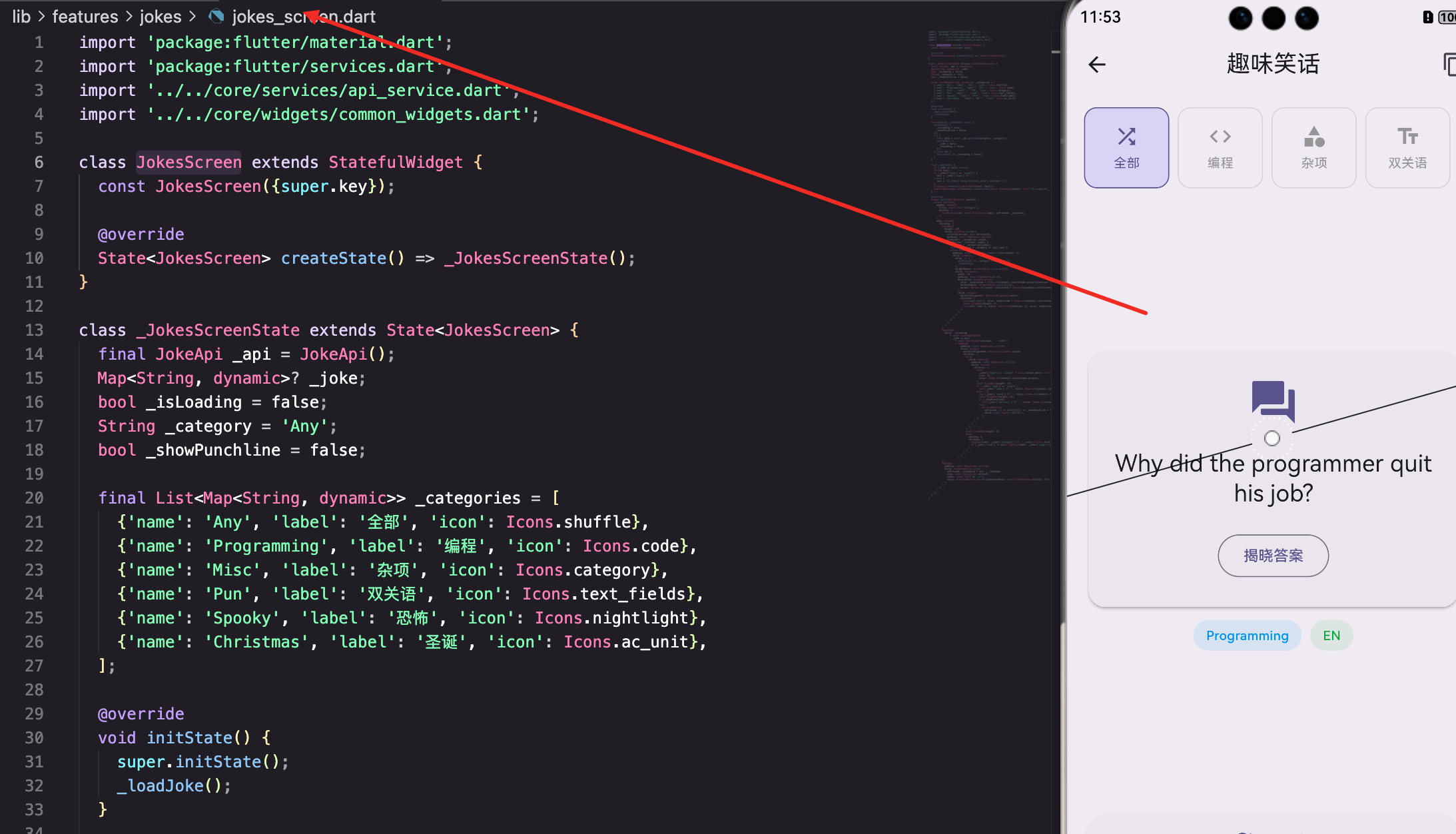
页面的基本结构
JokesScreen是笑话生成器的主页面:
dart
class JokesScreen extends StatefulWidget {
  const JokesScreen({super.key});

  @override
  State<JokesScreen> createState() => _JokesScreenState();
}

class _JokesScreenState extends State<JokesScreen> {
  final JokeApi _api = JokeApi();
  Map<String, dynamic>? _joke;
  bool _isLoading = false;
  String _category = 'Any';
  bool _showPunchline = false;

  final List<Map<String, dynamic>> _categories = [
    {'name': 'Any', 'label': '全部', 'icon': Icons.shuffle},
    {'name': 'Programming', 'label': '编程', 'icon': Icons.code},
    {'name': 'Misc', 'label': '杂项', 'icon': Icons.category},
    {'name': 'Pun', 'label': '双关语', 'icon': Icons.text_fields},
    {'name': 'Spooky', 'label': '恐怖', 'icon': Icons.nightlight},
    {'name': 'Christmas', 'label': '圣诞', 'icon': Icons.ac_unit},
  ];
_joke存储当前笑话。
_category存储选择的分类。
_showPunchline表示是否显示答案。
_categories定义了所有可用的分类。
笑话加载
_loadJoke方法加载笑话:
dart
  Future<void> _loadJoke() async {
    setState(() {
      _isLoading = true;
      _showPunchline = false;
    });
    try {
      final data = await _api.getJoke(category: _category);
      setState(() {
        _joke = data;
        _isLoading = false;
      });
    } catch (e) {
      setState(() => _isLoading = false);
    }
  }
调用API获取笑话。
重置_showPunchline,这样新笑话的答案不会立即显示。
复制功能
_copyJoke方法复制笑话到剪贴板:
dart
  void _copyJoke() {
    if (_joke == null) return;
    String text;
    if (_joke!['type'] == 'single') {
      text = _joke!['joke'] ?? '';
    } else {
      text = '${_joke!['setup']}\n\n${_joke!['delivery']}';
    }
    Clipboard.setData(ClipboardData(text: text));
    ScaffoldMessenger.of(context).showSnackBar(const SnackBar(content: Text('已复制到剪贴板')));
  }
根据笑话类型(单行或两行)组织文本。
使用Clipboard.setData复制到剪贴板。
分类选择
分类用水平的ListView展示:
dart
          SizedBox(
            height: 100,
            child: ListView.builder(
              scrollDirection: Axis.horizontal,
              padding: const EdgeInsets.all(12),
              itemCount: _categories.length,
              itemBuilder: (context, index) {
                final cat = _categories[index];
                final isSelected = _category == cat['name'];
                return Padding(
                  padding: const EdgeInsets.symmetric(horizontal: 4),
                  child: InkWell(
                    onTap: () {
                      setState(() => _category = cat['name']);
                      _loadJoke();
                    },
                    borderRadius: BorderRadius.circular(12),
                    child: Container(
                      width: 80,
                      padding: const EdgeInsets.all(8),
                      decoration: BoxDecoration(
                        color: isSelected ? Theme.of(context).colorScheme.primaryContainer : null,
                        borderRadius: BorderRadius.circular(12),
                        border: Border.all(color: isSelected ? Theme.of(context).colorScheme.primary : Colors.grey.withOpacity(0.3)),
                      ),
                      child: Column(
                        mainAxisAlignment: MainAxisAlignment.center,
                        children: [
                          Icon(cat['icon'], color: isSelected ? Theme.of(context).colorScheme.primary : Colors.grey),
                          const SizedBox(height: 4),
                          Text(cat['label'], style: TextStyle(fontSize: 12, color: isSelected ? Theme.of(context).colorScheme.primary : Colors.grey)),
                        ],
                      ),
                    ),
                  ),
                );
              },
            ),
          ),
每个分类用一个容器展示,包含图标和标签。
选中的分类用primaryContainer颜色高亮。
笑话展示
笑话用Card展示:
dart
                    Card(
                      child: Padding(
                        padding: const EdgeInsets.all(24),
                        child: Column(
                          children: [
                            Icon(
                              _joke!['type'] == 'single' ? Icons.format_quote : Icons.question_answer,
                              size: 48,
                              color: Theme.of(context).colorScheme.primary,
                            ),
                            const SizedBox(height: 20),
                            if (_joke!['type'] == 'single')
                              Text(_joke!['joke'] ?? '', style: Theme.of(context).textTheme.titleLarge, textAlign: TextAlign.center)
                            else ...[
                              Text(_joke!['setup'] ?? '', style: Theme.of(context).textTheme.titleLarge, textAlign: TextAlign.center),
                              const SizedBox(height: 20),
                              if (_showPunchline)
                                Text(_joke!['delivery'] ?? '', style: Theme.of(context).textTheme.titleMedium?.copyWith(color: Theme.of(context).colorScheme.primary, fontWeight: FontWeight.bold), textAlign: TextAlign.center)
                              else
                                OutlinedButton(
                                  onPressed: () => setState(() => _showPunchline = true),
                                  child: const Text('揭晓答案'),
                                ),
                            ],
                          ],
                        ),
                      ),
                    ),
单行笑话直接显示。
两行笑话先显示问题,然后显示"揭晓答案"按钮。
点击按钮后显示答案。
总结
这篇文章我们实现了一个笑话生成器。涉及到的知识点包括:
- API集成 - 使用笑话API获取笑话
- 分类管理 - 支持多个笑话分类
- 交互设计 - 实现答案揭晓的交互
- 剪贴板操作 - 复制笑话到剪贴板
- UI设计 - 清晰地展示笑话内容
笑话生成器展示了如何构建一个简单的内容展示应用 。通过合理的UI设计和流畅的交互,我们能为用户提供一个有趣的娱乐体验。
欢迎加入开源鸿蒙跨平台社区:https://openharmonycrossplatform.csdn.net