一、使用相册图片发送彩信
1、例子
SendMmsActivity.java
java
package com.example.chapter07_client;

import androidx.activity.result.ActivityResult;
import androidx.activity.result.ActivityResultCallback;
import androidx.activity.result.ActivityResultLauncher;
import androidx.activity.result.contract.ActivityResultContracts;
import androidx.appcompat.app.AppCompatActivity;

import android.content.Intent;
import android.net.Uri;
import android.os.Bundle;
import android.util.Log;
import android.view.View;
import android.widget.EditText;
import android.widget.ImageView;

import com.example.chapter07_client.util.ToastUtil;

public class SendMmsActivity extends AppCompatActivity implements View.OnClickListener {

    private ImageView iv_appendix;
    private EditText et_phone;
    private EditText et_title;
    private EditText et_message;
    private Uri picUri;

    private ActivityResultLauncher<Intent> mResultLauncher;

    @Override
    protected void onCreate(Bundle savedInstanceState) {
        super.onCreate(savedInstanceState);
        setContentView(R.layout.activity_send_mms);

        iv_appendix = findViewById(R.id.iv_appendix);
        iv_appendix.setOnClickListener(this);

        // 跳转到系统相册,选择图片,并返回
        mResultLauncher = registerForActivityResult(new ActivityResultContracts.StartActivityForResult(), new ActivityResultCallback<ActivityResult>() {
            @Override
            public void onActivityResult(ActivityResult result) {
                // 选择完了之后,到这里来
                if (result.getResultCode() == RESULT_OK) {
                    Intent intent = result.getData();
                    // 获得选中图片的路径对象
                    picUri = intent.getData();
                    if (picUri != null) {
                        // 显示选中的图片
                        iv_appendix.setImageURI(picUri);
                        Log.d("sam", "picUri:" + picUri.toString());
                    }
                }
            }
        });

        et_phone = findViewById(R.id.et_phone);
        et_title = findViewById(R.id.et_title);
        et_message = findViewById(R.id.et_message);
        findViewById(R.id.btn_send_mms).setOnClickListener(this);

    }

    @Override
    public void onClick(View view) {
        if (view.getId() == R.id.iv_appendix) {
            // 创建一个意图,获取内容
            Intent intent = new Intent(Intent.ACTION_GET_CONTENT);
            // 设置内容为图片类型
            intent.setType("image/*");
            // 打开系统相册,等待选择结果
            mResultLauncher.launch(intent);
        } else if (view.getId() == R.id.btn_send_mms) {
            // 发送带图片的彩信
            sendMms(et_phone.getText().toString(),
                    et_title.getText().toString(),
                    et_message.getText().toString());
        }
    }

    // 发送带图片的彩信
    private void sendMms(String phone, String title, String message) {
        Intent intent = new Intent(Intent.ACTION_SEND);
        intent.addFlags(Intent.FLAG_ACTIVITY_NEW_TASK);
        // 彩信发送的目标号码
        intent.putExtra("address", phone);
        // 彩信的标题
        intent.putExtra("subject", title);
        // 彩信的内容
        intent.putExtra("sms_body", message);
        // 彩信的图片附件
        intent.putExtra(Intent.EXTRA_STREAM, picUri);
        // 彩信的附件类型
        intent.setType("image/*");
        // Intent的接受者将被准许读取Intent携带的URI数据
        intent.setFlags(Intent.FLAG_GRANT_READ_URI_PERMISSION);
        // 因为未指定要打开哪个页面,所以系统会在底部弹出选择窗口
        startActivity(intent);
        ToastUtil.show(this, "请在弹窗中选择短信或者信息应用");

    }
}
布局文件activity_send_mms.xml
XML
<?xml version="1.0" encoding="utf-8"?>
<LinearLayout xmlns:android="http://schemas.android.com/apk/res/android"
    xmlns:app="http://schemas.android.com/apk/res-auto"
    xmlns:tools="http://schemas.android.com/tools"
    android:layout_width="match_parent"
    android:layout_height="match_parent"
    android:orientation="vertical"
    tools:context=".SendMmsActivity">

    <LinearLayout
        android:layout_width="match_parent"
        android:layout_height="wrap_content"
        android:orientation="horizontal">

        <TextView
            android:layout_width="90dp"
            android:layout_height="wrap_content"
            android:text="对方号码:"
            android:textSize="17sp"/>

        <EditText
            android:id="@+id/et_phone"
            android:layout_width="0dp"
            android:layout_height="wrap_content"
            android:layout_weight="1"
            android:inputType="phone"/>

    </LinearLayout>

    <LinearLayout
        android:layout_width="match_parent"
        android:layout_height="wrap_content"
        android:orientation="horizontal">

        <TextView
            android:layout_width="90dp"
            android:layout_height="wrap_content"
            android:text="彩信标题:"
            android:textSize="17sp"/>

        <EditText
            android:id="@+id/et_title"
            android:layout_width="0dp"
            android:layout_height="wrap_content"
            android:layout_weight="1"
            android:inputType="text"/>

    </LinearLayout>

    <LinearLayout
        android:layout_width="match_parent"
        android:layout_height="wrap_content"
        android:orientation="horizontal">

        <TextView
            android:layout_width="90dp"
            android:layout_height="wrap_content"
            android:text="彩信内容:"
            android:textSize="17sp"/>

        <EditText
            android:id="@+id/et_message"
            android:layout_width="0dp"
            android:layout_height="wrap_content"
            android:layout_weight="1"
            android:inputType="textMultiLine"
            android:minLines="5"
            android:gravity="top|start"/>

    </LinearLayout>

    <LinearLayout
        android:layout_width="match_parent"
        android:layout_height="wrap_content"
        android:orientation="horizontal">

        <TextView
            android:layout_width="90dp"
            android:layout_height="wrap_content"
            android:text="图片附件:"
            android:textSize="17sp"
            android:gravity="top|center"/>

        <ImageView
            android:id="@+id/iv_appendix"
            android:layout_width="0dp"
            android:layout_height="100dp"
            android:layout_weight="1"
            android:scaleType="fitStart"
            android:src="@drawable/link_mini"/>

    </LinearLayout>

    <Button
        android:id="@+id/btn_send_mms"
        android:layout_width="match_parent"
        android:layout_height="wrap_content"
        android:gravity="center"
        android:text="发送彩信"
        android:textSize="17sp"/>

</LinearLayout>
二、MediaStore
1、MediaStore包含了系统所有的多媒体文件
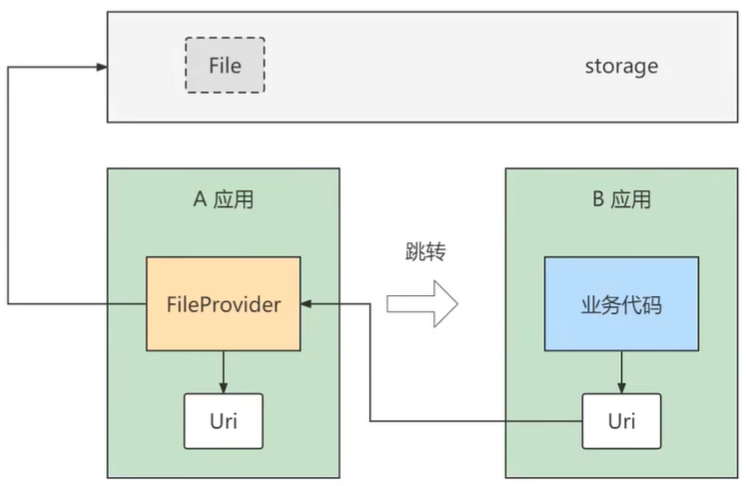
三、FileProvider
1、继承于ContentProvider,对第三方应用暴露文件,并授予文件读写操作的权限