针对Untiy的Webgl端网页端视频播放,又不想直接mp4格式等格式的一些小技巧方式。
1.安装AVPro Video插件。
2.场景ui布局类似如下图:
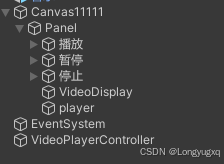
3.UI中新建image,改名VideoDisplay,把image组件删除,添加Displayugui组件,关联mediaplayer。
4.UI中新建gameobject,添加mediapalyer组件,并关联你要播放的某个视频。
5.新建gameobject,添加HTML5VideoPlayer组件,并设置如下,videofilename的名称就是你的视频名称,视频位置webgl网页端主要是放在StreamingAssets中,视频的后缀名可以改为我这个名称。然后你同步设置也要同名称。
6.这个组件可以播放多个视频,你只要有多个panel拷贝下就行了。
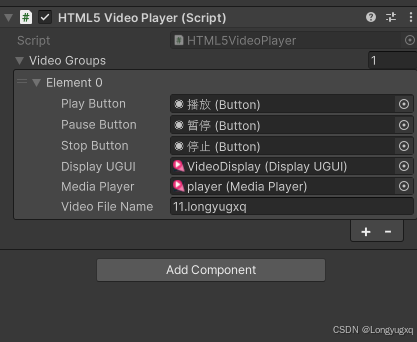
相关的HTML5VideoPlayer代码如下:
csharp
using UnityEngine;
using UnityEngine.UI;
using System.Collections.Generic;
using System.Collections;
using RenderHeads.Media.AVProVideo;

[System.Serializable]
public class VideoGroup
{
    public UnityEngine.UI.Button playButton;
    public UnityEngine.UI.Button pauseButton;
    public UnityEngine.UI.Button stopButton;
    public DisplayUGUI displayUGUI;
    public MediaPlayer mediaPlayer;
    public string videoFileName = "11.longyugxq";

    [HideInInspector] public bool isLoaded = false;
}

public class HTML5VideoPlayer : MonoBehaviour
{
    [SerializeField] private List<VideoGroup> videoGroups = new List<VideoGroup>();

    private void Start()
    {
        StartCoroutine(InitializeAsync());
    }

    private IEnumerator InitializeAsync()
    {
        for (int i = 0; i < videoGroups.Count; i++)
        {
            yield return InitializeVideoGroupAsync(videoGroups[i], i);
        }
    }

    private IEnumerator InitializeVideoGroupAsync(VideoGroup group, int groupIndex)
    {
        // 检查MediaPlayer是否已在Inspector中设置
        if (group.mediaPlayer == null)
        {
            Debug.LogError($"VideoGroup {groupIndex} 未配置 MediaPlayer");
            yield break;
        }

        // 打开视频文件
        bool opened = group.mediaPlayer.OpenMedia(
            new MediaPath(group.videoFileName, MediaPathType.RelativeToStreamingAssetsFolder),
            autoPlay: false
        );

        if (!opened)
        {
            Debug.LogError($"打开视频失败: {group.videoFileName}");
            yield break;
        }

        // 等待加载完成
        yield return new WaitForSeconds(0.01f);

        Debug.Log($"VideoGroup {groupIndex} - {group.videoFileName} 加载完成");

        // 绑定按钮事件
        if (group.playButton != null)
            group.playButton.onClick.AddListener(() => PlayVideo(groupIndex));
        if (group.pauseButton != null)
            group.pauseButton.onClick.AddListener(() => PauseVideo(groupIndex));
        if (group.stopButton != null)
            group.stopButton.onClick.AddListener(() => StopVideo(groupIndex));

        group.isLoaded = true;
    }

    public void PlayVideo(int groupIndex)
    {
        if (groupIndex >= 0 && groupIndex < videoGroups.Count && videoGroups[groupIndex].isLoaded && videoGroups[groupIndex].mediaPlayer != null)
        {
            videoGroups[groupIndex].mediaPlayer.Play();
        }
    }

    public void PauseVideo(int groupIndex)
    {
        if (groupIndex >= 0 && groupIndex < videoGroups.Count && videoGroups[groupIndex].mediaPlayer != null)
        {
            videoGroups[groupIndex].mediaPlayer.Pause();
        }
    }

    public void StopVideo(int groupIndex)
    {
        if (groupIndex >= 0 && groupIndex < videoGroups.Count && videoGroups[groupIndex].mediaPlayer != null)
        {
            MediaPlayer mediaPlayer = videoGroups[groupIndex].mediaPlayer;
            mediaPlayer.Stop();
            mediaPlayer.Control.Seek(0.0);
        }
    }
}