1、场景:
服务端主动推动消息到客户端(Electron 桌面应用)
普通的HTTP/HTTPS请求要先客户端发送请求,然后服务端才能返回结果
服务端主动推送数据到客户端,有两种方案:
SSE:
只能从服务端主动推送数据到客户端(单向),客户端发送数据还是要使用HTTP/HTTPS请求
Socket 通信:
客户端和服务端都可以发送数据给对方(双向)
先记录SSE的配置(我的服务端之前是用nodejs express 写的,已经使用 socket.io与客户端适配好了,现在用Springboot重构)
2、实现:
1、springboot 配置:
1、先实现Server层,方便其他控制器调用
package com.xxx.service;

import com.fasterxml.jackson.databind.ObjectMapper;
import org.springframework.stereotype.Service;
import org.springframework.web.servlet.mvc.method.annotation.SseEmitter;

import java.io.IOException;
import java.util.*;
import java.util.concurrent.ConcurrentHashMap;

@Service
public class SseService {
    // 1. 客户端ID → SSE连接(原有)
    private final Map<String, SseEmitter> emitterMap = new ConcurrentHashMap<>();
    // 2. 新增:群ID → 客户端ID列表(维护群和客户端的关联)
    private final Map<String, Set<String>> groupClientMap = new ConcurrentHashMap<>();
    // 3. 新增:客户端ID → 所属群ID列表(反向映射,用于客户端断开时清理)
    private final Map<String, Set<String>> clientGroupMap = new ConcurrentHashMap<>();

    private final ObjectMapper objectMapper = new ObjectMapper();

    /**
     * 注册客户端 SSE 连接(关联群ID)
     * @param clientId 客户端唯一标识(如 Electron 客户端ID)
     * @param groupIds 客户端加入的群ID列表(可传多个)
     */
    public SseEmitter registerClient(String clientId, Set<String> groupIds) {
        // 1. 创建 SSE 连接(原有逻辑)
        SseEmitter emitter = new SseEmitter(0L);
        emitterMap.put(clientId, emitter);
        System.out.println("[SSE 服务] 客户端[" + clientId + "]注册成功");

        // 2. 关联群ID(核心新增)
        if (groupIds != null && !groupIds.isEmpty()) {
            clientGroupMap.put(clientId, groupIds); // 客户端→群映射
            for (String groupId : groupIds) {
                // 群→客户端映射(不存在则新建Set)
                groupClientMap.computeIfAbsent(groupId, k -> ConcurrentHashMap.newKeySet()).add(clientId);
            }
            System.out.println("[SSE 服务] 客户端[" + clientId + "]关联群:" + String.join(",", groupIds));
        }

        // 3. 连接清理逻辑(增强:清理群关联)
        emitter.onCompletion(() -> cleanClient(clientId));
        emitter.onTimeout(() -> cleanClient(clientId));
        emitter.onError((e) -> {
            cleanClient(clientId);
            System.err.println("[SSE 服务] 客户端[" + clientId + "]连接错误:" + e.getMessage());
        });

        return emitter;
    }

    /**
     * 客户端断开时,清理所有关联(连接+群映射)
     */
    private void cleanClient(String clientId) {
        // 1. 移除 SSE 连接
        emitterMap.remove(clientId);

        // 2. 清理群-客户端关联
        Set<String> groupIds = clientGroupMap.remove(clientId);
        if (groupIds != null) {
            for (String groupId : groupIds) {
                Set<String> clientIds = groupClientMap.get(groupId);
                if (clientIds != null) {
                    clientIds.remove(clientId);
                    // 群下无客户端时,删除该群映射(节省内存)
                    if (clientIds.isEmpty()) {
                        groupClientMap.remove(groupId);
                    }
                }
            }
        }
        System.out.println("[SSE 服务] 客户端[" + clientId + "]已清理");
    }

    /**
     * 新增:发送群聊消息(核心方法)
     * @param groupId 群ID
     * @param type 消息类型(如 "groupChat")
     * @param chatData 群聊消息内容(封装成对象)
     */
    public String sendGroupMessage(String groupId, String type, Object chatData) {
        // 1. 获取该群下所有客户端ID
        Set<String> clientIds = groupClientMap.get(groupId);
        if (clientIds == null || clientIds.isEmpty()) {
            return "推送失败:群[" + groupId + "]无在线客户端";
        }

        // 2. 构建群消息(标准格式)
        Map<String, Object> message = new HashMap<>();
        message.put("type", type);
        message.put("data", chatData);
        String jsonStr;
        try {
            jsonStr = objectMapper.writeValueAsString(message);
        } catch (IOException e) {
            return "推送失败:消息序列化错误 - " + e.getMessage();
        }

        // 3. 推送给群内所有客户端
        int success = 0, fail = 0;
        for (String clientId : clientIds) {
            SseEmitter emitter = emitterMap.get(clientId);
            if (emitter != null) {
                try {
                    emitter.send(SseEmitter.event()
                            .data("data: " + jsonStr + "\n\n"));
                    success++;
                } catch (IOException e) {
                    cleanClient(clientId); // 清理无效连接
                    fail++;
                }
            } else {
                cleanClient(clientId); // 客户端已断开,清理映射
                fail++;
            }
        }

        return "群[" + groupId + "]消息推送完成:成功" + success + "个,失败" + fail + "个";
    }

    /**
     * 发送消息给指定客户端
     * @param clientId 客户端id
     * @param type 消息类型
     * @param data 消息
     * @return 发送结果
     */
    public String sendMessage(String clientId, String type, Object data) {
        // 原有逻辑不变...
        SseEmitter emitter = emitterMap.get(clientId);
        if (emitter == null) {
            return "客户端[" + clientId + "]未连接";
        }

        try {
            Map<String, Object> message = new HashMap<>();
            message.put("type", type);
            message.put("data", data);
            String jsonStr = objectMapper.writeValueAsString(message);

            emitter.send(SseEmitter.event()
                    .data("data: " + jsonStr + "\n\n"));
            return "成功推送至客户端[" + clientId + "]";
        } catch (IOException e) {
            cleanClient(clientId);
            return "推送失败:" + e.getMessage();
        }
    }

    /**
     * 发送消息给所有客户端(排除指定的发送者)
     * @param type 消息类型
     * @param data 消息内容
     * @param excludeClientId 要排除的客户端ID(发送者自己的clientId,可为null)
     * @return 消息发送结果
     */
    public String broadcastMessage(String type, Object data, String excludeClientId) {
        int success = 0, fail = 0;

        // 遍历所有客户端连接
        for (Map.Entry<String, SseEmitter> entry : emitterMap.entrySet()) {
            String clientId = entry.getKey();

            // 核心:跳过排除的客户端(发送者自己)
            if (excludeClientId != null && excludeClientId.equals(clientId)) {
                System.out.println("[SSE 广播] 跳过发送者客户端:" + clientId);
                continue; // 跳过当前循环,不发送给该客户端
            }

            try {
                Map<String, Object> message = new HashMap<>();
                message.put("type", type);
                message.put("data", data);
                String jsonStr = objectMapper.writeValueAsString(message);

                entry.getValue().send(SseEmitter.event()
                        .data("data: " + jsonStr + "\n\n"));
                success++;
            } catch (IOException e) {
                cleanClient(entry.getKey());
                fail++;
            }
        }

        // 兼容:若excludeClientId不为空,提示排除的客户端
        String excludeTip = excludeClientId != null ? "(排除发送者:" + excludeClientId + ")" : "";
        return "广播完成" + excludeTip + ":成功" + success + ",失败" + fail;
    }

    // 保留原有无参重载方法(兼容旧调用)
    public String broadcastMessage(String type, Object data) {
        return broadcastMessage(type, data, null);
    }

    public int getConnectedClientCount() {
        return emitterMap.size();
    }

    /**
     * 新增:获取指定群的在线客户端数量
     */
    public int getGroupClientCount(String groupId) {
        Set<String> clientIds = groupClientMap.get(groupId);
        return clientIds == null ? 0 : clientIds.size();
    }
}
2、再实现控制层:
package com.xxx.controller;

import com.qiang.service.SseService;
import com.qiang.service.UserService;
import org.springframework.beans.factory.annotation.Autowired;
import org.springframework.beans.factory.annotation.Qualifier;
import org.springframework.web.bind.annotation.*;
import org.springframework.web.servlet.mvc.method.annotation.SseEmitter;

import java.util.HashSet;
import java.util.List;
import java.util.Map;
import java.util.Set;

@RestController
@RequestMapping("/sse")
public class SseController {

    // 注入 SSE 服务类
    @Autowired
    private SseService sseService;
    @Autowired
    private UserService userService;

    /**
     * 建立 SSE 连接(调用 Service 的注册方法)
     */
    @GetMapping("/connect")
    public SseEmitter connect(@RequestParam String clientId) {
        // 查询会话成员表,userId通过客户端id获取该用户所有的群聊
        String userId = clientId.split("_")[2].trim();
        List<String> groupIdList = userService.getUserGroupChat(userId);
        Set<String> groupIdSet = new HashSet<>();
        if (groupIdList != null && !groupIdList.isEmpty()) {
            groupIdSet = new HashSet<>(groupIdList); // List → Set,自动去重
        }
        return sseService.registerClient(clientId, groupIdSet);
    }

    /**
     * 手动推送(调用 Service 的推送方法)
     */
    @PostMapping("/push")
    public String push(@RequestBody Map<String, String> params) {
        String clientId = params.get("clientId");
        String message = params.get("message");
        return sseService.sendMessage(clientId, "business", message);
    }

    /**
     * 获取在线客户端数量
     */
    @GetMapping("/count")
    public String getClientCount() {
        return "当前在线客户端数量:" + sseService.getConnectedClientCount();
    }
}
2、客户端(Electron 配置):
eventsource 是浏览器对象
我是在客户端主进程中接收消息的,要下载依赖。如果是在渲染进程或者是普通前端使用则不需要下载依赖
"eventsource": "^2.0.2"
1、工具函数:
// src/util/sseClient.js(主进程专用)
const EventSource = require('eventsource');

class SseClient {
    constructor(clientId) {
        this.clientId = clientId;
        this.isConnected = false; // 标记是否真正连接成功
        this.initSse();
    }

    initSse() {
        this.close(); // 关闭旧连接

        const sseUrl = `http://localhost:8088/sse/connect?clientId=${this.clientId}`;
        console.log(`[SSE] 尝试连接:${sseUrl}`);

        this.es = new EventSource(sseUrl);

        // 1. 连接成功(标记真正的连接状态)
        this.es.onopen = () => {
            this.isConnected = true;
            console.log('[SSE] 连接成功');
        };

        // 2. 优化错误处理(过滤无害错误)
        this.es.onerror = (e) => {
            // 过滤:连接成功前的无消息错误(无害)
            if (!this.isConnected && e.message === undefined) {
                console.log('[SSE] 初始化阶段临时错误(无害):', e.type);
                return; // 不打印错误,避免干扰
            }

            // 真正的错误(连接断开/失败)
            this.isConnected = false;
            console.error('[SSE] 真正的连接错误:', {
                type: e.type,
                message: e.message || '未知错误',
                readyState: this.es.readyState // 0:连接中, 1:已连接, 2:已关闭
            });

            // 仅在连接关闭时重连
            if (this.es.readyState === EventSource.CLOSED) {
                console.log(`[SSE] 3秒后尝试重连...`);
                setTimeout(() => this.initSse(), 3000);
            }
        };

        // 3. 正常接收消息
        this.es.onmessage = (e) => {
            try {
                const cleanData = e.data.replace(/^data: /, '').trim();
                const messageObj = JSON.parse(cleanData);
                // 打印解析结果(验证)
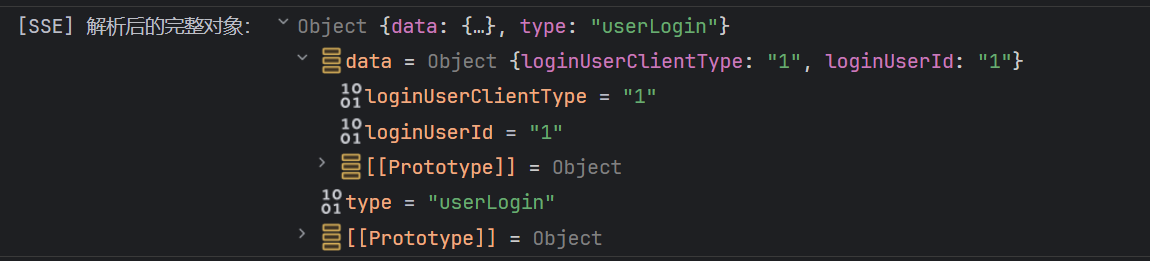
                console.log('[SSE] 解析后的完整对象:', messageObj);
            } catch (err) {
                // 解析失败时的容错
                console.warn('[SSE] 解析失败,原始数据:', e.data);
                console.error('[SSE] 解析错误详情:', err);
            }
        };

        // 4. 监听自定义事件(如 notification/business)
        this.es.addEventListener('notification', (e) => {
            const data = JSON.parse(e.data);
            console.log('[SSE] 通知消息:', data);
        });
    }

    close() {
        if (this.es) {
            this.es.close();
            this.es = null;
            this.isConnected = false;
        }
    }

    // 手动推送(修复后的 POST 版本)
    async triggerPush(message) {
        if (!this.isConnected) {
            console.warn('[SSE] 未连接,无法推送');
            return null;
        }
        try {
            const response = await fetch(`${this.serverUrl || 'http://localhost:8088'}/sse/push`, {
                method: 'POST',
                headers: { 'Content-Type': 'application/json' },
                body: JSON.stringify({ clientId: this.clientId, message })
            });
            const result = await response.text();
            console.log('[SSE] 手动推送结果:', result);
            return result;
        } catch (err) {
            console.error('[SSE] 手动推送失败:', err);
            return null;
        }
    }
}

module.exports = SseClient;
2、调用:
// clientId 要唯一,否则服务端推送消息时会有影响
new SseClient("自定义的clientId");