通过网盘分享的文件:game_flutter_openharmony.zip
链接: https://pan.baidu.com/s/1ryUS1A0zcvXGrDaStu530w 提取码: tqip
前言
记忆翻牌是一个配对游戏,翻开两张牌,如果图案相同就配对成功,不同就翻回去。
图案是游戏的核心元素,用什么图案、怎么显示,这篇来聊聊。
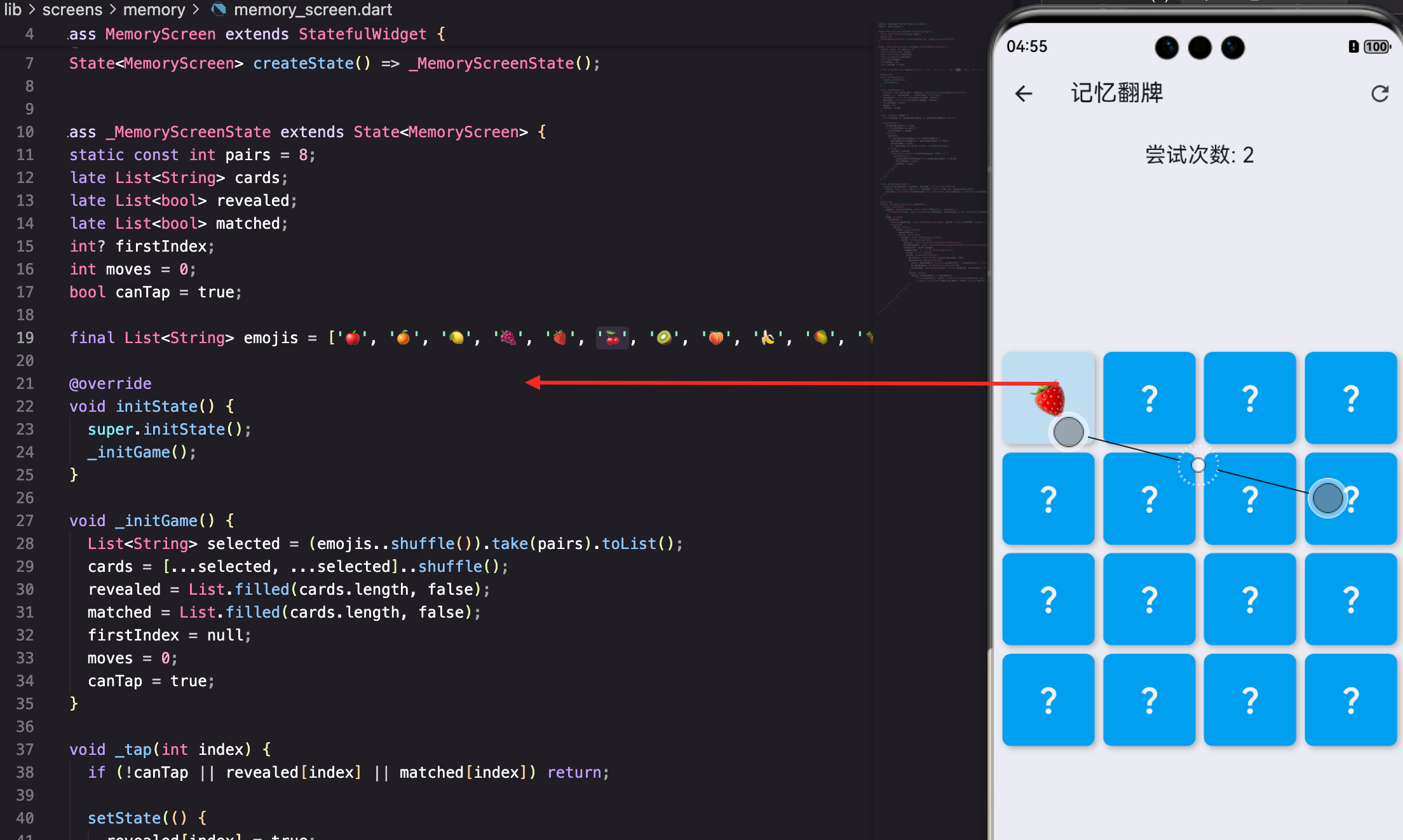
表情符号
dart
final List<String> emojis = ['🍎', '🍊', '🍋', '🍇', '🍓', '🍒', '🥝', '🍑', '🍌', '🥭', '🍍', '🥥'];这行代码定义了一个字符串列表,包含12种水果表情。
final表示这个列表引用不会改变(但列表内容可以改变)- 每个元素都是一个Unicode表情字符
- 选择水果是因为颜色鲜艳、容易区分
为什么用表情
- 不需要图片资源:表情是Unicode字符,直接用Text显示,不需要额外的图片文件
- 跨平台一致:大多数设备都支持这些表情,iOS、Android、鸿蒙都能正常显示
- 色彩丰富:水果表情颜色鲜艳,红橙黄绿都有,容易区分
- 简单直接:一个字符串就是一个图案,不需要复杂的图片加载逻辑
💡 用表情是我偷懒的做法。正经的游戏应该用精美的图片,但表情足够用了,而且开发速度快。
选择水果
dart
List<String> selected = (emojis..shuffle()).take(pairs).toList();这行代码从12种水果中随机选8种。让我拆解一下:
emojis..shuffle():..是级联操作符,先调用shuffle()打乱emojis,然后返回emojis本身.take(pairs):取前pairs个元素(pairs=8),返回一个Iterable.toList():把Iterable转成List
为什么要随机选择?因为每局游戏用不同的水果组合,增加新鲜感。
级联操作符的妙用
dart
// 这两种写法等价
List<String> selected = (emojis..shuffle()).take(pairs).toList();

// 等价于
emojis.shuffle();
List<String> selected = emojis.take(pairs).toList();级联操作符..让代码更紧凑。它执行方法但返回对象本身,而不是方法的返回值。
卡片数据
dart
static const int pairs = 8;
late List<String> cards;
这里定义了两个变量:
pairs:配对数量,8对就是16张卡片cards:存储所有卡片的图案,延迟初始化
生成卡片
dart
cards = [...selected, ...selected]..shuffle();这行代码生成16张卡片并打乱。
[...selected, ...selected]:展开运算符...把selected的元素展开,相当于把两个列表合并- 每种图案出现两次,形成配对
..shuffle():打乱顺序
举个例子,如果selected是'🍎', '🍊', '🍋',那么:
[...selected, ...selected]得到'🍎', '🍊', '🍋', '🍎', '🍊', '🍋'- shuffle后可能变成'🍊', '🍎', '🍋', '🍋', '🍎', '🍊'
卡片状态
dart
late List<bool> revealed;
late List<bool> matched;
两个布尔数组,分别记录每张卡片的状态:
- revealed: 是否翻开(临时状态,可能翻回去)
- matched: 是否已配对(永久状态,不会变)
初始化
dart
revealed = List.filled(cards.length, false);
matched = List.filled(cards.length, false);List.filled创建指定长度的列表,所有元素都是同一个值。
cards.length是16- 初始值都是false
- 所有卡片都是背面(revealed=false)、未配对(matched=false)
为什么用两个数组
一个数组不够吗?不够,因为状态转换不同:
- revealed可以从true变回false(翻开后不匹配,翻回去)
- matched只能从false变成true(配对成功后不会取消)
如果只用一个数组,就无法区分"已翻开但未配对"和"已配对"两种状态。
卡片渲染
dart
child: AnimatedContainer(
  duration: const Duration(milliseconds: 300),
  decoration: BoxDecoration(
    color: matched[i] ? Colors.green[200] : (revealed[i] ? Colors.white : Colors.blue[400]),
    borderRadius: BorderRadius.circular(8),
    boxShadow: [BoxShadow(color: Colors.black26, blurRadius: 4, offset: const Offset(2, 2))],
  ),
这是卡片的容器,使用AnimatedContainer实现动画效果。
三种颜色
dart
color: matched[i] ? Colors.green[200] : (revealed[i] ? Colors.white : Colors.blue[400]),嵌套的三元运算符,根据状态决定颜色:
- 先判断
matched[i]:如果已配对,用浅绿色 - 否则判断
revealed[i]:如果已翻开,用白色 - 否则用蓝色(背面)
颜色的含义:
- 浅绿色(green200): 配对成功,给玩家正向反馈
- 白色: 正面,显示图案
- 蓝色(blue400): 背面,隐藏图案
AnimatedContainer
dart
AnimatedContainer(
  duration: const Duration(milliseconds: 300),
AnimatedContainer是Flutter的动画容器,当属性变化时自动产生动画。
duration:动画时长300毫秒- 颜色变化会有平滑过渡,不是瞬间切换
- 不需要手动管理动画控制器
💡 AnimatedContainer是懒人福音。不用写AnimationController、Tween那些复杂的东西,属性变了自动动画。
圆角和阴影
dart
borderRadius: BorderRadius.circular(8),
boxShadow: [BoxShadow(color: Colors.black26, blurRadius: 4, offset: const Offset(2, 2))],
装饰细节:
- borderRadius: 8像素圆角,让卡片看起来更柔和
- boxShadow : 阴影效果,增加立体感
color: Colors.black26:26%透明度的黑色blurRadius: 4:模糊半径4像素offset: const Offset(2, 2):向右下偏移2像素
卡片内容
dart
child: Center(
  child: revealed[i] || matched[i]
      ? Text(cards[i], style: const TextStyle(fontSize: 32))
      : const Icon(Icons.question_mark, color: Colors.white, size: 32),
),
卡片的内容根据状态显示不同的东西。
正面显示
dart
revealed[i] || matched[i]
    ? Text(cards[i], style: const TextStyle(fontSize: 32))
条件:翻开或已配对时显示正面。
cards[i]是这张卡片的表情符号fontSize: 32:字号32,足够大,容易看清- Text可以直接显示表情符号,因为表情就是Unicode字符
背面显示
dart
: const Icon(Icons.question_mark, color: Colors.white, size: 32),未翻开时显示问号图标。
Icons.question_mark:Material Icons的问号color: Colors.white:白色,在蓝色背景上清晰size: 32:和表情一样大
为什么用问号
问号表示"未知",符合记忆翻牌的主题------你不知道背面是什么。
也可以用其他图标,比如Icons.help、Icons.visibility_off,但问号最直观。
GridView布局
dart
GridView.builder(
  physics: const NeverScrollableScrollPhysics(),
  gridDelegate: const SliverGridDelegateWithFixedCrossAxisCount(crossAxisCount: 4, mainAxisSpacing: 8, crossAxisSpacing: 8),
  itemCount: cards.length,
GridView.builder用于构建网格布局。
禁止滚动
dart
physics: const NeverScrollableScrollPhysics(),记忆翻牌的卡片是固定的,不需要滚动。禁止滚动后,手势不会被GridView拦截。
4x4网格
dart
crossAxisCount: 4,每行4张卡片。16张卡片正好4行4列。
如果想要更多卡片,可以改成5x4(20张)或6x6(36张),相应地调整pairs的值。
间距
dart
mainAxisSpacing: 8, crossAxisSpacing: 8,卡片之间8像素间距,让卡片不会挤在一起。
mainAxisSpacing:主轴(垂直)方向间距crossAxisSpacing:交叉轴(水平)方向间距
尝试次数
dart
Padding(padding: const EdgeInsets.all(16), child: Text('尝试次数: $moves', style: const TextStyle(fontSize: 20))),显示玩家翻了多少次牌。
moves变量在每次翻开第二张牌时加1- 玩家可以追求更少次数完成
- 8对卡片最少需要8次(每次都配对成功)
完整的初始化流程
dart
void _initGame() {
  List<String> selected = (emojis..shuffle()).take(pairs).toList();
  cards = [...selected, ...selected]..shuffle();
  revealed = List.filled(cards.length, false);
  matched = List.filled(cards.length, false);
  firstIndex = null;
  moves = 0;
  canTap = true;
}
初始化游戏的完整步骤:
- 从12种表情中随机选8种
- 每种复制一份,得到16张卡片
- 打乱卡片顺序
- 初始化revealed和matched数组
- 清空firstIndex(第一张翻开的牌)
- 重置尝试次数
- 允许点击
表情的可扩展性
如果想用其他图案,只需要修改emojis列表:
dart
// 动物主题
final List<String> emojis = ['🐶', '🐱', '🐭', '🐹', '🐰', '🦊', '🐻', '🐼', '🐨', '🐯', '🦁', '🐮'];
动物表情同样色彩丰富,而且更可爱。
dart
// 交通工具主题
final List<String> emojis = ['🚗', '🚕', '🚙', '🚌', '🚎', '🏎️', '🚓', '🚑', '🚒', '🚐', '🛻', '🚚'];
交通工具适合男孩子。
dart
// 运动主题
final List<String> emojis = ['⚽', '🏀', '🏈', '⚾', '🎾', '🏐', '🏉', '🎱', '🏓', '🏸', '🥊', '⛳'];
运动主题适合体育爱好者。
代码不用改,只换图案列表就行。这就是数据和逻辑分离的好处。
翻牌动画
当前实现用AnimatedContainer做颜色过渡,但没有真正的"翻牌"效果。如果想要3D翻转动画:
dart
AnimatedBuilder(
  animation: _controller,
  builder: (context, child) {
    return Transform(
      alignment: Alignment.center,
      transform: Matrix4.identity()
        ..setEntry(3, 2, 0.001) // 透视效果
        ..rotateY(_animation.value * pi),
      child: _animation.value < 0.5
          ? _buildCardBack()
          : Transform(
              alignment: Alignment.center,
              transform: Matrix4.identity()..rotateY(pi),
              child: _buildCardFront(),
            ),
    );
  },
)
这个动画比较复杂,需要AnimationController和Matrix4变换。
简化版翻牌
如果不想用3D变换,可以用缩放模拟翻牌:
dart
AnimatedScale(
  scale: revealed[i] ? 1.0 : 0.95,
  duration: const Duration(milliseconds: 200),
  child: AnimatedContainer(
    duration: const Duration(milliseconds: 200),
    // ... 其他属性
  ),
)
翻开时稍微放大,有一个"弹出"的感觉。
当前实现简化了,只用颜色变化表示翻牌。
配对逻辑
翻牌的核心是配对逻辑:
dart
int? firstIndex;
bool canTap = true;

void _onCardTap(int index) {
  if (!canTap || revealed[index] || matched[index]) return;

  setState(() {
    revealed[index] = true;

    if (firstIndex == null) {
      // 翻开第一张
      firstIndex = index;
    } else {
      // 翻开第二张
      moves++;

      if (cards[firstIndex!] == cards[index]) {
        // 配对成功
        matched[firstIndex!] = true;
        matched[index] = true;
        firstIndex = null;

        // 检查是否全部配对
        if (matched.every((m) => m)) {
          _showWinDialog();
        }
      } else {
        // 配对失败,延迟翻回去
        canTap = false;
        Future.delayed(const Duration(milliseconds: 1000), () {
          setState(() {
            revealed[firstIndex!] = false;
            revealed[index] = false;
            firstIndex = null;
            canTap = true;
          });
        });
      }
    }
  });
}
状态变量
- firstIndex: 第一张翻开的牌的索引,null表示还没翻
- canTap: 是否可以点击,配对失败时暂时禁止点击
翻开第一张
dart
if (firstIndex == null) {
  firstIndex = index;
}
记录索引,等待翻开第二张。
翻开第二张
dart
if (cards[firstIndex!] == cards[index]) {
  // 配对成功
  matched[firstIndex!] = true;
  matched[index] = true;
}
比较两张牌的图案,相同就配对成功。
配对失败
dart
canTap = false;
Future.delayed(const Duration(milliseconds: 1000), () {
  setState(() {
    revealed[firstIndex!] = false;
    revealed[index] = false;
    firstIndex = null;
    canTap = true;
  });
});
延迟1秒后翻回去,让玩家有时间看清图案。
canTap = false防止在延迟期间继续点击。
难度设置
可以通过调整pairs来改变难度:
dart
enum Difficulty { easy, medium, hard }

int getPairs(Difficulty difficulty) {
  switch (difficulty) {
    case Difficulty.easy: return 6;   // 12张牌,3x4
    case Difficulty.medium: return 8; // 16张牌,4x4
    case Difficulty.hard: return 12;  // 24张牌,4x6
  }
}
牌越多,记忆难度越大。
动态网格
根据牌数调整网格:
dart
int getCrossAxisCount(int pairs) {
  if (pairs <= 6) return 3;
  if (pairs <= 8) return 4;
  return 6;
}
6对用3列,8对用4列,12对用6列。
计时和计分
计时
dart
Stopwatch stopwatch = Stopwatch();

void _initGame() {
  // ... 初始化代码 ...
  stopwatch.reset();
  stopwatch.start();
}

String get timeString {
  int seconds = stopwatch.elapsed.inSeconds;
  return '${seconds ~/ 60}:${(seconds % 60).toString().padLeft(2, '0')}';
}
游戏开始时启动计时器,显示用时。
计分
可以根据尝试次数和用时计算分数:
dart
int calculateScore() {
  int baseScore = 1000;
  int movePenalty = moves * 10;
  int timePenalty = stopwatch.elapsed.inSeconds;
  return (baseScore - movePenalty - timePenalty).clamp(0, 1000);
}
尝试次数越少、用时越短,分数越高。
音效
可以加音效增强反馈:
dart
import 'package:audioplayers/audioplayers.dart';

final AudioPlayer _player = AudioPlayer();

void _playFlipSound() {
  _player.play(AssetSource('sounds/flip.mp3'));
}

void _playMatchSound() {
  _player.play(AssetSource('sounds/match.mp3'));
}
翻牌时播放翻牌音效,配对成功时播放成功音效。
需要添加audioplayers依赖和音效文件。当前实现简化了。
主题扩展
除了水果,可以支持多种主题:
dart
class CardTheme {
  final String name;
  final List<String> emojis;
  final Color cardBackColor;

  const CardTheme({
    required this.name,
    required this.emojis,
    required this.cardBackColor,
  });
}

final fruitTheme = CardTheme(
  name: '水果',
  emojis: ['🍎', '🍊', '🍋', '🍇', '🍓', '🍒', '🥝', '🍑', '🍌', '🥭', '🍍', '🥥'],
  cardBackColor: Colors.blue[400]!,
);

final animalTheme = CardTheme(
  name: '动物',
  emojis: ['🐶', '🐱', '🐭', '🐹', '🐰', '🦊', '🐻', '🐼', '🐨', '🐯', '🦁', '🐮'],
  cardBackColor: Colors.green[400]!,
);
玩家可以选择喜欢的主题,增加趣味性。
小结
这篇讲了记忆翻牌的表情图案,核心知识点:
- 表情符号: Unicode字符,不需要图片资源,跨平台兼容好
- 级联操作符 :
..执行方法并返回对象本身,代码更紧凑 - 展开运算符 :
...把列表元素展开,方便合并列表 - 随机选择: shuffle打乱 + take取前N个,每局不同组合
- 复制配对 :
[...list, ...list]每种图案两张,形成配对 - 双数组状态: revealed和matched分别记录临时和永久状态
- AnimatedContainer: 属性变化自动动画,简单易用
- 三元运算符嵌套: 根据多个条件决定颜色,层次分明
- 问号背面: Icon显示未知状态,符合游戏主题
- Text显示表情: 表情就是字符串,直接用Text渲染
- 配对逻辑: firstIndex记录第一张,比较后决定配对或翻回
- 延迟翻回: Future.delayed让玩家有时间看清图案
表情符号是记忆翻牌的简单方案,不需要图片资源,开发速度快,跨平台兼容好。配合配对逻辑,就是一个完整的记忆游戏。
欢迎加入开源鸿蒙跨平台社区:https://openharmonycrossplatform.csdn.net