环境准备
- linux下开发
-
- 在docker里面拉取合适的镜像
- 创建容器
- 启动容器
- 进入容器
- 创建conda的虚拟环境
- 配置清华pypi镜像(可选)
- [jupyter lab 开发](#jupyter lab 开发)
-
- 生成配置文件
- [通过 ipython 设置密钥](#通过 ipython 设置密钥)
- 退出ipython环境
- 安装notedown插件
- 修改配置文件
- 运行
- 访问
- pycharm进行开发
linux下开发
开发环境Ubuntu18.04+docker
如果有本地显卡,可以在本地开发
在docker里面拉取合适的镜像
该镜像已经包含了开发所需的大部分运行环境
bash
docker pull nvidia/cuda:11.0.3-cudnn8-devel-ubuntu20.04创建容器
run代表创建并运行;-itd以守护方式创建名为hand的容器;-p 8902:8902 -p 11742:22因为在容器里面所以需要将端口映射到外面将外面的8902端口和容器里的8902端口进行映射,将外面的11742和docker容器里的22进行映射;-v代表将宿主机目录挂载在docker容器中;--gpusall代表创建容器时将显卡带上,不然容器无法使用显卡;最后结尾/bin/bash要带上
bash
sudo docker run -it --gpus all -p 8902:8902 -p 11742:22 --shm-size 32G --ulimit memlock=-1 --ulimit stack=67108864 -v /home/wxa/mmlab/AIlearning:/workspace --name=SignLanguage --env="DISPLAY" --volume="/tmp/.X11-unix:/tmp/.X11-unix:rw" --device="/dev/video0:/dev/video0" nvcr.io/nvidia/pytorch:21.10-py3 /bin/bash启动容器
bash
docker start SLRT进入容器
bash
docker exec -it SLRT /bin/bash创建conda的虚拟环境
导出所有包
(这一步不需要操作,只是提示大家可以通过这个方式将所有包导出来)
bash
pip freeze > requirements.txt
bash
conda create -n mska python==3.10.13
conda activate mska
# Please install PyTorch according to your CUDA version.
pip install -r requirements.txt
requirements.txt的内容如下
bash
absl-py==2.0.0
accelerate==0.24.1
addict==2.4.0
aenum==3.1.15
aiofiles==23.2.1
aiohttp==3.9.1
aiosignal==1.3.1
albumentations==1.3.1
altair==5.2.0
annotated-types==0.6.0
antlr4-python3-runtime==4.9.3
anyio==3.7.1
anykeystore==0.2
apex==0.9.10.dev0
appdirs==1.4.4
argon2-cffi==23.1.0
argon2-cffi-bindings==21.2.0
arrow==1.3.0
astor==0.8.1
asttokens==2.4.1
astunparse==1.6.3
async-lru==2.0.4
async-timeout==4.0.3
attrs==23.1.0
audioread==3.0.1
Babel==2.13.1
backcall==0.2.0
beautifulsoup4==4.12.2
bitsandbytes==0.41.2.post2
black==23.11.0
bleach==6.1.0
blendmodes==2023
blinker==1.7.0
blis==0.7.11
boto3==1.33.2
botocore==1.33.2
cachetools==5.3.2
catalogue==2.0.10
certifi==2026.1.4
cffi==2.0.0
charset-normalizer==3.4.4
clean-fid==0.1.35
click==8.1.7
cloudpathlib==0.16.0
cloudpickle==3.0.0
cmake==3.25.0
colorama==0.4.6
coloredlogs==15.0.1
comm==0.2.0
confection==0.1.4
contourpy==1.2.0
cpm-kernels==1.0.11
cryptacular==1.6.2
cycler==0.12.1
cymem==2.0.8
dask==2023.9.2
datasets==2.14.7
debugpy==1.8.0
decorator==5.1.1
deepspeed==0.12.3
defusedxml==0.7.1
deprecation==2.1.0
dill==0.3.7
distributed==2023.9.2
docker==6.1.3
docker-pycreds==0.4.0
docstring-parser==0.15
easydict==1.11
einops==0.7.0
entrypoints==0.4
exceptiongroup==1.2.0
execnet==2.0.2
executing==2.0.1
Farama-Notifications==0.0.4
fastapi==0.103.2
fastjsonschema==2.19.0
ffmpy==0.3.1
filelock==3.9.0
fire==0.5.0
flatbuffers==23.5.26
fluidsynth==0.2
fonttools==4.45.1
fqdn==1.5.1
frozenlist==1.4.0
fsspec==2023.1.0
ftfy==6.1.3
functorch==2.0.0
future==0.18.3
gast==0.4.0
gitdb==4.0.11
GitPython==3.1.46
google-auth==2.47.0
google-auth-oauthlib==1.0.0
google-pasta==0.2.0
greenlet==3.3.0
grpcio==1.74.0
h11==0.14.0
h5py==3.10.0
HeapDict==1.0.1
hf-xet==1.2.0
hjson==3.1.0
httpcore==1.0.2
httpx==0.25.2
huggingface-hub==0.17.3
humanfriendly==10.0
hupper==1.12
idna==3.11
imageio==2.33.0
importlib-metadata==6.8.0
importlib-resources==6.1.1
inflection==0.5.1
iniconfig==2.0.0
intel-openmp==2024.0.0
ipykernel==6.27.1
ipython==8.18.1
ipython-genutils==0.2.0
isoduration==20.11.0
itsdangerous==2.1.2
jax==0.4.20
jedi==0.19.1
jieba==0.42.1
Jinja2==3.1.2
jmespath==1.0.1
joblib==1.3.2
json5==0.9.14
jsonpointer==2.1
jsonschema==4.20.0
jsonschema-specifications==2023.11.1
jupyter-events==0.12.0
jupyter_client==8.8.0
jupyter_core==5.9.1
jupyter_server==2.17.0
jupyter_server_terminals==0.5.4
jupyterlab_pygments==0.3.0
keras==2.13.1
keras-tuner==1.4.6
kiwisolver==1.4.5
kornia==0.7.0
kt-legacy==1.0.5
langcodes==3.3.0
lark==1.1.8
latex2mathml==3.76.0
lazy_loader==0.3
libclang==16.0.6
librosa==0.10.1
lightning-utilities==0.10.0
linkify-it-py==2.0.2
lit==15.0.7
llvmlite==0.41.1
lmdb==1.4.1
locket==1.0.0
loguru==0.7.2
loralib==0.1.2
lxml==4.9.3
Markdown==3.5.1
markdown-it-py==3.0.0
MarkupSafe==2.1.3
matplotlib==3.8.2
matplotlib-inline==0.1.6
mdit-py-plugins==0.4.0
mdtex2html==1.2.0
mdurl==0.1.2
mido==1.3.0
mistune==3.0.2
mkl==2024.0.0
mkl-devel==2024.0.0
mkl-include==2024.0.0
ml-dtypes==0.3.1
model-index==0.1.11
mpmath==1.3.0
msgpack==1.0.7
multidict==6.0.4
multiprocess==0.70.15
murmurhash==1.0.10
mypy-extensions==1.0.0
nbclient==0.9.0
nbconvert==7.11.0
nbformat==5.9.2
nest-asyncio==1.5.8
networkx==3.0
ninja==1.11.1.1
nltk==3.8.1
notebook_shim==0.2.3
numba==0.58.1
numpy==1.24.3
nvidia-cublas-cu11==11.11.3.6
nvidia-cublas-cu12==12.1.3.1
nvidia-cuda-cupti-cu11==11.7.101
nvidia-cuda-cupti-cu12==12.1.105
nvidia-cuda-nvrtc-cu11==11.8.89
nvidia-cuda-nvrtc-cu12==12.1.105
nvidia-cuda-runtime-cu11==11.8.89
nvidia-cuda-runtime-cu12==12.1.105
nvidia-cudnn-cu11==8.9.6.50
nvidia-cudnn-cu12==8.9.2.26
nvidia-cufft-cu11==10.9.0.58
nvidia-cufft-cu12==11.0.2.54
nvidia-cufile-cu12==1.13.1.3
nvidia-curand-cu11==10.2.10.91
nvidia-curand-cu12==10.3.2.106
nvidia-cusolver-cu11==11.4.0.1
nvidia-cusolver-cu12==11.4.5.107
nvidia-cusparse-cu11==11.7.4.91
nvidia-cusparse-cu12==12.1.0.106
nvidia-cusparselt-cu12==0.7.1
nvidia-ml-py==13.590.44
nvidia-nccl-cu11==2.14.3
nvidia-nccl-cu12==2.18.1
nvidia-nvjitlink-cu12==12.8.93
nvidia-nvshmem-cu12==3.3.20
nvidia-nvtx-cu11==11.7.91
nvidia-nvtx-cu12==12.1.105
nvtx==0.2.8
oauthlib==3.2.2
omegaconf==2.3.0
onnx==1.15.0
open-clip-torch==2.23.0
opencv-python==4.8.1.78
opencv-python-headless==4.8.1.78
opendatalab==0.0.10
openmim==0.3.9
openxlab==0.0.11
opt-einsum==3.3.0
ordered-set==4.1.0
orjson==3.9.10
overrides==7.4.0
packaging==23.2
paddlepaddle-gpu==2.5.2
pandas==1.5.3
pandocfilters==1.5.0
parso==0.8.3
partd==1.4.1
PasteDeploy==3.1.0
pathspec==0.11.2
pathtools==0.1.2
pathy==0.10.3
pbkdf2==1.3
peft==0.6.2
pexpect==4.9.0
pickleshare==0.7.5
piexif==1.1.3
Pillow==10.1.0
pkgutil_resolve_name==1.3.10
plaster==1.1.2
plaster-pastedeploy==1.0.1
platformdirs==4.0.0
pluggy==1.6.0
pooch==1.8.0
portalocker==2.8.2
preshed==3.0.9
pretty_midi==0.2.10
prettytable==3.9.0
prometheus-client==0.19.0
prompt-toolkit==3.0.41
protobuf==4.25.1
psutil==5.9.6
ptyprocess==0.7.0
pure-eval==0.2.2
py-cpuinfo==9.0.0
pyarrow==14.0.1
pyarrow-hotfix==0.6
pyasn1==0.5.1
pyasn1-modules==0.3.0
pybind11==2.11.1
pycocotools==2.0.7
pycparser==2.23
pycryptodome==3.19.0
pydantic==1.10.13
pydantic_core==0.42.0
pydeck==0.8.1b0
pydot==1.4.2
pydub==0.25.1
pyFluidSynth==1.3.2
pyglet==2.0.10
Pygments==2.17.2
Pympler==1.0.1
pynvml==11.4.1
pyparsing==3.1.1
pyramid==2.0.2
pyramid-mailer==0.15.1
pyre-extensions==0.0.30
pyrsistent==0.20.0
pytest==7.4.3
python-dateutil==2.8.2
python-hostlist==1.23.0
python-json-logger==2.0.7
python-multipart==0.0.6
python3-openid==3.2.0
pytz==2025.2
PyYAML==6.0.1
pyzmq==25.1.1
qudida==0.0.4
ray==2.8.0
referencing==0.31.0
regex==2023.10.3
repoze.sendmail==4.4.1
requests==2.32.5
requests-oauthlib==1.3.1
resampy==0.4.2
resize-right==0.0.2
rfc3339-validator==0.1.4
rfc3986-validator==0.1.1
rich==13.7.0
rouge-chinese==1.0.3
rpds-py==0.13.1
rsa==4.9
s3transfer==0.8.1
sacremoses==0.1.1
safetensors==0.4.1
scikit-image==0.22.0
scikit-learn==1.3.2
scipy==1.11.4
seaborn==0.13.0
semantic-version==2.10.0
Send2Trash==1.8.2
sentencepiece==0.1.99
sentry-sdk==1.39.2
setproctitle==1.3.3
shapely==2.0.2
shellingham==1.5.4
six==1.16.0
smart-open==6.4.0
smmap==5.0.1
sniffio==1.3.0
sortedcontainers==2.4.0
soundfile==0.12.1
soupsieve==2.5
soxr==0.3.7
spacy==3.7.2
spacy-legacy==3.0.12
spacy-loggers==1.0.5
sphinx-glpi-theme==0.4.1
SQLAlchemy==2.0.23
srsly==2.4.8
sse-starlette==1.8.2
stack-data==0.6.3
starlette==0.27.0
streamlit==1.28.2
sympy==1.12
tabulate==0.9.0
tbb==2021.11.0
tblib==3.0.0
tenacity==8.2.3
tensorboard==2.13.0
tensorboard-data-server==0.7.2
tensorflow==2.13.1
tensorflow-estimator==2.13.0
tensorflow-hub==0.15.0
tensorflow-io-gcs-filesystem==0.34.0
tensorflow-text==2.13.0
tensorrt==8.5.3.1
termcolor==2.3.0
terminado==0.18.0
terminaltables==3.1.10
thinc==8.2.1
thop==0.1.1.post2209072238
threadpoolctl==3.2.0
tifffile==2023.9.26
timm==0.9.12
tinycss2==1.2.1
tokenize-rt==5.2.0
tokenizers==0.15.0
tomesd==0.1.3
toml==0.10.2
tomli==2.0.1
toolz==0.12.0
torch==2.1.2
torchdata==0.7.1
torchtext==0.16.2
torchvision==0.16.2
tornado==6.5.4
tqdm==4.67.1
traitlets==5.14.0
trampoline==0.1.2
transaction==4.0
transformers==4.35.2
translationstring==1.4
triton==2.1.0
typer==0.9.4
types-python-dateutil==2.9.0.20251115
typing-inspect==0.9.0
typing-inspection==0.4.2
typing_extensions==4.5.0
tzdata==2025.3
tzlocal==5.3.1
uc-micro-py==1.0.3
uri-template==1.3.0
urllib3==2.0.7
uvicorn==0.40.0
validators==0.22.0
velruse==1.1.1
venusian==3.1.0
wandb==0.16.2
wasabi==1.1.3
watchdog==6.0.0
wcwidth==0.2.14
weasel==0.3.4
webcolors==25.10.0
webencodings==0.5.1
WebOb==1.8.9
websocket-client==1.9.0
Werkzeug==3.1.5
wrapt==2.0.1
WTForms==3.2.1
wtforms-recaptcha==0.3.2
xxhash==3.6.0
yarl==1.9.3
zict==3.0.0
zipp==3.23.0
zope.deprecation==6.0
zope.interface==8.2
zope.sqlalchemy==4.1
配置清华pypi镜像(可选)
bash
pip config set global.index-url https://pypi.tuna.tsinghua.edu.cn/simplejupyter lab 开发
生成配置文件
bash
jupyter notebook --generate-config通过 ipython 设置密钥
bash
ipython
In [1]:from jupyter_server.auth import passwd
In [2]: passwd()
Enter password:
Verify password:
Out[2]: 'argon2:$argon2id$v=19$m=10240,t=10,p=8$bILgA+awVG3CPwkhpC8jlw$B0Uhj9y1wYhA/FecVrSUVGhWs9cwFwwhv3fYIhlElSY'
退出ipython环境
bash
cirl + D安装notedown插件
如果已有这个库,可以不装
bash
pip install -i https://pypi.tuna.tsinghua.edu.cn/simple notedown修改配置文件
查看docker容器映射端口,需要容器运行的时候查看
docker port SignLanguage这个命令可以查看
bash
(base) @ai:~$ docker port SignLanguage
22/tcp -> 0.0.0.0:11742
22/tcp -> [::]:11742
8902/tcp -> 0.0.0.0:8902
8902/tcp -> [::]:8902
上面显示,22端口映射至11742,8902端口映射至8902
bash
vim ~/.jupyter/jupyter_notebook_config.py
#加入下面代码(G 跳到最后一行, o编辑)
c.NotebookApp.allow_password_change = True #允许首次使用hash登录后修改密码
c.NotebookApp.allow_remote_access = True #允许远程访问
c.NotebookApp.ip = '*'   # 就是设置所有ip皆可访问
c.NotebookApp.open_browser = False  # 禁止自动打开浏览器
c.NotebookApp.password = u'argon2:$argon2id$v=19$m=10240,t=10,p=8$bILgA+awVG3CPwkhpC8jlw$B0Uhj9y1wYhA/FecVrSUVGhWs9cwFwwhv3fYIhlElSY'
c.NotebookApp.port = 8900
c.NotebookApp.contents_manager_class = 'notedown.NotedownContentsManager'
运行
用这个命令
bash
jupyter lab访问
在谷歌浏览器访问http://localhost:8901/lab即可打开jupyter lab环境页面
至此linux的预备环境已经搭建好。
pycharm进行开发
获取pycharm专业版
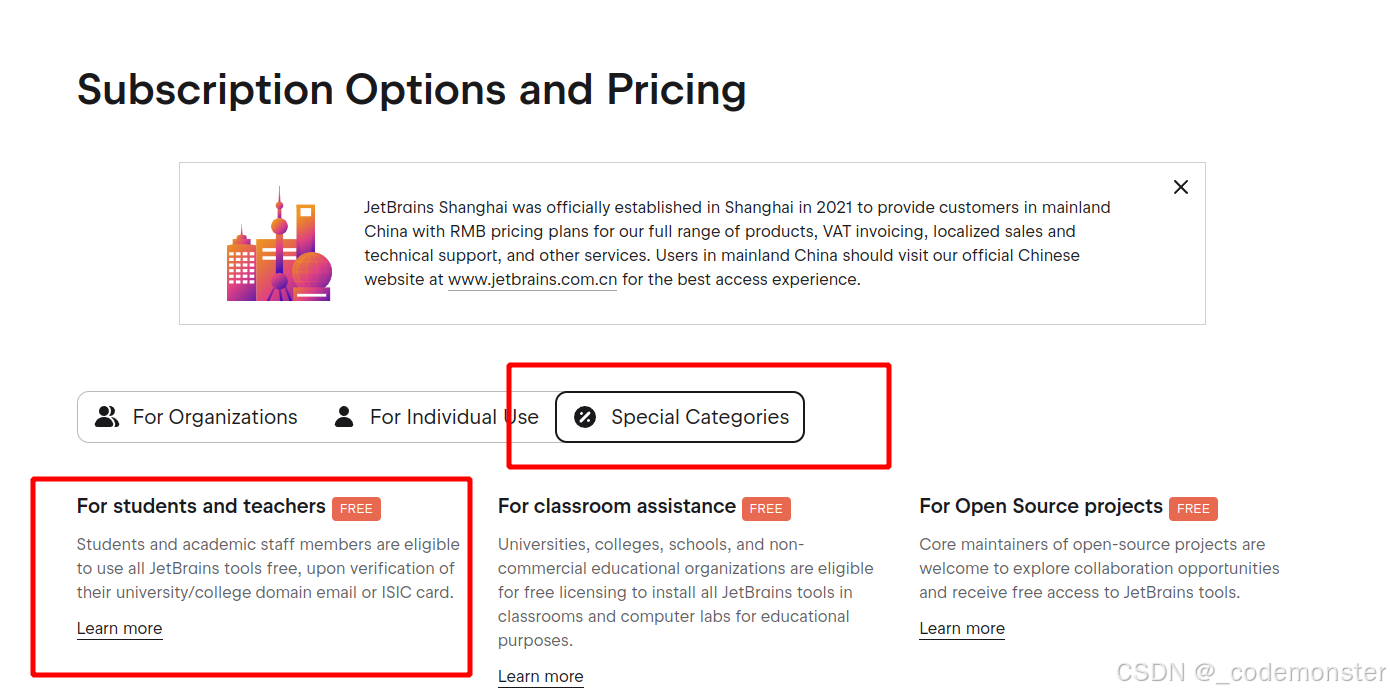
如果是学生或者老师可以通过上面的网址获取特定的免费教育专业版pycharm,需要按照官网引导自行注册
在Ubuntu中添加pycharm桌面图标
安装之后没有pycharm桌面图标
在/usr/share/applications/ 目录下新建文件 pycharm.desktop
写入
bash
[Desktop Entry]
Version=1.0
Type=Application
Name=Pycharm
Icon=/home/wxa/mmlab/AIlearning/tools/pycharm-2025.3.1.1/bin/pycharm.png
Exec=/home/wxa/mmlab/AIlearning/tools/pycharm-2025.3.1.1/bin/pycharm.sh
MimeType=application/x-py;
Name[en_US]=pycharm
将docker容器与pycharm相连
可以在容器里的虚拟环境如mska下进行下面操作
设置密码
passwd更新软件包列表
apt-get update安装服务及客户端
apt-get install openssh-server
apt-get install openssh-client
编辑文件
vim /etc/ssh/sshd_config添加下面内容
PermitRootLogin yes #允许root用户使用ssh登录

KexAlgorithms curve25519-sha256@libssh.org,ecdh-sha2-nistp256,ecdh-sha2-nistp384,ecdh-sha2-nistp521,diffie-hellman-group14-sha1
刷新重启
/etc/init.d/ssh restart退出容器测试
bash
ssh root@127.0.0.1 -p 11741