◀️ ⬇️ ▶️ ⬅️ ↙️ ↘️ ➡️ ⬆️ ↖️ ↗️ ⏬ ⏫ ⤵️ ⤴️ ↩️ ↪️ ↔️ ↕️ ⏪ ⏩ ℹ️
🌈🌈🌈欢迎来到"GIS猫"的博文🍭🍭🍭
"欢迎大家一起探讨,有问题可以私信/邮件,喜欢的朋友可以关注一下,下次更新不迷路"
目录
[1️⃣ 绘制矢量要素](#1️⃣ 绘制矢量要素)
[2️⃣ 制作二值化样本](#2️⃣ 制作二值化样本)
[3️⃣ 样本预处理](#3️⃣ 样本预处理)
本文介绍了遥感影像样本制作的完整流程,包括矢量要素绘制、二值化样本制作和样本预处理三大部分。首先详细说明了如何在ArcGIS中绘制矢量要素并转换为栅格样本,然后通过Python代码实现了样本的标准化提取、正样本优化和数据增强处理。文章提供了完整的代码实现,支持批量处理多个样本栅格,自动完成影像裁剪、格式转换、文件匹配检查等操作,最后通过旋转增强生成了多角度训练样本。整个流程涵盖了从原始数据到深度学习可用样本的全过程,为遥感影像分类任务提供了实用的技术方案。
1️⃣ 绘制矢量要素
首先利用arcgis加载影像。
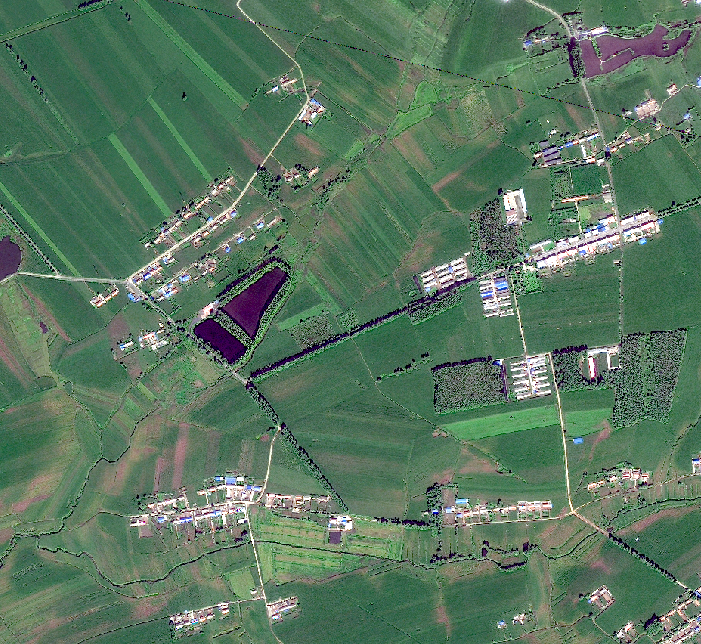
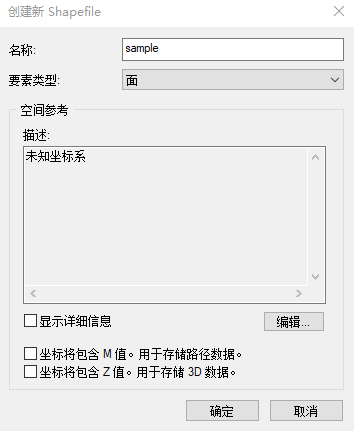
并新建一个shp矢量:名称改为样本名称,要素类型选择Polygon(面)。
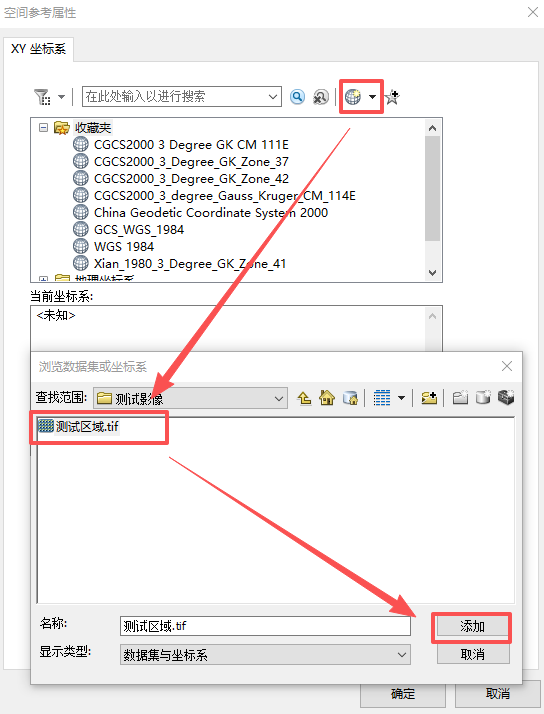
点击编辑,矢量要与影像坐标系保持一致,需要定义坐标系:
简便方法是直接点击"地球"图标,导入影像的坐标系。
制样本矢量边界:编辑工具栏,绘制样本矢量面要素。
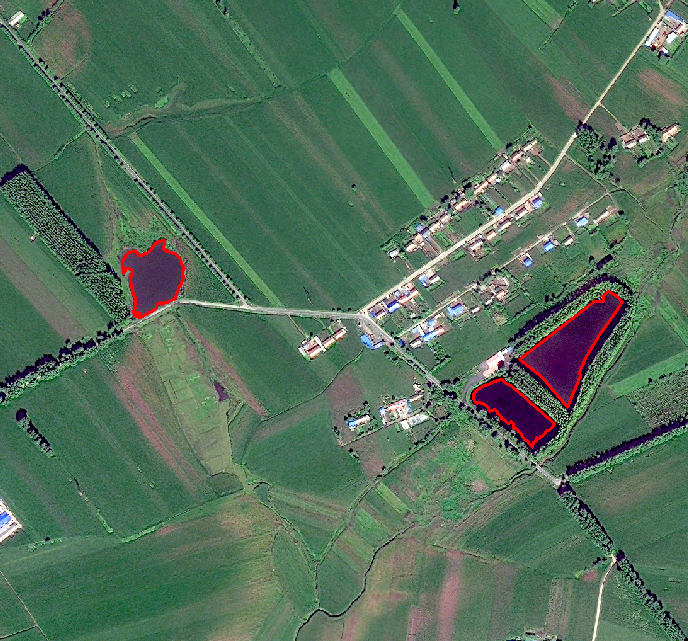
2️⃣ 制作二值化样本
绘制完成后,打开矢量的的属性表,新建一个字段。
id字段赋值为"255",名称字段命名为地物名称。
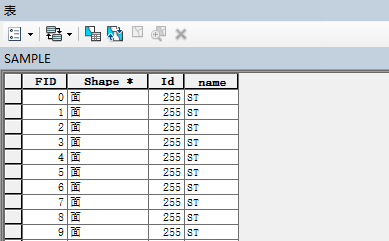
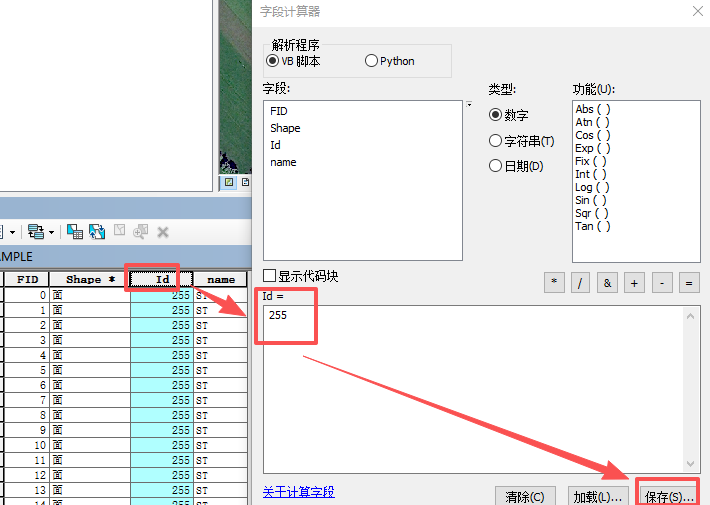
比较简单的方法是直接利用"字段计算器"赋值,右键字段选择"字段计算器"。
id字段可直接输入255,name字段的值需要加上英文双引号:"ST"。
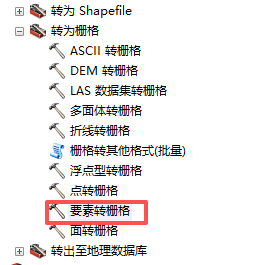
点击工具箱,选择"转换工具"--"转为栅格"--"要素转栅格"
"要素转栅格"工具中,要素为矢量数据,字段为"ID",即赋值"255"的字段名称,选择输出路径与输出像元大小,这里我将输出像元大小与测试影像保持一致。
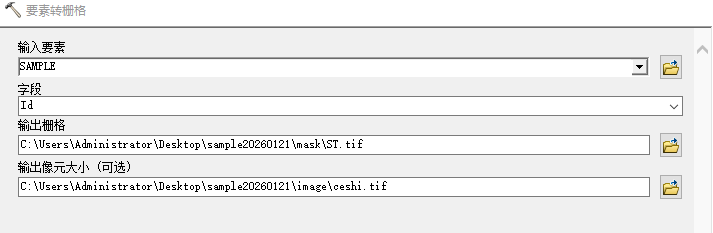
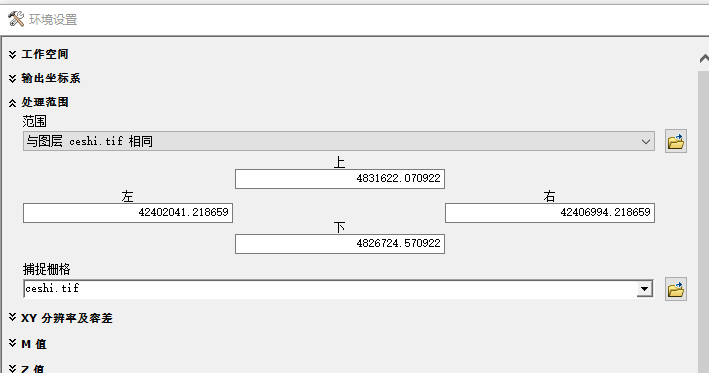
点击工具中的"环境",在环境设置里的"处理范围"中,使范围与测试影像保持一致,防止四至不同,后续预处理出错。
输出的样本栅格如图所示:

3️⃣ 样本预处理
👉标准化样本提取
首先设置文件夹,方便代码提取,结构为:
文件名称
|____image (影像.tif)(应该只有一景影像)
|____mask (样本.tif)(可以有多个不同的样本)
|____output (主要的输出文件夹,代码会在改文件夹下自动构建路径)
|____preprocessing (预处理文件夹)(需要根据自己的需求建立不同的文件夹)
在代码里定义路径:
# output : 输出文件夹
# image : 原始影像
# mask : 原始二值化数据
# image_tif : 裁剪后的栅格影像(TIFF格式)
# image_png : 裁剪后的栅格影像(PNG格式)
# mask_png : 掩膜的PNG格式
# mask_target : 单波段掩膜
# target_tif : 裁剪后的单波段掩膜(TIFF格式)
# target_png : 裁剪后的单波段掩膜(PNG格式)
源代码如下:
支持多个样本栅格的自动化处理,并且支持检查样本裁剪的一一匹配问题。
python
# GISkitty
# 需要更改文件夹路径:
# output : 输出文件夹
# image : 原始影像
# mask : 原始二值化数据
# image_tif : 裁剪后的栅格影像(TIFF格式)
# image_png : 裁剪后的栅格影像(PNG格式)
# mask_png : 掩膜的PNG格式
# mask_target : 单波段掩膜
# target_tif : 裁剪后的单波段掩膜(TIFF格式)
# target_png : 裁剪后的单波段掩膜(PNG格式)


import os
import time
import glob
import numpy as np
from osgeo import gdal
from PIL import Image
import logging
import shutil

# 设置日志
logging.basicConfig(level=logging.INFO, format='%(asctime)s - %(levelname)s - %(message)s')
logger = logging.getLogger(__name__)

# 解除PIL图像大小限制
Image.MAX_IMAGE_PIXELS = None

class GRID:
    """处理地理参考图像的类"""

    def __init__(self, proj_lib_path=None):
        """初始化,设置PROJ库路径"""
        if proj_lib_path:
            os.environ['PROJ_LIB'] = proj_lib_path
            # 检查路径是否存在
            if not os.path.exists(proj_lib_path):
                logger.warning(f"PROJ库路径不存在: {proj_lib_path}")
                # 尝试自动查找proj.db文件
                for root, dirs, files in os.walk(r"D:\anaconda"):
                    if "proj.db" in files:
                        os.environ['PROJ_LIB'] = root
                        logger.info(f"找到proj.db在: {root}")
                        break

    def load_image(self, filename):
        """加载图像"""
        image = gdal.Open(filename)
        if image is None:
            raise ValueError(f"无法打开文件: {filename}")

        img_width = image.RasterXSize
        img_height = image.RasterYSize
        img_geotrans = image.GetGeoTransform()
        img_proj = image.GetProjection()
        img_data = image.ReadAsArray(0, 0, img_width, img_height)

        del image
        return img_proj, img_geotrans, img_data

    def write_image(self, filename, img_proj, img_geotrans, img_data):
        """保存图像"""
        if 'int8' in img_data.dtype.name:
            datatype = gdal.GDT_Byte
        elif 'int16' in img_data.dtype.name:
            datatype = gdal.GDT_UInt16
        else:
            datatype = gdal.GDT_Float32

        if len(img_data.shape) == 3:
            img_bands, img_height, img_width = img_data.shape
        else:
            img_bands, (img_height, img_width) = 1, img_data.shape

        driver = gdal.GetDriverByName('GTiff')
        image = driver.Create(filename, img_width, img_height, img_bands, datatype)

        image.SetGeoTransform(img_geotrans)
        image.SetProjection(img_proj)

        if img_bands == 1:
            image.GetRasterBand(1).WriteArray(img_data)
        else:
            for i in range(img_bands):
                image.GetRasterBand(i + 1).WriteArray(img_data[i])

        del image

    def create_labelme_image(self, img_data, output_path):
        """为LabelMe创建专门的8位RGB图像"""
        # 确保图像数据有3个波段
        if len(img_data.shape) == 3 and img_data.shape[0] >= 3:
            # 取前3个波段
            bands = [img_data[0], img_data[1], img_data[2]]
        elif len(img_data.shape) == 3:
            # 如果波段数不足3个,复制第一个波段
            bands = [img_data[0], img_data[0], img_data[0]]
        else:
            # 单波段图像,复制3次
            bands = [img_data, img_data, img_data]

        # 转换为8位
        bands_8bit = []
        for band in bands:
            # 线性拉伸到0-255范围
            band_min = band.min()
            band_max = band.max()
            if band_max > band_min:
                band_8bit = ((band - band_min) / (band_max - band_min) * 255).astype(np.uint8)
            else:
                band_8bit = np.zeros_like(band, dtype=np.uint8)
            bands_8bit.append(band_8bit)

        # 合并波段为RGB图像
        rgb_image = np.stack(bands_8bit, axis=2)

        # 保存为PNG
        pil_image = Image.fromarray(rgb_image)
        pil_image.save(output_path, 'PNG')

    def crop_image_to_patches(self, input_path, output_tif_dir, output_png_dir, patch_size=256):
        """将图像裁剪为指定大小的块"""
        # 确保输出目录存在
        os.makedirs(output_tif_dir, exist_ok=True)
        os.makedirs(output_png_dir, exist_ok=True)

        t_start = time.time()
        logger.info(f"开始裁剪图像: {input_path}")

        # 加载图像
        proj, geotrans, data = self.load_image(input_path)

        # 处理数据形状
        if len(data.shape) == 2:
            # 单波段图像,添加一个维度
            data = np.expand_dims(data, axis=0)

        channel, height, width = data.shape
        logger.info(f"图像尺寸: {width}x{height}, 波段数: {channel}")

        patch_size_w = patch_size
        patch_size_h = patch_size
        num = 0

        for i in range(height // patch_size_h):
            for j in range(width // patch_size_w):
                num += 1
                sub_image = data[:, i * patch_size_h:(i + 1) * patch_size_h,
                                 j * patch_size_w:(j + 1) * patch_size_w]

                # 计算新的地理变换
                px = geotrans[0] + j * patch_size_w * geotrans[1] + i * patch_size_h * geotrans[2]
                py = geotrans[3] + j * patch_size_w * geotrans[4] + i * patch_size_h * geotrans[5]
                new_geotrans = [px, geotrans[1], geotrans[2], py, geotrans[4], geotrans[5]]

                # 保存地理参考TIFF
                tiff_path = os.path.join(output_tif_dir, f'{num:04d}.tif')
                self.write_image(tiff_path, proj, new_geotrans, sub_image)

                # 创建PNG图像
                png_path = os.path.join(output_png_dir, f'{num:04d}.png')
                self.create_labelme_image(sub_image, png_path)

                if num % 10 == 0:
                    time_end = time.time()
                    logger.info(f'第{num}张图像处理完毕,耗时:{round((time_end - t_start), 4)}秒')

        t_end = time.time()
        logger.info(f'所有图像处理完毕,共{num}张图像,耗时:{round((t_end - t_start), 4)}秒')

        return num, width, height  # 返回处理的数量和原始图像尺寸

def convert_mask_to_single_band(input_dir, output_dir):
    """将3波段掩膜转换为单波段掩膜"""
    # 创建输出目录
    os.makedirs(output_dir, exist_ok=True)
    logger.info(f"GISkitty开始转换掩膜文件,输入目录: {input_dir}")

    # 获取所有图片文件
    image_extensions = ['*.png', '*.jpg', '*.jpeg', '*.tif', '*.tiff']
    image_files = []
    for ext in image_extensions:
        image_files.extend(glob.glob(os.path.join(input_dir, ext)))
        image_files.extend(glob.glob(os.path.join(input_dir, ext.upper())))

    logger.info(f"找到 {len(image_files)} 个掩膜文件")

    processed_count = 0
    error_count = 0

    for image_path in image_files:
        try:
            # 获取文件名
            filename = os.path.basename(image_path)
            name, ext = os.path.splitext(filename)

            # 打开图像
            img = Image.open(image_path)
            img_array = np.array(img)

            # 检查图像维度
            if len(img_array.shape) == 2:
                # 已经是单波段图像
                single_band_mask = img_array
            elif len(img_array.shape) == 3 and img_array.shape[2] == 3:
                # 3波段图像,查找红色区域
                single_band_mask = np.zeros((img_array.shape[0], img_array.shape[1]), dtype=np.uint8)

                # 找到红色区域 (R=255, G=0, B=0)
                red_mask = (img_array[:, :, 0] == 255) & (img_array[:, :, 1] == 0) & (img_array[:, :, 2] == 0)

                # 如果严格匹配没有找到红色区域,尝试宽松匹配
                if not np.any(red_mask):
                    # 尝试宽松匹配(R通道值高,G和B通道值低)
                    red_mask = (img_array[:, :, 0] > 200) & (img_array[:, :, 1] < 50) & (img_array[:, :, 2] < 50)

                single_band_mask[red_mask] = 255
            elif len(img_array.shape) == 3 and img_array.shape[2] == 4:
                # RGBA图像,忽略alpha通道
                single_band_mask = np.zeros((img_array.shape[0], img_array.shape[1]), dtype=np.uint8)
                red_mask = (img_array[:, :, 0] == 255) & (img_array[:, :, 1] == 0) & (img_array[:, :, 2] == 0)
                if not np.any(red_mask):
                    red_mask = (img_array[:, :, 0] > 200) & (img_array[:, :, 1] < 50) & (img_array[:, :, 2] < 50)
                single_band_mask[red_mask] = 255
            else:
                logger.warning(f"未知的图像格式: {filename}, 形状: {img_array.shape}")
                continue

            # 保存单波段掩膜为PNG
            output_path = os.path.join(output_dir, f"{name}.png")
            output_img = Image.fromarray(single_band_mask)
            output_img.save(output_path, 'PNG')

            processed_count += 1

        except Exception as e:
            logger.error(f"处理文件 {image_path} 时出错: {str(e)}")
            error_count += 1

    logger.info(f"转换完成! GISkitty成功处理: {processed_count} 个文件,GISkitty处理失败: {error_count} 个文件")

def convert_single_tif_to_png(tif_path, output_dir, png_quality=95, optimize=True):
    """将单个TIF/TIFF图片转换为PNG格式"""
    # 创建目标文件夹
    os.makedirs(output_dir, exist_ok=True)

    try:
        # 获取文件名
        filename = os.path.basename(tif_path)

        # 生成输出文件名
        base_name = os.path.splitext(filename)[0]
        if base_name.endswith('.ti'):
            base_name = base_name[:-3]
        png_filename = f"{base_name}.png"
        png_path = os.path.join(output_dir, png_filename)

        # 打开TIF图片并转换为PNG
        with Image.open(tif_path) as img:
            # 根据原始图像模式决定输出模式
            if img.mode in ('1', 'L', 'P', 'RGB', 'RGBA'):
                img.save(png_path, format='PNG', quality=png_quality, optimize=optimize)
            elif img.mode == 'CMYK':
                img = img.convert('RGB')
                img.save(png_path, format='PNG', quality=png_quality, optimize=optimize)
            else:
                logger.warning(f"{filename} 使用不常见的图像模式: {img.mode},尝试转换为RGB")
                img = img.convert('RGB')
                img.save(png_path, format='PNG', quality=png_quality, optimize=optimize)

        logger.info(f"转换完成: {filename} -> {png_filename}")
        return True

    except Exception as e:
        logger.error(f"转换文件 {filename} 时出错: {str(e)}")
        return False

def crop_mask_to_patches(mask_png_path, output_tif_dir, output_png_dir, patch_size=256, num_patches=None):
    """将掩膜裁剪为指定大小的块,确保数量与图像一致"""
    # 确保输出目录存在
    os.makedirs(output_tif_dir, exist_ok=True)
    os.makedirs(output_png_dir, exist_ok=True)

    t_start = time.time()
    logger.info(f"开始裁剪掩膜: {mask_png_path}")

    try:
        # 打开掩膜PNG文件
        mask_img = Image.open(mask_png_path)
        mask_array = np.array(mask_img)

        height, width = mask_array.shape[:2]
        logger.info(f"掩膜尺寸: {width}x{height}")

        patch_size_w = patch_size
        patch_size_h = patch_size

        # 计算可以裁剪的块数
        num_rows = height // patch_size_h
        num_cols = width // patch_size_w
        total_patches = num_rows * num_cols

        logger.info(f"掩膜可裁剪块数: {total_patches} ({num_rows}行 x {num_cols}列)")

        # 如果指定了需要的块数,调整裁剪策略
        if num_patches and num_patches < total_patches:
            logger.info(f"需要裁剪的块数: {num_patches} (小于总可用块数)")
            # 计算需要的行列数
            needed_rows = int(np.sqrt(num_patches))
            needed_cols = num_patches // needed_rows

            # 从中心开始裁剪
            start_row = (num_rows - needed_rows) // 2
            start_col = (num_cols - needed_cols) // 2

            num_rows = needed_rows
            num_cols = needed_cols
            total_patches = num_rows * num_cols

            logger.info(f"调整后的裁剪区域: 从({start_row},{start_col})开始,{num_rows}行 x {num_cols}列")
        else:
            start_row = 0
            start_col = 0

        num = 0

        for i in range(num_rows):
            for j in range(num_cols):
                num += 1

                # 计算裁剪位置
                row_idx = start_row + i
                col_idx = start_col + j

                # 提取子图像
                sub_mask = mask_array[
                    row_idx * patch_size_h:(row_idx + 1) * patch_size_h,
                    col_idx * patch_size_w:(col_idx + 1) * patch_size_w
                ]

                # 保存PNG格式
                png_path = os.path.join(output_png_dir, f'{num:04d}.png')
                png_img = Image.fromarray(sub_mask)
                png_img.save(png_path, 'PNG')

                # 保存TIFF格式
                tiff_path = os.path.join(output_tif_dir, f'{num:04d}.tif')

                # 使用GDAL保存TIFF
                driver = gdal.GetDriverByName('GTiff')
                dataset = driver.Create(tiff_path, patch_size_w, patch_size_h, 1, gdal.GDT_Byte)
                dataset.GetRasterBand(1).WriteArray(sub_mask)
                dataset.FlushCache()
                dataset = None

                if num % 10 == 0:
                    time_end = time.time()
                    logger.info(f'第{num}张掩膜处理完毕,耗时:{round((time_end - t_start), 4)}秒')

        t_end = time.time()
        logger.info(f'所有掩膜处理完毕,共{num}张掩膜,耗时:{round((t_end - t_start), 4)}秒')

        return num

    except Exception as e:
        logger.error(f"裁剪掩膜时出错: {str(e)}")
        return 0

def check_images_in_directory(directory):
    """检查目录中的所有图像文件"""
    corrupted_files = []
    valid_files = 0

    for filename in os.listdir(directory):
        if filename.lower().endswith(('.tif', '.tiff', '.png', '.jpg', '.jpeg')):
            file_path = os.path.join(directory, filename)
            try:
                with Image.open(file_path) as img:
                    img.verify()
                valid_files += 1
            except Exception as e:
                logger.error(f"损坏的文件: {file_path}, 错误: {e}")
                corrupted_files.append(file_path)

    logger.info(f"检查完成: {valid_files} 个有效文件, {len(corrupted_files)} 个损坏文件")
    return corrupted_files

def check_file_consistency(image_dir, mask_dir):
    """检查两个文件夹中的文件是否一致(文件名不含后缀)"""
    logger.info("开始检查文件一致性...")

    # 获取两个文件夹中的文件(不含后缀)
    def get_filenames_without_ext(directory):
        filenames = set()
        for f in os.listdir(directory):
            if f.lower().endswith(('.tif', '.tiff', '.png', '.jpg', '.jpeg')):
                name = os.path.splitext(f)[0]
                filenames.add(name)
        return filenames

    image_files = get_filenames_without_ext(image_dir)
    mask_files = get_filenames_without_ext(mask_dir)

    logger.info(f"image_tif文件夹文件数: {len(image_files)}")
    logger.info(f"target_png文件夹文件数: {len(mask_files)}")

    # 找出不一致的文件
    only_in_image = image_files - mask_files
    only_in_mask = mask_files - image_files

    if not only_in_image and not only_in_mask:
        logger.info("✓ 两个文件夹中的文件数量一致且文件名匹配!")
        return True
    else:
        if only_in_image:
            logger.warning(f"仅在image_tif中找到的文件: {only_in_image}")
        if only_in_mask:
            logger.warning(f"仅在target_png中找到的文件: {only_in_mask}")
        logger.warning("✗ 两个文件夹中的文件不一致!")
        return False

def process_mask_file(mask_file_path, mask_name, base_output_dir, num_patches):
    """处理单个掩膜文件"""
    logger.info(f"开始处理掩膜: {mask_name}")

    # 创建掩膜专属目录
    mask_output_dir = os.path.join(base_output_dir, mask_name)

    # 创建所有子目录
    mask_png_dir = os.path.join(mask_output_dir, "mask_png")
    mask_target_dir = os.path.join(mask_output_dir, "mask_target")
    target_tif_dir = os.path.join(mask_output_dir, "target_tif")
    target_png_dir = os.path.join(mask_output_dir, "target_png")
    image_tif_dir = os.path.join(mask_output_dir, "image_tif")
    image_png_dir = os.path.join(mask_output_dir, "image_png")

    for dir_path in [mask_output_dir, mask_png_dir, mask_target_dir, target_tif_dir, target_png_dir, image_tif_dir, image_png_dir]:
        os.makedirs(dir_path, exist_ok=True)
        logger.info(f"创建目录: {dir_path}")

    # ====== 1. 将掩膜转换为PNG ======
    logger.info(f"步骤1: 将掩膜 {mask_name} 转换为PNG")

    # 直接转换单个掩膜文件
    success = convert_single_tif_to_png(
        tif_path=mask_file_path,
        output_dir=mask_png_dir,
        png_quality=95,
        optimize=True
    )

    if not success:
        logger.error(f"掩膜 {mask_name} 转换为PNG失败")
        return None

    # ====== 2. 将掩膜转换为单波段 ======
    logger.info(f"步骤2: 将掩膜 {mask_name} 转换为单波段")
    convert_mask_to_single_band(mask_png_dir, mask_target_dir)

    # ====== 3. 裁剪单波段掩膜 ======
    logger.info(f"步骤3: 裁剪单波段掩膜 {mask_name}")

    # 获取mask_target_dir中的所有PNG文件(应该只有一个)
    target_mask_files = [f for f in os.listdir(mask_target_dir) if f.lower().endswith('.png')]

    if not target_mask_files:
        logger.error(f"掩膜 {mask_name} 没有生成单波段掩膜文件")
        return None

    # 获取单波段掩膜文件路径
    mask_png_path = os.path.join(mask_target_dir, target_mask_files[0])

    # 裁剪掩膜,确保数量与图像一致
    num_mask_patches = crop_mask_to_patches(
        mask_png_path=mask_png_path,
        output_tif_dir=target_tif_dir,
        output_png_dir=target_png_dir,
        patch_size=256,
        num_patches=num_patches
    )

    if num_mask_patches != num_patches:
        logger.warning(f"掩膜 {mask_name} 裁剪数量({num_mask_patches})与图像数量({num_patches})不一致")

    logger.info(f"掩膜 {mask_name} 处理完成!")

    return mask_output_dir

def copy_image_results_to_mask_folder(base_image_tif_dir, base_image_png_dir, mask_output_dir):
    """将基础图像处理结果复制到掩膜文件夹"""
    # 创建目标目录
    mask_image_tif_dir = os.path.join(mask_output_dir, "image_tif")
    mask_image_png_dir = os.path.join(mask_output_dir, "image_png")

    os.makedirs(mask_image_tif_dir, exist_ok=True)
    os.makedirs(mask_image_png_dir, exist_ok=True)

    # 复制TIFF文件
    tif_files = [f for f in os.listdir(base_image_tif_dir) if f.lower().endswith('.tif')]
    for tif_file in tif_files:
        src_path = os.path.join(base_image_tif_dir, tif_file)
        dst_path = os.path.join(mask_image_tif_dir, tif_file)
        shutil.copy2(src_path, dst_path)

    # 复制PNG文件
    png_files = [f for f in os.listdir(base_image_png_dir) if f.lower().endswith('.png')]
    for png_file in png_files:
        src_path = os.path.join(base_image_png_dir, png_file)
        dst_path = os.path.join(mask_image_png_dir, png_file)
        shutil.copy2(src_path, dst_path)

    logger.info(f"复制完成: {len(tif_files)}个TIFF文件, {len(png_files)}个PNG文件")

def main():
    """主函数"""
    # ====== 1. 设置输入输出路径 ======
    # 输入文件路径(请根据实际情况修改)
    raster_path = r"C:\Users\Administrator\Desktop\sample20260121\image\ceshi.tif"  # 栅格影像路径
    mask_dir = r"C:\Users\Administrator\Desktop\sample20260121\mask"  # 掩膜文件夹路径

    # 输出根目录(请根据实际情况修改)
    output_base = r"C:\Users\Administrator\Desktop\sample20260121\output"

    # ====== 2. 创建基础输出目录 ======
    # 创建基础图像处理目录(这些会被复制到每个掩膜文件夹)
    base_image_tif_dir = os.path.join(output_base, "base_image_tif")
    base_image_png_dir = os.path.join(output_base, "base_image_png")

    for dir_path in [output_base, base_image_tif_dir, base_image_png_dir]:
        os.makedirs(dir_path, exist_ok=True)
        logger.info(f"创建目录: {dir_path}")

    # ====== 3. 初始化GRID类 ======
    grid = GRID(proj_lib_path=r"D:\anaconda\envs\NonGrainMonitoring\Library\share\proj")

    # ====== 4. 处理栅格影像(基础图像) ======
    logger.info("=" * 60)
    logger.info("步骤1: 处理栅格影像(基础图像)")
    logger.info("=" * 60)

    num_patches, img_width, img_height = grid.crop_image_to_patches(
        input_path=raster_path,
        output_tif_dir=base_image_tif_dir,
        output_png_dir=base_image_png_dir,
        patch_size=256
    )

    logger.info(f"图像处理完成: 共{num_patches}张图像,原始尺寸: {img_width}x{img_height}")

    # 检查基础图像
    logger.info("检查基础图像文件夹...")
    corrupted_images = check_images_in_directory(base_image_tif_dir)
    if corrupted_images:
        logger.warning(f"发现 {len(corrupted_images)} 个损坏的基础图像文件")

    # ====== 5. 获取掩膜文件列表 ======
    logger.info("=" * 60)
    logger.info("步骤2: 处理掩膜文件")
    logger.info("=" * 60)

    # 获取掩膜目录中的所有TIFF文件
    mask_files = [f for f in os.listdir(mask_dir) if f.lower().endswith(('.tif', '.tiff'))]

    if not mask_files:
        logger.error(f"在掩膜目录中没有找到TIFF文件: {mask_dir}")
        return

    logger.info(f"找到 {len(mask_files)} 个掩膜文件: {', '.join(mask_files)}")

    # ====== 6. 处理每个掩膜文件 ======
    processed_masks = []
    for mask_file in mask_files:
        try:
            mask_file_path = os.path.join(mask_dir, mask_file)
            mask_name = os.path.splitext(mask_file)[0]  # 去除扩展名

            logger.info(f"处理掩膜文件: {mask_file} -> {mask_name}")

            # 处理单个掩膜文件
            mask_output_dir = process_mask_file(
                mask_file_path=mask_file_path,
                mask_name=mask_name,
                base_output_dir=output_base,
                num_patches=num_patches
            )

            if mask_output_dir is None:
                logger.error(f"掩膜 {mask_name} 处理失败,跳过")
                continue

            # 将基础图像处理结果复制到掩膜文件夹
            copy_image_results_to_mask_folder(
                base_image_tif_dir=base_image_tif_dir,
                base_image_png_dir=base_image_png_dir,
                mask_output_dir=mask_output_dir
            )

            processed_masks.append(mask_name)

            logger.info(f"掩膜 {mask_name} 处理完成!")
            logger.info("-" * 40)

        except Exception as e:
            logger.error(f"处理掩膜文件 {mask_file} 时出错: {str(e)}")

    # ====== 7. 文件一致性检查 ======
    logger.info("=" * 60)
    logger.info("步骤3: 文件一致性检查")
    logger.info("=" * 60)

    if not processed_masks:
        logger.error("没有成功处理的掩膜文件")
        return

    all_consistent = True
    for mask_name in processed_masks:
        logger.info(f"检查掩膜: {mask_name}")

        # 获取掩膜文件夹中的image_tif和target_png目录
        mask_image_tif_dir = os.path.join(output_base, mask_name, "image_tif")
        mask_target_png_dir = os.path.join(output_base, mask_name, "target_png")

        if os.path.exists(mask_image_tif_dir) and os.path.exists(mask_target_png_dir):
            is_consistent = check_file_consistency(mask_image_tif_dir, mask_target_png_dir)
            if not is_consistent:
                all_consistent = False
                logger.error(f"掩膜 {mask_name} 文件一致性检查失败!")
        else:
            logger.error(f"掩膜 {mask_name} 缺少必要的目录")
            all_consistent = False

    if all_consistent:
        logger.info("✓ 所有掩膜文件夹中的文件一致性检查通过!")
    else:
        logger.error("✗ 部分掩膜文件夹中的文件一致性检查失败!")

    # ====== 8. 清理临时基础目录 ======
    logger.info("=" * 60)
    logger.info("步骤4: 清理临时文件")
    logger.info("=" * 60)

    # 删除基础图像目录(因为已经复制到各个掩膜文件夹)
    if os.path.exists(base_image_tif_dir):
        shutil.rmtree(base_image_tif_dir)
        logger.info(f"删除临时目录: {base_image_tif_dir}")

    if os.path.exists(base_image_png_dir):
        shutil.rmtree(base_image_png_dir)
        logger.info(f"删除临时目录: {base_image_png_dir}")

    logger.info("=" * 60)
    logger.info("处理完成!")
    logger.info(f"输出目录: {output_base}")
    logger.info(f"成功处理的掩膜数量: {len(processed_masks)}")
    logger.info(f"成功处理的掩膜: {', '.join(processed_masks)}")
    logger.info("=" * 60)

if __name__ == "__main__":
    # 运行主函数
    main()
👉正样本优化
由于是批量裁剪的样本,会有一些影像为空值,即部分256x256标准尺寸中并没有样本,需要人工剔除文件,只需要在处理完的掩膜文件里删除图片即可,即"target_png"文件夹内,如果想保证数据的纯粹,也可以单独建一个文件夹,存放到"preprocessing"文件夹内,新建一个文件夹命名"delect_png",把"target_png"文件夹内的数据赋值。
这一步需要输入四个文件夹路径:
output\image_tif # 包含tif文件的文件夹
preprocessing\ST\delect_png # 包含png文件的文件夹
preprocessing\ST\sample_tif # 输出tif文件的文件夹
preprocessing\ST\sample_png # 输出png文件的文件夹
源代码如下所示:
python
import os
import shutil
from pathlib import Path

def copy_matching_files():
    # ============ 在这里修改路径 ============
    # 源文件夹路径
    folder_4_1 = Path(r"C:\Users\Administrator\Desktop\sample20260121\output\image_tif")  # 包含tif文件的文件夹
    folder_4_2 = Path(r"C:\Users\Administrator\Desktop\sample20260121\preprocessing\ST\delect_png")  # 包含png文件的文件夹

    # 目标文件夹路径
    folder_5_1 = Path(r"C:\Users\Administrator\Desktop\sample20260121\preprocessing\ST\sample_tif")  # 输出tif文件的文件夹
    folder_5_2 = Path(r"C:\Users\Administrator\Desktop\sample20260121\preprocessing\ST\sample_png")  # 输出png文件的文件夹
    # =======================================

    # 创建输出文件夹
    folder_5_1.mkdir(parents=True, exist_ok=True)
    folder_5_2.mkdir(parents=True, exist_ok=True)

    # 步骤1:将4-2中的所有png文件复制到5-2
    print("正在复制4-2中的png文件到5-2...")
    png_files = list(folder_4_2.glob("*.png"))
    for png_file in png_files:
        shutil.copy2(png_file, folder_5_2 / png_file.name)
    print(f"已复制 {len(png_files)} 个png文件到5-2")

    # 步骤2:获取5-2中所有文件的文件名(不带后缀)
    print("正在获取5-2中的文件名...")
    png_filenames = {f.stem for f in folder_5_2.glob("*.png")}
    print(f"5-2中找到 {len(png_filenames)} 个文件")

    # 步骤3:从4-1中查找同名文件并复制到5-1
    print("正在从4-1中查找匹配的文件...")
    matched_count = 0
    for tif_file in folder_4_1.glob("*.tif"):
        if tif_file.stem in png_filenames:
            shutil.copy2(tif_file, folder_5_1 / tif_file.name)
            matched_count += 1

    # 步骤4:显示结果
    print(f"\n操作完成!")
    print(f"5-1中的tif文件数量: {len(list(folder_5_1.glob('*.tif')))}")
    print(f"5-2中的png文件数量: {len(list(folder_5_2.glob('*.png')))}")
    print(f"成功匹配并复制了 {matched_count} 个文件")

if __name__ == "__main__":
    copy_matching_files()
👉数据增强
最后就是数据增强,这一步可以自主选择做不做,建议进行数据增强,提高样本量。
路径有四个,输入路径为"preprocessing\ST\sample_tif"与"preprocessing\ST\sample_png",输出路径为"preprocessing\ST\up_image"与"preprocessing\ST\up_mask",这两个文件也是输入到深度学习算法的文件。
源代码如下所示:
python
import os
import random
import numpy as np
from PIL import Image
import rasterio
import cv2
from pathlib import Path, PureWindowsPath
from tqdm import tqdm
import warnings
warnings.filterwarnings('ignore')

class RemoteSensingDataAugmentor:
    def __init__(self, imageup_dir, maskup_dir):
        """
        初始化数据增强器

        Args:
            imageup_dir: 增强后影像的输出目录
            maskup_dir: 增强后掩膜的输出目录
        """
        # 使用Path处理路径,兼容中文
        self.imageup_dir = Path(imageup_dir)
        self.maskup_dir = Path(maskup_dir)

        # 创建输出目录
        self.imageup_dir.mkdir(parents=True, exist_ok=True)
        self.maskup_dir.mkdir(parents=True, exist_ok=True)

        print(f"增强影像将保存至: {self.imageup_dir}")
        print(f"增强掩膜将保存至: {self.maskup_dir}")

    def read_tif_image(self, img_path):
        """读取TIF遥感影像,支持中文路径"""
        # 确保路径为字符串格式
        img_path_str = str(img_path)
        with rasterio.open(img_path_str) as src:
            img = src.read()  # 读取所有波段
            metadata = {
                'crs': src.crs,
                'transform': src.transform,
                'width': src.width,
                'height': src.height,
                'count': src.count,
                'dtype': src.dtypes[0],
                'nodata': src.nodata
            }
        return img, metadata

    def read_png_mask(self, mask_path):
        """
        读取PNG掩膜文件,修复中文路径问题
        使用多种方法确保能读取中文路径下的文件
        """
        mask_path_str = str(mask_path)

        # 方法1: 先使用PIL读取,再转numpy数组 (对中文路径支持更好)
        try:
            pil_image = Image.open(mask_path_str)
            mask = np.array(pil_image)
            # 如果是彩色图像,转换为灰度
            if len(mask.shape) == 3:
                mask = cv2.cvtColor(mask, cv2.COLOR_RGB2GRAY)
        except Exception as e:
            print(f"PIL读取失败 {mask_path.name}: {e}, 尝试cv2方法")
            # 方法2: 使用cv2的imdecode (解决部分中文路径问题)
            with open(mask_path_str, 'rb') as f:
                img_array = np.frombuffer(f.read(), dtype=np.uint8)
                mask = cv2.imdecode(img_array, cv2.IMREAD_GRAYSCALE)

        if mask is None:
            raise ValueError(f"无法读取掩膜文件: {mask_path_str}")

        return mask

    def save_tif_image(self, img_array, metadata, save_path):
        """保存TIF遥感影像"""
        save_path_str = str(save_path)
        with rasterio.open(
            save_path_str,
            'w',
            driver='GTiff',
            height=metadata['height'],
            width=metadata['width'],
            count=metadata['count'],
            dtype=img_array.dtype,
            crs=metadata['crs'],
            transform=metadata['transform'],
            nodata=metadata['nodata']
        ) as dst:
            for i in range(metadata['count']):
                dst.write(img_array[i], i+1)

    def save_png_mask(self, mask_array, save_path):
        """保存PNG掩膜文件,确保使用正确的路径格式"""
        save_path_str = str(save_path)
        # 确保是8位无符号整数格式
        if mask_array.dtype != np.uint8:
            mask_array = mask_array.astype(np.uint8)
        # 使用cv2保存
        success = cv2.imwrite(save_path_str, mask_array)
        if not success:
            # 如果cv2保存失败,尝试用PIL保存
            Image.fromarray(mask_array).save(save_path_str)

    def random_flip(self, img, mask):
        """随机翻转"""
        # 随机水平翻转
        if random.random() < 0.5:
            img = np.flip(img, axis=2)  # 沿宽度方向翻转
            mask = np.flip(mask, axis=1)  # 沿宽度方向翻转

        # 随机垂直翻转
        if random.random() < 0.5:
            img = np.flip(img, axis=1)  # 沿高度方向翻转
            mask = np.flip(mask, axis=0)  # 沿高度方向翻转

        return img, mask

    def rotate_all_angles(self, img, mask, angle_idx):
        """按指定角度旋转(0, 90, 180, 270度)"""
        k = angle_idx  # 直接使用传入的角度索引,0, 1, 2, 3 对应 0, 90, 180, 270度

        if k > 0:
            # 旋转影像 (C, H, W)
            img = np.rot90(img, k=k, axes=(1, 2))
            # 旋转mask (H, W)
            mask = np.rot90(mask, k=k)

            # 更新元数据中的宽高(如果旋转了90或270度)
            if k % 2 == 1:
                # 交换宽高,但不需要在这里调整,因为numpy已经处理了
                pass

        return img, mask

    def augment_pair_all_angles(self, img_path, mask_path, save_prefix):
        """对一对影像和mask进行所有角度的增强"""
        try:
            # 读取数据
            img_array, img_metadata = self.read_tif_image(img_path)
            mask_array = self.read_png_mask(mask_path)

            print(f"  原始影像尺寸: {img_array.shape}, 原始掩膜尺寸: {mask_array.shape}")

            # 验证尺寸
            if img_array.shape[1] != mask_array.shape[0] or img_array.shape[2] != mask_array.shape[1]:
                print(f"  尺寸不匹配,调整掩膜尺寸...")
                # 调整mask尺寸以匹配影像 (H, W)
                mask_array = cv2.resize(mask_array,
                                       (img_array.shape[2], img_array.shape[1]),
                                       interpolation=cv2.INTER_NEAREST)
                print(f"  调整后掩膜尺寸: {mask_array.shape}")

            # 保存原始数据(0度)
            img_save_path = self.imageup_dir / f"{save_prefix}_0deg.tif"
            mask_save_path = self.maskup_dir / f"{save_prefix}_0deg.png"

            # 确保mask是二值图像 (0和255)
            mask_original = (mask_array > 0).astype(np.uint8) * 255

            # 更新元数据中的尺寸
            img_metadata_copy = img_metadata.copy()
            img_metadata_copy['height'] = img_array.shape[1]
            img_metadata_copy['width'] = img_array.shape[2]

            print(f"  保存0度影像: {img_save_path.name}")
            print(f"  保存0度掩膜: {mask_save_path.name}")

            self.save_tif_image(img_array, img_metadata_copy, img_save_path)
            self.save_png_mask(mask_original, mask_save_path)

            saved_paths = [(str(img_save_path), str(mask_save_path))]

            # 对90, 180, 270度进行旋转
            for angle_idx, angle_deg in enumerate([90, 180, 270], start=1):
                # 复制原始数据用于增强
                aug_img = img_array.copy()
                aug_mask = mask_array.copy()

                # 应用随机翻转(可选,根据需求可以保留或删除)
                aug_img, aug_mask = self.random_flip(aug_img, aug_mask)

                # 应用旋转
                aug_img, aug_mask = self.rotate_all_angles(aug_img, aug_mask, angle_idx)

                # 确保mask是二值图像 (0和255)
                aug_mask = (aug_mask > 0).astype(np.uint8) * 255

                # 保存增强后的数据
                img_save_path = self.imageup_dir / f"{save_prefix}_{angle_deg}deg.tif"
                mask_save_path = self.maskup_dir / f"{save_prefix}_{angle_deg}deg.png"

                # 更新元数据中的尺寸
                img_metadata_copy = img_metadata.copy()
                img_metadata_copy['height'] = aug_img.shape[1]
                img_metadata_copy['width'] = aug_img.shape[2]

                print(f"  保存{angle_deg}度影像: {img_save_path.name}")
                print(f"  保存{angle_deg}度掩膜: {mask_save_path.name}")

                self.save_tif_image(aug_img, img_metadata_copy, img_save_path)
                self.save_png_mask(aug_mask, mask_save_path)

                saved_paths.append((str(img_save_path), str(mask_save_path)))

            return saved_paths

        except Exception as e:
            print(f"增强 {img_path.name} 时出错: {e}")
            import traceback
            traceback.print_exc()
            return []

    def augment_dataset_all_angles(self, image_dir, mask_dir):
        """
        增强整个数据集,对每个图像生成所有角度的旋转版本

        Args:
            image_dir: 原始影像目录
            mask_dir: 原始掩膜目录

        Returns:
            tuple: (增强影像路径列表, 增强掩膜路径列表)
        """
        image_dir = Path(image_dir)
        mask_dir = Path(mask_dir)

        print(f"原始影像目录: {image_dir}")
        print(f"原始掩膜目录: {mask_dir}")

        # 获取所有影像文件
        image_files = sorted(list(image_dir.glob("*.tif")) +
                            list(image_dir.glob("*.tiff")))
        mask_files = sorted(list(mask_dir.glob("*.png")) +
                           list(mask_dir.glob("*.jpg")) +
                           list(mask_dir.glob("*.jpeg")))

        print(f"找到 {len(image_files)} 个影像文件和 {len(mask_files)} 个掩膜文件")

        # 验证文件对应关系
        paired_files = []
        for img_path in image_files:
            # 寻找对应的掩膜文件(假设文件名相同,扩展名不同)
            mask_candidates = []

            # 先尝试相同文件名
            mask_candidates.append(mask_dir / f"{img_path.stem}.png")
            mask_candidates.append(mask_dir / f"{img_path.stem}.jpg")

            # 如果有括号等情况,尝试不同变体
            mask_candidates.append(mask_dir / f"{img_path.stem}.PNG")
            mask_candidates.append(mask_dir / f"{img_path.stem}.JPG")
            mask_candidates.append(mask_dir / f"{img_path.stem}.jpeg")
            mask_candidates.append(mask_dir / f"{img_path.stem}.JPEG")

            mask_path = None
            for candidate in mask_candidates:
                if candidate.exists():
                    mask_path = candidate
                    break

            if mask_path:
                paired_files.append((img_path, mask_path))
                print(f"配对成功: {img_path.name} -> {mask_path.name}")
            else:
                print(f"警告: 未找到 {img_path.name} 对应的掩膜文件")

        print(f"成功配对 {len(paired_files)} 对数据")

        # 存储增强后的文件路径
        augmented_image_paths = []
        augmented_mask_paths = []

        # 进行数据增强
        for idx, (img_path, mask_path) in enumerate(tqdm(paired_files, desc="数据增强进度")):
            base_name = img_path.stem

            print(f"\n处理第 {idx+1}/{len(paired_files)} 对: {base_name}")

            # 对每个图像生成所有角度的旋转版本
            save_prefix = base_name
            print(f"  生成所有角度版本...")

            saved_paths = self.augment_pair_all_angles(
                img_path, mask_path, save_prefix
            )

            for img_aug_path, mask_aug_path in saved_paths:
                augmented_image_paths.append(img_aug_path)
                augmented_mask_paths.append(mask_aug_path)

        print(f"\n数据增强完成!")
        print(f"原始数据对: {len(paired_files)}")
        print(f"增强后总文件数: {len(augmented_image_paths)} 个影像, {len(augmented_mask_paths)} 个掩膜")
        print(f"增强影像保存在: {self.imageup_dir}")
        print(f"增强掩膜保存在: {self.maskup_dir}")

        return augmented_image_paths, augmented_mask_paths

def main():
    # 设置路径
    IMAGE_DIR = r"C:\Users\Administrator\Desktop\sample20260121\preprocessing\ST\sample_tif"  # 替换为影像文件夹路径
    MASK_DIR = r"C:\Users\Administrator\Desktop\sample20260121\preprocessing\ST\sample_png"   # 替换为掩膜文件夹路径
    IMAGEUP_DIR = r"C:\Users\Administrator\Desktop\sample20260121\preprocessing\ST\up_image"  # 替换为增强影像文件夹路径
    MASKUP_DIR = r"C:\Users\Administrator\Desktop\sample20260121\preprocessing\ST\up_mask"  # 替换为增强掩膜文件夹路径

    # 验证输入目录是否存在
    if not os.path.exists(IMAGE_DIR):
        print(f"错误: 影像目录不存在: {IMAGE_DIR}")
        return
    if not os.path.exists(MASK_DIR):
        print(f"错误: 掩膜目录不存在: {MASK_DIR}")
        return

    print("=" * 60)
    print("遥感数据增强脚本 - 所有角度版本")
    print("=" * 60)

    # 创建增强器
    augmentor = RemoteSensingDataAugmentor(
        imageup_dir=IMAGEUP_DIR,
        maskup_dir=MASKUP_DIR
    )

    # 进行数据增强(生成所有角度版本)
    augmented_images, augmented_masks = augmentor.augment_dataset_all_angles(
        image_dir=IMAGE_DIR,
        mask_dir=MASK_DIR
    )

    # 打印结果摘要
    print("\n" + "=" * 60)
    print("增强结果摘要")
    print("=" * 60)

    if len(augmented_images) > 0:
        print(f"✓ 成功生成 {len(augmented_images)} 个增强文件")
        print(f"✓ 每个原始图像生成 4 个不同角度版本 (0°, 90°, 180°, 270°)")

        # 计算角度分布
        angle_counts = {0: 0, 90: 0, 180: 0, 270: 0}
        for img_path in augmented_images:
            filename = os.path.basename(img_path)
            if "0deg" in filename:
                angle_counts[0] += 1
            elif "90deg" in filename:
                angle_counts[90] += 1
            elif "180deg" in filename:
                angle_counts[180] += 1
            elif "270deg" in filename:
                angle_counts[270] += 1

        print(f"\n角度分布:")
        for angle, count in angle_counts.items():
            print(f"  {angle}°: {count} 个文件")

        # 显示部分生成的文件
        print(f"\n部分增强文件:")
        for i, (img_path, mask_path) in enumerate(zip(augmented_images[:8], augmented_masks[:8]), 1):
            print(f"  {i:2d}. {os.path.basename(img_path)} -> {os.path.basename(mask_path)}")

        if len(augmented_images) > 8:
            print(f"  ... 以及 {len(augmented_images) - 8} 个其他文件")

        # 验证文件数量是否一致
        if len(augmented_images) == len(augmented_masks):
            print(f"\n✓ 影像和掩膜数量一致: {len(augmented_images)} 对")
        else:
            print(f"\n✗ 警告: 影像和掩膜数量不一致!")
            print(f"  影像数: {len(augmented_images)}, 掩膜数: {len(augmented_masks)}")
    else:
        print("✗ 未生成任何增强文件,请检查错误信息")

    print("\n脚本执行完成!")

if __name__ == "__main__":
    # 安装所需库(如果尚未安装)
    try:
        import rasterio
        import cv2
        import numpy as np
        from PIL import Image
    except ImportError as e:
        print(f"缺少必要的库,请安装: {e}")
        print("运行以下命令安装:")
        print("pip install numpy rasterio opencv-python pillow tqdm")
        exit(1)

    main()
有问题可以私信/评论区讨论~~~~~
◀️ ⬇️ ▶️ ⬅️ ↙️ ↘️ ➡️ ⬆️ ↖️ ↗️ ⏬ ⏫ ⤵️ ⤴️ ↩️ ↪️ ↔️ ↕️ ⏪ ⏩ ℹ️ ️
"内容持续更新,喜欢的朋友可以关注一下,下次更新不迷路"