目录
[1.不带参数的函数 instructions()](#1.不带参数的函数 instructions())
[位置参数(position parameter)和默认参数值(default parameter value)](#位置参数(position parameter)和默认参数值(default parameter value))
[Tic-Tac-Toe (井字棋)游戏](#Tic-Tac-Toe (井字棋)游戏)
本章书中是使用Tic-Tac-Toe(井字棋)游戏来展示的,还挺有意思的,来和计算机下棋。看看计算机是怎么来思考的。
什么是函数?
个人理解:function在英语中有"功能、职责"的意思,所以函数可以理解为实现某一个功能的代码块。比如,后面会说到的 ask_yes_no()函数,其功能就是获取用户的回答, give_me_five()函数的职责就是返回一个five。
python 有一些内建函数,之前用到的len()、range()等是python的内建函数。
为什么要使用函数?
函数的优点:
- 由函数组成的程序更易于编写和维护。
如果不使用函数,所有代码就需要全写在一个文件中,长长的代码理解和维护都是很困难的,闭眼想想一下,是不是挺吓人。如果 使用函数就可以将代码拆分成可管理的小块,一个功能一个函数,需要什么就调用什么,是不是清晰很多。
- 可以被复用到其他程序中。
如果不使用函数,只要用到这个功能的地方都要重写一次代码,但如果使用函数,只需要调用一下这个函数即可。要记住 "重复造轮子"是一件非常浪费时间的事情,所以要时刻将软件复用(software reuse)放在心上。
如何定义函数?
函数定义格式:
- 不带参数的函数:def 函数名() :
- 带参数的函数:def 函数名(参数名) :
- 带多个参数的函数: def 函数名(参数名1, 参数名2) :
- 带返回参数的函数: def 函数名(参数名): ... return 1
示例:
1.不带参数的函数 instructions()
先定义一个不带参数的函数 instructions(),用来展示游戏的介绍信息。
python
# 显示操作说明 instructions
# 演示 自建函数


# 自定义函数 instructions
def instructions():
	# 三重引号的内容叫做文档字符串(docstring或 documention string),用来说明函数的功能
	""" Display game instructions."""
	print(
	"""
	Welcome to the greatest intellectual challenge of all time: Tic-Tac-Toe.
	This will be a showdown between your human brain and my silicon processor.
	You will make your move known by entering a number, 0 - 8.
	The number will correspond to the board position as  illustrated:
				0 | 1 | 2
				---------
				3 | 4 | 5
				---------
				6 | 7 | 8
	Prepare yourself, human. The ultimate battle is about to begin. \n
	""")


# 主程序
print("Here are the instructions to the Tic-Tac-Toe game:")
#调用函数,此时函数内的代码才会执行
instructions()
print("You probably understand the game by now.")

input("\n\nPress the enter key to exit.")
2、带参数和返回值的函数
python
# Receive and Return
# 演示参数和返回值

# 定义函数display, 入参为message
def display(message) :
	print(message)


# 定义函数, 返回值为five
def give_me_five() :
	five = 5
	return five;

# 定义 回答yes or no的函数,
# 入参为一个yes/no问题,
# 返回值为用户的回答 y or n
def ask_yes_no(question) :
	""" Ask a yes or no question."""
	response = None
	# 收到的回答不是y或者n的话,就一直让用户回答
	while response not in ("y", "n") :
		response = input(question).lower()

	return response

# 程序主体
# 调用display函数,传入参数
display("Here's a message for you. \n")

# 调用give_me_five函数,获取number


number = give_me_five()
print("Here's what Igot from give_me_five(): ", number)

# 调用ask_yes_no函数,同时获取用户的回答
answer = ask_yes_no("\nPlease enter 'y' or 'n': ")
print("Thanks for entering:", answer)

input("\n\nPress the enter key to exit.")

# 注意:函数返回值可以是多个,用逗号分割。需要保有足够多的变量来捕获函数的返回值,如果数量不对,就会出错
对于抽象的简单理解
函数的编写和调用,其实就是实践被称为抽象(abstraction)的技术。抽象能够通观全局而不用过多考虑细节问题。像instructions()函数,我们只需要调用展示就行,无需关心其内部是如何实现的。
就好比餐厅退出套餐活动,你跟服务员A说:"要个套餐",A只需要跟配餐员B说:"一个套餐",配餐员B就知道你要了啥,不需要服务员A去详细的解释细节。
对于封装的简单理解
封装是一种抽象,抽象使用户不用关注细节,封装则是隐藏细节
通过give_me_five()函数来理解封装:
five 这个变量是局部变量 ,仅能在give_me_five函数内部使用个,这个函数外部不能接直接访问,这就是封装(encapsulation)。
封装通过隐藏细节来保证代码的独立性。
函数之间通信时交换必要信息,所以需要参数和返回值
理解全局变量和局部变量
封装将函数封印起来,完全独立于程序的其他部分。将信息送进去的唯一方式就是传参,将信息取出的唯一方式就是返回值。但也不是绝对的,函数之间可以使用也可以使用全局变量进行信息共享。
全局变量和局部变量的作用域是不同的。作用域(scope)表示的是程序中各自区分开的不同区域。定义的每个函数都有自己的额作用域,这也就是为什么函数不能访问其他函数中的变量的原因。
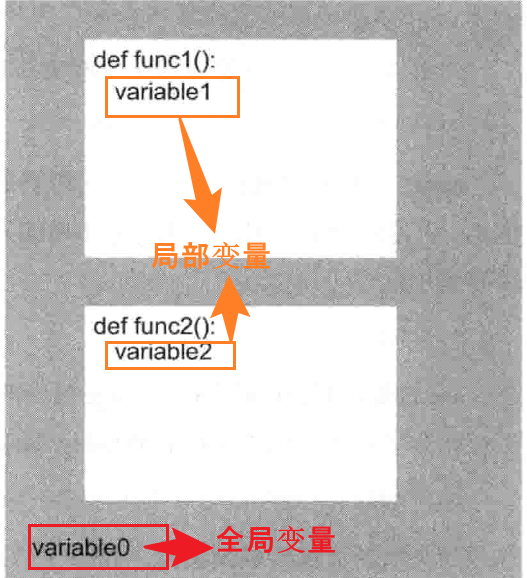 1、如图,variable0不在任何一个函数中,此时其就在全局作用域中,这个变量被称为 全局变量。func1()和func2()中都可以访问这个变量。
2、图中,func1()和func2()函数分别为两个作用域,func1()中定义的函数variable1只在func1()作用域中生效,func2()中定义的函数variable2只在func2()作用域中生效,variable1和variable2为局部变量。func2()不能访问variable1, func1()不能访问variable2。
全局变量不同于全局常量(当做常量来用的全局变量,之前建议字母全部大写的变量),全局常量可以改善程序的可读性,但是全局变量可能会让程序变得难以理解,所以尽量限制对全局变量的使用。
全局/局部变量实例
一个小栗子,展示全局变量的读取和修改:
python
# Global Reach
# 演示全局变量

# 从函数内部读取全部变量
def read_global() :
	print("From inside the local scope of read_global(), value is :", value) # 10

# 函数内部屏蔽全局变量
def shadow_global() :
	# 此时value 是shadow_global函数内部的一个局部变量,并不是全局变量value
	value = -10
	print("From inside the local scope of shadow_global(), value is :", value) # -10

# 从函数内部修改局部变量
def change_global() :
	# 因为有global 修饰,此时value为全局变量中的value
	global value
	value = -10
	print("From inside the local scope of shadow_global(), value is :", value) # -10


# 程序主体
# value 是个全局变量,因为现在是在全局作用域中
value = 10
print("In the global scope, value has been set to :", value, "\n") 	# 10


read_global()
print("Back in the global scope, value is still :", value, "\n")	# 10

shadow_global()
print("Back in the global scope, value is still :", value, "\n")	# 10

change_global()
print("Back in the global scope, valuee has now changed to :", value, "\n")	# -10

print("\n\nPress the enter key to exit.")
对参数的简单理解
理解位置参数(position parameter)和默认参数值(default parameter value),形参(parameter)和实参(argument),位置参数属于局部变量。
位置参数(position parameter)和默认参数值(default parameter value)
位置参数,name和age就是位置参数
def birthday1(name, age):
带默认值的参数,如果用户没有传入任何参数就是用默认值,用户传入了会覆盖默认值
name的默认值为Jackson, age的默认值为2
def birthday2(name = "Jackson", age = 2):
如果发现某函数经常以同样的参数值进行调用,就要考虑使用默认参数值。
形参(parameter)和实参(argument)
位置参数, name和age就是形参
def birthday1(name, age):
位置实参, Jackson和5就是实参
birthday1("Jackson", 5)
关键字实参,指定 关键字后,会按关键字赋值,如果不使用关键字则为顺序赋值
birthday1(age = 1, name = "Jackson")
小栗子:birthday_wishes.py
python
# Birthday Wishes
# 演示关键字参数和默认参数

# 位置参数
def birthday1(name, age):
	print("Happy birthday,", name, "!", "I hear you're", age, "today.\n")

# 带默认值的参数
def birthday2(name = "Jackson", age = 2):
	print("Happy birthday,", name, "!", "I hear you're", age, "today.\n")

# 位置实参,按参数顺序赋值
birthday1("Jackson", 5)  				# Happy birthday, Jackson ! I hear you're 5 today.
birthday1(5, "Jackson")					# Happy birthday, 5 ! I hear you're Jackson today.
# 关键字实参,根据关键字赋值,不考虑参数位置
birthday1(name = "Jackson", age = 1)	# Happy birthday, Jackson ! I hear you're 1 today.
birthday1(age = 1, name = "Jackson")	# Happy birthday, Jackson ! I hear you're 1 today.

birthday2()								# Happy birthday, Jackson ! I hear you're 2 today.
# 指定参数值后会覆盖默认值
birthday2(name = "Katherine")			# Happy birthday, Katherine ! I hear you're 2 today.
birthday2(age = 10)						# Happy birthday, Jackson ! I hear you're 10 today.
birthday2(name = "Katherine", age = 10)	# Happy birthday, Katherine ! I hear you're 10 today.
birthday2("Katherine", 10)				# Happy birthday, Katherine ! I hear you're 10 today.

input("\n\nPress the enter key to exit")
理解共享引用
学习 string和tuple不可变序列(immutable)时,有提到变量会指向一个值。也就是说变量并不会存储值,只是指向值在计算机内存中的存储位置。
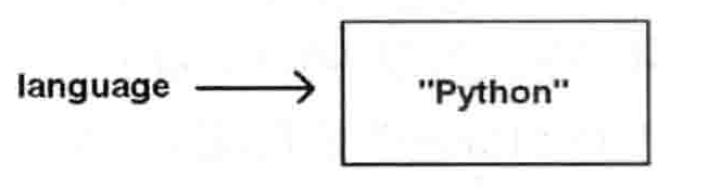 例如, language = "Python"会将字符串"Python"保存到计算机内存中的某个位置,然后再创建变量language并用它来指向内存中的那个位置。
回忆一下对于 不可变的理解,会发现,共享引用并没有什么意义。
延用上面language = "Python"的例子,现在给language赋值为Java
language = "Java"
print(language) ---> Java
只是在内存中新创建了一个Java的值,然后使language指向它,之前的Python依然存在,并没有被改变
但对于可变序列,比如列表,就有很大的意义了。
当多个变量指向同一个可变值时,它们会共享同一个引用:都指向同一个值。当其中一个变量对值做出修改会影响到其他的变量,因为只有一个共享副本。
书中使用一个例子来理解,但我觉得不是很好,但还是写出来大家体会一下:
通过不同人称呼某人(Mike)的方式不同,但都是Mike这个人。
比如:在聚会上,朋友叫他"Mike",土豪称他"Mr. Dawson",女友喊他"Honey"
mike = "khakis", "dress shirt", "jacket"
mr_dawson = mike
honey = mike
print(mike)
print(mr_dawson)
print(honey)
打印的都是"khakis", "dress shirt", "jacket"
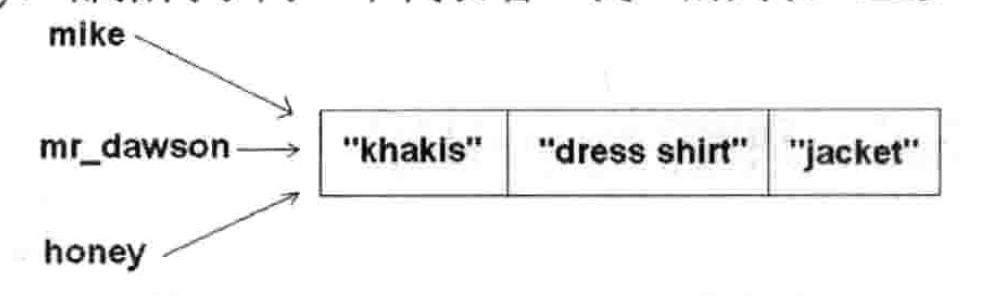
女友喊他"Honey",把他叫到一边,给了他一件亲手织的红色毛衣,让他换上
mike2 = "red sweather"
print(honey)
print(mr_dawson)
print(mike)
均打印 "khakis", "dress shirt", "red sweather"
此时叫他"Mike"的朋友和叫他"Mr. Dawson"的土豪都会看到他穿了一件红色的毛衣,但他们并没有叫其换衣服。
因为mike只有一个列表,所以任何一个修改改列表的动作都会反映在这个列表上。
所以,要注意,在使用任何可变值(mutable)时,一定要小心共享引用的问题。
如何避免这种情况呢?可以使用切片,切片会得到一个副本,对副本的修改不会影响原来的列表
honey = mike:
honey2 = "red sweather"
print(honey) ---> "khakis", "dress shirt", "red sweather"
print(mr_dawson) --->"khakis", "dress shirt", "jacket"
print(mike) --->"khakis", "dress shirt", "jacket"
下面井字棋游戏中 机器人行棋的函数中使用到了切片获得当前棋盘的副本,然后在副本棋盘上进行修改。整个思考和测试过程应该对玩家对手隐藏,但是玩家和机器人共享棋盘引用,如果不使用副本,机器人的每一步测试对手玩家都能看到了,就。。。体会一下。
Tic-Tac-Toe (井字棋)游戏
回归到前面提到的井字棋游戏Tic-Tac-Toe,游戏很简单,和计算机下棋,双方每次各走一步,谁先连成线谁获胜。
先做程序规划
显示该游戏的操作指南
决定谁先走
创建一个空的井子棋棋盘
显示棋盘
在没人获胜且不是平局时
如果轮到玩家
得到玩家的行棋位置
根据行棋位置更新棋盘
否则
计算出机器人的行棋位置
根据行棋位置更新棋盘
显示棋盘
切换行棋方
向赢家表示恭喜或声明平局
编制函数清单
| 函数 | 说明 |
|---|---|
| display_instrct() | 显示游戏说明 |
| ask_yes_no(question) | 询问一个"是或否"的问题。 入参:一个问题。 返回值:"y"或"n" |
| ask_number(question, low, hight) | 请求指定范围内的一个数字。 入参:一个问题、一个最低数值、一个最高数值 返回值:从low到high之间的一个数字 |
| pieces | 决定 谁先行棋。 返回值:机器人和玩家的棋子 |
| new_board() | 新建一个空棋盘。 返回值:一个棋盘 |
| display_board(board) | 将棋盘显示在屏幕上。 入参:一个棋盘 |
| legal_moves(board) | 创建一组合法的行棋步骤。 入参:一个棋盘 返回值:一组合法的行棋步骤 |
| winner(board) | 判断游戏的赢家。 入参:一个棋盘 返回值:一个棋子、"TIE"(平局)或None |
| human_move(board, human) | 获取玩家的行棋位置。 入参:一个棋盘、玩家的棋子 返回值:玩家的行棋位置 |
| computer_move(board, computer, human) | 计算机器人的行棋位置。 入参:一个棋盘、机器人的棋子、玩家的棋子。 返回值:机器人的行棋位置 |
| next_turn(turn) | 根据当前行棋方转换行棋方。 入参:一个棋子 返回值:一个棋子 |
| congrat_winner(the_winner, computer, human) | 向赢家表示祝贺,或宣布平局。 入参:赢家棋子、机器人棋子、玩家棋子 |
| [井字棋函数] |
代码:tic_tac_toe.py
python
# Tic-Tac-Toe
# 跟人类对手下井字棋

# 全局常量
"""
X 表示"X"的速记法,游戏中两种棋子之一
O 表示"O"的速记法,游戏中另一种棋子
EMPTY 表示棋盘上的空方格
TIE 表示平局
NUM_SQUARES 表示井字棋棋盘上的方格数
"""
X = "X"
O = "O"
EMPTY = " "
TIE = "TIE"
NUM_SQUARES = 9

# 显示游戏说明
def display_instruct() :
	""" Display game instructions."""
	print(
	"""
	Welcome to the greatest intellectual challenge of all time: Tic-Tac-Toe.
	This weill be a showdown between your human brain and my silicon processor.
	You will make your move known by entering a number, 0 - 8.
	The number will correspond to the board position as  illustrated:
				0 | 1 | 2
				---------
				3 | 4 | 5
				---------
				6 | 7 | 8
	Prepare yourself, human. The ultimate battle is about to begin. \n
	""")

"""
回答"是否"型问题
question:答案为 "是" 或 "否" 的问题
return:用户输入的答案 "y" or "n"

可能会有很多有不一样的是否问题,所以抽象为一个函数复用
"""
def ask_yes_no(question) :
	""" Ask a yes or no question."""
	response = None
	# 收到的回答不是y或者n的话,就一直让用户回答
	while response not in ("y", "n") :
		response = input(question).lower()

	return response

"""
回答"数字"型问题
question: 答案为 "数字" 的问题
low: 最低值
high: 最高值
return: 最低值-最高值范围内的一个数字

如果询问玩家的行棋,玩家给出行棋的方格编号,就要用到这个方法。
"""
def ask_number(question, low, high) :
	"""Ask for a number within a range."""
	response = None
	# 如果玩家的回答不在范围呢,就循环提问,直至用户给出范围内的回答
	while response not in range(low, high) :
		response = int(input(question))

	return response


# 询问玩家是否希望先行棋,然后据此返回机器人和玩家的棋子。根据井字棋的传统玩法,X先走
def pieces() :
	""" Determine if player or computer goes first."""

	# 调用ask_yes_no()函数,获取用户的回答
	go_first = ask_yes_no("Do you require the first move? (y/n): ")
	if go_first == "y" :
		print("\nThen take the fiirst move. You will need it.")
		# 设置双方使用的棋子,先行棋方用X,后行棋方用O
		human = X
		computer = O
	else :
		print("\nYour bravery will be your undoing... I will go first.")
		human = O
		computer = X
	return computer, human

# 创建新棋盘,长度为9的列表,各元素均被设置为Empty,并将其返回
def new_board() :
	"""Create new game board"""
	board = []
	for square in range(NUM_SQUARES) :
		board.append(EMPTY)
	return board

"""
画一个棋盘,并显示到屏幕上
棋盘上的元素 要么是EMPTY, 要么是O, 要么是X

每走一步都会更新显示棋盘,所以抽象/封装为一个函数
"""
def display_board(board) :
	"""Display game board on screen."""
	print("\n\t", board[0], "|", board[1], "|", board[2])
	print("\t", "---------")
	print("\n\t", board[3], "|", board[4], "|", board[5])
	print("\t", "---------")
	print("\n\t", board[6], "|", board[7], "|", board[8], "\n")

"""
获取合法的行棋列表
board: 棋盘
return: 合法的行棋列表

一步合法的行棋表示为空方格的编号。
例如,当中间的方格空着时,4就是一步合法的行棋。
如果四个角空着,那么[0,2,6,8]就是合法行棋的列表。
供其他函数使用,human_move()函数用它来确保玩家选择的是一步合法的行棋,
computer_move()函数用来得出机器人可以做出的有效行棋
"""
def legal_moves(board) :
	"""Create list of legal moves."""
	moves = []
	for square in range(NUM_SQUARES) :
		if board[square] == EMPTY :
			moves.append(square)
	return moves

"""
获取输赢情况。
board : 棋盘
return:
如果某一方获胜,就返回X或O;
如果所有方格都有棋子但没人获胜,则返回 TIE
如果没人获胜但还有至少一个空方格,则返回 None
"""
def winner(board) :
	"""Determine the game winner"""
	# 获胜的八种情况(即三颗同样的棋子排成一条直线)
	WAYS_TO_WIN = (
			(0, 1, 2),
			(3, 4, 5),
			(6, 7, 8),
			(0, 3, 6),
			(1, 4, 7),
			(2, 5, 8),
			(0, 4, 8),
			(2, 4, 6),
		)
	# for 循环遍历各种情况,判断是否有哪一方将三子连成一线
	for row in WAYS_TO_WIN :
		# 判断当前三个方格中的元素值是否相同(即是否都为X或是否都为O)且不是EMPTY,
		# 如果是,意味着有人赢了,将赢方棋子赋值给winner,并返回
		if board[row[0]] == board[row[1]] == board[row[2]] != EMPTY :
			# 获取赢方的棋子,赋值给winner
			winner = board[row[0]]
			return winner
	# 如果没人获胜,判断棋盘上是否还存在空方格,如果没有,则本局为平局,返回TIE
	if EMPTY not in board :
		return TIE
	# 如果没人获胜且棋盘上还有空格,游戏继续
	return None

"""
玩家行棋
board : 棋盘
human : 玩家的棋子。O 或 X,如果用户在pieces中选择了先行棋则为X,否则为O
return: 玩家的行棋方案,即输入的棋盘方格编号,输入几表示用户在此处落子

"""
def human_move(board, human) :
	"""Get human move"""
	# 调用legal_moves()函数,获取当前棋盘上的一组合法行棋
	legal = legal_moves(board)
	move = None
	# 如果玩家的行棋不合法,就一直循环让玩家重新行棋
	while move not in legal :
		move = ask_number("Where will you move? (0 - 8):", 0, NUM_SQUARES)
		# 判断用户行棋是否合法,如果不合法就给出提示,并让其重新行棋
		if move not in legal:
			print("\nThat square is already occupied, foolish human. Choose another.\n")
		print("Fine...")
		return move


"""
机器人行棋
board: 棋盘
computer: 机器人的棋子。 O 或者 X
human: 玩家的棋子。 O 或者 X

机器人行棋需要考虑的内容就比较多了,玩家行棋可以根据盘面自己思考,选择行棋方案。机器人行棋则需要程序来实现整个思考过程

值得注意的是 棋盘board是可变的(mutable),在这个函数中搜索最佳行棋方案时会对棋盘进行修改。
但因为board变量的引用是共享的,就会产生引用共享的副作用- 即对board的任何修改都会反应到调用函数的那些地方,
但整个搜索最佳方案的过程中(即思考过程)对棋盘的修改其实是不应该被其他人看到的,
所以此处需要先创建一个棋盘board的局部副本(使用切片的形式创建副本),然后对board副本进行修改。

副本是仅自己可见的
"""

def computer_move(board, computer, human):
	"""Make computer move."""
	# 由于该函数会对(棋盘)列表造成修改,所以需要创建一个副本
	board = board[:]
	"""
	机器人的行棋策略:
	如果有一步棋可以让机器人在本轮获胜,则选择那一步
	如果有一步棋可以让机器人在下一轮获胜,则选择那一步
	否则,机器人应该选择最佳的空格来走。最佳方格就是中间的,第二好的是四个角的,其余的就是第三好的
	"""
	# 定义按优劣顺序排列的行棋位置
	BEST_MOVES = (4, 0, 2, 6, 8, 1, 3, 5, 7)

	print("I shall take square  number", end = " ")

	# 循环合法行棋列表,对列表中的每个方格进行测试,
	# 看机器人是否能赢。 如果能赢,就走那个位置,返回move,结束
	# 否则,取消这步并尝试列表中的下一个空格
	for move in legal_moves(board) :
		# 将表格的move位置赋值为computer的棋子O/X
		board[move] = computer
		# 调用winner()函数,判断获胜棋子是否为computer
		if(winner(board) == computer) :
			print(move)
			return move
		# 如果不能获胜则结束对当前行棋方案的测试,并取消行棋,
		board[move] = EMPTY

	# 如果机器人下完这一步之后无法获胜,就需要测试玩家能不能在下一步棋获胜,
	# 遍历 合法行棋列表, 将玩家的棋子放入各个空方格,判断是否获胜
	# 如果可以获胜,那就应该在那个方格行棋,堵住该位置,让玩家无法获胜,
	# 然后返回 move,结束。 否则取消这一步并尝试列表中的下一个空格。
	for move in legal_moves(board) :
		# 将move位置空格设置为玩家的棋子
		board[move] = human
		# 判断赢家是否为玩家
		if winner(board) == human :
			# 如果玩家可以获胜,则在该空格行棋
			print(move)
			return move
		# 如果玩家不能获胜,结束对当前行棋方案的尝试,并取消行棋
		board[move] = EMPTY

	# 如果这一轮谁也赢不了,就查看最佳行棋列表,并选出第一个合法的
	# 遍历 BEST_MOVES,只要找到一个合法的就将其赋值给move并返回
	for move in BEST_MOVES :
		if move in legal_moves(board):
			print(move)
			return move

"""
切换行棋方
turn: 当前行棋方, O/X
return: 下一个行棋方, O/X

玩家下完 机器人下
机器人下完 玩家下
"""
def next_turn(turn) :
	"""Switch turns."""
	if turn == X :
		return O
	else :
		return X

# 宣布游戏结果,祝贺赢家
def congrat_winner(the_winner, computer, human) :
	"""Congratulate the winner."""
	if the_winner != TIE :
		print(the_winner, "win!\n")
	else :
		print("It's a tie!\n")

	if the_winner == computer :
		print("As I predicted, human, I am triumphant once more. \n"
			"Proof that computers are superior to humans in all regards.")

	elif the_winner == human :
		print("No, no! It cannot be! Somehow you tricked me, human. \n"
			"But never again! I, the computer, so swear it!")

	elif the_winner == TIE :
		print("You were most lucky, human, and somehow managed to tie me. \n"
			"Celebrate today... for this is the best you will ever achieve.")


# main函数
def main() :
	# 显示游戏指南
	display_instruct()

	# 决定谁先行棋,获取各方棋子
	computer, human = pieces()

	# 定义本轮行棋方
	turn = X

	# 创建空棋盘
	board = new_board()

	# 显示棋盘
	display_board(board)

	# 没有获胜方且不为平局时
	while not winner(board) :
		# 如果行棋方为玩家,则调用human_move(),玩家行棋
		if turn == human:
			move = human_move(board, human)
			# 设置棋盘move位置为human的棋子
			board[move] = human
		else :
			# 否则,调用computer_move(),机器人行棋
			move = computer_move(board, computer, human)
			# 设置棋盘move位置为computer的棋子
			board[move] = computer

		# 展示棋盘, 每次行棋结束都要显示棋盘,所以要写在循环里面
		display_board(board)
		# 切换行棋方
		turn = next_turn(turn)

	# 获取获胜方
	the_winner = winner(board)
	# 表示祝贺
	congrat_winner(the_winner, computer, human)

# 启动程序
main()

input("\n\nPress the enter key to quit.")