前言:哈喽,大家好,今天给大家分享一篇文章!并提供具体代码帮助大家深入理解,彻底掌握!创作不易,如果能帮助到大家或者给大家一些灵感和启发,欢迎 点赞 + 收藏 + 关注 哦 💕
(文后附完整代码)html+css+javascript 弓箭射击游戏项目分析
📚 本文简介
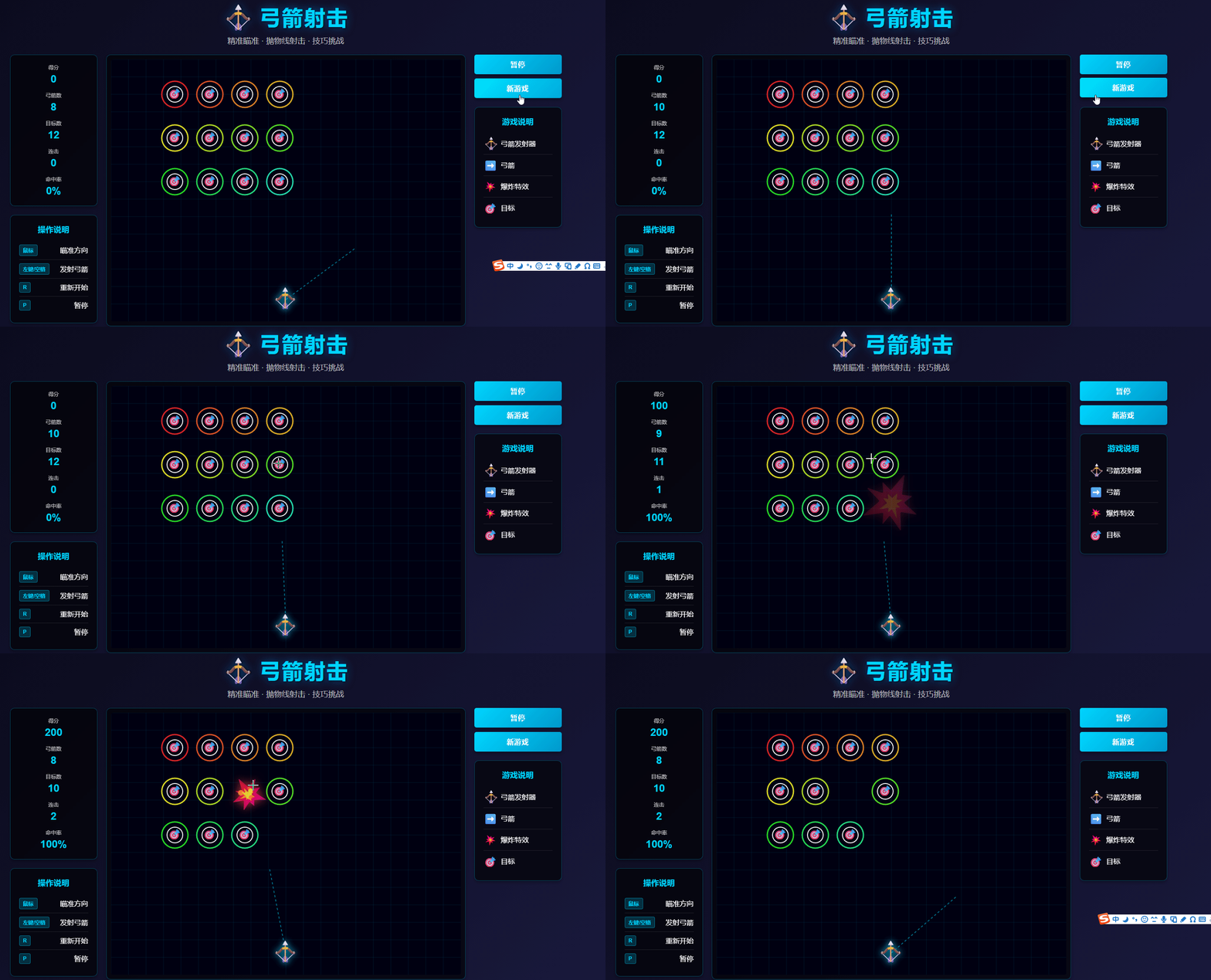
本文介绍了一个基于HTML5 Canvas的弓箭射击游戏项目,采用HTML+CSS+JavaScript技术栈实现。游戏包含完整的物理引擎(抛物线运动、碰撞检测)、视觉特效和音效系统。文章详细分析了项目架构,包括三栏式布局设计、Canvas元素渲染、状态遮罩层实现等前端技术要点,并解析了CSS样式系统和JavaScript核心逻辑(游戏状态管理、对象模型等)。该项目可作为学习前端游戏开发的实践案例,适合对Canvas游戏开发感兴趣的开发者参考学习。
目录
- [(文后附完整代码)html+css+javascript 弓箭射击游戏项目分析](#(文后附完整代码)html+css+javascript 弓箭射击游戏项目分析)
-
- [📚 本文简介](#📚 本文简介)
- [📚 一、项目架构概述](#📚 一、项目架构概述)
-
- [📘 1.1 项目简介](#📘 1.1 项目简介)
- [📘 1.2 技术栈与架构设计](#📘 1.2 技术栈与架构设计)
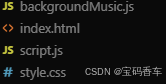
- [📘 1.3 项目文件结构](#📘 1.3 项目文件结构)
- [📚 二、HTML结构分析:语义化与模块化的界面搭建](#📚 二、HTML结构分析:语义化与模块化的界面搭建)
-
- [📘 2.1 整体布局设计](#📘 2.1 整体布局设计)
- [📘 2.2 关键元素解析](#📘 2.2 关键元素解析)
-
- [📖 2.2.1 Canvas元素的游戏画布](#📖 2.2.1 Canvas元素的游戏画布)
- [📖 2.2.2 状态遮罩层的设计](#📖 2.2.2 状态遮罩层的设计)
- [📖 2.2.3 信息面板与控制区](#📖 2.2.3 信息面板与控制区)
- [📚 三、CSS样式系统:视觉层次与动效设计](#📚 三、CSS样式系统:视觉层次与动效设计)
-
- [📘 3.1 全局样式与主题](#📘 3.1 全局样式与主题)
- [📘 3.2 视觉层次设计](#📘 3.2 视觉层次设计)
-
- [📖 3.2.1 卡片式信息面板](#📖 3.2.1 卡片式信息面板)
- [📖 3.2.2 数值显示的视觉强调](#📖 3.2.2 数值显示的视觉强调)
- [📖 3.2.3 弓箭图标旋转效果](#📖 3.2.3 弓箭图标旋转效果)
- [📘 3.3 交互元素设计](#📘 3.3 交互元素设计)
-
- [📖 3.3.1 按钮样式与状态](#📖 3.3.1 按钮样式与状态)
- [📖 3.3.2 键盘按键提示](#📖 3.3.2 键盘按键提示)
- [📚 四、JavaScript核心逻辑:游戏引擎架构](#📚 四、JavaScript核心逻辑:游戏引擎架构)
-
- [📘 4.1 游戏配置系统](#📘 4.1 游戏配置系统)
- [📘 4.2 游戏状态管理](#📘 4.2 游戏状态管理)
-
- [📖 4.2.1 状态变量设计](#📖 4.2.1 状态变量设计)
- [📖 4.2.2 游戏对象模型](#📖 4.2.2 游戏对象模型)
- [📘 4.3 物理引擎实现](#📘 4.3 物理引擎实现)
-
- [📖 4.3.1 抛物线物理系统](#📖 4.3.1 抛物线物理系统)
- [📖 4.3.2 碰撞检测系统](#📖 4.3.2 碰撞检测系统)
- [📖 4.3.3 边界处理](#📖 4.3.3 边界处理)
- [📘 4.4 渲染系统架构](#📘 4.4 渲染系统架构)
-
- [📖 4.4.1 双循环设计](#📖 4.4.1 双循环设计)
- [📖 4.4.2 渲染层次与视觉效果](#📖 4.4.2 渲染层次与视觉效果)
- [📖 4.4.3 特效系统](#📖 4.4.3 特效系统)
- [📘 4.5 输入处理系统](#📘 4.5 输入处理系统)
-
- [📖 4.5.1 鼠标控制](#📖 4.5.1 鼠标控制)
- [📖 4.5.2 键盘控制](#📖 4.5.2 键盘控制)
- [📚 五、音频系统设计:Web Audio API的应用](#📚 五、音频系统设计:Web Audio API的应用)
-
- [📘 5.1 音频架构](#📘 5.1 音频架构)
- [📘 5.2 背景音乐实现](#📘 5.2 背景音乐实现)
-
- [📖 5.2.1 旋律生成](#📖 5.2.1 旋律生成)
- [📖 5.2.2 音频合成技术](#📖 5.2.2 音频合成技术)
- [📘 5.3 音效系统](#📘 5.3 音效系统)
-
- [📖 5.3.1 音效分类](#📖 5.3.1 音效分类)
- [📖 5.3.2 音效播放函数](#📖 5.3.2 音效播放函数)
- [📚 六、游戏逻辑与流程控制](#📚 六、游戏逻辑与流程控制)
-
- [📘 6.1 游戏生命周期](#📘 6.1 游戏生命周期)
- [📘 6.2 目标生成算法](#📘 6.2 目标生成算法)
- [📘 6.3 得分与连击系统](#📘 6.3 得分与连击系统)
- [📘 6.4 游戏结束判定](#📘 6.4 游戏结束判定)
- [📚 七、性能优化与架构设计](#📚 七、性能优化与架构设计)
-
- [📘 7.1 性能优化策略](#📘 7.1 性能优化策略)
-
- [📖 7.1.1 时间跳跃保护](#📖 7.1.1 时间跳跃保护)
- [📖 7.1.2 数据有效性检查](#📖 7.1.2 数据有效性检查)
- [📖 7.1.3 对象池管理](#📖 7.1.3 对象池管理)
- [📘 7.2 架构设计亮点](#📘 7.2 架构设计亮点)
-
- [📖 7.2.1 模块化设计](#📖 7.2.1 模块化设计)
- [📖 7.2.2 状态机模式](#📖 7.2.2 状态机模式)
- [📖 7.2.3 事件驱动架构](#📖 7.2.3 事件驱动架构)
- [📚 八、游戏平衡性与难度设计](#📚 八、游戏平衡性与难度设计)
-
- [📘 8.1 物理参数平衡](#📘 8.1 物理参数平衡)
- [📘 8.2 难度曲线](#📘 8.2 难度曲线)
- [📚 九、与弹球射击游戏的对比分析](#📚 九、与弹球射击游戏的对比分析)
-
- [📘 9.1 核心玩法差异](#📘 9.1 核心玩法差异)
- [📘 9.2 技术实现差异](#📘 9.2 技术实现差异)
- [📘 9.3 游戏体验差异](#📘 9.3 游戏体验差异)
- [📚 十、总结与技术亮点](#📚 十、总结与技术亮点)
-
- [📘 10.1 技术亮点](#📘 10.1 技术亮点)
- [📘 10.2 设计优势](#📘 10.2 设计优势)
- [📘 10.3 可扩展方向](#📘 10.3 可扩展方向)
- 附录:关键算法复杂度
- [📚 完整代码(可直接使用)](#📚 完整代码(可直接使用))
-
- [📘 项目目录](#📘 项目目录)
- [📘 项目代码](#📘 项目代码)
-
- [📖 html代码](#📖 html代码)
- [📖 css代码](#📖 css代码)
- [📖 javascript代码](#📖 javascript代码)
------------ ⬇️·`正文开始`·⬇️------------
📚 一、项目架构概述
📘 1.1 项目简介
弓箭射击是一款基于HTML5 Canvas的物理引擎游戏,玩家通过鼠标瞄准发射弓箭,击中屏幕上方的圆形目标。游戏融合了真实的抛物线物理、动态视觉特效和沉浸式音效系统,提供了精准的射击体验。
📘 1.2 技术栈与架构设计
- 前端技术栈:HTML5 + CSS3 + 原生JavaScript(ES6+)
- 图形渲染:HTML5 Canvas 2D API
- 音频系统:Web Audio API(背景音乐 + 音效)
- 物理引擎:自定义抛物线物理系统(重力、碰撞检测)
- 渲染模式:双循环架构(更新循环 + 渲染循环)
📘 1.3 项目文件结构
00008弓箭射击/
├── index.html          # 游戏主页面
├── script.js           # 游戏核心逻辑(621行)
├── style.css           # 样式表
└──backgroundMusic.js  # 背景音乐模块
📚 二、HTML结构分析:语义化与模块化的界面搭建
📘 2.1 整体布局设计
游戏采用三栏式布局,通过Flexbox实现响应式设计:
┌─────────────────────────────────────────────────────┐
│                    Header 标题区                     │
├──────────┬──────────────────────────────┬──────────┤
│          │                              │          │
│ 左侧边栏 │      游戏主区域(Canvas)      │ 右侧边栏 │
│          │                              │          │
│ 信息面板 │                              │ 控制按钮 │
│ 操作说明 │                              │ 游戏说明 │
└──────────┴──────────────────────────────┴──────────┘
📘 2.2 关键元素解析
📖 2.2.1 Canvas元素的游戏画布
html
<canvas id="game-canvas" width="800" height="600"></canvas>- 尺寸设置:800×600像素固定尺寸
- 渲染上下文:2D上下文用于绘制游戏场景
- 交互区域:鼠标事件的主要监听目标
- 光标样式:crosshair(十字准星)
📖 2.2.2 状态遮罩层的设计
游戏实现了三层状态遮罩,通过CSS类控制显示/隐藏:
- 开始界面 (
start-screen):游戏未开始时显示 - 暂停遮罩 (
pause-overlay):游戏暂停时覆盖 - 结束界面 (
game-over):游戏结束时展示成绩
📖 2.2.3 信息面板与控制区
左侧边栏包含:
- 得分、弓箭数、目标数、连击数、命中率实时显示
- 完整的操作说明(键盘 + 鼠标)
右侧边栏提供:
- 暂停按钮
- 新游戏按钮
- 游戏说明面板
📚 三、CSS样式系统:视觉层次与动效设计
📘 3.1 全局样式与主题
css
body {
    background: linear-gradient(135deg, #0a0a1a 0%, #1a1a3e 100%);
    font-family: 'Arial', 'Microsoft YaHei', sans-serif;
}- 深色主题:渐变背景营造科技感
- 字体选择:优先系统字体,确保跨平台一致性
- 响应式设计 :使用
max-width和flex实现自适应
📘 3.2 视觉层次设计
📖 3.2.1 卡片式信息面板
css
.info-panel {
    background: rgba(0, 0, 0, 0.6);
    border-radius: 10px;
    backdrop-filter: blur(10px);
    border: 1px solid rgba(0, 212, 255, 0.3);
}- 半透明效果 :
rgba背景 +backdrop-filter模糊 - 霓虹边框:青色发光效果增强科技感
- 阴影层次 :
box-shadow提升立体感
📖 3.2.2 数值显示的视觉强调
css
.score-box .value {
    font-size: 24px;
    font-weight: bold;
    color: #00d4ff; /* 霓虹青色 */
}- 高对比度:青色数值在深色背景上清晰可见
- 字体大小:24px大号字体突出关键信息
📖 3.2.3 弓箭图标旋转效果
css
.bow-icon {
    display: inline-block;
    transform: rotate(-45deg);
}- 视觉优化:将弓箭emoji旋转45度,使其指向目标
- 一致性:与游戏中弓箭手的朝向保持一致
📘 3.3 交互元素设计
📖 3.3.1 按钮样式与状态
css
.btn {
    background: linear-gradient(135deg, #00d4ff 0%, #0099cc 100%);
    border: none;
    border-radius: 5px;
    padding: 12px 24px;
    transition: all 0.3s;
    box-shadow: 0 4px 6px rgba(0, 0, 0, 0.3);
}

.btn:hover {
    background: linear-gradient(135deg, #00e5ff 0%, #00aadd 100%);
    transform: translateY(-2px);
    box-shadow: 0 6px 8px rgba(0, 0, 0, 0.4);
}- 渐变背景:青色到蓝色的线性渐变
- 圆角设计:5px圆角,简洁现代
- 悬停效果:上移2px + 增强阴影,提升交互反馈
📖 3.3.2 键盘按键提示
css
.key {
    background: rgba(0, 212, 255, 0.2);
    border: 1px solid #00d4ff;
    border-radius: 4px;
    padding: 4px 8px;
}- 按键样式:模拟键盘按键外观
- 颜色编码:与主题色保持一致
📚 四、JavaScript核心逻辑:游戏引擎架构
📘 4.1 游戏配置系统
游戏采用常量配置模式,所有关键参数集中定义:
javascript
// 画布与物理配置
const CANVAS_WIDTH = 800;
const CANVAS_HEIGHT = 600;
const ARROW_LENGTH = 20;
const ARROW_SPEED = 28;      // 弓箭初速度
const GRAVITY = 0.25;         // 重力加速度
const TARGET_RADIUS = 30;     // 目标半径
const MAX_ARROWS = 10; // 最大弓箭数设计优势:
- 便于参数调整和平衡游戏难度
- 物理参数可独立优化
- 支持后续的难度系统扩展
📘 4.2 游戏状态管理
📖 4.2.1 状态变量设计
javascript
let gameRunning = false;  // 游戏运行状态
let gamePaused = false;   // 暂停状态
let gameOver = false;     // 游戏结束状态
let score = 0;            // 得分
let combo = 0;            // 连击数
let maxCombo = 0;         // 最高连击
let shotsFired = 0;       // 发射次数
let shotsHit = 0; // 命中次数状态机设计:
- 清晰的状态转换逻辑
- 防止非法状态组合(如同时暂停和运行)
- 支持游戏流程的精确控制
新增统计指标:
- 命中率计算:
shotsHit / shotsFired * 100% - 更全面的游戏数据统计
📖 4.2.2 游戏对象模型
javascript
// 弓箭对象
const arrow = {
    x: ARCHER_X,
    y: ARCHER_Y,
    vx: Math.cos(aimAngle) * ARROW_SPEED,
    vy: Math.sin(aimAngle) * ARROW_SPEED,
    angle: aimAngle,
    active: true
};

// 目标对象
const target = {
    x: spacingX + col * (TARGET_RADIUS * 2 + 20) + TARGET_RADIUS + 20,
    y: startY + row * (TARGET_RADIUS * 2 + 40),
    radius: TARGET_RADIUS,
    color: `hsl(${row * 60 + col * 15}, 70%, 50%)`,
    hit: false
};数据结构特点:
- 位置和速度分离,便于物理计算
- 颜色使用HSL动态生成,实现彩虹效果
active状态标记便于对象管理- 弓箭角度随速度方向实时更新
📘 4.3 物理引擎实现
📖 4.3.1 抛物线物理系统
javascript
function updateArrows(deltaTime) {
    for (let i = arrows.length - 1; i >= 0; i--) {
        const arrow = arrows[i];
        if (!arrow.active) continue;

        // 数据有效性检查
        if (!isFinite(arrow.x) || !isFinite(arrow.y)) {
            arrow.active = false;
            continue;
        }

        // 应用重力(每帧更新)
        arrow.vy += GRAVITY * deltaTime * 60;

        // 更新位置
        arrow.x += arrow.vx * deltaTime * 60;
        arrow.y += arrow.vy * deltaTime * 60;

        // 更新角度(根据速度方向)
        arrow.angle = Math.atan2(arrow.vy, arrow.vx);
    }
}物理模拟特点:
- 使用
deltaTime实现时间无关的物理计算 - 重力加速度:0.25像素/帧²,每帧更新
vy += GRAVITY * deltaTime * 60 - 速度更新:
vx和vy分别乘以deltaTime * 60转换为像素/帧 - 角度实时更新:
Math.atan2(vy, vx)确保弓箭朝向与速度一致 - 数据有效性检查:物理更新前后都检查,防止非法数值(NaN/Infinity)导致游戏崩溃
📖 4.3.2 碰撞检测系统
圆形与圆形碰撞算法:
javascript
// 计算距离
const dx = arrow.x - target.x;
const dy = arrow.y - target.y;
const distance = Math.sqrt(dx * dx + dy * dy);

if (distance < TARGET_RADIUS) {
    // 碰撞发生
    target.hit = true;
    createExplosion(target.x, target.y, 60);
    arrows.splice(i, 1);
    targetCount--;
    shotsHit++;
    score += 100;
    combo++;
    maxCombo = Math.max(maxCombo, combo);
    playHitSound();
}碰撞检测特点:
- 简化的圆形碰撞检测(弓箭视为点,目标为圆形)
- 距离计算:使用欧几里得距离公式
Math.sqrt(dx² + dy²) - 碰撞判定:距离 < 目标半径(TARGET_RADIUS = 30)
- 命中后立即移除弓箭,防止重复碰撞
- 统计命中次数(
shotsHit++)用于计算命中率 - 碰撞检测在边界检查之前,确保优先处理碰撞
📖 4.3.3 边界处理
javascript
// 检查边界
if (arrow.x < 0 || arrow.x > CANVAS_WIDTH || arrow.y < 0 || arrow.y > CANVAS_HEIGHT) {
    arrows.splice(i, 1);
    combo = 0; // 重置连击
    continue;
}边界策略:
- 超出边界的弓箭直接移除(x < 0 或 x > CANVAS_WIDTH 或 y < 0 或 y > CANVAS_HEIGHT)
- 未命中目标时重置连击(
combo = 0) - 鼓励精准瞄准而非盲目射击
- 边界检查在碰撞检测之后,确保优先处理碰撞
📘 4.4 渲染系统架构
📖 4.4.1 双循环设计
游戏采用分离的更新循环和渲染循环:
javascript
// 更新循环(物理计算)
function update(currentTime) {
    const deltaTime = (currentTime - lastTime) / 1000;
    updateArrows(deltaTime);
    updateExplosions(deltaTime);
    requestAnimationFrame(update);
}

// 渲染循环(画面绘制)
function draw() {
    drawBackground();
    drawTargets();
    drawArrows();
    drawArcher();
    drawExplosions();
    requestAnimationFrame(draw);
}架构优势:
- 物理更新与渲染帧率解耦
- 防止渲染卡顿影响物理计算
- 支持后续的插值渲染优化
📖 4.4.2 渲染层次与视觉效果
1. 背景渲染
javascript
function drawBackground() {
    ctx.fillStyle = '#000011';
    ctx.fillRect(0, 0, CANVAS_WIDTH, CANVAS_HEIGHT);

    // 绘制网格(垂直和水平)
    ctx.strokeStyle = 'rgba(0, 212, 255, 0.1)';
    ctx.lineWidth = 1;
    // 垂直网格线
    for (let x = 0; x < CANVAS_WIDTH; x += 40) {
        ctx.beginPath();
        ctx.moveTo(x, 0);
        ctx.lineTo(x, CANVAS_HEIGHT);
        ctx.stroke();
    }
    // 水平网格线
    for (let y = 0; y < CANVAS_HEIGHT; y += 40) {
        ctx.beginPath();
        ctx.moveTo(0, y);
        ctx.lineTo(CANVAS_WIDTH, y);
        ctx.stroke();
    }
}
2. 弓箭手渲染
javascript
function drawArcher() {
    ctx.save();
    ctx.translate(ARCHER_X, ARCHER_Y);

    // 先绘制瞄准线(在旋转之前,确保与鼠标一致)
    if (gameRunning && !gamePaused && !gameOver) {
        ctx.strokeStyle = 'rgba(0, 212, 255, 0.5)';
        ctx.lineWidth = 2;
        ctx.setLineDash([5, 5]);
        ctx.beginPath();
        ctx.moveTo(0, 0);
        ctx.lineTo(Math.cos(aimAngle) * 200, Math.sin(aimAngle) * 200);
        ctx.stroke();
        ctx.setLineDash([]);
    }

    // 左旋45度(-Math.PI/4)
    ctx.rotate(-Math.PI / 4);

    // 绘制弓箭手(使用emoji)
    ctx.font = '40px Arial';
    ctx.textAlign = 'center';
    ctx.textBaseline = 'middle';
    ctx.shadowBlur = 15;
    ctx.shadowColor = '#00d4ff';
    ctx.fillText('🏹', 0, 0);

    ctx.restore();
}渲染特点:
- 瞄准线:虚线显示,长度200像素,在旋转之前绘制确保与鼠标位置一致
- 旋转处理:弓箭手emoji左旋45度(-Math.PI/4),使其指向目标方向
- 发光效果:青色阴影(shadowBlur: 15, shadowColor: '#00d4ff')增强视觉效果
3. 弓箭渲染
javascript
function drawArrows() {
    arrows.forEach(arrow => {
        ctx.save();
        ctx.translate(arrow.x, arrow.y);
        ctx.rotate(arrow.angle);

        // 绘制箭身
        ctx.strokeStyle = '#8B4513';
        ctx.lineWidth = 3;
        ctx.beginPath();
        ctx.moveTo(0, 0);
        ctx.lineTo(ARROW_LENGTH, 0);
        ctx.stroke();

        // 绘制箭头
        ctx.fillStyle = '#C0C0C0';
        ctx.beginPath();
        ctx.moveTo(ARROW_LENGTH, 0);
        ctx.lineTo(ARROW_LENGTH - 8, -4);
        ctx.lineTo(ARROW_LENGTH - 8, 4);
        ctx.closePath();
        ctx.fill();

        // 绘制箭羽
        ctx.fillStyle = '#FFD700';
        ctx.fillRect(-3, -2, 6, 4);

        ctx.restore();
    });
}弓箭绘制细节:
- 箭身:棕色线段(#8B4513),长度20像素,线宽3像素
- 箭头:银色三角形(#C0C0C0),从箭身末端向前延伸8像素,高度8像素
- 箭羽:金色矩形(#FFD700),6×4像素,位于箭身尾部
- 旋转对齐 :根据弓箭速度方向实时更新角度(
Math.atan2(vy, vx)),确保朝向飞行方向 - 数据验证:绘制前检查位置有效性,防止NaN或Infinity导致渲染错误
4. 目标渲染
javascript
function drawTargets() {
    targets.forEach(target => {
        if (target.hit) return;

        ctx.save();

        // 绘制外圈
        ctx.strokeStyle = target.color;
        ctx.lineWidth = 3;
        ctx.beginPath();
        ctx.arc(target.x, target.y, target.radius, 0, Math.PI * 2);
        ctx.stroke();

        // 绘制内圈
        ctx.strokeStyle = '#fff';
        ctx.lineWidth = 2;
        ctx.beginPath();
        ctx.arc(target.x, target.y, target.radius * 0.6, 0, Math.PI * 2);
        ctx.stroke();

        // 绘制中心点
        ctx.fillStyle = '#ff0000';
        ctx.beginPath();
        ctx.arc(target.x, target.y, target.radius * 0.3, 0, Math.PI * 2);
        ctx.fill();

        // 绘制目标emoji
        ctx.font = `${target.radius * 0.8}px Arial`;
        ctx.textAlign = 'center';
        ctx.textBaseline = 'middle';
        ctx.fillText('🎯', target.x, target.y);

        ctx.restore();
    });
}目标绘制细节:
- 外圈:彩虹色,线宽3像素
- 内圈:白色,线宽2像素,半径60%
- 中心点:红色填充,半径30%
- emoji:🎯图标,大小为半径的80%
- 颜色生成:HSL颜色空间,行控制色相,列微调
📖 4.4.3 特效系统
爆炸特效实现:
javascript
function createExplosion(x, y, size) {
    const explosion = {
        x: x, y: y,
        emoji: '💥',
        size: size,
        life: 0.8,
        maxLife: 0.8,
        scale: 0,
        rotation: Math.random() * Math.PI * 2
    };
    explosions.push(explosion);

    // 粒子系统
    for (let i = 0; i < 12; i++) {
        particles.push({
            x: x, y: y,
            vx: (Math.random() - 0.5) * 300,
            vy: (Math.random() - 0.5) * 300,
            life: 0.6,
            maxLife: 0.6,
            size: Math.random() * 5 + 2,
            color: `hsl(${Math.random() * 60 + 10}, 100%, 60%)`
        });
    }
}特效特点:
- Emoji爆炸:使用💥符号增强视觉冲击力,带旋转和缩放动画
- 粒子系统:12个随机方向的彩色粒子,速度衰减系数0.95(模拟空气阻力)
- 生命周期管理:爆炸0.8秒淡出,粒子0.6秒淡出
- 视觉效果:爆炸带红色阴影发光效果(shadowBlur: 20, shadowColor: '#ff4444')
- 颜色范围:粒子颜色为橙色到黄色(HSL 10-70度)
📘 4.5 输入处理系统
📖 4.5.1 鼠标控制
javascript
canvas.addEventListener('mousemove', (e) => {
    const rect = canvas.getBoundingClientRect();
    mouseX = e.clientX - rect.left;
    mouseY = e.clientY - rect.top;

    // 计算瞄准角度
    const dx = mouseX - ARCHER_X;
    const dy = mouseY - ARCHER_Y;
    aimAngle = Math.atan2(dy, dx);

    // 限制角度范围(-157.5° 到 -22.5°)
    if (aimAngle > -Math.PI / 8) {
        aimAngle = -Math.PI / 8;
    } else if (aimAngle < -Math.PI * 7 / 8) {
        aimAngle = -Math.PI * 7 / 8;
    }
});角度限制设计:
- 防止向下发射(游戏逻辑限制)
- 允许左右约67.5°的瞄准范围(-157.5°到-22.5°)
- 角度计算:
Math.atan2(dy, dx),其中dy和dx是鼠标相对于弓箭手的位置 - 实时更新:鼠标移动时立即更新
aimAngle,瞄准线实时跟随 - 提升游戏策略性,鼓励向上瞄准
📖 4.5.2 键盘控制
javascript
document.addEventListener('keydown', (e) => {
    if (e.key === ' ' || e.key === 'Space') {
        e.preventDefault();
        if (gameRunning && !gamePaused && !gameOver) {
            shootArrow();
        }
    }

    if (e.key === 'p' || e.key === 'P') {
        togglePause();
    }

    if (e.key === 'r' || e.key === 'R') {
        startGame();
    }
});操作映射:
- 鼠标移动:实时更新瞄准角度,限制在-157.5°到-22.5°之间
- 鼠标左键/空格键:发射弓箭(仅在游戏运行且未暂停时)
- R键:重新开始游戏
- P键:暂停/继续游戏
- Canvas点击:发射弓箭(与空格键功能相同)
📚 五、音频系统设计:Web Audio API的应用
📘 5.1 音频架构
游戏采用分离的音频系统:
Web Audio API
├── 背景音乐系统 (backgroundMusicGain: 0.3)
│   └── 双振荡器合成旋律
└── 音效系统 (soundEffectsGain: 0.5)
    ├── 发射音效 (500Hz, 0.15s)
    ├── 爆炸音效 (300Hz, 0.2s)
    └── 击中音效 (700Hz, 0.12s)
📘 5.2 背景音乐实现
📖 5.2.1 旋律生成
javascript
const melody = [
    { freq1: 523.25, freq2: 659.25, duration: 0.5 }, // C5, E5
    { freq1: 587.33, freq2: 698.46, duration: 0.5 }, // D5, F5
    { freq1: 659.25, freq2: 783.99, duration: 0.5 }, // E5, G5
    { freq1: 698.46, freq2: 880.00, duration: 0.5 }, // F5, A5
    { freq1: 783.99, freq2: 987.77, duration: 0.5 }, // G5, B5
    { freq1: 880.00, freq2: 1046.50, duration: 0.5 }, // A5, C6
    { freq1: 783.99, freq2: 987.77, duration: 0.5 }, // G5, B5
    { freq1: 659.25, freq2: 783.99, duration: 0.5 }, // E5, G5
];音乐理论:
- 双音和弦:每个音符由两个频率叠加
- 频率选择:基于自然音阶(C大调)
- 波形选择:正弦波 + 三角波
- 循环播放:500ms间隔,无限循环
📖 5.2.2 音频合成技术
javascript
function playNextNote() {
    const osc1 = audioContext.createOscillator();
    const osc2 = audioContext.createOscillator();
    const gain1 = audioContext.createGain();
    const gain2 = audioContext.createGain();

    osc1.connect(gain1);
    osc2.connect(gain2);
    gain1.connect(backgroundMusicGain);
    gain2.connect(backgroundMusicGain);

    osc1.type = 'sine';
    osc2.type = 'triangle';
    osc1.frequency.value = note.freq1;
    osc2.frequency.value = note.freq2;

    // 音量包络
    gain1.gain.setValueAtTime(0.1, currentTime);
    gain1.gain.exponentialRampToValueAtTime(0.01, currentTime + note.duration);

    osc1.start(currentTime);
    osc1.stop(currentTime + note.duration);
}音频处理节点:
- 振荡器:生成不同波形的音频信号
- 增益节点:控制音量和包络
- 指数包络:自然的音量衰减曲线
📘 5.3 音效系统
📖 5.3.1 音效分类
| 音效类型 | 频率(Hz) | 波形 | 时长(s) | 音量 | 触发时机 |
|---|---|---|---|---|---|
| 发射 | 500 | square | 0.15 | 0.3 | 弓箭发射时 |
| 爆炸 | 300+150 | sawtooth | 0.2+0.15 | 0.4+0.3 | 目标击中时 |
| 击中 | 700 | sine | 0.12 | 0.3 | 碰撞发生时 |
📖 5.3.2 音效播放函数
javascript
function playSound(frequency, duration, type, volume) {
    const oscillator = audioContext.createOscillator();
    const gainNode = audioContext.createGain();

    oscillator.connect(gainNode);
    gainNode.connect(soundEffectsGain);

    oscillator.type = type;
    oscillator.frequency.value = frequency;

    gainNode.gain.setValueAtTime(volume, currentTime);
    gainNode.gain.exponentialRampToValueAtTime(0.01, currentTime + duration);

    oscillator.start(currentTime);
    oscillator.stop(currentTime + duration);
}
📚 六、游戏逻辑与流程控制
📘 6.1 游戏生命周期
开始界面 → 开始游戏 → 游戏运行 → [暂停/继续] → 游戏结束 → 重新开始📘 6.2 目标生成算法
javascript
function generateTargets() {
    targets = [];
    targetCount = 0;

    // 生成3行目标,每行4个
    const rows = 3;
    const cols = 4;
    const spacingX = (CANVAS_WIDTH - cols * (TARGET_RADIUS * 2 + 20)) / (cols + 1);
    const startY = 80;

    for (let row = 0; row < rows; row++) {
        for (let col = 0; col < cols; col++) {
            targets.push({
                x: spacingX + col * (TARGET_RADIUS * 2 + 20) + TARGET_RADIUS + 20,
                y: startY + row * (TARGET_RADIUS * 2 + 40),
                radius: TARGET_RADIUS,
                color: `hsl(${row * 60 + col * 15}, 70%, 50%)`,
                hit: false
            });
            targetCount++;
        }
    }
}布局特点:
- 3行×4列:共12个目标
- 等间距分布:自动计算间距确保居中
- 彩虹配色:每行60度色相偏移,每列15度微调
📘 6.3 得分与连击系统
javascript
// 击中目标
score += 100;
combo++;
maxCombo = Math.max(maxCombo, combo);
shotsHit++;

// 未命中时重置连击
combo = 0;

// 计算命中率
const accuracy = shotsFired > 0 ? Math.round((shotsHit / shotsFired) * 100) : 0;得分规则:
- 每个目标:100分
- 连击奖励:连续击中增加连击数
- 最高连击:记录单局最高连击
- 命中率:实时计算并显示
📘 6.4 游戏结束判定
javascript
// 条件1:所有目标被击中
if (targetCount === 0) {
    setTimeout(() => endGame(), 1000);
}

// 条件2:弓箭用尽但仍有目标
if (arrowsRemaining === 0 && arrows.length === 0 && targetCount > 0) {
    setTimeout(() => endGame(), 2000);
}结束延迟设计:
- 胜利:1秒延迟(展示特效)
- 失败:2秒延迟(在发射时预判,等待当前弓箭消失后判定)
- 判定时机:在
shootArrow()中预判,在updateArrows()中实时检查
📚 七、性能优化与架构设计
📘 7.1 性能优化策略
📖 7.1.1 时间跳跃保护
javascript
if (deltaTime > 0.1) {
    requestAnimationFrame(update);
    return;
}
问题场景 :浏览器标签页切换导致长时间未更新
解决方案:丢弃超过100ms的帧,防止物理计算异常
📖 7.1.2 数据有效性检查
javascript
// 物理更新前检查数据有效性
if (!isFinite(arrow.x) || !isFinite(arrow.y) || !isFinite(arrow.vx) || !isFinite(arrow.vy)) {
    arrow.active = false;
    continue;
}

// 绘制前检查数据有效性
if (!isFinite(arrow.x) || !isFinite(arrow.y)) {
    return; // 跳过绘制
}异常防护:
- 物理更新前检查:防止NaN/Infinity参与物理计算
- 绘制前检查:防止非法数值导致Canvas API报错
- 自动修复机制:发现异常数据时标记为不活跃,避免游戏崩溃
- 提升系统稳定性
📖 7.1.3 对象池管理
javascript
// 移除超出边界的弓箭
if (arrow.x < 0 || arrow.x > CANVAS_WIDTH || arrow.y < 0 || arrow.y > CANVAS_HEIGHT) {
    arrows.splice(i, 1);
}内存管理:
- 及时移除超出边界的弓箭
- 清理生命周期结束的特效
- 防止内存泄漏
📘 7.2 架构设计亮点
📖 7.2.1 模块化设计
javascript
// 功能模块分离
initAudioContext()      // 音频初始化
initGame()              // 游戏初始化
updateArrows()          // 物理更新
draw()                  // 渲染
startBackgroundMusic() // 音频控制优势:
- 代码职责清晰
- 便于测试和维护
- 支持功能扩展
📖 7.2.2 状态机模式
javascript
if (!gameRunning || gamePaused || gameOver) return;状态检查:
- 每个关键函数都进行状态验证
- 防止非法操作
- 确保游戏逻辑正确性
📖 7.2.3 事件驱动架构
javascript
canvas.addEventListener('mousemove', handleMouseMove);
document.addEventListener('keydown', handleKeyDown);事件处理:
- 输入事件与游戏逻辑分离
- 便于添加新的输入方式
- 支持多人游戏扩展
📚 八、游戏平衡性与难度设计
📘 8.1 物理参数平衡
| 参数 | 值 | 设计意图 |
|---|---|---|
| 重力 | 0.25 | 适中的抛物线轨迹 |
| 速度 | 28 | 快速但可控 |
| 弓箭数 | 10 | 有限次数增加策略性 |
| 目标数 | 12 | 3×4布局适中难度 |
| 目标半径 | 30 | 适中的命中难度 |
📘 8.2 难度曲线
游戏流程:
- 初期:10个弓箭,充足的尝试机会
- 中期:抛物线物理增加策略深度
- 后期:弓箭用尽后需要精准瞄准
平衡设计:
- 有限的弓箭数量鼓励精准瞄准
- 连击系统奖励连续命中
- 命中率统计提供反馈
📚 九、与弹球射击游戏的对比分析
📘 9.1 核心玩法差异
| 特性 | 弹球射击 | 弓箭射击 |
|---|---|---|
| 物理系统 | 多反弹、重力、摩擦 | 抛物线、重力 |
| 目标形状 | 矩形 | 圆形 |
| 碰撞检测 | 圆形-矩形 | 点-圆形 |
| 边界处理 | 弹性反弹 | 直接移除 |
| 目标数量 | 18 | 12 |
| 弹药数量 | 10 | 10 |
📘 9.2 技术实现差异
| 技术点 | 弹球射击 | 弓箭射击 |
|---|---|---|
| 碰撞算法 | 最近点算法 | 距离比较 |
| 对象渲染 | 径向渐变 | 矢量图形 |
| 角度控制 | 发射器角度 | 瞄准角度 |
| 统计系统 | 基础统计 | 命中率统计 |
| 边界行为 | 反弹 | 移除 |
📘 9.3 游戏体验差异
| 体验维度 | 弹球射击 | 弓箭射击 |
|---|---|---|
| 策略深度 | 中等(反弹利用) | 高(抛物线计算) |
| 操作难度 | 低 | 中等 |
| 视觉反馈 | 强(多反弹) | 中等(单次命中) |
| 音效反馈 | 4种 | 3种 |
| 重玩价值 | 高 | 高 |
📚 十、总结与技术亮点
📘 10.1 技术亮点
- 抛物线物理引擎:真实的重力模拟,角度实时更新
- 双循环架构:更新与渲染分离,确保物理稳定性
- Web Audio API:程序化音乐生成和音效合成
- 矢量图形渲染:弓箭由基础图形组合而成
- 命中率系统:更全面的游戏数据统计
- 状态机管理:清晰的游戏状态转换逻辑
📘 10.2 设计优势
- 代码简洁:621行实现完整游戏
- 性能优秀:60fps流畅运行
- 体验丰富:视觉、听觉、触觉反馈齐全
- 易于扩展:模块化设计支持功能添加
- 数据统计:命中率等指标提供深度反馈
📘 10.3 可扩展方向
- 难度系统:多关卡、移动目标、Boss战
- 道具系统:穿透箭、追踪箭、分裂箭
- 排行榜:本地存储或云端排名
- 多人模式:分屏或联网对战
- 皮肤系统:自定义弓箭和目标外观
- 关卡编辑器:用户创建和分享关卡
- 成就系统:解锁特殊弓箭和皮肤
附录:关键算法复杂度
| 操作 | 时间复杂度 | 空间复杂度 | 说明 |
|---|---|---|---|
| 弓箭更新 | O(n) | O(n) | n为弓箭数量 |
| 碰撞检测 | O(n×m) | O(1) | n弓箭×m目标 |
| 渲染 | O(n+m) | O(1) | 所有对象绘制 |
| 特效更新 | O§ | O§ | p为粒子数量 |
📚 完整代码(可直接使用)
📘 项目目录
📘 项目代码
📖 html代码
html
<!DOCTYPE html>
<html lang="zh-CN">
<head>
    <meta charset="UTF-8">
    <meta name="viewport" content="width=device-width, initial-scale=1.0">
    <title>弓箭射击 - 瞄准技巧</title>
    <link rel="stylesheet" href="style.css">
</head>
<body>
    <div class="container">
        <div class="header">
            <h1><span class="bow-icon">🏹</span> 弓箭射击</h1>
            <p class="subtitle">精准瞄准 · 抛物线射击 · 技巧挑战</p>
        </div>

        <div class="game-wrapper">
            <div class="sidebar left">
                <div class="info-panel">
                    <div class="score-box">
                        <div class="label">得分</div>
                        <div class="value" id="score">0</div>
                    </div>
                    <div class="score-box">
                        <div class="label">弓箭数</div>
                        <div class="value" id="arrows">10</div>
                    </div>
                    <div class="score-box">
                        <div class="label">目标数</div>
                        <div class="value" id="targets">0</div>
                    </div>
                    <div class="score-box">
                        <div class="label">连击</div>
                        <div class="value" id="combo">0</div>
                    </div>
                    <div class="score-box">
                        <div class="label">命中率</div>
                        <div class="value" id="accuracy">0%</div>
                    </div>
                </div>

                <div class="controls-panel">
                    <h3>操作说明</h3>
                    <div class="control-item">
                        <span class="key">鼠标</span>
                        <span>瞄准方向</span>
                    </div>
                    <div class="control-item">
                        <span class="key">左键/空格</span>
                        <span>发射弓箭</span>
                    </div>
                    <div class="control-item">
                        <span class="key">R</span>
                        <span>重新开始</span>
                    </div>
                    <div class="control-item">
                        <span class="key">P</span>
                        <span>暂停</span>
                    </div>
                </div>
            </div>

            <div class="game-area">
                <canvas id="game-canvas" width="800" height="600"></canvas>
                <div class="game-over" id="game-over">
                    <div class="game-over-content">
                        <h2>游戏结束</h2>
                        <p>最终得分: <span id="final-score">0</span></p>
                        <p>命中率: <span id="final-accuracy">0%</span></p>
                        <p>最高连击: <span id="final-combo">0</span></p>
                        <button class="btn" id="restart-btn">重新开始</button>
                    </div>
                </div>
                <div class="pause-overlay" id="pause-overlay">
                    <div class="pause-content">
                        <h2>游戏暂停</h2>
                        <button class="btn" id="resume-btn">继续游戏</button>
                    </div>
                </div>
                <div class="start-screen" id="start-screen">
                    <div class="start-content">
                        <h2><span class="bow-icon">🏹</span> 弓箭射击</h2>
                        <p>精准瞄准 · 抛物线射击 · 技巧挑战</p>
                        <p>使用鼠标瞄准,点击发射弓箭</p>
                        <p>击中目标获得分数,考验你的瞄准技巧!</p>
                        <p class="warning">💡 弓箭受重力影响,需要预判轨迹!</p>
                        <button class="btn" id="start-btn">开始游戏</button>
                    </div>
                </div>
            </div>

            <div class="sidebar right">
                <div class="button-group">
                    <button class="btn" id="pause-btn">暂停</button>
                    <button class="btn" id="new-game-btn">新游戏</button>
                </div>

                <div class="legend-panel">
                    <h3>游戏说明</h3>
                    <div class="legend-item">
                        <span class="emoji bow-icon">🏹</span>
                        <span>弓箭发射器</span>
                    </div>
                    <div class="legend-item">
                        <span class="emoji">➡️</span>
                        <span>弓箭</span>
                    </div>
                    <div class="legend-item">
                        <span class="emoji">💥</span>
                        <span>爆炸特效</span>
                    </div>
                    <div class="legend-item">
                        <span class="emoji">🎯</span>
                        <span>目标</span>
                    </div>
                </div>
            </div>
        </div>
    </div>

    <script src="backgroundMusic.js"></script>
    <script src="script.js"></script>
</body>
</html>
📖 css代码
css
* {
    margin: 0;
    padding: 0;
    box-sizing: border-box;
}

body {
    font-family: 'Arial', 'Microsoft YaHei', sans-serif;
    background: linear-gradient(135deg, #0a0a1a 0%, #1a1a3e 100%);
    min-height: 100vh;
    display: flex;
    justify-content: center;
    align-items: center;
    padding: 20px;
    color: #fff;
}

.container {
    max-width: 1400px;
    width: 100%;
}

.header {
    text-align: center;
    margin-bottom: 20px;
}

.header h1 {
    font-size: 48px;
    font-weight: bold;
    text-shadow: 2px 2px 4px rgba(0, 0, 0, 0.5), 0 0 20px rgba(0, 150, 255, 0.5);
    color: #00d4ff;
    text-transform: uppercase;
    letter-spacing: 3px;
}

/* 弓箭图标左旋45度 */
.bow-icon {
    display: inline-block;
    transform: rotate(-45deg);
}

.subtitle {
    font-size: 18px;
    color: rgba(255, 255, 255, 0.7);
    margin-top: 10px;
}

.game-wrapper {
    display: flex;
    gap: 20px;
    justify-content: center;
    align-items: flex-start;
}

.sidebar {
    width: 200px;
    display: flex;
    flex-direction: column;
    gap: 20px;
}

.info-panel,
.controls-panel,
.legend-panel {
    background: rgba(0, 0, 0, 0.6);
    border-radius: 10px;
    padding: 20px;
    backdrop-filter: blur(10px);
    box-shadow: 0 4px 6px rgba(0, 0, 0, 0.3);
    border: 1px solid rgba(0, 212, 255, 0.3);
}

.info-panel .label {
    font-size: 14px;
    color: rgba(255, 255, 255, 0.8);
    margin-bottom: 10px;
    text-align: center;
}

.score-box {
    margin-bottom: 15px;
}

.score-box:last-child {
    margin-bottom: 0;
}

.score-box .label {
    font-size: 12px;
    color: rgba(255, 255, 255, 0.7);
    margin-bottom: 5px;
}

.score-box .value {
    font-size: 24px;
    font-weight: bold;
    color: #00d4ff;
    text-align: center;
}

.controls-panel h3,
.legend-panel h3 {
    font-size: 18px;
    margin-bottom: 15px;
    text-align: center;
    color: #00d4ff;
}

.control-item {
    display: flex;
    justify-content: space-between;
    align-items: center;
    padding: 8px 0;
    border-bottom: 1px solid rgba(255, 255, 255, 0.1);
}

.control-item:last-child {
    border-bottom: none;
}

.control-item .key {
    background: rgba(0, 212, 255, 0.2);
    padding: 4px 8px;
    border-radius: 4px;
    font-size: 12px;
    font-weight: bold;
    color: #00d4ff;
    border: 1px solid rgba(0, 212, 255, 0.4);
}

.game-area {
    position: relative;
    background: rgba(0, 0, 0, 0.6);
    border-radius: 10px;
    padding: 10px;
    box-shadow: 0 4px 6px rgba(0, 0, 0, 0.3);
    border: 1px solid rgba(0, 212, 255, 0.3);
}

#game-canvas {
    display: block;
    background: #000;
    border-radius: 5px;
    cursor: crosshair;
}

.game-over,
.pause-overlay,
.start-screen {
    position: absolute;
    top: 0;
    left: 0;
    right: 0;
    bottom: 0;
    background: rgba(0, 0, 0, 0.85);
    display: none;
    justify-content: center;
    align-items: center;
    border-radius: 10px;
    z-index: 10;
}

.game-over.active,
.pause-overlay.active,
.start-screen.active {
    display: flex;
}

.game-over-content,
.pause-content,
.start-content {
    text-align: center;
    background: rgba(0, 0, 0, 0.8);
    padding: 40px;
    border-radius: 10px;
    border: 2px solid rgba(0, 212, 255, 0.5);
    box-shadow: 0 0 30px rgba(0, 212, 255, 0.3);
}

.game-over-content h2,
.pause-content h2,
.start-content h2 {
    font-size: 36px;
    margin-bottom: 20px;
    color: #00d4ff;
    text-shadow: 0 0 10px rgba(0, 212, 255, 0.5);
}

.game-over-content p,
.start-content p {
    font-size: 18px;
    margin: 10px 0;
    color: rgba(255, 255, 255, 0.9);
}

.start-content .warning {
    color: #ffaa00;
    font-weight: bold;
    font-size: 20px;
    margin: 15px 0;
    text-shadow: 0 0 10px rgba(255, 170, 0, 0.5);
}

.button-group {
    display: flex;
    flex-direction: column;
    gap: 10px;
}

.btn {
    background: linear-gradient(135deg, #00d4ff 0%, #0099cc 100%);
    color: #fff;
    border: none;
    padding: 12px 24px;
    border-radius: 5px;
    font-size: 16px;
    font-weight: bold;
    cursor: pointer;
    transition: all 0.3s;
    box-shadow: 0 4px 6px rgba(0, 0, 0, 0.3);
    text-transform: uppercase;
    letter-spacing: 1px;
}

.btn:hover {
    background: linear-gradient(135deg, #00e5ff 0%, #00aadd 100%);
    transform: translateY(-2px);
    box-shadow: 0 6px 8px rgba(0, 0, 0, 0.4);
}

.btn:active {
    transform: translateY(0);
    box-shadow: 0 2px 4px rgba(0, 0, 0, 0.3);
}

.legend-item {
    display: flex;
    align-items: center;
    gap: 10px;
    padding: 8px 0;
    border-bottom: 1px solid rgba(255, 255, 255, 0.1);
}

.legend-item:last-child {
    border-bottom: none;
}

.legend-item .emoji {
    font-size: 24px;
    width: 30px;
    text-align: center;
}


/* 响应式设计 */
@media (max-width: 1200px) {
    .game-wrapper {
        flex-direction: column;
        align-items: center;
    }

    .sidebar {
        width: 100%;
        max-width: 800px;
        flex-direction: row;
        justify-content: space-around;
    }

    .sidebar.left,
    .sidebar.right {
        width: 100%;
    }
}
📖 javascript代码
backgroundMusic.js
javascript
// 背景音乐模块
// 使用 Web Audio API 生成背景音乐

let musicInterval = null;
// 注意:audioContext 和 backgroundMusicGain 在主脚本中声明,这里只存储引用
let audioContextRef = null;
let backgroundMusicGainRef = null;

// 初始化背景音乐(需要传入音频上下文和增益节点)
function initBackgroundMusic(audioCtx, musicGain) {
    audioContextRef = audioCtx;
    backgroundMusicGainRef = musicGain;
}

// 获取游戏状态的函数(由主游戏传入)
let getGameState = null;

// 设置游戏状态获取函数
function setGameStateGetter(getter) {
    getGameState = getter;
}

// 生成背景音乐
function startBackgroundMusic() {
    if (!audioContextRef || !backgroundMusicGainRef || musicInterval) return;

    try {
        // 简单的旋律循环
        const melody = [
            { freq1: 523.25, freq2: 659.25, duration: 0.5 }, // C5, E5
            { freq1: 587.33, freq2: 698.46, duration: 0.5 }, // D5, F5
            { freq1: 659.25, freq2: 783.99, duration: 0.5 }, // E5, G5
            { freq1: 698.46, freq2: 880.00, duration: 0.5 }, // F5, A5
            { freq1: 783.99, freq2: 987.77, duration: 0.5 }, // G5, B5
            { freq1: 880.00, freq2: 1046.50, duration: 0.5 }, // A5, C6
            { freq1: 783.99, freq2: 987.77, duration: 0.5 }, // G5, B5
            { freq1: 659.25, freq2: 783.99, duration: 0.5 }, // E5, G5
        ];

        let noteIndex = 0;

        function playNextNote() {
            // 获取当前游戏状态
            if (getGameState) {
                const state = getGameState();
                if (!state.gameRunning || state.gamePaused || state.gameOver) {
                    return;
                }
            }

            const note = melody[noteIndex];
            const currentTime = audioContextRef.currentTime;

            // 创建新的振荡器
            const osc1 = audioContextRef.createOscillator();
            const osc2 = audioContextRef.createOscillator();
            const gain1 = audioContextRef.createGain();
            const gain2 = audioContextRef.createGain();

            osc1.connect(gain1);
            osc2.connect(gain2);
            gain1.connect(backgroundMusicGainRef);
            gain2.connect(backgroundMusicGainRef);

            osc1.type = 'sine';
            osc2.type = 'triangle';
            osc1.frequency.value = note.freq1;
            osc2.frequency.value = note.freq2;

            gain1.gain.setValueAtTime(0.1, currentTime);
            gain1.gain.exponentialRampToValueAtTime(0.01, currentTime + note.duration);
            gain2.gain.setValueAtTime(0.08, currentTime);
            gain2.gain.exponentialRampToValueAtTime(0.01, currentTime + note.duration);

            osc1.start(currentTime);
            osc1.stop(currentTime + note.duration);
            osc2.start(currentTime);
            osc2.stop(currentTime + note.duration);

            noteIndex = (noteIndex + 1) % melody.length;
        }

        // 立即播放第一个音符
        playNextNote();

        // 设置定时器循环播放
        musicInterval = setInterval(() => {
            if (getGameState) {
                const state = getGameState();
                if (state.gameRunning && !state.gamePaused && !state.gameOver) {
                    playNextNote();
                }
            } else {
                playNextNote();
            }
        }, 500); // 每500ms播放一个音符
    } catch (e) {
        console.log('背景音乐生成失败:', e);
    }
}

// 停止背景音乐
function stopBackgroundMusic() {
    if (musicInterval) {
        clearInterval(musicInterval);
        musicInterval = null;
    }
}
script.js
javascript
// 游戏配置
const CANVAS_WIDTH = 800;
const CANVAS_HEIGHT = 600;
const ARROW_LENGTH = 20;
const ARROW_SPEED = 28; // 增加射箭力度,确保能射到最上排
const GRAVITY = 0.25; // 稍微减小重力,让弓箭飞得更远
const ARCHER_X = CANVAS_WIDTH / 2;
const ARCHER_Y = CANVAS_HEIGHT - 50;
const TARGET_RADIUS = 30;
const MAX_ARROWS = 10;

// 游戏状态
let gameRunning = false;
let gamePaused = false;
let gameOver = false;
let score = 0;
let arrowsRemaining = MAX_ARROWS;
let combo = 0;
let maxCombo = 0;
let targetCount = 0;
let shotsFired = 0;
let shotsHit = 0;

// Canvas
const canvas = document.getElementById('game-canvas');
const ctx = canvas.getContext('2d');

// 游戏对象
let aimAngle = -Math.PI / 2; // 瞄准角度(默认向上)
let arrows = []; // 弓箭数组
let targets = []; // 目标数组
let explosions = []; // emoji爆炸特效
let particles = []; // 粒子特效

// 鼠标位置
let mouseX = 0;
let mouseY = 0;

// 音频上下文
let audioContext = null;
let backgroundMusicGain = null;
let soundEffectsGain = null;

// 时间管理
let lastTime = 0;

// 初始化音频上下文
function initAudioContext() {
    try {
        audioContext = new (window.AudioContext || window.webkitAudioContext)();
        // 创建背景音乐增益节点
        backgroundMusicGain = audioContext.createGain();
        backgroundMusicGain.connect(audioContext.destination);
        backgroundMusicGain.gain.value = 0.3;

        // 创建音效增益节点
        soundEffectsGain = audioContext.createGain();
        soundEffectsGain.connect(audioContext.destination);
        soundEffectsGain.gain.value = 0.5;

        // 初始化背景音乐模块
        initBackgroundMusic(audioContext, backgroundMusicGain);
        setGameStateGetter(() => ({
            gameRunning,
            gamePaused,
            gameOver
        }));
    } catch (e) {
        console.log('音频初始化失败:', e);
    }
}

// 播放音效
function playSound(frequency, duration, type = 'square', volume = 0.3) {
    if (!audioContext || !soundEffectsGain) return;

    try {
        const oscillator = audioContext.createOscillator();
        const gainNode = audioContext.createGain();

        oscillator.connect(gainNode);
        gainNode.connect(soundEffectsGain);

        oscillator.type = type;
        oscillator.frequency.value = frequency;

        const currentTime = audioContext.currentTime;
        gainNode.gain.setValueAtTime(volume, currentTime);
        gainNode.gain.exponentialRampToValueAtTime(0.01, currentTime + duration);

        oscillator.start(currentTime);
        oscillator.stop(currentTime + duration);
    } catch (e) {
        console.log('音效播放失败:', e);
    }
}

// 播放发射音效
function playShootSound() {
    playSound(500, 0.15, 'square', 0.3);
}

// 播放爆炸音效
function playExplosionSound() {
    const baseFreq = 300;
    playSound(baseFreq, 0.2, 'sawtooth', 0.4);
    setTimeout(() => playSound(baseFreq * 0.5, 0.15, 'sawtooth', 0.3), 50);
}

// 播放击中音效
function playHitSound() {
    playSound(700, 0.12, 'sine', 0.3);
}

// 创建爆炸特效
function createExplosion(x, y, size = 50) {
    const explosion = {
        x: x,
        y: y,
        emoji: '💥',
        size: size,
        life: 0.8,
        maxLife: 0.8,
        scale: 0,
        rotation: Math.random() * Math.PI * 2
    };
    explosions.push(explosion);

    // 创建粒子特效
    for (let i = 0; i < 12; i++) {
        particles.push({
            x: x,
            y: y,
            vx: (Math.random() - 0.5) * 300,
            vy: (Math.random() - 0.5) * 300,
            life: 0.6,
            maxLife: 0.6,
            size: Math.random() * 5 + 2,
            color: `hsl(${Math.random() * 60 + 10}, 100%, 60%)`
        });
    }

    playExplosionSound();
}

// 更新爆炸特效
function updateExplosions(deltaTime) {
    for (let i = explosions.length - 1; i >= 0; i--) {
        const exp = explosions[i];
        exp.life -= deltaTime;
        exp.scale = 1 - (exp.life / exp.maxLife);
        exp.rotation += deltaTime * 5;

        if (exp.life <= 0) {
            explosions.splice(i, 1);
        }
    }

    // 更新粒子
    for (let i = particles.length - 1; i >= 0; i--) {
        const p = particles[i];
        p.life -= deltaTime;
        p.x += p.vx * deltaTime;
        p.y += p.vy * deltaTime;
        p.vx *= 0.95;
        p.vy *= 0.95;

        if (p.life <= 0) {
            particles.splice(i, 1);
        }
    }
}

// 绘制爆炸特效
function drawExplosions() {
    explosions.forEach(exp => {
        const alpha = exp.life / exp.maxLife;
        const size = exp.size * (1 + exp.scale * 1.5);

        ctx.save();
        ctx.globalAlpha = alpha;
        ctx.translate(exp.x, exp.y);
        ctx.rotate(exp.rotation);
        ctx.font = `${size}px Arial`;
        ctx.textAlign = 'center';
        ctx.textBaseline = 'middle';
        ctx.shadowBlur = 20;
        ctx.shadowColor = '#ff4444';
        ctx.fillText(exp.emoji, 0, 0);
        ctx.restore();
    });

    // 绘制粒子
    particles.forEach(p => {
        const alpha = p.life / p.maxLife;
        ctx.save();
        ctx.globalAlpha = alpha;
        ctx.fillStyle = p.color;
        ctx.beginPath();
        ctx.arc(p.x, p.y, p.size, 0, Math.PI * 2);
        ctx.fill();
        ctx.restore();
    });
}

// 初始化游戏
function initGame() {
    // 清空数组
    arrows = [];
    targets = [];
    explosions = [];
    particles = [];

    // 重置状态
    score = 0;
    arrowsRemaining = MAX_ARROWS;
    combo = 0;
    maxCombo = 0;
    gameOver = false;
    aimAngle = -Math.PI / 2;
    shotsFired = 0;
    shotsHit = 0;

    // 生成目标
    generateTargets();

    updateUI();
}

// 生成目标
function generateTargets() {
    targets = [];
    targetCount = 0;

    // 生成3行目标,每行4个
    const rows = 3;
    const cols = 4;
    const spacingX = (CANVAS_WIDTH - cols * (TARGET_RADIUS * 2 + 20)) / (cols + 1);
    const startY = 80;

    for (let row = 0; row < rows; row++) {
        for (let col = 0; col < cols; col++) {
            targets.push({
                x: spacingX + col * (TARGET_RADIUS * 2 + 20) + TARGET_RADIUS + 20,
                y: startY + row * (TARGET_RADIUS * 2 + 40),
                radius: TARGET_RADIUS,
                color: `hsl(${row * 60 + col * 15}, 70%, 50%)`,
                hit: false
            });
            targetCount++;
        }
    }
}

// 发射弓箭
function shootArrow() {
    if (arrowsRemaining <= 0 || !gameRunning || gamePaused || gameOver) return;

    const arrow = {
        x: ARCHER_X,
        y: ARCHER_Y,
        vx: Math.cos(aimAngle) * ARROW_SPEED,
        vy: Math.sin(aimAngle) * ARROW_SPEED,
        angle: aimAngle,
        active: true
    };

    arrows.push(arrow);
    arrowsRemaining--;
    shotsFired++;
    playShootSound();
    updateUI();

    // 检查游戏结束
    if (arrowsRemaining === 0 && arrows.length === 0) {
        setTimeout(() => {
            if (targetCount > 0) {
                endGame();
            }
        }, 2000);
    }
}

// 更新弓箭物理
function updateArrows(deltaTime) {
    for (let i = arrows.length - 1; i >= 0; i--) {
        const arrow = arrows[i];
        if (!arrow.active) continue;

        // 检查数据有效性
        if (!isFinite(arrow.x) || !isFinite(arrow.y) || !isFinite(arrow.vx) || !isFinite(arrow.vy)) {
            arrow.active = false;
            continue;
        }

        // 应用重力
        arrow.vy += GRAVITY * deltaTime * 60;

        // 更新位置
        arrow.x += arrow.vx * deltaTime * 60;
        arrow.y += arrow.vy * deltaTime * 60;

        // 更新角度(根据速度方向)
        arrow.angle = Math.atan2(arrow.vy, arrow.vx);

        // 检查边界
        if (arrow.x < 0 || arrow.x > CANVAS_WIDTH || arrow.y < 0 || arrow.y > CANVAS_HEIGHT) {
            arrows.splice(i, 1);
            combo = 0; // 重置连击
            continue;
        }

        // 检查与目标的碰撞
        for (let j = targets.length - 1; j >= 0; j--) {
            const target = targets[j];
            if (target.hit) continue;

            const dx = arrow.x - target.x;
            const dy = arrow.y - target.y;
            const distance = Math.sqrt(dx * dx + dy * dy);

            if (distance < TARGET_RADIUS) {
                // 击中目标
                target.hit = true;
                createExplosion(target.x, target.y, 60);
                arrows.splice(i, 1);
                targetCount--;
                shotsHit++;
                score += 100;
                combo++;
                maxCombo = Math.max(maxCombo, combo);
                playHitSound();
                updateUI();

                // 检查是否所有目标都被击中
                if (targetCount === 0) {
                    setTimeout(() => endGame(), 1000);
                }
                break;
            }
        }
    }
}

// 绘制背景
function drawBackground() {
    ctx.fillStyle = '#000011';
    ctx.fillRect(0, 0, CANVAS_WIDTH, CANVAS_HEIGHT);

    // 绘制网格
    ctx.strokeStyle = 'rgba(0, 212, 255, 0.1)';
    ctx.lineWidth = 1;
    for (let x = 0; x < CANVAS_WIDTH; x += 40) {
        ctx.beginPath();
        ctx.moveTo(x, 0);
        ctx.lineTo(x, CANVAS_HEIGHT);
        ctx.stroke();
    }
    for (let y = 0; y < CANVAS_HEIGHT; y += 40) {
        ctx.beginPath();
        ctx.moveTo(0, y);
        ctx.lineTo(CANVAS_WIDTH, y);
        ctx.stroke();
    }
}

// 绘制弓箭手
function drawArcher() {
    ctx.save();
    ctx.translate(ARCHER_X, ARCHER_Y);

    // 先绘制瞄准线(在旋转之前,确保与鼠标一致)
    if (gameRunning && !gamePaused && !gameOver) {
        ctx.strokeStyle = 'rgba(0, 212, 255, 0.5)';
        ctx.lineWidth = 2;
        ctx.setLineDash([5, 5]);
        ctx.beginPath();
        ctx.moveTo(0, 0);
        ctx.lineTo(Math.cos(aimAngle) * 200, Math.sin(aimAngle) * 200);
        ctx.stroke();
        ctx.setLineDash([]);
    }

    // 左旋45度(-Math.PI/4)
    ctx.rotate(-Math.PI / 4);

    // 绘制弓箭手(使用emoji)
    ctx.font = '40px Arial';
    ctx.textAlign = 'center';
    ctx.textBaseline = 'middle';
    ctx.shadowBlur = 15;
    ctx.shadowColor = '#00d4ff';
    ctx.fillText('🏹', 0, 0);

    ctx.restore();
}

// 绘制弓箭
function drawArrows() {
    arrows.forEach(arrow => {
        if (!isFinite(arrow.x) || !isFinite(arrow.y)) return;

        ctx.save();
        ctx.translate(arrow.x, arrow.y);
        ctx.rotate(arrow.angle);

        // 绘制箭身
        ctx.strokeStyle = '#8B4513';
        ctx.lineWidth = 3;
        ctx.beginPath();
        ctx.moveTo(0, 0);
        ctx.lineTo(ARROW_LENGTH, 0);
        ctx.stroke();

        // 绘制箭头
        ctx.fillStyle = '#C0C0C0';
        ctx.beginPath();
        ctx.moveTo(ARROW_LENGTH, 0);
        ctx.lineTo(ARROW_LENGTH - 8, -4);
        ctx.lineTo(ARROW_LENGTH - 8, 4);
        ctx.closePath();
        ctx.fill();

        // 绘制箭羽
        ctx.fillStyle = '#FFD700';
        ctx.fillRect(-3, -2, 6, 4);

        ctx.restore();
    });
}

// 绘制目标
function drawTargets() {
    targets.forEach(target => {
        if (target.hit) return;

        ctx.save();

        // 绘制外圈
        ctx.strokeStyle = target.color;
        ctx.lineWidth = 3;
        ctx.beginPath();
        ctx.arc(target.x, target.y, target.radius, 0, Math.PI * 2);
        ctx.stroke();

        // 绘制内圈
        ctx.strokeStyle = '#fff';
        ctx.lineWidth = 2;
        ctx.beginPath();
        ctx.arc(target.x, target.y, target.radius * 0.6, 0, Math.PI * 2);
        ctx.stroke();

        // 绘制中心点
        ctx.fillStyle = '#ff0000';
        ctx.beginPath();
        ctx.arc(target.x, target.y, target.radius * 0.3, 0, Math.PI * 2);
        ctx.fill();

        // 绘制目标emoji
        ctx.font = `${target.radius * 0.8}px Arial`;
        ctx.textAlign = 'center';
        ctx.textBaseline = 'middle';
        ctx.fillText('🎯', target.x, target.y);

        ctx.restore();
    });
}

// 更新循环
function update(currentTime) {
    if (!gameRunning || gamePaused || gameOver) {
        requestAnimationFrame(update);
        return;
    }

    const deltaTime = (currentTime - lastTime) / 1000;
    lastTime = currentTime;

    // 防止时间跳跃过大
    if (deltaTime > 0.1) {
        requestAnimationFrame(update);
        return;
    }

    updateArrows(deltaTime);
    updateExplosions(deltaTime);

    requestAnimationFrame(update);
}

// 渲染循环
function draw() {
    if (!gameRunning || gamePaused) {
        requestAnimationFrame(draw);
        return;
    }

    drawBackground();
    drawTargets();
    drawArrows();
    drawArcher();
    drawExplosions();

    requestAnimationFrame(draw);
}

// 更新UI
function updateUI() {
    document.getElementById('score').textContent = score;
    document.getElementById('arrows').textContent = arrowsRemaining;
    document.getElementById('targets').textContent = targetCount;
    document.getElementById('combo').textContent = combo;

    const accuracy = shotsFired > 0 ? Math.round((shotsHit / shotsFired) * 100) : 0;
    document.getElementById('accuracy').textContent = accuracy + '%';
}

// 开始游戏
function startGame() {
    gameRunning = true;
    gamePaused = false;
    gameOver = false;

    document.getElementById('start-screen').classList.remove('active');
    document.getElementById('pause-overlay').classList.remove('active');
    document.getElementById('game-over').classList.remove('active');

    initGame();
    startBackgroundMusic();

    lastTime = performance.now();
    requestAnimationFrame(update);
    requestAnimationFrame(draw);
}

// 结束游戏
function endGame() {
    gameOver = true;
    gameRunning = false;

    stopBackgroundMusic();

    document.getElementById('game-over').classList.add('active');
    document.getElementById('final-score').textContent = score;

    const accuracy = shotsFired > 0 ? Math.round((shotsHit / shotsFired) * 100) : 0;
    document.getElementById('final-accuracy').textContent = accuracy + '%';
    document.getElementById('final-combo').textContent = maxCombo;
}

// 暂停/继续
function togglePause() {
    if (!gameRunning || gameOver) return;

    gamePaused = !gamePaused;

    if (gamePaused) {
        document.getElementById('pause-overlay').classList.add('active');
        stopBackgroundMusic();
    } else {
        document.getElementById('pause-overlay').classList.remove('active');
        startBackgroundMusic();
        lastTime = performance.now();
    }
}

// 鼠标移动事件
canvas.addEventListener('mousemove', (e) => {
    const rect = canvas.getBoundingClientRect();
    mouseX = e.clientX - rect.left;
    mouseY = e.clientY - rect.top;

    // 计算瞄准角度
    const dx = mouseX - ARCHER_X;
    const dy = mouseY - ARCHER_Y;
    aimAngle = Math.atan2(dy, dx);

    // 限制角度范围(不能向下射击)
    if (aimAngle > -Math.PI / 8) {
        aimAngle = -Math.PI / 8;
    } else if (aimAngle < -Math.PI * 7 / 8) {
        aimAngle = -Math.PI * 7 / 8;
    }
});

// 鼠标点击事件
canvas.addEventListener('click', (e) => {
    if (gameRunning && !gamePaused && !gameOver) {
        shootArrow();
    }
});

// 键盘事件
document.addEventListener('keydown', (e) => {
    if (e.key === ' ' || e.key === 'Space') {
        e.preventDefault();
        if (gameRunning && !gamePaused && !gameOver) {
            shootArrow();
        }
    }

    if (e.key === 'p' || e.key === 'P') {
        togglePause();
    }

    if (e.key === 'r' || e.key === 'R') {
        startGame();
    }
});

// UI按钮事件
document.getElementById('start-btn').addEventListener('click', startGame);
document.getElementById('restart-btn').addEventListener('click', startGame);
document.getElementById('new-game-btn').addEventListener('click', startGame);
document.getElementById('pause-btn').addEventListener('click', togglePause);
document.getElementById('resume-btn').addEventListener('click', togglePause);

// 初始化
initAudioContext();
updateUI();
------------ ⬆️·`正文结束`·⬆️------------
到此这篇文章就介绍到这了,更多精彩内容请关注本人以前的文章或继续浏览下面的文章,创作不易,如果能帮助到大家,希望大家多多支持宝码香车~💕,若转载本文,一定注明本文链接。

更多专栏订阅推荐:
💕 vue
✈️ Electron
⭐️ js
📝 字符串